Boyan Dimitrov
Director Platform Engineering
Sixt
@nathariel
Observability foundations
in dynamically evolving architectures
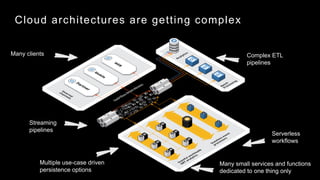
Cloud architectures are getting complex
Many small services and functions
dedicated to one thing only
Multiple use-case driven
persistence options
Streaming
pipelines
Complex ETL
pipelines
Many clients
Serverless
workflows
Microservices landscape picture
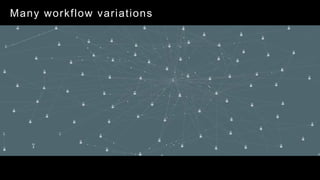
Microservices yield many moving pieces
Many workflow variations
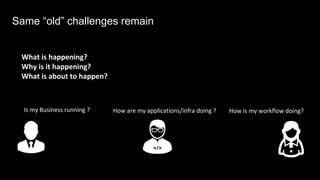
Is my Business running ? How is my workflow doing?How are my applications/infra doing ?
What is happening?
Why is it happening?
What is about to happen?
Same “old” challenges remain
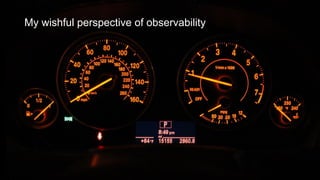
My wishful perspective of observability
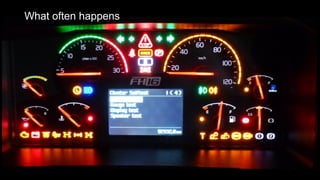
What often happens
And some other times…
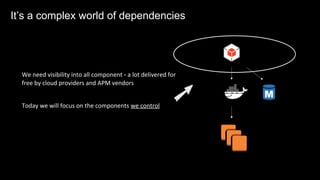
We need visibility into all component – a lot delivered for
free by cloud providers and APM vendors
Today we will focus on the components we control
AIt’s a complex world of dependencies
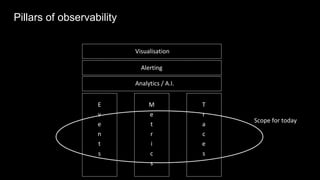
Pillars of observability
E
v
e
n
t
s
M
e
t
r
i
c
s
T
r
a
c
e
s
Analytics / A.I.
Alerting
Visualisation
Scope for today
Events
The journal of what happened with an application
curated by engineers.
Great when you have identified a failing component
and want to know more
Logging Intro
Logging: best practices
ü Structured logging
ü Add correlation-ids
ü Add context ( Service identifier,
Docker container meta, ECS Task definition…)
ü Agree on standard keys:
• “severity”: “WARNING”
• “level”: “WARN”,
• “criticality”: “W”,
Logging: best practices
{ …
"_source": {
"stream": "stderr",
"time": "2016-06-27T14:48:39.15693871Z",
"correlation-id": "2e71f0ee-aab0-4fd0-87e7-530a9b26a37f",
"level": "debug",
"logger": "handler",
"message": "Handling MintSnowflakeID()",
"service": "com.sixt.service.idgen",
"service-id": "51494694-37c1-11e6-955e-02420afe040e",
"docker": { … }
”k8s": { … }
}
DEBUG[2017-09-27T14:48:39+02:00] Handling MintSnowflakeId() correlation-id=1365c96e-
281d-44aa-805a-1072ab165de6 ip-address=192.168.99.1 logger=handler service=com.sixt.service.idgen
service-id=a122da41-3d2e-11e6-8158-a0999b047f3f service-version=0.3.0
Whan an engineer sees
locally
Logging in action
Actual format
Logging in action
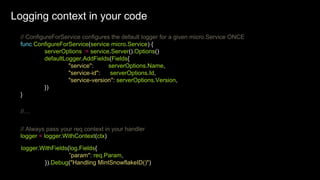
// ConfigureForService configures the default logger for a given micro.Service ONCE
func ConfigureForService(service micro.Service) {
serverOptions := service.Server().Options()
defaultLogger.AddFields(Fields{
"service": serverOptions.Name,
"service-id": serverOptions.Id,
"service-version": serverOptions.Version,
})
}
//…
logger = logger.WithContext(ctx)
// Always pass your req context in your handler
logger.WithFields(log.Fields{
”param": req.Param,
}).Debug("Handling MintSnowflakeID()")
Logging context in your code
Expressing and evaluating application health in code
“isHealthy”: “True”
Application Health Checks: intro
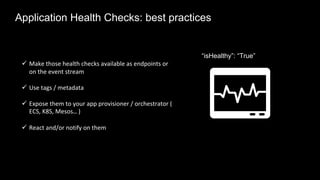
ü Make those health checks available as endpoints or
on the event stream
ü Use tags / metadata
ü Expose them to your app provisioner / orchestrator (
ECS, K8S, Mesos… )
ü React and/or notify on them
“isHealthy”: “True”
Application Health Checks: best practices
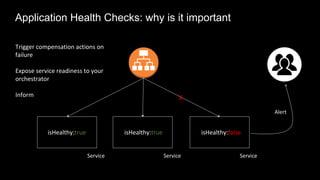
isHealthy:true
Service Service
isHealthy:true isHealthy:false
Service
X
Alert
Application Health Checks: why is it important
Trigger compensation actions on
failure
Expose service readiness to your
orchestrator
Inform
Relevant happenings around the system
• Instance rollouts
• Configuration changes
• Deployments
Changes
Sporadic in nature but can influence your system
Great for tracing interesting system behaviours
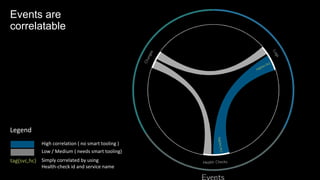
Events are
correlatable
Events are
correlatable
Legend
High correlation ( no smart tooling )
Low / Medium ( needs smart tooling)
tag(svc,hc) Simply correlated by using
Health-check id and service name
Metrics
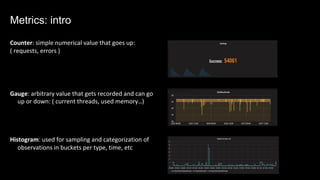
Metrics: intro
Counter: simple numerical value that goes up:
( requests, errors )
Gauge: arbitrary value that gets recorded and can go
up or down: ( current threads, used memory…)
Histogram: used for sampling and categorization of
observations in buckets per type, time, etc
ü Instrument as much as possible
ü Focus on the important things: response times, errors,
traffic
ü Use the right percentiles for your use case: 99th, 95th,
75th
ü Use Tags ( context! ) if possible
ü Agree on some naming standards – it helps ;)
ü Build the right visualization – common vs specific
Metrics: best practices
// Somewhere in your handler
tags := map[string]string{
"method": req.Method(),
"origin_service": fromService,
"origin_method": fromMethod,
}
err := fn(ctx, req, rsp)
// Instrument errors
if err != nil {
TaggedCounter(tags, 1.0, "server_handler", "error", 1)
TaggedTiming(tags, 1.0, "server_handler", "error",
time.Since(start))
} else {
// Otherwise, success!
TaggedCounter(tags, 1.0, "server_handler", "success", 1)
TaggedTiming(tags, 1.0, "server_handler", "success",
time.Since(start))
}
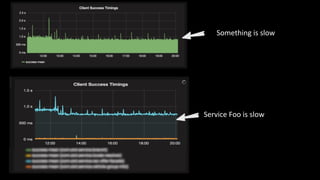
Metrics: in action
Something is slow
Service Foo is slow
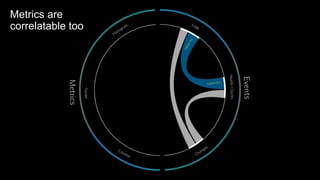
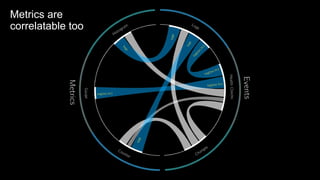
Metrics are
correlatable too
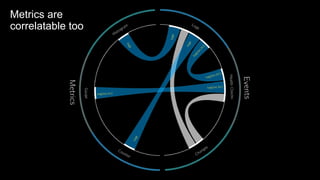
Metrics are
correlatable too
Metrics are
correlatable too
Tracing
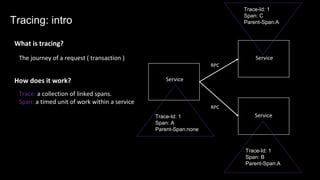
The journey of a request ( transaction )
What is tracing?
Trace: a collection of linked spans.
Span: a timed unit of work within a service
Service
Service
Service
RPC
RPC
Trace-Id: 1
Span: A
Parent-Span:none
Trace-Id: 1
Span: C
Parent-Span:A
Trace-Id: 1
Span: B
Parent-Span:A
How does it work?
Tracing: intro
Tracing: intro
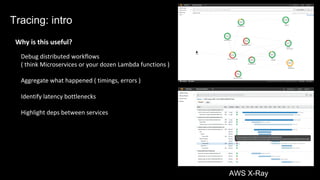
Why is this useful?
Debug distributed workflows
( think Microservices or your dozen Lambda functions )
Aggregate what happened ( timings, errors )
Identify latency bottlenecks
Highlight deps between services
AWS X-Ray
Several leading standards: Zipkin, OpenTracing, X-Ray, Stackdriver …
( possible to convert one into another )
Many open source and managed Tracers to choose from: Zipkin,
Appdash, Jaeger, Sky-Walking, Instana, Lightstep, X-Ray,
Stackdriver…
Tracing: available tooling
Most tracers today are based on or influenced by the Google
Dapper paper
Tracing: best practices
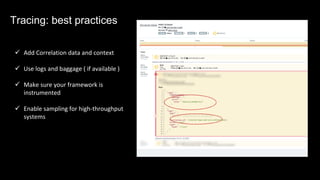
ü Add Correlation data and context
ü Use logs and baggage ( if available )
ü Make sure your framework is
instrumented
ü Enable sampling for high-throughput
systems
Tracing: best practices
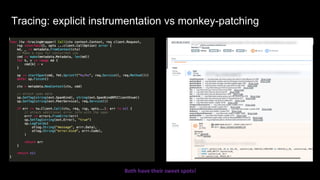
Tracing: explicit instrumentation vs monkey-patching
Both have their sweet spots!
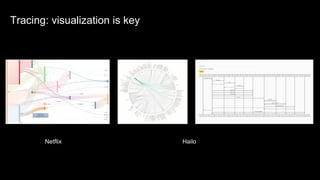
Netflix Hailo
Tracing: visualization is keyTracing: visualization is key
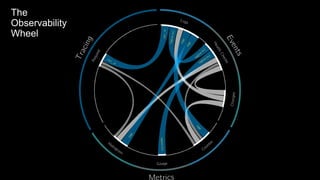
The
Observability
Wheel
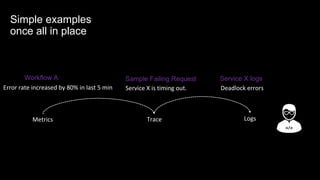
Simple examples
once all in place
Metrics Trace Logs
Error rate increased by 80% in last 5 min Service X is timing out. Deadlock errors
Workflow A Sample Failing Request Service X logs
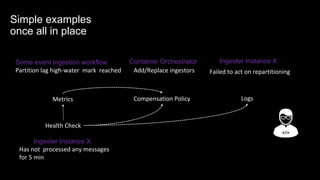
Simple examples
once all in place
Metrics Logs
Partition lag high-water mark reached Add/Replace ingestors Failed to act on repartitioning
Some event ingestion workflow Container Orchestrator
Compensation Policy
Health Check
Ingester Instance X
Has not processed any messages
for 5 min
Ingester Instance X
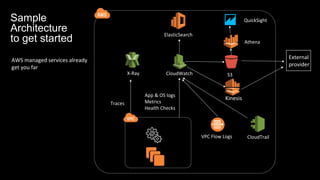
Architecture overview
CloudTrail
CloudWatchX-Ray
VPC Flow Logs
Traces
App & OS logs
Metrics
Health Checks
ElasticSearch
S3
Athena
QuickSightSample
Architecture
to get started
AWS managed services already
get you far
External
provider
Kinesis
CloudTrail
CloudWatch
VPC Flow Logs
Traces
Metrics
ElasticSearch S3
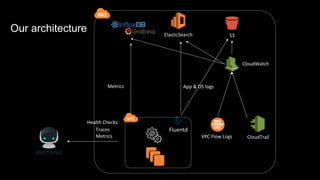
Our architecture
Health Checks
Fluentd
App & OS logs
Metrics
Foo
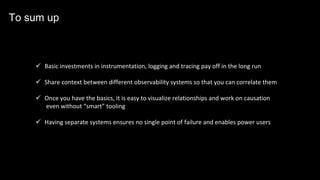
ü Basic investments in instrumentation, logging and tracing pay off in the long run
ü Share context between different observability systems so that you can correlate them
ü Once you have the basics, it is easy to visualize relationships and work on causation
even without “smart” tooling
ü Having separate systems ensures no single point of failure and enables power users
To sum up
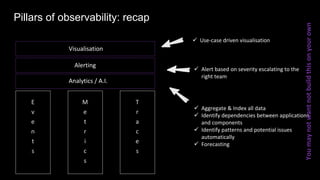
Pillars of observability: recap
E
v
e
n
t
s
M
e
t
r
i
c
s
T
r
a
c
e
s
Analytics / A.I.
Alerting
Visualisation
ü Alert based on severity escalating to the
right team
ü Aggregate & Index all data
ü Identify dependencies between applications
and components
ü Identify patterns and potential issues
automatically
ü Forecasting
ü Use-case driven visualisation
Youmaynotwantnotbuildthisonyourown
@nathariel
Thank you
https://www.slideshare.net/nathariel
References
Truck decorated with festive lights: Dmccabe
Volvo FH16 instrument cluster: Panoha

Observability foundations in dynamically evolving architectures

  • 1.
    Boyan Dimitrov Director PlatformEngineering Sixt @nathariel Observability foundations in dynamically evolving architectures
  • 2.
    Cloud architectures aregetting complex Many small services and functions dedicated to one thing only Multiple use-case driven persistence options Streaming pipelines Complex ETL pipelines Many clients Serverless workflows
  • 3.
  • 4.
  • 5.
    Is my Businessrunning ? How is my workflow doing?How are my applications/infra doing ? What is happening? Why is it happening? What is about to happen? Same “old” challenges remain
  • 6.
    My wishful perspectiveof observability
  • 7.
  • 8.
  • 9.
    We need visibilityinto all component – a lot delivered for free by cloud providers and APM vendors Today we will focus on the components we control AIt’s a complex world of dependencies
  • 10.
  • 11.
  • 12.
    The journal ofwhat happened with an application curated by engineers. Great when you have identified a failing component and want to know more Logging Intro
  • 13.
    Logging: best practices üStructured logging ü Add correlation-ids ü Add context ( Service identifier, Docker container meta, ECS Task definition…) ü Agree on standard keys: • “severity”: “WARNING” • “level”: “WARN”, • “criticality”: “W”, Logging: best practices
  • 14.
    { … "_source": { "stream":"stderr", "time": "2016-06-27T14:48:39.15693871Z", "correlation-id": "2e71f0ee-aab0-4fd0-87e7-530a9b26a37f", "level": "debug", "logger": "handler", "message": "Handling MintSnowflakeID()", "service": "com.sixt.service.idgen", "service-id": "51494694-37c1-11e6-955e-02420afe040e", "docker": { … } ”k8s": { … } } DEBUG[2017-09-27T14:48:39+02:00] Handling MintSnowflakeId() correlation-id=1365c96e- 281d-44aa-805a-1072ab165de6 ip-address=192.168.99.1 logger=handler service=com.sixt.service.idgen service-id=a122da41-3d2e-11e6-8158-a0999b047f3f service-version=0.3.0 Whan an engineer sees locally Logging in action Actual format Logging in action
  • 15.
    // ConfigureForService configuresthe default logger for a given micro.Service ONCE func ConfigureForService(service micro.Service) { serverOptions := service.Server().Options() defaultLogger.AddFields(Fields{ "service": serverOptions.Name, "service-id": serverOptions.Id, "service-version": serverOptions.Version, }) } //… logger = logger.WithContext(ctx) // Always pass your req context in your handler logger.WithFields(log.Fields{ ”param": req.Param, }).Debug("Handling MintSnowflakeID()") Logging context in your code Logging context in your code
  • 17.
    Expressing and evaluatingapplication health in code “isHealthy”: “True” Application Health Checks: intro
  • 18.
    ü Make thosehealth checks available as endpoints or on the event stream ü Use tags / metadata ü Expose them to your app provisioner / orchestrator ( ECS, K8S, Mesos… ) ü React and/or notify on them “isHealthy”: “True” Application Health Checks: best practices
  • 19.
    isHealthy:true Service Service isHealthy:true isHealthy:false Service X Alert ApplicationHealth Checks: why is it important Trigger compensation actions on failure Expose service readiness to your orchestrator Inform
  • 20.
    Relevant happenings aroundthe system • Instance rollouts • Configuration changes • Deployments Changes Sporadic in nature but can influence your system Great for tracing interesting system behaviours
  • 21.
  • 22.
    Events are correlatable Legend High correlation( no smart tooling ) Low / Medium ( needs smart tooling) tag(svc,hc) Simply correlated by using Health-check id and service name
  • 23.
  • 24.
    Metrics: intro Counter: simplenumerical value that goes up: ( requests, errors ) Gauge: arbitrary value that gets recorded and can go up or down: ( current threads, used memory…) Histogram: used for sampling and categorization of observations in buckets per type, time, etc
  • 25.
    ü Instrument asmuch as possible ü Focus on the important things: response times, errors, traffic ü Use the right percentiles for your use case: 99th, 95th, 75th ü Use Tags ( context! ) if possible ü Agree on some naming standards – it helps ;) ü Build the right visualization – common vs specific Metrics: best practices
  • 26.
    // Somewhere inyour handler tags := map[string]string{ "method": req.Method(), "origin_service": fromService, "origin_method": fromMethod, } err := fn(ctx, req, rsp) // Instrument errors if err != nil { TaggedCounter(tags, 1.0, "server_handler", "error", 1) TaggedTiming(tags, 1.0, "server_handler", "error", time.Since(start)) } else { // Otherwise, success! TaggedCounter(tags, 1.0, "server_handler", "success", 1) TaggedTiming(tags, 1.0, "server_handler", "success", time.Since(start)) } Metrics: in action
  • 28.
  • 29.
  • 30.
  • 31.
  • 32.
  • 33.
    The journey ofa request ( transaction ) What is tracing? Trace: a collection of linked spans. Span: a timed unit of work within a service Service Service Service RPC RPC Trace-Id: 1 Span: A Parent-Span:none Trace-Id: 1 Span: C Parent-Span:A Trace-Id: 1 Span: B Parent-Span:A How does it work? Tracing: intro
  • 34.
    Tracing: intro Why isthis useful? Debug distributed workflows ( think Microservices or your dozen Lambda functions ) Aggregate what happened ( timings, errors ) Identify latency bottlenecks Highlight deps between services AWS X-Ray
  • 35.
    Several leading standards:Zipkin, OpenTracing, X-Ray, Stackdriver … ( possible to convert one into another ) Many open source and managed Tracers to choose from: Zipkin, Appdash, Jaeger, Sky-Walking, Instana, Lightstep, X-Ray, Stackdriver… Tracing: available tooling Most tracers today are based on or influenced by the Google Dapper paper
  • 36.
    Tracing: best practices üAdd Correlation data and context ü Use logs and baggage ( if available ) ü Make sure your framework is instrumented ü Enable sampling for high-throughput systems Tracing: best practices
  • 37.
    Tracing: explicit instrumentationvs monkey-patching Both have their sweet spots!
  • 38.
    Netflix Hailo Tracing: visualizationis keyTracing: visualization is key
  • 39.
  • 40.
    Simple examples once allin place Metrics Trace Logs Error rate increased by 80% in last 5 min Service X is timing out. Deadlock errors Workflow A Sample Failing Request Service X logs
  • 41.
    Simple examples once allin place Metrics Logs Partition lag high-water mark reached Add/Replace ingestors Failed to act on repartitioning Some event ingestion workflow Container Orchestrator Compensation Policy Health Check Ingester Instance X Has not processed any messages for 5 min Ingester Instance X
  • 42.
  • 43.
    CloudTrail CloudWatchX-Ray VPC Flow Logs Traces App& OS logs Metrics Health Checks ElasticSearch S3 Athena QuickSightSample Architecture to get started AWS managed services already get you far External provider Kinesis
  • 44.
    CloudTrail CloudWatch VPC Flow Logs Traces Metrics ElasticSearchS3 Our architecture Health Checks Fluentd App & OS logs Metrics Foo
  • 46.
    ü Basic investmentsin instrumentation, logging and tracing pay off in the long run ü Share context between different observability systems so that you can correlate them ü Once you have the basics, it is easy to visualize relationships and work on causation even without “smart” tooling ü Having separate systems ensures no single point of failure and enables power users To sum up
  • 47.
    Pillars of observability:recap E v e n t s M e t r i c s T r a c e s Analytics / A.I. Alerting Visualisation ü Alert based on severity escalating to the right team ü Aggregate & Index all data ü Identify dependencies between applications and components ü Identify patterns and potential issues automatically ü Forecasting ü Use-case driven visualisation Youmaynotwantnotbuildthisonyourown
  • 48.
  • 49.
    References Truck decorated withfestive lights: Dmccabe Volvo FH16 instrument cluster: Panoha