React Native: Hype, Reality
and basics
Who am I?
● Google Certified Associate Android Developer.
● Founding Member, Lead Full Stack and
Embedded Firmware Engineer @ AutoNxt
Automation.
● Tech Speaker at Google Dev Fest 2017.
● Recognized Developer and Contributor @ XDA
Developers
● Open source enthusiast, contributor and Tech
Speaker.
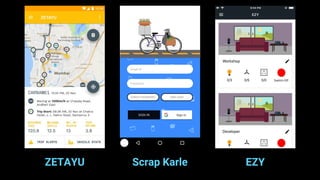
ZETAYU Scrap Karle EZY
Native Programming
Pros
● Best performance, easy access to HW
and sensors.
● Wide range of resources and Tutorials.
● Large repository of supported libraries
and SDKs.
● Acceptance to App store or Play store
without haste.
Source: medium.com
Cons
● Handling different codebase.
● Support for different OS
● Support for wide range of devices.
● UI/UX and different terminologies.
● High development cost due to
multiple resources involved.
Source: medium.com
Why React Native?
● Single codebase across.
● Javascript at the heart.
● Near native performance.
● Hot Reloading.
● Access to platform specific code.
● Large community and support for widely
used modules (maps, firebase, etc.) Source: medium.com
Quick Comparison
● Java or Kotlin or Swift or C#
● XML, Storyboard, etc.
● XML attributes, Constraints.
● Classes or Screens
● Retrofit, Alamofire, Volley, etc.
● Platform Specific access
● Javascript
● JSX
● Flexbox
● Components
● Fetch API
● Platform specific access
Let’s Dive Deep!
What’s Functional Programming?
function double (arr) {
let results = []
for (let i = 0; i < arr.length; i++){
results.push(arr[i] * 2)
}
return results
}
function double (arr) {
return arr.map((item) => item * 2)
}
Imperative Programming
Declarative Programming
Declarative Pure functions
“A function is only pure if, given the same
input, it will always produce the same
output.”
Math.random(); // => 0.4011148700956255
Math.random(); // => 0.8533405303023756
Math.random(); // => 0.3550692005082965
const double = x => x * 2;
double(5); // => 10
double(5); // => 10
double(5); // => 10
Pure
Impure
Other FP Concepts
● No Shared State.
● Immutability.
● No Side Effects.
● Reusability via Higher Order Functions.
● Reliance on pure functions like map(),
reduce(), filter()
Source: medium.com
What is React Native?
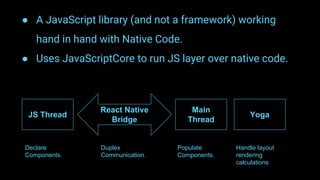
● A JavaScript library (and not a framework) working
hand in hand with Native Code.
● Uses JavaScriptCore to run JS layer over native code.
JS Thread
React Native
Bridge
Main
Thread
Yoga
Declare
Components.
Duplex
Communication.
Populate
Components.
Handle layout
rendering
calculations
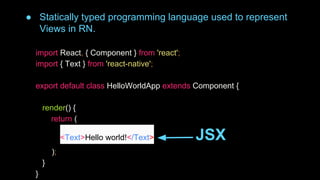
JSX
import React, { Component } from 'react';
import { Text } from 'react-native';
export default class HelloWorldApp extends Component {
render() {
return (
<Text>Hello world!</Text> JSX
);
}
}
● Statically typed programming language used to represent
Views in RN.
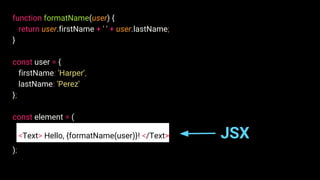
function formatName(user) {
return user.firstName + ' ' + user.lastName;
}
const user = {
firstName: 'Harper',
lastName: 'Perez'
};
const element = (
<Text> Hello, {formatName(user)}! </Text> JSX
);
React Components
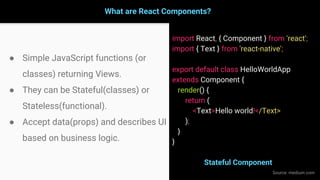
What are React Components?
● Simple JavaScript functions (or
classes) returning Views.
● They can be Stateful(classes) or
Stateless(functional).
● Accept data(props) and describes UI
based on business logic.
import React, { Component } from 'react';
import { Text } from 'react-native';
export default class HelloWorldApp
extends Component {
render() {
return (
<Text>Hello world!</Text>
);
}
}
Stateful Component
Source: medium.com
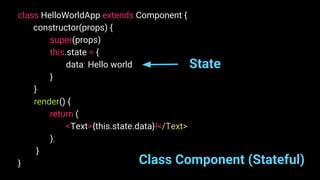
class HelloWorldApp extends Component {
constructor(props) {
super(props)
this.state = {
data: Hello world
}
}
render() {
return (
<Text>{this.state.data}!</Text>
);
}
} Class Component (Stateful)
State
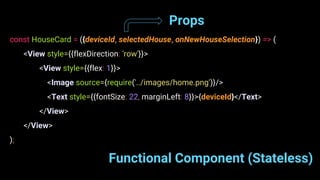
Functional Component (Stateless)
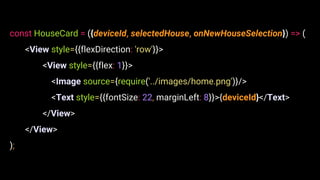
const HouseCard = ({deviceId, selectedHouse, onNewHouseSelection}) => (
<View style={{flexDirection: 'row'}}>
<View style={{flex: 1}}>
<Image source={require('../images/home.png')}/>
<Text style={{fontSize: 22, marginLeft: 8}}>{deviceId}</Text>
</View>
</View>
);
Props
State and Props
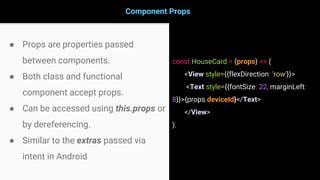
Component Props
● Props are properties passed
between components.
● Both class and functional
component accept props.
● Can be accessed using this.props or
by dereferencing.
● Similar to the extras passed via
intent in Android
const HouseCard = (props) => (
<View style={{flexDirection: 'row'}}>
<Text style={{fontSize: 22, marginLeft:
8}}>{props.deviceId}</Text>
</View>
);
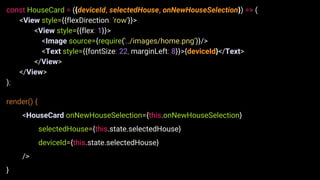
const HouseCard = ({deviceId, selectedHouse, onNewHouseSelection}) => (
<View style={{flexDirection: 'row'}}>
<View style={{flex: 1}}>
<Image source={require('../images/home.png')}/>
<Text style={{fontSize: 22, marginLeft: 8}}>{deviceId}</Text>
</View>
</View>
);
render() {
<HouseCard onNewHouseSelection={this.onNewHouseSelection}
selectedHouse={this.state.selectedHouse}
deviceId={this.state.selectedHouse}
/>
}
Component State
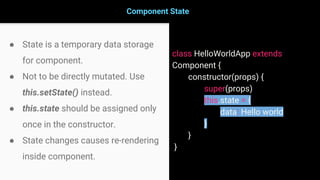
● State is a temporary data storage
for component.
● Not to be directly mutated. Use
this.setState() instead.
● this.state should be assigned only
once in the constructor.
● State changes causes re-rendering
inside component.
class HelloWorldApp extends
Component {
constructor(props) {
super(props)
this.state = {
data: Hello world
}
}
}
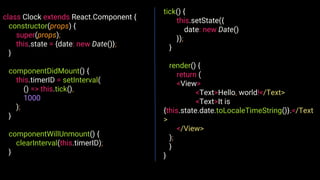
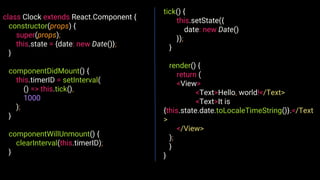
class Clock extends React.Component {
constructor(props) {
super(props);
this.state = {date: new Date()};
}
componentDidMount() {
this.timerID = setInterval(
() => this.tick(),
1000
);
}
componentWillUnmount() {
clearInterval(this.timerID);
}
tick() {
this.setState({
date: new Date()
});
}
render() {
return (
<View>
<Text>Hello, world!</Text>
<Text>It is
{this.state.date.toLocaleTimeString()}.</Text
>
</View>
);
}
}
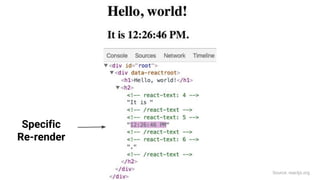
Specific
Re-render
Source: reactjs.org
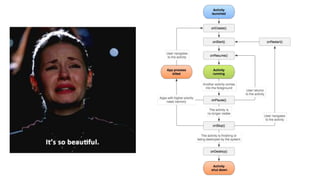
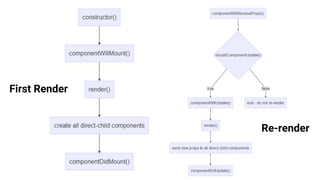
Component Lifecycle
First Render
Re-render
class Clock extends React.Component {
constructor(props) {
super(props);
this.state = {date: new Date()};
}
componentDidMount() {
this.timerID = setInterval(
() => this.tick(),
1000
);
}
componentWillUnmount() {
clearInterval(this.timerID);
}
tick() {
this.setState({
date: new Date()
});
}
render() {
return (
<View>
<Text>Hello, world!</Text>
<Text>It is
{this.state.date.toLocaleTimeString()}.</Text
>
</View>
);
}
}
Styling
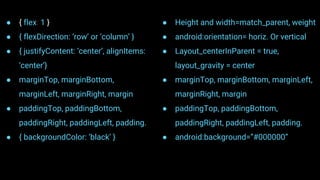
Welcome to Flexbox (LinearLayout clone)
● RN uses flexbox for styling.
● Flexbox sits perfectly with
Android’s LinearLayout analogy.
● Styles are represented in the
form of simple JS objects.
● Attributes are written with
camelCase notations.
● { flex: 1 }
● { flexDirection: ‘row’ or ‘column’ }
● { justifyContent: ‘center’, alignItems:
‘center’}
● marginTop, marginBottom,
marginLeft, marginRight, margin
● paddingTop, paddingBottom,
paddingRight, paddingLeft, padding.
● { backgroundColor: ‘black’ }
● Height and width=match_parent, weight
● android:orientation= horiz. Or vertical
● Layout_centerInParent = true,
layout_gravity = center
● marginTop, marginBottom, marginLeft,
marginRight, margin
● paddingTop, paddingBottom,
paddingRight, paddingLeft, padding.
● android:background=”#000000”
const HouseCard = ({deviceId, selectedHouse, onNewHouseSelection}) => (
<View style={{flexDirection: 'row'}}>
<View style={{flex: 1}}>
<Image source={require('../images/home.png')}/>
<Text style={{fontSize: 22, marginLeft: 8}}>{deviceId}</Text>
</View>
</View>
);
Networking
fetch('https://www.example.com', {
method: 'POST',
body: JSON.stringify({
username: 'vishal', password: '#4@!94'})
}).then(data => {
return data.json()
}).then(jsonData => {
// play with it.....
const fullName = jsonData.fullName
});
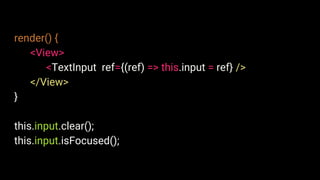
Ref
render() {
<View>
<TextInput ref={(ref) => this.input = ref} />
</View>
}
this.input.clear();
this.input.isFocused();
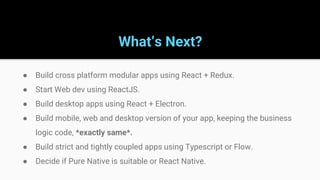
What’s Next?
● Build cross platform modular apps using React + Redux.
● Start Web dev using ReactJS.
● Build desktop apps using React + Electron.
● Build mobile, web and desktop version of your app, keeping the business
logic code, *exactly same*.
● Build strict and tightly coupled apps using Typescript or Flow.
● Decide if Pure Native is suitable or React Native.
Thank You!
Twitter: @vishal_AF
GitHub: vishal-android-freak
LinkedIn: vishalaf
Email: vishal@autonxt.in

React native

  • 1.
    React Native: Hype,Reality and basics
  • 2.
    Who am I? ●Google Certified Associate Android Developer. ● Founding Member, Lead Full Stack and Embedded Firmware Engineer @ AutoNxt Automation. ● Tech Speaker at Google Dev Fest 2017. ● Recognized Developer and Contributor @ XDA Developers ● Open source enthusiast, contributor and Tech Speaker.
  • 3.
  • 4.
  • 5.
    Pros ● Best performance,easy access to HW and sensors. ● Wide range of resources and Tutorials. ● Large repository of supported libraries and SDKs. ● Acceptance to App store or Play store without haste. Source: medium.com
  • 6.
    Cons ● Handling differentcodebase. ● Support for different OS ● Support for wide range of devices. ● UI/UX and different terminologies. ● High development cost due to multiple resources involved. Source: medium.com
  • 7.
    Why React Native? ●Single codebase across. ● Javascript at the heart. ● Near native performance. ● Hot Reloading. ● Access to platform specific code. ● Large community and support for widely used modules (maps, firebase, etc.) Source: medium.com
  • 8.
    Quick Comparison ● Javaor Kotlin or Swift or C# ● XML, Storyboard, etc. ● XML attributes, Constraints. ● Classes or Screens ● Retrofit, Alamofire, Volley, etc. ● Platform Specific access ● Javascript ● JSX ● Flexbox ● Components ● Fetch API ● Platform specific access
  • 9.
  • 10.
  • 11.
    function double (arr){ let results = [] for (let i = 0; i < arr.length; i++){ results.push(arr[i] * 2) } return results } function double (arr) { return arr.map((item) => item * 2) } Imperative Programming Declarative Programming
  • 12.
    Declarative Pure functions “Afunction is only pure if, given the same input, it will always produce the same output.”
  • 13.
    Math.random(); // =>0.4011148700956255 Math.random(); // => 0.8533405303023756 Math.random(); // => 0.3550692005082965 const double = x => x * 2; double(5); // => 10 double(5); // => 10 double(5); // => 10 Pure Impure
  • 14.
    Other FP Concepts ●No Shared State. ● Immutability. ● No Side Effects. ● Reusability via Higher Order Functions. ● Reliance on pure functions like map(), reduce(), filter() Source: medium.com
  • 15.
  • 16.
    ● A JavaScriptlibrary (and not a framework) working hand in hand with Native Code. ● Uses JavaScriptCore to run JS layer over native code. JS Thread React Native Bridge Main Thread Yoga Declare Components. Duplex Communication. Populate Components. Handle layout rendering calculations
  • 17.
  • 18.
    import React, {Component } from 'react'; import { Text } from 'react-native'; export default class HelloWorldApp extends Component { render() { return ( <Text>Hello world!</Text> JSX ); } } ● Statically typed programming language used to represent Views in RN.
  • 19.
    function formatName(user) { returnuser.firstName + ' ' + user.lastName; } const user = { firstName: 'Harper', lastName: 'Perez' }; const element = ( <Text> Hello, {formatName(user)}! </Text> JSX );
  • 20.
  • 21.
    What are ReactComponents? ● Simple JavaScript functions (or classes) returning Views. ● They can be Stateful(classes) or Stateless(functional). ● Accept data(props) and describes UI based on business logic. import React, { Component } from 'react'; import { Text } from 'react-native'; export default class HelloWorldApp extends Component { render() { return ( <Text>Hello world!</Text> ); } } Stateful Component Source: medium.com
  • 22.
    class HelloWorldApp extendsComponent { constructor(props) { super(props) this.state = { data: Hello world } } render() { return ( <Text>{this.state.data}!</Text> ); } } Class Component (Stateful) State
  • 23.
    Functional Component (Stateless) constHouseCard = ({deviceId, selectedHouse, onNewHouseSelection}) => ( <View style={{flexDirection: 'row'}}> <View style={{flex: 1}}> <Image source={require('../images/home.png')}/> <Text style={{fontSize: 22, marginLeft: 8}}>{deviceId}</Text> </View> </View> ); Props
  • 24.
  • 25.
    Component Props ● Propsare properties passed between components. ● Both class and functional component accept props. ● Can be accessed using this.props or by dereferencing. ● Similar to the extras passed via intent in Android const HouseCard = (props) => ( <View style={{flexDirection: 'row'}}> <Text style={{fontSize: 22, marginLeft: 8}}>{props.deviceId}</Text> </View> );
  • 26.
    const HouseCard =({deviceId, selectedHouse, onNewHouseSelection}) => ( <View style={{flexDirection: 'row'}}> <View style={{flex: 1}}> <Image source={require('../images/home.png')}/> <Text style={{fontSize: 22, marginLeft: 8}}>{deviceId}</Text> </View> </View> ); render() { <HouseCard onNewHouseSelection={this.onNewHouseSelection} selectedHouse={this.state.selectedHouse} deviceId={this.state.selectedHouse} /> }
  • 27.
    Component State ● Stateis a temporary data storage for component. ● Not to be directly mutated. Use this.setState() instead. ● this.state should be assigned only once in the constructor. ● State changes causes re-rendering inside component. class HelloWorldApp extends Component { constructor(props) { super(props) this.state = { data: Hello world } } }
  • 28.
    class Clock extendsReact.Component { constructor(props) { super(props); this.state = {date: new Date()}; } componentDidMount() { this.timerID = setInterval( () => this.tick(), 1000 ); } componentWillUnmount() { clearInterval(this.timerID); } tick() { this.setState({ date: new Date() }); } render() { return ( <View> <Text>Hello, world!</Text> <Text>It is {this.state.date.toLocaleTimeString()}.</Text > </View> ); } }
  • 29.
  • 30.
  • 32.
  • 33.
    class Clock extendsReact.Component { constructor(props) { super(props); this.state = {date: new Date()}; } componentDidMount() { this.timerID = setInterval( () => this.tick(), 1000 ); } componentWillUnmount() { clearInterval(this.timerID); } tick() { this.setState({ date: new Date() }); } render() { return ( <View> <Text>Hello, world!</Text> <Text>It is {this.state.date.toLocaleTimeString()}.</Text > </View> ); } }
  • 34.
  • 35.
    Welcome to Flexbox(LinearLayout clone) ● RN uses flexbox for styling. ● Flexbox sits perfectly with Android’s LinearLayout analogy. ● Styles are represented in the form of simple JS objects. ● Attributes are written with camelCase notations.
  • 36.
    ● { flex:1 } ● { flexDirection: ‘row’ or ‘column’ } ● { justifyContent: ‘center’, alignItems: ‘center’} ● marginTop, marginBottom, marginLeft, marginRight, margin ● paddingTop, paddingBottom, paddingRight, paddingLeft, padding. ● { backgroundColor: ‘black’ } ● Height and width=match_parent, weight ● android:orientation= horiz. Or vertical ● Layout_centerInParent = true, layout_gravity = center ● marginTop, marginBottom, marginLeft, marginRight, margin ● paddingTop, paddingBottom, paddingRight, paddingLeft, padding. ● android:background=”#000000”
  • 37.
    const HouseCard =({deviceId, selectedHouse, onNewHouseSelection}) => ( <View style={{flexDirection: 'row'}}> <View style={{flex: 1}}> <Image source={require('../images/home.png')}/> <Text style={{fontSize: 22, marginLeft: 8}}>{deviceId}</Text> </View> </View> );
  • 38.
  • 40.
    fetch('https://www.example.com', { method: 'POST', body:JSON.stringify({ username: 'vishal', password: '#4@!94'}) }).then(data => { return data.json() }).then(jsonData => { // play with it..... const fullName = jsonData.fullName });
  • 41.
  • 42.
    render() { <View> <TextInput ref={(ref)=> this.input = ref} /> </View> } this.input.clear(); this.input.isFocused();
  • 43.
    What’s Next? ● Buildcross platform modular apps using React + Redux. ● Start Web dev using ReactJS. ● Build desktop apps using React + Electron. ● Build mobile, web and desktop version of your app, keeping the business logic code, *exactly same*. ● Build strict and tightly coupled apps using Typescript or Flow. ● Decide if Pure Native is suitable or React Native.
  • 45.
    Thank You! Twitter: @vishal_AF GitHub:vishal-android-freak LinkedIn: vishalaf Email: vishal@autonxt.in