High Performance Functions
With Rcpp
(make R coding faster with the integration of
C++)
About
This presentation is created by Farheen Nilofer (https://in.linkedin.com/pub/farheen-nilofer/a5/5b9/58a ) as part
of the internship requirements at DecisionStats.org.
I would like to thank Mr. Ajay Ohri (https://in.linkedin.com/in/ajayohri ) and Miss Sunakshi for their invaluable help
and guidance.
Get Code here:
https://github.com/Farheen2302/RCPP_Code
Introduction
The usage and implementation of Rcpp package of R have been detailed in these slides.
Convert a R function to a Rcpp function which is the integration of both C++ and R to make R coding many folds faster
than the usual speed of execution.
Every functionality is explained through many examples to make understand how the integration is done.
Prerequisites:
Languages:
1.Basics of C++ or C(both will work ,you can go for it http://www.learncpp.com/ or http://www.cplusplus.com/)
2. Basics of R (You can join 4 hours of R course at DataCamp)
Tools:
R or better RStudio
You’ll also need a working C++ compiler. To get it:
● On Windows, install Rtools.
● On Mac, install Xcode from the app store.
● On Linux, sudo apt-get install r-base-dev or similar.
Focus:
It doesn't matter here, how well you know the language but
important is to see how the integration is done.
It doesn't matter here, how well you know the language but
important is to see how the integration is done.
FOCUS:
What is Rcpp?
Rcpp is a package in R.
-tool written by Dirk E and Romain Francois
Rcpp makes it very easy to integrate your R code with C++.
Rcpp provides easy ,clean and approachable API that will ultimately give you high performance code
link - http://www.rcpp.org/
Why we need Rcpp?
-code is just not fast enough.
-to improve the performance in R.
- Rcpp package help in integrating C++ with R and that help in making the code faster.
sources- http://adv-r.had.co.nz/Rcpp.html
Bottlenecks of R handled by C++
-problems of Data Structures and Algorithms the R doesn't support .
C++ has STL(Standard Template Library ) to implement efficiently many data structures.
- Recursive functions or calling a function a million times are hardest time for R code to execute .
- overhead of a function in C++ is much lower than R.
-C++ makes it easy for loops to vectorise code easily whose subsequent iteration depend on previous ones.
Using sourceCpp: sourceCpp() is a function of R to load files from the disk. sourceCpp() is Rcpp function -an extension
of R source() to load C++ files in R.
Attributes and Classes: Attributes and classes to be used with Rcpp.
Missing Values: deal with R's missing values through C++.
Rcpp Sugar: avoid loops in C++ and write vectorized code (what is syntactic sugar- explain more)
The STL(Standard Template Library): use data structures and algorithms from STL,built in C++.
Examples: implemented examples to enhance the performance.
Putting Rcpp package:How to put C++ in R package.
Learning More: Many references to further learning is provided here.
What will be covered through these slides?
1.Getting started with C++
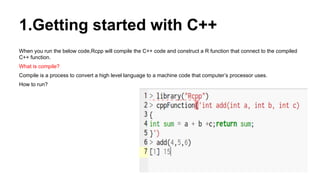
When you run the below code,Rcpp will compile the C++ code and construct a R function that connect to the compiled
C++ function.
What is compile?
Compile is a process to convert a high level language to a machine code that computer’s processor uses.
How to run?
How to code in Rcpp?
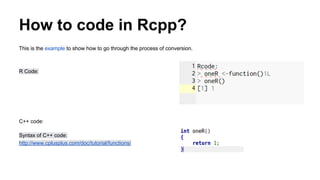
This is the example to show how to go through the process of conversion.
R Code:
C++ code:
Syntax of C++ code:
http://www.cplusplus.com/doc/tutorial/functions/
How to code in Rcpp?
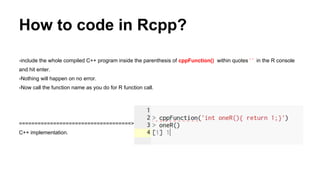
-include the whole compiled C++ program inside the parenthesis of cppFunction() within quotes ‘ ’ in the R console
and hit enter.
-Nothing will happen on no error.
-Now call the function name as you do for R function call.
====================================>
C++ implementation.
How C++ functions different from R
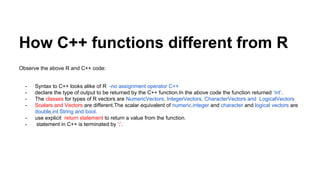
Observe the above R and C++ code:
- Syntax to C++ looks alike of R -no assignment operator C++
- declare the type of output to be returned by the C++ function.In the above code the function returned ‘int’.
- The classes for types of R vectors are NumericVectors, IntegerVectors, CharacterVectors and LogicalVectors
- Scalars and Vectors are different.The scalar equivalent of numeric,integer and character and logical vectors are
double,int String and bool.
- use explicit return statement to return a value from the function.
- statement in C++ is terminated by ‘;’.
2.Convert R functions to C++ equivalent.
There are four different ways:
● Scalar input and scalar output
● Vector input and scalar output
● Vector input and vector output
● Matrix input and vector output
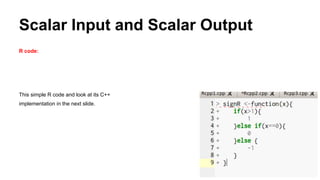
Scalar Input and Scalar Output
R code:
This simple R code and look at its C++
implementation in the next slide.
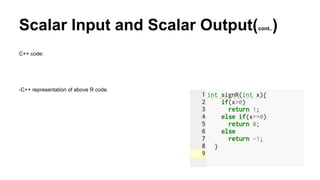
Scalar Input and Scalar Output(cont..)
C++ code:
-C++ representation of above R code.
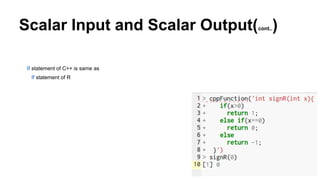
Scalar Input and Scalar Output(cont..)
If statement of C++ is same as
If statement of R
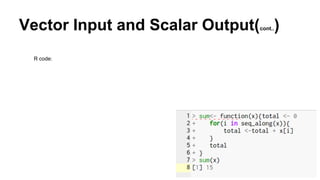
Vector Input and Scalar Output(cont..)
R code:
Vector Input and Scalar Output
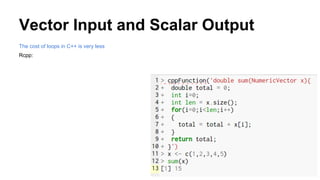
The cost of loops in C++ is very less
Rcpp:
Some more difference between C++ and R.
C++ version is similar but bit different as in
1.C++ methods are called with a full stop as here done for calling 'size()'
2.'for' loop has a different syntax
3.In C++ vector indices start at '0' ,this is very common source of bug while converting R function to C++
4.Use ' = ' instead '<-'.
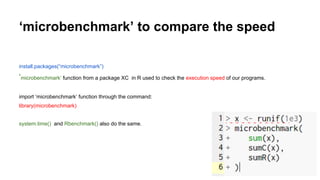
‘microbenchmark’ to compare the speed
install.packages(“microbenchmark”)
‘microbenchmark’ function from a package XC in R used to check the execution speed of our programs.
import ‘microbenchmark’ function through the command:
library(microbenchmark)
system.time() and Rbenchmark() also do the same.
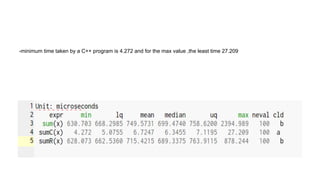
-minimum time taken by a C++ program is 4.272 and for the max value ,the least time 27.209
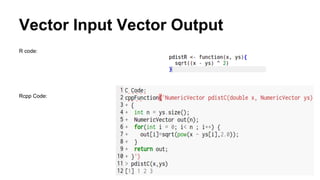
Vector Input Vector Output
R code:
Rcpp Code:
Vector Input Vector Output(cont..)
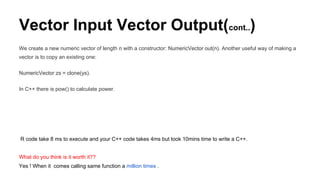
We create a new numeric vector of length n with a constructor: NumericVector out(n). Another useful way of making a
vector is to copy an existing one:
NumericVector zs = clone(ys).
In C++ there is pow() to calculate power.
R code take 8 ms to execute and your C++ code takes 4ms but took 10mins time to write a C++.
What do you think is it worth it??
Yes ! When it comes calling same function a million times .
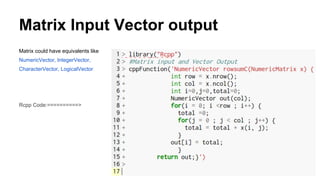
Matrix Input Vector output
Matrix could have equivalents like
NumericVector, IntegerVector,
CharacterVector, LogicalVector
Rcpp Code:==========>
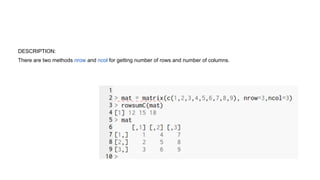
DESCRIPTION:
There are two methods nrow and ncol for getting number of rows and number of columns.
From Inline to Stand-alone
Its tiresome to write code inside the function cppFunction().
Are you too?
Can’t we have some other method to do so?
Using sourceCpp()
The method we have earlier used was the inline method.
Sometimes when you need some sort of code immediately because in real word everything is so fast the we need to
keep everything ready.
Using sourceCpp() (cont..)
There comes Stand alone functions.In this we need to already define the function and use it whenever required without
the overhead of writing immediatly.
How to do that?
Ans-You need to add only two three lines of code to your C++ function and compile the function whenever needed
using sourceCpp() function from your R console.
Using sourceCpp() (cont..)
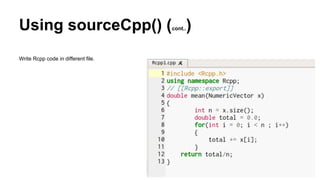
Make sure to save your Rcpp file as .cpp extension
And keep in mind that there is a ‘gap’ between ‘//’ and ‘[[Rcpp::export]]’
Using sourceCpp() (cont..)
Write Rcpp code in different file.
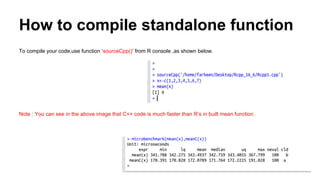
How to compile standalone function
To compile your code,use function ‘sourceCpp()’ from R console ,as shown below.
Note : You can see in the above image that C++ code is much faster than R’s in built mean function.
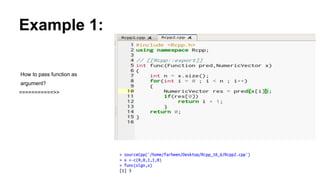
Example 1:
How to pass function as
argument?
===========>>
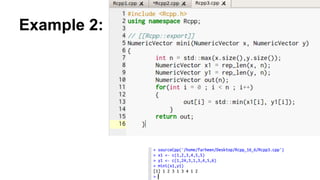
Example 2:
More practice…...
Someone here who want more brushing can also try ..
all(),cumprod(),cummin(),cummax(),diff(),range,var and for prior knowledge visit wikipedia.
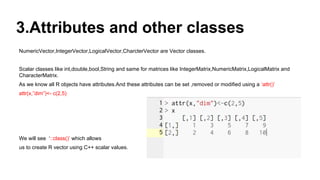
3.Attributes and other classes
NumericVector,IntegerVector,LogicalVector,CharcterVector are Vector classes.
Scalar classes like int,double,bool,String and same for matrices like IntegerMatrix,NumericMatrix,LogicalMatrix and
CharacterMatrix.
As we know all R objects have attributes.And these attributes can be set ,removed or modified using a ‘attr()’
attr(x,”dim”)<- c(2,5)
We will see ‘::class()’ which allows
us to create R vector using C++ scalar values.
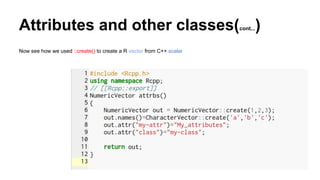
Attributes and other classes(cont...)
Now see how we used ::create() to create a R vector from C++ scalar
Attributes and other classes(cont...)
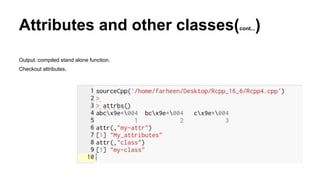
Output.:compiled stand alone function.
Checkout attributes,
List and DataFrames(as(),lm(),inherit(),stop())
List and DataFrames one of the most important features in R.
-will see how to extract component from the list using as() and convert them into C++ equivalents.
Note lm(), inherit() and stop().
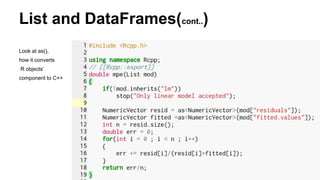
List and DataFrames(cont..)
Look at as(),
how it converts
R objects’
component to C++
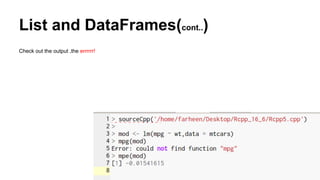
List and DataFrames(cont..)
Check out the output ,the errrrrr!
Why R function in Rcpp code?
Calling a R function could be very useful.
1.For parameter initialization.
2.Access a custom data summary.To recode Huh! Overhead!
3.Calling a plotting routine.Tedious help,right?
Calling a R function would be overhead too.
Its slower than C++ equivalent and even slower than R code.
Warning: Do it when it make sense,not because its available.
Why R function in Rcpp code?
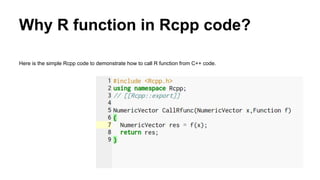
Here is the simple Rcpp code to demonstrate how to call R function from C++ code.
Why R function in Rcpp code?(cont..)
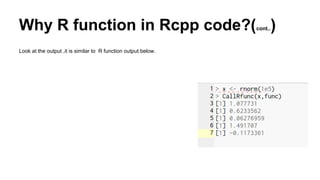
Look at the output ,it is similar to R function output below.
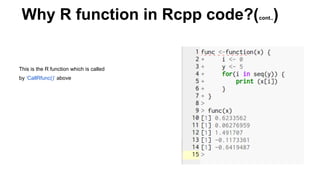
This is the R function which is called
by ‘CallRfunc()’ above
Why R function in Rcpp code?(cont..)
There are classes for many more specialised language object.
Environment, ComplexVector, RawVector, DottPair, Language, Promise, Symbol, WeakReference and so on.
4.Missing Values
How to deal with missing values in Rcpp?
Lets find out!
We need to get two things.
1.How R’s missing values behaves in C++ Scalar(int ,double..).
2.How to get and set Missing values in Vector(NumericVector,..).
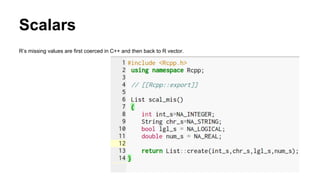
Scalars
R’s missing values are first coerced in C++ and then back to R vector.
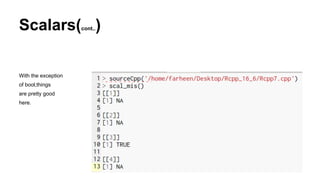
Scalars(cont..)
With the exception
of bool,things
are pretty good
here.
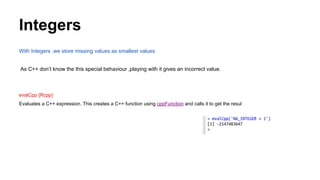
Integers
With Integers ,we store missing values as smallest values
As C++ don’t know the this special behaviour ,playing with it gives an incorrect value.
evalCpp {Rcpp}
Evaluates a C++ expression. This creates a C++ function using cppFunction and calls it to get the resul
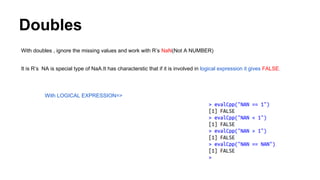
Doubles
With doubles , ignore the missing values and work with R’s NaN(Not A NUMBER)
It is R’s NA is special type of NaA.It has characterstic that if it is involved in logical expression it gives FALSE.
With LOGICAL EXPRESSION=>
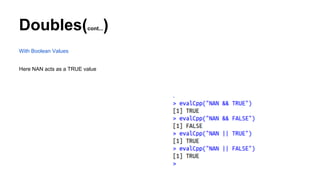
Doubles(cont...)
With Boolean Values
Here NAN acts as a TRUE value
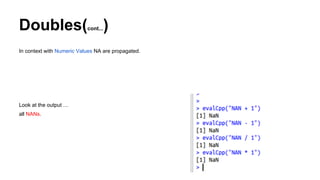
Doubles(cont...)
In context with Numeric Values NA are propagated.
Look at the output …
all NANs.
String
String is Scalar string ,itself introduced by Rcpp.
String knows how to deal with missing values.
Boolean
One thing to note here is that C++ have only two value TRUE and FALSE while
R’s logical Vector have three values TRUE, FALSE and NA.
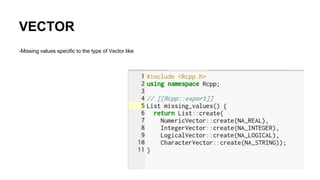
VECTOR
-Missing values specific to the type of Vector like
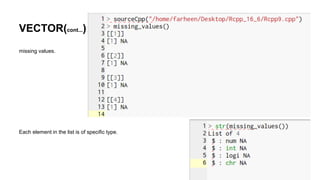
VECTOR(cont...)
missing values.
Each element in the list is of specific type.
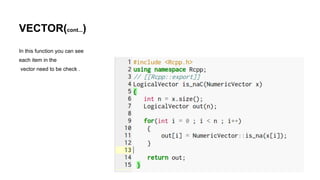
VECTOR(cont...)
In this function you can see
each item in the
vector need to be check .
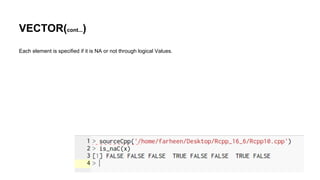
VECTOR(cont...)
Each element is specified if it is NA or not through logical Values.
5.Rcpp Sugar
Rcpp provide lot of Syntactic Sugar to ensure C++ function work very similar to their R equivalent.
Sugar functions can be roughly broken down into
● logical summary functions
● arithmetic and logical operators
● vector views
● other useful functions]
Lets begin
Rcpp Sugar(cont...)
ARITHMETIC AND LOGICAL OPERATORS:
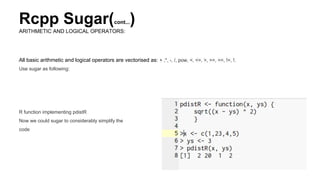
All basic arithmetic and logical operators are vectorised as: + ,*, -, /, pow, <, <=, >, >=, ==, !=, !.
Use sugar as following:
R function implementing pdistR
Now we could sugar to considerably simplify the
code
Rcpp Sugar(cont...)
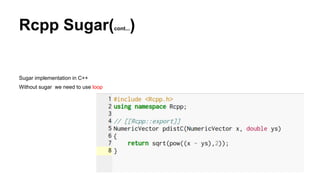
Sugar implementation in C++
Without sugar we need to use loop
Rcpp Sugar(cont...)
LOGICAL SUMMARY FUNCTION
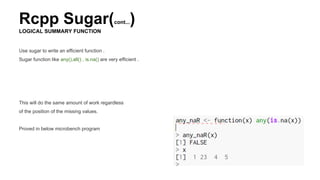
Use sugar to write an efficient function .
Sugar function like any(),all() , is.na() are very efficient .
This will do the same amount of work regardless
of the position of the missing values.
Proved in below microbench program
Rcpp Sugar(cont...)
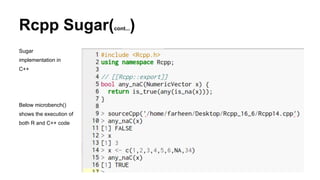
Sugar
implementation in
C++
Below microbench()
shows the execution of
both R and C++ code
Rcpp Sugar(cont...)
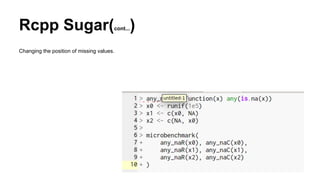
Changing the position of missing values.
Rcpp Sugar(cont...)
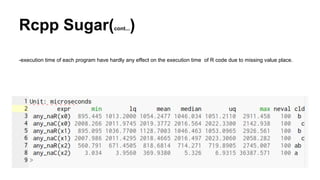
-execution time of each program have hardly any effect on the execution time of R code due to missing value place.
Rcpp Sugar(cont...)
VECTOR VIEW
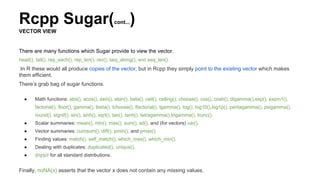
There are many functions which Sugar provide to view the vector.
head(), tail(), rep_each(), rep_len(), rev(), seq_along(), and seq_len().
In R these would all produce copies of the vector, but in Rcpp they simply point to the existing vector which makes
them efficient.
There’s grab bag of sugar functions.
● Math functions: abs(), acos(), asin(), atan(), beta(), ceil(), ceiling(), choose(), cos(), cosh(), digamma(),exp(), expm1(),
factorial(), floor(), gamma(), lbeta(), lchoose(), lfactorial(), lgamma(), log(), log10(),log1p(), pentagamma(), psigamma(),
round(), signif(), sin(), sinh(), sqrt(), tan(), tanh(), tetragamma(),trigamma(), trunc().
● Scalar summaries: mean(), min(), max(), sum(), sd(), and (for vectors) var().
● Vector summaries: cumsum(), diff(), pmin(), and pmax().
● Finding values: match(), self_match(), which_max(), which_min().
● Dealing with duplicates: duplicated(), unique().
● d/q/p/r for all standard distributions.
Finally, noNA(x) asserts that the vector x does not contain any missing values.
6.The STL(Standard Library Templates)
The real strength of C++ is when you use STL for algorithm and Data Structure.
If you need an algorithm or data structure that isn’t implemented in STL, a good place to look is boost.
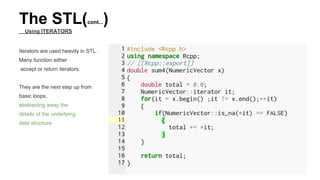
Iterators are used heavily in STL .Many function either accept or return iterators.
They are the next step up from basic loops, abstracting away the details of the underlying data structure
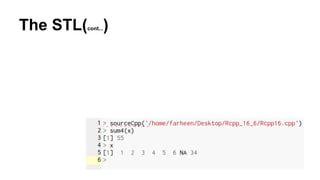
The STL(cont...)
Using ITERATORS
Iterators are used heavily in STL .
Many function either
accept or return iterators.
They are the next step up from
basic loops,
abstracting away the
details of the underlying
data structure
The STL(cont...)
The STL(cont...)
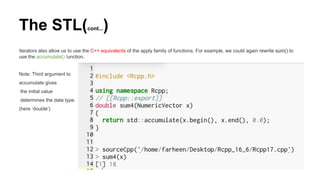
Iterators also allow us to use the C++ equivalents of the apply family of functions. For example, we could again rewrite sum() to
use the accumulate() function.
Note: Third argument to
accumulate gives
the initial value
determines the data type.
(here ‘double’)
The STL(cont...)
ALGORITHMS
The <algorithm> header provides large number of algorithms that work with iterators. A good reference is available at
http://www.cplusplus.com/reference/algorithm/.
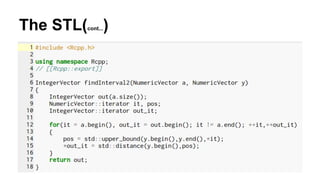
Here we are implementing basic Rcpp version of findInterval()
Where two vector are inputs and
output is there upper bound.
The STL(cont...)
The STL(cont...)
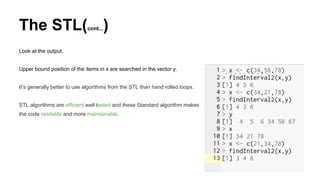
Look at the output.
Upper bound position of the items in x are searched in the vector y.
It’s generally better to use algorithms from the STL than hand rolled loops.
STL algorithms are efficient,well tested and these Standard algorithm makes
the code readable and more maintainable.
The STL(cont...)
Data Structures
The STL provides a large set of data structures: array, bitset, list, forward_list, map, multimap, multiset,priority_queue,
queue, dequeue, set, stack, unordered_map, unordered_set, unordered_multimap,unordered_multiset, and vector.
The most important of these data structures are the vector, the unordered_set, and the unordered_map.
A good reference for STL data structures is http://www.cplusplus.com/reference/stl/ — I recommend you keep it open while
working with the STL.
Rcpp knows how to convert from many STL data structures to their R equivalents
The STL(cont...):Vectors
Data Structures
An STL vector is very similar to an R vector but more efficient.
Vectors are templated i.e you need to specify their type while creating.vector<int>, vector<bool>, vector<double>, vector<String>.
standard [] notation : to access element in the vector
.push_back(): to add new element at the end of the vector.
.reserve() : to allocate sufficient storage.
More methods of a vector are described at http://www.cplusplus.com/reference/vector/vector/.
The STL(cont...):Vectors
Data Structures
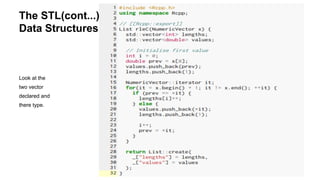
Look at the
two vector
declared and
there type.
The STL(cont...):Sets
Set maintain a unique set of values.
C++ provides both ordered (std :: set) and unordered sets (std :: unordered_set).
Unordered set are efficient than ordered sets.
Like vectors sets are also templated ,you need to specify the type. unordered_set<int>, unordered_set<bool>, etc.
For more details visit http://www.cplusplus.com/reference/set/set/ and http://www.cplusplus.
com/reference/unordered_set/unordered_set/.
Note :The use of seen.insert(x[i]).second. insert() returns a pair, the .first value is an iterator that points to element and the.second
value is a boolean that’s true if the value was a new addition to the set.
The STL(cont...):Sets
Note that the ordered sets are only available
in C++ 11.
Therefore you need to use cpp11 plugig.
// [Rcpp::plugins(cpp11)]]
The STL(cont...):Map
It is useful for functions like table() or match() that need to look up the value ,instead of storing presence and absence it
can store the additional data.
There are ordered (std::map) and unordered (std::unordered_map).
Map is templated ,you need to specify the type like map<int, double> ,unordered_map<double, int>.
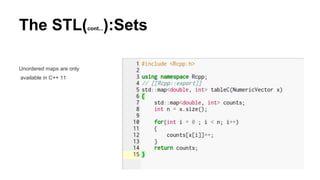
The STL(cont...):Sets
Unordered maps are only
available in C++ 11
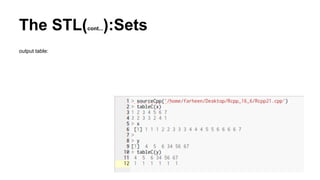
The STL(cont...):Sets
output table:
7.Case Studies
Two case-studies to give you a reason to replace your R code with Rcpp.
1.Gibbs Sampler
2.R vectorisation vs C++ vectorisation
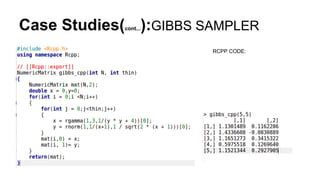
GIBBS SAMPLER:
The R and C++ code shown below is very similar (it only took a few minutes to convert the R version to the C++ version), but runs
about 20 times faster on my computer.
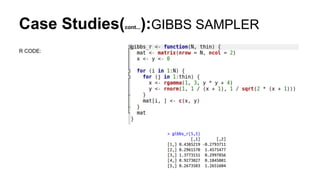
Case Studies(cont...):GIBBS SAMPLER
R CODE:
Case Studies(cont...):GIBBS SAMPLER
RCPP CODE:
Case Studies(cont...):GIBBS SAMPLER
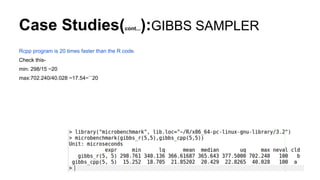
Rcpp program is 20 times faster than the R code.
Check this-
min: 298/15 ~20
max:702.240/40.028 ~17.54~``20
Case Studies:R VECTORIZATION VS C++
VECTORIZATION
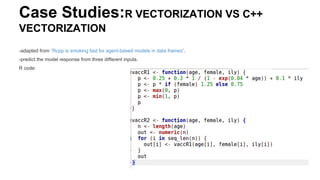
-adapted from “Rcpp is smoking fast for agent-based models in data frames”.
-predict the model response from three different inputs.
R code:
Case Studies:R VECTORIZATION VS C++
VECTORIZATION(cont...)
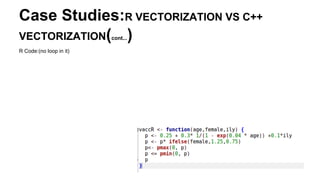
R Code:(no loop in it)
Case Studies:R VECTORIZATION VS C++
VECTORIZATION(cont...)
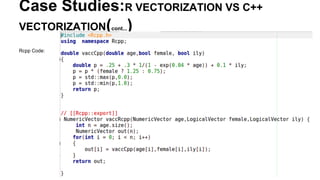
Rcpp Code:
Case Studies:R VECTORIZATION VS C++
VECTORIZATION(cont...)
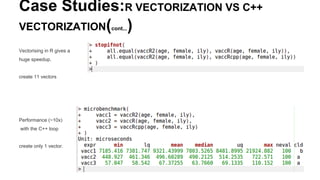
Vectorising in R gives a
huge speedup.
create 11 vectors
Performance (~10x)
with the C++ loop
create only 1 vector.
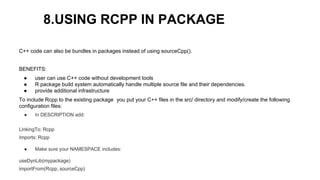
8.USING RCPP IN PACKAGE
C++ code can also be bundles in packages instead of using sourceCpp().
BENEFITS:
● user can use C++ code without development tools
● R package build system automatically handle multiple source file and their dependencies.
● provide additional infrastructure
To include Rcpp to the existing package you put your C++ files in the src/ directory and modify/create the following
configuration files:
● In DESCRIPTION add:
LinkingTo: Rcpp
Imports: Rcpp
● Make sure your NAMESPACE includes:
useDynLib(mypackage)
importFrom(Rcpp, sourceCpp)
USING RCPP IN PACKAGE(cont...)
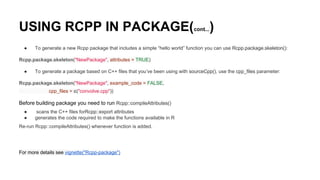
● To generate a new Rcpp package that includes a simple “hello world” function you can use Rcpp.package.skeleton():
Rcpp.package.skeleton("NewPackage", attributes = TRUE)
● To generate a package based on C++ files that you’ve been using with sourceCpp(), use the cpp_files parameter:
Rcpp.package.skeleton("NewPackage", example_code = FALSE,
cpp_files = c("convolve.cpp"))
Before building package you need to run Rcpp::compileAttributes()
● scans the C++ files forRcpp::export attributes
● generates the code required to make the functions available in R
Re-run Rcpp::compileAttributes() whenever function is added.
For more details see vignette("Rcpp-package")
LEARNING MORE
Rcpp book
vignette("Rcpp-package")
vignette("Rcpp-modules")
vignette("Rcpp-quickref")
Rcpp homepage
Dirk’s Rcpp page
Learning C++:
Effective C++ and Effective STL by Scott Meyers
C++ Annotations
Algorithm Libraries
Algorithm Design Manual
Introduction to Algorithms
online textbook
coursera course
Thank You
You can get the whole code :https://github.com/Farheen2302/RCPP_Code
Any questions?
Contact us at
info@decisionstats.org
farheenfnilofer@gmail.com

Rcpp

  • 1.
    High Performance Functions WithRcpp (make R coding faster with the integration of C++)
  • 2.
    About This presentation iscreated by Farheen Nilofer (https://in.linkedin.com/pub/farheen-nilofer/a5/5b9/58a ) as part of the internship requirements at DecisionStats.org. I would like to thank Mr. Ajay Ohri (https://in.linkedin.com/in/ajayohri ) and Miss Sunakshi for their invaluable help and guidance. Get Code here: https://github.com/Farheen2302/RCPP_Code
  • 3.
    Introduction The usage andimplementation of Rcpp package of R have been detailed in these slides. Convert a R function to a Rcpp function which is the integration of both C++ and R to make R coding many folds faster than the usual speed of execution. Every functionality is explained through many examples to make understand how the integration is done.
  • 4.
    Prerequisites: Languages: 1.Basics of C++or C(both will work ,you can go for it http://www.learncpp.com/ or http://www.cplusplus.com/) 2. Basics of R (You can join 4 hours of R course at DataCamp) Tools: R or better RStudio You’ll also need a working C++ compiler. To get it: ● On Windows, install Rtools. ● On Mac, install Xcode from the app store. ● On Linux, sudo apt-get install r-base-dev or similar.
  • 5.
    Focus: It doesn't matterhere, how well you know the language but important is to see how the integration is done. It doesn't matter here, how well you know the language but important is to see how the integration is done. FOCUS:
  • 6.
    What is Rcpp? Rcppis a package in R. -tool written by Dirk E and Romain Francois Rcpp makes it very easy to integrate your R code with C++. Rcpp provides easy ,clean and approachable API that will ultimately give you high performance code link - http://www.rcpp.org/
  • 7.
    Why we needRcpp? -code is just not fast enough. -to improve the performance in R. - Rcpp package help in integrating C++ with R and that help in making the code faster. sources- http://adv-r.had.co.nz/Rcpp.html
  • 8.
    Bottlenecks of Rhandled by C++ -problems of Data Structures and Algorithms the R doesn't support . C++ has STL(Standard Template Library ) to implement efficiently many data structures. - Recursive functions or calling a function a million times are hardest time for R code to execute . - overhead of a function in C++ is much lower than R. -C++ makes it easy for loops to vectorise code easily whose subsequent iteration depend on previous ones.
  • 9.
    Using sourceCpp: sourceCpp()is a function of R to load files from the disk. sourceCpp() is Rcpp function -an extension of R source() to load C++ files in R. Attributes and Classes: Attributes and classes to be used with Rcpp. Missing Values: deal with R's missing values through C++. Rcpp Sugar: avoid loops in C++ and write vectorized code (what is syntactic sugar- explain more) The STL(Standard Template Library): use data structures and algorithms from STL,built in C++. Examples: implemented examples to enhance the performance. Putting Rcpp package:How to put C++ in R package. Learning More: Many references to further learning is provided here. What will be covered through these slides?
  • 10.
    1.Getting started withC++ When you run the below code,Rcpp will compile the C++ code and construct a R function that connect to the compiled C++ function. What is compile? Compile is a process to convert a high level language to a machine code that computer’s processor uses. How to run?
  • 11.
    How to codein Rcpp? This is the example to show how to go through the process of conversion. R Code: C++ code: Syntax of C++ code: http://www.cplusplus.com/doc/tutorial/functions/
  • 12.
    How to codein Rcpp? -include the whole compiled C++ program inside the parenthesis of cppFunction() within quotes ‘ ’ in the R console and hit enter. -Nothing will happen on no error. -Now call the function name as you do for R function call. ====================================> C++ implementation.
  • 13.
    How C++ functionsdifferent from R Observe the above R and C++ code: - Syntax to C++ looks alike of R -no assignment operator C++ - declare the type of output to be returned by the C++ function.In the above code the function returned ‘int’. - The classes for types of R vectors are NumericVectors, IntegerVectors, CharacterVectors and LogicalVectors - Scalars and Vectors are different.The scalar equivalent of numeric,integer and character and logical vectors are double,int String and bool. - use explicit return statement to return a value from the function. - statement in C++ is terminated by ‘;’.
  • 14.
    2.Convert R functionsto C++ equivalent. There are four different ways: ● Scalar input and scalar output ● Vector input and scalar output ● Vector input and vector output ● Matrix input and vector output
  • 15.
    Scalar Input andScalar Output R code: This simple R code and look at its C++ implementation in the next slide.
  • 16.
    Scalar Input andScalar Output(cont..) C++ code: -C++ representation of above R code.
  • 17.
    Scalar Input andScalar Output(cont..) If statement of C++ is same as If statement of R
  • 18.
    Vector Input andScalar Output(cont..) R code:
  • 19.
    Vector Input andScalar Output The cost of loops in C++ is very less Rcpp:
  • 20.
    Some more differencebetween C++ and R. C++ version is similar but bit different as in 1.C++ methods are called with a full stop as here done for calling 'size()' 2.'for' loop has a different syntax 3.In C++ vector indices start at '0' ,this is very common source of bug while converting R function to C++ 4.Use ' = ' instead '<-'.
  • 21.
    ‘microbenchmark’ to comparethe speed install.packages(“microbenchmark”) ‘microbenchmark’ function from a package XC in R used to check the execution speed of our programs. import ‘microbenchmark’ function through the command: library(microbenchmark) system.time() and Rbenchmark() also do the same.
  • 22.
    -minimum time takenby a C++ program is 4.272 and for the max value ,the least time 27.209
  • 23.
    Vector Input VectorOutput R code: Rcpp Code:
  • 24.
    Vector Input VectorOutput(cont..) We create a new numeric vector of length n with a constructor: NumericVector out(n). Another useful way of making a vector is to copy an existing one: NumericVector zs = clone(ys). In C++ there is pow() to calculate power. R code take 8 ms to execute and your C++ code takes 4ms but took 10mins time to write a C++. What do you think is it worth it?? Yes ! When it comes calling same function a million times .
  • 25.
    Matrix Input Vectoroutput Matrix could have equivalents like NumericVector, IntegerVector, CharacterVector, LogicalVector Rcpp Code:==========>
  • 26.
    DESCRIPTION: There are twomethods nrow and ncol for getting number of rows and number of columns.
  • 27.
    From Inline toStand-alone Its tiresome to write code inside the function cppFunction(). Are you too? Can’t we have some other method to do so? Using sourceCpp() The method we have earlier used was the inline method. Sometimes when you need some sort of code immediately because in real word everything is so fast the we need to keep everything ready.
  • 28.
    Using sourceCpp() (cont..) Therecomes Stand alone functions.In this we need to already define the function and use it whenever required without the overhead of writing immediatly. How to do that? Ans-You need to add only two three lines of code to your C++ function and compile the function whenever needed using sourceCpp() function from your R console.
  • 29.
    Using sourceCpp() (cont..) Makesure to save your Rcpp file as .cpp extension And keep in mind that there is a ‘gap’ between ‘//’ and ‘[[Rcpp::export]]’
  • 30.
    Using sourceCpp() (cont..) WriteRcpp code in different file.
  • 31.
    How to compilestandalone function To compile your code,use function ‘sourceCpp()’ from R console ,as shown below. Note : You can see in the above image that C++ code is much faster than R’s in built mean function.
  • 32.
    Example 1: How topass function as argument? ===========>>
  • 33.
  • 34.
    More practice…... Someone herewho want more brushing can also try .. all(),cumprod(),cummin(),cummax(),diff(),range,var and for prior knowledge visit wikipedia.
  • 35.
    3.Attributes and otherclasses NumericVector,IntegerVector,LogicalVector,CharcterVector are Vector classes. Scalar classes like int,double,bool,String and same for matrices like IntegerMatrix,NumericMatrix,LogicalMatrix and CharacterMatrix. As we know all R objects have attributes.And these attributes can be set ,removed or modified using a ‘attr()’ attr(x,”dim”)<- c(2,5) We will see ‘::class()’ which allows us to create R vector using C++ scalar values.
  • 36.
    Attributes and otherclasses(cont...) Now see how we used ::create() to create a R vector from C++ scalar
  • 37.
    Attributes and otherclasses(cont...) Output.:compiled stand alone function. Checkout attributes,
  • 38.
    List and DataFrames(as(),lm(),inherit(),stop()) Listand DataFrames one of the most important features in R. -will see how to extract component from the list using as() and convert them into C++ equivalents. Note lm(), inherit() and stop().
  • 39.
    List and DataFrames(cont..) Lookat as(), how it converts R objects’ component to C++
  • 40.
    List and DataFrames(cont..) Checkout the output ,the errrrrr!
  • 41.
    Why R functionin Rcpp code? Calling a R function could be very useful. 1.For parameter initialization. 2.Access a custom data summary.To recode Huh! Overhead! 3.Calling a plotting routine.Tedious help,right? Calling a R function would be overhead too. Its slower than C++ equivalent and even slower than R code. Warning: Do it when it make sense,not because its available.
  • 42.
    Why R functionin Rcpp code? Here is the simple Rcpp code to demonstrate how to call R function from C++ code.
  • 43.
    Why R functionin Rcpp code?(cont..) Look at the output ,it is similar to R function output below.
  • 44.
    This is theR function which is called by ‘CallRfunc()’ above Why R function in Rcpp code?(cont..)
  • 45.
    Why R functionin Rcpp code?(cont..) There are classes for many more specialised language object. Environment, ComplexVector, RawVector, DottPair, Language, Promise, Symbol, WeakReference and so on.
  • 46.
    4.Missing Values How todeal with missing values in Rcpp? Lets find out! We need to get two things. 1.How R’s missing values behaves in C++ Scalar(int ,double..). 2.How to get and set Missing values in Vector(NumericVector,..).
  • 47.
    Scalars R’s missing valuesare first coerced in C++ and then back to R vector.
  • 48.
    Scalars(cont..) With the exception ofbool,things are pretty good here.
  • 49.
    Integers With Integers ,westore missing values as smallest values As C++ don’t know the this special behaviour ,playing with it gives an incorrect value. evalCpp {Rcpp} Evaluates a C++ expression. This creates a C++ function using cppFunction and calls it to get the resul
  • 50.
    Doubles With doubles ,ignore the missing values and work with R’s NaN(Not A NUMBER) It is R’s NA is special type of NaA.It has characterstic that if it is involved in logical expression it gives FALSE. With LOGICAL EXPRESSION=>
  • 51.
  • 52.
    Doubles(cont...) In context withNumeric Values NA are propagated. Look at the output … all NANs.
  • 53.
    String String is Scalarstring ,itself introduced by Rcpp. String knows how to deal with missing values. Boolean One thing to note here is that C++ have only two value TRUE and FALSE while R’s logical Vector have three values TRUE, FALSE and NA.
  • 54.
    VECTOR -Missing values specificto the type of Vector like
  • 55.
    VECTOR(cont...) missing values. Each elementin the list is of specific type.
  • 56.
    VECTOR(cont...) In this functionyou can see each item in the vector need to be check .
  • 57.
    VECTOR(cont...) Each element isspecified if it is NA or not through logical Values.
  • 58.
    5.Rcpp Sugar Rcpp providelot of Syntactic Sugar to ensure C++ function work very similar to their R equivalent. Sugar functions can be roughly broken down into ● logical summary functions ● arithmetic and logical operators ● vector views ● other useful functions] Lets begin
  • 59.
    Rcpp Sugar(cont...) ARITHMETIC ANDLOGICAL OPERATORS: All basic arithmetic and logical operators are vectorised as: + ,*, -, /, pow, <, <=, >, >=, ==, !=, !. Use sugar as following: R function implementing pdistR Now we could sugar to considerably simplify the code
  • 60.
    Rcpp Sugar(cont...) Sugar implementationin C++ Without sugar we need to use loop
  • 61.
    Rcpp Sugar(cont...) LOGICAL SUMMARYFUNCTION Use sugar to write an efficient function . Sugar function like any(),all() , is.na() are very efficient . This will do the same amount of work regardless of the position of the missing values. Proved in below microbench program
  • 62.
    Rcpp Sugar(cont...) Sugar implementation in C++ Belowmicrobench() shows the execution of both R and C++ code
  • 63.
    Rcpp Sugar(cont...) Changing theposition of missing values.
  • 64.
    Rcpp Sugar(cont...) -execution timeof each program have hardly any effect on the execution time of R code due to missing value place.
  • 65.
    Rcpp Sugar(cont...) VECTOR VIEW Thereare many functions which Sugar provide to view the vector. head(), tail(), rep_each(), rep_len(), rev(), seq_along(), and seq_len(). In R these would all produce copies of the vector, but in Rcpp they simply point to the existing vector which makes them efficient. There’s grab bag of sugar functions. ● Math functions: abs(), acos(), asin(), atan(), beta(), ceil(), ceiling(), choose(), cos(), cosh(), digamma(),exp(), expm1(), factorial(), floor(), gamma(), lbeta(), lchoose(), lfactorial(), lgamma(), log(), log10(),log1p(), pentagamma(), psigamma(), round(), signif(), sin(), sinh(), sqrt(), tan(), tanh(), tetragamma(),trigamma(), trunc(). ● Scalar summaries: mean(), min(), max(), sum(), sd(), and (for vectors) var(). ● Vector summaries: cumsum(), diff(), pmin(), and pmax(). ● Finding values: match(), self_match(), which_max(), which_min(). ● Dealing with duplicates: duplicated(), unique(). ● d/q/p/r for all standard distributions. Finally, noNA(x) asserts that the vector x does not contain any missing values.
  • 66.
    6.The STL(Standard LibraryTemplates) The real strength of C++ is when you use STL for algorithm and Data Structure. If you need an algorithm or data structure that isn’t implemented in STL, a good place to look is boost. Iterators are used heavily in STL .Many function either accept or return iterators. They are the next step up from basic loops, abstracting away the details of the underlying data structure
  • 67.
    The STL(cont...) Using ITERATORS Iteratorsare used heavily in STL . Many function either accept or return iterators. They are the next step up from basic loops, abstracting away the details of the underlying data structure
  • 68.
  • 69.
    The STL(cont...) Iterators alsoallow us to use the C++ equivalents of the apply family of functions. For example, we could again rewrite sum() to use the accumulate() function. Note: Third argument to accumulate gives the initial value determines the data type. (here ‘double’)
  • 70.
    The STL(cont...) ALGORITHMS The <algorithm>header provides large number of algorithms that work with iterators. A good reference is available at http://www.cplusplus.com/reference/algorithm/. Here we are implementing basic Rcpp version of findInterval() Where two vector are inputs and output is there upper bound.
  • 71.
  • 72.
    The STL(cont...) Look atthe output. Upper bound position of the items in x are searched in the vector y. It’s generally better to use algorithms from the STL than hand rolled loops. STL algorithms are efficient,well tested and these Standard algorithm makes the code readable and more maintainable.
  • 73.
    The STL(cont...) Data Structures TheSTL provides a large set of data structures: array, bitset, list, forward_list, map, multimap, multiset,priority_queue, queue, dequeue, set, stack, unordered_map, unordered_set, unordered_multimap,unordered_multiset, and vector. The most important of these data structures are the vector, the unordered_set, and the unordered_map. A good reference for STL data structures is http://www.cplusplus.com/reference/stl/ — I recommend you keep it open while working with the STL. Rcpp knows how to convert from many STL data structures to their R equivalents
  • 74.
    The STL(cont...):Vectors Data Structures AnSTL vector is very similar to an R vector but more efficient. Vectors are templated i.e you need to specify their type while creating.vector<int>, vector<bool>, vector<double>, vector<String>. standard [] notation : to access element in the vector .push_back(): to add new element at the end of the vector. .reserve() : to allocate sufficient storage. More methods of a vector are described at http://www.cplusplus.com/reference/vector/vector/.
  • 75.
    The STL(cont...):Vectors Data Structures Lookat the two vector declared and there type.
  • 76.
    The STL(cont...):Sets Set maintaina unique set of values. C++ provides both ordered (std :: set) and unordered sets (std :: unordered_set). Unordered set are efficient than ordered sets. Like vectors sets are also templated ,you need to specify the type. unordered_set<int>, unordered_set<bool>, etc. For more details visit http://www.cplusplus.com/reference/set/set/ and http://www.cplusplus. com/reference/unordered_set/unordered_set/. Note :The use of seen.insert(x[i]).second. insert() returns a pair, the .first value is an iterator that points to element and the.second value is a boolean that’s true if the value was a new addition to the set.
  • 77.
    The STL(cont...):Sets Note thatthe ordered sets are only available in C++ 11. Therefore you need to use cpp11 plugig. // [Rcpp::plugins(cpp11)]]
  • 78.
    The STL(cont...):Map It isuseful for functions like table() or match() that need to look up the value ,instead of storing presence and absence it can store the additional data. There are ordered (std::map) and unordered (std::unordered_map). Map is templated ,you need to specify the type like map<int, double> ,unordered_map<double, int>.
  • 79.
    The STL(cont...):Sets Unordered mapsare only available in C++ 11
  • 80.
  • 81.
    7.Case Studies Two case-studiesto give you a reason to replace your R code with Rcpp. 1.Gibbs Sampler 2.R vectorisation vs C++ vectorisation GIBBS SAMPLER: The R and C++ code shown below is very similar (it only took a few minutes to convert the R version to the C++ version), but runs about 20 times faster on my computer.
  • 82.
  • 83.
  • 84.
    Case Studies(cont...):GIBBS SAMPLER Rcppprogram is 20 times faster than the R code. Check this- min: 298/15 ~20 max:702.240/40.028 ~17.54~``20
  • 85.
    Case Studies:R VECTORIZATIONVS C++ VECTORIZATION -adapted from “Rcpp is smoking fast for agent-based models in data frames”. -predict the model response from three different inputs. R code:
  • 86.
    Case Studies:R VECTORIZATIONVS C++ VECTORIZATION(cont...) R Code:(no loop in it)
  • 87.
    Case Studies:R VECTORIZATIONVS C++ VECTORIZATION(cont...) Rcpp Code:
  • 88.
    Case Studies:R VECTORIZATIONVS C++ VECTORIZATION(cont...) Vectorising in R gives a huge speedup. create 11 vectors Performance (~10x) with the C++ loop create only 1 vector.
  • 89.
    8.USING RCPP INPACKAGE C++ code can also be bundles in packages instead of using sourceCpp(). BENEFITS: ● user can use C++ code without development tools ● R package build system automatically handle multiple source file and their dependencies. ● provide additional infrastructure To include Rcpp to the existing package you put your C++ files in the src/ directory and modify/create the following configuration files: ● In DESCRIPTION add: LinkingTo: Rcpp Imports: Rcpp ● Make sure your NAMESPACE includes: useDynLib(mypackage) importFrom(Rcpp, sourceCpp)
  • 90.
    USING RCPP INPACKAGE(cont...) ● To generate a new Rcpp package that includes a simple “hello world” function you can use Rcpp.package.skeleton(): Rcpp.package.skeleton("NewPackage", attributes = TRUE) ● To generate a package based on C++ files that you’ve been using with sourceCpp(), use the cpp_files parameter: Rcpp.package.skeleton("NewPackage", example_code = FALSE, cpp_files = c("convolve.cpp")) Before building package you need to run Rcpp::compileAttributes() ● scans the C++ files forRcpp::export attributes ● generates the code required to make the functions available in R Re-run Rcpp::compileAttributes() whenever function is added. For more details see vignette("Rcpp-package")
  • 91.
    LEARNING MORE Rcpp book vignette("Rcpp-package") vignette("Rcpp-modules") vignette("Rcpp-quickref") Rcpphomepage Dirk’s Rcpp page Learning C++: Effective C++ and Effective STL by Scott Meyers C++ Annotations Algorithm Libraries Algorithm Design Manual Introduction to Algorithms online textbook coursera course
  • 92.
    Thank You You canget the whole code :https://github.com/Farheen2302/RCPP_Code Any questions? Contact us at info@decisionstats.org farheenfnilofer@gmail.com