Getting Started with
MicroPython
on the
Raspberry Pi Pico
Toronto Raspberry Pi Meetup Group
2021-02-11
Stewart Russell – scruss@scruss.com
What, another one?
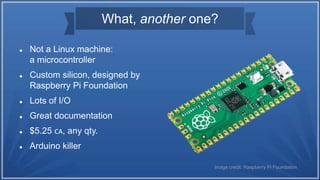
 Not a Linux machine:
a microcontroller
 Custom silicon, designed by
Raspberry Pi Foundation
 Lots of I/O
 Great documentation
 $5.25 🇨🇦, any qty.
 Arduino killer
Image credit: Raspberry Pi Foundation
RP2040 Overview
 Dual-core ARM Cortex-M0+ at 133 MHz
 264 KB RAM
 No Flash storage
(Pico has 2 MB external)
 26 × multi-function GPIO pins
 2 × SPI, 2 × I2C, 2 × UART, 3 × 12-bit
ADC, 16 × PWM
 8 × PIO state machines
Image credit: Raspberry Pi Foundation
So where do I get one?
 In theory, you can buy as
many as you want, but:
 BuyaPi: Sold Out
 Canakit: Sold Out
(preorders ship Feb 28)
 Elmwood: Sold Out
 Newark, Digikey: on order
 My Canada Post experience
 BuyaPi: ordered Jan 21, arrived Feb 2.
Average speed: house spider
 Elmwood: ordered Jan 27, arrived Feb
3.
Average speed: 3-toed sloth
 Don’t use Canada Post because 😷
What is MicroPython?
 Python 3 implementation
 Small: 256 KB flash, 16 KB RAM (minimum)
 Compiled on-chip; standalone
 Subset of standard Python library
 Core developers were hired to implement for Pico
 Now includes ARMv6M assembler
 micropython.org
MicroPython Differences
 System libraries are typically limited, e.g.:
 Strings are always UTF-8; 8-bit codecs excluded
 Time is monotonic (fractional) seconds: no timezones or DST
 No CSV, numpy, pip (→ upip), …
 .py → .mpy (like .pyc) compilation isn’t automatic
 Hardware interface modules:
 machine: for hardware features like pins, PWM, I²C, ADC, …
 rp2: RP2040 PIO assembler, raw Flash access
 help() docstrings short or absent: see online docs
Flashing MicroPython
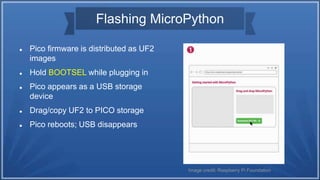
 Pico firmware is distributed as UF2
images
 Hold BOOTSEL while plugging in
 Pico appears as a USB storage
device
 Drag/copy UF2 to PICO storage
 Pico reboots; USB disappears
Image credit: Raspberry Pi Foundation
Editing: Thonny
 Raspberry Pi Foundation’s
recommended editor
 Installed by default
 Includes loading/saving to
Pico flash
 Has a simple graph tool
 … plus firmware updater
 … and (Raspberry) REPL
sorry not sorry
(and no, I don’t know why the graph broke)
“but my $EDITOR …!!1!”
 You don’t have to use Thonny
 … it’s just more work if you don’t.
 The command-line MicroPython tool with REPL access is rshell:
https://github.com/dhylands/rshell/tree/pico
 Make sure you get the this branch, as it handles the quirks of the
Pico’s RTC
 … and yes, the Foundation has shipped yet another device which
doesn’t have battery backup on its clock ☹
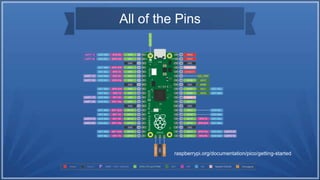
All of the Pins
raspberrypi.org/documentation/pico/getting-started
Documentation
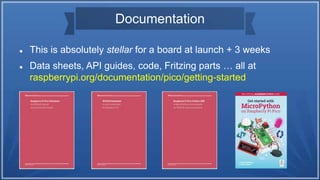
 This is absolutely stellar for a board at launch + 3 weeks
 Data sheets, API guides, code, Fritzing parts … all at
raspberrypi.org/documentation/pico/getting-started
Unexpected Quirks
 It’s a new board, and folks are just learning, but:
1 ADC: default analogue-to-digital setup is quite noisy
2 PWM: duty cycle changes if frequency is changed
3 UART Serial: has no wait/timeout, will lock if read and no data
waiting
4 Dual core/threading: seems to be not well understood yet
Worked example
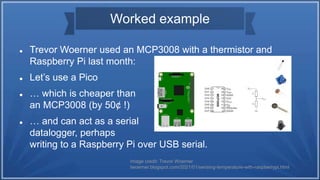
 Trevor Woerner used an MCP3008 with a thermistor and
Raspberry Pi last month:
 Let’s use a Pico
 … which is cheaper than
an MCP3008 (by 50¢ !)
 … and can act as a serial
datalogger, perhaps
writing to a Raspberry Pi over USB serial.
Image credit: Trevor Woerner
twoerner.blogspot.com/2021/01/sensing-temperature-with-raspberrypi.html
Wiring
 Pins used:
 ADC2 (pin 34)
 3V3 (pin 36)
 AGND (pin 33)
 10 kΩ resistor between 3V3
and thermistor
 10 kΩ @ 25 °C thermistor, β
= 3950
RaspberryPiPico.pptx

RaspberryPiPico.pptx

  • 1.
    Getting Started with MicroPython onthe Raspberry Pi Pico Toronto Raspberry Pi Meetup Group 2021-02-11 Stewart Russell – scruss@scruss.com
  • 2.
    What, another one? Not a Linux machine: a microcontroller  Custom silicon, designed by Raspberry Pi Foundation  Lots of I/O  Great documentation  $5.25 🇨🇦, any qty.  Arduino killer Image credit: Raspberry Pi Foundation
  • 3.
    RP2040 Overview  Dual-coreARM Cortex-M0+ at 133 MHz  264 KB RAM  No Flash storage (Pico has 2 MB external)  26 × multi-function GPIO pins  2 × SPI, 2 × I2C, 2 × UART, 3 × 12-bit ADC, 16 × PWM  8 × PIO state machines Image credit: Raspberry Pi Foundation
  • 4.
    So where doI get one?  In theory, you can buy as many as you want, but:  BuyaPi: Sold Out  Canakit: Sold Out (preorders ship Feb 28)  Elmwood: Sold Out  Newark, Digikey: on order  My Canada Post experience  BuyaPi: ordered Jan 21, arrived Feb 2. Average speed: house spider  Elmwood: ordered Jan 27, arrived Feb 3. Average speed: 3-toed sloth  Don’t use Canada Post because 😷
  • 5.
    What is MicroPython? Python 3 implementation  Small: 256 KB flash, 16 KB RAM (minimum)  Compiled on-chip; standalone  Subset of standard Python library  Core developers were hired to implement for Pico  Now includes ARMv6M assembler  micropython.org
  • 6.
    MicroPython Differences  Systemlibraries are typically limited, e.g.:  Strings are always UTF-8; 8-bit codecs excluded  Time is monotonic (fractional) seconds: no timezones or DST  No CSV, numpy, pip (→ upip), …  .py → .mpy (like .pyc) compilation isn’t automatic  Hardware interface modules:  machine: for hardware features like pins, PWM, I²C, ADC, …  rp2: RP2040 PIO assembler, raw Flash access  help() docstrings short or absent: see online docs
  • 7.
    Flashing MicroPython  Picofirmware is distributed as UF2 images  Hold BOOTSEL while plugging in  Pico appears as a USB storage device  Drag/copy UF2 to PICO storage  Pico reboots; USB disappears Image credit: Raspberry Pi Foundation
  • 8.
    Editing: Thonny  RaspberryPi Foundation’s recommended editor  Installed by default  Includes loading/saving to Pico flash  Has a simple graph tool  … plus firmware updater  … and (Raspberry) REPL sorry not sorry (and no, I don’t know why the graph broke)
  • 9.
    “but my $EDITOR…!!1!”  You don’t have to use Thonny  … it’s just more work if you don’t.  The command-line MicroPython tool with REPL access is rshell: https://github.com/dhylands/rshell/tree/pico  Make sure you get the this branch, as it handles the quirks of the Pico’s RTC  … and yes, the Foundation has shipped yet another device which doesn’t have battery backup on its clock ☹
  • 10.
    All of thePins raspberrypi.org/documentation/pico/getting-started
  • 11.
    Documentation  This isabsolutely stellar for a board at launch + 3 weeks  Data sheets, API guides, code, Fritzing parts … all at raspberrypi.org/documentation/pico/getting-started
  • 12.
    Unexpected Quirks  It’sa new board, and folks are just learning, but: 1 ADC: default analogue-to-digital setup is quite noisy 2 PWM: duty cycle changes if frequency is changed 3 UART Serial: has no wait/timeout, will lock if read and no data waiting 4 Dual core/threading: seems to be not well understood yet
  • 13.
    Worked example  TrevorWoerner used an MCP3008 with a thermistor and Raspberry Pi last month:  Let’s use a Pico  … which is cheaper than an MCP3008 (by 50¢ !)  … and can act as a serial datalogger, perhaps writing to a Raspberry Pi over USB serial. Image credit: Trevor Woerner twoerner.blogspot.com/2021/01/sensing-temperature-with-raspberrypi.html
  • 14.
    Wiring  Pins used: ADC2 (pin 34)  3V3 (pin 36)  AGND (pin 33)  10 kΩ resistor between 3V3 and thermistor  10 kΩ @ 25 °C thermistor, β = 3950

Editor's Notes

  • #3 You can buy a whole reel of 480 for $2655 from Digikey: https://www.digikey.ca/en/products/detail/raspberry-pi/SC0915/13624793 Pins are not included. Board is castellated and can be surface-mounted to other electronics. Not really an Arduino killer: Arduino have announced the Arduino Micro Connect based on the RP2040 (price tba)
  • #4 Someone else will cover the deeper details soon It also has: * RTC * Low power sleep modes * Hardware RNG (though not crypto) Can be massively overclocked. The above photo was an early piece of test silicon: it’s not available in CERDIP format (boo!)
  • #8 Pico doesn’t export any USB storage, and some people don’t like the BOOTSEL process. You can use SWD to upload, and another Pico makes a good SWD probe