Online Railway Reservation
Software Requirements Specification For Automated Railway Reservation System   PREPARED FOR PROF. HARSHALA     PREPARED BY BEG JOVERIA MIRZA  [11] ARATHY NAIR  [47] (SYBSC.I.T. A)
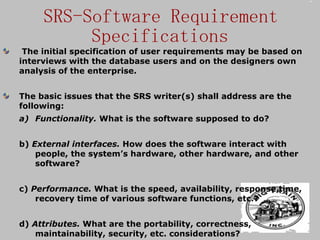
SRS-Software Requirement Specifications The initial specification of user requirements may be based on interviews with the database users and on the designers own analysis of the enterprise. The basic issues that the SRS writer(s) shall address are the following: Functionality.  What is the software supposed to do?  b)  External interfaces.  How does the software interact with people, the system’s hardware, other hardware, and other software?  c)  Performance.  What is the speed, availability, response time, recovery time of various software functions, etc.?  d)  Attributes.  What are the portability, correctness, maintainability, security, etc. considerations?
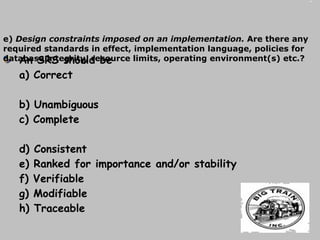
An SRS should be a) Correct  b) Unambiguous  c) Complete  d) Consistent  e) Ranked for importance and/or stability  f) Verifiable  g) Modifiable  h) Traceable e)  Design constraints imposed on an implementation.  Are there any required standards in effect, implementation language, policies for database integrity, resource limits, operating environment(s) etc.?
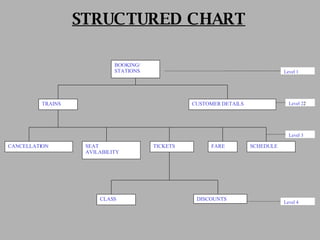
ER-Diagram: An entity-relationship (ER) diagram is a specialized graphic that illustrates the interrelationships between entities in a database.   Structure chart: The entry for every type of categorization under consideration   is given in a structure chart.
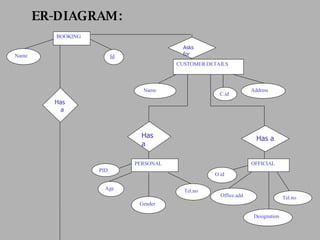
ER-DIAGRAM: Name BOOKING Id CUSTOMER DETAILS Name Address PERSONAL Age Gender Tel.no OFFICIAL Designation Office.add Tel.no PID O.id C.id Asks for Has a Has a Has  a
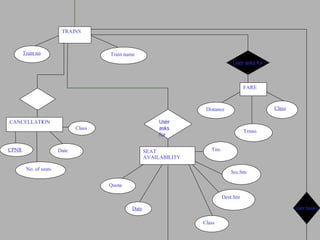
TRAINS Train no Train name SEAT AVAILABILITY Tno Src.Stn Dest.Stn Class Quota User asks for Date FARE Distance Class Trnno. CANCELLATION CPNR No. of seats Date Class User asks for User books
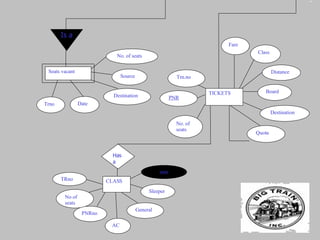
TICKETS PNR No. of seats Board Trn.no Destination Quota Class Fare Distance CLASS AC General No of seats PNRno Sleeper TRno Has a Seats vacant Trno Date Source Destination No. of seats Is a date
STRUCTURED CHART BOOKING/ STATIONS CUSTOMER DETAILS TRAINS CANCELLATION SEAT AVILABILITY TICKETS FARE SCHEDULE CLASS DISCOUNTS Level 1 Level 2 2 Level   3 Level   4
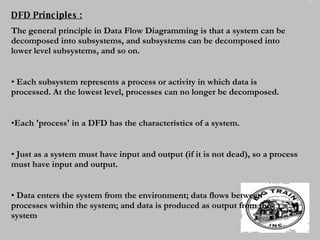
DFD Principles : The general principle in Data Flow Diagramming is that a system can be decomposed into subsystems, and subsystems can be decomposed into lower level subsystems, and so on.  Each subsystem represents a process or activity in which data is processed. At the lowest level, processes can no longer be decomposed.  Each 'process' in a DFD has the characteristics of a system.  Just as a system must have input and output (if it is not dead), so a process must have input and output.  Data enters the system from the environment; data flows between processes within the system; and data is produced as output from the system
DATA FLOW DIAGRAM CONTEXT LEVEL DFD
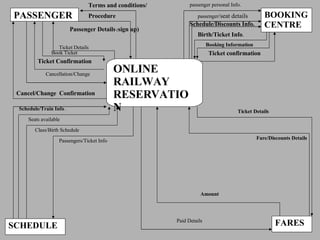
BOOKING CENTRE PASSENGER Terms and conditions/ Procedure Passenger Details  ( sign up)     ONLINE RAILWAY RESERVATION SCHEDULE FARES Ticket Details   Ticket Confirmation   Cancellation/Change   Cancel/Change  Confirmation passenger /seat details   Birth/Ticket Info .   Ticket confirmation   Schedule/Discounts Info. Booking Information   passenger personal Info.   Schedule/Train Info  .   Seats available   Class/Birth Schedule Passengers/Ticket Info   Fare/Discounts Details Ticket Details Amount Book Ticket Paid Details
Level - I
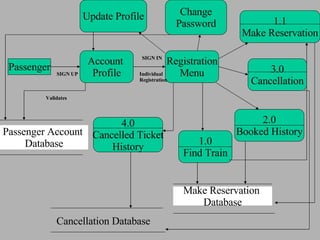
Account  Profile 1.0 Find Train Registration Menu SIGN UP Individual Registration SIGN IN Validates Passenger Account  Database 1.1 Make Reservation 3.0 Cancellation 2.0 Booked History Update Profile Change Password Make Reservation  Database Cancellation Database 4.0 Cancelled Ticket History Passenger
Level - II
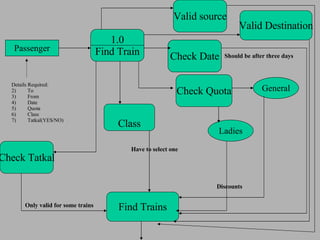
1.0 Find Train Details Required: To From Date Quota Class Tatkal(YES/NO) Check Date Should be after three days Check Quota General Ladies Check Tatkal Only valid for some trains Passenger Discounts Class Have to select one Find Trains Valid Destination Valid source
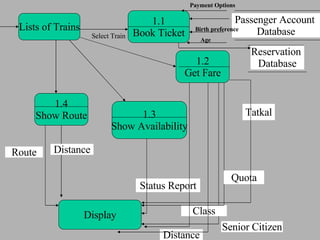
Lists of Trains 1.3 Show Availability 1.2 Get Fare 1.4 Show Route 1.1 Book Ticket Select Train Passenger Account  Database Tatkal Status Report Quota Senior Citizen Class Distance Route Distance Display Birth preference Age Payment Options Reservation  Database
Level III
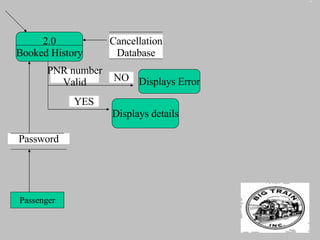
2.0 Booked History Password Cancellation Database Displays details PNR number Valid YES NO Displays Error Passenger
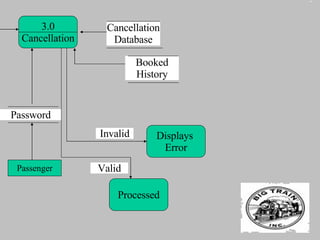
3.0 Cancellation Password Passenger Cancellation Database Booked History Displays  Error Processed Valid Invalid
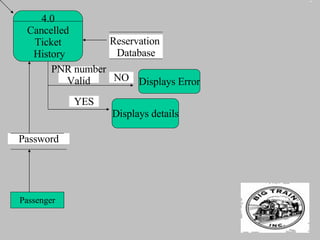
4.0 Cancelled Ticket History Password Reservation  Database Displays details PNR number Valid YES NO Displays Error Passenger
THANKING-YOU

railway reservation software documentaion

  • 1.
    OnlineRailway Reservation
  • 2.
    Software Requirements SpecificationFor Automated Railway Reservation System PREPARED FOR PROF. HARSHALA     PREPARED BY BEG JOVERIA MIRZA [11] ARATHY NAIR [47] (SYBSC.I.T. A)
  • 3.
    SRS-Software Requirement SpecificationsThe initial specification of user requirements may be based on interviews with the database users and on the designers own analysis of the enterprise. The basic issues that the SRS writer(s) shall address are the following: Functionality. What is the software supposed to do? b) External interfaces. How does the software interact with people, the system’s hardware, other hardware, and other software? c) Performance. What is the speed, availability, response time, recovery time of various software functions, etc.? d) Attributes. What are the portability, correctness, maintainability, security, etc. considerations?
  • 4.
    An SRS shouldbe a) Correct b) Unambiguous c) Complete d) Consistent e) Ranked for importance and/or stability f) Verifiable g) Modifiable h) Traceable e) Design constraints imposed on an implementation. Are there any required standards in effect, implementation language, policies for database integrity, resource limits, operating environment(s) etc.?
  • 5.
    ER-Diagram: An entity-relationship(ER) diagram is a specialized graphic that illustrates the interrelationships between entities in a database. Structure chart: The entry for every type of categorization under consideration is given in a structure chart.
  • 6.
    ER-DIAGRAM: Name BOOKINGId CUSTOMER DETAILS Name Address PERSONAL Age Gender Tel.no OFFICIAL Designation Office.add Tel.no PID O.id C.id Asks for Has a Has a Has a
  • 7.
    TRAINS Train noTrain name SEAT AVAILABILITY Tno Src.Stn Dest.Stn Class Quota User asks for Date FARE Distance Class Trnno. CANCELLATION CPNR No. of seats Date Class User asks for User books
  • 8.
    TICKETS PNR No.of seats Board Trn.no Destination Quota Class Fare Distance CLASS AC General No of seats PNRno Sleeper TRno Has a Seats vacant Trno Date Source Destination No. of seats Is a date
  • 9.
    STRUCTURED CHART BOOKING/STATIONS CUSTOMER DETAILS TRAINS CANCELLATION SEAT AVILABILITY TICKETS FARE SCHEDULE CLASS DISCOUNTS Level 1 Level 2 2 Level 3 Level 4
  • 10.
    DFD Principles :The general principle in Data Flow Diagramming is that a system can be decomposed into subsystems, and subsystems can be decomposed into lower level subsystems, and so on. Each subsystem represents a process or activity in which data is processed. At the lowest level, processes can no longer be decomposed. Each 'process' in a DFD has the characteristics of a system. Just as a system must have input and output (if it is not dead), so a process must have input and output. Data enters the system from the environment; data flows between processes within the system; and data is produced as output from the system
  • 11.
    DATA FLOW DIAGRAMCONTEXT LEVEL DFD
  • 12.
    BOOKING CENTRE PASSENGERTerms and conditions/ Procedure Passenger Details ( sign up)   ONLINE RAILWAY RESERVATION SCHEDULE FARES Ticket Details Ticket Confirmation Cancellation/Change Cancel/Change Confirmation passenger /seat details Birth/Ticket Info . Ticket confirmation Schedule/Discounts Info. Booking Information passenger personal Info. Schedule/Train Info .   Seats available Class/Birth Schedule Passengers/Ticket Info Fare/Discounts Details Ticket Details Amount Book Ticket Paid Details
  • 13.
  • 14.
    Account Profile1.0 Find Train Registration Menu SIGN UP Individual Registration SIGN IN Validates Passenger Account Database 1.1 Make Reservation 3.0 Cancellation 2.0 Booked History Update Profile Change Password Make Reservation Database Cancellation Database 4.0 Cancelled Ticket History Passenger
  • 15.
  • 16.
    1.0 Find TrainDetails Required: To From Date Quota Class Tatkal(YES/NO) Check Date Should be after three days Check Quota General Ladies Check Tatkal Only valid for some trains Passenger Discounts Class Have to select one Find Trains Valid Destination Valid source
  • 17.
    Lists of Trains1.3 Show Availability 1.2 Get Fare 1.4 Show Route 1.1 Book Ticket Select Train Passenger Account Database Tatkal Status Report Quota Senior Citizen Class Distance Route Distance Display Birth preference Age Payment Options Reservation Database
  • 18.
  • 19.
    2.0 Booked HistoryPassword Cancellation Database Displays details PNR number Valid YES NO Displays Error Passenger
  • 20.
    3.0 Cancellation PasswordPassenger Cancellation Database Booked History Displays Error Processed Valid Invalid
  • 21.
    4.0 Cancelled TicketHistory Password Reservation Database Displays details PNR number Valid YES NO Displays Error Passenger
  • 22.