ABSTRACT
OBJECTIVE:
 Airline Reservation System contains the details about flight schedules
and its fare tariffs, passenger reservations and ticket records. An
airline’s inventory contains all flights with their available seats. The
inventory of an airline service is generally divided into three category of
classes (e.g. First, Business or Economy class) and each category is
having seats up to 26 bookings, along with prices and booking
conditions. Inventory data is imported and maintained through a
Schedule Distribution System over standardized interfaces. One of the
core functions of the inventory management of airline reservations is
the inventory control. Inventory control steers how many seats are
available for the different booking classes, by opening and closing
individual booking classes for sale. In combination with the fares and
booking conditions stored in the Fare Quote System the price for each
sold seat is determined.
MODULES
 Registration module
 Administrative module
 Passenger module
1. Registration module
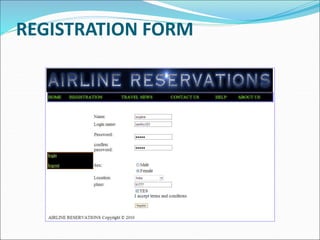
 In registration module first we ask passenger to give
his details.After registering with us the passenger can
logon to his/her own account and can view all flight
details such as Timings, Prices,Availability of seats and
can book the ticket with unique ticket id.Once
Passenger registered with us can book any number of
tickets.
2. Administrative module
 Administrative module is provided for the sake of administrators
to manage the site and update the content at regular intervals,
The major operations included in this module are:

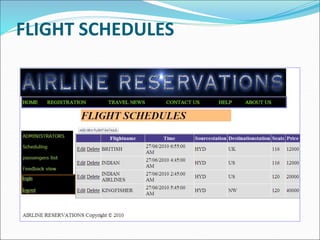
 Create and maintain airline schedule, fare and timings of the
Flight.
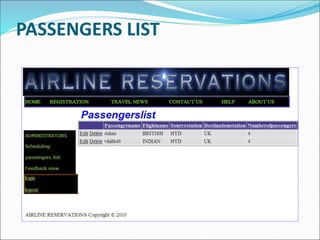
 View the passenger list.
 View the available seats in the flights.
 Cancel the tickets.
 Updating the flight schedule and timings and fare.
3. Passenger module
 This module is meant for passengers, where a user logging
into his/her owns account will view this panel. The major
operations included in this module were
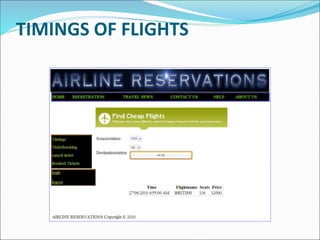
 View all airline schedules, timings, fare details and seats
availability.
 Book for the tickets.
 View and cancelling of the ticket.
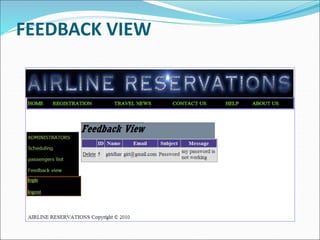
 Send feedback
3. SCOPE & PURPOSE
 3.1 PURPOSE:
 Airline Reservation System contains the details about
flight schedules and its fare tariffs, passenger
reservations and ticket records.
 The inventory of an airline service is generally divided
into three category of classes (e.g. First, Business or
Economy class) and each category is having seats up to
26 bookings, along with prices and booking
conditions.
SCOPE:
 Inventory control steers how many seats are available
for the different booking classes, by opening and
closing individual booking classes for sale. In
combination with the fares and booking conditions
stored in the Fare Quote System the price for each sold
seat is determined.
EXISTING SYSTEM
 In few countries if a person wants to book a flight ticket, he use to
follow one of these things:
 Manually goes to the Airport and book his ticket.
 Downloading the ticket form as paper document, filling it manually
and submitting it at Airport.
 Fill the Ticket form on system and get the print out as paper documents
to submit it at Airport.
 Booking the Ticket at some particular registered ticket counters in
online.
 Even above approaches make a ticket booking online, it was not
completely done on online. Passenger may not have much freedom
over this approach.
 Hence the Passenger may or may not be satisfied with this approach as
it includes manual intervention like travelling to Airport for booking
his ticket.
PROPOSED SYSTEM:
 The Proposed system ensures the complete freedom
for users, where user at his own system can logon to
this website and can book his ticket. Our proposed
system allows only registered users to book the tickets,
view timings and cancel their tickets.
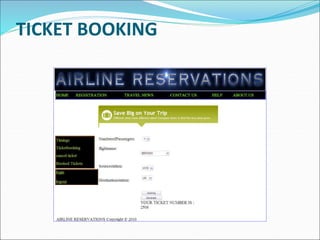
 In this Proposal the entire work is done on online and
ticket with id is also provided for passengers as a print
document. Here passengers can send their queries and
suggestions through a feedback form.
SYSTEM ARCHITECTURE
The application will follow three-tier architecture. In
three-tier architecture application will run the
traditional client/server model but from the web
server. The client only displays the GUI and data but
has no part in producing results.
 Three-tier architecture will contain the following tiers
 Client/Presentation Tier:
 This tier includes all the HTML content or forms to
be displayed on the client browser. It is the form which
provides the user interface to end user. Programmer uses
this tier to get or set the data back and forth.
 Business Logic Layer
 In the Business logic tier, the actual processing of the data
and the logic behind the implementation of the
application will be present. This tier can contain a class,
which can be used to write the functions, and also works as
a mediator between the presentation tier and data tiers.
Data Tier:
 Data Tier contains methods and classes that deal with
passing and storing data to the data Storage Layer.
Queries or stored procedures are used to access the
data from the database or to perform any operation to
the database. It stores the data passed by the
presentation tier.
SYSTEM DESIGN
Unified Modeling Language:
 UML stands for Unified Modeling Language. It is a third
generation method for specifying, visualizing and
documenting the artifacts of an object oriented system
under development. Object modeling is the process by
which the logical objects in the real world (problem space)
are represented (mapped) by the actual objects in the
program (logical or a mini world). This visual
representation of the objects, their relationships and their
structures is for the ease of understanding. This is a step
while developing any product after analysis.
 The Unified Modeling Language encompasses a
number of models.
 Use case diagrams
 Class diagrams
 Sequence diagrams
Use Case Diagram:
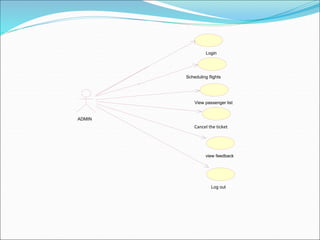
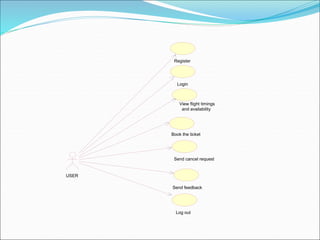
 Use case diagram consists of use cases and actors and
shows the interaction between them. The key points
are:
 The main purpose is to show the interaction between
the use cases and the actor.
 To represent the system requirement from user’s
perspective.
 The use cases are the functions that are to be
performed in the module.
 An actor could be the end-user of the system or an
external system.
Login
Scheduling flights
View passenger list
Cancel the ticket
view feedback
Log out
ADMIN
View flight timings
and availability
Book the ticket
Send feedback
Send cancel request
Log out
Register
Login
USER
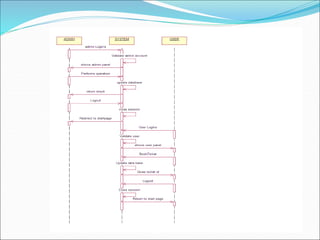
Sequence Diagram:
The purpose of sequence diagram is to show the flow of
functionality through a use case. In other words, we
call it a mapping process in terms of data transfers
from the actor through the corresponding objects.
SEQUENCE DIAGRAM
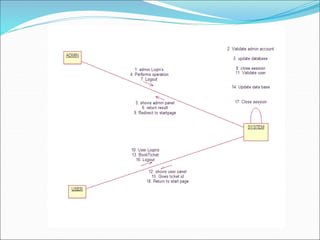
COLLABORATION DIAGRAM
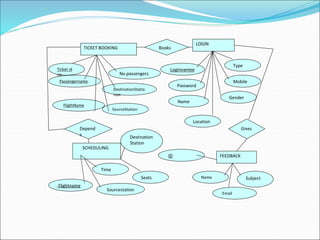
ER DIAGRAM
TICKET BOOKING
Ticket id
no
Passengername
DestinationStatio
non
No.passengers
SourceStation
FligthName
LOGIN
Loginnamee
Password
Name
Gender
Mobile
Location
Type
SCHEDULING
Flightname
Time
Sourcestation
ID
Destination
Station
FEEDBACK
Name
Email
Subject
Seats
Books
Depend
s
Gives
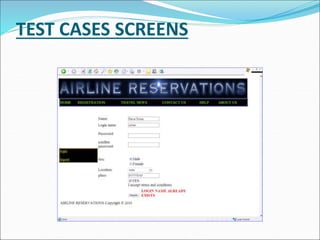
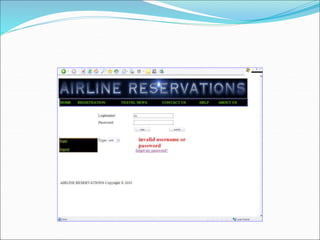
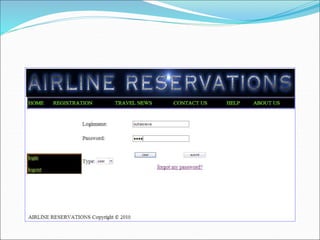
TEST CASES SCREENS
REGISTRATION FORM
FLIGHT SCHEDULES
PASSENGERS LIST
FEEDBACK VIEW
TIMINGS OF FLIGHTS
TICKET BOOKING
CONCLUSION & FUTURE SCOPE
 Getting accurate information about what visas or permits
you need is an important part of preparing for a trip or stay
abroad. To help you with this task we have provided
information about embassies and consulates abroad, and
we have also included companies that provide visa and
passport services.
 We offer documentation processing, application & filing
services for those interested in applying for a visa.A strong
research team ensures that cases are evaluated and
processed as per the latest updated rules and regulations.
BIBLIOGRAPHY
 FOR .NET INSTALLATION
 www.support.mircosoft.com
 FOR DEPLOYMENT AND PACKING ON SERVER
 www.developer.com
 www.15seconds.com

 FOR SQL
 www.msdn.microsoft.com

 FOR ASP.NET
 www.asp.net
 www.asptoday.com
 www.aspfree.com

327923326-Ppt-of-Airline-Reservation-System-Project-Report.ppt

  • 2.
    ABSTRACT OBJECTIVE:  Airline ReservationSystem contains the details about flight schedules and its fare tariffs, passenger reservations and ticket records. An airline’s inventory contains all flights with their available seats. The inventory of an airline service is generally divided into three category of classes (e.g. First, Business or Economy class) and each category is having seats up to 26 bookings, along with prices and booking conditions. Inventory data is imported and maintained through a Schedule Distribution System over standardized interfaces. One of the core functions of the inventory management of airline reservations is the inventory control. Inventory control steers how many seats are available for the different booking classes, by opening and closing individual booking classes for sale. In combination with the fares and booking conditions stored in the Fare Quote System the price for each sold seat is determined.
  • 3.
    MODULES  Registration module Administrative module  Passenger module
  • 4.
    1. Registration module In registration module first we ask passenger to give his details.After registering with us the passenger can logon to his/her own account and can view all flight details such as Timings, Prices,Availability of seats and can book the ticket with unique ticket id.Once Passenger registered with us can book any number of tickets.
  • 5.
    2. Administrative module Administrative module is provided for the sake of administrators to manage the site and update the content at regular intervals, The major operations included in this module are:   Create and maintain airline schedule, fare and timings of the Flight.  View the passenger list.  View the available seats in the flights.  Cancel the tickets.  Updating the flight schedule and timings and fare.
  • 6.
    3. Passenger module This module is meant for passengers, where a user logging into his/her owns account will view this panel. The major operations included in this module were  View all airline schedules, timings, fare details and seats availability.  Book for the tickets.  View and cancelling of the ticket.  Send feedback
  • 7.
    3. SCOPE &PURPOSE  3.1 PURPOSE:  Airline Reservation System contains the details about flight schedules and its fare tariffs, passenger reservations and ticket records.  The inventory of an airline service is generally divided into three category of classes (e.g. First, Business or Economy class) and each category is having seats up to 26 bookings, along with prices and booking conditions.
  • 8.
    SCOPE:  Inventory controlsteers how many seats are available for the different booking classes, by opening and closing individual booking classes for sale. In combination with the fares and booking conditions stored in the Fare Quote System the price for each sold seat is determined.
  • 9.
    EXISTING SYSTEM  Infew countries if a person wants to book a flight ticket, he use to follow one of these things:  Manually goes to the Airport and book his ticket.  Downloading the ticket form as paper document, filling it manually and submitting it at Airport.  Fill the Ticket form on system and get the print out as paper documents to submit it at Airport.  Booking the Ticket at some particular registered ticket counters in online.  Even above approaches make a ticket booking online, it was not completely done on online. Passenger may not have much freedom over this approach.  Hence the Passenger may or may not be satisfied with this approach as it includes manual intervention like travelling to Airport for booking his ticket.
  • 10.
    PROPOSED SYSTEM:  TheProposed system ensures the complete freedom for users, where user at his own system can logon to this website and can book his ticket. Our proposed system allows only registered users to book the tickets, view timings and cancel their tickets.  In this Proposal the entire work is done on online and ticket with id is also provided for passengers as a print document. Here passengers can send their queries and suggestions through a feedback form.
  • 11.
    SYSTEM ARCHITECTURE The applicationwill follow three-tier architecture. In three-tier architecture application will run the traditional client/server model but from the web server. The client only displays the GUI and data but has no part in producing results.
  • 12.
     Three-tier architecturewill contain the following tiers  Client/Presentation Tier:  This tier includes all the HTML content or forms to be displayed on the client browser. It is the form which provides the user interface to end user. Programmer uses this tier to get or set the data back and forth.  Business Logic Layer  In the Business logic tier, the actual processing of the data and the logic behind the implementation of the application will be present. This tier can contain a class, which can be used to write the functions, and also works as a mediator between the presentation tier and data tiers.
  • 13.
    Data Tier:  DataTier contains methods and classes that deal with passing and storing data to the data Storage Layer. Queries or stored procedures are used to access the data from the database or to perform any operation to the database. It stores the data passed by the presentation tier.
  • 14.
    SYSTEM DESIGN Unified ModelingLanguage:  UML stands for Unified Modeling Language. It is a third generation method for specifying, visualizing and documenting the artifacts of an object oriented system under development. Object modeling is the process by which the logical objects in the real world (problem space) are represented (mapped) by the actual objects in the program (logical or a mini world). This visual representation of the objects, their relationships and their structures is for the ease of understanding. This is a step while developing any product after analysis.
  • 15.
     The UnifiedModeling Language encompasses a number of models.  Use case diagrams  Class diagrams  Sequence diagrams
  • 16.
    Use Case Diagram: Use case diagram consists of use cases and actors and shows the interaction between them. The key points are:  The main purpose is to show the interaction between the use cases and the actor.  To represent the system requirement from user’s perspective.  The use cases are the functions that are to be performed in the module.  An actor could be the end-user of the system or an external system.
  • 17.
    Login Scheduling flights View passengerlist Cancel the ticket view feedback Log out ADMIN
  • 18.
    View flight timings andavailability Book the ticket Send feedback Send cancel request Log out Register Login USER
  • 19.
    Sequence Diagram: The purposeof sequence diagram is to show the flow of functionality through a use case. In other words, we call it a mapping process in terms of data transfers from the actor through the corresponding objects.
  • 20.
  • 22.
  • 24.
  • 25.
  • 26.
  • 29.
  • 30.
  • 31.
  • 32.
  • 33.
  • 34.
  • 35.
    CONCLUSION & FUTURESCOPE  Getting accurate information about what visas or permits you need is an important part of preparing for a trip or stay abroad. To help you with this task we have provided information about embassies and consulates abroad, and we have also included companies that provide visa and passport services.  We offer documentation processing, application & filing services for those interested in applying for a visa.A strong research team ensures that cases are evaluated and processed as per the latest updated rules and regulations.
  • 36.
    BIBLIOGRAPHY  FOR .NETINSTALLATION  www.support.mircosoft.com  FOR DEPLOYMENT AND PACKING ON SERVER  www.developer.com  www.15seconds.com   FOR SQL  www.msdn.microsoft.com   FOR ASP.NET  www.asp.net  www.asptoday.com  www.aspfree.com