RAID & It’s
Levels
SYSTEM AND NETWORK ADMINISTRATION
“The unsung heroes weaving the web of
connectivity, where every click, every
connection, is their masterpiece”
- SHERRY
RAID
TECHNOLOGY
REDUNDANT ARRAY OF INDEPENDENT DISKS
Introduction to RAID
 RAID is a technology that
significantly enhances data storage
and reliability. Let's explore its
various aspects.
 Redundant Array of Independent Disks is
a storage technology that combines
multiple disk drives into a single logical
unit. The main goals of RAID are to
improve data reliability, increase
input/output performance, or achieve
both simultaneously.
RAID Levels
 There are several RAID levels, each
serving different purposes.
RAID 0 (Striping for Performance)
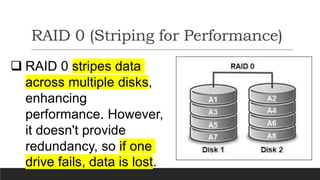
 RAID 0 stripes data
across multiple disks,
enhancing
performance. However,
it doesn't provide
redundancy, so if one
drive fails, data is lost.
RAID1 (Mirroring for Redundancy)
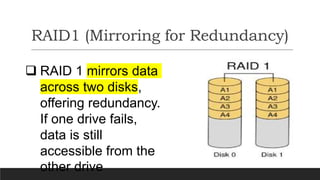
 RAID 1 mirrors data
across two disks,
offering redundancy.
If one drive fails,
data is still
accessible from the
other drive
RAID 1 0 (Mirroring & Stripping)
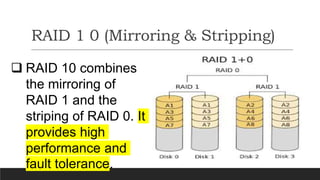
 RAID 10 combines
the mirroring of
RAID 1 and the
striping of RAID 0. It
provides high
performance and
fault tolerance.
RAID 5 (Striping with Parity)
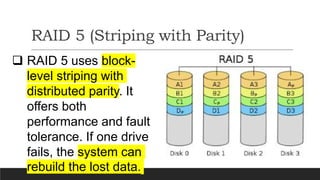
 RAID 5 uses block-
level striping with
distributed parity. It
offers both
performance and fault
tolerance. If one drive
fails, the system can
rebuild the lost data.
RAID 6 (Dual Parity)
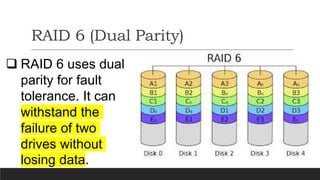
 RAID 6 uses dual
parity for fault
tolerance. It can
withstand the
failure of two
drives without
losing data.
LET’S GO FOR
IMPLEMENTATION
OPEN THE TERMINAL IN YOUR RHEL.
COMMANDS:
Implementation
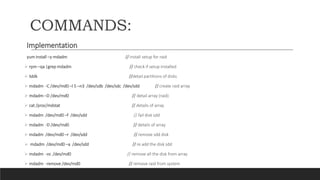
yum install –y mdadm // install setup for raid
 rpm –qa |grep mdadm // check if setup installed
 lsblk //detail partitions of disks
 mdadm -C /dev/md0 –l 5 –n3 /dev/sdb /dev/sdc /dev/sdd // create raid array
 mdadm –D /dev/md0 // detail array (raid)
 cat /proc/mdstat // details of array
 mdadm /dev/md0 –f /dev/sdd // fail disk sdd
 mdadm -D /dev/md0 // details of array
 mdadm /dev/md0 –r /dev/sdd // remove sdd disk
 mdadm /dev/md0 –a /dev/sdd // re add the disk sdd
 mdadm -vs /dev/md0 // remove all the disk from array
 mdadm -remove /dev/md0 // remove raid from system

RAID & It’s Levels.pptx

  • 1.
    RAID & It’s Levels SYSTEMAND NETWORK ADMINISTRATION
  • 2.
    “The unsung heroesweaving the web of connectivity, where every click, every connection, is their masterpiece” - SHERRY
  • 3.
  • 4.
    Introduction to RAID RAID is a technology that significantly enhances data storage and reliability. Let's explore its various aspects.
  • 5.
     Redundant Arrayof Independent Disks is a storage technology that combines multiple disk drives into a single logical unit. The main goals of RAID are to improve data reliability, increase input/output performance, or achieve both simultaneously.
  • 6.
    RAID Levels  Thereare several RAID levels, each serving different purposes.
  • 7.
    RAID 0 (Stripingfor Performance)  RAID 0 stripes data across multiple disks, enhancing performance. However, it doesn't provide redundancy, so if one drive fails, data is lost.
  • 8.
    RAID1 (Mirroring forRedundancy)  RAID 1 mirrors data across two disks, offering redundancy. If one drive fails, data is still accessible from the other drive
  • 9.
    RAID 1 0(Mirroring & Stripping)  RAID 10 combines the mirroring of RAID 1 and the striping of RAID 0. It provides high performance and fault tolerance.
  • 10.
    RAID 5 (Stripingwith Parity)  RAID 5 uses block- level striping with distributed parity. It offers both performance and fault tolerance. If one drive fails, the system can rebuild the lost data.
  • 11.
    RAID 6 (DualParity)  RAID 6 uses dual parity for fault tolerance. It can withstand the failure of two drives without losing data.
  • 12.
    LET’S GO FOR IMPLEMENTATION OPENTHE TERMINAL IN YOUR RHEL.
  • 13.
    COMMANDS: Implementation yum install –ymdadm // install setup for raid  rpm –qa |grep mdadm // check if setup installed  lsblk //detail partitions of disks  mdadm -C /dev/md0 –l 5 –n3 /dev/sdb /dev/sdc /dev/sdd // create raid array  mdadm –D /dev/md0 // detail array (raid)  cat /proc/mdstat // details of array  mdadm /dev/md0 –f /dev/sdd // fail disk sdd  mdadm -D /dev/md0 // details of array  mdadm /dev/md0 –r /dev/sdd // remove sdd disk  mdadm /dev/md0 –a /dev/sdd // re add the disk sdd  mdadm -vs /dev/md0 // remove all the disk from array  mdadm -remove /dev/md0 // remove raid from system