Q4.
   How did the use of media
   technologies in the construction,
   research, planning and evaluation
   stages?
Research
Preliminary tasks


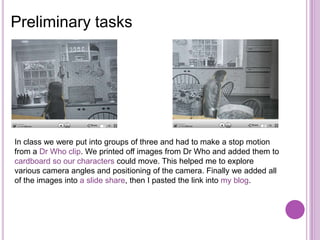
In class we were put into groups of three and had to make a stop motion
from a Dr Who clip. We printed off images from Dr Who and added them to
cardboard so our characters could move. This helped me to explore
various camera angles and positioning of the camera. Finally we added all
of the images into a slide share, then I pasted the link into my blog.
Preliminary tasks


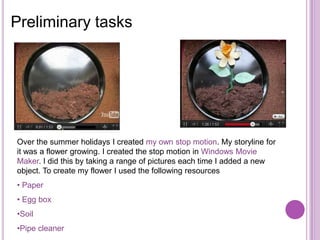
Over the summer holidays I created my own stop motion. My storyline for
it was a flower growing. I created the stop motion in Windows Movie
Maker. I did this by taking a range of pictures each time I added a new
object. To create my flower I used the following resources
• Paper
• Egg box
•Soil
•Pipe cleaner
Choosing A Soundtrack                                                       Q4.
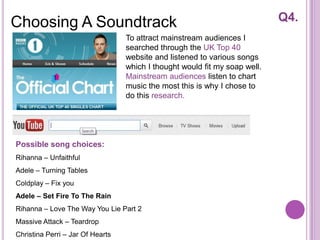
                                  To attract mainstream audiences I
                                  searched through the UK Top 40
                                  website and listened to various songs
                                  which I thought would fit my soap well.
                                  Mainstream audiences listen to chart
                                  music the most this is why I chose to
                                  do this research.


Possible song choices:
Rihanna – Unfaithful
Adele – Turning Tables
Coldplay – Fix you
Adele – Set Fire To The Rain
Rihanna – Love The Way You Lie Part 2
Massive Attack – Teardrop
Christina Perri – Jar Of Hearts
Researching existing products                                             Q4.


To get a better understanding of what I had my products to look like to fit
conventions I used Google the search engine to research existing posters,
magazines and outfits for characters on existing soaps.


I spent a lot of time watching existing soap’s on BBC IPlayer and Channel 4 On
Demand, this helped me with finding similar storylines that could be possible
for Hill Top farm.
Construction
Taking images for the billboard and                      Q4.

magazine


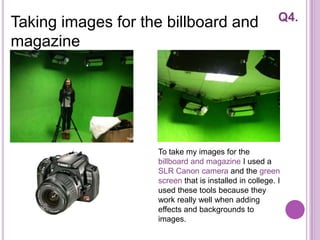
                    To take my images for the
                    billboard and magazine I used a
                    SLR Canon camera and the green
                    screen that is installed in college. I
                    used these tools because they
                    work really well when adding
                    effects and backgrounds to
                    images.
Creating the Billboard                                                     Q4.
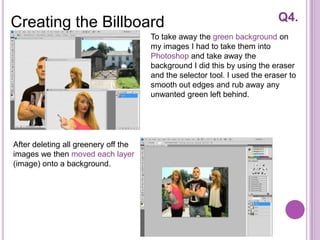
                                      To take away the green background on
                                      my images I had to take them into
                                      Photoshop and take away the
                                      background I did this by using the eraser
                                      and the selector tool. I used the eraser to
                                      smooth out edges and rub away any
                                      unwanted green left behind.


After deleting all greenery off the
images we then moved each layer
(image) onto a background.
Creating the Logo                                                            Q4.


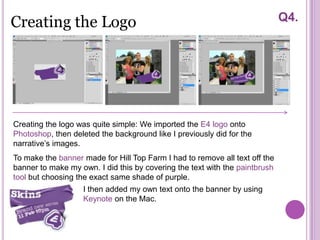
Creating the logo was quite simple: We imported the E4 logo onto
Photoshop, then deleted the background like I previously did for the
narrative’s images.
To make the banner made for Hill Top Farm I had to remove all text off the
banner to make my own. I did this by covering the text with the paintbrush
tool but choosing the exact same shade of purple.
                   I then added my own text onto the banner by using
                   Keynote on the Mac.
Planning & Evaluation
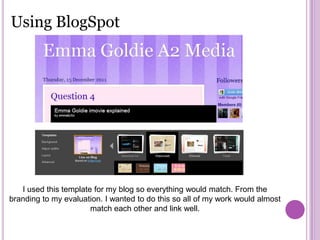
Using BlogSpot


   I used this template for my blog so everything would match. From the
branding to my evaluation. I wanted to do this so all of my work would almost
                       match each other and link well.
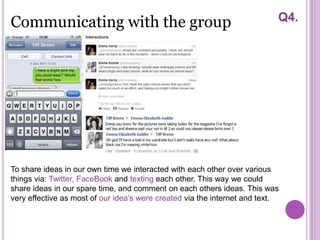
Communicating with the group                                               Q4.


To share ideas in our own time we interacted with each other over various
things via: Twitter, FaceBook and texting each other. This way we could
share ideas in our spare time, and comment on each others ideas. This was
very effective as most of our idea’s were created via the internet and text.
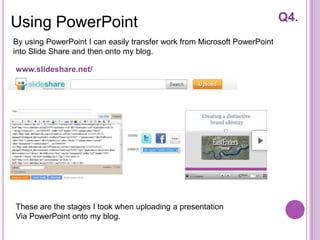
Using PowerPoint                                                           Q4.
By using PowerPoint I can easily transfer work from Microsoft PowerPoint
into Slide Share and then onto my blog.

www.slideshare.net/


These are the stages I took when uploading a presentation
Via PowerPoint onto my blog.
iMac uses                                                                       Q4.
I created a short video clip on the Mac computer to show how I used and
created all of my products. I recorded myself doing various things that I did
on my trailer these include:


• Showing how to import raw footage onto iMovie
• Showing how to split a clip, cut a clip and change the speed on iMovie
• Showing how to add transitions onto the end of clips
• Showing how to upload a song from YouTube onto iMovie
• Showing how to add title cards to the trailer
• Showing how to use KeyNote for the final title card and adding it to the
trailer
• Showing how I Add my final trailer onto my blog


This is presented in my blog listed under question 4
              egoldie.blogspot.com
Using PowerPoint
I decided to present my evaluation by using Microsoft PowerPoint as I am
very familiar with its uses and I knew I could present screen shots with
annotations easily but professionally.


PowerPoint has allowed me to have a set design on each slide so my work
looks neat and in order. I have used a set colour scheme to match my blog,
trailer and my evaluation all into one. PowerPoint has worked well for me as
work has saved every time I have added work onto it, This was supported by
my 4Gb memory stick. Work may have been produced quicker if the
computer system didn’t freeze as often as it has, this is the only draw back
that has occurred when producing my products and evaluation.

Question 4 Of My Evaluation

  • 1.
    Q4. How did the use of media technologies in the construction, research, planning and evaluation stages?
  • 2.
  • 3.
    Preliminary tasks In classwe were put into groups of three and had to make a stop motion from a Dr Who clip. We printed off images from Dr Who and added them to cardboard so our characters could move. This helped me to explore various camera angles and positioning of the camera. Finally we added all of the images into a slide share, then I pasted the link into my blog.
  • 4.
    Preliminary tasks Over thesummer holidays I created my own stop motion. My storyline for it was a flower growing. I created the stop motion in Windows Movie Maker. I did this by taking a range of pictures each time I added a new object. To create my flower I used the following resources • Paper • Egg box •Soil •Pipe cleaner
  • 5.
    Choosing A Soundtrack Q4. To attract mainstream audiences I searched through the UK Top 40 website and listened to various songs which I thought would fit my soap well. Mainstream audiences listen to chart music the most this is why I chose to do this research. Possible song choices: Rihanna – Unfaithful Adele – Turning Tables Coldplay – Fix you Adele – Set Fire To The Rain Rihanna – Love The Way You Lie Part 2 Massive Attack – Teardrop Christina Perri – Jar Of Hearts
  • 6.
    Researching existing products Q4. To get a better understanding of what I had my products to look like to fit conventions I used Google the search engine to research existing posters, magazines and outfits for characters on existing soaps. I spent a lot of time watching existing soap’s on BBC IPlayer and Channel 4 On Demand, this helped me with finding similar storylines that could be possible for Hill Top farm.
  • 7.
  • 8.
    Taking images forthe billboard and Q4. magazine To take my images for the billboard and magazine I used a SLR Canon camera and the green screen that is installed in college. I used these tools because they work really well when adding effects and backgrounds to images.
  • 9.
    Creating the Billboard Q4. To take away the green background on my images I had to take them into Photoshop and take away the background I did this by using the eraser and the selector tool. I used the eraser to smooth out edges and rub away any unwanted green left behind. After deleting all greenery off the images we then moved each layer (image) onto a background.
  • 10.
    Creating the Logo Q4. Creating the logo was quite simple: We imported the E4 logo onto Photoshop, then deleted the background like I previously did for the narrative’s images. To make the banner made for Hill Top Farm I had to remove all text off the banner to make my own. I did this by covering the text with the paintbrush tool but choosing the exact same shade of purple. I then added my own text onto the banner by using Keynote on the Mac.
  • 11.
  • 12.
    Using BlogSpot I used this template for my blog so everything would match. From the branding to my evaluation. I wanted to do this so all of my work would almost match each other and link well.
  • 13.
    Communicating with thegroup Q4. To share ideas in our own time we interacted with each other over various things via: Twitter, FaceBook and texting each other. This way we could share ideas in our spare time, and comment on each others ideas. This was very effective as most of our idea’s were created via the internet and text.
  • 14.
    Using PowerPoint Q4. By using PowerPoint I can easily transfer work from Microsoft PowerPoint into Slide Share and then onto my blog. www.slideshare.net/ These are the stages I took when uploading a presentation Via PowerPoint onto my blog.
  • 15.
    iMac uses Q4. I created a short video clip on the Mac computer to show how I used and created all of my products. I recorded myself doing various things that I did on my trailer these include: • Showing how to import raw footage onto iMovie • Showing how to split a clip, cut a clip and change the speed on iMovie • Showing how to add transitions onto the end of clips • Showing how to upload a song from YouTube onto iMovie • Showing how to add title cards to the trailer • Showing how to use KeyNote for the final title card and adding it to the trailer • Showing how I Add my final trailer onto my blog This is presented in my blog listed under question 4 egoldie.blogspot.com
  • 16.
    Using PowerPoint I decidedto present my evaluation by using Microsoft PowerPoint as I am very familiar with its uses and I knew I could present screen shots with annotations easily but professionally. PowerPoint has allowed me to have a set design on each slide so my work looks neat and in order. I have used a set colour scheme to match my blog, trailer and my evaluation all into one. PowerPoint has worked well for me as work has saved every time I have added work onto it, This was supported by my 4Gb memory stick. Work may have been produced quicker if the computer system didn’t freeze as often as it has, this is the only draw back that has occurred when producing my products and evaluation.