4. HOW DID YOU USE NEW MEDIA
TECHNOLOGIES IN THE
CONSTRUCTION AND RESEARCH,
PLANNING AND EVALUATION
STAGES?
FORMATS
BLOGGER
I have been using Blogger through AS and A2 media
studies to post all of my pre-production, production
and post-production in an easy to use and clear
way. I have found the ‘flipcard’ template to be the
clearest and easiest for me to use and the best way
for a viewer of my blog to use. It needs to be easy to
navigate for me, the teacher and the examiner.
YOUTUBE
I have used YouTube as a format for uploading my
final music video to enable my peers to watch the
video and give me feedback for evaluation, as well as
it being a useful tool for my research into EDM
videos for pre-production.
I also used YouTube for tutorials for Premier and
cinematography techniques.
PREZI & POWERPOINT
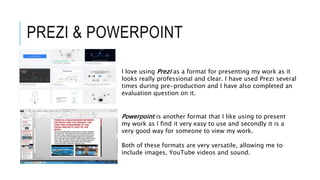
I love using Prezi as a format for presenting my work as it
looks really professional and clear. I have used Prezi several
times during pre-production and I have also completed an
evaluation question on it.
Powerpoint is another format that I like using to present
my work as I find it very easy to use and secondly it is a
very good way for someone to view my work.
Both of these formats are very versatile, allowing me to
include images, YouTube videos and sound.
MICROSOFT WORD & SLIDE SHARE
I used Microsoft Word to type up my shot list and
production schedule. This is a very simplistic way of
presenting information and therefore I tried to use it as
little as possible.
Slideshare is a site that allows for users to upload a
PowerPoint or a word document and present it in a way that
looks good on blogger once you embed and upload it. I
have used this across the past two years to enable me to
upload my work to Blogger.
This too is professional and relatively easy to use.
STORYBOARD THAT
Storyboard That is a website that
allows you to create your own
storyboards with the templates and
images that they offer as shown
above. I used this to draft my ideas
at the very beginning of the pre-
production process which was the
start of me being able to visualise
what my music video would look
like.
MEGA ANIME AVATAR CREATOR
I found Mega Anime Avatar Creator during my AS
studies, and I have used it again this year as it’s a
really good way of demonstrating my target
audience. There are so many different features and
styles which makes it really easy to make an avatar
very specific to what you wish to achieve.
SOCIAL MEDIA
FACEBOOK
I used the social networking site
‘Facebook’s’ Messenger to gain the rights
to my song that I chose for my music video.
The social network allowed me to gain the
first stage of permission quickly and
efficiently.
EDITING
ADOBE PREMIER PRO
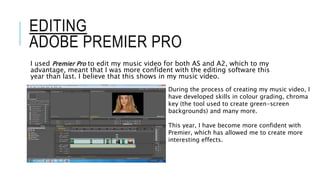
I used Premier Pro to edit my music video for both AS and A2, which to my
advantage, meant that I was more confident with the editing software this
year than last. I believe that this shows in my music video.
During the process of creating my music video, I
have developed skills in colour grading, chroma
key (the tool used to create green-screen
backgrounds) and many more.
This year, I have become more confident with
Premier, which has allowed me to create more
interesting effects.
PHOTOSHOP
As an AS photography student, I am mostly familiar
and confident using Photoshop which has benefitted
me greatly in the process of post – production,
exemplified in my poster advert for my video (right).
Photoshop was also vital to the editing of my
digipack.
In both images, I have used the horizontal type tool,
the quick selection tool, the move tool and colour
correction tools.
I also used Photoshop
while practising album
covers during our
preliminary tasks.
MY IPHONE
My iPhone has been essential to this process for a number of reasons. It is
always on me for jotting down ideas, finding a sound that I like through
Shizam, and for the following reasons:
1. I have used my iPhone to take photographs (such as the photography
studio for my locations post) which I then go on to edit with VSCO Cam
and upload to blogger.
2. I used my phone to upload posts to blogger when I have not been able to
use a computer.
3. I used my phone to Facebook message the remixer of my chosen song
4. Lastly, I used my favourite music app ‘Sound Cloud’ to research music of
similar genre to EDM and read comments that people have made. This
gave me an idea of my target audience and what their other music tastes
are as Sound cloud allows you to look at what other people have ‘liked’.

Question 4

  • 1.
    4. HOW DIDYOU USE NEW MEDIA TECHNOLOGIES IN THE CONSTRUCTION AND RESEARCH, PLANNING AND EVALUATION STAGES?
  • 2.
    FORMATS BLOGGER I have beenusing Blogger through AS and A2 media studies to post all of my pre-production, production and post-production in an easy to use and clear way. I have found the ‘flipcard’ template to be the clearest and easiest for me to use and the best way for a viewer of my blog to use. It needs to be easy to navigate for me, the teacher and the examiner. YOUTUBE I have used YouTube as a format for uploading my final music video to enable my peers to watch the video and give me feedback for evaluation, as well as it being a useful tool for my research into EDM videos for pre-production. I also used YouTube for tutorials for Premier and cinematography techniques.
  • 3.
    PREZI & POWERPOINT Ilove using Prezi as a format for presenting my work as it looks really professional and clear. I have used Prezi several times during pre-production and I have also completed an evaluation question on it. Powerpoint is another format that I like using to present my work as I find it very easy to use and secondly it is a very good way for someone to view my work. Both of these formats are very versatile, allowing me to include images, YouTube videos and sound.
  • 4.
    MICROSOFT WORD &SLIDE SHARE I used Microsoft Word to type up my shot list and production schedule. This is a very simplistic way of presenting information and therefore I tried to use it as little as possible. Slideshare is a site that allows for users to upload a PowerPoint or a word document and present it in a way that looks good on blogger once you embed and upload it. I have used this across the past two years to enable me to upload my work to Blogger. This too is professional and relatively easy to use.
  • 5.
    STORYBOARD THAT Storyboard Thatis a website that allows you to create your own storyboards with the templates and images that they offer as shown above. I used this to draft my ideas at the very beginning of the pre- production process which was the start of me being able to visualise what my music video would look like. MEGA ANIME AVATAR CREATOR I found Mega Anime Avatar Creator during my AS studies, and I have used it again this year as it’s a really good way of demonstrating my target audience. There are so many different features and styles which makes it really easy to make an avatar very specific to what you wish to achieve.
  • 6.
    SOCIAL MEDIA FACEBOOK I usedthe social networking site ‘Facebook’s’ Messenger to gain the rights to my song that I chose for my music video. The social network allowed me to gain the first stage of permission quickly and efficiently.
  • 7.
    EDITING ADOBE PREMIER PRO Iused Premier Pro to edit my music video for both AS and A2, which to my advantage, meant that I was more confident with the editing software this year than last. I believe that this shows in my music video. During the process of creating my music video, I have developed skills in colour grading, chroma key (the tool used to create green-screen backgrounds) and many more. This year, I have become more confident with Premier, which has allowed me to create more interesting effects.
  • 8.
    PHOTOSHOP As an ASphotography student, I am mostly familiar and confident using Photoshop which has benefitted me greatly in the process of post – production, exemplified in my poster advert for my video (right). Photoshop was also vital to the editing of my digipack. In both images, I have used the horizontal type tool, the quick selection tool, the move tool and colour correction tools. I also used Photoshop while practising album covers during our preliminary tasks.
  • 9.
    MY IPHONE My iPhonehas been essential to this process for a number of reasons. It is always on me for jotting down ideas, finding a sound that I like through Shizam, and for the following reasons: 1. I have used my iPhone to take photographs (such as the photography studio for my locations post) which I then go on to edit with VSCO Cam and upload to blogger. 2. I used my phone to upload posts to blogger when I have not been able to use a computer. 3. I used my phone to Facebook message the remixer of my chosen song 4. Lastly, I used my favourite music app ‘Sound Cloud’ to research music of similar genre to EDM and read comments that people have made. This gave me an idea of my target audience and what their other music tastes are as Sound cloud allows you to look at what other people have ‘liked’.