Number SystemsNumber Systems
and Binary Arithmeticand Binary Arithmetic
Quantitative Analysis II
Professor Bob Orr
© Copyright 2000 Indiana University Board of Trustees
Introduction to NumberingIntroduction to Numbering
SystemsSystems
 We are all familiar with the decimal
number system (Base 10). Some other
number systems that we will work with are:
– Binary → Base 2
– Octal → Base 8
– Hexadecimal → Base 16
© Copyright 2000 Indiana University Board of Trustees
Characteristics of NumberingCharacteristics of Numbering
SystemsSystems
1) The digits are consecutive.
2) The number of digits is equal to the size of
the base.
3) Zero is always the first digit.
4) The base number is never a digit.
5) When 1 is added to the largest digit, a sum
of zero and a carry of one results.
6) Numeric values determined by the have
implicit positional values of the digits.
© Copyright 2000 Indiana University Board of Trustees
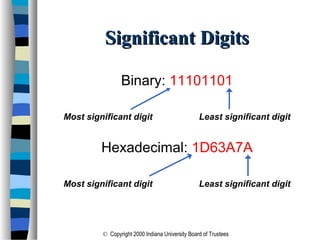
Significant DigitsSignificant Digits
Binary: 11101101
Most significant digit Least significant digit
Hexadecimal: 1D63A7A
Most significant digit Least significant digit
© Copyright 2000 Indiana University Board of Trustees
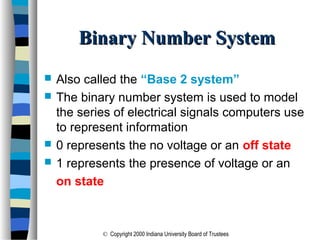
Binary Number SystemBinary Number System
 Also called the “Base 2 system”
 The binary number system is used to model
the series of electrical signals computers use
to represent information
 0 represents the no voltage or an off state
 1 represents the presence of voltage or an
on state
© Copyright 2000 Indiana University Board of Trustees
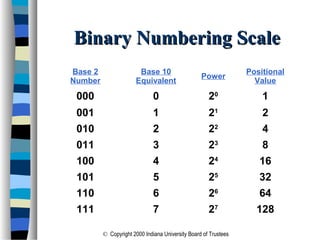
Binary Numbering ScaleBinary Numbering Scale
Base 2
Number
Base 10
Equivalent
Power
Positional
Value
000 0 20
1
001 1 21
2
010 2 22
4
011 3 23
8
100 4 24
16
101 5 25
32
110 6 26
64
111 7 27
128
© Copyright 2000 Indiana University Board of Trustees
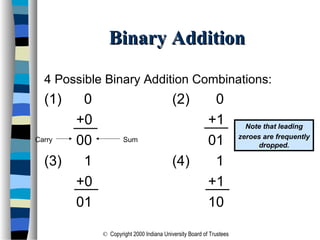
Binary AdditionBinary Addition
4 Possible Binary Addition Combinations:
(1) 0 (2) 0
+0 +1
00 01
(3) 1 (4) 1
+0 +1
01 10
SumCarry
Note that leading
zeroes are frequently
dropped.
© Copyright 2000 Indiana University Board of Trustees
Decimal to Binary ConversionDecimal to Binary Conversion
 The easiest way to convert a decimal number
to its binary equivalent is to use the Division
Algorithm
 This method repeatedly divides a decimal
number by 2 and records the quotient and
remainder
– The remainder digits (a sequence of zeros and
ones) form the binary equivalent in least
significant to most significant digit sequence
© Copyright 2000 Indiana University Board of Trustees
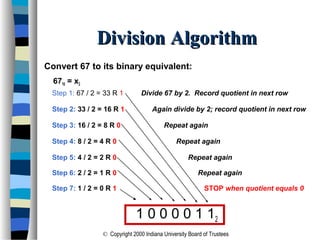
Division AlgorithmDivision Algorithm
Convert 67 to its binary equivalent:
6710 = x2
Step 1: 67 / 2 = 33 R 1 Divide 67 by 2. Record quotient in next row
Step 2: 33 / 2 = 16 R 1 Again divide by 2; record quotient in next row
Step 3: 16 / 2 = 8 R 0 Repeat again
Step 4: 8 / 2 = 4 R 0 Repeat again
Step 5: 4 / 2 = 2 R 0 Repeat again
Step 6: 2 / 2 = 1 R 0 Repeat again
Step 7: 1 / 2 = 0 R 1 STOP when quotient equals 0
1 0 0 0 0 1 12
© Copyright 2000 Indiana University Board of Trustees
Binary to Decimal ConversionBinary to Decimal Conversion
 The easiest method for converting a
binary number to its decimal equivalent
is to use the Multiplication Algorithm
 Multiply the binary digits by increasing
powers of two, starting from the right
 Then, to find the decimal number
equivalent, sum those products
© Copyright 2000 Indiana University Board of Trustees
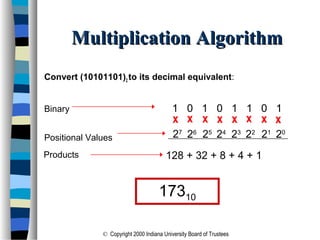
Multiplication AlgorithmMultiplication Algorithm
Convert (10101101)2 to its decimal equivalent:
Binary 1 0 1 0 1 1 0 1
Positional Values
xxxxxxxx
20
21
22
23
24
25
26
27
128 + 32 + 8 + 4 + 1Products
17310
© Copyright 2000 Indiana University Board of Trustees
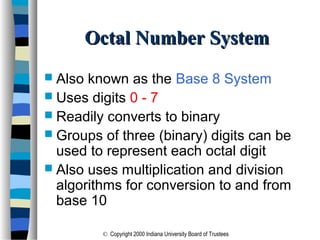
Octal Number SystemOctal Number System
 Also known as the Base 8 System
 Uses digits 0 - 7
 Readily converts to binary
 Groups of three (binary) digits can be
used to represent each octal digit
 Also uses multiplication and division
algorithms for conversion to and from
base 10
© Copyright 2000 Indiana University Board of Trustees
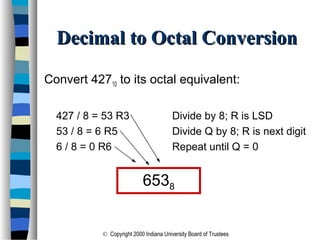
Decimal to Octal ConversionDecimal to Octal Conversion
Convert 42710 to its octal equivalent:
427 / 8 = 53 R3 Divide by 8; R is LSD
53 / 8 = 6 R5 Divide Q by 8; R is next digit
6 / 8 = 0 R6 Repeat until Q = 0
6538
© Copyright 2000 Indiana University Board of Trustees
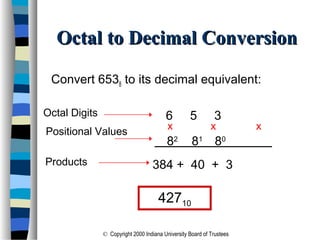
Octal to Decimal ConversionOctal to Decimal Conversion
Convert 6538 to its decimal equivalent:
6 5 3
xxx
82
81
80
384 + 40 + 3
42710
Positional Values
Products
Octal Digits
© Copyright 2000 Indiana University Board of Trustees
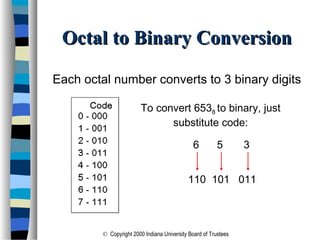
Octal to Binary ConversionOctal to Binary Conversion
Each octal number converts to 3 binary digits
To convert 6538 to binary, just
substitute code:
6 5 3
110 101 011
© Copyright 2000 Indiana University Board of Trustees
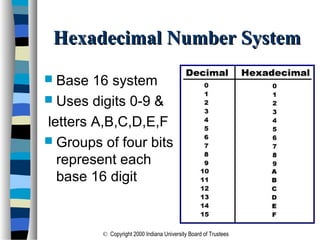
Hexadecimal Number SystemHexadecimal Number System
 Base 16 system
 Uses digits 0-9 &
letters A,B,C,D,E,F
 Groups of four bits
represent each
base 16 digit
© Copyright 2000 Indiana University Board of Trustees
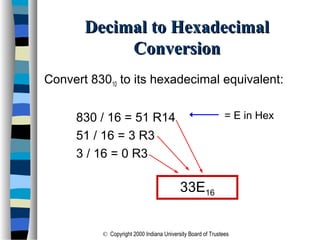
Decimal to HexadecimalDecimal to Hexadecimal
ConversionConversion
Convert 83010 to its hexadecimal equivalent:
830 / 16 = 51 R14
51 / 16 = 3 R3
3 / 16 = 0 R3
33E16
= E in Hex
© Copyright 2000 Indiana University Board of Trustees
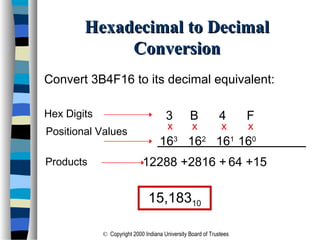
Hexadecimal to DecimalHexadecimal to Decimal
ConversionConversion
Convert 3B4F16 to its decimal equivalent:
Hex Digits 3 B 4 F
xxx
163
162
161
160
12288 +2816 + 64 +15
15,18310
Positional Values
Products
x
© Copyright 2000 Indiana University Board of Trustees
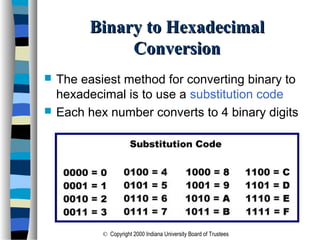
Binary to HexadecimalBinary to Hexadecimal
ConversionConversion
 The easiest method for converting binary to
hexadecimal is to use a substitution code
 Each hex number converts to 4 binary digits
© Copyright 2000 Indiana University Board of Trustees
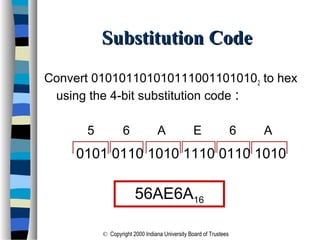
Convert 0101011010101110011010102 to hex
using the 4-bit substitution code :
0101 0110 1010 1110 0110 1010
Substitution CodeSubstitution Code
5 6 A E 6 A
56AE6A16
© Copyright 2000 Indiana University Board of Trustees
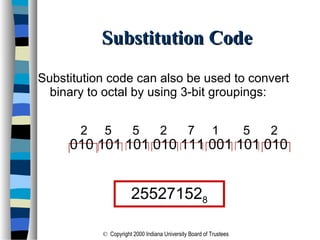
Substitution code can also be used to convert
binary to octal by using 3-bit groupings:
010 101 101 010 111 001 101 010
Substitution CodeSubstitution Code
2 5 5 2 7 1 5 2
255271528
© Copyright 2000 Indiana University Board of Trustees
Complementary ArithmeticComplementary Arithmetic
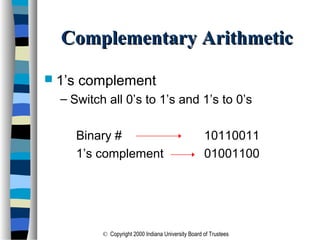
 1’s complement
– Switch all 0’s to 1’s and 1’s to 0’s
Binary # 10110011
1’s complement 01001100
© Copyright 2000 Indiana University Board of Trustees
Complementary ArithmeticComplementary Arithmetic
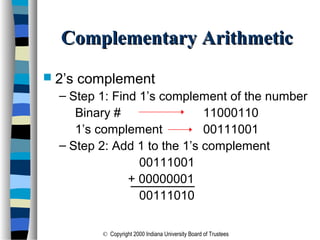
 2’s complement
– Step 1: Find 1’s complement of the number
Binary # 11000110
1’s complement 00111001
– Step 2: Add 1 to the 1’s complement
00111001
+ 00000001
00111010
© Copyright 2000 Indiana University Board of Trustees
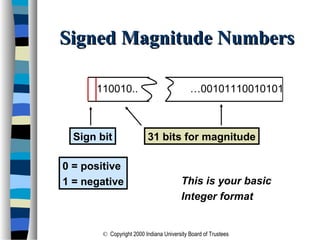
Signed Magnitude NumbersSigned Magnitude Numbers
Sign bit
0 = positive
1 = negative
31 bits for magnitude
This is your basic
Integer format
110010.. …00101110010101
© Copyright 2000 Indiana University Board of Trustees
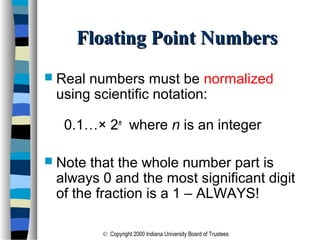
Floating Point NumbersFloating Point Numbers
 Real numbers must be normalized
using scientific notation:
0.1…× 2n
where n is an integer
 Note that the whole number part is
always 0 and the most significant digit
of the fraction is a 1 – ALWAYS!
© Copyright 2000 Indiana University Board of Trustees
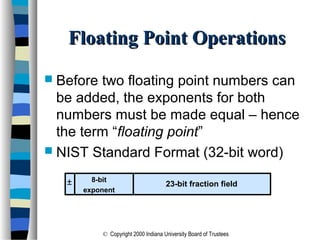
Floating Point OperationsFloating Point Operations
 Before two floating point numbers can
be added, the exponents for both
numbers must be made equal – hence
the term “floating point”
 NIST Standard Format (32-bit word)
8-bit
exponent
23-bit fraction field±
© Copyright 2000 Indiana University Board of Trustees
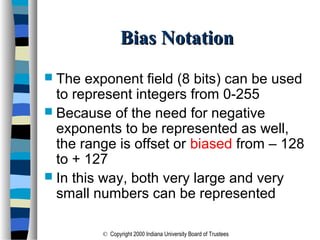
Bias NotationBias Notation
 The exponent field (8 bits) can be used
to represent integers from 0-255
 Because of the need for negative
exponents to be represented as well,
the range is offset or biased from – 128
to + 127
 In this way, both very large and very
small numbers can be represented
© Copyright 2000 Indiana University Board of Trustees
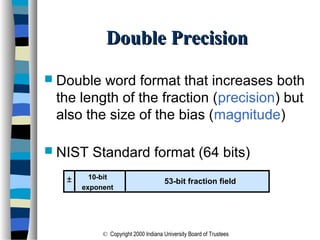
Double PrecisionDouble Precision
 Double word format that increases both
the length of the fraction (precision) but
also the size of the bias (magnitude)
 NIST Standard format (64 bits)
10-bit
exponent
53-bit fraction field±
© Copyright 2000 Indiana University Board of Trustees
Error ConsiderationsError Considerations
 The “Hole at Zero” Problem
– Regardless of how large an exponent field
is, there are still smaller positive and
negative numbers about zero that cannot
be represented
– In bias notation, +2-129
and - 2-129
are beyond
the acceptable range
– The “Hole at Zero” defines the range of
values near zero that cannot be stored
© Copyright 2000 Indiana University Board of Trustees
Computational ErrorsComputational Errors
 When converting base 10 fractions to
binary, only those fractions whose values
can be expressed as a sum of base 2
fractions will convert evenly
 All other base 10 fractions feature a least
significant bit that is either rounded or
truncated – an approximation
 When two such numbers are multiplied,
the rounding error is compounded

Quantitative Analysis 2

  • 1.
    Number SystemsNumber Systems andBinary Arithmeticand Binary Arithmetic Quantitative Analysis II Professor Bob Orr
  • 2.
    © Copyright 2000Indiana University Board of Trustees Introduction to NumberingIntroduction to Numbering SystemsSystems  We are all familiar with the decimal number system (Base 10). Some other number systems that we will work with are: – Binary → Base 2 – Octal → Base 8 – Hexadecimal → Base 16
  • 3.
    © Copyright 2000Indiana University Board of Trustees Characteristics of NumberingCharacteristics of Numbering SystemsSystems 1) The digits are consecutive. 2) The number of digits is equal to the size of the base. 3) Zero is always the first digit. 4) The base number is never a digit. 5) When 1 is added to the largest digit, a sum of zero and a carry of one results. 6) Numeric values determined by the have implicit positional values of the digits.
  • 4.
    © Copyright 2000Indiana University Board of Trustees Significant DigitsSignificant Digits Binary: 11101101 Most significant digit Least significant digit Hexadecimal: 1D63A7A Most significant digit Least significant digit
  • 5.
    © Copyright 2000Indiana University Board of Trustees Binary Number SystemBinary Number System  Also called the “Base 2 system”  The binary number system is used to model the series of electrical signals computers use to represent information  0 represents the no voltage or an off state  1 represents the presence of voltage or an on state
  • 6.
    © Copyright 2000Indiana University Board of Trustees Binary Numbering ScaleBinary Numbering Scale Base 2 Number Base 10 Equivalent Power Positional Value 000 0 20 1 001 1 21 2 010 2 22 4 011 3 23 8 100 4 24 16 101 5 25 32 110 6 26 64 111 7 27 128
  • 7.
    © Copyright 2000Indiana University Board of Trustees Binary AdditionBinary Addition 4 Possible Binary Addition Combinations: (1) 0 (2) 0 +0 +1 00 01 (3) 1 (4) 1 +0 +1 01 10 SumCarry Note that leading zeroes are frequently dropped.
  • 8.
    © Copyright 2000Indiana University Board of Trustees Decimal to Binary ConversionDecimal to Binary Conversion  The easiest way to convert a decimal number to its binary equivalent is to use the Division Algorithm  This method repeatedly divides a decimal number by 2 and records the quotient and remainder – The remainder digits (a sequence of zeros and ones) form the binary equivalent in least significant to most significant digit sequence
  • 9.
    © Copyright 2000Indiana University Board of Trustees Division AlgorithmDivision Algorithm Convert 67 to its binary equivalent: 6710 = x2 Step 1: 67 / 2 = 33 R 1 Divide 67 by 2. Record quotient in next row Step 2: 33 / 2 = 16 R 1 Again divide by 2; record quotient in next row Step 3: 16 / 2 = 8 R 0 Repeat again Step 4: 8 / 2 = 4 R 0 Repeat again Step 5: 4 / 2 = 2 R 0 Repeat again Step 6: 2 / 2 = 1 R 0 Repeat again Step 7: 1 / 2 = 0 R 1 STOP when quotient equals 0 1 0 0 0 0 1 12
  • 10.
    © Copyright 2000Indiana University Board of Trustees Binary to Decimal ConversionBinary to Decimal Conversion  The easiest method for converting a binary number to its decimal equivalent is to use the Multiplication Algorithm  Multiply the binary digits by increasing powers of two, starting from the right  Then, to find the decimal number equivalent, sum those products
  • 11.
    © Copyright 2000Indiana University Board of Trustees Multiplication AlgorithmMultiplication Algorithm Convert (10101101)2 to its decimal equivalent: Binary 1 0 1 0 1 1 0 1 Positional Values xxxxxxxx 20 21 22 23 24 25 26 27 128 + 32 + 8 + 4 + 1Products 17310
  • 12.
    © Copyright 2000Indiana University Board of Trustees Octal Number SystemOctal Number System  Also known as the Base 8 System  Uses digits 0 - 7  Readily converts to binary  Groups of three (binary) digits can be used to represent each octal digit  Also uses multiplication and division algorithms for conversion to and from base 10
  • 13.
    © Copyright 2000Indiana University Board of Trustees Decimal to Octal ConversionDecimal to Octal Conversion Convert 42710 to its octal equivalent: 427 / 8 = 53 R3 Divide by 8; R is LSD 53 / 8 = 6 R5 Divide Q by 8; R is next digit 6 / 8 = 0 R6 Repeat until Q = 0 6538
  • 14.
    © Copyright 2000Indiana University Board of Trustees Octal to Decimal ConversionOctal to Decimal Conversion Convert 6538 to its decimal equivalent: 6 5 3 xxx 82 81 80 384 + 40 + 3 42710 Positional Values Products Octal Digits
  • 15.
    © Copyright 2000Indiana University Board of Trustees Octal to Binary ConversionOctal to Binary Conversion Each octal number converts to 3 binary digits To convert 6538 to binary, just substitute code: 6 5 3 110 101 011
  • 16.
    © Copyright 2000Indiana University Board of Trustees Hexadecimal Number SystemHexadecimal Number System  Base 16 system  Uses digits 0-9 & letters A,B,C,D,E,F  Groups of four bits represent each base 16 digit
  • 17.
    © Copyright 2000Indiana University Board of Trustees Decimal to HexadecimalDecimal to Hexadecimal ConversionConversion Convert 83010 to its hexadecimal equivalent: 830 / 16 = 51 R14 51 / 16 = 3 R3 3 / 16 = 0 R3 33E16 = E in Hex
  • 18.
    © Copyright 2000Indiana University Board of Trustees Hexadecimal to DecimalHexadecimal to Decimal ConversionConversion Convert 3B4F16 to its decimal equivalent: Hex Digits 3 B 4 F xxx 163 162 161 160 12288 +2816 + 64 +15 15,18310 Positional Values Products x
  • 19.
    © Copyright 2000Indiana University Board of Trustees Binary to HexadecimalBinary to Hexadecimal ConversionConversion  The easiest method for converting binary to hexadecimal is to use a substitution code  Each hex number converts to 4 binary digits
  • 20.
    © Copyright 2000Indiana University Board of Trustees Convert 0101011010101110011010102 to hex using the 4-bit substitution code : 0101 0110 1010 1110 0110 1010 Substitution CodeSubstitution Code 5 6 A E 6 A 56AE6A16
  • 21.
    © Copyright 2000Indiana University Board of Trustees Substitution code can also be used to convert binary to octal by using 3-bit groupings: 010 101 101 010 111 001 101 010 Substitution CodeSubstitution Code 2 5 5 2 7 1 5 2 255271528
  • 22.
    © Copyright 2000Indiana University Board of Trustees Complementary ArithmeticComplementary Arithmetic  1’s complement – Switch all 0’s to 1’s and 1’s to 0’s Binary # 10110011 1’s complement 01001100
  • 23.
    © Copyright 2000Indiana University Board of Trustees Complementary ArithmeticComplementary Arithmetic  2’s complement – Step 1: Find 1’s complement of the number Binary # 11000110 1’s complement 00111001 – Step 2: Add 1 to the 1’s complement 00111001 + 00000001 00111010
  • 24.
    © Copyright 2000Indiana University Board of Trustees Signed Magnitude NumbersSigned Magnitude Numbers Sign bit 0 = positive 1 = negative 31 bits for magnitude This is your basic Integer format 110010.. …00101110010101
  • 25.
    © Copyright 2000Indiana University Board of Trustees Floating Point NumbersFloating Point Numbers  Real numbers must be normalized using scientific notation: 0.1…× 2n where n is an integer  Note that the whole number part is always 0 and the most significant digit of the fraction is a 1 – ALWAYS!
  • 26.
    © Copyright 2000Indiana University Board of Trustees Floating Point OperationsFloating Point Operations  Before two floating point numbers can be added, the exponents for both numbers must be made equal – hence the term “floating point”  NIST Standard Format (32-bit word) 8-bit exponent 23-bit fraction field±
  • 27.
    © Copyright 2000Indiana University Board of Trustees Bias NotationBias Notation  The exponent field (8 bits) can be used to represent integers from 0-255  Because of the need for negative exponents to be represented as well, the range is offset or biased from – 128 to + 127  In this way, both very large and very small numbers can be represented
  • 28.
    © Copyright 2000Indiana University Board of Trustees Double PrecisionDouble Precision  Double word format that increases both the length of the fraction (precision) but also the size of the bias (magnitude)  NIST Standard format (64 bits) 10-bit exponent 53-bit fraction field±
  • 29.
    © Copyright 2000Indiana University Board of Trustees Error ConsiderationsError Considerations  The “Hole at Zero” Problem – Regardless of how large an exponent field is, there are still smaller positive and negative numbers about zero that cannot be represented – In bias notation, +2-129 and - 2-129 are beyond the acceptable range – The “Hole at Zero” defines the range of values near zero that cannot be stored
  • 30.
    © Copyright 2000Indiana University Board of Trustees Computational ErrorsComputational Errors  When converting base 10 fractions to binary, only those fractions whose values can be expressed as a sum of base 2 fractions will convert evenly  All other base 10 fractions feature a least significant bit that is either rounded or truncated – an approximation  When two such numbers are multiplied, the rounding error is compounded