LINKEDIN.COM/IN/RCCANNIZZARO
•
•
•
•
•
•
•
•
•
•
•
•
•
•
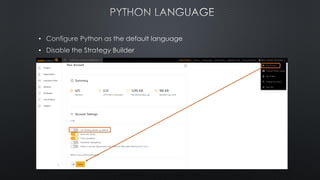
• QuantConnect
•
•
•
•
Disclaimer: the author has no affiliation with QuantConnect or any of their services.
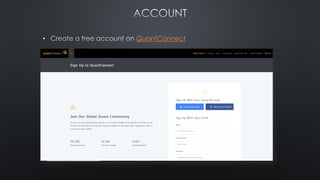
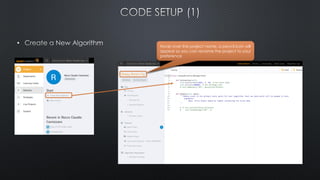
• QuantConnect
•
•
• Hover over the project name, a pencil icon will
appear so you can rename the project to your
preference
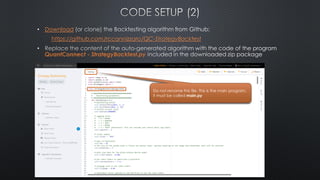
• Download
https://github.com/rccannizzaro/QC-StrategyBacktest
•
QuantConnect - StrategyBacktest.py
Do not rename this file. This is the main program,
it must be called main.py
•
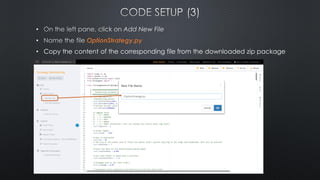
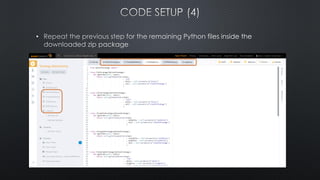
• OptionStrategy.py
• Copy the content of the corresponding file from the downloaded zip package
•
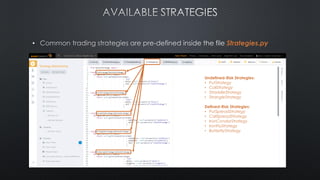
• Strategies.py
Undefined-Risk Strategies:
• PutStrategy
• CallStrategy
• StraddleStrategy
• StrangleStrategy
Defined-Risk Strategies:
• PutSpreadStrategy
• CallSpreadStrategy
• IronCondorStrategy
• IronFlyStrategy
• ButterflyStrategy
• Each Strategy is defined as a class inheriting from the OptionStrategy class
• Additional strategies can be defined, by implementing the interface method getOrder()
• The input parameter chain is a list of option contracts for a given Expiration (controlled by the DTE parameter)
• The getOrder() method selects a number of contracts to buy/sell based on certain criteria (Call/Put, Delta, Strike,
Price)
• For strategies that require multiple expiration cycles (i.e. calendars), the run() method from the OptionStrategy class
must be overridden/implemented by the custom strategy class. See the implementation of class
TEBombShelterStrategy for details
class ButterflyStrategy(OptionStrategy):
def getOrder(self, chain):
return self.getButterflyOrder(chain
, netDelta = self.parameters["netDelta"]
, type = self.parameters["butteflyType"]
, leftWingSize = self.parameters["butterflyLeftWingSize"]
, rightWingSize = self.parameters["butterflyRightWingSize"]
, sell = self.parameters["creditStrategy"]
)
See the pre-built methods get<XYX>Order() inside
OptionStrategy.py for examples of how to
implement the getOrder() method
• A backtest is a simulation of a trading strategy using historical data:
• It is a valuable tool for research and analysis, however results based on historical
data are not necessarily indicative of future performance
• Real life issues like Fees, Commissions, Slippage, Assignment, Market Order Fills, etc.
are approximated/simulated by the backtesting software
• SPX Options data availability issues*:
• At this time, quote data for the SPX Weekly Options are not available on QuantConnect.
• It appears that 0-DTE quote data are not available even when using monthly options.
➢ Unable to backtest 0-DTE SPX options (at least for now)
➢ Consider using 0-DTE SPY options as a proxy
* See this thread for details.
Issue
• QuantConnect offers various pricing models for computing Options greeks,
however these models seem to be unstable at times:
• Greeks values are sometimes inconsistent (i.e. OTM contracts closer to ATM showing
Delta much smaller – in absolute terms – than further OTM contracts)
• Greeks values are sometimes unavailable
• As a result, there were challenges in implementing strike selection strategies
that are based on the Greeks (i.e. Delta)
Solution
• A custom class BSM (defined inside BSMLibrary.py) has been created to model
options pricing and compute IV and the Greeks.
• Based on the Black-Scholes-Merton model for pricing European options with no
dividends
• It’s not a perfect match in case of American style options but it’s a relatively good
approximation
Issues
• Limit Orders on multiple legs are not supported on QuantConnect
• The default model for filling Market Orders tends to fill at the worst price (Bid-Price when
selling, Ask-Price when buying)
Solution:
• Multi-leg orders (i.e. spreads, strangles, etc.) are treated as a package, a Market Order on
each leg is executed when the mid-price of the entire order hits the target price
• To overcome the issue with the fill price at the Bid/Ask extremes, a custom Fill model (class
BetaFillModel) has been implemented:
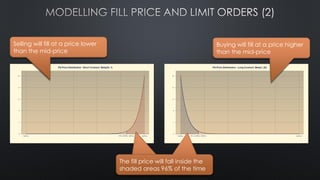
• Each leg of the order is filled at a price that is close to the mid-price of that contract
• The fill price is modelled as a random variable from the Beta distribution
• The distribution parameters are chosen so that the full order is filled at price worse than the mid-price
(simulates price discovery/slippage), but close enough to the mid-price to be realistic (see details in
the next slide)
The fill price will fall inside the
shaded areas 96% of the time
The fill price will fall inside the
shaded areas 96% of the time
Selling will fill at a price lower
than the mid-price
Buying will fill at a price higher
than the mid-price
•
•
•
•
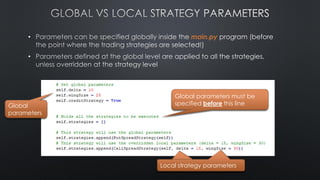
main.py
• main.py
•
Global parameters must be
specified before this line
Global
parameters
Local strategy parameters
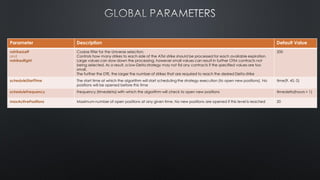
Parameter Description Default Value
nstrikesLeft
and
nstrikesRight
Coarse filter for the Universe selection.
Controls how many strikes to each side of the ATM strike should be processed for each available expiration.
Large values can slow down the processing, however small values can result in further OTM contracts not
being selected. As a result, a low-Delta strategy may not fid any contracts if the specified values are too
small.
The further the DTE, the larger the number of strikes that are required to reach the desired Delta strike
200
scheduleStartTime The start time at which the algorithm will start scheduling the strategy execution (to open new positions). No
positions will be opened before this time
time(9, 45, 0)
scheduleFrequency Frequency (timedelta) with which the algorithm will check to open new positions timedelta(hours = 1)
maxActivePositions Maximum number of open positions at any given time. No new positions are opened if this level is reached 20
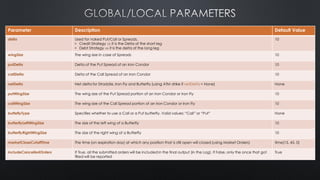
Parameter Description Default Value
delta Used for naked Put/Call or Spreads.
• Credit Strategy  it is the Delta of the short leg
• Debt Strategy  it is the delta of the long leg
10
wingSize The wing size in case of Spreads 10
putDelta Delta of the Put Spread of an Iron Condor 10
callDelta Delta of the Call Spread of an Iron Condor 10
netDelta Net delta for Straddle, Iron Fly and Butterfly (using ATM strike if netDelta = None) None
putWingSize The wing size of the Put Spread portion of an Iron Condor or Iron Fly 10
callWingSize The wing size of the Call Spread portion of an Iron Condor or Iron Fly 10
butteflyType Specifies whether to use a Call or a Put butterfly. Valid values: “Call” or “Put” None
butterflyLeftWingSize The size of the left wing of a Butterfly 10
butterflyRightWingSize The size of the right wing of a Butterfly 10
marketCloseCutoffTime The time (on expiration day) at which any position that is still open will closed (using Market Orders) time(15, 45, 0)
includeCancelledOrders If True, all the submitted orders will be included in the final output (in the Log). If False, only the once that got
filled will be reported
True
Parameter Description Default Value
dte Days to Expiration. Used in conjunction with parameter dteWindow.
Contracts expiring in the range [dte-dteWindow, dte] are included in the selection process.
Once this filtering has been applied, the contracts with the expiration closest to the dte parameter are used
45
dteWindow See above 7
dteThreshold This parameter ignored if set to None or if dte < dteThreshold.
Once an open position reaches the dteThreshold, the following behavior is implemented:
• If forceDteThreshold = True  close the position immediately, regardless of whether it is profitable or not
• If forceDteThreshold = False  close the position as soon as it is profitable
21
allowMultipleEntriesPerExpiry Controls whether to allow a Strategy to open multiple positions on the same Expiration date False
forceDteThreshold Controls what happens when an open position reaches/crosses the dteThreshold. See above
useLimitOrders Controls whether to use Limit orders for Opening/Closing a position. True
limitOrderRelativePriceAdjustment Adjustment factor applied to the Mid-Price to set the Limit Order:
• Credit Strategy:
limitOrderRelativePriceAdjustment = 0.3  sets the Limit Order price 30% higher than the current Mid-Price
• Debit Strategy:
limitOrderRelativePriceAdjustment = -0.2  sets the Limit Order price 20% lower than the current Mid-Price
0.0
limitOrderAbsolutePrice Alternative method to set the absolute price (per contract) of the Limit Order. Only used if a value is specified
Unless you know that your price target can get a fill, it is advisable to use a relative adjustment or you may
never get your order filled
• Credit Strategy:
limitOrderAbsolutePrice = 1.5  sets the Limit Order price at exactly 1.5$
Debit Strategy:
limitOrderAbsolutePrice = -2.3  sets the Limit Order price at exactly -2.3$
None
limitOrderExpiration Controls how long Limit order is valid for. timedelta(hours = 8)
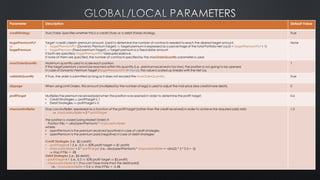
Parameter Description Default Value
creditStrategy True|False. Specifies whether this is a credit (True) or a debit (False) strategy. True
targetPremiumPct
or
targetPremium
Target <credit|debit> premium amount. Used to determine the number of contracts needed to reach the desired target amount.
• targetPremiumPct (Dynamic Premium Target)  target premium is expressed as a percentage of the total Portfolio Net Liq (0 < targetPremiumPct < 1)
• targetPremium (Fixed premium Target)  target premium is a fixed dollar amount
If both are specified, targetPremiumPct takes precedence.
If none of them are specified, the number of contracts specified by the maxOrderQuantity parameter is used.
None
maxOrderQuantity Maximum quantity used to scale each position.
If the target premium cannot be reached within this quantity (i.e., premium received is too low), the position is not going to be opened.
In case of Dynamic Premium Target (targetPremiumPct != None), this value is scaled up linearly with the Net Liq
1
validateQuantity If True, the order is submitted as long as it does not exceed the maxOrderQuantity. True
slippage When using Limit Orders, this amount (multiplied by the number of legs) is used to adjust the mid-price (less credit/more debit). 0
profitTarget Multiplies the premium received/paid when the position was opened in order to determine the profit target.
• Credit Strategies  profitTarget ≤ 1
• Debit Strategies  profitTarget ≥ 0
0.6
stopLossMultiplier Stop Loss Multiplier, expressed as a function of the profit target (rather than the credit received) in order to achieve the required odds ratio
 stopLossMultiplier = 2 * profitTarget
The position is closed (using Market Order) if:
Position P&L < -abs(openPremium) * stopLossMultiplier
where:
• openPremium is the premium received (positive) in case of credit strategies
• openPremium is the premium paid (negative) in case of debit strategies
Credit Strategies (i.e., $2 credit):
• profitTarget ≤ 1 (i.e., 0.5  50% profit target  $1 profit)
• stopLossMultiplier = 2 * profitTarget (i.e. -abs(openPremium) * stopLossMultiplier = -abs(2) * 2 * 0.5 = -2)
 stop if P&L < -2$
Debit Strategies (i.e., $4 debit):
- profitTarget ≤ 1 (i.e., 0.5  50% profit target  $2 profit)
- stopLossMultiplier ≤ 1 (You can't lose more than the debit paid)
i.e.: stopLossMultiplier = 0.6  stop if P&L < -2.4$
1.5
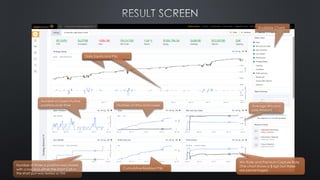
Available Charts
Daily Equity and P&L
Number of Open/Active
positions over time Number of Wins and Losses
Cumulative Realized P&L
Average Win and
Loss Amount
Daily Equity and P&L
Win Rate and Premium Capture Rate
(The chart shows a $ sign but these
are percentages)
Number of times a position was closed
with a loss and either the short Call or
the short put was tested or ITM
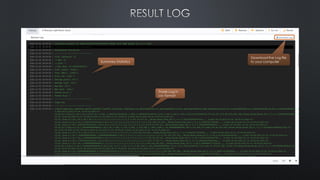
Summary Statistics
Trade Log in
csv format
Download the Log file
to your computer
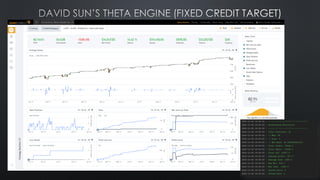
Strategy Details
# Backtesting period
self.SetStartDate(2021, 1, 1)
self.SetEndDate(2021, 11, 30)
# Initial account value ($100K)
self.initialAccountValue = 100000
# Use SPY
self.ticker = "SPY"
# Open at 45 DTE
self.dte = 45
# Close at 21 DTE (no matter what)
self.dteThreshold = 21
self.forceDteThreshold = True
# Limit order 20% higher than the current mid-price
self.limitOrderRelativePriceAdjustment = 0.2
# Set expiration for Limit orders if they are not filled
self.limitOrderExpiration = timedelta(hours = 4)
# Sell enough contracts to reach $1000 premium (Fixed credit target)
self.targetPremium = 1000
# Sell no more than 6 contracts.
self.maxOrderQuantity = 6
# 60% Profit Target
self.profitTarget = 0.6
# 2X Stop Loss
self.stopLossMultiplier = 2 * self.profitTarget
# Holds all the strategies to be executed
self.strategies = []
# Sell a 10-Delta Put
self.strategies.append(PutStrategy(self, delta = 10, creditStrategy = True))
Strategy Details
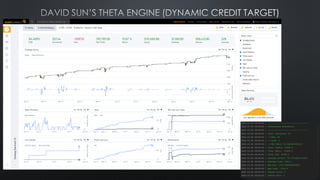
# Backtesting period
self.SetStartDate(2021, 1, 1)
self.SetEndDate(2021, 11, 30)
# Initial account value ($100K)
self.initialAccountValue = 100000
# Use SPY
self.ticker = "SPY"
# Open at 45 DTE
self.dte = 45
# Close at 21 DTE (no matter what)
self.dteThreshold = 21
self.forceDteThreshold = True
# Limit order 20% higher than the current mid-price
self.limitOrderRelativePriceAdjustment = 0.2
# Set expiration for Limit orders if they are not filled
self.limitOrderExpiration = timedelta(hours = 4)
# Sell enough contracts to reach 1% of the Net Liq (Dynamic credit target)
self.targetPremiumPct = 0.01
# Sell no more than 10 contracts.
self.maxOrderQuantity = 10
# 60% Profit Target
self.profitTarget = 0.6
# 2X Stop Loss
self.stopLossMultiplier = 2 * self.profitTarget
# Holds all the strategies to be executed
self.strategies = []
# Sell a 10-Delta Put
self.strategies.append(PutStrategy(self, delta = 10, creditStrategy = True))
# Backtesting period
self.SetStartDate(2021, 1, 1)
self.SetEndDate(2021, 11, 25)
# Initial account value ($1M)
self.initialAccountValue = 1000000
# Use SPX
self.ticker = "SPX"
# Open at 45 DTE
self.dte = 45
# No DTE threshold
self.dteThreshold = None
# Set expiration for Limit orders if they are not filled
self.limitOrderExpiration = timedelta(hours = 4)
# Sell enough contracts to reach $1000 premium
self.targetPremium = 1000
# Sell no more than 20 contracts.
self.maxOrderQuantity = 20
# 60% Profit Target
self.profitTarget = 0.6
# 2X Stop Loss
self.stopLossMultiplier = 2 * self.profitTarget
# Holds all the strategies to be executed
self.strategies = []
# Sell a 10-Delta, 25-wide Put Spread with a Limit price of $1
self.strategies.append(PutSpreadStrategy(self, delta = 10, wingSize = 25, limitOrderAbsolutePrice = 1 creditStrategy = True))
# Pair it with a 7-Delta, 25-wide Call Spread with a Limit price of $1.5
self.strategies.append(PutSpreadStrategy(self, delta = 7, wingSize = 25, limitOrderAbsolutePrice = 1.5 creditStrategy = True))
Strategy Details
# Backtesting period
self.SetStartDate(2020, 2, 20)
self.SetEndDate(2020, 4, 30)
# Initial account value ($1M)
self.initialAccountValue = 1000000
# Use SPX
self.ticker = "SPX"
# Open at 45 DTE
self.dte = 120
# Search for contracts expiring between 80 DTE and 120 DTE
self.dteWindow = 40
# Process up to 400 strikes (=> 2000 points) to the left of ATM,
# zero strikes to the right
self.nStrikesLeft = 400
self.nStrikesRight = 0
# Close at 60 DTE (as soon as it is profitable)
self.dteThreshold = 60
# The dteThreshold is not enforced
self.forceDteThreshold = False
# Limit order 20% higher than the current mid-price
self.limitOrderRelativePriceAdjustment = 0.2
# Set expiration for Limit orders if they are not filled
self.limitOrderExpiration = timedelta(hours = 4)
# Dynamic Credit target: 1% of the Net Liq
self.targetPremiumPct = 0.01
# Sell no more than 3 contracts.
self.maxOrderQuantity = 3
# 60% Profit Target
self.profitTarget = 0.6
# Run only one position at the time
self.maxActivePositions = 1
# 2X Stop Loss
self.stopLossMultiplier = 2
# Disable some of the charts, there is a max limit of 10 time series
self.setupCharts(PnL = False, Performance = False
, WinLossStats = False, LossDetails = False
)
# Holds all the strategies to be executed
self.strategies = []
# Sell 120-DTE 15-Delta Put, use 10% of the credit to buy 2 90-DTE Puts.
# Plot the value of the Short and the Long contracts every 30 minutes
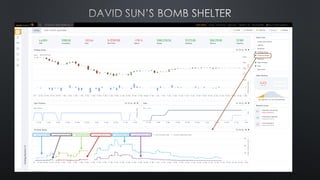
self.strategies.append(TEBombShelterStrategy(self
, delta = 15
, frontDte = self.dte – 30
, hedgeAllocation = 0.1
, plotLegDetails = True
, chartUpdateFrequency = 30)
)
QuantConnect - Options Backtesting

QuantConnect - Options Backtesting

  • 1.
  • 2.
  • 4.
  • 5.
    • QuantConnect • • • • Disclaimer: theauthor has no affiliation with QuantConnect or any of their services.
  • 7.
  • 8.
  • 9.
    • Hover overthe project name, a pencil icon will appear so you can rename the project to your preference
  • 10.
    • Download https://github.com/rccannizzaro/QC-StrategyBacktest • QuantConnect -StrategyBacktest.py Do not rename this file. This is the main program, it must be called main.py
  • 11.
    • • OptionStrategy.py • Copythe content of the corresponding file from the downloaded zip package
  • 12.
  • 14.
    • Strategies.py Undefined-Risk Strategies: •PutStrategy • CallStrategy • StraddleStrategy • StrangleStrategy Defined-Risk Strategies: • PutSpreadStrategy • CallSpreadStrategy • IronCondorStrategy • IronFlyStrategy • ButterflyStrategy
  • 15.
    • Each Strategyis defined as a class inheriting from the OptionStrategy class • Additional strategies can be defined, by implementing the interface method getOrder() • The input parameter chain is a list of option contracts for a given Expiration (controlled by the DTE parameter) • The getOrder() method selects a number of contracts to buy/sell based on certain criteria (Call/Put, Delta, Strike, Price) • For strategies that require multiple expiration cycles (i.e. calendars), the run() method from the OptionStrategy class must be overridden/implemented by the custom strategy class. See the implementation of class TEBombShelterStrategy for details class ButterflyStrategy(OptionStrategy): def getOrder(self, chain): return self.getButterflyOrder(chain , netDelta = self.parameters["netDelta"] , type = self.parameters["butteflyType"] , leftWingSize = self.parameters["butterflyLeftWingSize"] , rightWingSize = self.parameters["butterflyRightWingSize"] , sell = self.parameters["creditStrategy"] ) See the pre-built methods get<XYX>Order() inside OptionStrategy.py for examples of how to implement the getOrder() method
  • 17.
    • A backtestis a simulation of a trading strategy using historical data: • It is a valuable tool for research and analysis, however results based on historical data are not necessarily indicative of future performance • Real life issues like Fees, Commissions, Slippage, Assignment, Market Order Fills, etc. are approximated/simulated by the backtesting software
  • 18.
    • SPX Optionsdata availability issues*: • At this time, quote data for the SPX Weekly Options are not available on QuantConnect. • It appears that 0-DTE quote data are not available even when using monthly options. ➢ Unable to backtest 0-DTE SPX options (at least for now) ➢ Consider using 0-DTE SPY options as a proxy * See this thread for details.
  • 19.
    Issue • QuantConnect offersvarious pricing models for computing Options greeks, however these models seem to be unstable at times: • Greeks values are sometimes inconsistent (i.e. OTM contracts closer to ATM showing Delta much smaller – in absolute terms – than further OTM contracts) • Greeks values are sometimes unavailable • As a result, there were challenges in implementing strike selection strategies that are based on the Greeks (i.e. Delta) Solution • A custom class BSM (defined inside BSMLibrary.py) has been created to model options pricing and compute IV and the Greeks. • Based on the Black-Scholes-Merton model for pricing European options with no dividends • It’s not a perfect match in case of American style options but it’s a relatively good approximation
  • 20.
    Issues • Limit Orderson multiple legs are not supported on QuantConnect • The default model for filling Market Orders tends to fill at the worst price (Bid-Price when selling, Ask-Price when buying) Solution: • Multi-leg orders (i.e. spreads, strangles, etc.) are treated as a package, a Market Order on each leg is executed when the mid-price of the entire order hits the target price • To overcome the issue with the fill price at the Bid/Ask extremes, a custom Fill model (class BetaFillModel) has been implemented: • Each leg of the order is filled at a price that is close to the mid-price of that contract • The fill price is modelled as a random variable from the Beta distribution • The distribution parameters are chosen so that the full order is filled at price worse than the mid-price (simulates price discovery/slippage), but close enough to the mid-price to be realistic (see details in the next slide)
  • 21.
    The fill pricewill fall inside the shaded areas 96% of the time The fill price will fall inside the shaded areas 96% of the time Selling will fill at a price lower than the mid-price Buying will fill at a price higher than the mid-price
  • 23.
  • 24.
    • main.py • Global parametersmust be specified before this line Global parameters Local strategy parameters Local strategy parameters
  • 25.
    Parameter Description DefaultValue nstrikesLeft and nstrikesRight Coarse filter for the Universe selection. Controls how many strikes to each side of the ATM strike should be processed for each available expiration. Large values can slow down the processing, however small values can result in further OTM contracts not being selected. As a result, a low-Delta strategy may not fid any contracts if the specified values are too small. The further the DTE, the larger the number of strikes that are required to reach the desired Delta strike 200 scheduleStartTime The start time at which the algorithm will start scheduling the strategy execution (to open new positions). No positions will be opened before this time time(9, 45, 0) scheduleFrequency Frequency (timedelta) with which the algorithm will check to open new positions timedelta(hours = 1) maxActivePositions Maximum number of open positions at any given time. No new positions are opened if this level is reached 20
  • 26.
    Parameter Description DefaultValue delta Used for naked Put/Call or Spreads. • Credit Strategy  it is the Delta of the short leg • Debt Strategy  it is the delta of the long leg 10 wingSize The wing size in case of Spreads 10 putDelta Delta of the Put Spread of an Iron Condor 10 callDelta Delta of the Call Spread of an Iron Condor 10 netDelta Net delta for Straddle, Iron Fly and Butterfly (using ATM strike if netDelta = None) None putWingSize The wing size of the Put Spread portion of an Iron Condor or Iron Fly 10 callWingSize The wing size of the Call Spread portion of an Iron Condor or Iron Fly 10 butteflyType Specifies whether to use a Call or a Put butterfly. Valid values: “Call” or “Put” None butterflyLeftWingSize The size of the left wing of a Butterfly 10 butterflyRightWingSize The size of the right wing of a Butterfly 10 marketCloseCutoffTime The time (on expiration day) at which any position that is still open will closed (using Market Orders) time(15, 45, 0) includeCancelledOrders If True, all the submitted orders will be included in the final output (in the Log). If False, only the once that got filled will be reported True
  • 27.
    Parameter Description DefaultValue dte Days to Expiration. Used in conjunction with parameter dteWindow. Contracts expiring in the range [dte-dteWindow, dte] are included in the selection process. Once this filtering has been applied, the contracts with the expiration closest to the dte parameter are used 45 dteWindow See above 7 dteThreshold This parameter ignored if set to None or if dte < dteThreshold. Once an open position reaches the dteThreshold, the following behavior is implemented: • If forceDteThreshold = True  close the position immediately, regardless of whether it is profitable or not • If forceDteThreshold = False  close the position as soon as it is profitable 21 allowMultipleEntriesPerExpiry Controls whether to allow a Strategy to open multiple positions on the same Expiration date False forceDteThreshold Controls what happens when an open position reaches/crosses the dteThreshold. See above useLimitOrders Controls whether to use Limit orders for Opening/Closing a position. True limitOrderRelativePriceAdjustment Adjustment factor applied to the Mid-Price to set the Limit Order: • Credit Strategy: limitOrderRelativePriceAdjustment = 0.3  sets the Limit Order price 30% higher than the current Mid-Price • Debit Strategy: limitOrderRelativePriceAdjustment = -0.2  sets the Limit Order price 20% lower than the current Mid-Price 0.0 limitOrderAbsolutePrice Alternative method to set the absolute price (per contract) of the Limit Order. Only used if a value is specified Unless you know that your price target can get a fill, it is advisable to use a relative adjustment or you may never get your order filled • Credit Strategy: limitOrderAbsolutePrice = 1.5  sets the Limit Order price at exactly 1.5$ Debit Strategy: limitOrderAbsolutePrice = -2.3  sets the Limit Order price at exactly -2.3$ None limitOrderExpiration Controls how long Limit order is valid for. timedelta(hours = 8)
  • 28.
    Parameter Description DefaultValue creditStrategy True|False. Specifies whether this is a credit (True) or a debit (False) strategy. True targetPremiumPct or targetPremium Target <credit|debit> premium amount. Used to determine the number of contracts needed to reach the desired target amount. • targetPremiumPct (Dynamic Premium Target)  target premium is expressed as a percentage of the total Portfolio Net Liq (0 < targetPremiumPct < 1) • targetPremium (Fixed premium Target)  target premium is a fixed dollar amount If both are specified, targetPremiumPct takes precedence. If none of them are specified, the number of contracts specified by the maxOrderQuantity parameter is used. None maxOrderQuantity Maximum quantity used to scale each position. If the target premium cannot be reached within this quantity (i.e., premium received is too low), the position is not going to be opened. In case of Dynamic Premium Target (targetPremiumPct != None), this value is scaled up linearly with the Net Liq 1 validateQuantity If True, the order is submitted as long as it does not exceed the maxOrderQuantity. True slippage When using Limit Orders, this amount (multiplied by the number of legs) is used to adjust the mid-price (less credit/more debit). 0 profitTarget Multiplies the premium received/paid when the position was opened in order to determine the profit target. • Credit Strategies  profitTarget ≤ 1 • Debit Strategies  profitTarget ≥ 0 0.6 stopLossMultiplier Stop Loss Multiplier, expressed as a function of the profit target (rather than the credit received) in order to achieve the required odds ratio  stopLossMultiplier = 2 * profitTarget The position is closed (using Market Order) if: Position P&L < -abs(openPremium) * stopLossMultiplier where: • openPremium is the premium received (positive) in case of credit strategies • openPremium is the premium paid (negative) in case of debit strategies Credit Strategies (i.e., $2 credit): • profitTarget ≤ 1 (i.e., 0.5  50% profit target  $1 profit) • stopLossMultiplier = 2 * profitTarget (i.e. -abs(openPremium) * stopLossMultiplier = -abs(2) * 2 * 0.5 = -2)  stop if P&L < -2$ Debit Strategies (i.e., $4 debit): - profitTarget ≤ 1 (i.e., 0.5  50% profit target  $2 profit) - stopLossMultiplier ≤ 1 (You can't lose more than the debit paid) i.e.: stopLossMultiplier = 0.6  stop if P&L < -2.4$ 1.5
  • 30.
    Available Charts Daily Equityand P&L Number of Open/Active positions over time Number of Wins and Losses Cumulative Realized P&L Average Win and Loss Amount Daily Equity and P&L Win Rate and Premium Capture Rate (The chart shows a $ sign but these are percentages) Number of times a position was closed with a loss and either the short Call or the short put was tested or ITM
  • 31.
    Summary Statistics Trade Login csv format Download the Log file to your computer
  • 33.
    Strategy Details # Backtestingperiod self.SetStartDate(2021, 1, 1) self.SetEndDate(2021, 11, 30) # Initial account value ($100K) self.initialAccountValue = 100000 # Use SPY self.ticker = "SPY" # Open at 45 DTE self.dte = 45 # Close at 21 DTE (no matter what) self.dteThreshold = 21 self.forceDteThreshold = True # Limit order 20% higher than the current mid-price self.limitOrderRelativePriceAdjustment = 0.2 # Set expiration for Limit orders if they are not filled self.limitOrderExpiration = timedelta(hours = 4) # Sell enough contracts to reach $1000 premium (Fixed credit target) self.targetPremium = 1000 # Sell no more than 6 contracts. self.maxOrderQuantity = 6 # 60% Profit Target self.profitTarget = 0.6 # 2X Stop Loss self.stopLossMultiplier = 2 * self.profitTarget # Holds all the strategies to be executed self.strategies = [] # Sell a 10-Delta Put self.strategies.append(PutStrategy(self, delta = 10, creditStrategy = True))
  • 35.
    Strategy Details # Backtestingperiod self.SetStartDate(2021, 1, 1) self.SetEndDate(2021, 11, 30) # Initial account value ($100K) self.initialAccountValue = 100000 # Use SPY self.ticker = "SPY" # Open at 45 DTE self.dte = 45 # Close at 21 DTE (no matter what) self.dteThreshold = 21 self.forceDteThreshold = True # Limit order 20% higher than the current mid-price self.limitOrderRelativePriceAdjustment = 0.2 # Set expiration for Limit orders if they are not filled self.limitOrderExpiration = timedelta(hours = 4) # Sell enough contracts to reach 1% of the Net Liq (Dynamic credit target) self.targetPremiumPct = 0.01 # Sell no more than 10 contracts. self.maxOrderQuantity = 10 # 60% Profit Target self.profitTarget = 0.6 # 2X Stop Loss self.stopLossMultiplier = 2 * self.profitTarget # Holds all the strategies to be executed self.strategies = [] # Sell a 10-Delta Put self.strategies.append(PutStrategy(self, delta = 10, creditStrategy = True))
  • 37.
    # Backtesting period self.SetStartDate(2021,1, 1) self.SetEndDate(2021, 11, 25) # Initial account value ($1M) self.initialAccountValue = 1000000 # Use SPX self.ticker = "SPX" # Open at 45 DTE self.dte = 45 # No DTE threshold self.dteThreshold = None # Set expiration for Limit orders if they are not filled self.limitOrderExpiration = timedelta(hours = 4) # Sell enough contracts to reach $1000 premium self.targetPremium = 1000 # Sell no more than 20 contracts. self.maxOrderQuantity = 20 # 60% Profit Target self.profitTarget = 0.6 # 2X Stop Loss self.stopLossMultiplier = 2 * self.profitTarget # Holds all the strategies to be executed self.strategies = [] # Sell a 10-Delta, 25-wide Put Spread with a Limit price of $1 self.strategies.append(PutSpreadStrategy(self, delta = 10, wingSize = 25, limitOrderAbsolutePrice = 1 creditStrategy = True)) # Pair it with a 7-Delta, 25-wide Call Spread with a Limit price of $1.5 self.strategies.append(PutSpreadStrategy(self, delta = 7, wingSize = 25, limitOrderAbsolutePrice = 1.5 creditStrategy = True))
  • 39.
    Strategy Details # Backtestingperiod self.SetStartDate(2020, 2, 20) self.SetEndDate(2020, 4, 30) # Initial account value ($1M) self.initialAccountValue = 1000000 # Use SPX self.ticker = "SPX" # Open at 45 DTE self.dte = 120 # Search for contracts expiring between 80 DTE and 120 DTE self.dteWindow = 40 # Process up to 400 strikes (=> 2000 points) to the left of ATM, # zero strikes to the right self.nStrikesLeft = 400 self.nStrikesRight = 0 # Close at 60 DTE (as soon as it is profitable) self.dteThreshold = 60 # The dteThreshold is not enforced self.forceDteThreshold = False # Limit order 20% higher than the current mid-price self.limitOrderRelativePriceAdjustment = 0.2 # Set expiration for Limit orders if they are not filled self.limitOrderExpiration = timedelta(hours = 4) # Dynamic Credit target: 1% of the Net Liq self.targetPremiumPct = 0.01 # Sell no more than 3 contracts. self.maxOrderQuantity = 3 # 60% Profit Target self.profitTarget = 0.6 # Run only one position at the time self.maxActivePositions = 1 # 2X Stop Loss self.stopLossMultiplier = 2 # Disable some of the charts, there is a max limit of 10 time series self.setupCharts(PnL = False, Performance = False , WinLossStats = False, LossDetails = False ) # Holds all the strategies to be executed self.strategies = [] # Sell 120-DTE 15-Delta Put, use 10% of the credit to buy 2 90-DTE Puts. # Plot the value of the Short and the Long contracts every 30 minutes self.strategies.append(TEBombShelterStrategy(self , delta = 15 , frontDte = self.dte – 30 , hedgeAllocation = 0.1 , plotLegDetails = True , chartUpdateFrequency = 30) )