How to design quant strategies
using R
Saturday, May 16, 2015
Anil Yadav
(Head, Algorithm strategy advisory team at iRageCapital)
Content
 What is R?
 How can we use R packages in writing quantitative trading strategies?
 Steps in development of a quantitative trading strategy
 Optimizing the quantitative trading strategy
Disclaimer: The information in this presentation is intended to be general in nature and is
not financial product advice.
Introduction to R
 R is an open source software. It is free!
 Popular because it has packages with readymade functions
 Easy to find help for queries or code on internet
Installation: Download and install R-studio from (http://cran.r-project.org)
Help guide: (http://www.rseek.org/)
Packages in R
• We will use the package ‘quantstrat’ for writing our strategy today
– Install the package
install.packages("quantstrat", repos=http://R-Forge.R-project.org)
– Install the dependencies (FinancialInstrument, blotter, foreach, doParallel)
install.packages("FinancialInstrument", repos=http://R-Forge.R-project.org)
• Other useful CRAN packages: TTR, quantmod, etc
Writing a quant strategy
The steps are:
1. Hypothesis Formation – what is the idea for trade
2. Testing - statistically testing the hypothesis with data, how much
confidence do you have on your strategy
3. Refining – Optimizing the strategy parameters and paper trading
4. Production - Implementing the strategy in a live trading
environment. This would involve writing the strategy on a trading
platform.
Step 1: Hypothesis
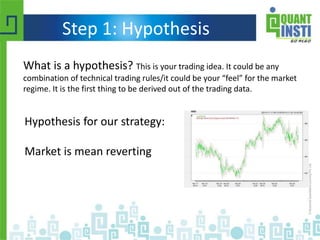
What is a hypothesis? This is your trading idea. It could be any
combination of technical trading rules/it could be your “feel” for the market
regime. It is the first thing to be derived out of the trading data.
Hypothesis for our strategy:
Market is mean reverting
Step 2: Testing
To test the hypothesis, we will have to write it as a strategy which has
statistical methods to compute the indicators, signals and calculate the
profits for the given data.
The steps for the testing part are:
1. Get the data
2. Write the strategy (indicators, signals, trades, PnL)
3. Analyze the output
Data
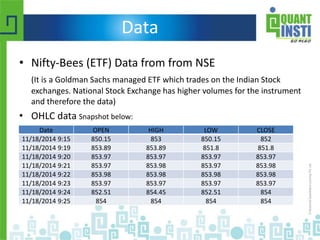
• Nifty-Bees (ETF) Data from from NSE
(It is a Goldman Sachs managed ETF which trades on the Indian Stock
exchanges. National Stock Exchange has higher volumes for the instrument
and therefore the data)
• OHLC data Snapshot below:
Date OPEN HIGH LOW CLOSE
11/18/2014 9:15 850.15 853 850.15 852
11/18/2014 9:19 853.89 853.89 851.8 851.8
11/18/2014 9:20 853.97 853.97 853.97 853.97
11/18/2014 9:21 853.97 853.98 853.97 853.98
11/18/2014 9:22 853.98 853.98 853.98 853.98
11/18/2014 9:23 853.97 853.97 853.97 853.97
11/18/2014 9:24 852.51 854.45 852.51 854
11/18/2014 9:25 854 854 854 854
Plot the data
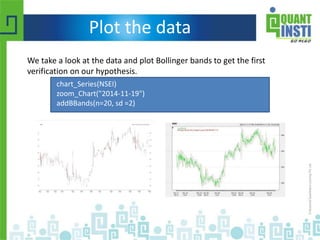
We take a look at the data and plot Bollinger bands to get the first
verification on our hypothesis.
chart_Series(NSEI)
zoom_Chart("2014-11-19")
addBBands(n=20, sd =2)
Writing the strategy
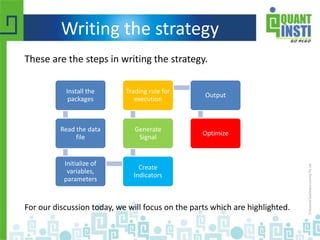
These are the steps in writing the strategy.
Install the
packages
Read the data
file
Initialize of
variables,
parameters
Create
Indicators
Generate
Signal
Trading rule for
execution
Output
Optimize
For our discussion today, we will focus on the parts which are highlighted.
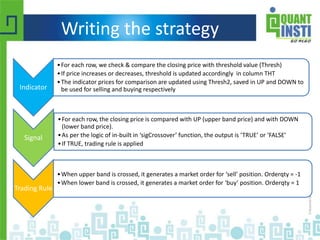
Indicator
•For each row, we check & compare the closing price with threshold value (Thresh)
•If price increases or decreases, threshold is updated accordingly in column THT
•The indicator prices for comparison are updated using Thresh2, saved in UP and DOWN to
be used for selling and buying respectively
Signal
•For each row, the closing price is compared with UP (upper band price) and with DOWN
(lower band price).
•As per the logic of in-built in ‘sigCrossover’ function, the output is ‘TRUE’ or ‘FALSE’
•If TRUE, trading rule is applied
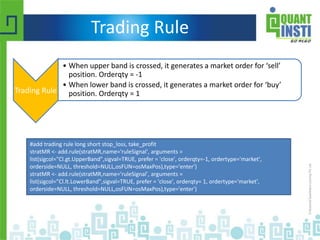
Trading Rule
•When upper band is crossed, it generates a market order for ‘sell’ position. Orderqty = -1
•When lower band is crossed, it generates a market order for ‘buy’ position. Orderqty = 1
Writing the strategy
Indicator
Indicator
•For each row, we check & compare the closing price with threshold value (Thresh)
•If price increases or decreases, threshold(Thresh) is updated accordingly in column THT
•The indicator prices for comparison are updated using band limit (Thresh2), saved in UP
and DOWN to be used for selling and buying respectively
THTFunc<-function(CompTh=NSEI,Thresh=6, Thresh2=3){
numRow<- nrow(CompTh)
xa<-coredata(CompTh)[,4]
xb<-xa
tht<-xa[1]
for(i in 2:numRow){
if(xa[i]>(tht+Thresh)){ tht<-xa[i]}
if(xa[i]<(tht-Thresh)){ tht<-xa[i]}
xb[i]<-tht
}
up <- xb + Thresh2
dn<- xb-Thresh2
res <- cbind(xb, dn,up)
colnames(res) <- c("THT", "DOWN", "UP")
reclass(res,CompTh)
}
THTFunc()
Signal
Signal
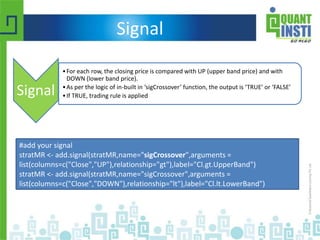
•For each row, the closing price is compared with UP (upper band price) and with
DOWN (lower band price).
•As per the logic of in-built in ‘sigCrossover’ function, the output is ‘TRUE’ or ‘FALSE’
•If TRUE, trading rule is applied
#add your signal
stratMR <- add.signal(stratMR,name="sigCrossover",arguments =
list(columns=c("Close","UP"),relationship="gt"),label="Cl.gt.UpperBand")
stratMR <- add.signal(stratMR,name="sigCrossover",arguments =
list(columns=c("Close","DOWN"),relationship="lt"),label="Cl.lt.LowerBand")
Trading Rule
Trading Rule
• When upper band is crossed, it generates a market order for ‘sell’
position. Orderqty = -1
• When lower band is crossed, it generates a market order for ‘buy’
position. Orderqty = 1
#add trading rule long short stop_loss, take_profit
stratMR <- add.rule(stratMR,name='ruleSignal', arguments =
list(sigcol="Cl.gt.UpperBand",sigval=TRUE, prefer = 'close', orderqty=-1, ordertype='market',
orderside=NULL, threshold=NULL,osFUN=osMaxPos),type='enter')
stratMR <- add.rule(stratMR,name='ruleSignal', arguments =
list(sigcol="Cl.lt.LowerBand",sigval=TRUE, prefer = 'close', orderqty= 1, ordertype='market',
orderside=NULL, threshold=NULL,osFUN=osMaxPos),type='enter')
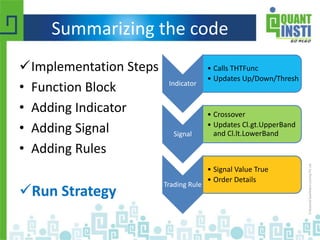
Summarizing the code
Implementation Steps
• Function Block
• Adding Indicator
• Adding Signal
• Adding Rules
Run Strategy
Indicator
• Calls THTFunc
• Updates Up/Down/Thresh
Signal
• Crossover
• Updates Cl.gt.UpperBand
and Cl.lt.LowerBand
Trading Rule
• Signal Value True
• Order Details
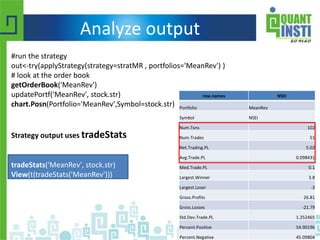
Analyze output
row.names NSEI
Portfolio MeanRev
Symbol NSEI
Num.Txns 102
Num.Trades 51
Net.Trading.PL 5.02
Avg.Trade.PL 0.098431
Med.Trade.PL 0.1
Largest.Winner 3.8
Largest.Loser -3
Gross.Profits 26.81
Gross.Losses -21.79
Std.Dev.Trade.PL 1.252465
Percent.Positive 54.90196
Percent.Negative 45.09804
#run the strategy
out<-try(applyStrategy(strategy=stratMR , portfolios='MeanRev') )
# look at the order book
getOrderBook('MeanRev')
updatePortf('MeanRev', stock.str)
chart.Posn(Portfolio='MeanRev',Symbol=stock.str)
Strategy output uses tradeStats
tradeStats('MeanRev', stock.str)
View(t(tradeStats('MeanRev')))
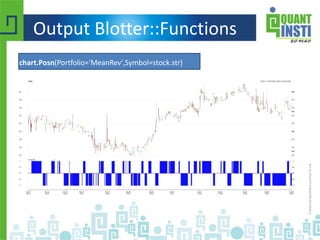
Output Blotter::Functions `
chart.Posn(Portfolio='MeanRev',Symbol=stock.str)
Writing a strategy
The steps are:
 Hypothesis Formation – what is the idea for trade
 Testing - statistically testing the hypothesis with data,
how much confidence do you have on your strategy
 Refining – Optimizing the strategy parameters and paper
trading
 Production - Implementing the strategy in a live trading
environment. This would involve writing the strategy on a
trading platform.
Step 3: Optimization
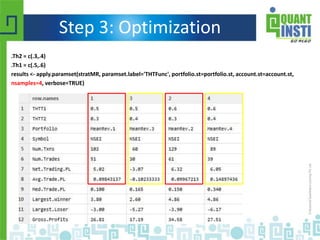
.Th2 = c(.3,.4)
.Th1 = c(.5,.6)
results <- apply.paramset(stratMR, paramset.label='THTFunc', portfolio.st=portfolio.st, account.st=account.st,
nsamples=4, verbose=TRUE)
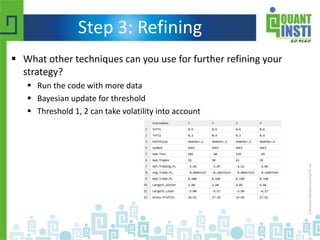
Step 3: Refining
 What other techniques can you use for further refining your
strategy?
 Run the code with more data
 Bayesian update for threshold
 Threshold 1, 2 can take volatility into account
Writing a strategy
The steps are:
 Hypothesis Formation – what is the idea for trade
 Testing - statistically testing the hypothesis with data,
how much confidence do you have on your strategy
 Refining – Optimizing the strategy parameters and paper
trading
 Production - Implementing the strategy in a live trading
environment. This would involve writing the strategy on a
trading platform.
About QI & EPAT
Quantinsti Quantitative Pvt Ltd. -
Quantinsti developed the curriculum for the first dedicated educational program
on Algorithmic and High-Frequency Trading globally (EPAT) in 2009.
Launched with an aim to introduce its course participants to a world class
exposure in the domain of Algorithmic Trading,it provides participants with in-
house proprietary tools and other globally renowned applications to rise steeply
on the learning curve that they witness during the program.
Executive Program in Algorithmic Trading (EPAT)-
• 6-months long comprehensive course in Algorithmic and Quantitative Trading.
• Primary focus on financial technology trends and solutions.
• It is an online live interactive course aimed at working professionals from diverse
backgrounds such as trading-brokerage services, Analytics, Quantitative roles, and
Programming & IT industry.
• Get placement assistance and internship opportunities with leading global firms
after the program
Program Delivery
• Next EPAT batch starting from 10th January, 2015.
• Weekends only program
– 3 hrs sessions on Saturday & Sunday both
– 4 months long program + 2 months project / internship
– Practical Oriented
– 100 contact hours including practical sessions
• Convenience – Conducted online
• Open Source
• Virtual Classroom integration
• Student Portal
• Faculty supervision
• Placement assistance
Thank you!
Next steps
 Watch QI youtube videos for more learning
 Read more at
http://www.rinfinance.com/agenda/2013/workshop/Hum
me+Peterson.pdf
 Contact us if you wish to learn R for Algo trading
 Questions?
Contact us at @ contact@quantinsti.com or sales@quantinsti.com or @: +91-22-61691400, +91-9920448877
Contact Us
To Learn Automated Trading
Email: contact@quantinsti.com
Connect With Us:
SINGAPORE
11 Collyer Quay,
#10-10, The Arcade,
Singapore - 049317
Phone: +65-6221-3654
INDIA
A-309, Boomerang,
Chandivali Farm Road, Powai,
Mumbai - 400 072
Phone: +91-022-61691400

How to design quant trading strategies using “R”?

  • 1.
    How to designquant strategies using R Saturday, May 16, 2015 Anil Yadav (Head, Algorithm strategy advisory team at iRageCapital)
  • 2.
    Content  What isR?  How can we use R packages in writing quantitative trading strategies?  Steps in development of a quantitative trading strategy  Optimizing the quantitative trading strategy Disclaimer: The information in this presentation is intended to be general in nature and is not financial product advice.
  • 3.
    Introduction to R R is an open source software. It is free!  Popular because it has packages with readymade functions  Easy to find help for queries or code on internet Installation: Download and install R-studio from (http://cran.r-project.org) Help guide: (http://www.rseek.org/)
  • 4.
    Packages in R •We will use the package ‘quantstrat’ for writing our strategy today – Install the package install.packages("quantstrat", repos=http://R-Forge.R-project.org) – Install the dependencies (FinancialInstrument, blotter, foreach, doParallel) install.packages("FinancialInstrument", repos=http://R-Forge.R-project.org) • Other useful CRAN packages: TTR, quantmod, etc
  • 5.
    Writing a quantstrategy The steps are: 1. Hypothesis Formation – what is the idea for trade 2. Testing - statistically testing the hypothesis with data, how much confidence do you have on your strategy 3. Refining – Optimizing the strategy parameters and paper trading 4. Production - Implementing the strategy in a live trading environment. This would involve writing the strategy on a trading platform.
  • 6.
    Step 1: Hypothesis Whatis a hypothesis? This is your trading idea. It could be any combination of technical trading rules/it could be your “feel” for the market regime. It is the first thing to be derived out of the trading data. Hypothesis for our strategy: Market is mean reverting
  • 7.
    Step 2: Testing Totest the hypothesis, we will have to write it as a strategy which has statistical methods to compute the indicators, signals and calculate the profits for the given data. The steps for the testing part are: 1. Get the data 2. Write the strategy (indicators, signals, trades, PnL) 3. Analyze the output
  • 8.
    Data • Nifty-Bees (ETF)Data from from NSE (It is a Goldman Sachs managed ETF which trades on the Indian Stock exchanges. National Stock Exchange has higher volumes for the instrument and therefore the data) • OHLC data Snapshot below: Date OPEN HIGH LOW CLOSE 11/18/2014 9:15 850.15 853 850.15 852 11/18/2014 9:19 853.89 853.89 851.8 851.8 11/18/2014 9:20 853.97 853.97 853.97 853.97 11/18/2014 9:21 853.97 853.98 853.97 853.98 11/18/2014 9:22 853.98 853.98 853.98 853.98 11/18/2014 9:23 853.97 853.97 853.97 853.97 11/18/2014 9:24 852.51 854.45 852.51 854 11/18/2014 9:25 854 854 854 854
  • 9.
    Plot the data Wetake a look at the data and plot Bollinger bands to get the first verification on our hypothesis. chart_Series(NSEI) zoom_Chart("2014-11-19") addBBands(n=20, sd =2)
  • 10.
    Writing the strategy Theseare the steps in writing the strategy. Install the packages Read the data file Initialize of variables, parameters Create Indicators Generate Signal Trading rule for execution Output Optimize For our discussion today, we will focus on the parts which are highlighted.
  • 11.
    Indicator •For each row,we check & compare the closing price with threshold value (Thresh) •If price increases or decreases, threshold is updated accordingly in column THT •The indicator prices for comparison are updated using Thresh2, saved in UP and DOWN to be used for selling and buying respectively Signal •For each row, the closing price is compared with UP (upper band price) and with DOWN (lower band price). •As per the logic of in-built in ‘sigCrossover’ function, the output is ‘TRUE’ or ‘FALSE’ •If TRUE, trading rule is applied Trading Rule •When upper band is crossed, it generates a market order for ‘sell’ position. Orderqty = -1 •When lower band is crossed, it generates a market order for ‘buy’ position. Orderqty = 1 Writing the strategy
  • 12.
    Indicator Indicator •For each row,we check & compare the closing price with threshold value (Thresh) •If price increases or decreases, threshold(Thresh) is updated accordingly in column THT •The indicator prices for comparison are updated using band limit (Thresh2), saved in UP and DOWN to be used for selling and buying respectively THTFunc<-function(CompTh=NSEI,Thresh=6, Thresh2=3){ numRow<- nrow(CompTh) xa<-coredata(CompTh)[,4] xb<-xa tht<-xa[1] for(i in 2:numRow){ if(xa[i]>(tht+Thresh)){ tht<-xa[i]} if(xa[i]<(tht-Thresh)){ tht<-xa[i]} xb[i]<-tht } up <- xb + Thresh2 dn<- xb-Thresh2 res <- cbind(xb, dn,up) colnames(res) <- c("THT", "DOWN", "UP") reclass(res,CompTh) } THTFunc()
  • 13.
    Signal Signal •For each row,the closing price is compared with UP (upper band price) and with DOWN (lower band price). •As per the logic of in-built in ‘sigCrossover’ function, the output is ‘TRUE’ or ‘FALSE’ •If TRUE, trading rule is applied #add your signal stratMR <- add.signal(stratMR,name="sigCrossover",arguments = list(columns=c("Close","UP"),relationship="gt"),label="Cl.gt.UpperBand") stratMR <- add.signal(stratMR,name="sigCrossover",arguments = list(columns=c("Close","DOWN"),relationship="lt"),label="Cl.lt.LowerBand")
  • 14.
    Trading Rule Trading Rule •When upper band is crossed, it generates a market order for ‘sell’ position. Orderqty = -1 • When lower band is crossed, it generates a market order for ‘buy’ position. Orderqty = 1 #add trading rule long short stop_loss, take_profit stratMR <- add.rule(stratMR,name='ruleSignal', arguments = list(sigcol="Cl.gt.UpperBand",sigval=TRUE, prefer = 'close', orderqty=-1, ordertype='market', orderside=NULL, threshold=NULL,osFUN=osMaxPos),type='enter') stratMR <- add.rule(stratMR,name='ruleSignal', arguments = list(sigcol="Cl.lt.LowerBand",sigval=TRUE, prefer = 'close', orderqty= 1, ordertype='market', orderside=NULL, threshold=NULL,osFUN=osMaxPos),type='enter')
  • 15.
    Summarizing the code ImplementationSteps • Function Block • Adding Indicator • Adding Signal • Adding Rules Run Strategy Indicator • Calls THTFunc • Updates Up/Down/Thresh Signal • Crossover • Updates Cl.gt.UpperBand and Cl.lt.LowerBand Trading Rule • Signal Value True • Order Details
  • 16.
    Analyze output row.names NSEI PortfolioMeanRev Symbol NSEI Num.Txns 102 Num.Trades 51 Net.Trading.PL 5.02 Avg.Trade.PL 0.098431 Med.Trade.PL 0.1 Largest.Winner 3.8 Largest.Loser -3 Gross.Profits 26.81 Gross.Losses -21.79 Std.Dev.Trade.PL 1.252465 Percent.Positive 54.90196 Percent.Negative 45.09804 #run the strategy out<-try(applyStrategy(strategy=stratMR , portfolios='MeanRev') ) # look at the order book getOrderBook('MeanRev') updatePortf('MeanRev', stock.str) chart.Posn(Portfolio='MeanRev',Symbol=stock.str) Strategy output uses tradeStats tradeStats('MeanRev', stock.str) View(t(tradeStats('MeanRev')))
  • 17.
  • 18.
    Writing a strategy Thesteps are:  Hypothesis Formation – what is the idea for trade  Testing - statistically testing the hypothesis with data, how much confidence do you have on your strategy  Refining – Optimizing the strategy parameters and paper trading  Production - Implementing the strategy in a live trading environment. This would involve writing the strategy on a trading platform.
  • 19.
    Step 3: Optimization .Th2= c(.3,.4) .Th1 = c(.5,.6) results <- apply.paramset(stratMR, paramset.label='THTFunc', portfolio.st=portfolio.st, account.st=account.st, nsamples=4, verbose=TRUE)
  • 20.
    Step 3: Refining What other techniques can you use for further refining your strategy?  Run the code with more data  Bayesian update for threshold  Threshold 1, 2 can take volatility into account
  • 21.
    Writing a strategy Thesteps are:  Hypothesis Formation – what is the idea for trade  Testing - statistically testing the hypothesis with data, how much confidence do you have on your strategy  Refining – Optimizing the strategy parameters and paper trading  Production - Implementing the strategy in a live trading environment. This would involve writing the strategy on a trading platform.
  • 22.
    About QI &EPAT Quantinsti Quantitative Pvt Ltd. - Quantinsti developed the curriculum for the first dedicated educational program on Algorithmic and High-Frequency Trading globally (EPAT) in 2009. Launched with an aim to introduce its course participants to a world class exposure in the domain of Algorithmic Trading,it provides participants with in- house proprietary tools and other globally renowned applications to rise steeply on the learning curve that they witness during the program. Executive Program in Algorithmic Trading (EPAT)- • 6-months long comprehensive course in Algorithmic and Quantitative Trading. • Primary focus on financial technology trends and solutions. • It is an online live interactive course aimed at working professionals from diverse backgrounds such as trading-brokerage services, Analytics, Quantitative roles, and Programming & IT industry. • Get placement assistance and internship opportunities with leading global firms after the program
  • 23.
    Program Delivery • NextEPAT batch starting from 10th January, 2015. • Weekends only program – 3 hrs sessions on Saturday & Sunday both – 4 months long program + 2 months project / internship – Practical Oriented – 100 contact hours including practical sessions • Convenience – Conducted online • Open Source • Virtual Classroom integration • Student Portal • Faculty supervision • Placement assistance
  • 24.
    Thank you! Next steps Watch QI youtube videos for more learning  Read more at http://www.rinfinance.com/agenda/2013/workshop/Hum me+Peterson.pdf  Contact us if you wish to learn R for Algo trading  Questions? Contact us at @ contact@quantinsti.com or sales@quantinsti.com or @: +91-22-61691400, +91-9920448877
  • 25.
    Contact Us To LearnAutomated Trading Email: contact@quantinsti.com Connect With Us: SINGAPORE 11 Collyer Quay, #10-10, The Arcade, Singapore - 049317 Phone: +65-6221-3654 INDIA A-309, Boomerang, Chandivali Farm Road, Powai, Mumbai - 400 072 Phone: +91-022-61691400

Editor's Notes

  • #4 You might have heard a lot about R especially in context of big data. In quant trading, R has gained a lot of popularity as it is free and open sourced. That reduces our task for re-writing the functions which are already there. For instance, with only one line of code BBands(prices, n=60,"SMA",sd=2) you have created bollinger bands for your data.
  • #5 Here can mention the difference between Cran packages and other packages
  • #6 Pls write 3-4 words explaining the jargon.
  • #7 Pls add the content – based on data that we will see. This is strategy that we intend to test.
  • #8 Pls add the content
  • #9 Pls provide the answers for international audience
  • #13 Define a time-varying Threshold Price Create a UP/DOWN band around the Threshold Price THTFunc() does this in the Code Threshold Price (Thresh1) Band Limits (Thresh2)
  • #14 sigCrossover is an in-built function
  • #19 Pls write 3-4 words explaining the jargon.
  • #22 Pls write 3-4 words explaining the jargon.