Copyright 2015 IT Professional Academy 1
Automation (QTP) Testing
Course
DAY - 2
Copyright 2015 IT Professional Academy 2
Topics for Today
What is QTP and License Types
i. Floating
ii. Node Lock
QTP Introduction
i. About QTP
ii. Support OS & Browsers
About QTP utility programme
i. Add In Manager
ii. QTP supported Technologies
QTP window or QTP Editor Components ( 6 / 11 Panes)
i. Test Pane ( key word view and expert view)
ii. Data table
iii. Active screen
iv. Debug viewer -- Upto 8.2
v. Information pane
vi. Missing resource Pane --- Upto 9.2
vii. Test flow
viii. Available key words
ix. Resources
QTP Logical Structure
Record and Playback
Copyright 2015 IT Professional Academy 3
What is QTP?
•QTP is a Functional Automation tool by HP.
Now called as UFT. i.e. unified functional tool.
Latest version is UFT 12.5
•Validates functional flows of the Application.
•Not fully capable of validating UX, color,
position, location, intuitiveness etc of the
application.
Copyright 2015 IT Professional Academy 4
QTP License
Seat License: This type of license is present on
the client machine itself. No server involved.
Concurrent License: License is located at the
server and multiple machines access to get
license details. Most common type of license
arrangement.
Copyright 2015 IT Professional Academy 5
OS and Applications
OS:
Windows only includes client as well as server.
Applications:
Internet Browsers namely IE, Chrome, Firefox.
(Limited Versions Only)
Windows based Applications:
SAP, Silverlight, VB, Java, Dot Net etc
Click on the Icon to the right
for QTP and Browser
Support Matrix:
Copyright 2015 IT Professional Academy 6
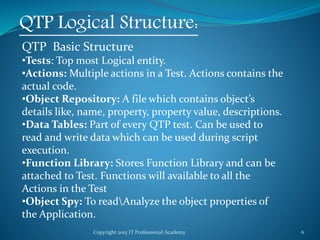
QTP Logical Structure:
QTP Basic Structure
•Tests: Top most Logical entity.
•Actions: Multiple actions in a Test. Actions contains the
actual code.
•Object Repository: A file which contains object’s
details like, name, property, property value, descriptions.
•Data Tables: Part of every QTP test. Can be used to
read and write data which can be used during script
execution.
•Function Library: Stores Function Library and can be
attached to Test. Functions will available to all the
Actions in the Test
•Object Spy: To readAnalyze the object properties of
the Application.
Copyright 2015 IT Professional Academy 7
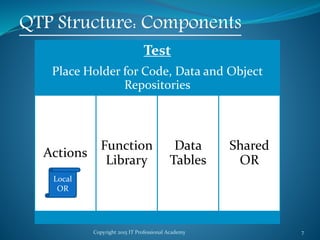
Test
Place Holder for Code, Data and Object
Repositories
Actions
Function
Library
Data
Tables
Shared
OR
QTP Structure: Components
Local
OR
Copyright 2015 IT Professional Academy 8
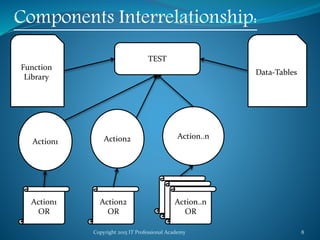
Components Interrelationship:
TEST
Action1 Action2 Action..n
Action1
OR
Action2
OR
Action..n
OR
Function
Library
Data-Tables
Copyright 2015 IT Professional Academy 9
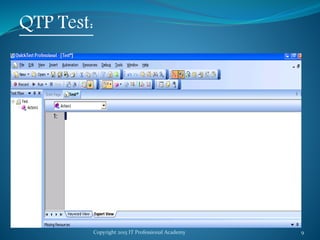
QTP Test:
Copyright 2015 IT Professional Academy 10
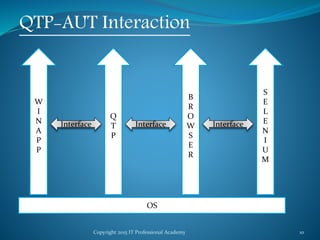
QTP-AUT Interaction
OS
Q
T
P
B
R
O
W
S
E
R
S
E
L
E
N
I
U
M
InterfaceInterface
W
I
N
A
P
P
Interface
Copyright 2015 IT Professional Academy 11
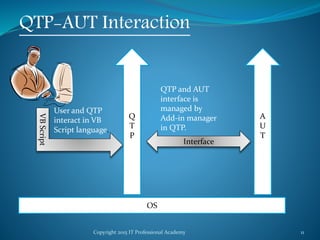
QTP-AUT Interaction
OS
Q
T
P
A
U
T
Interface
VBScript
User and QTP
interact in VB
Script language.
QTP and AUT
interface is
managed by
Add-in manager
in QTP.
Copyright 2015 IT Professional Academy 12
QTP Set Up
•QTP 10 works on windows XP.
•Windows Virtualization is to be Used to Run
Windows XP over Windows 7.
•Oracle VM can also be used to achieve
virtualization.
Copyright 2015 IT Professional Academy 13
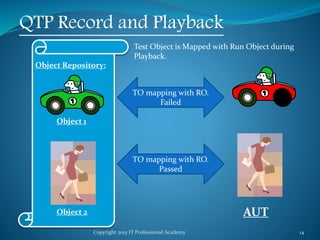
QTP Record and Playback
Recording: While recording, QTP records user’s
commandsstatements and targetsObjects
description.
Objects Description: Is Stored in Object repository.
Stored Object is also called TO (Test object).
Commands: Is stored in Actions under QTP Test.
Playback: When script is replayed, QTP reads the
statementscommands from the script and try to find
the similar object in the AUT. If target is found,
command is executed; if not test fails.
Copyright 2015 IT Professional Academy 14
QTP Record and Playback
Object Repository:
Object 1
Object 2
TO mapping with RO.
Failed
TO mapping with RO.
Passed
Test Object is Mapped with Run Object during
Playback.
AUT
Copyright 2015 IT Professional Academy 15
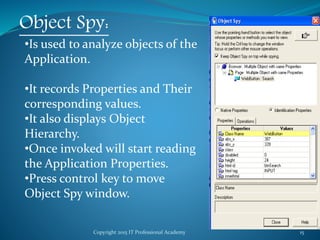
Object Spy:
•Is used to analyze objects of the
Application.
•It records Properties and Their
corresponding values.
•It also displays Object
Hierarchy.
•Once invoked will start reading
the Application Properties.
•Press control key to move
Object Spy window.
Copyright 2015 IT Professional Academy 16
What is VBScript?
•A Safe subset of visual basic
•The VBScript Code is case Insensitive.
•Microsoft Visual Basic Scripting Edition brings active
scripting to a wide variety of environments, including
Web client scripting in Microsoft Internet Explorer
and Web server scripting in Microsoft Internet
Information Service (IIS).
Copyright 2015 IT Professional Academy 17
VBScript data type?
•VBScript has only one data type called a Variant.
•A Variant is a special kind of data type that can
contain different kinds of information, depending on
how it is used.
•Because Variant is the only data type in VBScript, it
is also the data type returned by all functions in
VBScript.
•At its simplest, a Variant can contain either numeric
or string information.
•A Variant behaves as a number when you use it in a
numeric context and as a string when you use it in a
string context.
Copyright 2015 IT Professional Academy 18
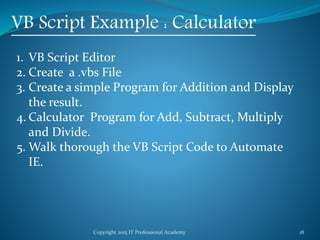
VB Script Example : Calculator
1. VB Script Editor
2. Create a .vbs File
3. Create a simple Program for Addition and Display
the result.
4. Calculator Program for Add, Subtract, Multiply
and Divide.
5. Walk thorough the VB Script Code to Automate
IE.
Copyright 2015 IT Professional Academy 19
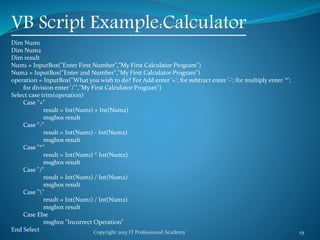
VB Script Example:Calculator
Dim Num1
Dim Num2
Dim result
Num1 = InputBox("Enter First Number","My First Calculator Program")
Num2 = InputBox("Enter 2nd Number","My First Calculator Program")
operation = InputBox("What you wish to do? For Add enter '+'; for subtract enter '-'; for multiply enter '*';
for division enter '/'","My First Calculator Program")
Select case trim(operation)
Case "+"
result = Int(Num1) + Int(Num2)
msgbox result
Case "-"
result = Int(Num1) - Int(Num2)
msgbox result
Case "*"
result = Int(Num1) * Int(Num2)
msgbox result
Case "/"
result = Int(Num1) / Int(Num2)
msgbox result
Case ""
result = Int(Num1) / Int(Num2)
msgbox result
Case Else
msgbox "Incorrect Operation"
End Select
Copyright 2015 IT Professional Academy 20
VB Script Example: Calculator and
Automate Browser
Note: Click on the Icons to Invoke the Program.
Copyright 2015 IT Professional Academy 21
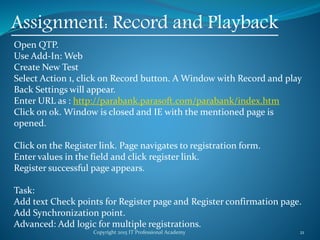
Assignment: Record and Playback
Open QTP.
Use Add-In: Web
Create New Test
Select Action 1, click on Record button. A Window with Record and play
Back Settings will appear.
Enter URL as : http://parabank.parasoft.com/parabank/index.htm
Click on ok. Window is closed and IE with the mentioned page is
opened.
Click on the Register link. Page navigates to registration form.
Enter values in the field and click register link.
Register successful page appears.
Task:
Add text Check points for Register page and Register confirmation page.
Add Synchronization point.
Advanced: Add logic for multiple registrations.
Copyright 2015 IT Professional Academy 22
QTP DAY 2 Ends.
Thank you.

QTP Automation Testing Tutorial 2

  • 1.
    Copyright 2015 ITProfessional Academy 1 Automation (QTP) Testing Course DAY - 2
  • 2.
    Copyright 2015 ITProfessional Academy 2 Topics for Today What is QTP and License Types i. Floating ii. Node Lock QTP Introduction i. About QTP ii. Support OS & Browsers About QTP utility programme i. Add In Manager ii. QTP supported Technologies QTP window or QTP Editor Components ( 6 / 11 Panes) i. Test Pane ( key word view and expert view) ii. Data table iii. Active screen iv. Debug viewer -- Upto 8.2 v. Information pane vi. Missing resource Pane --- Upto 9.2 vii. Test flow viii. Available key words ix. Resources QTP Logical Structure Record and Playback
  • 3.
    Copyright 2015 ITProfessional Academy 3 What is QTP? •QTP is a Functional Automation tool by HP. Now called as UFT. i.e. unified functional tool. Latest version is UFT 12.5 •Validates functional flows of the Application. •Not fully capable of validating UX, color, position, location, intuitiveness etc of the application.
  • 4.
    Copyright 2015 ITProfessional Academy 4 QTP License Seat License: This type of license is present on the client machine itself. No server involved. Concurrent License: License is located at the server and multiple machines access to get license details. Most common type of license arrangement.
  • 5.
    Copyright 2015 ITProfessional Academy 5 OS and Applications OS: Windows only includes client as well as server. Applications: Internet Browsers namely IE, Chrome, Firefox. (Limited Versions Only) Windows based Applications: SAP, Silverlight, VB, Java, Dot Net etc Click on the Icon to the right for QTP and Browser Support Matrix:
  • 6.
    Copyright 2015 ITProfessional Academy 6 QTP Logical Structure: QTP Basic Structure •Tests: Top most Logical entity. •Actions: Multiple actions in a Test. Actions contains the actual code. •Object Repository: A file which contains object’s details like, name, property, property value, descriptions. •Data Tables: Part of every QTP test. Can be used to read and write data which can be used during script execution. •Function Library: Stores Function Library and can be attached to Test. Functions will available to all the Actions in the Test •Object Spy: To readAnalyze the object properties of the Application.
  • 7.
    Copyright 2015 ITProfessional Academy 7 Test Place Holder for Code, Data and Object Repositories Actions Function Library Data Tables Shared OR QTP Structure: Components Local OR
  • 8.
    Copyright 2015 ITProfessional Academy 8 Components Interrelationship: TEST Action1 Action2 Action..n Action1 OR Action2 OR Action..n OR Function Library Data-Tables
  • 9.
    Copyright 2015 ITProfessional Academy 9 QTP Test:
  • 10.
    Copyright 2015 ITProfessional Academy 10 QTP-AUT Interaction OS Q T P B R O W S E R S E L E N I U M InterfaceInterface W I N A P P Interface
  • 11.
    Copyright 2015 ITProfessional Academy 11 QTP-AUT Interaction OS Q T P A U T Interface VBScript User and QTP interact in VB Script language. QTP and AUT interface is managed by Add-in manager in QTP.
  • 12.
    Copyright 2015 ITProfessional Academy 12 QTP Set Up •QTP 10 works on windows XP. •Windows Virtualization is to be Used to Run Windows XP over Windows 7. •Oracle VM can also be used to achieve virtualization.
  • 13.
    Copyright 2015 ITProfessional Academy 13 QTP Record and Playback Recording: While recording, QTP records user’s commandsstatements and targetsObjects description. Objects Description: Is Stored in Object repository. Stored Object is also called TO (Test object). Commands: Is stored in Actions under QTP Test. Playback: When script is replayed, QTP reads the statementscommands from the script and try to find the similar object in the AUT. If target is found, command is executed; if not test fails.
  • 14.
    Copyright 2015 ITProfessional Academy 14 QTP Record and Playback Object Repository: Object 1 Object 2 TO mapping with RO. Failed TO mapping with RO. Passed Test Object is Mapped with Run Object during Playback. AUT
  • 15.
    Copyright 2015 ITProfessional Academy 15 Object Spy: •Is used to analyze objects of the Application. •It records Properties and Their corresponding values. •It also displays Object Hierarchy. •Once invoked will start reading the Application Properties. •Press control key to move Object Spy window.
  • 16.
    Copyright 2015 ITProfessional Academy 16 What is VBScript? •A Safe subset of visual basic •The VBScript Code is case Insensitive. •Microsoft Visual Basic Scripting Edition brings active scripting to a wide variety of environments, including Web client scripting in Microsoft Internet Explorer and Web server scripting in Microsoft Internet Information Service (IIS).
  • 17.
    Copyright 2015 ITProfessional Academy 17 VBScript data type? •VBScript has only one data type called a Variant. •A Variant is a special kind of data type that can contain different kinds of information, depending on how it is used. •Because Variant is the only data type in VBScript, it is also the data type returned by all functions in VBScript. •At its simplest, a Variant can contain either numeric or string information. •A Variant behaves as a number when you use it in a numeric context and as a string when you use it in a string context.
  • 18.
    Copyright 2015 ITProfessional Academy 18 VB Script Example : Calculator 1. VB Script Editor 2. Create a .vbs File 3. Create a simple Program for Addition and Display the result. 4. Calculator Program for Add, Subtract, Multiply and Divide. 5. Walk thorough the VB Script Code to Automate IE.
  • 19.
    Copyright 2015 ITProfessional Academy 19 VB Script Example:Calculator Dim Num1 Dim Num2 Dim result Num1 = InputBox("Enter First Number","My First Calculator Program") Num2 = InputBox("Enter 2nd Number","My First Calculator Program") operation = InputBox("What you wish to do? For Add enter '+'; for subtract enter '-'; for multiply enter '*'; for division enter '/'","My First Calculator Program") Select case trim(operation) Case "+" result = Int(Num1) + Int(Num2) msgbox result Case "-" result = Int(Num1) - Int(Num2) msgbox result Case "*" result = Int(Num1) * Int(Num2) msgbox result Case "/" result = Int(Num1) / Int(Num2) msgbox result Case "" result = Int(Num1) / Int(Num2) msgbox result Case Else msgbox "Incorrect Operation" End Select
  • 20.
    Copyright 2015 ITProfessional Academy 20 VB Script Example: Calculator and Automate Browser Note: Click on the Icons to Invoke the Program.
  • 21.
    Copyright 2015 ITProfessional Academy 21 Assignment: Record and Playback Open QTP. Use Add-In: Web Create New Test Select Action 1, click on Record button. A Window with Record and play Back Settings will appear. Enter URL as : http://parabank.parasoft.com/parabank/index.htm Click on ok. Window is closed and IE with the mentioned page is opened. Click on the Register link. Page navigates to registration form. Enter values in the field and click register link. Register successful page appears. Task: Add text Check points for Register page and Register confirmation page. Add Synchronization point. Advanced: Add logic for multiple registrations.
  • 22.
    Copyright 2015 ITProfessional Academy 22 QTP DAY 2 Ends. Thank you.