
Copyright 2015 IT Professional Academy 1
Automation (QTP) Testing
Course
DAY - 5
Copyright 2015 IT Professional Academy 2
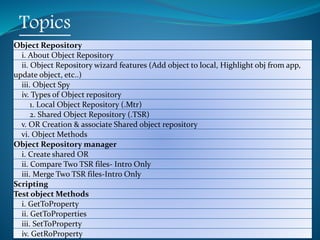
Topics
Object Repository
i. About Object Repository
ii. Object Repository wizard features (Add object to local, Highlight obj from app,
update object, etc..)
iii. Object Spy
iv. Types of Object repository
1. Local Object Repository (.Mtr)
2. Shared Object Repository (.TSR)
v. OR Creation & associate Shared object repository
vi. Object Methods
Object Repository manager
i. Create shared OR
ii. Compare Two TSR files- Intro Only
iii. Merge Two TSR files-Intro Only
Scripting
Test object Methods
i. GetToProperty
ii. GetToProperties
iii. SetToProperty
iv. GetRoProperty
Copyright 2015 IT Professional Academy 3
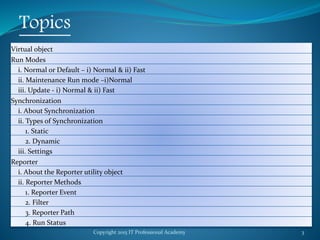
Topics
Virtual object
Run Modes
i. Normal or Default – i) Normal & ii) Fast
ii. Maintenance Run mode –i)Normal
iii. Update - i) Normal & ii) Fast
Synchronization
i. About Synchronization
ii. Types of Synchronization
1. Static
2. Dynamic
iii. Settings
Reporter
i. About the Reporter utility object
ii. Reporter Methods
1. Reporter Event
2. Filter
3. Reporter Path
4. Run Status
Copyright 2015 IT Professional Academy 4
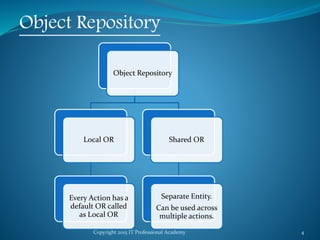
Object Repository
Object Repository
Local OR
Every Action has a
default OR called
as Local OR
Shared OR
Separate Entity.
Can be used across
multiple actions.
Copyright 2015 IT Professional Academy 5
Object Repository
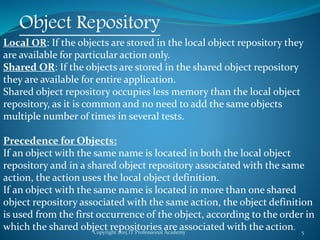
Local OR: If the objects are stored in the local object repository they
are available for particular action only.
Shared OR: If the objects are stored in the shared object repository
they are available for entire application.
Shared object repository occupies less memory than the local object
repository, as it is common and no need to add the same objects
multiple number of times in several tests.
Precedence for Objects:
If an object with the same name is located in both the local object
repository and in a shared object repository associated with the same
action, the action uses the local object definition.
If an object with the same name is located in more than one shared
object repository associated with the same action, the object definition
is used from the first occurrence of the object, according to the order in
which the shared object repositories are associated with the action.
Copyright 2015 IT Professional Academy 6
Compare and Merge OR
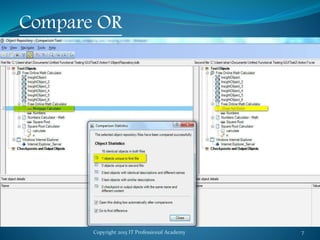
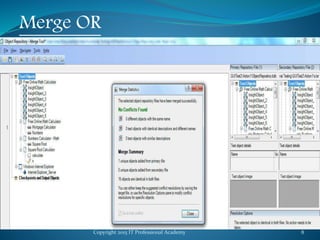
•Invoked from Object Manager
•Used for Comparison and Merging of Shared OR.
•Local OR can not be Compared and Merged.
Copyright 2015 IT Professional Academy 7
Compare OR
Copyright 2015 IT Professional Academy 8
Merge OR
Copyright 2015 IT Professional Academy 9
Get, Set RO and TO Property
GetTOProperty: To get the Property values of the
Object located in side an OR at Run time.
GetROProperty: To get the Property values of the
Object present in AUT at Run time.
SetToProperty: To Set the Property values of the Object
located in side an OR at Run time. Value set at run time
will not impact actual values in OR.
SetROProperty: Set RO Property is not a valid function.
We can not set the value of the Run-Time Object in AUT
at run time. This is also a Interview question asked to
confuse.
Copyright 2015 IT Professional Academy 10
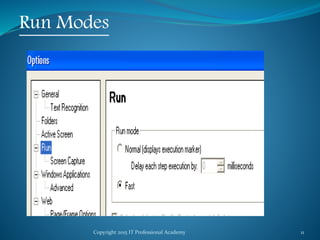
Run Modes
Used to control Execution Speed of the Execution.
Useful for Implementing Synchronizations in the Script.
Two Modes:
1. Normal: Can set Delay. For example: If a Delay of 1 Sec
is inserted, QTP will wait 1 Sec before executing new
step.
Also, Execution Marker will be displayed while
execution.
2. Fast: QTP will not wait and will continue to execute
with out any delay. Performance can be improved by
selecting this option. Execution Cursor will not be
displayed here.
Copyright 2015 IT Professional Academy 11
Run Modes
Copyright 2015 IT Professional Academy 12
Synchronization
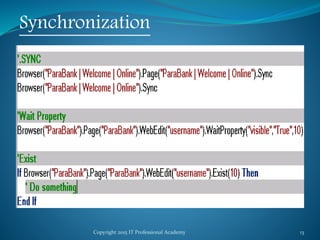
Synchronization is a collection of techniques to sync Scripts
based on AUT response; i.e. QTP should wait for Application
to respond before doing the next step in the script.
It is the most important thing which makes a FW robust.
There are multiple ways to insert synchronization points:
a. Browser.Page.Sync
b. Browser.Sync
c. Browser.Page.WebElement.Exist(5)
d. Browser.Page.WebElement.WaitProperty()
e. Wait(5)
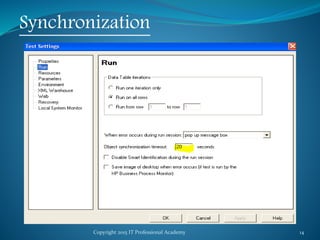
f. Object Synchronization Time Out. Test->Settings->Run
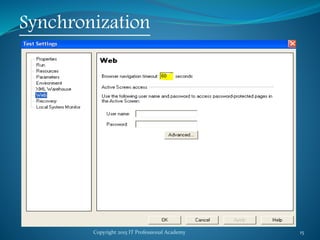
g. Browser Navigation Time Out. Test->Setting->Web
Copyright 2015 IT Professional Academy 13
Synchronization
Copyright 2015 IT Professional Academy 14
Synchronization
Copyright 2015 IT Professional Academy 15
Synchronization
Copyright 2015 IT Professional Academy 16
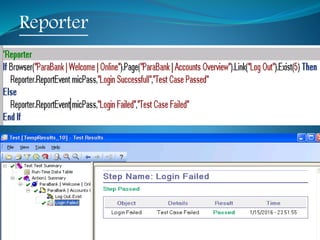
Reporter
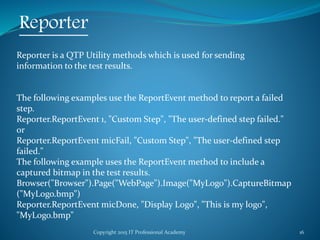
Reporter is a QTP Utility methods which is used for sending
information to the test results.
The following examples use the ReportEvent method to report a failed
step.
Reporter.ReportEvent 1, "Custom Step", "The user-defined step failed."
or
Reporter.ReportEvent micFail, "Custom Step", "The user-defined step
failed."
The following example uses the ReportEvent method to include a
captured bitmap in the test results.
Browser("Browser").Page("WebPage").Image("MyLogo").CaptureBitmap
("MyLogo.bmp")
Reporter.ReportEvent micDone, "Display Logo", "This is my logo",
"MyLogo.bmp"
Copyright 2015 IT Professional Academy 17
Reporter
Copyright 2015 IT Professional Academy 18
Thank You

QTP Automation Testing Tutorial 5

  • 1.
    Copyright 2015 ITProfessional Academy 1 Automation (QTP) Testing Course DAY - 5
  • 2.
    Copyright 2015 ITProfessional Academy 2 Topics Object Repository i. About Object Repository ii. Object Repository wizard features (Add object to local, Highlight obj from app, update object, etc..) iii. Object Spy iv. Types of Object repository 1. Local Object Repository (.Mtr) 2. Shared Object Repository (.TSR) v. OR Creation & associate Shared object repository vi. Object Methods Object Repository manager i. Create shared OR ii. Compare Two TSR files- Intro Only iii. Merge Two TSR files-Intro Only Scripting Test object Methods i. GetToProperty ii. GetToProperties iii. SetToProperty iv. GetRoProperty
  • 3.
    Copyright 2015 ITProfessional Academy 3 Topics Virtual object Run Modes i. Normal or Default – i) Normal & ii) Fast ii. Maintenance Run mode –i)Normal iii. Update - i) Normal & ii) Fast Synchronization i. About Synchronization ii. Types of Synchronization 1. Static 2. Dynamic iii. Settings Reporter i. About the Reporter utility object ii. Reporter Methods 1. Reporter Event 2. Filter 3. Reporter Path 4. Run Status
  • 4.
    Copyright 2015 ITProfessional Academy 4 Object Repository Object Repository Local OR Every Action has a default OR called as Local OR Shared OR Separate Entity. Can be used across multiple actions.
  • 5.
    Copyright 2015 ITProfessional Academy 5 Object Repository Local OR: If the objects are stored in the local object repository they are available for particular action only. Shared OR: If the objects are stored in the shared object repository they are available for entire application. Shared object repository occupies less memory than the local object repository, as it is common and no need to add the same objects multiple number of times in several tests. Precedence for Objects: If an object with the same name is located in both the local object repository and in a shared object repository associated with the same action, the action uses the local object definition. If an object with the same name is located in more than one shared object repository associated with the same action, the object definition is used from the first occurrence of the object, according to the order in which the shared object repositories are associated with the action.
  • 6.
    Copyright 2015 ITProfessional Academy 6 Compare and Merge OR •Invoked from Object Manager •Used for Comparison and Merging of Shared OR. •Local OR can not be Compared and Merged.
  • 7.
    Copyright 2015 ITProfessional Academy 7 Compare OR
  • 8.
    Copyright 2015 ITProfessional Academy 8 Merge OR
  • 9.
    Copyright 2015 ITProfessional Academy 9 Get, Set RO and TO Property GetTOProperty: To get the Property values of the Object located in side an OR at Run time. GetROProperty: To get the Property values of the Object present in AUT at Run time. SetToProperty: To Set the Property values of the Object located in side an OR at Run time. Value set at run time will not impact actual values in OR. SetROProperty: Set RO Property is not a valid function. We can not set the value of the Run-Time Object in AUT at run time. This is also a Interview question asked to confuse.
  • 10.
    Copyright 2015 ITProfessional Academy 10 Run Modes Used to control Execution Speed of the Execution. Useful for Implementing Synchronizations in the Script. Two Modes: 1. Normal: Can set Delay. For example: If a Delay of 1 Sec is inserted, QTP will wait 1 Sec before executing new step. Also, Execution Marker will be displayed while execution. 2. Fast: QTP will not wait and will continue to execute with out any delay. Performance can be improved by selecting this option. Execution Cursor will not be displayed here.
  • 11.
    Copyright 2015 ITProfessional Academy 11 Run Modes
  • 12.
    Copyright 2015 ITProfessional Academy 12 Synchronization Synchronization is a collection of techniques to sync Scripts based on AUT response; i.e. QTP should wait for Application to respond before doing the next step in the script. It is the most important thing which makes a FW robust. There are multiple ways to insert synchronization points: a. Browser.Page.Sync b. Browser.Sync c. Browser.Page.WebElement.Exist(5) d. Browser.Page.WebElement.WaitProperty() e. Wait(5) f. Object Synchronization Time Out. Test->Settings->Run g. Browser Navigation Time Out. Test->Setting->Web
  • 13.
    Copyright 2015 ITProfessional Academy 13 Synchronization
  • 14.
    Copyright 2015 ITProfessional Academy 14 Synchronization
  • 15.
    Copyright 2015 ITProfessional Academy 15 Synchronization
  • 16.
    Copyright 2015 ITProfessional Academy 16 Reporter Reporter is a QTP Utility methods which is used for sending information to the test results. The following examples use the ReportEvent method to report a failed step. Reporter.ReportEvent 1, "Custom Step", "The user-defined step failed." or Reporter.ReportEvent micFail, "Custom Step", "The user-defined step failed." The following example uses the ReportEvent method to include a captured bitmap in the test results. Browser("Browser").Page("WebPage").Image("MyLogo").CaptureBitmap ("MyLogo.bmp") Reporter.ReportEvent micDone, "Display Logo", "This is my logo", "MyLogo.bmp"
  • 17.
    Copyright 2015 ITProfessional Academy 17 Reporter
  • 18.
    Copyright 2015 ITProfessional Academy 18 Thank You