NAME : MUHAMMAD SHAZMIL BIN MOHD SABILAN
MATRICS NO : BTAL17047398
COURSE : BACHELOR OF COMPUTER SCIENCE
(SOFTWARE DEVELOPMENT)
SUPERVISOR : PROF. MADYA DR. ENGKU FADZLI HASAN BIN
SYED ABDULLAH
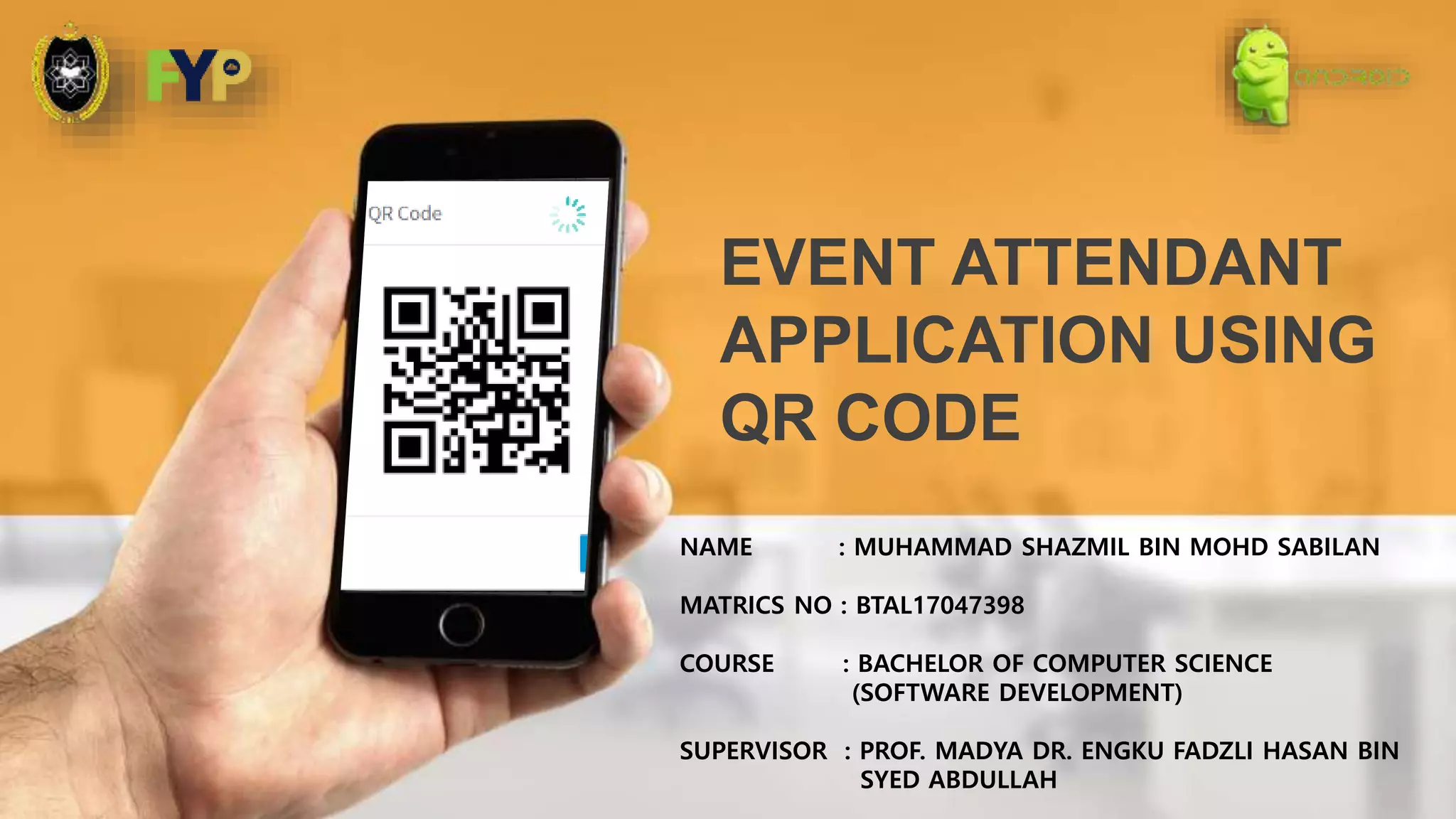
EVENT ATTENDANT
APPLICATION USING
QR CODE
-QR code is a new technology that can store text data in many ways. The QR code itself is a
short form for quick response code .
-The system focuses on recording attendance of participating people for events using QR code.
-This system is a mobile application system for scanning QR code and Web Based system for
generate QR code.
-Events usually require pen and paper to record participants. So, this system will use the QR
code technique to ensure that attendee attendance can be easily recorded.
PROJECT BACKGROUND
QR
PROJECT BACKGROUND
-Organizer created an event. Then the organizer signs event in the system (web based).
The system will generate qr code that contains event information. During the event, QR code
will be seen on the screen lcd or printed and placed on the wall
-The user will open the app and check in. The application verify login and get user information.
-Users will scan the QR code that the organizer generates. The system records the attendant
based on user information and event information extracted from QR code.
-Then, reports of participants attending the event are produced in the form of tables.
SYSTEM FLOW
PROBLEM STATEMENT
-The usual way of recording attendance takes a lot of time if there are many participants.
Therefore, this system will make the event more efficient in its time.
-Participants also find it difficult to find their name to record attendance in the form of
regular prints used today
-The reliability of the participants in terms of entry and exit time for the event.
OBJECTIVE
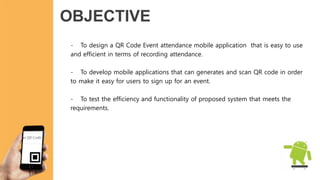
- To design a QR Code Event attendance mobile application that is easy to use
and efficient in terms of recording attendance.
- To develop mobile applications that can generates and scan QR code in order
to make it easy for users to sign up for an event.
- To test the efficiency and functionality of proposed system that meets the
requirements.
SCOPE
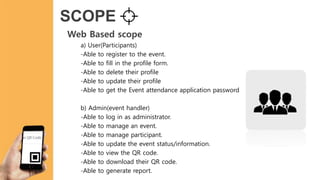
Web Based scope
a) User(Participants)
-Able to register to the event.
-Able to fill in the profile form.
-Able to delete their profile
-Able to update their profile
-Able to get the Event attendance application password
b) Admin(event handler)
-Able to log in as administrator.
-Able to manage an event.
-Able to manage participant.
-Able to update the event status/information.
-Able to view the QR code.
-Able to download their QR code.
-Able to generate report.
SCOPE
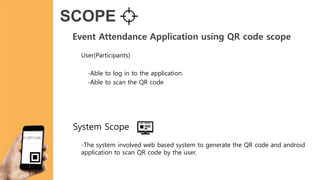
Event Attendance Application using QR code scope
User(Participants)
-Able to log in to the application.
-Able to scan the QR code
-The system involved web based system to generate the QR code and android
application to scan QR code by the user.
System Scope
QR Code Design
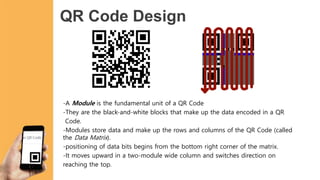
-A Module is the fundamental unit of a QR Code
-They are the black-and-white blocks that make up the data encoded in a QR
Code.
-Modules store data and make up the rows and columns of the QR Code (called
the Data Matrix).
-positioning of data bits begins from the bottom right corner of the matrix.
-It moves upward in a two-module wide column and switches direction on
reaching the top.
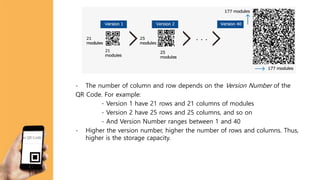
- The number of column and row depends on the Version Number of the
QR Code. For example:
- Version 1 have 21 rows and 21 columns of modules
- Version 2 have 25 rows and 25 columns, and so on
- And Version Number ranges between 1 and 40
- Higher the version number, higher the number of rows and columns. Thus,
higher is the storage capacity.
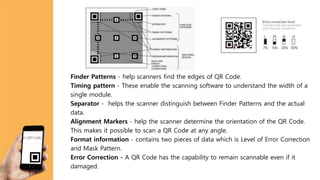
Finder Patterns - help scanners find the edges of QR Code.
Timing pattern - These enable the scanning software to understand the width of a
single module.
Separator - helps the scanner distinguish between Finder Patterns and the actual
data.
Alignment Markers - help the scanner determine the orientation of the QR Code.
This makes it possible to scan a QR Code at any angle.
Format information - contains two pieces of data which is Level of Error Correction
and Mask Pattern.
Error Correction - A QR Code has the capability to remain scannable even if it
damaged.
Testing
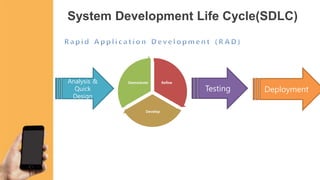
System Development Life Cycle(SDLC)
Analysis &
Quick
Design
Refine
Develop
Demostrate
Deployment
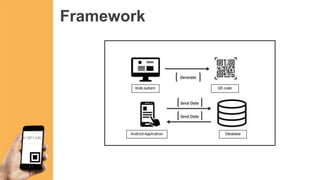
Framework
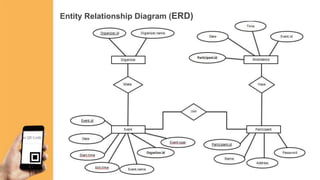
Entity Relationship Diagram (ERD)
Context Diagram(CD)
Context diagram is divided into two parts which is Web Based QR code
Generator System and Event Attendance Application using QR code
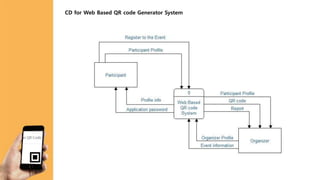
CD for Web Based QR code Generator System
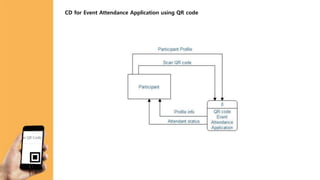
CD for Event Attendance Application using QR code
Data Flow Diagram(DFD)
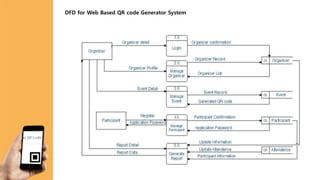
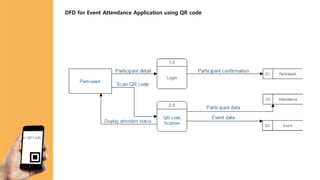
Data Flow Diagram(DFD)is divided into two parts which is Web Based QR code
Generator System and Event Attendance Application using QR code
DFD for Web Based QR code Generator System
DFD for Event Attendance Application using QR code
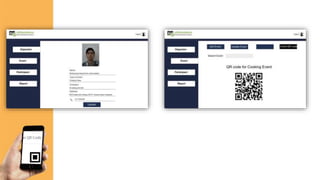
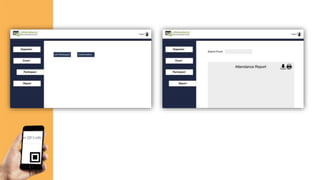
PROOF OF CONCEPT
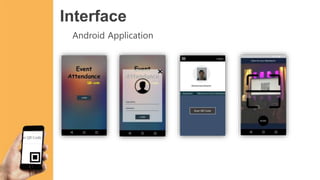
Interface
Android Application
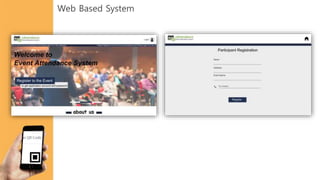
Web Based System
Thank you

QR code event attendence application system

  • 1.
    NAME : MUHAMMADSHAZMIL BIN MOHD SABILAN MATRICS NO : BTAL17047398 COURSE : BACHELOR OF COMPUTER SCIENCE (SOFTWARE DEVELOPMENT) SUPERVISOR : PROF. MADYA DR. ENGKU FADZLI HASAN BIN SYED ABDULLAH EVENT ATTENDANT APPLICATION USING QR CODE
  • 2.
    -QR code isa new technology that can store text data in many ways. The QR code itself is a short form for quick response code . -The system focuses on recording attendance of participating people for events using QR code. -This system is a mobile application system for scanning QR code and Web Based system for generate QR code. -Events usually require pen and paper to record participants. So, this system will use the QR code technique to ensure that attendee attendance can be easily recorded. PROJECT BACKGROUND QR
  • 3.
    PROJECT BACKGROUND -Organizer createdan event. Then the organizer signs event in the system (web based). The system will generate qr code that contains event information. During the event, QR code will be seen on the screen lcd or printed and placed on the wall -The user will open the app and check in. The application verify login and get user information. -Users will scan the QR code that the organizer generates. The system records the attendant based on user information and event information extracted from QR code. -Then, reports of participants attending the event are produced in the form of tables. SYSTEM FLOW
  • 4.
    PROBLEM STATEMENT -The usualway of recording attendance takes a lot of time if there are many participants. Therefore, this system will make the event more efficient in its time. -Participants also find it difficult to find their name to record attendance in the form of regular prints used today -The reliability of the participants in terms of entry and exit time for the event.
  • 5.
    OBJECTIVE - To designa QR Code Event attendance mobile application that is easy to use and efficient in terms of recording attendance. - To develop mobile applications that can generates and scan QR code in order to make it easy for users to sign up for an event. - To test the efficiency and functionality of proposed system that meets the requirements.
  • 6.
    SCOPE Web Based scope a)User(Participants) -Able to register to the event. -Able to fill in the profile form. -Able to delete their profile -Able to update their profile -Able to get the Event attendance application password b) Admin(event handler) -Able to log in as administrator. -Able to manage an event. -Able to manage participant. -Able to update the event status/information. -Able to view the QR code. -Able to download their QR code. -Able to generate report.
  • 7.
    SCOPE Event Attendance Applicationusing QR code scope User(Participants) -Able to log in to the application. -Able to scan the QR code -The system involved web based system to generate the QR code and android application to scan QR code by the user. System Scope
  • 8.
    QR Code Design -AModule is the fundamental unit of a QR Code -They are the black-and-white blocks that make up the data encoded in a QR Code. -Modules store data and make up the rows and columns of the QR Code (called the Data Matrix). -positioning of data bits begins from the bottom right corner of the matrix. -It moves upward in a two-module wide column and switches direction on reaching the top.
  • 9.
    - The numberof column and row depends on the Version Number of the QR Code. For example: - Version 1 have 21 rows and 21 columns of modules - Version 2 have 25 rows and 25 columns, and so on - And Version Number ranges between 1 and 40 - Higher the version number, higher the number of rows and columns. Thus, higher is the storage capacity.
  • 10.
    Finder Patterns -help scanners find the edges of QR Code. Timing pattern - These enable the scanning software to understand the width of a single module. Separator - helps the scanner distinguish between Finder Patterns and the actual data. Alignment Markers - help the scanner determine the orientation of the QR Code. This makes it possible to scan a QR Code at any angle. Format information - contains two pieces of data which is Level of Error Correction and Mask Pattern. Error Correction - A QR Code has the capability to remain scannable even if it damaged.
  • 11.
    Testing System Development LifeCycle(SDLC) Analysis & Quick Design Refine Develop Demostrate Deployment
  • 13.
  • 14.
  • 15.
    Context Diagram(CD) Context diagramis divided into two parts which is Web Based QR code Generator System and Event Attendance Application using QR code
  • 16.
    CD for WebBased QR code Generator System
  • 17.
    CD for EventAttendance Application using QR code
  • 18.
    Data Flow Diagram(DFD) DataFlow Diagram(DFD)is divided into two parts which is Web Based QR code Generator System and Event Attendance Application using QR code
  • 19.
    DFD for WebBased QR code Generator System
  • 20.
    DFD for EventAttendance Application using QR code
  • 21.
  • 22.
  • 23.
  • 26.