QBASIC:
A TOOL FOR MODERN
PROGRAMMING
BY REDEN R. PATACSIL AND GIFTY BELLE MANAOIS
Beginner’s All Purpose Symbolic
Instruction Code (BASIC)
 is an interpreter which means it reads every line, translate it and lets the
computer execute it before reading another.
 Each instruction starts with a line number.
RULES IN USING QBASIC
 Statements to be made should be in proper sequence.
 Each statement should have one BASIC command which are called
keywords.
 QBASIC has standard rules which are called Syntax.
QBASIC Data
 CONSTANT- data whose values does not change or remains fixed.
 NUMERIC CONSTANT – numbers used for mathematical calculations.
 ALPHANUMERIC CONSTANT – number or alphabets in double quotes.
 VARIABLE – data whose values change depending on calculations
executed by the program.
 NUMERIC VARIABLE – variable that holds numeric constant.
 ALPHANUMERIC VARIABLE – number or alphabets in double quotes.
 CLS – used to clear the screen.
 PRINT – used to display the output on the screen.
 REM – stands for REMARK. It gives an explanation of the program thereby
making the program more understandable.
 LET – assigns a value to a variable in a program.
 END – it is usually given at the end of the program.
 INPUT – allows users to enter values for a variable while running a program.
 DELETE <LINE NO.> - delete a line number in a program
 RUN – used to execute the program and get the output on the screen.
 NEW – used to totally write a new program.
 SYSTEM – used to exit the QBASIC program.
QBASIC Commands
PRINT Command
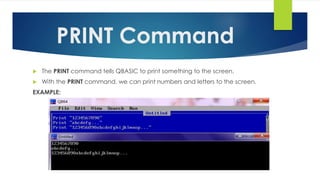
 The PRINT command tells QBASIC to print something to the screen.
 With the PRINT command, we can print numbers and letters to the screen.
EXAMPLE:
PRINT Command
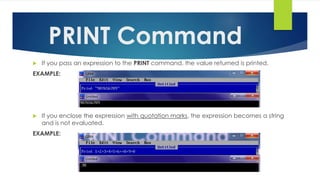
 If you pass an expression to the PRINT command, the value returned is printed.
EXAMPLE:
 If you enclose the expression with quotation marks, the expression becomes a string
and is not evaluated.
EXAMPLE:
PRINT Command
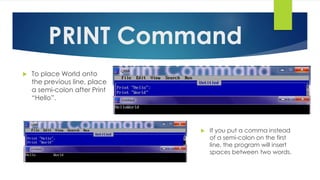
 To place World onto
the previous line, place
a semi-colon after Print
“Hello”.
 If you put a comma instead
of a semi-colon on the first
line, the program will insert
spaces between two words.
Variables
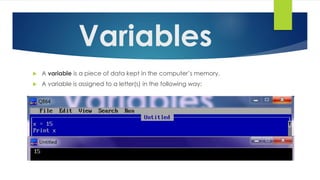
 A variable is a piece of data kept in the computer’s memory.
 A variable is assigned to a letter(s) in the following way:
INPUT Command
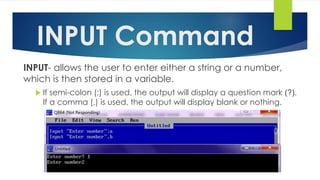
INPUT- allows the user to enter either a string or a number,
which is then stored in a variable.
 If semi-colon (;) is used, the output will display a question mark (?).
If a comma (,) is used, the output will display blank or nothing.
INPUT+PRINT Command
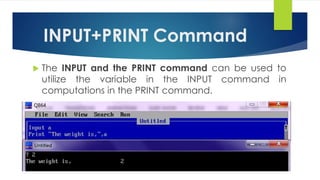
 The INPUT and the PRINT command can be used to
utilize the variable in the INPUT command in
computations in the PRINT command.
IF & THEN Command
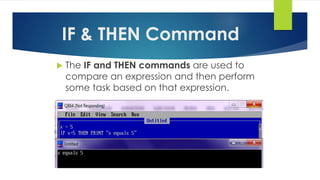
 The IF and THEN commands are used to
compare an expression and then perform
some task based on that expression.
IF & THEN Command
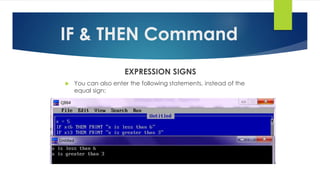
EXPRESSION SIGNS
 You can also enter the following statements, instead of the
equal sign:
IF & THEN Command
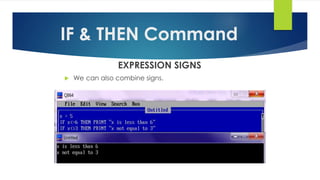
EXPRESSION SIGNS
 We can also combine signs.
ELSE Command
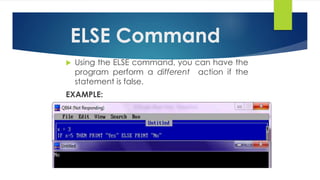
 Using the ELSE command, you can have the
program perform a different action if the
statement is false.
EXAMPLE:
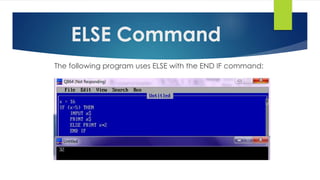
The following program uses ELSE with the END IF command:
ELSE Command
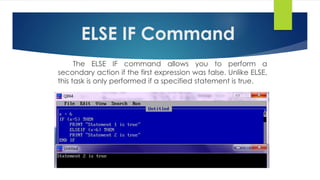
ELSE IF Command
The ELSE IF command allows you to perform a
secondary action if the first expression was false. Unlike ELSE,
this task is only performed if a specified statement is true.
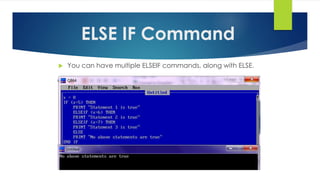
 You can have multiple ELSEIF commands, along with ELSE.
ELSE IF Command
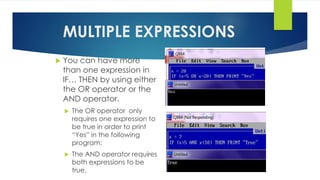
MULTIPLE EXPRESSIONS
 You can have more
than one expression in
IF… THEN by using either
the OR operator or the
AND operator.
 The OR operator only
requires one expression to
be true in order to print
“Yes” in the following
program:
 The AND operator requires
both expressions to be
true.
THANK YOU!
REDEN R. PATACSIL
&
GIFTY BELLE MANAOIS

QBASIC: A Tool For Modern Programming

  • 1.
    QBASIC: A TOOL FORMODERN PROGRAMMING BY REDEN R. PATACSIL AND GIFTY BELLE MANAOIS
  • 2.
    Beginner’s All PurposeSymbolic Instruction Code (BASIC)  is an interpreter which means it reads every line, translate it and lets the computer execute it before reading another.  Each instruction starts with a line number. RULES IN USING QBASIC  Statements to be made should be in proper sequence.  Each statement should have one BASIC command which are called keywords.  QBASIC has standard rules which are called Syntax.
  • 3.
    QBASIC Data  CONSTANT-data whose values does not change or remains fixed.  NUMERIC CONSTANT – numbers used for mathematical calculations.  ALPHANUMERIC CONSTANT – number or alphabets in double quotes.  VARIABLE – data whose values change depending on calculations executed by the program.  NUMERIC VARIABLE – variable that holds numeric constant.  ALPHANUMERIC VARIABLE – number or alphabets in double quotes.
  • 4.
     CLS –used to clear the screen.  PRINT – used to display the output on the screen.  REM – stands for REMARK. It gives an explanation of the program thereby making the program more understandable.  LET – assigns a value to a variable in a program.  END – it is usually given at the end of the program.  INPUT – allows users to enter values for a variable while running a program.  DELETE <LINE NO.> - delete a line number in a program  RUN – used to execute the program and get the output on the screen.  NEW – used to totally write a new program.  SYSTEM – used to exit the QBASIC program. QBASIC Commands
  • 5.
    PRINT Command  ThePRINT command tells QBASIC to print something to the screen.  With the PRINT command, we can print numbers and letters to the screen. EXAMPLE:
  • 6.
    PRINT Command  Ifyou pass an expression to the PRINT command, the value returned is printed. EXAMPLE:  If you enclose the expression with quotation marks, the expression becomes a string and is not evaluated. EXAMPLE:
  • 7.
    PRINT Command  Toplace World onto the previous line, place a semi-colon after Print “Hello”.  If you put a comma instead of a semi-colon on the first line, the program will insert spaces between two words.
  • 8.
    Variables  A variableis a piece of data kept in the computer’s memory.  A variable is assigned to a letter(s) in the following way:
  • 9.
    INPUT Command INPUT- allowsthe user to enter either a string or a number, which is then stored in a variable.  If semi-colon (;) is used, the output will display a question mark (?). If a comma (,) is used, the output will display blank or nothing.
  • 10.
    INPUT+PRINT Command  TheINPUT and the PRINT command can be used to utilize the variable in the INPUT command in computations in the PRINT command.
  • 11.
    IF & THENCommand  The IF and THEN commands are used to compare an expression and then perform some task based on that expression.
  • 12.
    IF & THENCommand EXPRESSION SIGNS  You can also enter the following statements, instead of the equal sign:
  • 13.
    IF & THENCommand EXPRESSION SIGNS  We can also combine signs.
  • 14.
    ELSE Command  Usingthe ELSE command, you can have the program perform a different action if the statement is false. EXAMPLE:
  • 15.
    The following programuses ELSE with the END IF command: ELSE Command
  • 16.
    ELSE IF Command TheELSE IF command allows you to perform a secondary action if the first expression was false. Unlike ELSE, this task is only performed if a specified statement is true.
  • 17.
     You canhave multiple ELSEIF commands, along with ELSE. ELSE IF Command
  • 18.
    MULTIPLE EXPRESSIONS  Youcan have more than one expression in IF… THEN by using either the OR operator or the AND operator.  The OR operator only requires one expression to be true in order to print “Yes” in the following program:  The AND operator requires both expressions to be true.
  • 19.
    THANK YOU! REDEN R.PATACSIL & GIFTY BELLE MANAOIS