‫‪Play with Python‬‬
                          ‫1‪Lab‬‬
‫كل الشرح في المحاضرة، أي مفاهيم في المعامل :قاعدة هامة‬
          ‫ستكون مغطاه في المحاضرة قبل المعمل‬
          ‫المطلوب فقط شرح المطلوب من التمرين‬
                      ‫ودعهم ينطلقون‬
Agenda
•   Setup the Environment and Hello World
•   Exercise 1:
    o   Factorial then Factorial with list
•   Exercise 2:
    o   character count and histogram
•   Fun:
    o   Plot!
Setup the Environment
•   Install Python 2.7.3:
    o   python-2.7.3.msi
•   Install Aptana IDE:
    o   Aptana_Studio_3_Setup_3.2.0.exe
Setup the Environment
  1- Open your Python IDLE from:
  Start >> All Programs >> Python 2.7 >>
IDLE

  2- Write your first program:
  print "Hello World"
  Press Enter
Setup the Environment (Your first project)
3- Start Aptana:
         Start >> All Programs >> Aptana Studio 3
         press ok for the workspace
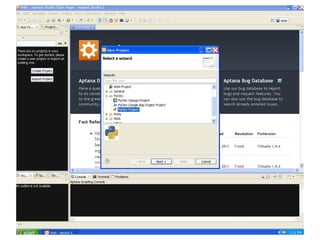
4- Create your first project:
         Select File >> New >> Project ... >> PyDev Project


5-Enter Project Name: lab1
6-(for first time only) Click on "Please configure an interpreter ... "
7- click auto Config
8- click ok
9- then ok (wait till Aptana finishes ...)
10-create your main file by:
              right click on "lab1" in Package Explorer >> New >> PyDev Module
11- Enter Name: main
12- click ok
Screenshots (steps 3- 12)
Setup the Environment (Your first project)
Write the following code in your main file:
      n = 5
      for i in range(1, n):
       print "Hello World"


click on run as from the toolbar


Select "Python Run "


Click Ok (See the run in Console)
Setup the Environment (Your first project)
put your previous code in a function like this
      def main():
       n = 5
       for i in range(1, n):
          print "Hello World"


   then call it:
   main()
Setup the Environment (Your first project)
again change your main to return 2 values, "hello world"
  string and its length
      def main():
       s = "Hello World"
       return "Hello World", len(s)


   then print the return of main like this:
   print main()
      ('Hello World', 11)
Exercise 1
Write this program in your main file:
def count_char(str):
       d = {}
       for char in str:
              if char in d:
                      d[char] += 1
              else:
                      d[char] = 1
       return d
print count_char("My name is FCIS tell me every thing you know
   !")


{' ': 9, 'C': 1, 'F': 1, 'I': 2, 'M': 1, 'S': 1, 'a': 1, 'e': 5, 'g': 1, 'i': 2, 'h': 1, 'k': 1, 'm': 2, 'l': 2, 'o': 1,
      'n': 3, 's': 1, 'r': 1, 't': 2, 'w': 1, 'v': 1, 'y': 2}
This program counts the occurrences of characters in given string and returns a
    dictionary containing for every key character an integer value
Exercise 1 (10 minutes)
Add a new function draw_historgram() that draws an ascii histogram of a given
   dictionary (from count_char()) like this:
a   :   * *
    :   * * * * * * * * *
e   :   * * * * *
d   :   *
g   :   *
i   :   * *
M   :   *
k   :   *
v   :   *
m   :   * * * *
l   :   * *
o   :   * *
...
Exercise 1 (Solution)
def draw_historgram(d):
    for char in d:
        print char, " : ",
        for c in range(1, d[char]+1):
            print "*",
        print ""
Exercise 2
Write this program in your main file:
def fact(n):
     if (n <= 1):
            return 1
     else:
            return n * fact(n - 1)


print fact(5)
120


this program computes a factorial for a given integer
Exercise 2 (15 minutes)
Modify this function to make it return the factorial, and also
  a list contains all factorials so far like this:


print fact(5)
(120, [1, 2, 6, 24, 120])


the list contains all the factorials from 1 to 5
Exercise 2 (Solution)
def fact(n):
      if (n <= 1):
             return 1, [1]
      else:
             prev_fact, theList = fact(n - 1)


             current_fact = n* prev_fact
             theList.append(current_fact)


             return current_fact, theList


print fact(5)


Note: in this exercise the student should be able to implement the solution with the multiple return values ( tuple), this
    python feature is explained in the lecture
This exercise is to let the students think the in new way of programming, to feel change from C/C++/C3/Java traditional
     languages
Have Fun
Install Pythonxy:
(Click yes for every question the installer asks about
   existing python setup)


Open Spyder by:(Start>>python(x,y) >> Spyder >> Spyder
  )


Copy and paste your Fact() function to the python
  interpreter, and plot Fact() like this:
f, l = fact(5)
plot(l)
Thank You

Python summer course play with python (lab1)

  • 1.
    ‫‪Play with Python‬‬ ‫1‪Lab‬‬ ‫كل الشرح في المحاضرة، أي مفاهيم في المعامل :قاعدة هامة‬ ‫ستكون مغطاه في المحاضرة قبل المعمل‬ ‫المطلوب فقط شرح المطلوب من التمرين‬ ‫ودعهم ينطلقون‬
  • 2.
    Agenda • Setup the Environment and Hello World • Exercise 1: o Factorial then Factorial with list • Exercise 2: o character count and histogram • Fun: o Plot!
  • 3.
    Setup the Environment • Install Python 2.7.3: o python-2.7.3.msi • Install Aptana IDE: o Aptana_Studio_3_Setup_3.2.0.exe
  • 4.
    Setup the Environment 1- Open your Python IDLE from: Start >> All Programs >> Python 2.7 >> IDLE 2- Write your first program: print "Hello World" Press Enter
  • 5.
    Setup the Environment(Your first project) 3- Start Aptana: Start >> All Programs >> Aptana Studio 3 press ok for the workspace 4- Create your first project: Select File >> New >> Project ... >> PyDev Project 5-Enter Project Name: lab1 6-(for first time only) Click on "Please configure an interpreter ... " 7- click auto Config 8- click ok 9- then ok (wait till Aptana finishes ...) 10-create your main file by: right click on "lab1" in Package Explorer >> New >> PyDev Module 11- Enter Name: main 12- click ok
  • 6.
  • 22.
    Setup the Environment(Your first project) Write the following code in your main file: n = 5 for i in range(1, n): print "Hello World" click on run as from the toolbar Select "Python Run " Click Ok (See the run in Console)
  • 23.
    Setup the Environment(Your first project) put your previous code in a function like this def main(): n = 5 for i in range(1, n): print "Hello World" then call it: main()
  • 24.
    Setup the Environment(Your first project) again change your main to return 2 values, "hello world" string and its length def main(): s = "Hello World" return "Hello World", len(s) then print the return of main like this: print main() ('Hello World', 11)
  • 25.
    Exercise 1 Write thisprogram in your main file: def count_char(str): d = {} for char in str: if char in d: d[char] += 1 else: d[char] = 1 return d print count_char("My name is FCIS tell me every thing you know !") {' ': 9, 'C': 1, 'F': 1, 'I': 2, 'M': 1, 'S': 1, 'a': 1, 'e': 5, 'g': 1, 'i': 2, 'h': 1, 'k': 1, 'm': 2, 'l': 2, 'o': 1, 'n': 3, 's': 1, 'r': 1, 't': 2, 'w': 1, 'v': 1, 'y': 2} This program counts the occurrences of characters in given string and returns a dictionary containing for every key character an integer value
  • 26.
    Exercise 1 (10minutes) Add a new function draw_historgram() that draws an ascii histogram of a given dictionary (from count_char()) like this: a : * * : * * * * * * * * * e : * * * * * d : * g : * i : * * M : * k : * v : * m : * * * * l : * * o : * * ...
  • 27.
    Exercise 1 (Solution) defdraw_historgram(d): for char in d: print char, " : ", for c in range(1, d[char]+1): print "*", print ""
  • 28.
    Exercise 2 Write thisprogram in your main file: def fact(n): if (n <= 1): return 1 else: return n * fact(n - 1) print fact(5) 120 this program computes a factorial for a given integer
  • 29.
    Exercise 2 (15minutes) Modify this function to make it return the factorial, and also a list contains all factorials so far like this: print fact(5) (120, [1, 2, 6, 24, 120]) the list contains all the factorials from 1 to 5
  • 30.
    Exercise 2 (Solution) deffact(n): if (n <= 1): return 1, [1] else: prev_fact, theList = fact(n - 1) current_fact = n* prev_fact theList.append(current_fact) return current_fact, theList print fact(5) Note: in this exercise the student should be able to implement the solution with the multiple return values ( tuple), this python feature is explained in the lecture This exercise is to let the students think the in new way of programming, to feel change from C/C++/C3/Java traditional languages
  • 31.
    Have Fun Install Pythonxy: (Clickyes for every question the installer asks about existing python setup) Open Spyder by:(Start>>python(x,y) >> Spyder >> Spyder ) Copy and paste your Fact() function to the python interpreter, and plot Fact() like this: f, l = fact(5) plot(l)
  • 35.