Download to read offline
![Python Numbers
Number data types store numeric values. Number
objects are created when you assign a value to
them.
For example −
var1 = 1
var2 = 10
You can also delete the reference to a number
object by using the del statement. The syntax of
the del statement is :-
del var1[,var2[,var3[....,varN]]]]
You can delete a single object or multiple objects
by using the del statement.
For example
del var
del var_a, var_b](https://image.slidesharecdn.com/pythonstandarddatatypes-210903113029/85/Python-standard-data-types-4-320.jpg)
![Python Strings
Strings in Python are identified as a contiguous set of
characters represented in the quotation marks.
Python allows for either pairs of single or double
quotes. Subsets of strings can be taken using the slice
operator ([ ] and [:] ) with indexes starting at 0 in the
beginning of the string and working their way from -1
at the end.](https://image.slidesharecdn.com/pythonstandarddatatypes-210903113029/85/Python-standard-data-types-5-320.jpg)
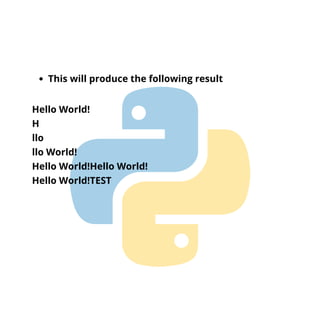
![#!/usr/bin/python
str = 'Hello World!'
print str # Prints complete string
print str[0] # Prints first character of the string
print str[2:5] # Prints characters starting from 3rd to 5th
print str[2:] # Prints string starting from 3rd character
print str * 2 # Prints string two times
print str + "TEST" # Prints concatenated string
The plus (+) sign is the string concatenation
operator and the asterisk (*) is the repetition
operator.
For example](https://image.slidesharecdn.com/pythonstandarddatatypes-210903113029/85/Python-standard-data-types-6-320.jpg)
![Python Lists
Lists are the most versatile of Python's compound
data types. A list contains items separated by
commas and enclosed within square brackets ([]).
To some extent, lists are similar to arrays in C.
One difference between them is that all the items
belonging to a list can be of different data type.
The values stored in a list can be accessed using
the slice operator ([ ] and [:]) with indexes starting
at 0 in the beginning of the list and working their
way to end -1.
The plus (+) sign is the list concatenation operator,
and the asterisk (*) is the repetition operator.](https://image.slidesharecdn.com/pythonstandarddatatypes-210903113029/85/Python-standard-data-types-8-320.jpg)
![For example
#!/usr/bin/python
list = [ 'abcd', 786 , 2.23, 'john', 70.2 ]
tinylist = [123, 'john']
print list # Prints complete list
print list[0] # Prints first element of the list
print list[1:3] # Prints elements starting from 2nd till 3rd
print list[2:] # Prints elements starting from 3rd element
print tinylist * 2 # Prints list two times
print list + tinylist # Prints concatenated lists](https://image.slidesharecdn.com/pythonstandarddatatypes-210903113029/85/Python-standard-data-types-9-320.jpg)
![This produce the following result
['abcd', 786, 2.23, 'john', 70.2]
abcd
[786, 2.23]
[2.23, 'john', 70.2]
[123, 'john', 123, 'john']
['abcd', 786, 2.23, 'john', 70.2, 123, 'john']](https://image.slidesharecdn.com/pythonstandarddatatypes-210903113029/85/Python-standard-data-types-10-320.jpg)
![Python Tuples
A tuple is another sequence data type that is
similar to the list. A tuple consists of a number of
values separated by commas.
Unlike lists, however, tuples are enclosed within
parentheses.
The main differences between lists and tuples are:
Lists are enclosed in brackets ( [ ] ) and their
elements and size can be changed, while tuples
are enclosed in parentheses ( ( ) ) and cannot be
updated.
Tuples can be thought of as read-only lists.](https://image.slidesharecdn.com/pythonstandarddatatypes-210903113029/85/Python-standard-data-types-11-320.jpg)
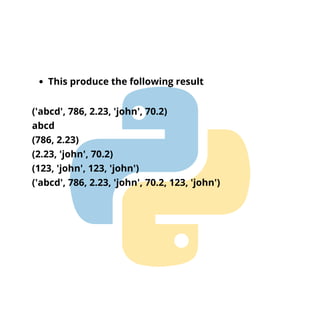
![For example
#!/usr/bin/python
tuple = ( 'abcd', 786 , 2.23, 'john', 70.2 )
tinytuple = (123, 'john')
print tuple # Prints the complete tuple
print tuple[0] # Prints first element of the tuple
print tuple[1:3] # Prints elements of the tuple starting from
2nd till 3rd
print tuple[2:] # Prints elements of the tuple starting from
3rd element
print tinytuple * 2 # Prints the contents of the tuple twice
print tuple + tinytuple # Prints concatenated tuples](https://image.slidesharecdn.com/pythonstandarddatatypes-210903113029/85/Python-standard-data-types-12-320.jpg)
![Python Dictionary
Python's dictionaries are kind of hash table type.
They work like associative arrays or hashes found
in Perl and consist of key-value pairs.
A dictionary key can be almost any Python type,
but are usually numbers or strings.
Values, on the other hand, can be any arbitrary
Python object.
Dictionaries are enclosed by curly braces ({ }) and
values can be assigned and accessed using square
braces ([]).](https://image.slidesharecdn.com/pythonstandarddatatypes-210903113029/85/Python-standard-data-types-14-320.jpg)
![For example
#!/usr/bin/python
dict = {}
dict['one'] = "This is one"
dict[2] = "This is two"
tinydict = {'name': 'john','code':6734, 'dept': 'sales'}
print dict['one'] # Prints value for 'one' key
print dict[2] # Prints value for 2 key
print tinydict # Prints complete dictionary
print tinydict.keys() # Prints all the keys
print tinydict.values() # Prints all the values](https://image.slidesharecdn.com/pythonstandarddatatypes-210903113029/85/Python-standard-data-types-15-320.jpg)
![This produce the following result
This is one
This is two
{'dept': 'sales', 'code': 6734, 'name': 'john'}
['dept', 'code', 'name']
['sales', 6734, 'john']](https://image.slidesharecdn.com/pythonstandarddatatypes-210903113029/85/Python-standard-data-types-16-320.jpg)


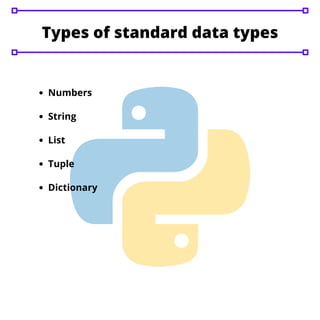
This document summarizes Python's standard data types including numbers, strings, lists, tuples, and dictionaries. It provides examples of how to define and manipulate each type. Numbers can be used for mathematical operations while strings support slicing and concatenation. Lists are versatile and allow different data types, with items accessed via indexes. Tuples are similar to lists but immutable. Dictionaries store key-value pairs and are accessed via keys.


