PYTHON- BASIC
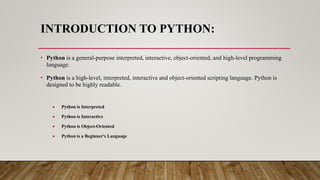
INTRODUCTION TO PYTHON:
• Python is a general-purpose interpreted, interactive, object-oriented, and high-level programming
language.
• Python is a high-level, interpreted, interactive and object-oriented scripting language. Python is
designed to be highly readable.
 Python is Interpreted
 Python is Interactive
 Python is Object-Oriented
 Python is a Beginner's Language
ADVANTAGES OF PYTHON
As mentioned before, Python is one of the most widely used language over the web. I'm going to list
few of them here:
 Easy-to-learn
 Easy-to-read
 Easy-to-maintain
 A broad standard library
 Portable
APPLICATIONS OF PYTHON
CHARACTERISTICS OF PYTHON
Following are important characteristics of Python Programming −
 It supports functional and structured programming methods as well as OOP.
 It can be used as a scripting language or can be compiled to byte-code for
building large applications.
 It provides very high-level dynamic data types and supports dynamic type
checking.
 It supports automatic garbage collection.
 It can be easily integrated with C, C++, COM, ActiveX, CORBA, and Java.
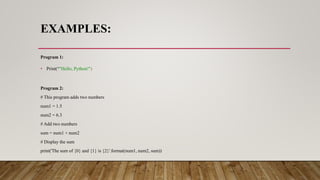
EXAMPLES:
Program 1:
• Print(“"Hello, Python!")
Program 2:
# This program adds two numbers
num1 = 1.5
num2 = 6.3
# Add two numbers
sum = num1 + num2
# Display the sum
print('The sum of {0} and {1} is {2}'.format(num1, num2, sum))
PYTHON DATA TYPES
• Variables can store data of different types, and different types can do different things.
Python has the following data types built-in by default, in these categories:
Text Type: str
Numeric
Types:
int, float, complex
Sequence
Types:
list, tuple, range
Mapping
Type:
dict
Set Types: set, frozenset
Boolean Type: bool
Binary Types: bytes, bytearray, memoryview
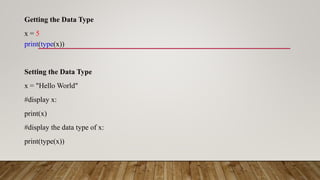
Getting the Data Type
x = 5
print(type(x))
Setting the Data Type
x = "Hello World"
#display x:
print(x)
#display the data type of x:
print(type(x))
NUMBERS
• Int :
Example:
x = 1
y =35656222554887711
z = -3255522
print(type(x))
print(type(y))
print(type(z))
• Float
Example:
x = 1.10
y = 1.0
z = -35.59
print(type(x))
print(type(y))
print(type(z))
• Complex
Example:
x = 3+5j
y = 5j
z = -5j
print(type(x))
print(type(y))
print(type(z))
STRINGS
Single Line:
a = "Hello"
print(a)
Multiline Strings:
a = """Lorem ipsum dolor sit amet,
consectetur adipiscing elit,
sed do eiusmod tempor incididunt
ut labore et dolore magna aliqua."""
print(a)
• Slicing:
b = "Hello, World!"
print(b[2:5])
• Upper Case:
a = "Hello, World!"
print(a.upper())
• Lower Case:
a = "Hello, World!"
print(a.lower())
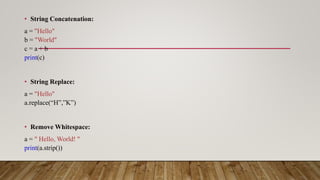
• String Concatenation:
a = "Hello"
b = "World"
c = a + b
print(c)
• String Replace:
a = "Hello"
a.replace(“H”,”K”)
• Remove Whitespace:
a = " Hello, World! "
print(a.strip())
PYTHON LISTS
• Lists are the most versatile of Python's compound data types. A list contains items separated by commas and
enclosed within square brackets ([]). To some extent, lists are similar to arrays in C. One difference between them
is that all the items belonging to a list can be of different data type.
• list = [ 'abcd', 786 , 2.23, 'john', 70.2 ]
• tinylist = [123, 'john']
• print list # Prints complete list
• print list[0] # Prints first element of the list
• print list[1:3] # Prints elements starting from 2nd till 3rd
• print list[2:] # Prints elements starting from 3rd element
• print tinylist * 2 # Prints list two times
• print list + tinylist # Prints concatenated lists
Add List Items:
Append Items:
thislist = ["apple", "banana", "cherry"]
thislist.append("orange")
print(thislist)
Insert Items:
thislist = ["apple", "banana", "cherry"]
thislist.insert(1, "orange")
print(thislist)
Extend List:
thislist = ["apple", "banana", "cherry"]
tropical = ["mango", "pineapple", "papaya"]
thislist.extend(tropical)
print(thislist)
Python - Remove List Items
Remove Specified Item:
thislist = ["apple", "banana", "cherry"]
thislist.remove("banana")
print(thislist)
Remove Specified Index:
thislist = ["apple", "banana", "cherry"]
thislist.pop(1)
print(thislist)
Del:
thislist = ["apple", "banana", "cherry"]
del thislist[0]
print(thislist)
Clear the List:
thislist = ["apple", "banana", "cherry"]
thislist.clear()
print(thislist)
Sort List Alphanumerically:
thislist = ["orange", "mango", "kiwi", "pineapple", "banana"]
thislist.sort()
print(thislist)
Sort Descending:
thislist = ["orange", "mango", "kiwi", "pineapple", "banana"]
thislist.sort(reverse = True)
print(thislist)
thislist = ["apple", "banana", "cherry"]
Copy a List:
mylist = thislist.copy()
print(mylist)
PYTHON TUPLES
• A tuple is another sequence data type that is similar to the list. A tuple consists of a number of values separated by commas. Unlike lists, however,
tuples are enclosed within parentheses.
• The main differences between lists and tuples are: Lists are enclosed in brackets ( [ ] ) and their elements and size can be changed, while tuples are
enclosed in parentheses ( ( ) ) and cannot be updated. Tuples can be thought of as read-only lists. For example
• tuple = ( 'abcd', 786 , 2.23, 'john', 70.2 )
• tinytuple = (123, 'john')
• print tuple # Prints the complete tuple
• print tuple[0] # Prints first element of the tuple
• print tuple[1:3] # Prints elements of the tuple starting from 2nd till 3rd
• print tuple[2:] # Prints elements of the tuple starting from 3rd element
• print tinytuple * 2 # Prints the contents of the tuple twice
• print tuple + tinytuple # Prints concatenated tuples
Access Tuple Items:
thistuple = ("apple", "banana", "cherry")
print(thistuple[1])
Negative Indexing:
thistuple = ("apple", "banana", "cherry")
print(thistuple[-1])
Change Tuple Values:
x = ("apple", "banana", "cherry")
x[1]=“Kiwi”
print(x)
Del:
thistuple = ("apple", "banana", "cherry")
del thistuple
print(thistuple)
PYTHON DICTIONARIES
• Python's dictionaries are kind of hash table type. They work like associative arrays or hashes found in Perl and consist of key-value pairs. A
dictionary key can be almost any Python type, but are usually numbers or strings. Values, on the other hand, can be any arbitrary Python object.
• Dictionaries are enclosed by curly braces ({ }) and values can be assigned and accessed using square braces ([]). For example −#!/usr/bin/python
• dict = {}
• dict['one'] = "This is one"
• dict[2] = "This is two"
• tinydict = {'name': 'john','code':6734, 'dept': 'sales’}
• print dict['one'] # Prints value for 'one' key
• print dict[2] # Prints value for 2 key
• print tinydict # Prints complete dictionary
• print tinydict.keys() # Prints all the keys
• print tinydict.values() # Prints all the values
Accessing Items:
thisdict = {
"brand": "Ford",
"model": "Mustang",
"year": 1964
}
x = thisdict["model"]
Change Values:
thisdict = {
"brand": "Ford",
"model": "Mustang",
"year": 1964
}
thisdict["year"] = 2018
Update Dictionary:
thisdict = {
"brand": "Ford",
"model": "Mustang",
"year": 1964
}
thisdict.update({"year": 2020})
Adding Items:
thisdict = {
"brand": "Ford",
"model": "Mustang",
"year": 1964
}
thisdict["color"] = "red"
print(thisdict)
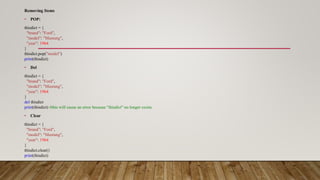
Removing Items
• POP:
thisdict = {
"brand": "Ford",
"model": "Mustang",
"year": 1964
}
thisdict.pop("model")
print(thisdict)
• Del
thisdict = {
"brand": "Ford",
"model": "Mustang",
"year": 1964
}
del thisdict
print(thisdict) #this will cause an error because "thisdict" no longer exists.
• Clear
thisdict = {
"brand": "Ford",
"model": "Mustang",
"year": 1964
}
thisdict.clear()
print(thisdict)
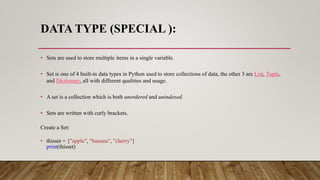
DATA TYPE (SPECIAL ):
• Sets are used to store multiple items in a single variable.
• Set is one of 4 built-in data types in Python used to store collections of data, the other 3 are List, Tuple,
and Dictionary, all with different qualities and usage.
• A set is a collection which is both unordered and unindexed.
• Sets are written with curly brackets.
Create a Set:
• thisset = {"apple", "banana", "cherry"}
print(thisset)
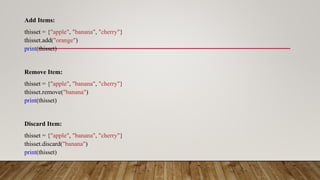
Add Items:
thisset = {"apple", "banana", "cherry"}
thisset.add("orange")
print(thisset)
Remove Item:
thisset = {"apple", "banana", "cherry"}
thisset.remove("banana")
print(thisset)
Discard Item:
thisset = {"apple", "banana", "cherry"}
thisset.discard("banana")
print(thisset)
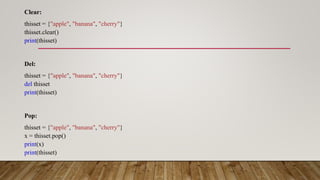
Clear:
thisset = {"apple", "banana", "cherry"}
thisset.clear()
print(thisset)
Del:
thisset = {"apple", "banana", "cherry"}
del thisset
print(thisset)
Pop:
thisset = {"apple", "banana", "cherry"}
x = thisset.pop()
print(x)
print(thisset)

Python- Basic. pptx with lists, tuples dictionaries and data types

  • 1.
  • 2.
    INTRODUCTION TO PYTHON: •Python is a general-purpose interpreted, interactive, object-oriented, and high-level programming language. • Python is a high-level, interpreted, interactive and object-oriented scripting language. Python is designed to be highly readable.  Python is Interpreted  Python is Interactive  Python is Object-Oriented  Python is a Beginner's Language
  • 3.
    ADVANTAGES OF PYTHON Asmentioned before, Python is one of the most widely used language over the web. I'm going to list few of them here:  Easy-to-learn  Easy-to-read  Easy-to-maintain  A broad standard library  Portable
  • 4.
  • 5.
    CHARACTERISTICS OF PYTHON Followingare important characteristics of Python Programming −  It supports functional and structured programming methods as well as OOP.  It can be used as a scripting language or can be compiled to byte-code for building large applications.  It provides very high-level dynamic data types and supports dynamic type checking.  It supports automatic garbage collection.  It can be easily integrated with C, C++, COM, ActiveX, CORBA, and Java.
  • 6.
    EXAMPLES: Program 1: • Print(“"Hello,Python!") Program 2: # This program adds two numbers num1 = 1.5 num2 = 6.3 # Add two numbers sum = num1 + num2 # Display the sum print('The sum of {0} and {1} is {2}'.format(num1, num2, sum))
  • 7.
    PYTHON DATA TYPES •Variables can store data of different types, and different types can do different things. Python has the following data types built-in by default, in these categories:
  • 8.
    Text Type: str Numeric Types: int,float, complex Sequence Types: list, tuple, range Mapping Type: dict Set Types: set, frozenset Boolean Type: bool Binary Types: bytes, bytearray, memoryview
  • 9.
    Getting the DataType x = 5 print(type(x)) Setting the Data Type x = "Hello World" #display x: print(x) #display the data type of x: print(type(x))
  • 10.
    NUMBERS • Int : Example: x= 1 y =35656222554887711 z = -3255522 print(type(x)) print(type(y)) print(type(z)) • Float Example: x = 1.10 y = 1.0 z = -35.59 print(type(x)) print(type(y)) print(type(z)) • Complex Example: x = 3+5j y = 5j z = -5j print(type(x)) print(type(y)) print(type(z))
  • 11.
    STRINGS Single Line: a ="Hello" print(a) Multiline Strings: a = """Lorem ipsum dolor sit amet, consectetur adipiscing elit, sed do eiusmod tempor incididunt ut labore et dolore magna aliqua.""" print(a)
  • 12.
    • Slicing: b ="Hello, World!" print(b[2:5]) • Upper Case: a = "Hello, World!" print(a.upper()) • Lower Case: a = "Hello, World!" print(a.lower())
  • 13.
    • String Concatenation: a= "Hello" b = "World" c = a + b print(c) • String Replace: a = "Hello" a.replace(“H”,”K”) • Remove Whitespace: a = " Hello, World! " print(a.strip())
  • 14.
    PYTHON LISTS • Listsare the most versatile of Python's compound data types. A list contains items separated by commas and enclosed within square brackets ([]). To some extent, lists are similar to arrays in C. One difference between them is that all the items belonging to a list can be of different data type. • list = [ 'abcd', 786 , 2.23, 'john', 70.2 ] • tinylist = [123, 'john'] • print list # Prints complete list • print list[0] # Prints first element of the list • print list[1:3] # Prints elements starting from 2nd till 3rd • print list[2:] # Prints elements starting from 3rd element • print tinylist * 2 # Prints list two times • print list + tinylist # Prints concatenated lists
  • 15.
    Add List Items: AppendItems: thislist = ["apple", "banana", "cherry"] thislist.append("orange") print(thislist) Insert Items: thislist = ["apple", "banana", "cherry"] thislist.insert(1, "orange") print(thislist) Extend List: thislist = ["apple", "banana", "cherry"] tropical = ["mango", "pineapple", "papaya"] thislist.extend(tropical) print(thislist)
  • 16.
    Python - RemoveList Items Remove Specified Item: thislist = ["apple", "banana", "cherry"] thislist.remove("banana") print(thislist) Remove Specified Index: thislist = ["apple", "banana", "cherry"] thislist.pop(1) print(thislist) Del: thislist = ["apple", "banana", "cherry"] del thislist[0] print(thislist) Clear the List: thislist = ["apple", "banana", "cherry"] thislist.clear() print(thislist)
  • 17.
    Sort List Alphanumerically: thislist= ["orange", "mango", "kiwi", "pineapple", "banana"] thislist.sort() print(thislist) Sort Descending: thislist = ["orange", "mango", "kiwi", "pineapple", "banana"] thislist.sort(reverse = True) print(thislist) thislist = ["apple", "banana", "cherry"] Copy a List: mylist = thislist.copy() print(mylist)
  • 18.
    PYTHON TUPLES • Atuple is another sequence data type that is similar to the list. A tuple consists of a number of values separated by commas. Unlike lists, however, tuples are enclosed within parentheses. • The main differences between lists and tuples are: Lists are enclosed in brackets ( [ ] ) and their elements and size can be changed, while tuples are enclosed in parentheses ( ( ) ) and cannot be updated. Tuples can be thought of as read-only lists. For example • tuple = ( 'abcd', 786 , 2.23, 'john', 70.2 ) • tinytuple = (123, 'john') • print tuple # Prints the complete tuple • print tuple[0] # Prints first element of the tuple • print tuple[1:3] # Prints elements of the tuple starting from 2nd till 3rd • print tuple[2:] # Prints elements of the tuple starting from 3rd element • print tinytuple * 2 # Prints the contents of the tuple twice • print tuple + tinytuple # Prints concatenated tuples
  • 19.
    Access Tuple Items: thistuple= ("apple", "banana", "cherry") print(thistuple[1]) Negative Indexing: thistuple = ("apple", "banana", "cherry") print(thistuple[-1]) Change Tuple Values: x = ("apple", "banana", "cherry") x[1]=“Kiwi” print(x) Del: thistuple = ("apple", "banana", "cherry") del thistuple print(thistuple)
  • 20.
    PYTHON DICTIONARIES • Python'sdictionaries are kind of hash table type. They work like associative arrays or hashes found in Perl and consist of key-value pairs. A dictionary key can be almost any Python type, but are usually numbers or strings. Values, on the other hand, can be any arbitrary Python object. • Dictionaries are enclosed by curly braces ({ }) and values can be assigned and accessed using square braces ([]). For example −#!/usr/bin/python • dict = {} • dict['one'] = "This is one" • dict[2] = "This is two" • tinydict = {'name': 'john','code':6734, 'dept': 'sales’} • print dict['one'] # Prints value for 'one' key • print dict[2] # Prints value for 2 key • print tinydict # Prints complete dictionary • print tinydict.keys() # Prints all the keys • print tinydict.values() # Prints all the values
  • 21.
    Accessing Items: thisdict ={ "brand": "Ford", "model": "Mustang", "year": 1964 } x = thisdict["model"] Change Values: thisdict = { "brand": "Ford", "model": "Mustang", "year": 1964 } thisdict["year"] = 2018
  • 22.
    Update Dictionary: thisdict ={ "brand": "Ford", "model": "Mustang", "year": 1964 } thisdict.update({"year": 2020}) Adding Items: thisdict = { "brand": "Ford", "model": "Mustang", "year": 1964 } thisdict["color"] = "red" print(thisdict)
  • 23.
    Removing Items • POP: thisdict= { "brand": "Ford", "model": "Mustang", "year": 1964 } thisdict.pop("model") print(thisdict) • Del thisdict = { "brand": "Ford", "model": "Mustang", "year": 1964 } del thisdict print(thisdict) #this will cause an error because "thisdict" no longer exists. • Clear thisdict = { "brand": "Ford", "model": "Mustang", "year": 1964 } thisdict.clear() print(thisdict)
  • 24.
    DATA TYPE (SPECIAL): • Sets are used to store multiple items in a single variable. • Set is one of 4 built-in data types in Python used to store collections of data, the other 3 are List, Tuple, and Dictionary, all with different qualities and usage. • A set is a collection which is both unordered and unindexed. • Sets are written with curly brackets. Create a Set: • thisset = {"apple", "banana", "cherry"} print(thisset)
  • 25.
    Add Items: thisset ={"apple", "banana", "cherry"} thisset.add("orange") print(thisset) Remove Item: thisset = {"apple", "banana", "cherry"} thisset.remove("banana") print(thisset) Discard Item: thisset = {"apple", "banana", "cherry"} thisset.discard("banana") print(thisset)
  • 26.
    Clear: thisset = {"apple","banana", "cherry"} thisset.clear() print(thisset) Del: thisset = {"apple", "banana", "cherry"} del thisset print(thisset) Pop: thisset = {"apple", "banana", "cherry"} x = thisset.pop() print(x) print(thisset)