GVK CHINMAYA VIDYALAYA
SENIOR SECONDARY SCHOOL
Kothuru, Indukurupet, SPS Nellore
Python Fundamentals
Class: 11 Subject: Python Teacher: C Vijaya
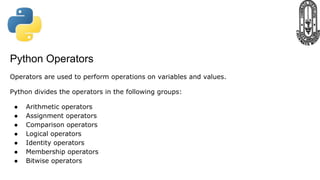
Python Operators
Operators are used to perform operations on variables and values.
Python divides the operators in the following groups:
● Arithmetic operators
● Assignment operators
● Comparison operators
● Logical operators
● Identity operators
● Membership operators
● Bitwise operators
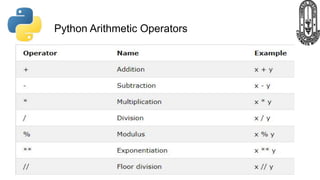
Python Arithmetic Operators
Arithmetic operators are used with numeric values to perform
common mathematical operations:
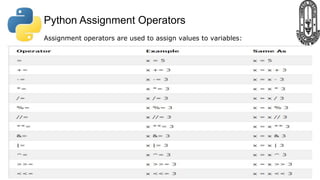
Python Assignment Operators
Assignment operators are used to assign values to variables:
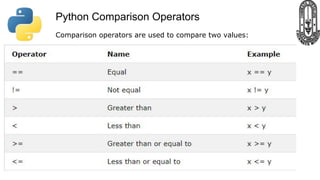
Python Comparison Operators
Comparison operators are used to compare two values:
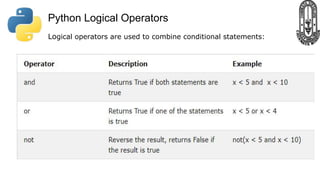
Python Logical Operators
Logical operators are used to combine conditional statements:
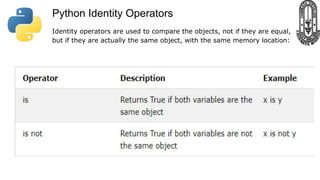
Python Identity Operators
Identity operators are used to compare the objects, not if they are equal,
but if they are actually the same object, with the same memory location:
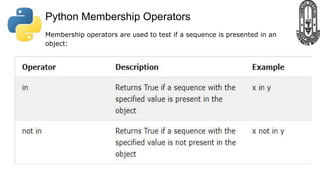
Python Membership Operators
Membership operators are used to test if a sequence is presented in an
object:
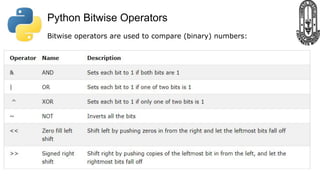
Python Bitwise Operators
Bitwise operators are used to compare (binary) numbers:
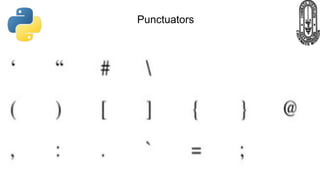
Punctuators
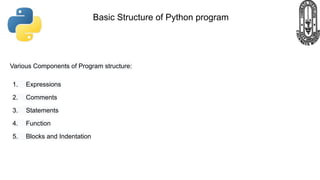
Various Components of Program structure:
1. Expressions
2. Comments
3. Statements
4. Function
5. Blocks and Indentation
Basic Structure of Python program
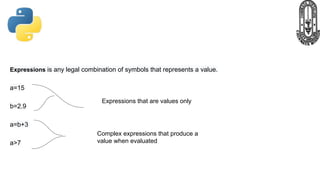
Expressions is any legal combination of symbols that represents a value.
a=15
b=2.9
a=b+3
a>7
Expressions that are values only
Complex expressions that produce a
value when evaluated
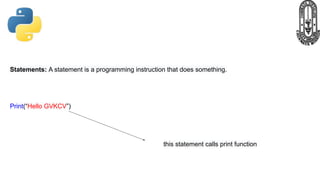
Statements: A statement is a programming instruction that does something.
Print(“Hello GVKCV”)
this statement calls print function
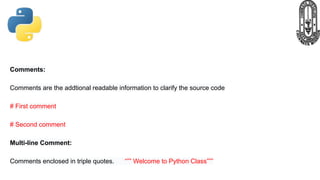
Comments:
Comments are the addtional readable information to clarify the source code
# First comment
# Second comment
Multi-line Comment:
Comments enclosed in triple quotes. “”” Welcome to Python Class”””
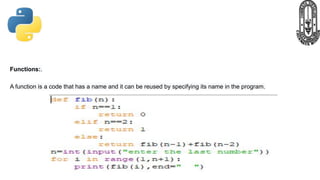
Functions:.
A function is a code that has a name and it can be reused by specifying its name in the program.
Blocks and Indentation:
A group of statements which are part of another statement or a function are called block.
Statements at same indentation level are part of same block.
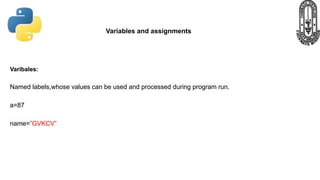
Varibales:
Named labels,whose values can be used and processed during program run.
a=87
name=”GVKCV”
Variables and assignments
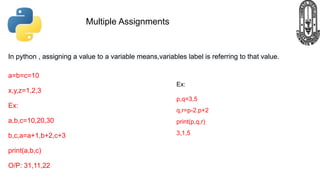
In python , assigning a value to a variable means,variables label is referring to that value.
a=b=c=10
x,y,z=1,2,3
Ex:
a,b,c=10,20,30
b,c,a=a+1,b+2,c+3
print(a,b,c)
O/P: 31,11,22
Multiple Assignments
Ex:
p,q=3,5
q,r=p-2.p+2
print(p,q,r)
3,1,5
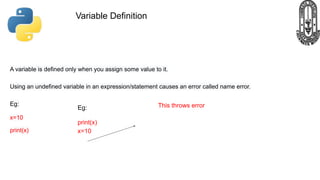
A variable is defined only when you assign some value to it.
Using an undefined variable in an expression/statement causes an error called name error.
Eg:
x=10
print(x)
Variable Definition
Eg:
print(x)
x=10
This throws error
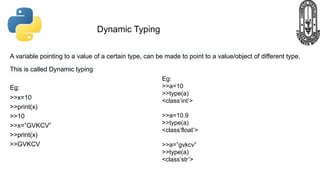
A variable pointing to a value of a certain type, can be made to point to a value/object of different type.
This is called Dynamic typing
Eg:
>>x=10
>>print(x)
>>10
>>x=”GVKCV”
>>print(x)
>>GVKCV
Dynamic Typing
Eg:
>>a=10
>>type(a)
<class’int’>
>>a=10.9
>>type(a)
<class’float’>
>>a=”gvkcv”
>>type(a)
<class’str’>
Simple input and output
Eg:
>>name=input(“Enter your name”)
Enter your name GVKCV
>>age=input(“Enter your age”)
Enter your age 22
>> name
GVKCV
>>type(name)
<class’str’>
>>age
22
>>type(age)
<class ‘str’)
>>age+1
Type Error
Note: The Input() function
always returns a value of string
type.
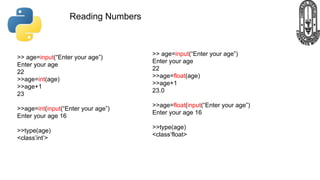
Reading Numbers
>> age=input(“Enter your age”)
Enter your age
22
>>age=int(age)
>>age+1
23
>>age=int(input(“Enter your age”)
Enter your age 16
>>type(age)
<class’int’>
>> age=input(“Enter your age”)
Enter your age
22
>>age=float(age)
>>age+1
23.0
>>age=float(input(“Enter your age”)
Enter your age 16
>>type(age)
<class’float>
Output Through print statement
Eg:
>>print(“Welcome to python class”)
Welcome to python class
>>a=10
>>print(“The value stored in varible a is”,a)
The value stored in variable a is 10
>>print(“My”,”Name”,”is”,”GVKCV”,sep=”....”)
My….Name….is….GVKCV
Python Fundamentals Class 11

Python Fundamentals Class 11

  • 1.
    GVK CHINMAYA VIDYALAYA SENIORSECONDARY SCHOOL Kothuru, Indukurupet, SPS Nellore Python Fundamentals Class: 11 Subject: Python Teacher: C Vijaya
  • 2.
    Python Operators Operators areused to perform operations on variables and values. Python divides the operators in the following groups: ● Arithmetic operators ● Assignment operators ● Comparison operators ● Logical operators ● Identity operators ● Membership operators ● Bitwise operators
  • 3.
    Python Arithmetic Operators Arithmeticoperators are used with numeric values to perform common mathematical operations:
  • 4.
    Python Assignment Operators Assignmentoperators are used to assign values to variables:
  • 5.
    Python Comparison Operators Comparisonoperators are used to compare two values:
  • 6.
    Python Logical Operators Logicaloperators are used to combine conditional statements:
  • 7.
    Python Identity Operators Identityoperators are used to compare the objects, not if they are equal, but if they are actually the same object, with the same memory location:
  • 8.
    Python Membership Operators Membershipoperators are used to test if a sequence is presented in an object:
  • 9.
    Python Bitwise Operators Bitwiseoperators are used to compare (binary) numbers:
  • 10.
  • 11.
    Various Components ofProgram structure: 1. Expressions 2. Comments 3. Statements 4. Function 5. Blocks and Indentation Basic Structure of Python program
  • 12.
    Expressions is anylegal combination of symbols that represents a value. a=15 b=2.9 a=b+3 a>7 Expressions that are values only Complex expressions that produce a value when evaluated
  • 13.
    Statements: A statementis a programming instruction that does something. Print(“Hello GVKCV”) this statement calls print function
  • 14.
    Comments: Comments are theaddtional readable information to clarify the source code # First comment # Second comment Multi-line Comment: Comments enclosed in triple quotes. “”” Welcome to Python Class”””
  • 15.
    Functions:. A function isa code that has a name and it can be reused by specifying its name in the program.
  • 16.
    Blocks and Indentation: Agroup of statements which are part of another statement or a function are called block. Statements at same indentation level are part of same block.
  • 17.
    Varibales: Named labels,whose valuescan be used and processed during program run. a=87 name=”GVKCV” Variables and assignments
  • 18.
    In python ,assigning a value to a variable means,variables label is referring to that value. a=b=c=10 x,y,z=1,2,3 Ex: a,b,c=10,20,30 b,c,a=a+1,b+2,c+3 print(a,b,c) O/P: 31,11,22 Multiple Assignments Ex: p,q=3,5 q,r=p-2.p+2 print(p,q,r) 3,1,5
  • 19.
    A variable isdefined only when you assign some value to it. Using an undefined variable in an expression/statement causes an error called name error. Eg: x=10 print(x) Variable Definition Eg: print(x) x=10 This throws error
  • 20.
    A variable pointingto a value of a certain type, can be made to point to a value/object of different type. This is called Dynamic typing Eg: >>x=10 >>print(x) >>10 >>x=”GVKCV” >>print(x) >>GVKCV Dynamic Typing Eg: >>a=10 >>type(a) <class’int’> >>a=10.9 >>type(a) <class’float’> >>a=”gvkcv” >>type(a) <class’str’>
  • 21.
    Simple input andoutput Eg: >>name=input(“Enter your name”) Enter your name GVKCV >>age=input(“Enter your age”) Enter your age 22 >> name GVKCV >>type(name) <class’str’> >>age 22 >>type(age) <class ‘str’) >>age+1 Type Error Note: The Input() function always returns a value of string type.
  • 22.
    Reading Numbers >> age=input(“Enteryour age”) Enter your age 22 >>age=int(age) >>age+1 23 >>age=int(input(“Enter your age”) Enter your age 16 >>type(age) <class’int’> >> age=input(“Enter your age”) Enter your age 22 >>age=float(age) >>age+1 23.0 >>age=float(input(“Enter your age”) Enter your age 16 >>type(age) <class’float>
  • 23.
    Output Through printstatement Eg: >>print(“Welcome to python class”) Welcome to python class >>a=10 >>print(“The value stored in varible a is”,a) The value stored in variable a is 10 >>print(“My”,”Name”,”is”,”GVKCV”,sep=”....”) My….Name….is….GVKCV