Keywords
• Reserve wordof the compiler/interpreter which can’t be used
as identifier.
• We cannot use a keyword as variable name, function name or
any other identifier. They are used to define the syntax and
structure of the Python language.
import keyword
>>> print(keyword.kwlist)
structure of the Python language.
• In Python, keywords are case sensitive.
• There are 33 keywords in Python 3.3. This number can vary
slightly in course of time.
• All the keywords except True, False and None are in lowercase
and they must be written as it is.
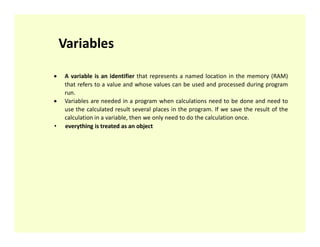
A variableis an identifier that represents a named location in the memory (RAM)
that refers to a value and whose values can be used and processed during program
run.
Variables are needed in a program when calculations need to be done and need to
use the calculated result several places in the program. If we save the result of the
calculation in a variable, then we only need to do the calculation once.
• everything is treated as an object
Variables
• everything is treated as an object
9.
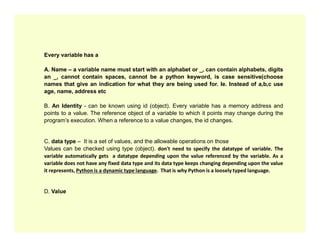
Every variable hasa
A. Name – a variable name must start with an alphabet or _, can contain alphabets, digits
an _, cannot contain spaces, cannot be a python keyword, is case sensitive(choose
names that give an indication for what they are being used for. Ie. Instead of a,b,c use
age, name, address etc
B. An Identity - can be known using id (object). Every variable has a memory address and
points to a value. The reference object of a variable to which it points may change during the
program’s execution. When a reference to a value changes, the id changes.
C. data type – It is a set of values, and the allowable operations on those
Values can be checked using type (object). don't need to specify the datatype of variable. The
variable automatically gets a datatype depending upon the value referenced by the variable. As a
variable does not have any fixed data type and its data type keeps changing depending upon the value
it represents, Python is a dynamic type language. That is why Python is a loosely typed language.
D. Value
10.
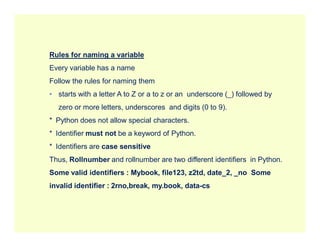
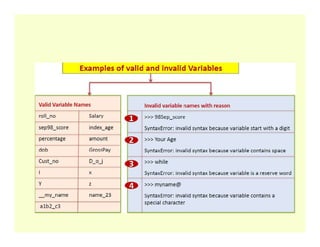
Rules for naminga variable
Every variable has a name
Follow the rules for naming them
• starts with a letter A to Z or a to z or an underscore (_) followed by
zero or more letters, underscores and digits (0 to 9).
* Python does not allow special characters.
* Python does not allow special characters.
* Identifier must not be a keyword of Python.
* Identifiers are case sensitive
Thus, Rollnumber and rollnumber are two different identifiers in Python.
Some valid identifiers : Mybook, file123, z2td, date_2, _no Some
invalid identifier : 2rno,break, my.book, data-cs
11.
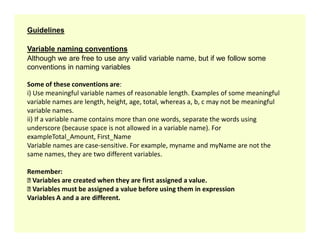
Guidelines
Variable naming conventions
Althoughwe are free to use any valid variable name, but if we follow some
conventions in naming variables
Some of these conventions are:
i) Use meaningful variable names of reasonable length. Examples of some meaningful
variable names are length, height, age, total, whereas a, b, c may not be meaningful
variable names.
ii) If a variable name contains more than one words, separate the words using
underscore (because space is not allowed in a variable name). For
underscore (because space is not allowed in a variable name). For
exampleTotal_Amount, First_Name
Variable names are case-sensitive. For example, myname and myName are not the
same names, they are two different variables.
Remember:
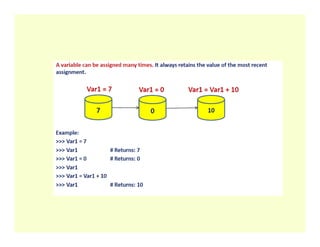
Variables are created when they are first assigned a value.
Variables must be assigned a value before using them in expression
Variables A and a are different.
13.
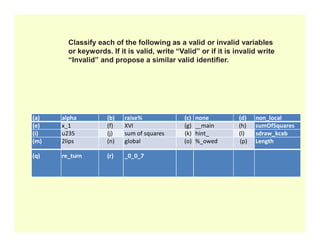
(a) alpha (b)raise% (c) none (d) non_local
(e) x_1 (f) XVI (g) main (h) sumOfSquares
Classify each of the following as a valid or invalid variables
or keywords. If it is valid, write “Valid” or if it is invalid write
“Invalid” and propose a similar valid identifier.
(e) x_1 (f) XVI (g) main (h) sumOfSquares
(i) u235 (j) sum of squares (k) hint_ (l) sdraw_kcab
(m) 2lips (n) global (o) %_owed (p) Length
(q) re_turn (r) _0_0_7
14.
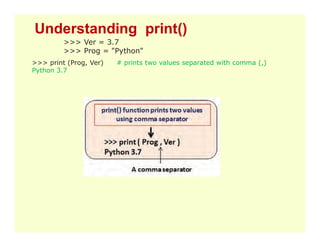
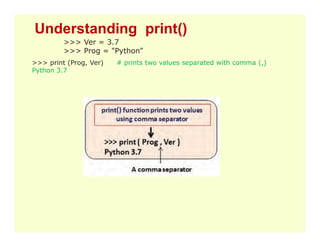
>>> Ver =3.7
>>> Prog = "Python"
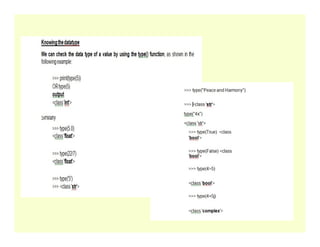
>>> print (Prog, Ver) # prints two values separated with comma (,)
Python 3.7
Understanding print()
15.
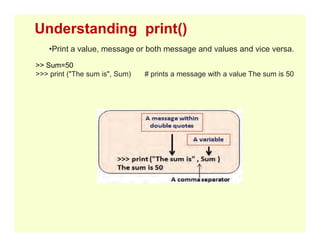
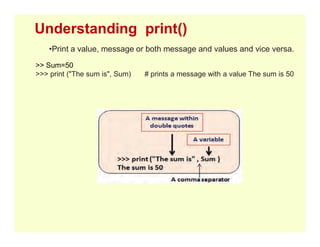
•Print a value,message or both message and values and vice versa.
>> Sum=50
>>> print ("The sum is", Sum) # prints a message with a value The sum is 50
Understanding print()
16.
Operators
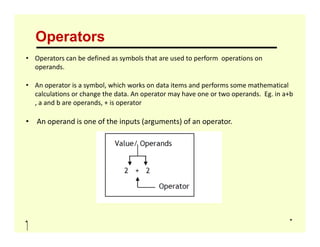
• Operators canbe defined as symbols that are used to perform operations on
operands.
• An operator is a symbol, which works on data items and performs some mathematical
calculations or change the data. An operator may have one or two operands. Eg. in a+b
, a and b are operands, + is operator
• An operand is one of the inputs (arguments) of an operator.
• An operand is one of the inputs (arguments) of an operator.
17.
Operators
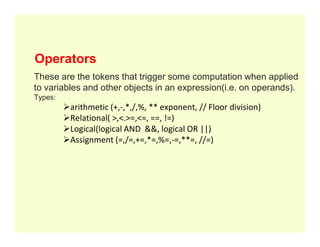
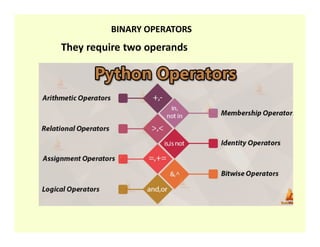
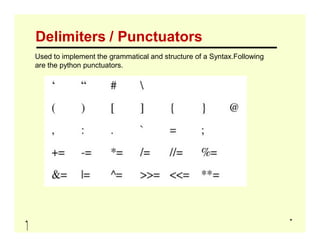
These are thetokens that trigger some computation when applied
to variables and other objects in an expression(i.e. on operands).
Types:
arithmetic (+,-,*,/,%, ** exponent, // Floor division)
Relational( >,<.>=,<=, ==, !=)
Logical(logical AND &&, logical OR ||)
Logical(logical AND &&, logical OR ||)
Assignment (=,/=,+=,*=,%=,-=,**=, //=)
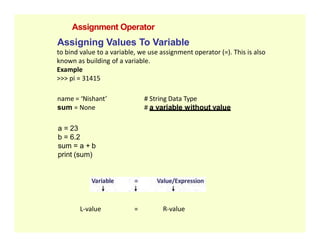
Assigning Values ToVariable
to bind value to a variable, we use assignment operator (=). This is also
known as building of a variable.
Example
>>> pi = 31415
name = ‘Nishant’ # String Data Type
sum = None # a variable without value
Assignment Operator
a = 23
b = 6.2
sum = a + b
print (sum)
L-value = R-value
20.
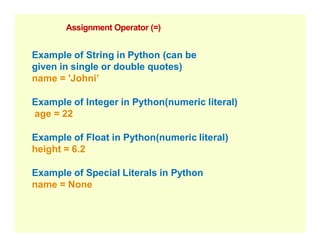
Assignment Operator (=)
Exampleof String in Python (can be
given in single or double quotes)
name = 'Johni’
Example of Integer in Python(numeric literal)
age = 22
Example of Float in Python(numeric literal)
height = 6.2
Example of Special Literals in Python
name = None
22.
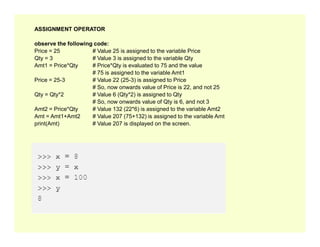
ASSIGNMENT OPERATOR
observe thefollowing code:
Price = 25 # Value 25 is assigned to the variable Price
Qty = 3 # Value 3 is assigned to the variable Qty
Amt1 = Price*Qty # Price*Qty is evaluated to 75 and the value
# 75 is assigned to the variable Amt1
Price = 25-3 # Value 22 (25-3) is assigned to Price
# So, now onwards value of Price is 22, and not 25
Qty = Qty*2 # Value 6 (Qty*2) is assigned to Qty
# So, now onwards value of Qty is 6, and not 3
Amt2 = Price*Qty # Value 132 (22*6) is assigned to the variable Amt2
Amt = Amt1+Amt2 # Value 207 (75+132) is assigned to the variable Amt
print(Amt) # Value 207 is displayed on the screen.
print(Amt) # Value 207 is displayed on the screen.
23.
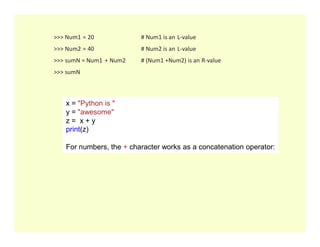
>>> Num1 =20 # Num1 is an L-value
>>> Num2 = 40 # Num2 is an L-value
>>> sumN = Num1 + Num2 # (Num1 +Num2) is an R-value
>>> sumN
x = "Python is "
y = "awesome"
z = x + y
z = x + y
print(z)
Output :Python is awesome
For numbers, the + character works as a concatenation operator:
24.
>>> Ver =3.7
>>> Prog = "Python"
>>> print (Prog, Ver) # prints two values separated with comma (,)
Python 3.7
Understanding print()
25.
•Print a value,message or both message and values and vice versa.
>> Sum=50
>>> print ("The sum is", Sum) # prints a message with a value The sum is 50
Understanding print()
26.
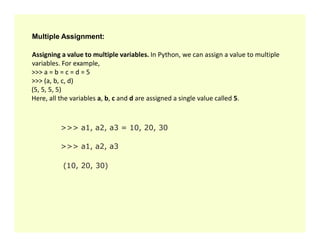
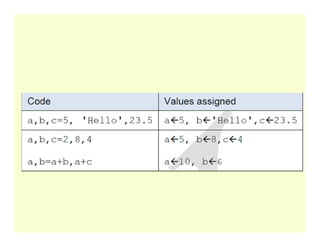
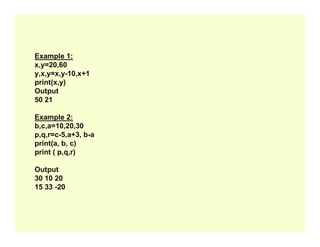
Multiple Assignment:
Assigning avalue to multiple variables. In Python, we can assign a value to multiple
variables. For example,
>>> a = b = c = d = 5
>>> (a, b, c, d)
(5, 5, 5, 5)
Here, all the variables a, b, c and d are assigned a single value called 5.
>>> a1, a2, a3 = 10, 20, 30
>>> a1, a2, a3 = 10, 20, 30
>>> a1, a2, a3
(10, 20, 30)
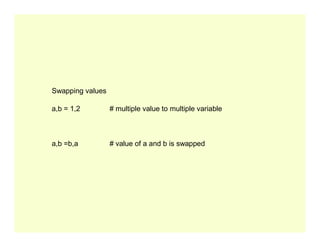
Swapping values
a,b =1,2 # multiple value to multiple variable
a,b =b,a # value of a and b is swapped
30.
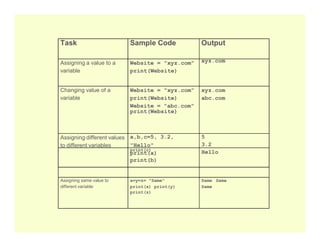
Task Sample CodeOutput
Assigning a value to a
variable
Website = "xyz.com"
print(Website)
xyz.com
Changing value of a
variable
Website = "xyz.com"
print(Website)
Website = "abc.com"
print(Website)
xyz.com
abc.com
Assigning different values
to different variables
a,b,c=5, 3.2,
"Hello"
print(a)
print(b)
5
3.2
Hello
print(c)
Assigning same value to
different variable
x=y=z= "Same"
print(x) print(y)
print(z)
Same Same
Same
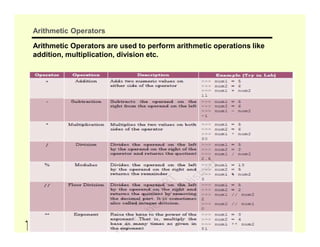
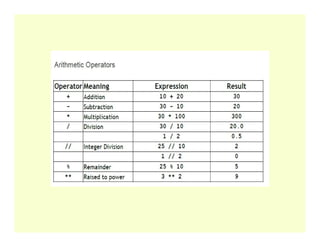
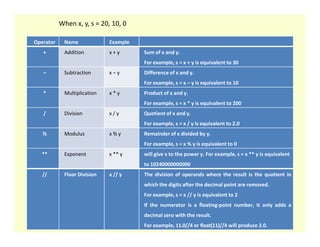
Operator Name Example
+Addition x + y Sum of x and y.
For example, s = x + y is equivalent to 30
– Subtraction x – y Difference of x and y.
For example, s = x – y is equivalent to 10
* Multiplication x * y Product of x and y.
For example, s = x * y is equivalent to 200
/ Division x / y Quotient of x and y.
For example, s = x / y is equivalent to 2.0
When x, y, s = 20, 10, 0
For example, s = x / y is equivalent to 2.0
% Modulus x % y Remainder of x divided by y.
For example, s = x % y is equivalent to 0
** Exponent x ** y will give x to the power y. For example, s = x ** y is equivalent
to 10240000000000
// Floor Division x // y The division of operands where the result is the quotient in
which the digits after the decimal point are removed.
For example, s = x // y is equivalent to 2
If the numerator is a floating-point number, it only adds a
decimal zero with the result.
For example, 11.0//4 or float(11)//4 will produce 2.0.
34.
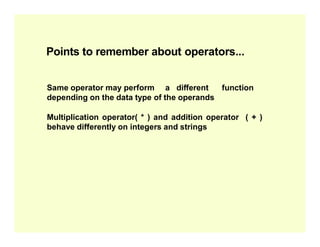
Points to rememberabout operators...
Same operator may perform a different function
depending on the data type of the operands
Multiplication operator( * ) and addition operator ( + )
behave differently on integers and strings
behave differently on integers and strings
35.
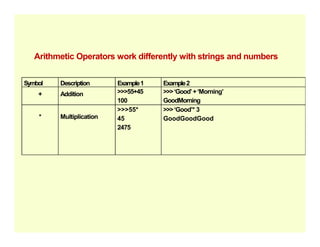
Arithmetic Operators workdifferently with strings and numbers
Symbol Description Example1 Example2
+ Addition >>>55+45
100
>>>‘Good’+‘Morning’
GoodMorning
* Multiplication
>>>55*
45
>>>‘Good’* 3
GoodGoodGood
2475
39.
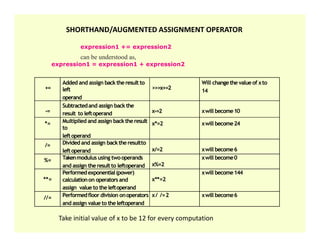
+=
Added and assignback theresult to
left
operand
>>>x+=2
Will changethe valueof xto
14
-=
Subtractedand assign back the
result to leftoperand x-=2 xwill become10
*= Multiplied and assign backtheresult x*=2 xwill become24
SHORTHAND/AUGMENTED ASSIGNMENT OPERATOR
expression1 += expression2
can be understood as,
expression1 = expression1 + expression2
*= Multiplied and assign backtheresult
to
leftoperand
x*=2 xwill become24
/= Divided and assign backtheresultto
leftoperand x/=2 xwill become6
%= Takenmodulus using twooperands
and assign theresultto leftoperand x%=2
xwill become0
**=
Performedexponential(power)
calculationon operators and
assign value to theleftoperand
x**=2
xwill become144
//= Performedfloor division onoperators
and assign value to theleftoperand
x/ /=2 xwill become6
Take initial value of x to be 12 for every computation
40.
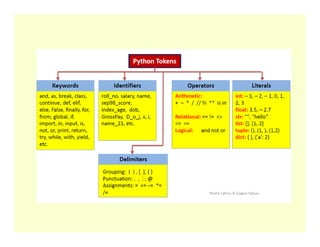
Operators Operators type
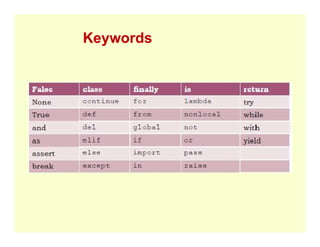
() [ ] { } Grouping
+ - * / // % ** Arithmetic operators
== != <> <= >= is in Relational operators
and not or Logical operators
41.
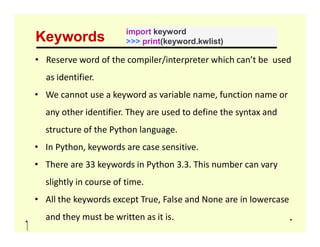
Type of Multi-line
Statement
Usage
Multi-linestatement
In Python, end of a statement is marked by a newline character.
However, Statements in Python can be extended to one or more lines using
parentheses (), braces {}, square brackets [], semi-colon (;), continuation
character slash (). When we need to do long calculations and cannot fit these
statements into one line, we can make use of these characters.
Examples:
Statement
Using Continuation
Character (/)
s = 1 + 2 + 3 +
4 + 5 + 6 +
7 + 8 + 9
Using Parentheses () n = (1 * 2 * 3 + 4 – 5)
Using Square Brackets [] footballer = ['MESSI',
'NEYMAR',
'SUAREZ']
Using braces {} x = {1 + 2 + 3 + 4 + 5 + 6 +
7 + 8 + 9}
Using Semicolons ( ; ) flag = 2; ropes = 3; pole = 4
42.
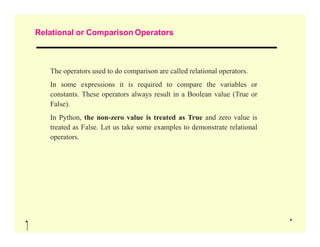
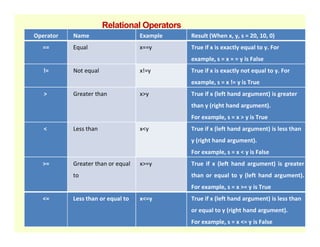
Relational or ComparisonOperators
The operators used to do comparison are called relational operators.
In some expressions it is required to compare the variables or
constants. These operators always result in a Boolean value (True or
False).
In Python, the non-zero value is treated as True and zero value is
treated as False. Let us take some examples to demonstrate relational
treated as False. Let us take some examples to demonstrate relational
operators.
43.
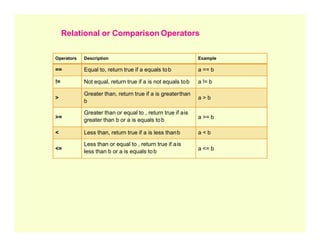
Operators Description Example
==Equal to, return true if a equals tob a == b
!= Not equal, return true if a is not equals tob a != b
>
Greater than, return true if a is greaterthan
b
a > b
>=
Greater than or equal to , return true if ais
greater than b or a is equals tob
a >= b
Relational or Comparison Operators
< Less than, return true if a is less thanb a < b
<=
Less than or equal to , return true if ais
less than b or a is equals tob
a <= b
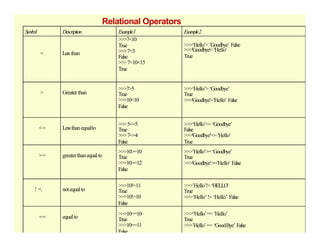
Operator Name ExampleResult (When x, y, s = 20, 10, 0)
== Equal x==y True if x is exactly equal to y. For
example, s = x = = y is False
!= Not equal x!=y True if x is exactly not equal to y. For
example, s = x != y is True
> Greater than x>y True if x (left hand argument) is greater
than y (right hand argument).
For example, s = x > y is True
Relational Operators
< Less than x<y True if x (left hand argument) is less than
y (right hand argument).
For example, s = x < y is False
>= Greater than or equal
to
x>=y True if x (left hand argument) is greater
than or equal to y (left hand argument).
For example, s = x >= y is True
<= Less than or equal to x<=y True if x (left hand argument) is less than
or equal to y (right hand argument).
For example, s = x <= y is False
46.
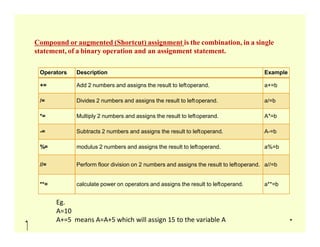
Operators Description Example
+=Add 2 numbers and assigns the result to leftoperand. a+=b
/= Divides 2 numbers and assigns the result to leftoperand. a/=b
*= Multiply 2 numbers and assigns the result to leftoperand. A*=b
Compound or augmented (Shortcut) assignment is the combination, in a single
statement, of a binary operation and an assignment statement.
-= Subtracts 2 numbers and assigns the result to leftoperand. A-=b
%= modulus 2 numbers and assigns the result to leftoperand. a%=b
//= Perform floor division on 2 numbers and assigns the result to leftoperand. a//=b
**= calculate power on operators and assigns the result to leftoperand. a**=b
Eg.
A=10
A+=5 means A=A+5 which will assign 15 to the variable A
47.
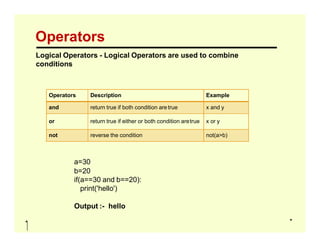
Operators
Logical Operators -Logical Operators are used to combine
conditions
Operators Description Example
and return true if both condition aretrue x and y
or return true if either or both condition aretrue x or y
a=30
b=20
if(a==30 and b==20):
print('hello')
Output :- hello
or return true if either or both condition aretrue x or y
not reverse the condition not(a>b)
48.
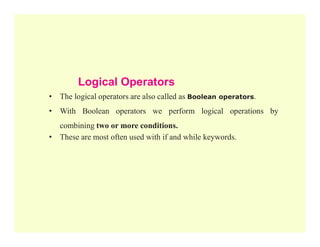
Logical Operators
• Thelogical operators are also called as Boolean operators.
• With Boolean operators we perform logical operations by
combining two or more conditions.
combining two or more conditions.
• These are most often used with if and while keywords.
49.
Logical Operators -and
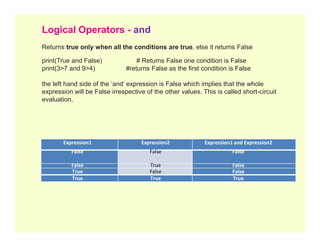
Returns true only when all the conditions are true, else it returns False
print(True and False) # Returns False one condition is False
print(3>7 and 9>4) #returns False as the first condition is False
the left hand side of the ‘and’ expression is False which implies that the whole
expression will be False irrespective of the other values. This is called short-circuit
evaluation.
Expression1 Expression2 Expression1 and Expression2
False False False
False True False
True False False
True True True
50.
Logical Operators -or
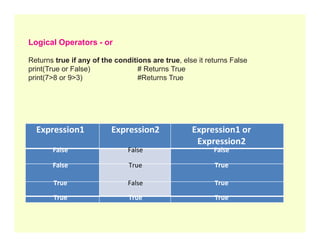
Returns true if any of the conditions are true, else it returns False
print(True or False) # Returns True
print(7>8 or 9>3) #Returns True
Expression1 Expression2 Expression1 or
Expression1 Expression2 Expression1 or
Expression2
False False False
False True True
True False True
True True True
51.
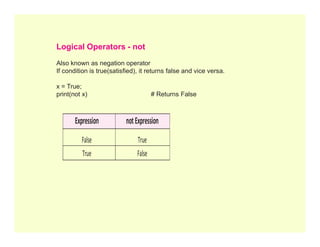
Expression notExpression
Logical Operators- not
Also known as negation operator
If condition is true(satisfied), it returns false and vice versa.
x = True;
print(not x) # Returns False
Expression notExpression
False True
True False
52.
Type Conversion
is theconversion of object from one data type to another data type.
It helps us do operations on values having different data types. For ex:
concatenating an integer to a string.
Python has two types of type conversion.
1. Implicit Type Conversion
2. Explicit Type Conversion
53.
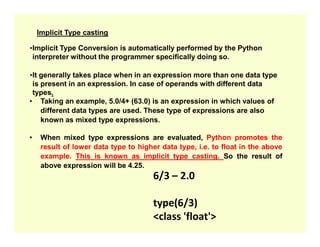
Implicit Type casting
•ImplicitType Conversion is automatically performed by the Python
interpreter without the programmer specifically doing so.
•It generally takes place when in an expression more than one data type
is present in an expression. In case of operands with different data
types.
• Taking an example, 5.0/4+ (63.0) is an expression in which values of
different data types are used. These type of expressions are also
known as mixed type expressions.
known as mixed type expressions.
• When mixed type expressions are evaluated, Python promotes the
result of lower data type to higher data type, i.e. to float in the above
example. This is known as implicit type casting. So the result of
above expression will be 4.25.
6/3 – 2.0
type(6/3)
<class 'float'>
54.
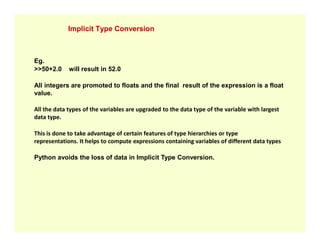
Implicit Type Conversion
Eg.
>>50+2.0will result in 52.0
All integers are promoted to floats and the final result of the expression is a float
value.
All the data types of the variables are upgraded to the data type of the variable with largest
data type.
This is done to take advantage of certain features of type hierarchies or type
representations. It helps to compute expressions containing variables of different data types
Python avoids the loss of data in Implicit Type Conversion.
55.
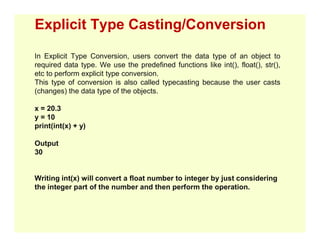
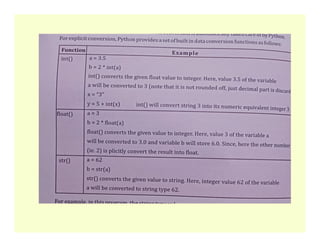
Explicit Type Casting/Conversion
InExplicit Type Conversion, users convert the data type of an object to
required data type. We use the predefined functions like int(), float(), str(),
etc to perform explicit type conversion.
This type of conversion is also called typecasting because the user casts
(changes) the data type of the objects.
x = 20.3
y = 10
print(int(x) + y)
print(int(x) + y)
Output
30
Writing int(x) will convert a float number to integer by just considering
the integer part of the number and then perform the operation.
56.
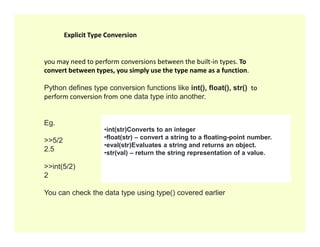
you may needto perform conversions between the built-in types. To
convert between types, you simply use the type name as a function.
Python defines type conversion functions like int(), float(), str() to
perform conversion from one data type into another.
Eg.
Explicit Type Conversion
Eg.
>>5/2
2.5
>>int(5/2)
2
You can check the data type using type() covered earlier
•int(str)Converts to an integer
•float(str) – convert a string to a floating-point number.
•eval(str)Evaluates a string and returns an object.
•str(val) – return the string representation of a value.
57.
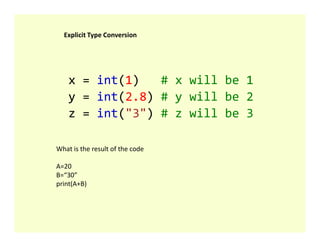
x = int(1)# x will be 1
y = int(2.8) # y will be 2
z = int("3") # z will be 3
Explicit Type Conversion
What is the result of the code
A=20
B=“30”
print(A+B)
58.
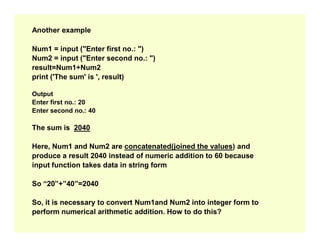
Another example
Num1 =input ("Enter first no.: ")
Num2 = input ("Enter second no.: ")
result=Num1+Num2
print ('The sum' is ', result)
Output
Enter first no.: 20
Enter second no.: 40
The sum is 2040
The sum is 2040
Here, Num1 and Num2 are concatenated(joined the values) and
produce a result 2040 instead of numeric addition to 60 because
input function takes data in string form
So “20”+”40”=2040
So, it is necessary to convert Num1and Num2 into integer form to
perform numerical arithmetic addition. How to do this?
59.
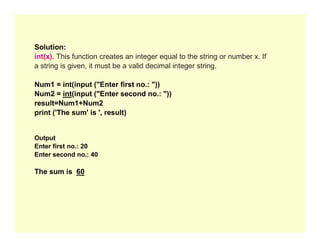
Solution:
int(x). This functioncreates an integer equal to the string or number x. If
a string is given, it must be a valid decimal integer string.
Num1 = int(input ("Enter first no.: "))
Num2 = int(input ("Enter second no.: "))
result=Num1+Num2
print ('The sum' is ', result)
Output
Enter first no.: 20
Enter second no.: 40
The sum is 60
60.
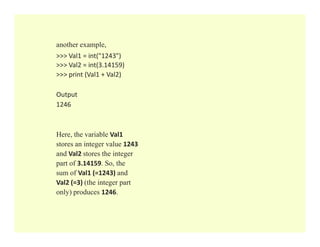
another example,
>>> Val1= int("1243")
>>> Val2 = int(3.14159)
>>> print (Val1 + Val2)
Output
1246
Here, the variable Val1
stores an integer value 1243
and Val2 stores the integer
part of 3.14159. So, the
sum of Val1 (=1243) and
Val2 (=3) (the integer part
only) produces 1246.
61.
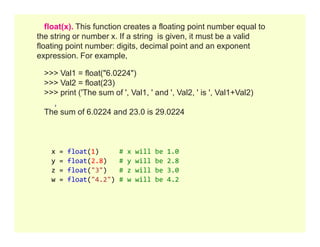
float(x). This functioncreates a floating point number equal to
the string or number x. If a string is given, it must be a valid
floating point number: digits, decimal point and an exponent
expression. For example,
>>> Val1 = float("6.0224")
>>> Val2 = float(23)
>>> print ('The sum of ', Val1, ' and ', Val2, ' is ', Val1+Val2)
The sum of 6.0224 and 23.0 is 29.0224
x = float(1) # x will be 1.0
y = float(2.8) # y will be 2.8
z = float("3") # z will be 3.0
w = float("4.2") # w will be 4.2
62.
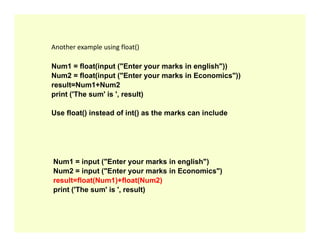
Another example usingfloat()
Num1 = float(input ("Enter your marks in english"))
Num2 = float(input ("Enter your marks in Economics"))
result=Num1+Num2
print ('The sum' is ', result)
Use float() instead of int() as the marks can include
Num1 = input ("Enter your marks in english")
Num2 = input ("Enter your marks in Economics")
result=float(Num1)+float(Num2)
print ('The sum' is ', result)
63.
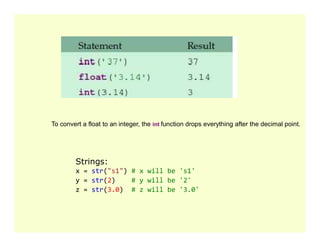
To convert afloat to an integer, the int function drops everything after the decimal point.
To convert a float to an integer, the int function drops everything after the decimal point.
Strings:
x = str("s1") # x will be 's1'
y = str(2) # y will be '2'
z = str(3.0) # z will be '3.0'
64.
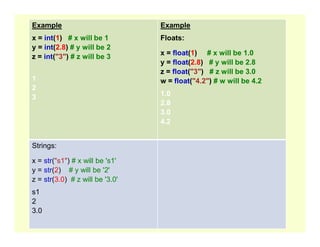
Example
x = int(1)# x will be 1
y = int(2.8) # y will be 2
z = int("3") # z will be 3
1
2
3
Example
Floats:
x = float(1) # x will be 1.0
y = float(2.8) # y will be 2.8
z = float("3") # z will be 3.0
w = float("4.2") # w will be 4.2
1.0
2.8
3.0
4.2
4.2
Strings:
x = str("s1") # x will be 's1'
y = str(2) # y will be '2'
z = str(3.0) # z will be '3.0'
s1
2
3.0
66.
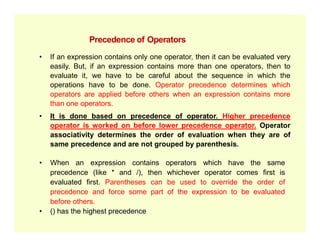
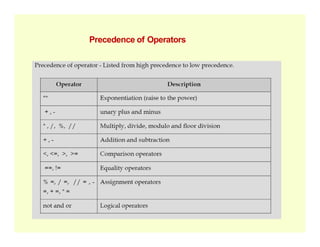
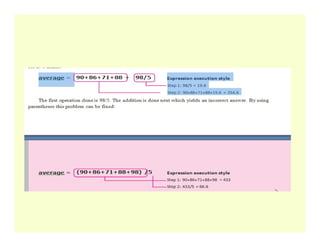
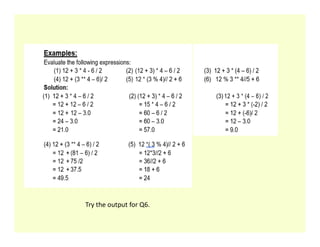
• If anexpression contains only one operator, then it can be evaluated very
easily. But, if an expression contains more than one operators, then to
evaluate it, we have to be careful about the sequence in which the
operations have to be done. Operator precedence determines which
operators are applied before others when an expression contains more
than one operators.
• It is done based on precedence of operator. Higher precedence
operator is worked on before lower precedence operator. Operator
Precedence of Operators
operator is worked on before lower precedence operator. Operator
associativity determines the order of evaluation when they are of
same precedence and are not grouped by parenthesis.
• When an expression contains operators which have the same
precedence (like * and /), then whichever operator comes first is
evaluated first. Parentheses can be used to override the order of
precedence and force some part of the expression to be evaluated
before others.
• () has the highest precedence
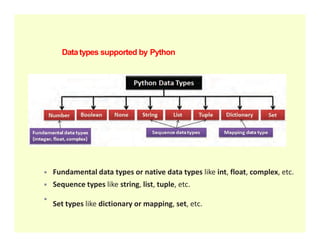
Datatypes supported byPython
Fundamental data types or native data types like int, float, complex, etc.
Sequence types like string, list, tuple, etc.
Set types like dictionary or mapping, set, etc.
75.
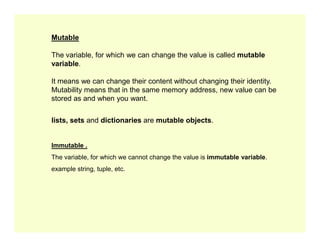
Mutable
The variable, forwhich we can change the value is called mutable
variable.
It means we can change their content without changing their identity.
Mutability means that in the same memory address, new value can be
stored as and when you want.
lists, sets and dictionaries are mutable objects.
lists, sets and dictionaries are mutable objects.
Immutable .
The variable, for which we cannot change the value is immutable variable.
example string, tuple, etc.
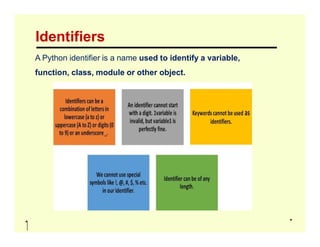
Example Data Type
x= "Hello World" str
x = 20 int
x = 20.5 float
x = 1j complex
x = ["apple", "banana", "cherry"] list
x = ("apple", "banana", "cherry") tuple
x = range(6) range
x = range(6) range
x = {"name" : "John", "age" : 36} dict
x = {"apple", "banana", "cherry"} set
x = True bool
x = None NoneType
78.
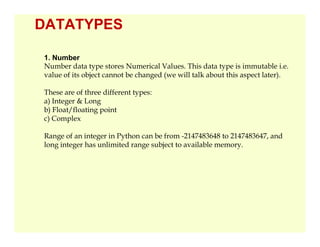
DATATYPES
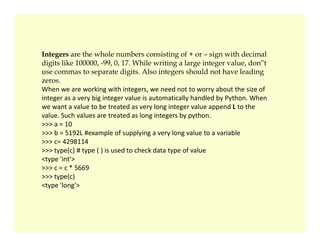
1. Number
Number datatype stores Numerical Values. This data type is immutable i.e.
value of its object cannot be changed (we will talk about this aspect later).
These are of three different types:
a) Integer & Long
b) Float/floating point
c) Complex
Range of an integer in Python can be from -2147483648 to 2147483647, and
long integer has unlimited range subject to available memory.
79.
Integers are thewhole numbers consisting of + or – sign with decimal
digits like 100000, -99, 0, 17. While writing a large integer value, don‟t
use commas to separate digits. Also integers should not have leading
zeros.
When we are working with integers, we need not to worry about the size of
integer as a very big integer value is automatically handled by Python. When
we want a value to be treated as very long integer value append L to the
value. Such values are treated as long integers by python.
>>> a = 10
>>> a = 10
>>> b = 5192L #example of supplying a very long value to a variable
>>> c= 4298114
>>> type(c) # type ( ) is used to check data type of value
<type 'int'>
>>> c = c * 5669
>>> type(c)
<type 'long'>
80.
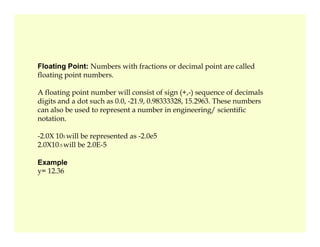
Floating Point: Numberswith fractions or decimal point are called
floating point numbers.
A floating point number will consist of sign (+,-) sequence of decimals
digits and a dot such as 0.0, -21.9, 0.98333328, 15.2963. These numbers
can also be used to represent a number in engineering/ scientific
notation.
-2.0X 10⁵ will be represented as -2.0e5
2.0X10⁻⁵ will be 2.0E-5
Example
y= 12.36
81.
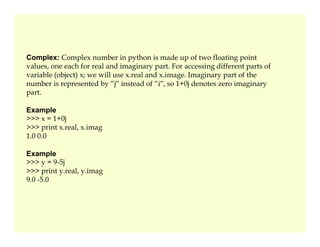
Complex: Complex numberin python is made up of two floating point
values, one each for real and imaginary part. For accessing different parts of
variable (object) x; we will use x.real and x.image. Imaginary part of the
number is represented by “j‟ instead of “i‟, so 1+0j denotes zero imaginary
part.
Example
>>> x = 1+0j
>>> print x.real, x.imag
>>> print x.real, x.imag
1.0 0.0
Example
>>> y = 9-5j
>>> print y.real, y.imag
9.0 -5.0
82.
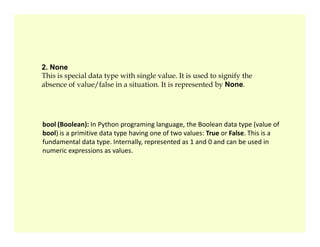
2. None
This isspecial data type with single value. It is used to signify the
absence of value/false in a situation. It is represented by None.
bool (Boolean): In Python programing language, the Boolean data type (value of
bool (Boolean): In Python programing language, the Boolean data type (value of
bool) is a primitive data type having one of two values: True or False. This is a
fundamental data type. Internally, represented as 1 and 0 and can be used in
numeric expressions as values.
83.
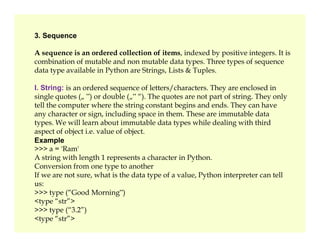
3. Sequence
A sequenceis an ordered collection of items, indexed by positive integers. It is
combination of mutable and non mutable data types. Three types of sequence
data type available in Python are Strings, Lists & Tuples.
I. String: is an ordered sequence of letters/characters. They are enclosed in
single quotes („ ‟) or double („‟ “). The quotes are not part of string. They only
tell the computer where the string constant begins and ends. They can have
any character or sign, including space in them. These are immutable data
types. We will learn about immutable data types while dealing with third
types. We will learn about immutable data types while dealing with third
aspect of object i.e. value of object.
Example
>>> a = 'Ram'
A string with length 1 represents a character in Python.
Conversion from one type to another
If we are not sure, what is the data type of a value, Python interpreter can tell
us:
>>> type (“Good Morning‟)
<type “str”>
>>> type (“3.2”)
<type “str”>
84.
II. Lists: Listis also a sequence of values of any type. Values in the list are
called
elements / items. These are mutable and indexed/ordered. List is enclosed in
square brackets.
Example
l = [“abc”, 20.5,5]
III.Tuples: Tuples are a sequence of values of any type, and are indexed by
integers. They are immutable. Tuples are enclosed in (). We have already seen
a tuple, in Example 2 (4, 2).
85.
Sequence Data Type
String
•Anordered
sequence of letters
and characters
Lists
•A sequence of
values of any type
Tuple
•are sequence of
values of any type
and characters
•Enclosed in “ “ or
‘ ‘
•Are immutable
Example
>>>a=“Ram”
•Values in the list
are called items
and are indexed
•Are mutable
•Are enclosed in []
Example
[‘spam’ , 20, 13.5]
•Are indexed by
integers
•Are immutable
•Are enclosed in ()
Example
(2,4)
86.
4. Sets
Set isan unordered collection of values, of any type, with no duplicate
entry. Sets are immutable.
Example
s = set ([1,2,34])
5. Mapping
This data type is unordered and mutable. Dictionaries fall
This data type is unordered and mutable. Dictionaries fall
under Mappings.
5.1 Dictionaries: Can store any number of python objects.
What they store is a key – value pairs, which are accessed
using key. Dictionary is enclosed in curly brackets.
Example
d = {1:'a',2:'b',3:'c'}
87.
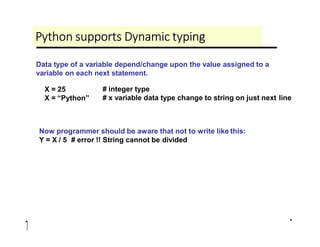
Python supports Dynamictyping
Data type of a variable depend/change upon the value assigned to a
variable on each next statement.
X = 25
X = “Python”
# integer type
# x variable data type change to string on just next line
Now programmer should be aware that not to write like this:
Y = X / 5 # error !! String cannot be divided
89.
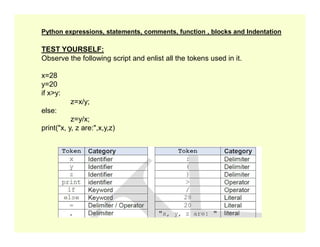
TEST YOURSELF:
Observe thefollowing script and enlist all the tokens used in it.
x=28
y=20
if x>y:
z=x/y;
else:
z=y/x;
Python expressions, statements, comments, function , blocks and Indentation
print("x, y, z are:",x,y,z)
90.
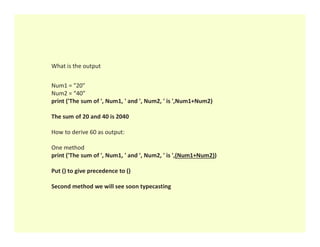
What is theoutput
Num1 = "20"
Num2 = “40”
print ('The sum of ', Num1, ' and ', Num2, ' is ',Num1+Num2)
The sum of 20 and 40 is 2040
How to derive 60 as output:
One method
print ('The sum of ', Num1, ' and ', Num2, ' is ',(Num1+Num2))
Put () to give precedence to ()
Second method we will see soon typecasting
91.
Points to rememberabout
variables……
•Are created when they are first assigned a value
•Refer to an object
•Refer to an object
•Must be assigned a value before using them in
any expression
•Keywords cannot be used as variable names
92.
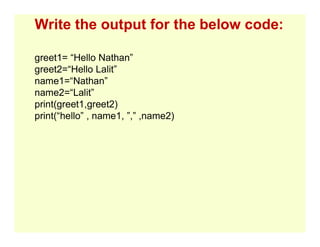
Write the outputfor the below code:
greet1= “Hello Nathan”
greet2=“Hello Lalit”
name1=“Nathan”
name2=“Lalit”
print(greet1,greet2)
print(“hello” , name1, ”,” ,name2)
93.
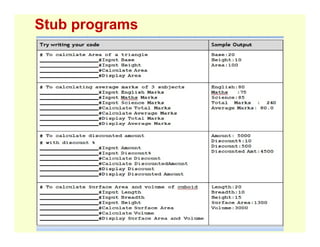
Basic Input Outputand Process
1. WAPto add 2 numbers.[R=a+b]
2. WAPto multiply 3 numbers.[R=a*b*c]
3. WAPto find average 5 numbers[R=(a+b+c+d+e)/5]
4. WAPto display age after 15 years.[nage =age+15]
5. WAPto display a3 numbers[R=a*a*a]
6. WAPto find the area of square. [A=a*a]
7. WAPto find the area of rectangle [A=a*b]
8. WAPto find the result XN
9. WAPto find the perimeter of rectangle[A=2*(l+ b) ]
10.WAPto find the area of circle [A=3.14*r*r]
11.WAPto find the circumference of circle [C=2*3.14*r]
12. WAPto swap the values of two variables.[a= a + b; b=a – b; a= a –b;]
13. WAPto input Hours, Minutes and Seconds and display inseconds.
[TS=H*60*60+M*60+S]
15. WAPto input cost and display cost after increasing 25%
[cost+(cost*25)]/100]
94.
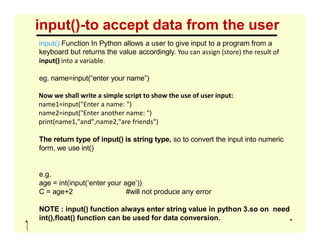
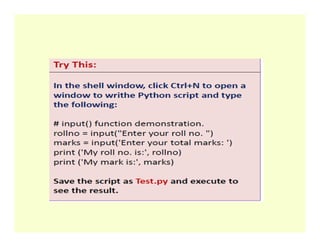
input()-to accept datafrom the user
input() Function In Python allows a user to give input to a program from a
keyboard but returns the value accordingly. You can assign (store) the result of
input() into a variable.
eg. name=input(“enter your name”)
Now we shall write a simple script to show the use of user input:
name1=input("Enter a name: ")
name2=input("Enter another name: ")
print(name1,"and",name2,"are friends")
print(name1,"and",name2,"are friends")
The return type of input() is string type, so to convert the input into numeric
form, we use int()
e.g.
age = int(input(‘enter your age’))
C = age+2 #will not produce any error
NOTE : input() function always enter string value in python 3.so on need
int(),float() function can be used for data conversion.
96.
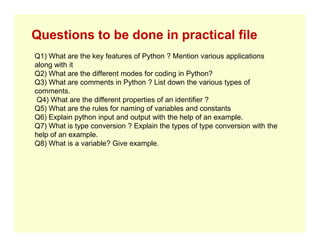
Questions to bedone in practical file
Q1) What are the key features of Python ? Mention various applications
along with it
Q2) What are the different modes for coding in Python?
Q3) What are comments in Python ? List down the various types of
comments.
Q4) What are the different properties of an identifier ?
Q5) What are the rules for naming of variables and constants
Q6) Explain python input and output with the help of an example.
Q7) What is type conversion ? Explain the types of type conversion with the
Q7) What is type conversion ? Explain the types of type conversion with the
help of an example.
Q8) What is a variable? Give example.
97.
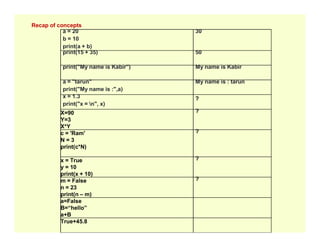
Recap of concepts
a= 20
b = 10
print(a + b)
30
print(15 + 35) 50
print("My name is Kabir") My name is Kabir
a = "tarun"
print("My name is :",a)
My name is : tarun
x = 1.3
print("x = n", x)
?
X=90
Y=3
X*Y
?
X*Y
c = 'Ram'
N = 3
print(c*N)
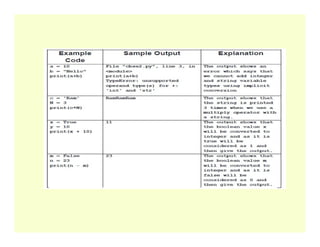
?
x = True
y = 10
print(x + 10)
?
m = False
n = 23
print(n – m)
?
a=False
B=“hello”
a+B
True+45.8
98.
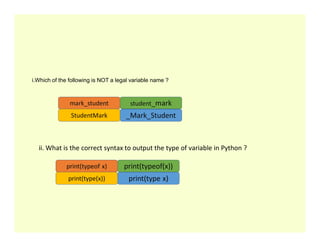
i.Which of thefollowing is NOT a legal variable name ?
ii. What is the correct syntax to output the type of variable in Python ?
99.
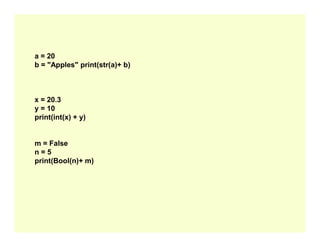
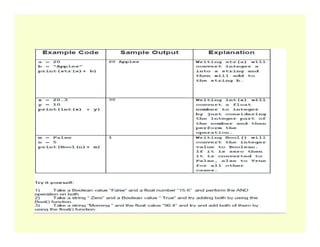
a = 20
b= "Apples" print(str(a)+ b)
x = 20.3
y = 10
print(int(x) + y)
m = False
n = 5
print(Bool(n)+ m)
100.
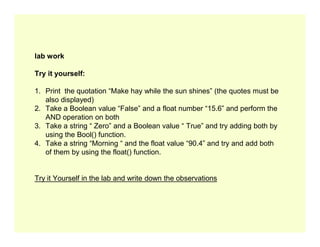
lab work
Try ityourself:
1. Print the quotation “Make hay while the sun shines” (the quotes must be
also displayed)
2. Take a Boolean value “False” and a float number “15.6” and perform the
AND operation on both
3. Take a string “ Zero” and a Boolean value “ True” and try adding both by
3. Take a string “ Zero” and a Boolean value “ True” and try adding both by
using the Bool() function.
4. Take a string “Morning “ and the float value “90.4” and try and add both
of them by using the float() function.
Try it Yourself in the lab and write down the observations
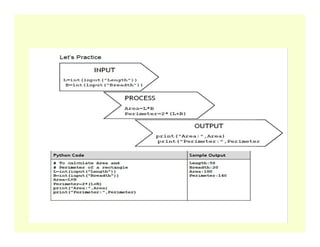
101.
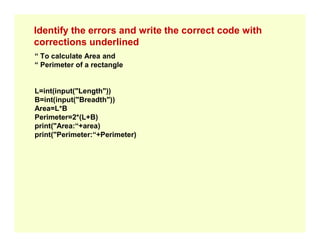
Identify the errorsand write the correct code with
corrections underlined
“ To calculate Area and
“ Perimeter of a rectangle
L=int(input("Length"))
B=int(input("Breadth"))
Area=L*B
Perimeter=2*(L+B)
print("Area:“+area)
print("Area:“+area)
print("Perimeter:“+Perimeter)
![Operators Operators type
( ) [ ] { } Grouping
+ - * / // % ** Arithmetic operators
== != <> <= >= is in Relational operators
and not or Logical operators](https://image.slidesharecdn.com/class9-pythonnotes-part2-251210201313-ac587c4f/85/class-9-Python-notes-part-2-pdfANRAVDBDD-40-320.jpg)
![Type of Multi-line
Statement
Usage
Multi-line statement
In Python, end of a statement is marked by a newline character.
However, Statements in Python can be extended to one or more lines using
parentheses (), braces {}, square brackets [], semi-colon (;), continuation
character slash (). When we need to do long calculations and cannot fit these
statements into one line, we can make use of these characters.
Examples:
Statement
Using Continuation
Character (/)
s = 1 + 2 + 3 +
4 + 5 + 6 +
7 + 8 + 9
Using Parentheses () n = (1 * 2 * 3 + 4 – 5)
Using Square Brackets [] footballer = ['MESSI',
'NEYMAR',
'SUAREZ']
Using braces {} x = {1 + 2 + 3 + 4 + 5 + 6 +
7 + 8 + 9}
Using Semicolons ( ; ) flag = 2; ropes = 3; pole = 4](https://image.slidesharecdn.com/class9-pythonnotes-part2-251210201313-ac587c4f/85/class-9-Python-notes-part-2-pdfANRAVDBDD-41-320.jpg)
![Delimiters Classification
( ) [ ] { } Grouping
. , : ; @ Punctuation
= += –= *= /= //= %= **= Arithmetic
assignment/binding
&= |= ^= <<= >>= Bitwise
assignment/binding
assignment/binding](https://image.slidesharecdn.com/class9-pythonnotes-part2-251210201313-ac587c4f/85/class-9-Python-notes-part-2-pdfANRAVDBDD-71-320.jpg)
![Example Data Type
x = "Hello World" str
x = 20 int
x = 20.5 float
x = 1j complex
x = ["apple", "banana", "cherry"] list
x = ("apple", "banana", "cherry") tuple
x = range(6) range
x = range(6) range
x = {"name" : "John", "age" : 36} dict
x = {"apple", "banana", "cherry"} set
x = True bool
x = None NoneType](https://image.slidesharecdn.com/class9-pythonnotes-part2-251210201313-ac587c4f/85/class-9-Python-notes-part-2-pdfANRAVDBDD-77-320.jpg)
![II. Lists: List is also a sequence of values of any type. Values in the list are
called
elements / items. These are mutable and indexed/ordered. List is enclosed in
square brackets.
Example
l = [“abc”, 20.5,5]
III.Tuples: Tuples are a sequence of values of any type, and are indexed by
integers. They are immutable. Tuples are enclosed in (). We have already seen
a tuple, in Example 2 (4, 2).](https://image.slidesharecdn.com/class9-pythonnotes-part2-251210201313-ac587c4f/85/class-9-Python-notes-part-2-pdfANRAVDBDD-84-320.jpg)
![Sequence Data Type
String
•An ordered
sequence of letters
and characters
Lists
•A sequence of
values of any type
Tuple
•are sequence of
values of any type
and characters
•Enclosed in “ “ or
‘ ‘
•Are immutable
Example
>>>a=“Ram”
•Values in the list
are called items
and are indexed
•Are mutable
•Are enclosed in []
Example
[‘spam’ , 20, 13.5]
•Are indexed by
integers
•Are immutable
•Are enclosed in ()
Example
(2,4)](https://image.slidesharecdn.com/class9-pythonnotes-part2-251210201313-ac587c4f/85/class-9-Python-notes-part-2-pdfANRAVDBDD-85-320.jpg)
![4. Sets
Set is an unordered collection of values, of any type, with no duplicate
entry. Sets are immutable.
Example
s = set ([1,2,34])
5. Mapping
This data type is unordered and mutable. Dictionaries fall
This data type is unordered and mutable. Dictionaries fall
under Mappings.
5.1 Dictionaries: Can store any number of python objects.
What they store is a key – value pairs, which are accessed
using key. Dictionary is enclosed in curly brackets.
Example
d = {1:'a',2:'b',3:'c'}](https://image.slidesharecdn.com/class9-pythonnotes-part2-251210201313-ac587c4f/85/class-9-Python-notes-part-2-pdfANRAVDBDD-86-320.jpg)
![Basic Input Output and Process
1. WAPto add 2 numbers.[R=a+b]
2. WAPto multiply 3 numbers.[R=a*b*c]
3. WAPto find average 5 numbers[R=(a+b+c+d+e)/5]
4. WAPto display age after 15 years.[nage =age+15]
5. WAPto display a3 numbers[R=a*a*a]
6. WAPto find the area of square. [A=a*a]
7. WAPto find the area of rectangle [A=a*b]
8. WAPto find the result XN
9. WAPto find the perimeter of rectangle[A=2*(l+ b) ]
10.WAPto find the area of circle [A=3.14*r*r]
11.WAPto find the circumference of circle [C=2*3.14*r]
12. WAPto swap the values of two variables.[a= a + b; b=a – b; a= a –b;]
13. WAPto input Hours, Minutes and Seconds and display inseconds.
[TS=H*60*60+M*60+S]
15. WAPto input cost and display cost after increasing 25%
[cost+(cost*25)]/100]](https://image.slidesharecdn.com/class9-pythonnotes-part2-251210201313-ac587c4f/85/class-9-Python-notes-part-2-pdfANRAVDBDD-93-320.jpg)