A Quick Tour of Python
Amey Karkare
Dept. of CSE
IIT Kanpur
Welcome Python Programming
1
Acknowledgements
 MS Office clip art, various websites and
images
 The images/contents are used for
teaching purpose and for fun. The
copyright remains with the original
creator. If you suspect a copyright
violation, bring it to my notice and I will
remove that image/content.
Welcome Python Programming
2
About me
http://www.cse.iitk.ac.in/~karkare
Feb-24
3
Programming
The Programming Cycle for Python
Feb-24
4
Programming
Write/Edit
Run
with some input
OK?
YES
More
Inputs?
YES
NO
NO
Feb-24 Programming
5
Feb-24 Programming
6
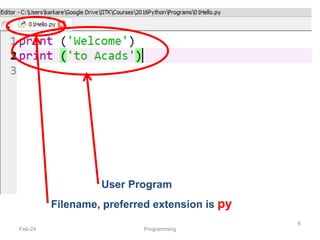
Filename, preferred extension is py
User Program
Python Shell is Interactive
Feb-24 Programming
7
IN[1]:
IN[2]:
IN[4]:
IN[3]:
Python Shell Prompt
User Commands
(Statements)
Outputs
( )
Interacting with Python Programs
• Python program communicates its results to
user using print
• Most useful programs require information
from users
– Name and age for a travel reservation system
• Python 3 uses input to read user input as a
string (str)
Feb-24 Programming
8
input
• Take as argument a string to print as a prompt
• Returns the user typed value as a string
– details of how to process user string later
Feb-24 Programming 9
IN[1]:
IN[2]:
IN[3]:
( )
Elements of Python
• A Python program is a sequence of definitions
and commands (statements)
• Commands manipulate objects
• Each object is associated with a Type
• Type:
– A set of values
– A set of operations on these values
• Expressions: An operation (combination of
objects and operators)
Feb-24 Programming
10
Types in Python
• int
– Bounded integers, e.g. 732 or -5
• float
– Real numbers, e.g. 3.14 or 2.0
• long
– Long integers with unlimited precision
• str
– Strings, e.g. ‘hello’ or ‘C’
Feb-24 Programming
11
Types in Python
• Scalar
– Indivisible objects that do not have internal
structure
– int (signed integers), float (floating point), bool
(Boolean), NoneType
• NoneType is a special type with a single value
• The value is called None
• Non-Scalar
– Objects having internal structure
– str (strings)
Feb-24 Programming
12
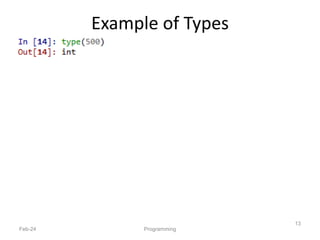
Example of Types
Feb-24 Programming
13
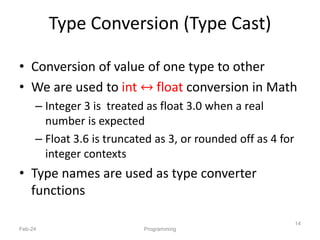
Type Conversion (Type Cast)
• Conversion of value of one type to other
• We are used to int ↔ float conversion in Math
– Integer 3 is treated as float 3.0 when a real
number is expected
– Float 3.6 is truncated as 3, or rounded off as 4 for
integer contexts
• Type names are used as type converter
functions
Feb-24 Programming
14
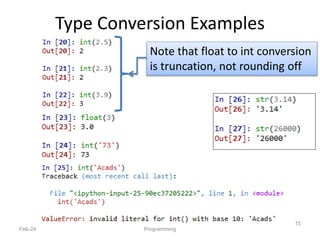
Type Conversion Examples
Feb-24 Programming
15
Note that float to int conversion
is truncation, not rounding off
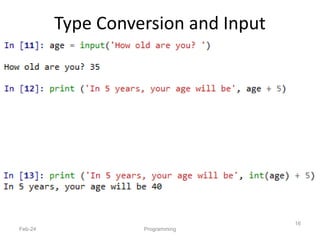
Type Conversion and Input
Feb-24 Programming
16
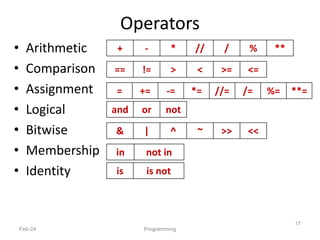
Operators
• Arithmetic
• Comparison
• Assignment
• Logical
• Bitwise
• Membership
• Identity
Feb-24 Programming
17
+ - * // / % **
== != > < >= <=
= += -= *= //= /= %= **=
and or not
in not in
is is not
& | ^ ~ >> <<
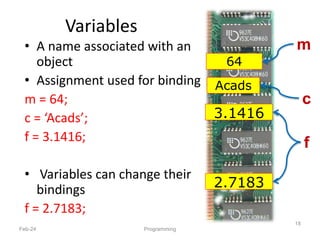
Variables
• A name associated with an
object
• Assignment used for binding
m = 64;
c = ‘Acads’;
f = 3.1416;
• Variables can change their
bindings
f = 2.7183;
Feb-24 Programming
18
64
Acads
3.1416
2.7183
m
c
f
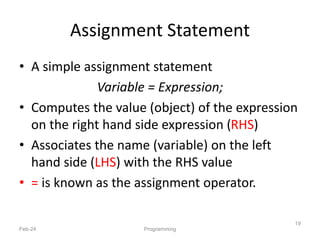
Assignment Statement
• A simple assignment statement
Variable = Expression;
• Computes the value (object) of the expression
on the right hand side expression (RHS)
• Associates the name (variable) on the left
hand side (LHS) with the RHS value
• = is known as the assignment operator.
Feb-24 Programming
19
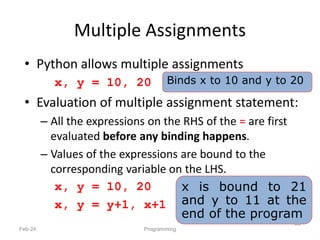
Multiple Assignments
• Python allows multiple assignments
x, y = 10, 20
• Evaluation of multiple assignment statement:
– All the expressions on the RHS of the = are first
evaluated before any binding happens.
– Values of the expressions are bound to the
corresponding variable on the LHS.
x, y = 10, 20
x, y = y+1, x+1
Feb-24 Programming
20
Binds x to 10 and y to 20
x is bound to 21
and y to 11 at the
end of the program
Programming using Python
Operators and Expressions
2/12/2024
21
Programming
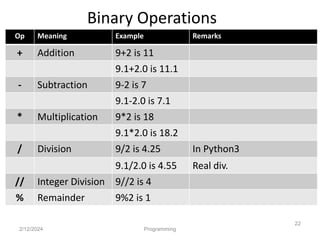
Binary Operations
2/12/2024 Programming
22
Op Meaning Example Remarks
+ Addition 9+2 is 11
9.1+2.0 is 11.1
- Subtraction 9-2 is 7
9.1-2.0 is 7.1
* Multiplication 9*2 is 18
9.1*2.0 is 18.2
/ Division 9/2 is 4.25 In Python3
9.1/2.0 is 4.55 Real div.
// Integer Division 9//2 is 4
% Remainder 9%2 is 1
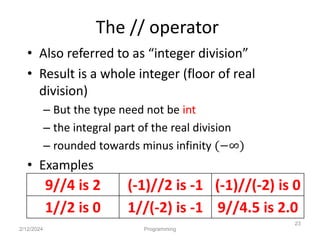
The // operator
• Also referred to as “integer division”
• Result is a whole integer (floor of real
division)
– But the type need not be int
– the integral part of the real division
– rounded towards minus infinity (−∞)
• Examples
2/12/2024 Programming
23
9//4 is 2 (-1)//2 is -1 (-1)//(-2) is 0
1//2 is 0 1//(-2) is -1 9//4.5 is 2.0
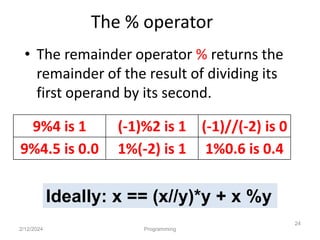
The % operator
• The remainder operator % returns the
remainder of the result of dividing its
first operand by its second.
2/12/2024 Programming
24
9%4 is 1 (-1)%2 is 1 (-1)//(-2) is 0
9%4.5 is 0.0 1%(-2) is 1 1%0.6 is 0.4
Ideally: x == (x//y)*y + x %y
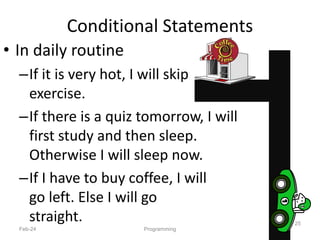
Conditional Statements
• In daily routine
–If it is very hot, I will skip
exercise.
–If there is a quiz tomorrow, I will
first study and then sleep.
Otherwise I will sleep now.
–If I have to buy coffee, I will
go left. Else I will go
straight.
Feb-24 Programming
25
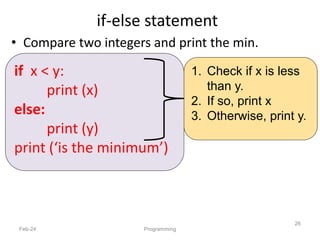
if-else statement
• Compare two integers and print the min.
Feb-24 Programming
26
1. Check if x is less
than y.
2. If so, print x
3. Otherwise, print y.
if x < y:
print (x)
else:
print (y)
print (‘is the minimum’)
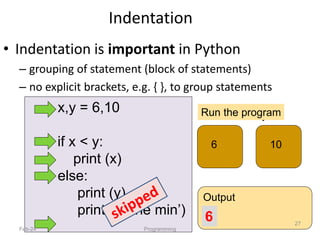
x,y = 6,10
if x < y:
print (x)
else:
print (y)
print (‘is the min’)
x y
6 10
Run the program
Output
6
Indentation
Feb-24 Programming
27
• Indentation is important in Python
– grouping of statement (block of statements)
– no explicit brackets, e.g. { }, to group statements
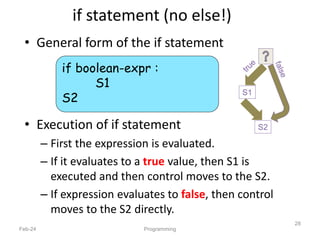
if statement (no else!)
• General form of the if statement
• Execution of if statement
– First the expression is evaluated.
– If it evaluates to a true value, then S1 is
executed and then control moves to the S2.
– If expression evaluates to false, then control
moves to the S2 directly.
Feb-24 Programming
28
if boolean-expr :
S1
S2
S1
S2
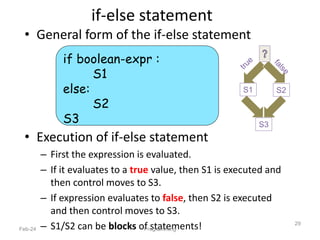
if-else statement
• General form of the if-else statement
• Execution of if-else statement
– First the expression is evaluated.
– If it evaluates to a true value, then S1 is executed and
then control moves to S3.
– If expression evaluates to false, then S2 is executed
and then control moves to S3.
– S1/S2 can be blocks of statements!
Feb-24 Programming
29
if boolean-expr :
S1
else:
S2
S3
S2
S1
S3
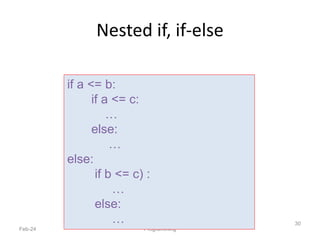
Nested if, if-else
Feb-24 Programming
30
if a <= b:
if a <= c:
…
else:
…
else:
if b <= c) :
…
else:
…
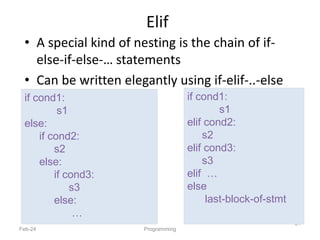
Elif
• A special kind of nesting is the chain of if-
else-if-else-… statements
• Can be written elegantly using if-elif-..-else
Feb-24 Programming
31
if cond1:
s1
elif cond2:
s2
elif cond3:
s3
elif …
else
last-block-of-stmt
if cond1:
s1
else:
if cond2:
s2
else:
if cond3:
s3
else:
…
Summary of if, if-else
• if-else, nested if's, elif.
• Multiple ways to solve a problem
–issues of readability,
maintainability
–and efficiency
Feb-24 Programming
32
Class Quiz
• What is the value of expression:
a) Run time crash/error
b) I don’t know / I don’t care
c) False
d) True
Feb-24 Programming
33
(5<2) and (3/0 > 1)
The correct answer is
False
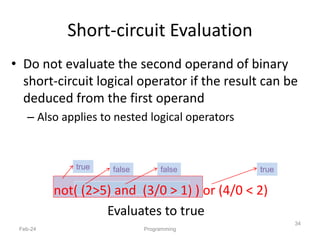
Short-circuit Evaluation
• Do not evaluate the second operand of binary
short-circuit logical operator if the result can be
deduced from the first operand
– Also applies to nested logical operators
not( (2>5) and (3/0 > 1) ) or (4/0 < 2)
Evaluates to true
Feb-24 Programming
34
false false
true true
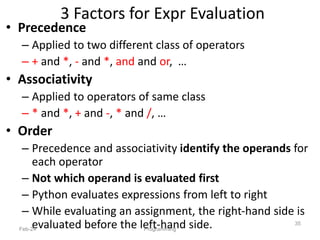
3 Factors for Expr Evaluation
• Precedence
– Applied to two different class of operators
– + and *, - and *, and and or, …
• Associativity
– Applied to operators of same class
– * and *, + and -, * and /, …
• Order
– Precedence and associativity identify the operands for
each operator
– Not which operand is evaluated first
– Python evaluates expressions from left to right
– While evaluating an assignment, the right-hand side is
evaluated before the left-hand side.
Feb-24 Programming
35
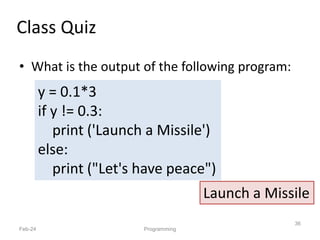
• What is the output of the following program:
Feb-24
36
Programming
Class Quiz
y = 0.1*3
if y != 0.3:
print ('Launch a Missile')
else:
print ("Let's have peace")
Launch a Missile
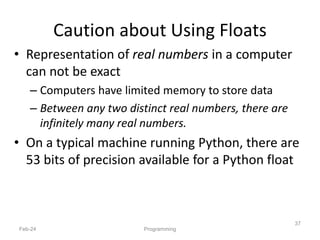
• Representation of real numbers in a computer
can not be exact
– Computers have limited memory to store data
– Between any two distinct real numbers, there are
infinitely many real numbers.
• On a typical machine running Python, there are
53 bits of precision available for a Python float
Feb-24
37
Programming
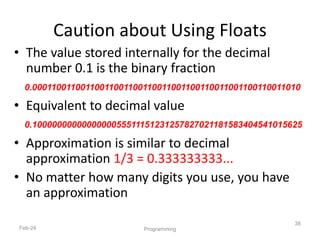
Caution about Using Floats
• The value stored internally for the decimal
number 0.1 is the binary fraction
• Equivalent to decimal value
• Approximation is similar to decimal
approximation 1/3 = 0.333333333...
• No matter how many digits you use, you have
an approximation
Feb-24
38
Programming
Caution about Using Floats
0.00011001100110011001100110011001100110011001100110011010
0.1000000000000000055511151231257827021181583404541015625
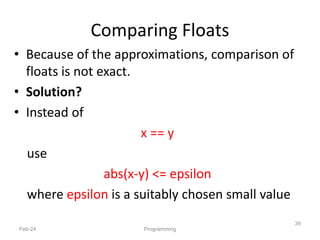
• Because of the approximations, comparison of
floats is not exact.
• Solution?
• Instead of
x == y
use
abs(x-y) <= epsilon
where epsilon is a suitably chosen small value
Feb-24
39
Programming
Comparing Floats
Programming using Python
Loops
Feb-24
40
Python Programming
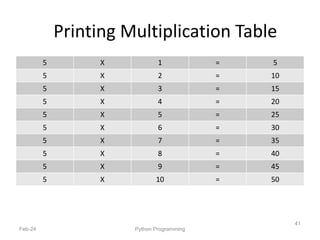
Printing Multiplication Table
5 X 1 = 5
5 X 2 = 10
5 X 3 = 15
5 X 4 = 20
5 X 5 = 25
5 X 6 = 30
5 X 7 = 35
5 X 8 = 40
5 X 9 = 45
5 X 10 = 50
Feb-24 Python Programming
41
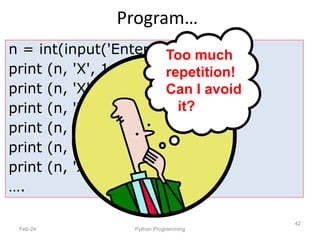
Program…
Feb-24 Python Programming
42
n = int(input('Enter a number: '))
print (n, 'X', 1, '=', n*1)
print (n, 'X', 2, '=', n*2)
print (n, 'X', 3, '=', n*3)
print (n, 'X', 4, '=', n*4)
print (n, 'X', 5, '=', n*5)
print (n, 'X', 6, '=', n*6)
….
Too much
repetition!
Can I avoid
it?
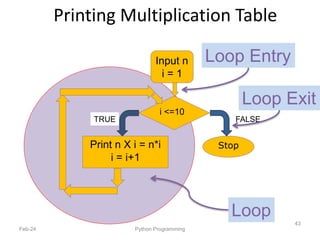
Print n X i = n*i
i = i+1
Input n
i = 1
i <=10
TRUE FALSE
Printing Multiplication Table
Feb-24 Python Programming
43
Stop
Loop
Loop Entry
Loop Exit
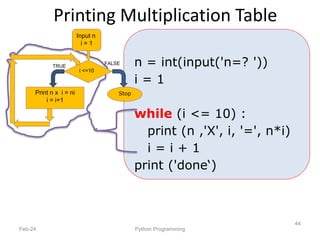
Printing Multiplication Table
Feb-24 Python Programming
44
n = int(input('n=? '))
i = 1
while (i <= 10) :
print (n ,'X', i, '=', n*i)
i = i + 1
print ('done‘)
Print n x i = ni
i = i+1
Input n
i = 1
TRUE
i <=10
FALSE
Stop
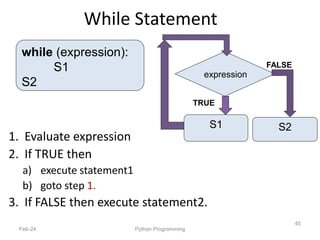
While Statement
1. Evaluate expression
2. If TRUE then
a) execute statement1
b) goto step 1.
3. If FALSE then execute statement2.
Feb-24 Python Programming
45
while (expression):
S1
S2
FALSE
TRUE
S1
expression
S2
For Loop
Feb-24 Python Programming
46
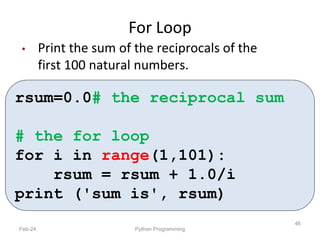
• Print the sum of the reciprocals of the
first 100 natural numbers.
rsum=0.0# the reciprocal sum
# the for loop
for i in range(1,101):
rsum = rsum + 1.0/i
print ('sum is', rsum)
For loop in Python
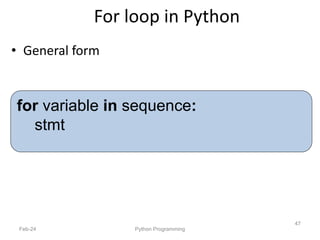
• General form
Feb-24 Python Programming
47
for variable in sequence:
stmt
range
• range(s, e, d)
–generates the list:
[s, s+d, s+2*d, …, s+k*d]
where s+k*d < e <= s+(k+1)*d
• range(s, e) is equivalent to range(s, e, 1)
• range(e) is equivalent to range(0, e)
Feb-24 Python Programming
48
Exercise: What if d is negative? Use python
interpreter to find out.
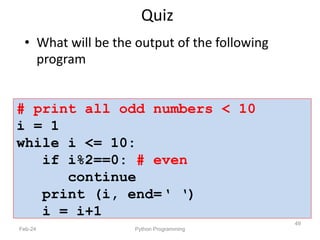
# print all odd numbers < 10
i = 1
while i <= 10:
if i%2==0: # even
continue
print (i, end=‘ ‘)
i = i+1
Quiz
• What will be the output of the following
program
Feb-24 Python Programming
49
# print all odd numbers < 10
i = 1
while i <= 10:
if i%2==0: # even
continue
print (i, end=‘ ‘)
i = i+1
Continue and Update Expr
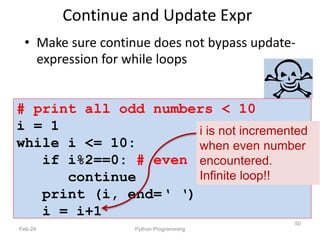
• Make sure continue does not bypass update-
expression for while loops
Feb-24 Python Programming
50
i is not incremented
when even number
encountered.
Infinite loop!!
Programming using Python
f(unctions)
Feb-24
51
Programming, Functions
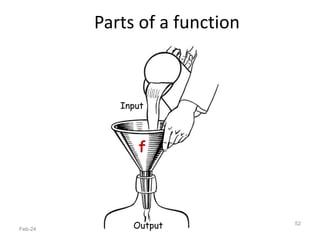
Parts of a function
Feb-24 Programming, Functions
52
Input
Output
f
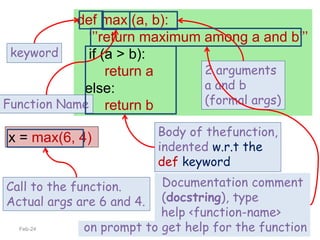
x = max(6, 4)
def max (a, b):
‘’’return maximum among a and b’’’
if (a > b):
return a
else:
return b
keyword
Function Name
2 arguments
a and b
(formal args)
Body of thefunction,
indented w.r.t the
def keyword
Feb-24 Programming, Functions
53
Documentation comment
(docstring), type
help <function-name>
on prompt to get help for the function
Call to the function.
Actual args are 6 and 4.
Feb-24 Programming, Functions
54
def max (a, b):
‘‘‘return maximum among a and b’’’
if (a > b):
return a
else:
return b
In[3] : help(max)
Help on function max in module __main__:
max(a, b)
return maximum among a and b
Keyword Arguments
Feb-24 Programming, Functions
55
def printName(first, last, initials) :
if initials:
print (first[0] + '. ' + last[0] + '.')
else:
print (first, last)
Call Output
printName('Acads', 'Institute', False) Acads Institute
printName('Acads', 'Institute', True) A. I.
printName(last='Institute', initials=False, first='Acads') Acads Institute
printName('Acads', initials=True, last='Institute') A. I.
Note use of [0]
to get the first
character of a
string. More on
this later.
Keyword Arguments
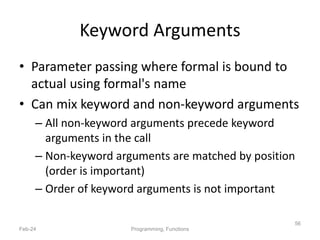
• Parameter passing where formal is bound to
actual using formal's name
• Can mix keyword and non-keyword arguments
– All non-keyword arguments precede keyword
arguments in the call
– Non-keyword arguments are matched by position
(order is important)
– Order of keyword arguments is not important
Feb-24 Programming, Functions
56
Default Values
Feb-24 Programming, Functions
57
def printName(first, last, initials=False) :
if initials:
print (first[0] + '. ' + last[0] + '.')
else:
print (first, last)
Call Output
printName('Acads', 'Institute') Acads Institute
printName(first='Acads', last='Institute', initials=True) A. I.
printName(last='Institute', first='Acads') Acads Institute
printName('Acads', last='Institute') Acads Institute
Note the use
of “default”
value
Default Values
• Allows user to call a function with fewer
arguments
• Useful when some argument has a fixed value
for most of the calls
• All arguments with default values must be at
the end of argument list
– non-default argument can not follow default
argument
Feb-24 Programming, Functions
58
Globals
• Globals allow functions to communicate with
each other indirectly
– Without parameter passing/return value
• Convenient when two seemingly “far-apart”
functions want to share data
– No direct caller/callee relation
• If a function has to update a global, it must re-
declare the global variable with global
keyword.
Feb-24 Programming, Functions
59
Globals
Feb-24 Programming, Functions
60
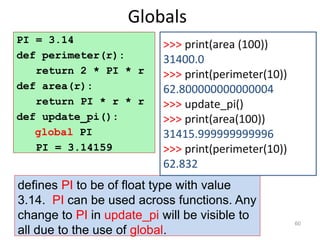
PI = 3.14
def perimeter(r):
return 2 * PI * r
def area(r):
return PI * r * r
def update_pi():
global PI
PI = 3.14159
defines PI to be of float type with value
3.14. PI can be used across functions. Any
change to PI in update_pi will be visible to
all due to the use of global.
>>> print(area (100))
31400.0
>>> print(perimeter(10))
62.800000000000004
>>> update_pi()
>>> print(area(100))
31415.999999999996
>>> print(perimeter(10))
62.832
Programming with Python
Feb-24
61
Programming
T U E
P L S
L I S
S T
S T N
R I G S
Strings
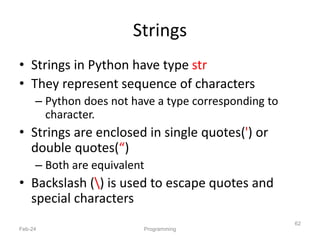
• Strings in Python have type str
• They represent sequence of characters
– Python does not have a type corresponding to
character.
• Strings are enclosed in single quotes(') or
double quotes(“)
– Both are equivalent
• Backslash () is used to escape quotes and
special characters
Feb-24 Programming
62
Strings
Feb-24 Programming
63
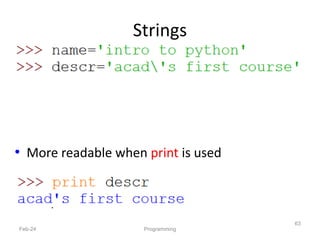
• More readable when print is used
Length of a String
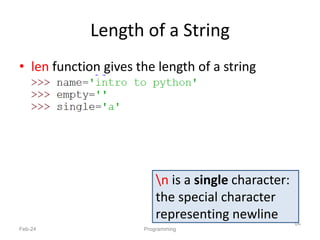
• len function gives the length of a string
Feb-24 Programming
64
n is a single character:
the special character
representing newline
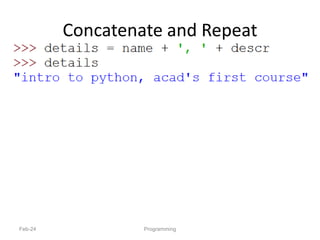
Concatenate and Repeat
• In Python, + and * operations have special
meaning when operating on strings
• + is used for concatenation of (two) strings
• * is used to repeat a string, an int number of
time
• Function/Operator Overloading
Feb-24 Programming
65
Concatenate and Repeat
Feb-24 Programming
66
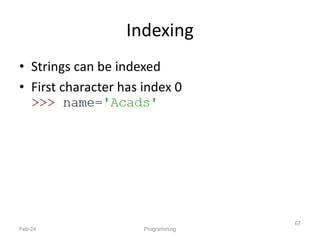
Indexing
• Strings can be indexed
• First character has index 0
Feb-24 Programming
67
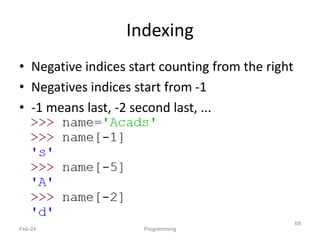
Indexing
• Negative indices start counting from the right
• Negatives indices start from -1
• -1 means last, -2 second last, ...
Feb-24 Programming
68
Indexing
• Using an index that is too large or too small
results in “index out of range” error
Feb-24 Programming
69
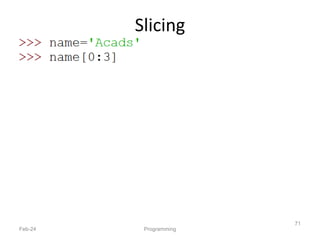
Slicing
• To obtain a substring
• s[start:end] means substring of s starting at
index start and ending at index end-1
• s[0:len(s)] is same as s
• Both start and end are optional
– If start is omitted, it defaults to 0
– If end is omitted, it defaults to the length of string
• s[:] is same as s[0:len(s)], that is same as s
Feb-24 Programming
70
Slicing
Feb-24 Programming
71
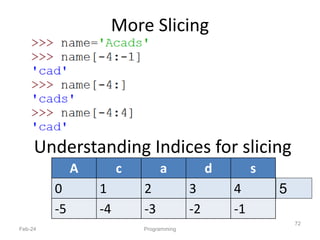
More Slicing
Feb-24 Programming
72
A c a d s
0 1 2 3 4
-5 -4 -3 -2 -1
Understanding Indices for slicing
5
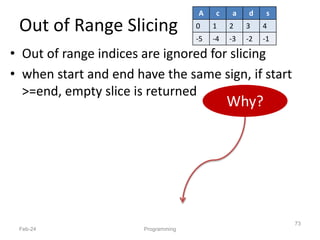
Out of Range Slicing
• Out of range indices are ignored for slicing
• when start and end have the same sign, if start
>=end, empty slice is returned
Feb-24 Programming
73
Why?
A c a d s
0 1 2 3 4
-5 -4 -3 -2 -1
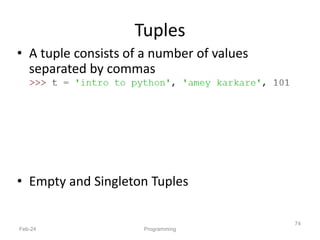
Tuples
• A tuple consists of a number of values
separated by commas
• Empty and Singleton Tuples
Feb-24 Programming
74
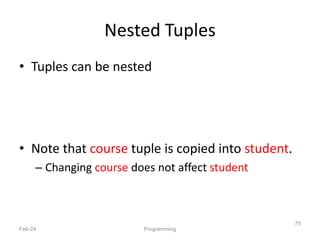
Nested Tuples
• Tuples can be nested
• Note that course tuple is copied into student.
– Changing course does not affect student
Feb-24 Programming
75
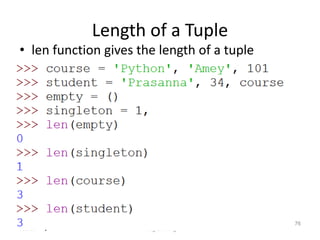
Length of a Tuple
• len function gives the length of a tuple
Feb-24 Programming
76
More Operations on Tuples
• Tuples can be concatenated, repeated,
indexed and sliced
Feb-24 Programming
77
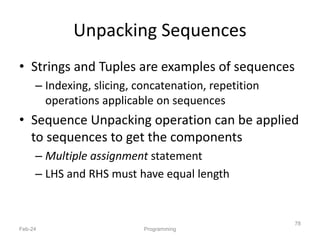
Unpacking Sequences
• Strings and Tuples are examples of sequences
– Indexing, slicing, concatenation, repetition
operations applicable on sequences
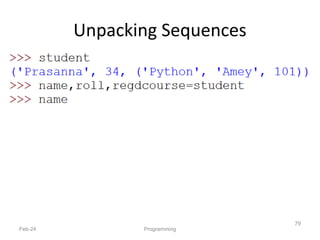
• Sequence Unpacking operation can be applied
to sequences to get the components
– Multiple assignment statement
– LHS and RHS must have equal length
Feb-24 Programming
78
Unpacking Sequences
Feb-24 Programming
79
( )
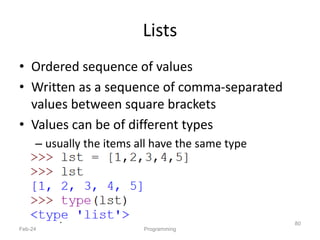
Lists
• Ordered sequence of values
• Written as a sequence of comma-separated
values between square brackets
• Values can be of different types
– usually the items all have the same type
Feb-24 Programming
80
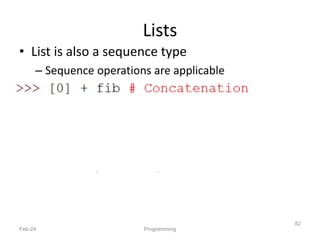
Lists
• List is also a sequence type
– Sequence operations are applicable
Feb-24 Programming
81
Lists
• List is also a sequence type
– Sequence operations are applicable
Feb-24 Programming
82
Repetition
( )
More Operations on Lists
• L.append(x)
• L.extend(seq)
• L.insert(i, x)
• L.remove(x)
• L.pop(i)
Feb-24 Programming
83
• L.pop()
• L.index(x)
• L.count(x)
• L.sort()
• L.reverse()
x is any value, seq is a sequence value (list, string, tuple, …),
i is an integer value
Mutable and Immutable Types
• Tuples and List types look very similar
• However, there is one major difference: Lists
are mutable
– Contents of a list can be modified
• Tuples and Strings are immutable
– Contents can not be modified
Feb-24 Programming
84
Summary of Sequences
Operation Meaning
seq[i] i-th element of the sequence
len(seq) Length of the sequence
seq1 + seq2 Concatenate the two sequences
num*seq
seq*num
Repeat seq num times
seq[start:end] slice starting from start, and ending at end-1
e in seq True if e is present is seq, False otherwise
e not in seq True if e is not present is seq, False otherwise
for e in seq Iterate over all elements in seq (e is bound to one element per
iteration)
Feb-24 Programming
85
Sequence types include String, Tuple and List.
Lists are mutable, Tuple and Strings immutable.
Summary of Sequences
Feb-24 Programming
86
• For details and many useful functions, refer to:
https://docs.python.org/3.2/tutorial/datastruct
ures.html
Programming with Python
Sets and Dictionaries
Feb-24
87
Esc101, Strings
Sets
• An unordered collection with no duplicate
elements
• Supports
– membership testing
– eliminating duplicate entries
– Set operations: union, intersection, difference,
and symmetric difference.
Feb-24 Programming
88
Sets
Feb-24 Programming
89
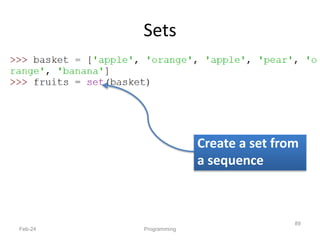
Create a set from
a sequence
{ }
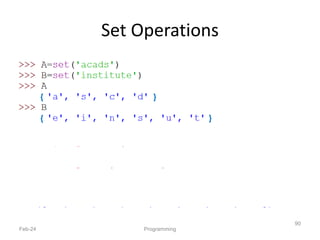
Set Operations
Feb-24 Programming
90
{ }
{ }
{ }
{ }
{ }
Dictionaries
• Unordered set of key:value pairs,
• Keys have to be unique and immutable
• Key:value pairs enclosed inside curly braces
{...}
• Empty dictionary is created by writing {}
• Dictionaries are mutable
–add new key:value pairs,
–change the pairing
–delete a key (and associated value)
Feb-24 Programming
91
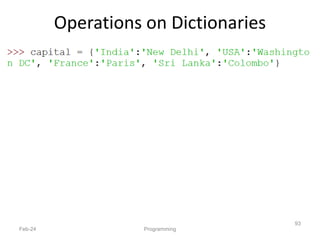
Operations on Dictionaries
Operation Meaning
len(d) Number of key:value pairs in d
d.keys() List containing the keys in d
d.values() List containing the values in d
k in d True if key k is in d
d[k] Value associated with key k in d
d.get(k, v) If k is present in d, then d[k] else v
d[k] = v Map the value v to key k in d
(replace d[k] if present)
del d[k] Remove key k (and associated value) from d
for k in d Iterate over the keys in d
Feb-24 Programming
92
Operations on Dictionaries
Feb-24 Programming
93
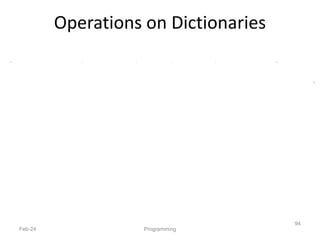
Operations on Dictionaries
Feb-24 Programming
94
Operations on Dictionaries
Feb-24 Programming
95
# Remember: for ... in iterates over keys only
# Sort values in a list
Dictionary Construction
• The dict constructor: builds dictionaries
directly from sequences of key-value pairs
Feb-24 Esc101, Strings
96
Programming with Python
File I/O
Feb-24
97
Programming
File I/O
• Files are persistent storage
• Allow data to be stored beyond program
lifetime
• The basic operations on files are
– open, close, read, write
• Python treat files as sequence of lines
– sequence operations work for the data read from
files
Feb-24 Programming
98
File I/O: open and close
open(filename, mode)
• While opening a file, you need to supply
– The name of the file, including the path
– The mode in which you want to open a file
– Common modes are r (read), w (write), a (append)
• Mode is optional, defaults to r
• open(..) returns a file object
• close() on the file object closes the file
– finishes any buffered operations
Feb-24 Programming
99
File I/O: Example
Feb-24 Programming
100
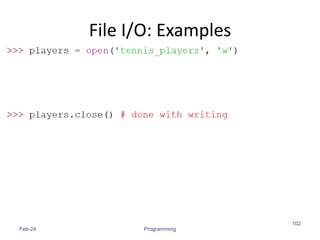
• Do some writing
• How to do it?
• see the next few slides
File I/O: read, write and append
• Reading from an open file returns the
contents of the file
– as sequence of lines in the program
• Writing to a file
– IMPORTANT: If opened with mode 'w', clears the
existing contents of the file
– Use append mode ('a') to preserve the contents
– Writing happens at the end
Feb-24 Programming
101
File I/O: Examples
Feb-24 Programming
102
File I/O: Examples
Feb-24 Programming
103
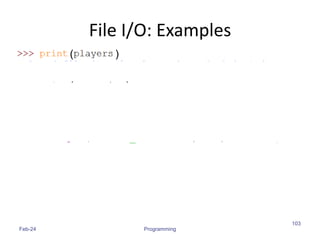
(
( )
)
File I/O: Examples
Feb-24 Programming
104
Note empty line due to 'n'
( )
File I/O: Examples
Feb-24 Programming
105
Note the use of for ... in
for sequence
]
( )
File I/O: Examples
Feb-24 Programming
106
( )
( )
( )
Programming using Python
Modules and Packages
Amey Karkare
Dept. of CSE
IIT Kanpur
Welcome Python Programming
107
Modules
• As program gets longer, need to organize them
for easier access and easier maintenance.
• Reuse same functions across programs without
copying its definition into each program.
• Python allows putting definitions in a file
– use them in a script or in an interactive instance of the
interpreter
• Such a file is called a module
– definitions from a module can be imported into other
modules or into the main module
Feb-24 Programming
108
Modules
• A module is a file containing Python
definitions and statements.
• The file name is the module name with the
suffix .py appended.
• Within a module, the module’s name is
available in the global variable __name__.
Feb-24 Programming
109
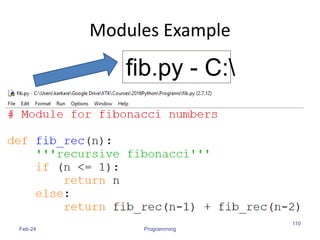
Modules Example
Feb-24 Programming
110
fib.py - C:
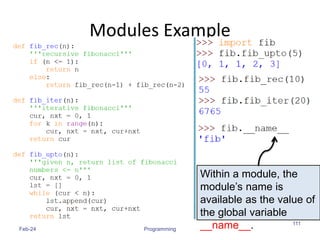
Modules Example
Feb-24 Programming
111
Within a module, the
module’s name is
available as the value of
the global variable
__name__.
Importing Specific Functions
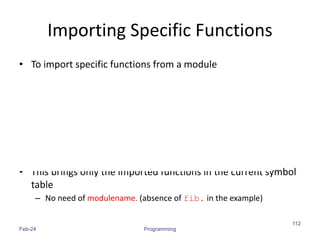
• To import specific functions from a module
• This brings only the imported functions in the current symbol
table
– No need of modulename. (absence of fib. in the example)
Feb-24 Programming
112
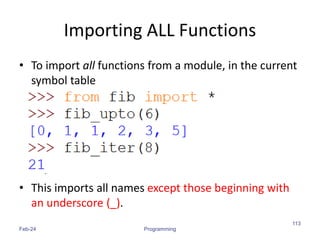
Importing ALL Functions
• To import all functions from a module, in the current
symbol table
• This imports all names except those beginning with
an underscore (_).
Feb-24 Programming
113
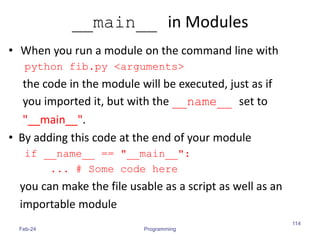
__main__ in Modules
• When you run a module on the command line with
python fib.py <arguments>
the code in the module will be executed, just as if
you imported it, but with the __name__ set to
"__main__".
• By adding this code at the end of your module
if __name__ == "__main__":
... # Some code here
you can make the file usable as a script as well as an
importable module
Feb-24 Programming
114
__main__ in Modules
if __name__ == "__main__":
import sys
print (fib_iter(int(sys.argv[1])))
• This code parses the command line only if the
module is executed as the “main” file:
$ python fib.py 10
55
• If the module is imported, the code is not run:
>>> import fib
>>>
Feb-24 Programming
115
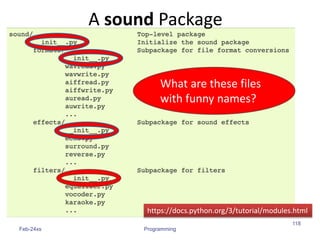
Package
• A Python package is a collection of Python
modules.
• Another level of organization.
• Packages are a way of structuring Python’s
module namespace by using dotted module
names.
– The module name A.B designates a submodule
named B in a package named A.
– The use of dotted module names saves the authors of
multi-module packages like NumPy or Pillow from
having to worry about each other’s module names.
Feb-24 Programming
116
Feb-24 Programming
117
https://docs.python.org/3/tutorial/modules.html
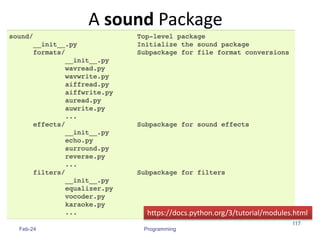
A sound Package
Feb-24xs Programming
118
https://docs.python.org/3/tutorial/modules.html
A sound Package
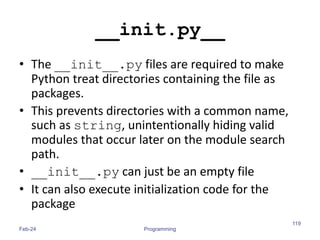
What are these files
with funny names?
__init.py__
• The __init__.py files are required to make
Python treat directories containing the file as
packages.
• This prevents directories with a common name,
such as string, unintentionally hiding valid
modules that occur later on the module search
path.
• __init__.py can just be an empty file
• It can also execute initialization code for the
package
Feb-24 Programming
119
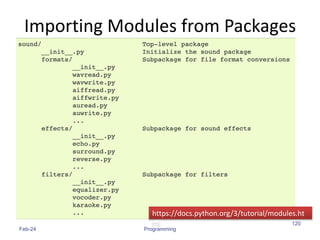
Importing Modules from Packages
Feb-24 Programming
120
https://docs.python.org/3/tutorial/modules.ht
ml
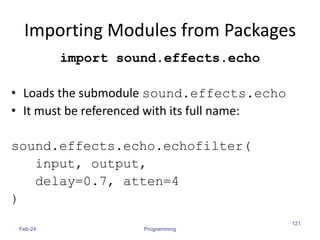
Importing Modules from Packages
import sound.effects.echo
• Loads the submodule sound.effects.echo
• It must be referenced with its full name:
sound.effects.echo.echofilter(
input, output,
delay=0.7, atten=4
)
Feb-24 Programming
121
Importing Modules from Packages
from sound.effects import echo
• This also loads the submodule echo
• Makes it available without package prefix
• It can be used as:
echo.echofilter(
input, output,
delay=0.7, atten=4
)
Feb-24 Programming
122
Importing Modules from Packages
from sound.effects.echo import echofilter
• This loads the submodule echo, but this makes its
function echofilter() directly available.
echofilter(input, output,
delay=0.7, atten=4)
Feb-24 Programming
123
Popular Packages
• pandas, numpy, scipy, matplotlib, …
• Provide a lot of useful functions
Feb-24 Programming
124

Python4HPC.pptx

  • 1.
    A Quick Tourof Python Amey Karkare Dept. of CSE IIT Kanpur Welcome Python Programming 1
  • 2.
    Acknowledgements  MS Officeclip art, various websites and images  The images/contents are used for teaching purpose and for fun. The copyright remains with the original creator. If you suspect a copyright violation, bring it to my notice and I will remove that image/content. Welcome Python Programming 2
  • 3.
  • 4.
    The Programming Cyclefor Python Feb-24 4 Programming
  • 5.
  • 6.
    Feb-24 Programming 6 Filename, preferredextension is py User Program
  • 7.
    Python Shell isInteractive Feb-24 Programming 7 IN[1]: IN[2]: IN[4]: IN[3]: Python Shell Prompt User Commands (Statements) Outputs ( )
  • 8.
    Interacting with PythonPrograms • Python program communicates its results to user using print • Most useful programs require information from users – Name and age for a travel reservation system • Python 3 uses input to read user input as a string (str) Feb-24 Programming 8
  • 9.
    input • Take asargument a string to print as a prompt • Returns the user typed value as a string – details of how to process user string later Feb-24 Programming 9 IN[1]: IN[2]: IN[3]: ( )
  • 10.
    Elements of Python •A Python program is a sequence of definitions and commands (statements) • Commands manipulate objects • Each object is associated with a Type • Type: – A set of values – A set of operations on these values • Expressions: An operation (combination of objects and operators) Feb-24 Programming 10
  • 11.
    Types in Python •int – Bounded integers, e.g. 732 or -5 • float – Real numbers, e.g. 3.14 or 2.0 • long – Long integers with unlimited precision • str – Strings, e.g. ‘hello’ or ‘C’ Feb-24 Programming 11
  • 12.
    Types in Python •Scalar – Indivisible objects that do not have internal structure – int (signed integers), float (floating point), bool (Boolean), NoneType • NoneType is a special type with a single value • The value is called None • Non-Scalar – Objects having internal structure – str (strings) Feb-24 Programming 12
  • 13.
  • 14.
    Type Conversion (TypeCast) • Conversion of value of one type to other • We are used to int ↔ float conversion in Math – Integer 3 is treated as float 3.0 when a real number is expected – Float 3.6 is truncated as 3, or rounded off as 4 for integer contexts • Type names are used as type converter functions Feb-24 Programming 14
  • 15.
    Type Conversion Examples Feb-24Programming 15 Note that float to int conversion is truncation, not rounding off
  • 16.
    Type Conversion andInput Feb-24 Programming 16
  • 17.
    Operators • Arithmetic • Comparison •Assignment • Logical • Bitwise • Membership • Identity Feb-24 Programming 17 + - * // / % ** == != > < >= <= = += -= *= //= /= %= **= and or not in not in is is not & | ^ ~ >> <<
  • 18.
    Variables • A nameassociated with an object • Assignment used for binding m = 64; c = ‘Acads’; f = 3.1416; • Variables can change their bindings f = 2.7183; Feb-24 Programming 18 64 Acads 3.1416 2.7183 m c f
  • 19.
    Assignment Statement • Asimple assignment statement Variable = Expression; • Computes the value (object) of the expression on the right hand side expression (RHS) • Associates the name (variable) on the left hand side (LHS) with the RHS value • = is known as the assignment operator. Feb-24 Programming 19
  • 20.
    Multiple Assignments • Pythonallows multiple assignments x, y = 10, 20 • Evaluation of multiple assignment statement: – All the expressions on the RHS of the = are first evaluated before any binding happens. – Values of the expressions are bound to the corresponding variable on the LHS. x, y = 10, 20 x, y = y+1, x+1 Feb-24 Programming 20 Binds x to 10 and y to 20 x is bound to 21 and y to 11 at the end of the program
  • 21.
    Programming using Python Operatorsand Expressions 2/12/2024 21 Programming
  • 22.
    Binary Operations 2/12/2024 Programming 22 OpMeaning Example Remarks + Addition 9+2 is 11 9.1+2.0 is 11.1 - Subtraction 9-2 is 7 9.1-2.0 is 7.1 * Multiplication 9*2 is 18 9.1*2.0 is 18.2 / Division 9/2 is 4.25 In Python3 9.1/2.0 is 4.55 Real div. // Integer Division 9//2 is 4 % Remainder 9%2 is 1
  • 23.
    The // operator •Also referred to as “integer division” • Result is a whole integer (floor of real division) – But the type need not be int – the integral part of the real division – rounded towards minus infinity (−∞) • Examples 2/12/2024 Programming 23 9//4 is 2 (-1)//2 is -1 (-1)//(-2) is 0 1//2 is 0 1//(-2) is -1 9//4.5 is 2.0
  • 24.
    The % operator •The remainder operator % returns the remainder of the result of dividing its first operand by its second. 2/12/2024 Programming 24 9%4 is 1 (-1)%2 is 1 (-1)//(-2) is 0 9%4.5 is 0.0 1%(-2) is 1 1%0.6 is 0.4 Ideally: x == (x//y)*y + x %y
  • 25.
    Conditional Statements • Indaily routine –If it is very hot, I will skip exercise. –If there is a quiz tomorrow, I will first study and then sleep. Otherwise I will sleep now. –If I have to buy coffee, I will go left. Else I will go straight. Feb-24 Programming 25
  • 26.
    if-else statement • Comparetwo integers and print the min. Feb-24 Programming 26 1. Check if x is less than y. 2. If so, print x 3. Otherwise, print y. if x < y: print (x) else: print (y) print (‘is the minimum’)
  • 27.
    x,y = 6,10 ifx < y: print (x) else: print (y) print (‘is the min’) x y 6 10 Run the program Output 6 Indentation Feb-24 Programming 27 • Indentation is important in Python – grouping of statement (block of statements) – no explicit brackets, e.g. { }, to group statements
  • 28.
    if statement (noelse!) • General form of the if statement • Execution of if statement – First the expression is evaluated. – If it evaluates to a true value, then S1 is executed and then control moves to the S2. – If expression evaluates to false, then control moves to the S2 directly. Feb-24 Programming 28 if boolean-expr : S1 S2 S1 S2
  • 29.
    if-else statement • Generalform of the if-else statement • Execution of if-else statement – First the expression is evaluated. – If it evaluates to a true value, then S1 is executed and then control moves to S3. – If expression evaluates to false, then S2 is executed and then control moves to S3. – S1/S2 can be blocks of statements! Feb-24 Programming 29 if boolean-expr : S1 else: S2 S3 S2 S1 S3
  • 30.
    Nested if, if-else Feb-24Programming 30 if a <= b: if a <= c: … else: … else: if b <= c) : … else: …
  • 31.
    Elif • A specialkind of nesting is the chain of if- else-if-else-… statements • Can be written elegantly using if-elif-..-else Feb-24 Programming 31 if cond1: s1 elif cond2: s2 elif cond3: s3 elif … else last-block-of-stmt if cond1: s1 else: if cond2: s2 else: if cond3: s3 else: …
  • 32.
    Summary of if,if-else • if-else, nested if's, elif. • Multiple ways to solve a problem –issues of readability, maintainability –and efficiency Feb-24 Programming 32
  • 33.
    Class Quiz • Whatis the value of expression: a) Run time crash/error b) I don’t know / I don’t care c) False d) True Feb-24 Programming 33 (5<2) and (3/0 > 1) The correct answer is False
  • 34.
    Short-circuit Evaluation • Donot evaluate the second operand of binary short-circuit logical operator if the result can be deduced from the first operand – Also applies to nested logical operators not( (2>5) and (3/0 > 1) ) or (4/0 < 2) Evaluates to true Feb-24 Programming 34 false false true true
  • 35.
    3 Factors forExpr Evaluation • Precedence – Applied to two different class of operators – + and *, - and *, and and or, … • Associativity – Applied to operators of same class – * and *, + and -, * and /, … • Order – Precedence and associativity identify the operands for each operator – Not which operand is evaluated first – Python evaluates expressions from left to right – While evaluating an assignment, the right-hand side is evaluated before the left-hand side. Feb-24 Programming 35
  • 36.
    • What isthe output of the following program: Feb-24 36 Programming Class Quiz y = 0.1*3 if y != 0.3: print ('Launch a Missile') else: print ("Let's have peace") Launch a Missile
  • 37.
    • Representation ofreal numbers in a computer can not be exact – Computers have limited memory to store data – Between any two distinct real numbers, there are infinitely many real numbers. • On a typical machine running Python, there are 53 bits of precision available for a Python float Feb-24 37 Programming Caution about Using Floats
  • 38.
    • The valuestored internally for the decimal number 0.1 is the binary fraction • Equivalent to decimal value • Approximation is similar to decimal approximation 1/3 = 0.333333333... • No matter how many digits you use, you have an approximation Feb-24 38 Programming Caution about Using Floats 0.00011001100110011001100110011001100110011001100110011010 0.1000000000000000055511151231257827021181583404541015625
  • 39.
    • Because ofthe approximations, comparison of floats is not exact. • Solution? • Instead of x == y use abs(x-y) <= epsilon where epsilon is a suitably chosen small value Feb-24 39 Programming Comparing Floats
  • 40.
  • 41.
    Printing Multiplication Table 5X 1 = 5 5 X 2 = 10 5 X 3 = 15 5 X 4 = 20 5 X 5 = 25 5 X 6 = 30 5 X 7 = 35 5 X 8 = 40 5 X 9 = 45 5 X 10 = 50 Feb-24 Python Programming 41
  • 42.
    Program… Feb-24 Python Programming 42 n= int(input('Enter a number: ')) print (n, 'X', 1, '=', n*1) print (n, 'X', 2, '=', n*2) print (n, 'X', 3, '=', n*3) print (n, 'X', 4, '=', n*4) print (n, 'X', 5, '=', n*5) print (n, 'X', 6, '=', n*6) …. Too much repetition! Can I avoid it?
  • 43.
    Print n Xi = n*i i = i+1 Input n i = 1 i <=10 TRUE FALSE Printing Multiplication Table Feb-24 Python Programming 43 Stop Loop Loop Entry Loop Exit
  • 44.
    Printing Multiplication Table Feb-24Python Programming 44 n = int(input('n=? ')) i = 1 while (i <= 10) : print (n ,'X', i, '=', n*i) i = i + 1 print ('done‘) Print n x i = ni i = i+1 Input n i = 1 TRUE i <=10 FALSE Stop
  • 45.
    While Statement 1. Evaluateexpression 2. If TRUE then a) execute statement1 b) goto step 1. 3. If FALSE then execute statement2. Feb-24 Python Programming 45 while (expression): S1 S2 FALSE TRUE S1 expression S2
  • 46.
    For Loop Feb-24 PythonProgramming 46 • Print the sum of the reciprocals of the first 100 natural numbers. rsum=0.0# the reciprocal sum # the for loop for i in range(1,101): rsum = rsum + 1.0/i print ('sum is', rsum)
  • 47.
    For loop inPython • General form Feb-24 Python Programming 47 for variable in sequence: stmt
  • 48.
    range • range(s, e,d) –generates the list: [s, s+d, s+2*d, …, s+k*d] where s+k*d < e <= s+(k+1)*d • range(s, e) is equivalent to range(s, e, 1) • range(e) is equivalent to range(0, e) Feb-24 Python Programming 48 Exercise: What if d is negative? Use python interpreter to find out.
  • 49.
    # print allodd numbers < 10 i = 1 while i <= 10: if i%2==0: # even continue print (i, end=‘ ‘) i = i+1 Quiz • What will be the output of the following program Feb-24 Python Programming 49
  • 50.
    # print allodd numbers < 10 i = 1 while i <= 10: if i%2==0: # even continue print (i, end=‘ ‘) i = i+1 Continue and Update Expr • Make sure continue does not bypass update- expression for while loops Feb-24 Python Programming 50 i is not incremented when even number encountered. Infinite loop!!
  • 51.
  • 52.
    Parts of afunction Feb-24 Programming, Functions 52 Input Output f
  • 53.
    x = max(6,4) def max (a, b): ‘’’return maximum among a and b’’’ if (a > b): return a else: return b keyword Function Name 2 arguments a and b (formal args) Body of thefunction, indented w.r.t the def keyword Feb-24 Programming, Functions 53 Documentation comment (docstring), type help <function-name> on prompt to get help for the function Call to the function. Actual args are 6 and 4.
  • 54.
    Feb-24 Programming, Functions 54 defmax (a, b): ‘‘‘return maximum among a and b’’’ if (a > b): return a else: return b In[3] : help(max) Help on function max in module __main__: max(a, b) return maximum among a and b
  • 55.
    Keyword Arguments Feb-24 Programming,Functions 55 def printName(first, last, initials) : if initials: print (first[0] + '. ' + last[0] + '.') else: print (first, last) Call Output printName('Acads', 'Institute', False) Acads Institute printName('Acads', 'Institute', True) A. I. printName(last='Institute', initials=False, first='Acads') Acads Institute printName('Acads', initials=True, last='Institute') A. I. Note use of [0] to get the first character of a string. More on this later.
  • 56.
    Keyword Arguments • Parameterpassing where formal is bound to actual using formal's name • Can mix keyword and non-keyword arguments – All non-keyword arguments precede keyword arguments in the call – Non-keyword arguments are matched by position (order is important) – Order of keyword arguments is not important Feb-24 Programming, Functions 56
  • 57.
    Default Values Feb-24 Programming,Functions 57 def printName(first, last, initials=False) : if initials: print (first[0] + '. ' + last[0] + '.') else: print (first, last) Call Output printName('Acads', 'Institute') Acads Institute printName(first='Acads', last='Institute', initials=True) A. I. printName(last='Institute', first='Acads') Acads Institute printName('Acads', last='Institute') Acads Institute Note the use of “default” value
  • 58.
    Default Values • Allowsuser to call a function with fewer arguments • Useful when some argument has a fixed value for most of the calls • All arguments with default values must be at the end of argument list – non-default argument can not follow default argument Feb-24 Programming, Functions 58
  • 59.
    Globals • Globals allowfunctions to communicate with each other indirectly – Without parameter passing/return value • Convenient when two seemingly “far-apart” functions want to share data – No direct caller/callee relation • If a function has to update a global, it must re- declare the global variable with global keyword. Feb-24 Programming, Functions 59
  • 60.
    Globals Feb-24 Programming, Functions 60 PI= 3.14 def perimeter(r): return 2 * PI * r def area(r): return PI * r * r def update_pi(): global PI PI = 3.14159 defines PI to be of float type with value 3.14. PI can be used across functions. Any change to PI in update_pi will be visible to all due to the use of global. >>> print(area (100)) 31400.0 >>> print(perimeter(10)) 62.800000000000004 >>> update_pi() >>> print(area(100)) 31415.999999999996 >>> print(perimeter(10)) 62.832
  • 61.
    Programming with Python Feb-24 61 Programming TU E P L S L I S S T S T N R I G S
  • 62.
    Strings • Strings inPython have type str • They represent sequence of characters – Python does not have a type corresponding to character. • Strings are enclosed in single quotes(') or double quotes(“) – Both are equivalent • Backslash () is used to escape quotes and special characters Feb-24 Programming 62
  • 63.
    Strings Feb-24 Programming 63 • Morereadable when print is used
  • 64.
    Length of aString • len function gives the length of a string Feb-24 Programming 64 n is a single character: the special character representing newline
  • 65.
    Concatenate and Repeat •In Python, + and * operations have special meaning when operating on strings • + is used for concatenation of (two) strings • * is used to repeat a string, an int number of time • Function/Operator Overloading Feb-24 Programming 65
  • 66.
  • 67.
    Indexing • Strings canbe indexed • First character has index 0 Feb-24 Programming 67
  • 68.
    Indexing • Negative indicesstart counting from the right • Negatives indices start from -1 • -1 means last, -2 second last, ... Feb-24 Programming 68
  • 69.
    Indexing • Using anindex that is too large or too small results in “index out of range” error Feb-24 Programming 69
  • 70.
    Slicing • To obtaina substring • s[start:end] means substring of s starting at index start and ending at index end-1 • s[0:len(s)] is same as s • Both start and end are optional – If start is omitted, it defaults to 0 – If end is omitted, it defaults to the length of string • s[:] is same as s[0:len(s)], that is same as s Feb-24 Programming 70
  • 71.
  • 72.
    More Slicing Feb-24 Programming 72 Ac a d s 0 1 2 3 4 -5 -4 -3 -2 -1 Understanding Indices for slicing 5
  • 73.
    Out of RangeSlicing • Out of range indices are ignored for slicing • when start and end have the same sign, if start >=end, empty slice is returned Feb-24 Programming 73 Why? A c a d s 0 1 2 3 4 -5 -4 -3 -2 -1
  • 74.
    Tuples • A tupleconsists of a number of values separated by commas • Empty and Singleton Tuples Feb-24 Programming 74
  • 75.
    Nested Tuples • Tuplescan be nested • Note that course tuple is copied into student. – Changing course does not affect student Feb-24 Programming 75
  • 76.
    Length of aTuple • len function gives the length of a tuple Feb-24 Programming 76
  • 77.
    More Operations onTuples • Tuples can be concatenated, repeated, indexed and sliced Feb-24 Programming 77
  • 78.
    Unpacking Sequences • Stringsand Tuples are examples of sequences – Indexing, slicing, concatenation, repetition operations applicable on sequences • Sequence Unpacking operation can be applied to sequences to get the components – Multiple assignment statement – LHS and RHS must have equal length Feb-24 Programming 78
  • 79.
  • 80.
    Lists • Ordered sequenceof values • Written as a sequence of comma-separated values between square brackets • Values can be of different types – usually the items all have the same type Feb-24 Programming 80
  • 81.
    Lists • List isalso a sequence type – Sequence operations are applicable Feb-24 Programming 81
  • 82.
    Lists • List isalso a sequence type – Sequence operations are applicable Feb-24 Programming 82 Repetition ( )
  • 83.
    More Operations onLists • L.append(x) • L.extend(seq) • L.insert(i, x) • L.remove(x) • L.pop(i) Feb-24 Programming 83 • L.pop() • L.index(x) • L.count(x) • L.sort() • L.reverse() x is any value, seq is a sequence value (list, string, tuple, …), i is an integer value
  • 84.
    Mutable and ImmutableTypes • Tuples and List types look very similar • However, there is one major difference: Lists are mutable – Contents of a list can be modified • Tuples and Strings are immutable – Contents can not be modified Feb-24 Programming 84
  • 85.
    Summary of Sequences OperationMeaning seq[i] i-th element of the sequence len(seq) Length of the sequence seq1 + seq2 Concatenate the two sequences num*seq seq*num Repeat seq num times seq[start:end] slice starting from start, and ending at end-1 e in seq True if e is present is seq, False otherwise e not in seq True if e is not present is seq, False otherwise for e in seq Iterate over all elements in seq (e is bound to one element per iteration) Feb-24 Programming 85 Sequence types include String, Tuple and List. Lists are mutable, Tuple and Strings immutable.
  • 86.
    Summary of Sequences Feb-24Programming 86 • For details and many useful functions, refer to: https://docs.python.org/3.2/tutorial/datastruct ures.html
  • 87.
    Programming with Python Setsand Dictionaries Feb-24 87 Esc101, Strings
  • 88.
    Sets • An unorderedcollection with no duplicate elements • Supports – membership testing – eliminating duplicate entries – Set operations: union, intersection, difference, and symmetric difference. Feb-24 Programming 88
  • 89.
    Sets Feb-24 Programming 89 Create aset from a sequence { }
  • 90.
  • 91.
    Dictionaries • Unordered setof key:value pairs, • Keys have to be unique and immutable • Key:value pairs enclosed inside curly braces {...} • Empty dictionary is created by writing {} • Dictionaries are mutable –add new key:value pairs, –change the pairing –delete a key (and associated value) Feb-24 Programming 91
  • 92.
    Operations on Dictionaries OperationMeaning len(d) Number of key:value pairs in d d.keys() List containing the keys in d d.values() List containing the values in d k in d True if key k is in d d[k] Value associated with key k in d d.get(k, v) If k is present in d, then d[k] else v d[k] = v Map the value v to key k in d (replace d[k] if present) del d[k] Remove key k (and associated value) from d for k in d Iterate over the keys in d Feb-24 Programming 92
  • 93.
  • 94.
  • 95.
    Operations on Dictionaries Feb-24Programming 95 # Remember: for ... in iterates over keys only # Sort values in a list
  • 96.
    Dictionary Construction • Thedict constructor: builds dictionaries directly from sequences of key-value pairs Feb-24 Esc101, Strings 96
  • 97.
    Programming with Python FileI/O Feb-24 97 Programming
  • 98.
    File I/O • Filesare persistent storage • Allow data to be stored beyond program lifetime • The basic operations on files are – open, close, read, write • Python treat files as sequence of lines – sequence operations work for the data read from files Feb-24 Programming 98
  • 99.
    File I/O: openand close open(filename, mode) • While opening a file, you need to supply – The name of the file, including the path – The mode in which you want to open a file – Common modes are r (read), w (write), a (append) • Mode is optional, defaults to r • open(..) returns a file object • close() on the file object closes the file – finishes any buffered operations Feb-24 Programming 99
  • 100.
    File I/O: Example Feb-24Programming 100 • Do some writing • How to do it? • see the next few slides
  • 101.
    File I/O: read,write and append • Reading from an open file returns the contents of the file – as sequence of lines in the program • Writing to a file – IMPORTANT: If opened with mode 'w', clears the existing contents of the file – Use append mode ('a') to preserve the contents – Writing happens at the end Feb-24 Programming 101
  • 102.
  • 103.
    File I/O: Examples Feb-24Programming 103 ( ( ) )
  • 104.
    File I/O: Examples Feb-24Programming 104 Note empty line due to 'n' ( )
  • 105.
    File I/O: Examples Feb-24Programming 105 Note the use of for ... in for sequence ] ( )
  • 106.
    File I/O: Examples Feb-24Programming 106 ( ) ( ) ( )
  • 107.
    Programming using Python Modulesand Packages Amey Karkare Dept. of CSE IIT Kanpur Welcome Python Programming 107
  • 108.
    Modules • As programgets longer, need to organize them for easier access and easier maintenance. • Reuse same functions across programs without copying its definition into each program. • Python allows putting definitions in a file – use them in a script or in an interactive instance of the interpreter • Such a file is called a module – definitions from a module can be imported into other modules or into the main module Feb-24 Programming 108
  • 109.
    Modules • A moduleis a file containing Python definitions and statements. • The file name is the module name with the suffix .py appended. • Within a module, the module’s name is available in the global variable __name__. Feb-24 Programming 109
  • 110.
  • 111.
    Modules Example Feb-24 Programming 111 Withina module, the module’s name is available as the value of the global variable __name__.
  • 112.
    Importing Specific Functions •To import specific functions from a module • This brings only the imported functions in the current symbol table – No need of modulename. (absence of fib. in the example) Feb-24 Programming 112
  • 113.
    Importing ALL Functions •To import all functions from a module, in the current symbol table • This imports all names except those beginning with an underscore (_). Feb-24 Programming 113
  • 114.
    __main__ in Modules •When you run a module on the command line with python fib.py <arguments> the code in the module will be executed, just as if you imported it, but with the __name__ set to "__main__". • By adding this code at the end of your module if __name__ == "__main__": ... # Some code here you can make the file usable as a script as well as an importable module Feb-24 Programming 114
  • 115.
    __main__ in Modules if__name__ == "__main__": import sys print (fib_iter(int(sys.argv[1]))) • This code parses the command line only if the module is executed as the “main” file: $ python fib.py 10 55 • If the module is imported, the code is not run: >>> import fib >>> Feb-24 Programming 115
  • 116.
    Package • A Pythonpackage is a collection of Python modules. • Another level of organization. • Packages are a way of structuring Python’s module namespace by using dotted module names. – The module name A.B designates a submodule named B in a package named A. – The use of dotted module names saves the authors of multi-module packages like NumPy or Pillow from having to worry about each other’s module names. Feb-24 Programming 116
  • 117.
  • 118.
  • 119.
    __init.py__ • The __init__.pyfiles are required to make Python treat directories containing the file as packages. • This prevents directories with a common name, such as string, unintentionally hiding valid modules that occur later on the module search path. • __init__.py can just be an empty file • It can also execute initialization code for the package Feb-24 Programming 119
  • 120.
    Importing Modules fromPackages Feb-24 Programming 120 https://docs.python.org/3/tutorial/modules.ht ml
  • 121.
    Importing Modules fromPackages import sound.effects.echo • Loads the submodule sound.effects.echo • It must be referenced with its full name: sound.effects.echo.echofilter( input, output, delay=0.7, atten=4 ) Feb-24 Programming 121
  • 122.
    Importing Modules fromPackages from sound.effects import echo • This also loads the submodule echo • Makes it available without package prefix • It can be used as: echo.echofilter( input, output, delay=0.7, atten=4 ) Feb-24 Programming 122
  • 123.
    Importing Modules fromPackages from sound.effects.echo import echofilter • This loads the submodule echo, but this makes its function echofilter() directly available. echofilter(input, output, delay=0.7, atten=4) Feb-24 Programming 123
  • 124.
    Popular Packages • pandas,numpy, scipy, matplotlib, … • Provide a lot of useful functions Feb-24 Programming 124