DJANGO CHANNELS
by Chew Kok Hoor kokhoor@solutionx.com.
About Me
 Also Director of Third Life Sdn. Bhd. – co-
developer of Mobile Marketing app for Businesses:
channels.io
 Web Applications - Django
 Mobile Apps backend - Django
 Point-of-Sales system (POS) - Django
 POS Device Connectors - Tornado.
Objective
 General overview of Channels
 Simple Example
 Scaling
What is Django Channels
“Channels is a project to make Django able to
handle more than just plain HTTP requests,
including WebSockets and HTTP2, as well as the
ability to run code after a response has been sent for
things like thumbnailing or background calculation.”
- http://channels.readthedocs.io/
Web Applications Activities /
Tasks
 Respond to request (GET, POST, …)
 Batch activities – slower tasks such as sending
email etc.
 Web Sockets
Python Frameworks / Libraries
 Respond to request (GET, POST, …)
 DJANGO
 Batch processing
 Celery, RQ, Gearman
 Web Sockets
 Flask, Tornado, Twisted
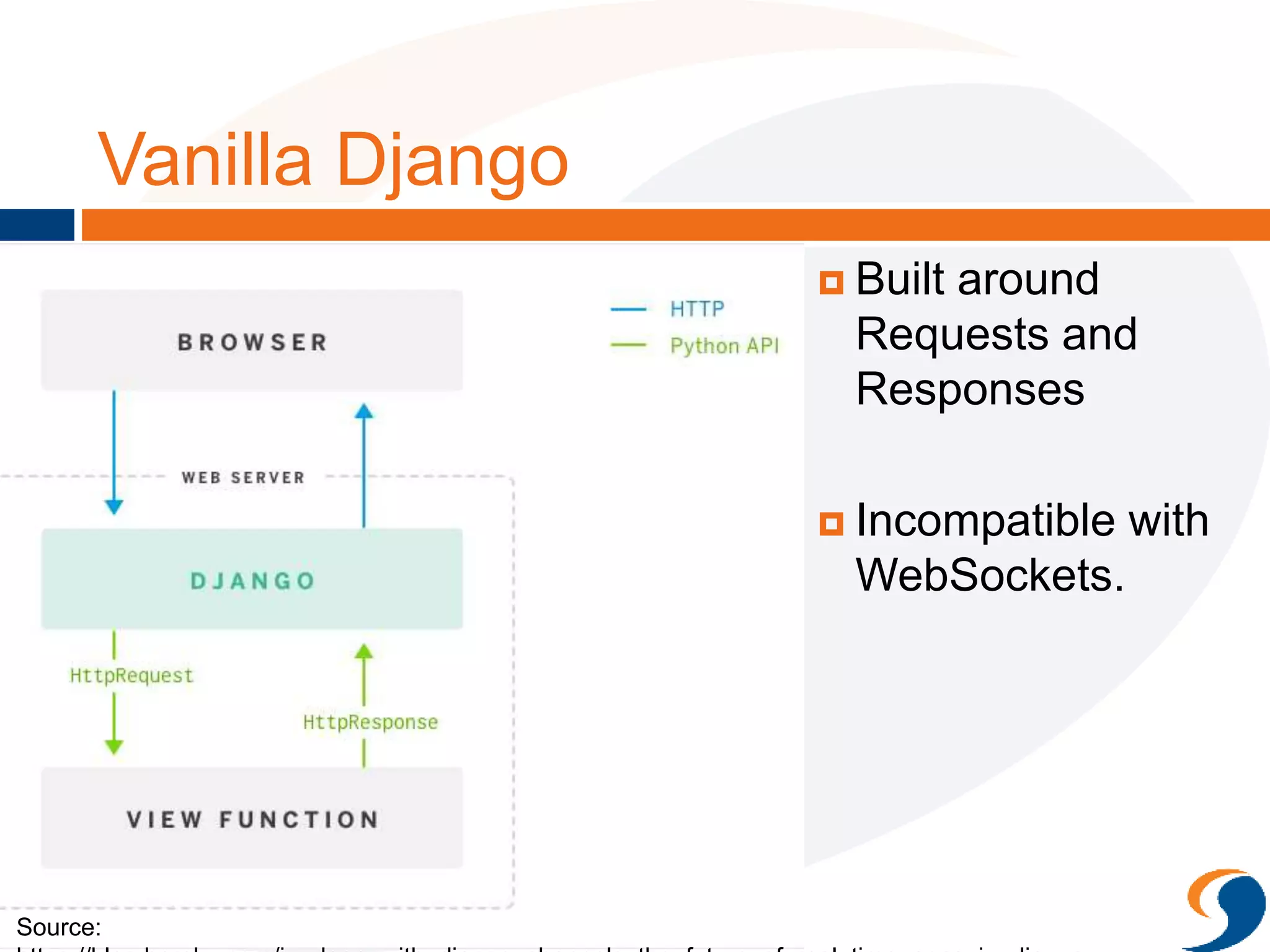
Vanilla Django
 Built around
Requests and
Responses
 Incompatible with
WebSockets.
Source:
https://blog.heroku.com/in_deep_with_django_channels_the_future_of_real_time_apps_in_django
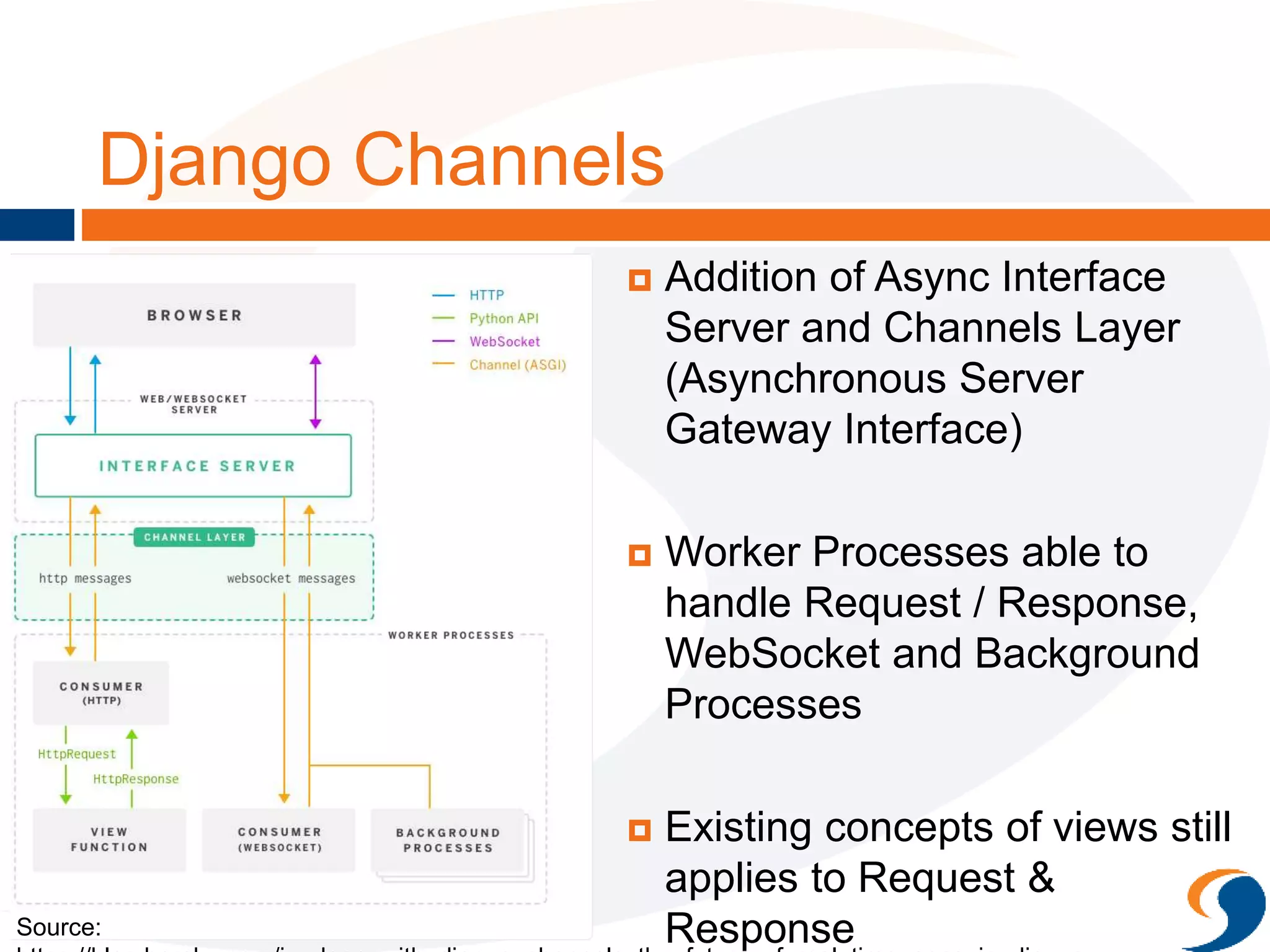
Django Channels
 Addition of Async Interface
Server and Channels Layer
(Asynchronous Server
Gateway Interface)
 Worker Processes able to
handle Request / Response,
WebSocket and Background
Processes
 Existing concepts of views still
applies to Request &
Response
Source:
https://blog.heroku.com/in_deep_with_django_channels_the_future_of_real_time_apps_in_django
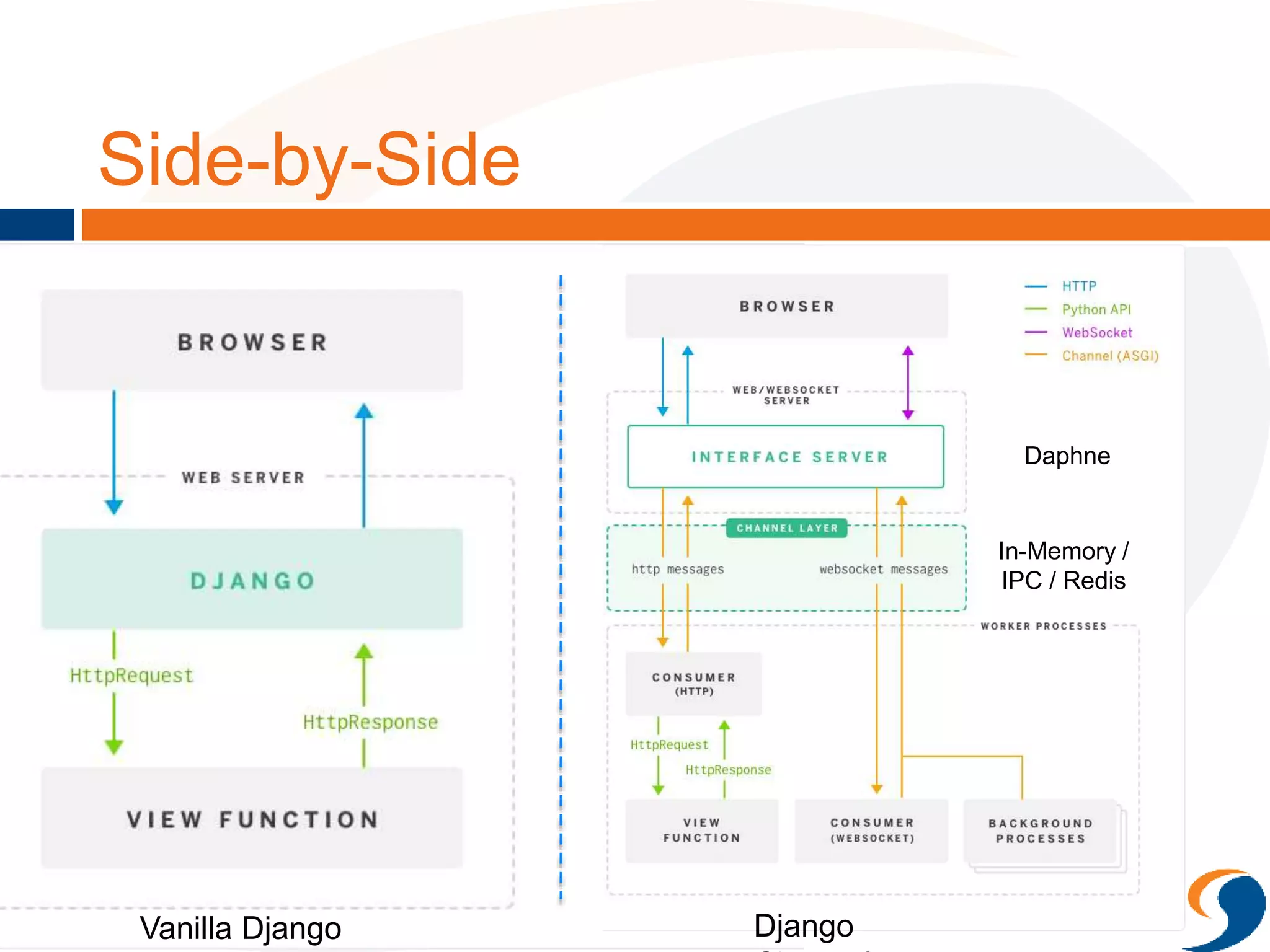
Side-by-Side
Vanilla Django Django
Daphne
In-Memory /
IPC / Redis
Why Django Channels?
 Pros
 Consolidate and centralize configuration and program code
 Easier re-use
 Asynchronous in nature but you still write synchronous code
– no yields, monkey-patching etc.
 In one big package, so improvements and directions can be
aligned.
 Cons
 Celery more complete compared to what Channels has to
offer
 Channels Layer choices still limited (IPC, Redis)
 Stuck in an Opinionated Framework
Example app for Django
Channels
 Borrowed code from
https://github.com/jacobian/chann
els-example/
 Covers:
 Traditional Request Response
(TemplateViews)
 Batch (fake email sending)
 WebSockets
Getting Started
 pip install channels
 pip install asgi_redis
 settings.py
CHANNEL_LAYERS = {
"default": {
"BACKEND": "asgi_redis.RedisChannelLayer",
"CONFIG": {
"hosts": [‘redis://localhost:6379’],
},
"ROUTING": "main.routing.default_routing",
}
}
Routing
routing.py
from channels.routing import route
from . import consumers
from . import batch
channel_routing = [
route('send-invite', batch.send_invite),
]
chat_routing = [
route('websocket.connect', consumers.ws_connect),
route('websocket.receive', consumers.ws_receive),
route('websocket.disconnect', consumers.ws_disconnect),
]
default_routing = channel_routing + chat_routing
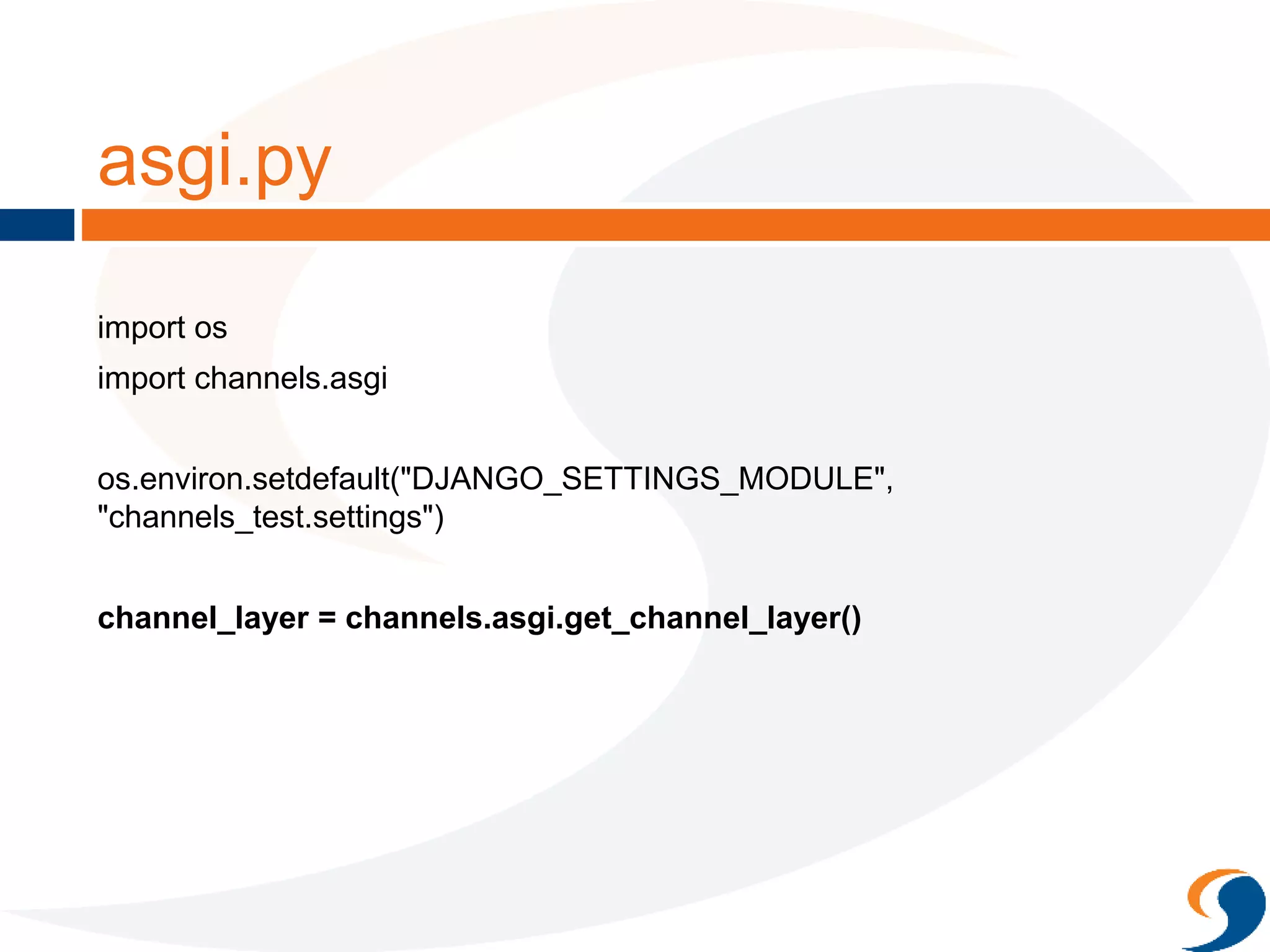
asgi.py
import os
import channels.asgi
os.environ.setdefault("DJANGO_SETTINGS_MODULE",
"channels_test.settings")
channel_layer = channels.asgi.get_channel_layer()
Excerpt of views.py
class InviteView(TemplateView):
template_name = "invite.html"
def post(self, request, *args, **kwargs):
context = self.get_context_data()
REQUEST_DATA = request.POST
email = REQUEST_DATA.get('email')
if not email:
context['error'] = "Email field not provided"
return super(TemplateView, self).render_to_response(context)
data = {
'email': email,
'message': u"Hi, %s, you're invited!! Check us out at http://www.solutionx.com.my for more
info!" % email
}
Channel('send-invite', alias=settings.BATCH_CHANNEL_LAYER).send(data)
context['message'] = "We're sending the invite for you!"
return super(TemplateView, self).render_to_response(context)
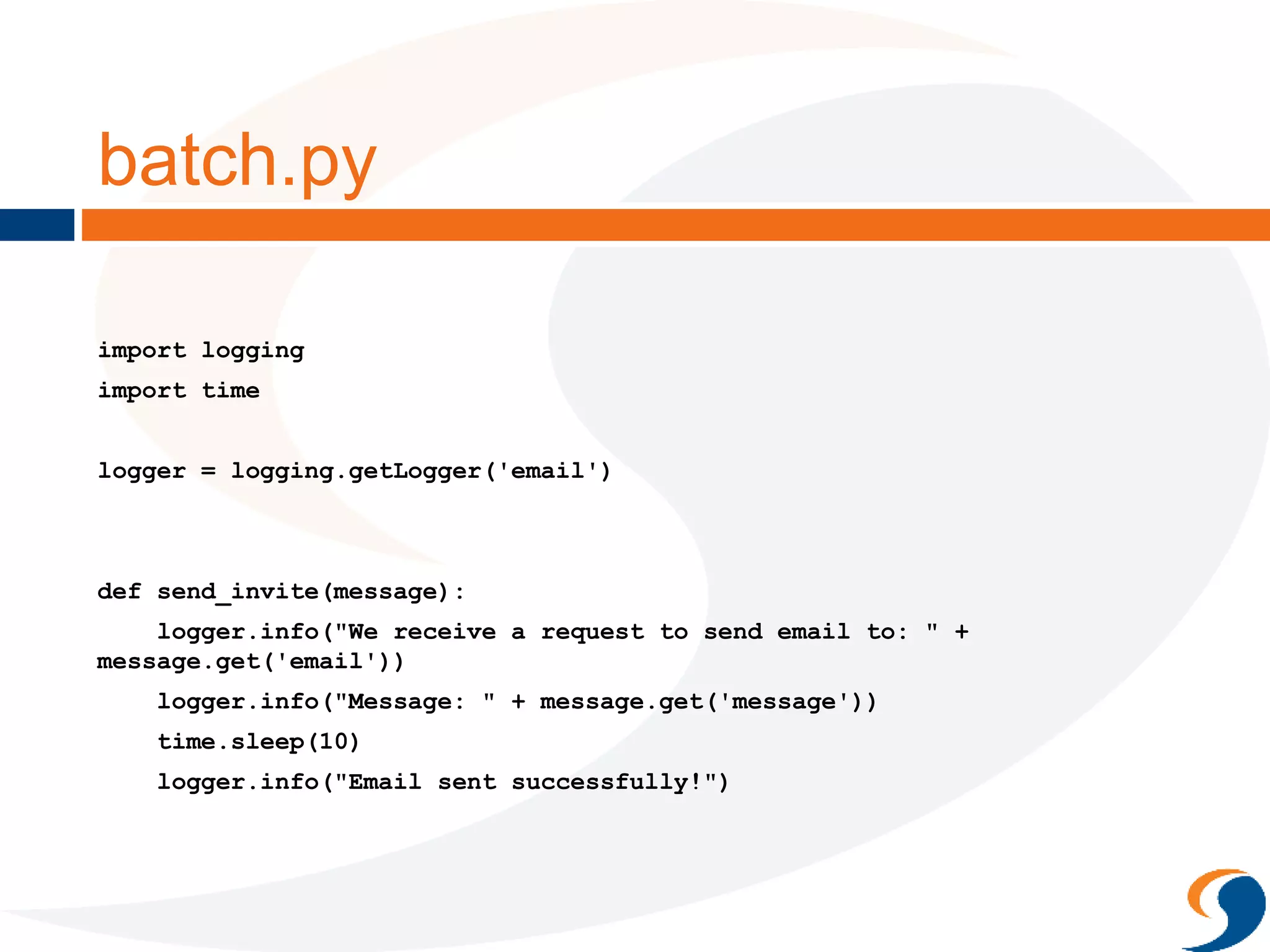
batch.py
import logging
import time
logger = logging.getLogger('email')
def send_invite(message):
logger.info("We receive a request to send email to: " +
message.get('email'))
logger.info("Message: " + message.get('message'))
time.sleep(10)
logger.info("Email sent successfully!")
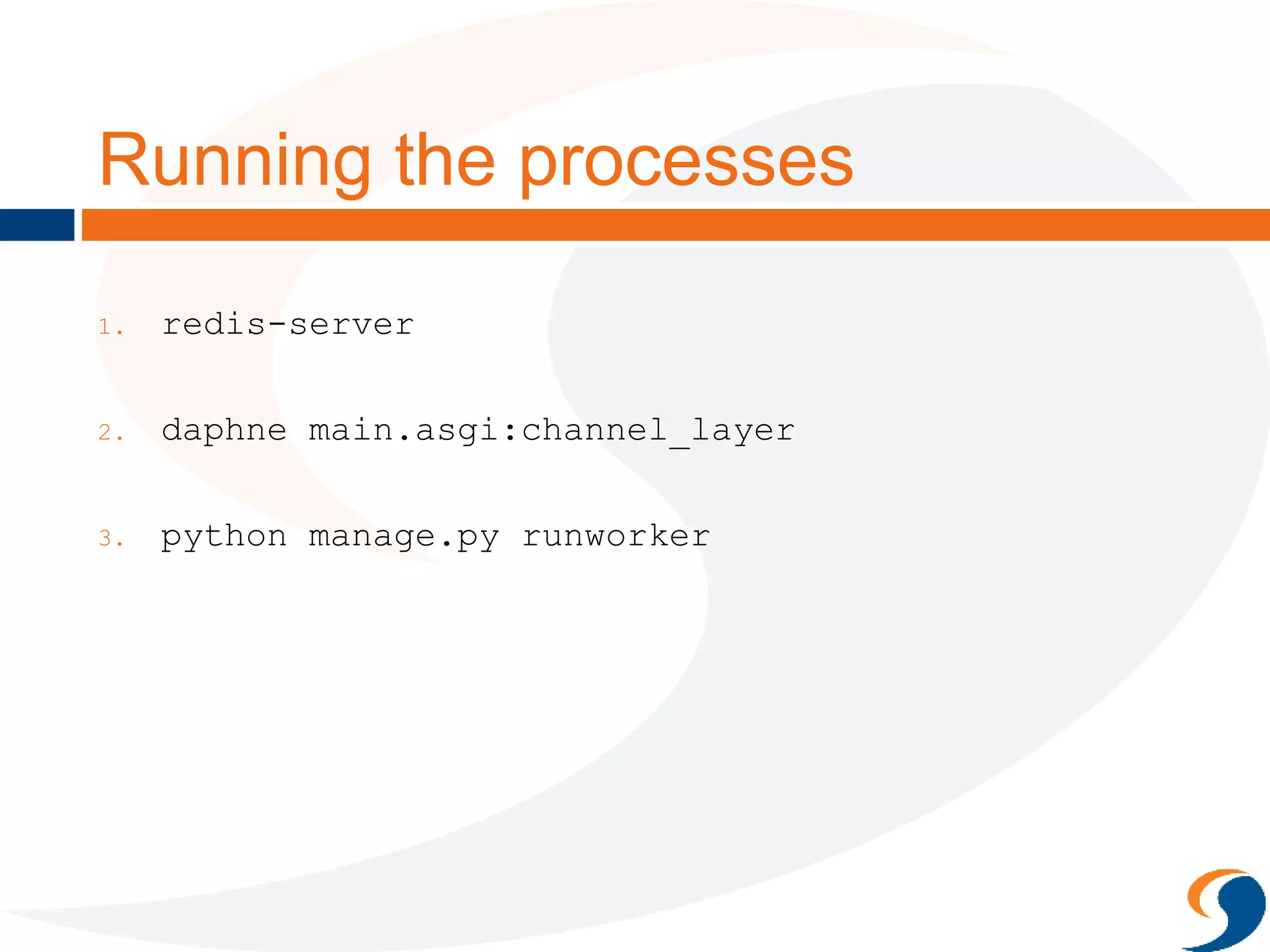
Running the processes
1. redis-server
2. daphne main.asgi:channel_layer
3. python manage.py runworker
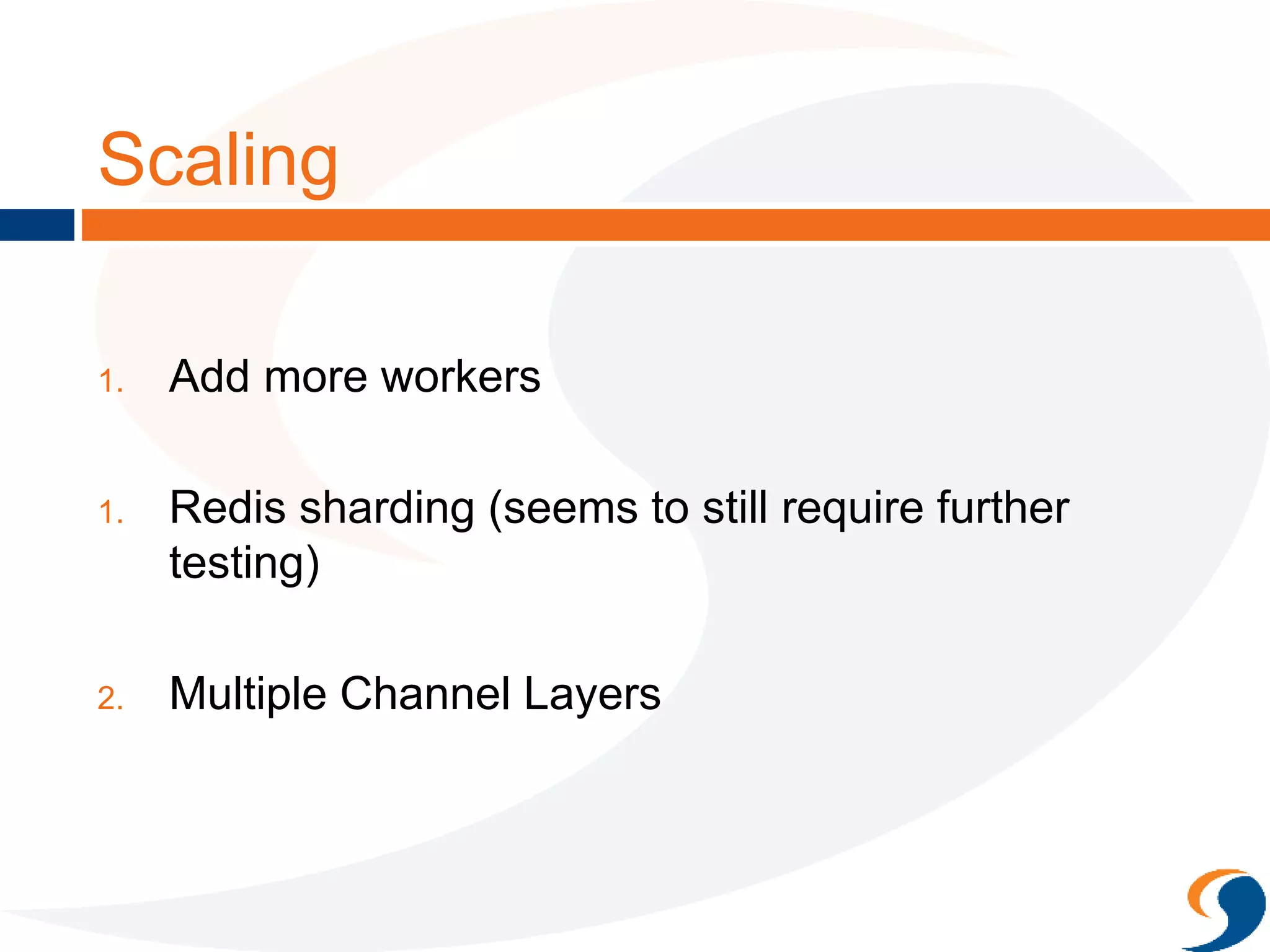
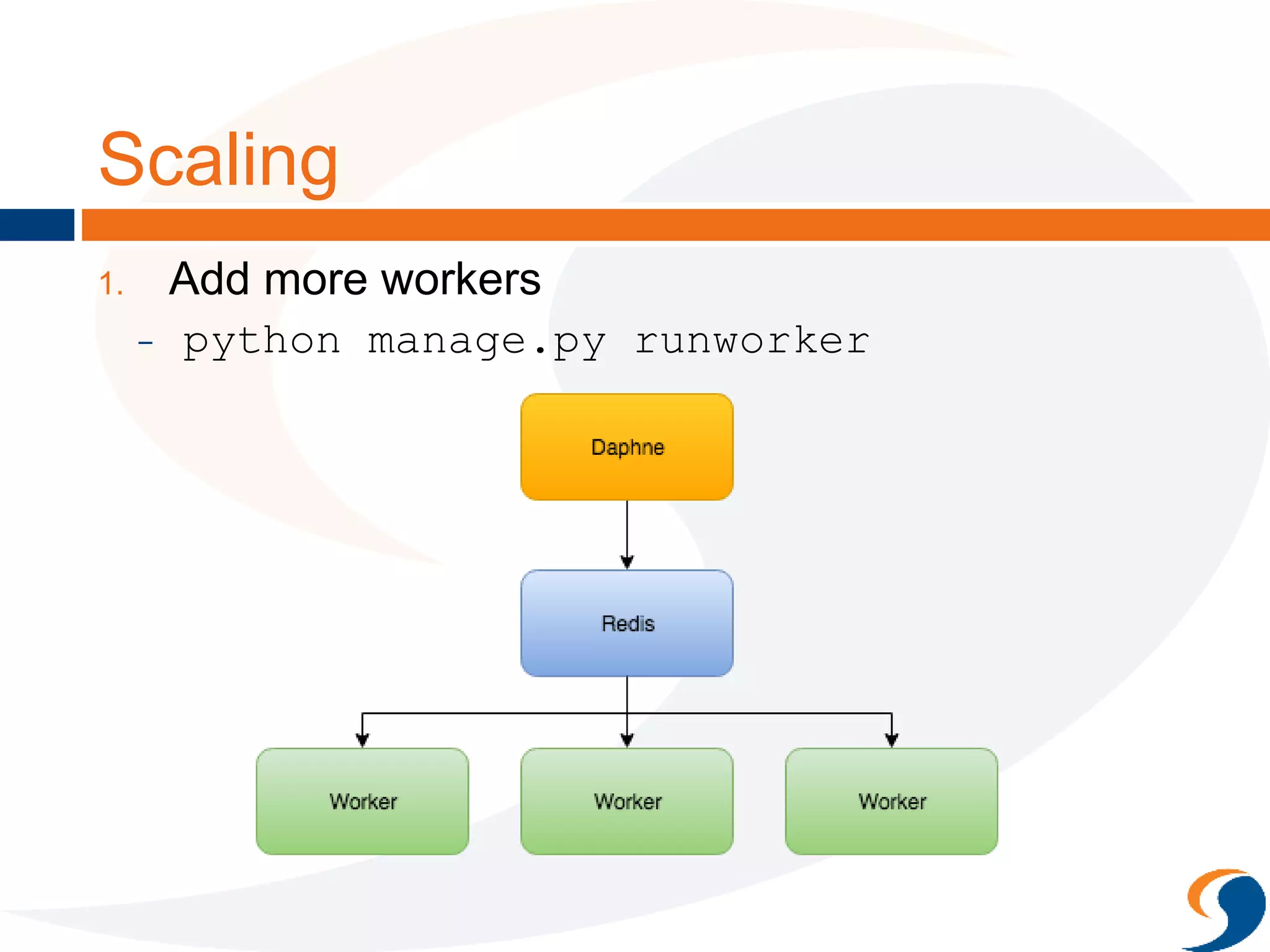
Scaling
1. Add more workers
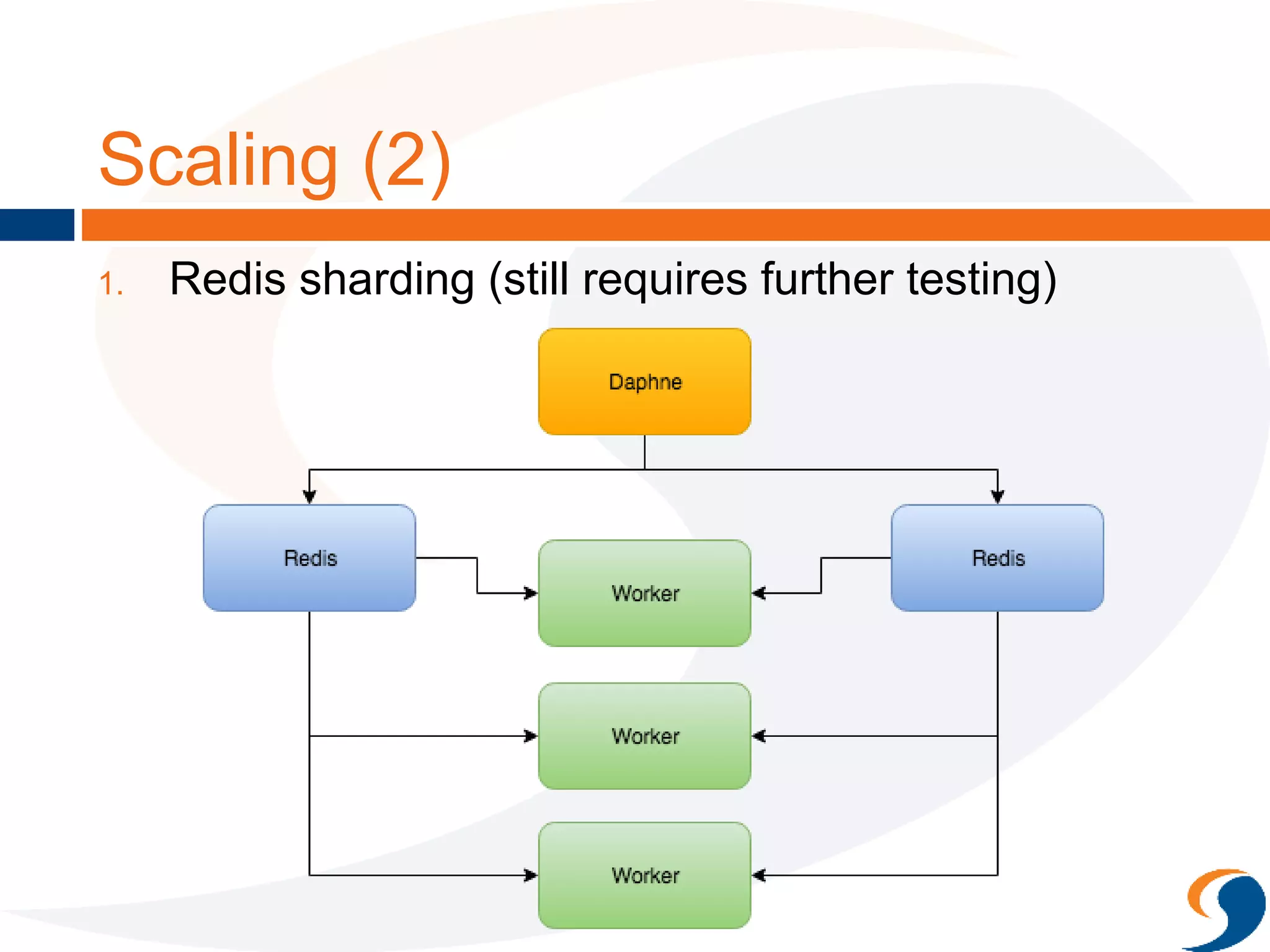
1. Redis sharding (seems to still require further
testing)
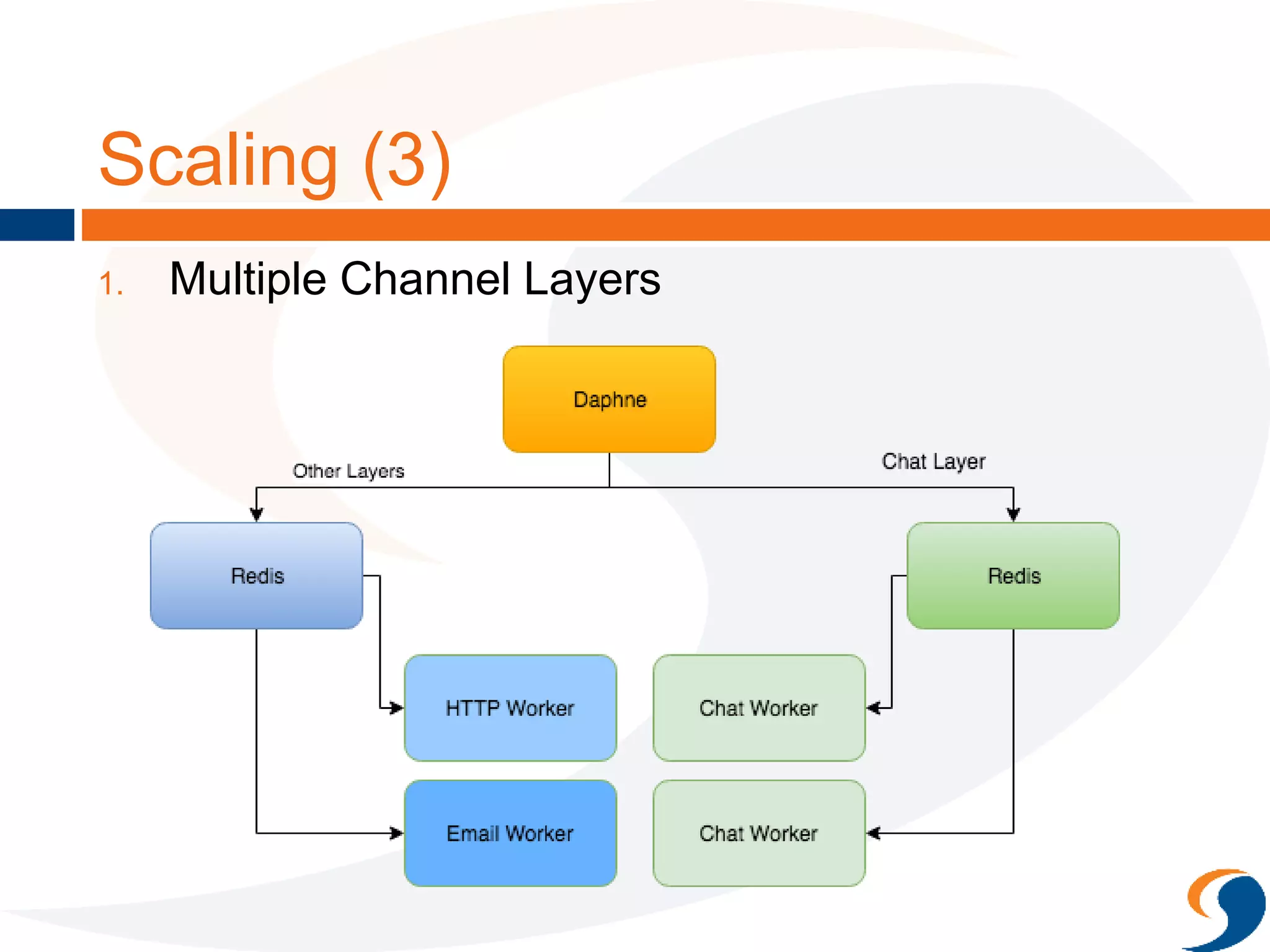
2. Multiple Channel Layers
Scaling
1. Add more workers
- python manage.py runworker
Scaling (2)
1. Redis sharding (still requires further testing)
Redis Sharding
CHANNEL_LAYERS = {
"default": {
"BACKEND": "asgi_redis.RedisChannelLayer",
"CONFIG": {
"hosts": ['redis://localhost:6379',
'redis://localhost:7777'],
},
"ROUTING": "main.routing.default_routing",
}
}
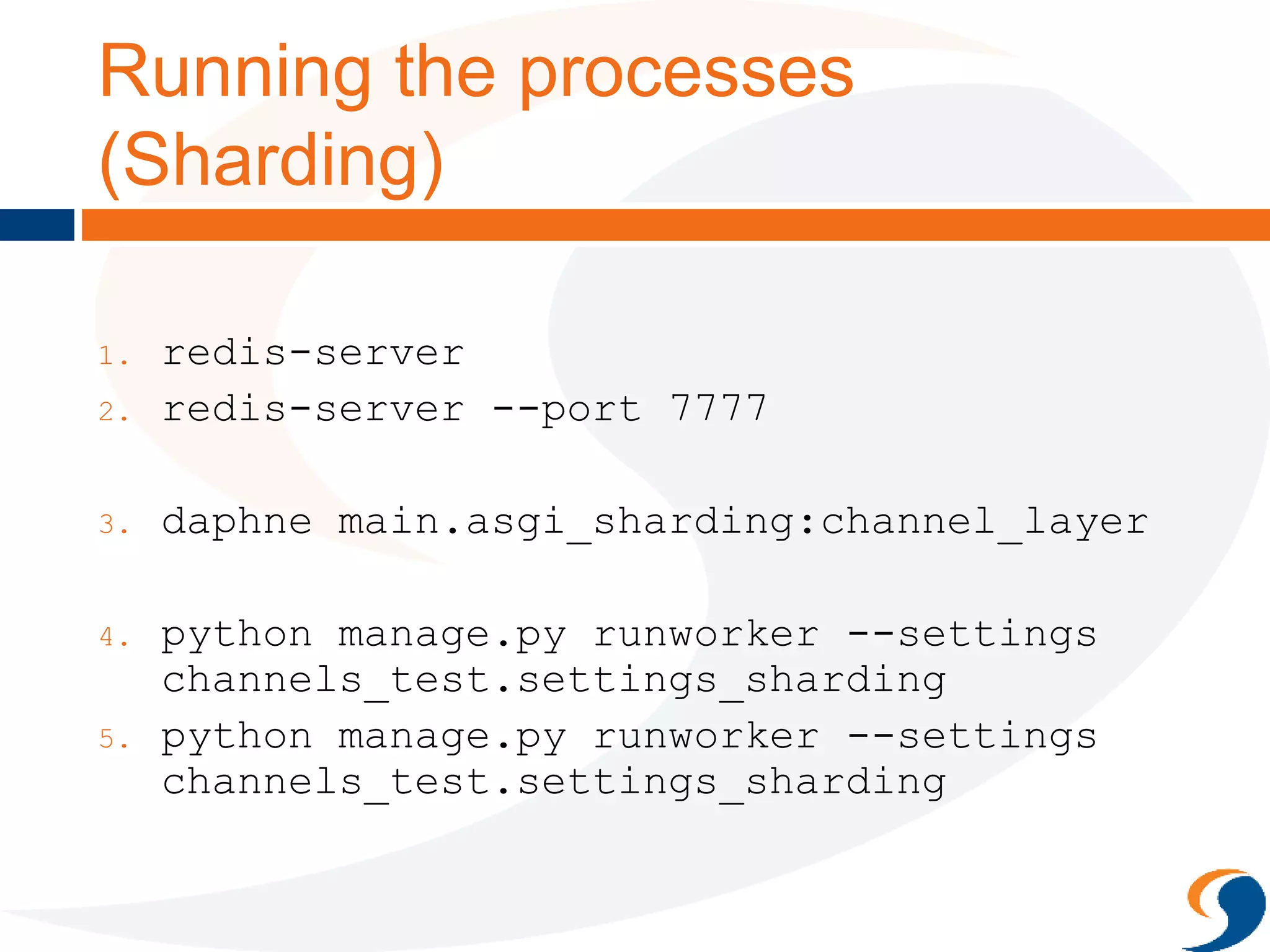
Running the processes
(Sharding)
1. redis-server
2. redis-server --port 7777
3. daphne main.asgi_sharding:channel_layer
4. python manage.py runworker --settings
channels_test.settings_sharding
5. python manage.py runworker --settings
channels_test.settings_sharding
Scaling (3)
1. Multiple Channel Layers
Multiple Channel Layers
CHANNEL_LAYERS = {
"test": {
"BACKEND": "asgi_redis.RedisChannelLayer",
"CONFIG": {
"hosts": [‘redis://localhost:6379’],
},
"ROUTING": "main.routing.channel_routing",
},
"chat": {
"BACKEND": "asgi_redis.RedisChannelLayer",
"CONFIG": {
"hosts": [`redis://localhost:7777’],
},
"ROUTING": "main.routing.chat_routing",
},
}
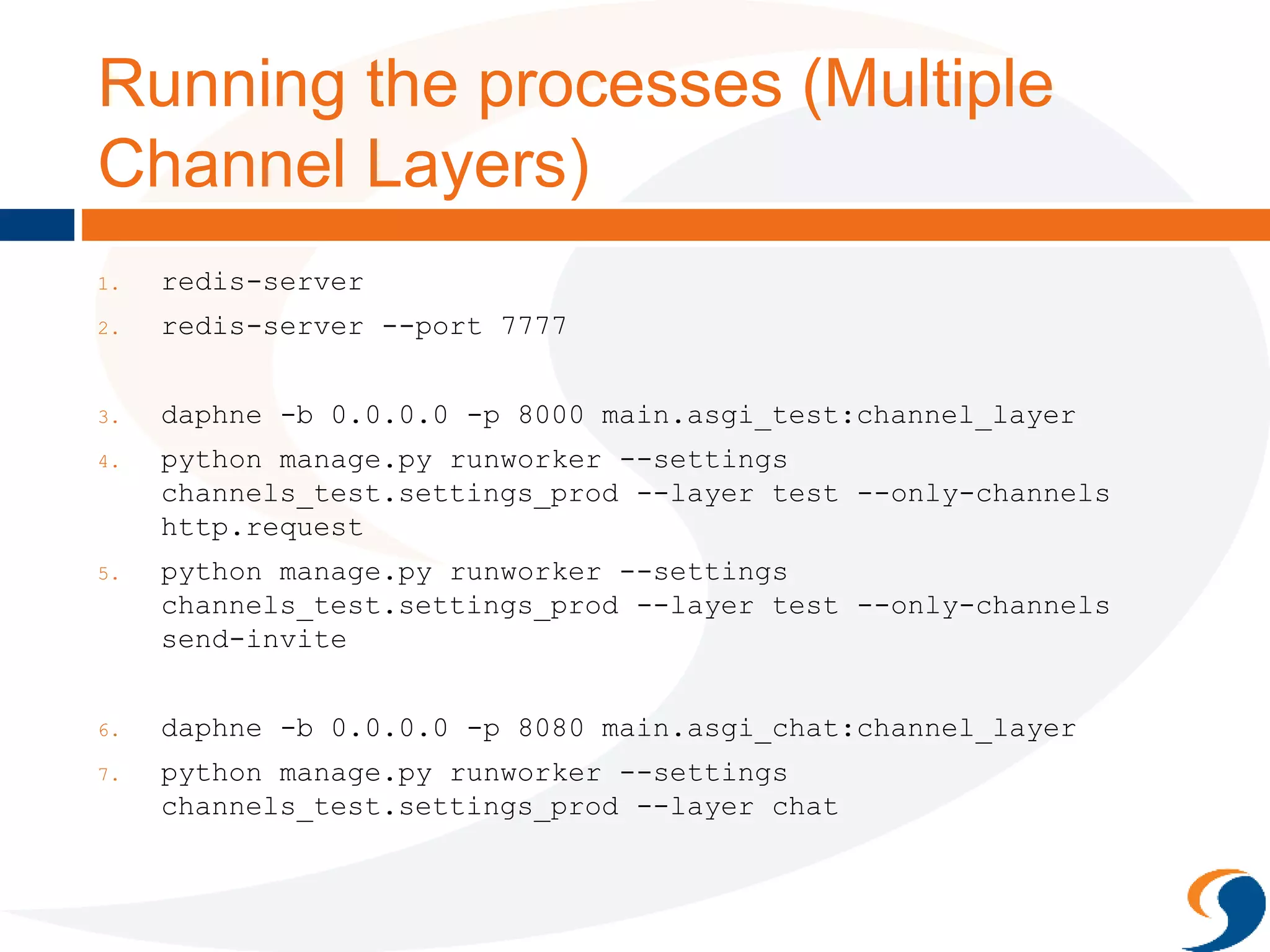
Running the processes (Multiple
Channel Layers)
1. redis-server
2. redis-server --port 7777
3. daphne -b 0.0.0.0 -p 8000 main.asgi_test:channel_layer
4. python manage.py runworker --settings
channels_test.settings_prod --layer test --only-channels
http.request
5. python manage.py runworker --settings
channels_test.settings_prod --layer test --only-channels
send-invite
6. daphne -b 0.0.0.0 -p 8080 main.asgi_chat:channel_layer
7. python manage.py runworker --settings
channels_test.settings_prod --layer chat
Wrapping Up
 New but promising
 Hopefully makes writing complex web apps
easier
 References:
 https://blog.heroku.com/in_deep_with_django_channe
ls_the_future_of_real_time_apps_in_django
 http://www.machinalis.com/blog/introduction-to-
django-channels/
 http://channels.readthedocs.io/en/latest/
 https://github.com/andrewgodwin/channels
Q&A
Chew Kok Hoor
Director
kokhoor@solutionx.com.my
iOS
channels.io App (not related to Django Channels, name
similarity purely co-incidental)
http://channels.io
Android

PyConMY 2016 Django Channels

  • 1.
    DJANGO CHANNELS by ChewKok Hoor kokhoor@solutionx.com.
  • 2.
    About Me  AlsoDirector of Third Life Sdn. Bhd. – co- developer of Mobile Marketing app for Businesses: channels.io  Web Applications - Django  Mobile Apps backend - Django  Point-of-Sales system (POS) - Django  POS Device Connectors - Tornado.
  • 3.
    Objective  General overviewof Channels  Simple Example  Scaling
  • 4.
    What is DjangoChannels “Channels is a project to make Django able to handle more than just plain HTTP requests, including WebSockets and HTTP2, as well as the ability to run code after a response has been sent for things like thumbnailing or background calculation.” - http://channels.readthedocs.io/
  • 5.
    Web Applications Activities/ Tasks  Respond to request (GET, POST, …)  Batch activities – slower tasks such as sending email etc.  Web Sockets
  • 6.
    Python Frameworks /Libraries  Respond to request (GET, POST, …)  DJANGO  Batch processing  Celery, RQ, Gearman  Web Sockets  Flask, Tornado, Twisted
  • 7.
    Vanilla Django  Builtaround Requests and Responses  Incompatible with WebSockets. Source: https://blog.heroku.com/in_deep_with_django_channels_the_future_of_real_time_apps_in_django
  • 8.
    Django Channels  Additionof Async Interface Server and Channels Layer (Asynchronous Server Gateway Interface)  Worker Processes able to handle Request / Response, WebSocket and Background Processes  Existing concepts of views still applies to Request & Response Source: https://blog.heroku.com/in_deep_with_django_channels_the_future_of_real_time_apps_in_django
  • 9.
  • 10.
    Why Django Channels? Pros  Consolidate and centralize configuration and program code  Easier re-use  Asynchronous in nature but you still write synchronous code – no yields, monkey-patching etc.  In one big package, so improvements and directions can be aligned.  Cons  Celery more complete compared to what Channels has to offer  Channels Layer choices still limited (IPC, Redis)  Stuck in an Opinionated Framework
  • 11.
    Example app forDjango Channels  Borrowed code from https://github.com/jacobian/chann els-example/  Covers:  Traditional Request Response (TemplateViews)  Batch (fake email sending)  WebSockets
  • 12.
    Getting Started  pipinstall channels  pip install asgi_redis  settings.py CHANNEL_LAYERS = { "default": { "BACKEND": "asgi_redis.RedisChannelLayer", "CONFIG": { "hosts": [‘redis://localhost:6379’], }, "ROUTING": "main.routing.default_routing", } }
  • 13.
    Routing routing.py from channels.routing importroute from . import consumers from . import batch channel_routing = [ route('send-invite', batch.send_invite), ] chat_routing = [ route('websocket.connect', consumers.ws_connect), route('websocket.receive', consumers.ws_receive), route('websocket.disconnect', consumers.ws_disconnect), ] default_routing = channel_routing + chat_routing
  • 14.
  • 15.
    Excerpt of views.py classInviteView(TemplateView): template_name = "invite.html" def post(self, request, *args, **kwargs): context = self.get_context_data() REQUEST_DATA = request.POST email = REQUEST_DATA.get('email') if not email: context['error'] = "Email field not provided" return super(TemplateView, self).render_to_response(context) data = { 'email': email, 'message': u"Hi, %s, you're invited!! Check us out at http://www.solutionx.com.my for more info!" % email } Channel('send-invite', alias=settings.BATCH_CHANNEL_LAYER).send(data) context['message'] = "We're sending the invite for you!" return super(TemplateView, self).render_to_response(context)
  • 16.
    batch.py import logging import time logger= logging.getLogger('email') def send_invite(message): logger.info("We receive a request to send email to: " + message.get('email')) logger.info("Message: " + message.get('message')) time.sleep(10) logger.info("Email sent successfully!")
  • 17.
    Running the processes 1.redis-server 2. daphne main.asgi:channel_layer 3. python manage.py runworker
  • 18.
    Scaling 1. Add moreworkers 1. Redis sharding (seems to still require further testing) 2. Multiple Channel Layers
  • 19.
    Scaling 1. Add moreworkers - python manage.py runworker
  • 20.
    Scaling (2) 1. Redissharding (still requires further testing)
  • 21.
    Redis Sharding CHANNEL_LAYERS ={ "default": { "BACKEND": "asgi_redis.RedisChannelLayer", "CONFIG": { "hosts": ['redis://localhost:6379', 'redis://localhost:7777'], }, "ROUTING": "main.routing.default_routing", } }
  • 22.
    Running the processes (Sharding) 1.redis-server 2. redis-server --port 7777 3. daphne main.asgi_sharding:channel_layer 4. python manage.py runworker --settings channels_test.settings_sharding 5. python manage.py runworker --settings channels_test.settings_sharding
  • 23.
  • 24.
    Multiple Channel Layers CHANNEL_LAYERS= { "test": { "BACKEND": "asgi_redis.RedisChannelLayer", "CONFIG": { "hosts": [‘redis://localhost:6379’], }, "ROUTING": "main.routing.channel_routing", }, "chat": { "BACKEND": "asgi_redis.RedisChannelLayer", "CONFIG": { "hosts": [`redis://localhost:7777’], }, "ROUTING": "main.routing.chat_routing", }, }
  • 25.
    Running the processes(Multiple Channel Layers) 1. redis-server 2. redis-server --port 7777 3. daphne -b 0.0.0.0 -p 8000 main.asgi_test:channel_layer 4. python manage.py runworker --settings channels_test.settings_prod --layer test --only-channels http.request 5. python manage.py runworker --settings channels_test.settings_prod --layer test --only-channels send-invite 6. daphne -b 0.0.0.0 -p 8080 main.asgi_chat:channel_layer 7. python manage.py runworker --settings channels_test.settings_prod --layer chat
  • 26.
    Wrapping Up  Newbut promising  Hopefully makes writing complex web apps easier  References:  https://blog.heroku.com/in_deep_with_django_channe ls_the_future_of_real_time_apps_in_django  http://www.machinalis.com/blog/introduction-to- django-channels/  http://channels.readthedocs.io/en/latest/  https://github.com/andrewgodwin/channels
  • 27.
    Q&A Chew Kok Hoor Director kokhoor@solutionx.com.my iOS channels.ioApp (not related to Django Channels, name similarity purely co-incidental) http://channels.io Android