
1
Pulling Back the Cloud Curtain
Sagi Brody, CTO"
@webairsagi"
sagi@webair.com
2
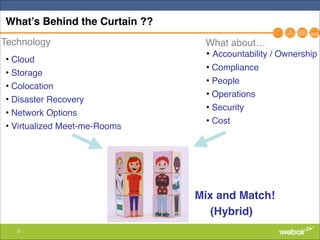
What’s Behind the Curtain ??
"
• Cloud"
• Storage"
• Colocation"
• Disaster Recovery"
• Network Options"
• Virtualized Meet-me-Rooms
• Accountability / Ownership"
• Compliance"
• People"
• Operations"
• Security"
• Cost
What about…Technology
Mix and Match!!
(Hybrid)
3
Who is this guy?
4
Who are you?
5
Webair?
Founded: 1996"
Headquarters: New York, NY"
Services Offered: Public, Private & Hybrid Cloud, Dedicated Servers, Colocation, CDN, Security,
DRaaS, Full Stack Ownership"
"
Customers: Enterprise, Healthcare, eCommerce, SaaS, SMB, IT, Arts"
"
The Webair Value: !
➢ Over 18 years providing customers with best-in-class Managed Hosting solutions "
➢ High-touch Support"
➢ Full ownership of our customer’s infrastructure stack so they can focus on their core business.
(not a commercial, I promise!!)
6
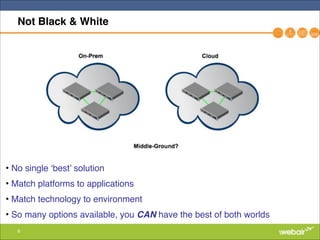
Not Black & White
• No single ‘best’ solution"
• Match platforms to applications"
• Match technology to environment"
• So many options available, you CAN have the best of both worlds
7
Use Case Examples
1) Existing on-premises infrastructure is out of capacity or in
need or refresh"
2) Existing colocated infrastructure is out of capacity or
stakeholders want to reduce operational responsibilities"
3) Disaster Recovery solution is required for either of the above"
4) Agile Networking via Network Fabrics"
5) Web Application Stacks - Where & How?
8
Definitions & Platforms - Public Cloud
Infrastructure as a Service (Public Cloud)!
• AWS, Google Compute, vCloud Air, Azure, etc.."
• DIY Infrastructure platform"
• Abstracted Compute / Storage"
• Pay-per-Use"
• Built for automated scalability "
• Typically non-HA, software built to withstand loss of instances
(non-perpetual use)"
• PaaS Services "
• Database, NoSQL"
• AD / Office365"
• Software Development Platforms
9
Definitions & Platforms - Public Cloud
Public Cloud?!
• Refers to IaaS providers"
• Refers MSPs/CSPs"
• Can be part of larger managed solution"
• Can have more HA built into single instance "
" (for perpetual use VMs) "
• Can be DIY or fully managed, or both"
• Offered via many different types of companies:"
• Traditional Hosters"
• Colocation looking to bolt on managed"
• IT solution providers, VARs, MSPs
10
Definitions & Platforms - Private Cloud
• Virtual Private Cloud (VPC)!
• (Dedicated) Private Cloud!
• Hypervisor as a Service (HVaaS)
11
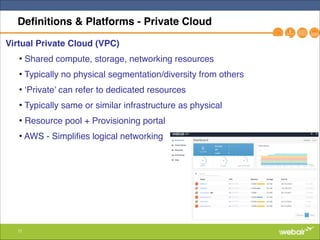
Definitions & Platforms - Private Cloud
Virtual Private Cloud (VPC)!
• Shared compute, storage, networking resources"
• Typically no physical segmentation/diversity from others "
• ‘Private’ can refer to dedicated resources"
• Typically same or similar infrastructure as physical "
• Resource pool + Provisioning portal "
• AWS - Simplifies logical networking"
"
12
Definitions & Platforms - Dedicated Private Cloud
Dedicated Private Cloud !
• Physical segmentation"
• Dedicated hypervisors"
• Options for dedicated storage & networking"
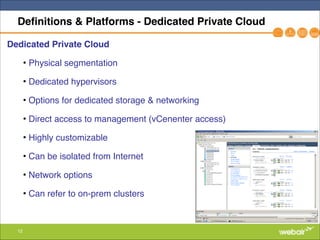
• Direct access to management (vCenenter access)"
• Highly customizable"
• Can be isolated from Internet "
• Network options"
• Can refer to on-prem clusters
13
Definitions & Platforms - Private Cloud
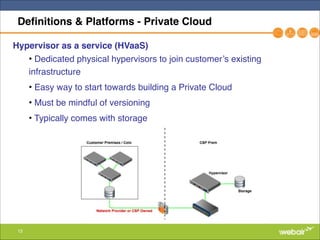
Hypervisor as a service (HVaaS)!
• Dedicated physical hypervisors to join customer’s existing
infrastructure"
• Easy way to start towards building a Private Cloud"
• Must be mindful of versioning"
• Typically comes with storage
14
Definitions & Platforms - Cloud Storage
Cloud Storage & Storage as a Service!
• Object storage!
• APIs"
• Drivers to file"
• FS agnostic"
• Example: S3 "
• File storage!
• NFS / CFS"
• FS specific"
• Use case - file/backup/large storage"
• Block storage!
• SAN"
• Platform specific offerings (NetApp as a Service?)
15
Definitions & Platforms
• Hybrid Cloud - Any combination of cloud services, colocation, public
cloud, on-prem, very open ended."
• Colocation - Customer equipment @ Provider data center"
• MSP/CSP:"
• Provides Managed Cloud, Data center, Network solutions"
• Can Manage 3rd party clouds "
• Customized Solutions"
• Not same scale as large IaaS"
"
16
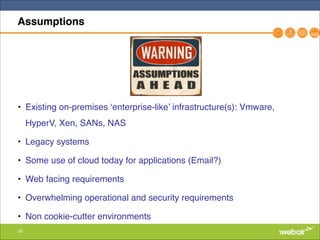
Assumptions
• Existing on-premises ‘enterprise-like’ infrastructure(s): Vmware,
HyperV, Xen, SANs, NAS"
• Legacy systems"
• Some use of cloud today for applications (Email?)"
• Web facing requirements"
• Overwhelming operational and security requirements"
• Non cookie-cutter environments
17
Extending On-premises Infrastructure
Scenario:!
• Existing virtualized infrastructure on premises. "
• Additional capacity is required to meet workload demands."
• Existing equipment going EOL"
• Lack of operational resources"
• Looking for alternative cost model to meet capacity needs"
• Looking to shift security/compliance responsibilities"
"
Solutions:!
• Extend existing infrastructure (buy more gear)"
• Use IaaS"
• Use CSP for public, private cloud, or HVaaS
18
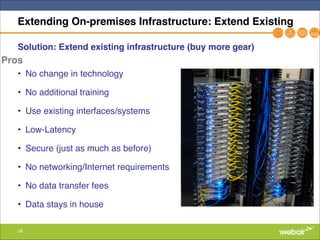
Extending On-premises Infrastructure: Extend Existing
Solution: Extend existing infrastructure (buy more gear)!
"
• No change in technology"
• No additional training"
• Use existing interfaces/systems"
• Low-Latency"
• Secure (just as much as before)"
• No networking/Internet requirements"
• No data transfer fees"
• Data stays in house
Pros
19
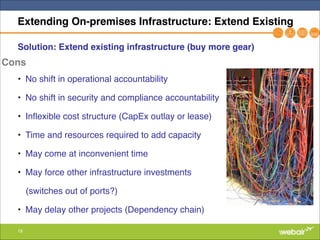
Extending On-premises Infrastructure: Extend Existing
Solution: Extend existing infrastructure (buy more gear)!
"
• No shift in operational accountability"
• No shift in security and compliance accountability"
• Inflexible cost structure (CapEx outlay or lease)"
• Time and resources required to add capacity"
• May come at inconvenient time"
• May force other infrastructure investments "
(switches out of ports?)"
• May delay other projects (Dependency chain)
Cons
20
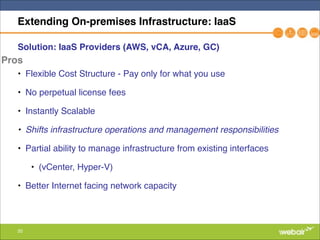
Extending On-premises Infrastructure: IaaS
Solution: IaaS Providers (AWS, vCA, Azure, GC)!
"
• Flexible Cost Structure - Pay only for what you use"
• No perpetual license fees"
• Instantly Scalable"
• Shifts infrastructure operations and management responsibilities !
• Partial ability to manage infrastructure from existing interfaces "
• (vCenter, Hyper-V)"
• Better Internet facing network capacity"
Pros
21
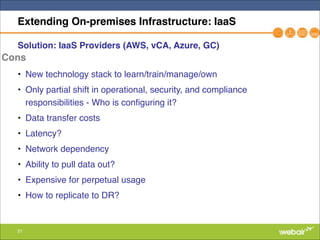
Extending On-premises Infrastructure: IaaS
Solution: IaaS Providers (AWS, vCA, Azure, GC)!
"
• New technology stack to learn/train/manage/own"
• Only partial shift in operational, security, and compliance
responsibilities - Who is configuring it? "
• Data transfer costs"
• Latency?"
• Network dependency"
• Ability to pull data out?"
• Expensive for perpetual usage"
• How to replicate to DR?
Cons
22
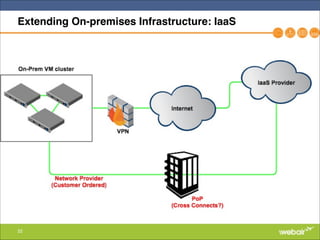
Extending On-premises Infrastructure: IaaS
23
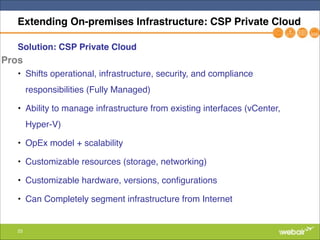
Extending On-premises Infrastructure: CSP Private Cloud
Solution: CSP Private Cloud!
"
• Shifts operational, infrastructure, security, and compliance
responsibilities (Fully Managed)"
• Ability to manage infrastructure from existing interfaces (vCenter,
Hyper-V)"
• OpEx model + scalability"
• Customizable resources (storage, networking)"
• Customizable hardware, versions, configurations"
• Can Completely segment infrastructure from Internet
Pros
24
Extending On-premises Infrastructure: CSP Private Cloud
Solution: CSP Private Cloud!
"
• May require contract/commitment"
• Not same scale as IaaS"
• Requires Internet/Network connectivity"
• Latency may still be a factor"
• Must trust provider and understand exactly what’s included in service
(don’t assume)"
• Careful when using IT vendors, VARs, web designers who are
providing as ancillary service
Cons
25
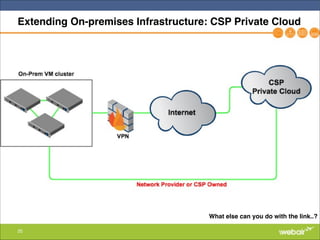
Extending On-premises Infrastructure: CSP Private Cloud
What else can you do with the link..?
26
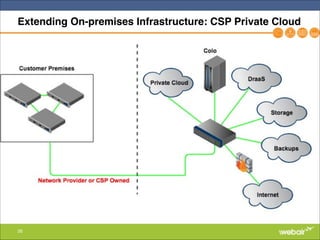
Extending On-premises Infrastructure: CSP Private Cloud
27
Extending On-premises Infrastructure: Network
Why Connect Direct?!
• IaaS providers charge less for data in/out over direct connections"
• IaaS providers provide network SLAs, but may require redundant links"
• Consistent performance & QoS"
• Lower Latency"
• Secure & Private"
• Tie into existing networks (MPLS, VPLS)"
• Other services available via same link (more later..)
28
Extending Colocation using Cloud
Scenario:!
• Existing virtualized infrastructure at colocation facility"
• Additional capacity is required to meet workload demands."
• Existing equipment going EOL"
• Lack of operational resources"
• Looking for alternative cost model to meet capacity needs"
• Looking to shift security/compliance responsibilities"
"
Solutions:!
• Extend existing infrastructure (buy more gear)"
• Use IaaS"
• Use CSP for public, private cloud, or HVaaS
29
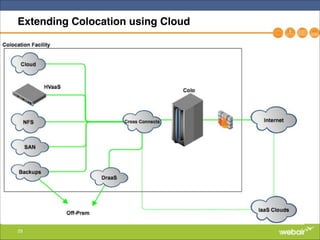
Extending Colocation using Cloud
30
Extending Colocation using Cloud
• Relinquish operational, security, and management control for
individual layers slowly and when it makes sense."
• Allows you to move to cloud resources at your own pace"
• Allows for mix/match physical/cloud based on used case"
• Cloud ‘Behind the firewall’, mix-match IPs between colo/cloud"
• Connected via physical cross connects: Secure, Private, Fast"
• Available quickly as needed"
• Use for short term projects (storage firmware upgrades??)
31
Disaster Recovery as a Service: Goals
• SLA based RPO (Recovery Point Objective)"
• SLA based RTO (Recovery Time Objective)"
• Application Consistency across VMs"
• Applications available to same networks/Internet same as production"
• Automated run-books (servers, scripts, network) and fail-back"
• Ability to test in fenced environment"
• Compliance reporting"
• Clearly defined accountability/ownership for service"
• Quarterly testing with successful results"
32
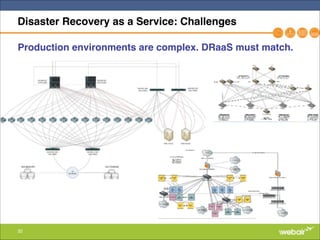
Disaster Recovery as a Service: Challenges
Production environments are complex. DRaaS must match.
33
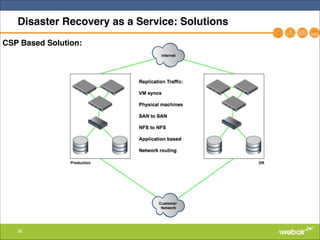
Disaster Recovery as a Service: Solutions
VM Based Replication Solutions"
• Site to Site software:!
• Veeam Software (snapshot based)"
• Zerto Software (synchronous)"
• EMC RecoverPoint"
• Vmware - VDP"
• HyperV SRV + Replication"
• To Consider!
• Overhead of setup, configuration, and management"
• Ownership of solution"
• Hardware + Site requirements
34
Disaster Recovery as a Service: Solutions
VM Based Replication Solutions"
• IaaS Based!
• HyperV - Azure Site Recovery"
• Vmware - vCloud Air Disaster Recovery"
• To Consider!
• No hardware required (OpEx instead of CapEx)"
• Overhead of setup, configuration, and management"
• Ownership of solution"
• Testing & Failback testing"
• Latency"
• Compliance
35
Disaster Recovery as a Service: Solutions
• VM Replication (IaaS, Zerto, Veeam) only gets you 80% there"
• SAN<->SAN Repl. may be required for direct iSCSI mounts"
• Some apps better off replicated in app (Exchange DAS, SQL clusters)
- Requires always on VMs"
• Internet facing apps - BGP swing or automated DNS change required"
• Internal network with MPLS, VPLS or SD-WAN, same at DR"
• Legacy platforms on internal networks require physical at same
location (AS400)"
• Firewalls & Security duplication
36
Disaster Recovery as a Service: Solutions
CSP Based Solution:
37
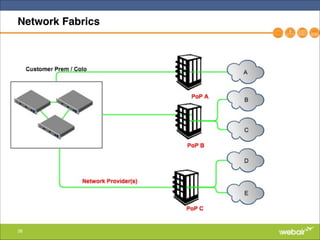
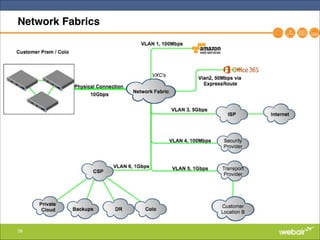
Network Fabrics
• SDN Matured."
• One physical link for a multitude of use-cases."
• Consolidate transport/transit/VPN"
• Immediate provisioning."
• Reduced Cost - No more per cross connect fees"
• SLA/QoS"
• Physical PoPs are being virtualized.
38
Network Fabrics
39
Network Fabrics
40
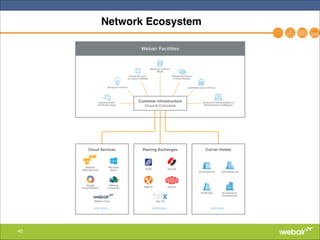
Network Ecosystem
41
What runs on top of all that infrastructure?
42
What runs on top of all that infrastructure?
• Example: Web Facing Applications"
• Common use case for ARTS community (Ticketing & scheduling)"
• Connects to on-prem/off-prem sites/services and 3rd parties"
• Sites must be scalable and able to deal with ‘viral’ spikes"
• Security considerations:!
• Storing PII and CC #s, PCI is a MUST"
• Application (layer7) attacks/hacks"
• DDoS attacks"
• Threat Monitoring/Mitigation
43
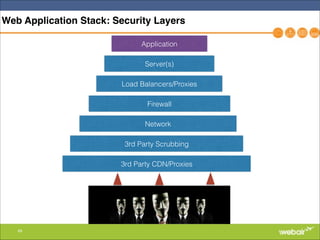
Web Application Stack: Security Layers
Application
Server(s)
Load Balancers/Proxies
Firewall
Network
3rd Party Scrubbing
3rd Party CDN/Proxies
44
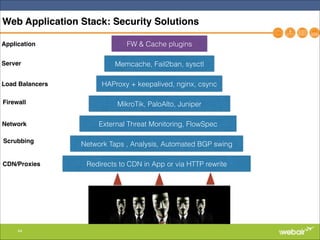
Web Application Stack: Security Solutions
FW & Cache plugins
Memcache, Fail2ban, sysctl
HAProxy + keepalived, nginx, csync
MikroTik, PaloAlto, Juniper
External Threat Monitoring, FlowSpec
Network Taps , Analysis, Automated BGP swing
Redirects to CDN in App or via HTTP rewrite
Application
Server
Load Balancers
Firewall
Network
Scrubbing
CDN/Proxies
45
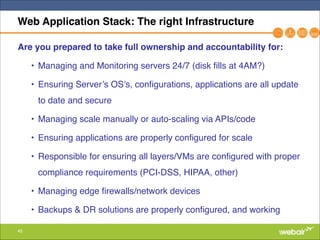
Web Application Stack: The right Infrastructure
Are you prepared to take full ownership and accountability for:!
• Managing and Monitoring servers 24/7 (disk fills at 4AM?)"
• Ensuring Server’s OS’s, configurations, applications are all update
to date and secure"
• Managing scale manually or auto-scaling via APIs/code"
• Ensuring applications are properly configured for scale"
• Responsible for ensuring all layers/VMs are configured with proper
compliance requirements (PCI-DSS, HIPAA, other)"
• Managing edge firewalls/network devices"
• Backups & DR solutions are properly configured, and working
46
Web Application Stack: The right Infrastructure
• If Yes -> IaaS is by far the best technical solution "
• Check costs when considering perpetual usage"
• If No -> "
• Use an MSP who is already built on top of an IaaS provider and is
willing to own what you don’t want to."
• Use a CSP which can do the same and possibly provide more
flexibility."
Bottom Line: Figure out what you want your internal IT and external
providers to be accountable/responsible for. Align solution to that +
technology compatibility and flexibility.
47
Web Application Stack: The right Infrastructure
• Is your configuration so complex that you will strongly benefit from
tight integrations with IaaS/APIs?"
• Very common @ scale and when huge temporary spikes are
common"
• Quick starting point"
Or!
• Would you rather have internal IT resources focused on adding value
in other areas such as adding features to products/services?"
• If yes - Look for Full Stack Ownership
48
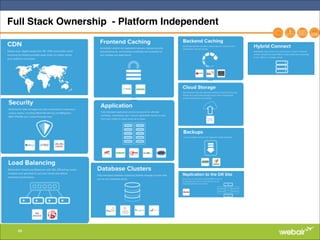
Full Stack Ownership - Platform Independent
49
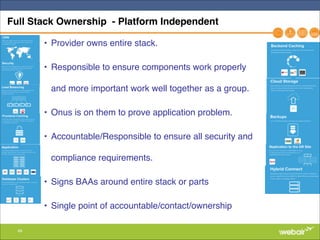
Full Stack Ownership - Platform Independent
• Provider owns entire stack. "
• Responsible to ensure components work properly
and more important work well together as a group."
• Onus is on them to prove application problem."
• Accountable/Responsible to ensure all security and
compliance requirements."
• Signs BAAs around entire stack or parts"
• Single point of accountable/contact/ownership
50
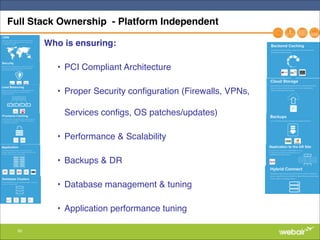
Full Stack Ownership - Platform Independent
Who is ensuring: !
• PCI Compliant Architecture"
• Proper Security configuration (Firewalls, VPNs,
Services configs, OS patches/updates)"
• Performance & Scalability"
• Backups & DR"
• Database management & tuning"
• Application performance tuning
51
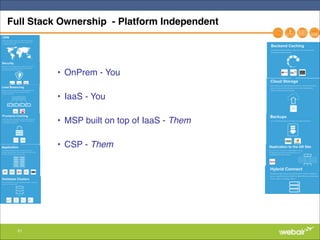
Full Stack Ownership - Platform Independent
• OnPrem - You"
• IaaS - You"
• MSP built on top of IaaS - Them!
• CSP - Them!
52
Beware of Shiny Object Syndrome
53
The Human Factor: Partnership and Trust
• If you’re looking for any sort of non-DIY solution/platform, or to
relinquish accountability & management: "
You’re looking for a partner.!
"
• The team behind the technology is just as important as the technology
itself."
• Is the partner a solution provider? Are they aligned with your best
interests?"
• Do they care about your account? "
• Do you like working with them? "
• Do you trust them with your business?"
• When there are challenges?"
" Who do you call?"
" Will they come through?
54
THANK YOU!
Sagi Brody, CTO!
@WebairSagi!
sagi@webair.com

Pulling Back the Cloud Curtain

  • 1.
    1 Pulling Back theCloud Curtain Sagi Brody, CTO" @webairsagi" sagi@webair.com
  • 2.
    2 What’s Behind theCurtain ?? " • Cloud" • Storage" • Colocation" • Disaster Recovery" • Network Options" • Virtualized Meet-me-Rooms • Accountability / Ownership" • Compliance" • People" • Operations" • Security" • Cost What about…Technology Mix and Match!! (Hybrid)
  • 3.
  • 4.
  • 5.
    5 Webair? Founded: 1996" Headquarters: NewYork, NY" Services Offered: Public, Private & Hybrid Cloud, Dedicated Servers, Colocation, CDN, Security, DRaaS, Full Stack Ownership" " Customers: Enterprise, Healthcare, eCommerce, SaaS, SMB, IT, Arts" " The Webair Value: ! ➢ Over 18 years providing customers with best-in-class Managed Hosting solutions " ➢ High-touch Support" ➢ Full ownership of our customer’s infrastructure stack so they can focus on their core business. (not a commercial, I promise!!)
  • 6.
    6 Not Black &White • No single ‘best’ solution" • Match platforms to applications" • Match technology to environment" • So many options available, you CAN have the best of both worlds
  • 7.
    7 Use Case Examples 1)Existing on-premises infrastructure is out of capacity or in need or refresh" 2) Existing colocated infrastructure is out of capacity or stakeholders want to reduce operational responsibilities" 3) Disaster Recovery solution is required for either of the above" 4) Agile Networking via Network Fabrics" 5) Web Application Stacks - Where & How?
  • 8.
    8 Definitions & Platforms- Public Cloud Infrastructure as a Service (Public Cloud)! • AWS, Google Compute, vCloud Air, Azure, etc.." • DIY Infrastructure platform" • Abstracted Compute / Storage" • Pay-per-Use" • Built for automated scalability " • Typically non-HA, software built to withstand loss of instances (non-perpetual use)" • PaaS Services " • Database, NoSQL" • AD / Office365" • Software Development Platforms
  • 9.
    9 Definitions & Platforms- Public Cloud Public Cloud?! • Refers to IaaS providers" • Refers MSPs/CSPs" • Can be part of larger managed solution" • Can have more HA built into single instance " " (for perpetual use VMs) " • Can be DIY or fully managed, or both" • Offered via many different types of companies:" • Traditional Hosters" • Colocation looking to bolt on managed" • IT solution providers, VARs, MSPs
  • 10.
    10 Definitions & Platforms- Private Cloud • Virtual Private Cloud (VPC)! • (Dedicated) Private Cloud! • Hypervisor as a Service (HVaaS)
  • 11.
    11 Definitions & Platforms- Private Cloud Virtual Private Cloud (VPC)! • Shared compute, storage, networking resources" • Typically no physical segmentation/diversity from others " • ‘Private’ can refer to dedicated resources" • Typically same or similar infrastructure as physical " • Resource pool + Provisioning portal " • AWS - Simplifies logical networking" "
  • 12.
    12 Definitions & Platforms- Dedicated Private Cloud Dedicated Private Cloud ! • Physical segmentation" • Dedicated hypervisors" • Options for dedicated storage & networking" • Direct access to management (vCenenter access)" • Highly customizable" • Can be isolated from Internet " • Network options" • Can refer to on-prem clusters
  • 13.
    13 Definitions & Platforms- Private Cloud Hypervisor as a service (HVaaS)! • Dedicated physical hypervisors to join customer’s existing infrastructure" • Easy way to start towards building a Private Cloud" • Must be mindful of versioning" • Typically comes with storage
  • 14.
    14 Definitions & Platforms- Cloud Storage Cloud Storage & Storage as a Service! • Object storage! • APIs" • Drivers to file" • FS agnostic" • Example: S3 " • File storage! • NFS / CFS" • FS specific" • Use case - file/backup/large storage" • Block storage! • SAN" • Platform specific offerings (NetApp as a Service?)
  • 15.
    15 Definitions & Platforms •Hybrid Cloud - Any combination of cloud services, colocation, public cloud, on-prem, very open ended." • Colocation - Customer equipment @ Provider data center" • MSP/CSP:" • Provides Managed Cloud, Data center, Network solutions" • Can Manage 3rd party clouds " • Customized Solutions" • Not same scale as large IaaS" "
  • 16.
    16 Assumptions • Existing on-premises‘enterprise-like’ infrastructure(s): Vmware, HyperV, Xen, SANs, NAS" • Legacy systems" • Some use of cloud today for applications (Email?)" • Web facing requirements" • Overwhelming operational and security requirements" • Non cookie-cutter environments
  • 17.
    17 Extending On-premises Infrastructure Scenario:! •Existing virtualized infrastructure on premises. " • Additional capacity is required to meet workload demands." • Existing equipment going EOL" • Lack of operational resources" • Looking for alternative cost model to meet capacity needs" • Looking to shift security/compliance responsibilities" " Solutions:! • Extend existing infrastructure (buy more gear)" • Use IaaS" • Use CSP for public, private cloud, or HVaaS
  • 18.
    18 Extending On-premises Infrastructure:Extend Existing Solution: Extend existing infrastructure (buy more gear)! " • No change in technology" • No additional training" • Use existing interfaces/systems" • Low-Latency" • Secure (just as much as before)" • No networking/Internet requirements" • No data transfer fees" • Data stays in house Pros
  • 19.
    19 Extending On-premises Infrastructure:Extend Existing Solution: Extend existing infrastructure (buy more gear)! " • No shift in operational accountability" • No shift in security and compliance accountability" • Inflexible cost structure (CapEx outlay or lease)" • Time and resources required to add capacity" • May come at inconvenient time" • May force other infrastructure investments " (switches out of ports?)" • May delay other projects (Dependency chain) Cons
  • 20.
    20 Extending On-premises Infrastructure:IaaS Solution: IaaS Providers (AWS, vCA, Azure, GC)! " • Flexible Cost Structure - Pay only for what you use" • No perpetual license fees" • Instantly Scalable" • Shifts infrastructure operations and management responsibilities ! • Partial ability to manage infrastructure from existing interfaces " • (vCenter, Hyper-V)" • Better Internet facing network capacity" Pros
  • 21.
    21 Extending On-premises Infrastructure:IaaS Solution: IaaS Providers (AWS, vCA, Azure, GC)! " • New technology stack to learn/train/manage/own" • Only partial shift in operational, security, and compliance responsibilities - Who is configuring it? " • Data transfer costs" • Latency?" • Network dependency" • Ability to pull data out?" • Expensive for perpetual usage" • How to replicate to DR? Cons
  • 22.
  • 23.
    23 Extending On-premises Infrastructure:CSP Private Cloud Solution: CSP Private Cloud! " • Shifts operational, infrastructure, security, and compliance responsibilities (Fully Managed)" • Ability to manage infrastructure from existing interfaces (vCenter, Hyper-V)" • OpEx model + scalability" • Customizable resources (storage, networking)" • Customizable hardware, versions, configurations" • Can Completely segment infrastructure from Internet Pros
  • 24.
    24 Extending On-premises Infrastructure:CSP Private Cloud Solution: CSP Private Cloud! " • May require contract/commitment" • Not same scale as IaaS" • Requires Internet/Network connectivity" • Latency may still be a factor" • Must trust provider and understand exactly what’s included in service (don’t assume)" • Careful when using IT vendors, VARs, web designers who are providing as ancillary service Cons
  • 25.
    25 Extending On-premises Infrastructure:CSP Private Cloud What else can you do with the link..?
  • 26.
  • 27.
    27 Extending On-premises Infrastructure:Network Why Connect Direct?! • IaaS providers charge less for data in/out over direct connections" • IaaS providers provide network SLAs, but may require redundant links" • Consistent performance & QoS" • Lower Latency" • Secure & Private" • Tie into existing networks (MPLS, VPLS)" • Other services available via same link (more later..)
  • 28.
    28 Extending Colocation usingCloud Scenario:! • Existing virtualized infrastructure at colocation facility" • Additional capacity is required to meet workload demands." • Existing equipment going EOL" • Lack of operational resources" • Looking for alternative cost model to meet capacity needs" • Looking to shift security/compliance responsibilities" " Solutions:! • Extend existing infrastructure (buy more gear)" • Use IaaS" • Use CSP for public, private cloud, or HVaaS
  • 29.
  • 30.
    30 Extending Colocation usingCloud • Relinquish operational, security, and management control for individual layers slowly and when it makes sense." • Allows you to move to cloud resources at your own pace" • Allows for mix/match physical/cloud based on used case" • Cloud ‘Behind the firewall’, mix-match IPs between colo/cloud" • Connected via physical cross connects: Secure, Private, Fast" • Available quickly as needed" • Use for short term projects (storage firmware upgrades??)
  • 31.
    31 Disaster Recovery asa Service: Goals • SLA based RPO (Recovery Point Objective)" • SLA based RTO (Recovery Time Objective)" • Application Consistency across VMs" • Applications available to same networks/Internet same as production" • Automated run-books (servers, scripts, network) and fail-back" • Ability to test in fenced environment" • Compliance reporting" • Clearly defined accountability/ownership for service" • Quarterly testing with successful results"
  • 32.
    32 Disaster Recovery asa Service: Challenges Production environments are complex. DRaaS must match.
  • 33.
    33 Disaster Recovery asa Service: Solutions VM Based Replication Solutions" • Site to Site software:! • Veeam Software (snapshot based)" • Zerto Software (synchronous)" • EMC RecoverPoint" • Vmware - VDP" • HyperV SRV + Replication" • To Consider! • Overhead of setup, configuration, and management" • Ownership of solution" • Hardware + Site requirements
  • 34.
    34 Disaster Recovery asa Service: Solutions VM Based Replication Solutions" • IaaS Based! • HyperV - Azure Site Recovery" • Vmware - vCloud Air Disaster Recovery" • To Consider! • No hardware required (OpEx instead of CapEx)" • Overhead of setup, configuration, and management" • Ownership of solution" • Testing & Failback testing" • Latency" • Compliance
  • 35.
    35 Disaster Recovery asa Service: Solutions • VM Replication (IaaS, Zerto, Veeam) only gets you 80% there" • SAN<->SAN Repl. may be required for direct iSCSI mounts" • Some apps better off replicated in app (Exchange DAS, SQL clusters) - Requires always on VMs" • Internet facing apps - BGP swing or automated DNS change required" • Internal network with MPLS, VPLS or SD-WAN, same at DR" • Legacy platforms on internal networks require physical at same location (AS400)" • Firewalls & Security duplication
  • 36.
    36 Disaster Recovery asa Service: Solutions CSP Based Solution:
  • 37.
    37 Network Fabrics • SDNMatured." • One physical link for a multitude of use-cases." • Consolidate transport/transit/VPN" • Immediate provisioning." • Reduced Cost - No more per cross connect fees" • SLA/QoS" • Physical PoPs are being virtualized.
  • 38.
  • 39.
  • 40.
  • 41.
    41 What runs ontop of all that infrastructure?
  • 42.
    42 What runs ontop of all that infrastructure? • Example: Web Facing Applications" • Common use case for ARTS community (Ticketing & scheduling)" • Connects to on-prem/off-prem sites/services and 3rd parties" • Sites must be scalable and able to deal with ‘viral’ spikes" • Security considerations:! • Storing PII and CC #s, PCI is a MUST" • Application (layer7) attacks/hacks" • DDoS attacks" • Threat Monitoring/Mitigation
  • 43.
    43 Web Application Stack:Security Layers Application Server(s) Load Balancers/Proxies Firewall Network 3rd Party Scrubbing 3rd Party CDN/Proxies
  • 44.
    44 Web Application Stack:Security Solutions FW & Cache plugins Memcache, Fail2ban, sysctl HAProxy + keepalived, nginx, csync MikroTik, PaloAlto, Juniper External Threat Monitoring, FlowSpec Network Taps , Analysis, Automated BGP swing Redirects to CDN in App or via HTTP rewrite Application Server Load Balancers Firewall Network Scrubbing CDN/Proxies
  • 45.
    45 Web Application Stack:The right Infrastructure Are you prepared to take full ownership and accountability for:! • Managing and Monitoring servers 24/7 (disk fills at 4AM?)" • Ensuring Server’s OS’s, configurations, applications are all update to date and secure" • Managing scale manually or auto-scaling via APIs/code" • Ensuring applications are properly configured for scale" • Responsible for ensuring all layers/VMs are configured with proper compliance requirements (PCI-DSS, HIPAA, other)" • Managing edge firewalls/network devices" • Backups & DR solutions are properly configured, and working
  • 46.
    46 Web Application Stack:The right Infrastructure • If Yes -> IaaS is by far the best technical solution " • Check costs when considering perpetual usage" • If No -> " • Use an MSP who is already built on top of an IaaS provider and is willing to own what you don’t want to." • Use a CSP which can do the same and possibly provide more flexibility." Bottom Line: Figure out what you want your internal IT and external providers to be accountable/responsible for. Align solution to that + technology compatibility and flexibility.
  • 47.
    47 Web Application Stack:The right Infrastructure • Is your configuration so complex that you will strongly benefit from tight integrations with IaaS/APIs?" • Very common @ scale and when huge temporary spikes are common" • Quick starting point" Or! • Would you rather have internal IT resources focused on adding value in other areas such as adding features to products/services?" • If yes - Look for Full Stack Ownership
  • 48.
    48 Full Stack Ownership- Platform Independent
  • 49.
    49 Full Stack Ownership- Platform Independent • Provider owns entire stack. " • Responsible to ensure components work properly and more important work well together as a group." • Onus is on them to prove application problem." • Accountable/Responsible to ensure all security and compliance requirements." • Signs BAAs around entire stack or parts" • Single point of accountable/contact/ownership
  • 50.
    50 Full Stack Ownership- Platform Independent Who is ensuring: ! • PCI Compliant Architecture" • Proper Security configuration (Firewalls, VPNs, Services configs, OS patches/updates)" • Performance & Scalability" • Backups & DR" • Database management & tuning" • Application performance tuning
  • 51.
    51 Full Stack Ownership- Platform Independent • OnPrem - You" • IaaS - You" • MSP built on top of IaaS - Them! • CSP - Them!
  • 52.
    52 Beware of ShinyObject Syndrome
  • 53.
    53 The Human Factor:Partnership and Trust • If you’re looking for any sort of non-DIY solution/platform, or to relinquish accountability & management: " You’re looking for a partner.! " • The team behind the technology is just as important as the technology itself." • Is the partner a solution provider? Are they aligned with your best interests?" • Do they care about your account? " • Do you like working with them? " • Do you trust them with your business?" • When there are challenges?" " Who do you call?" " Will they come through?
  • 54.
    54 THANK YOU! Sagi Brody,CTO! @WebairSagi! sagi@webair.com