Processing programming language
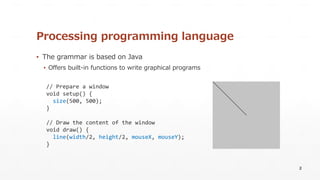
▪The grammar is based on Java
▪ Offers built-in functions to write graphical programs
2
// Prepare a window
void setup() {
size(500, 500);
}
// Draw the content of the window
void draw() {
line(width/2, height/2, mouseX, mouseY);
}
3.
Challenges
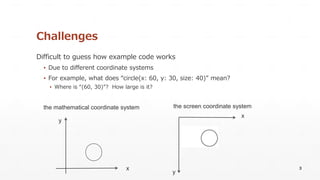
Difficult to guesshow example code works
▪ Due to different coordinate systems
▪ For example, what does “circle(x: 60, y: 30, size: 40)” mean?
▪ Where is “(60, 30)”? How large is it?
3
x
y
x
y
the mathematical coordinate system the screen coordinate system
4.
PShapeTrace
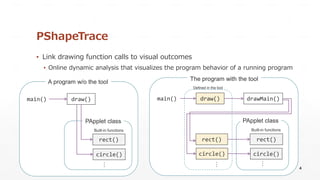
▪ Link drawingfunction calls to visual outcomes
▪ Online dynamic analysis that visualizes the program behavior of a running program
4
draw()
PApplet class
main()
rect()
A program w/o the tool
circle()
draw()
PApplet class
rect()
The program with the tool
circle()
main() drawMain()
rect()
circle()
Defined in the tool
Built-in functions Built-in functions
…
…
…
5.
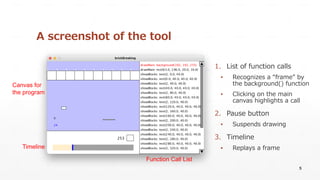
A screenshot ofthe tool
1. List of function calls
▪ Recognizes a “frame” by
the background() function
▪ Clicking on the main
canvas highlights a call
2. Pause button
▪ Suspends drawing
3. Timeline
▪ Replays a frame
5
Canvas for
the program
Function Call List
Timeline
6.
Experiment: Usability Study
▪Participants: 10 undergraduate students who had completed a Processing course
▪ A getting started guide for the tool was provided before starting the tasks
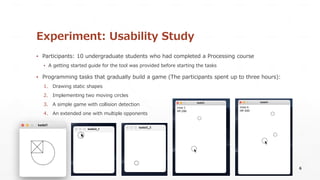
▪ Programming tasks that gradually build a game (The participants spent up to three hours):
1. Drawing static shapes
2. Implementing two moving circles
3. A simple game with collision detection
4. An extended one with multiple opponents
6
7.
Results: Usefulness
7
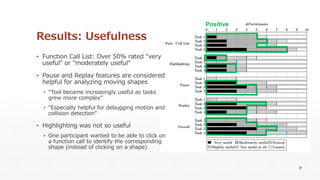
▪ FunctionCall List: Over 50% rated "very
useful" or "moderately useful“
▪ Pause and Replay features are considered
helpful for analyzing moving shapes
▪ “Tool became increasingly useful as tasks
grew more complex”
▪ “Especially helpful for debugging motion and
collision detection”
▪ Highlighting was not so useful
▪ One participant wanted to be able to click on
a function call to identify the corresponding
shape (instead of clicking on a shape)
Positive
8.
Conclusion
PShapeTrace is developedto link Processing code to its output
▪ Performance impact is acceptable for classroom use
▪ The tool’s features are helpful for completing programming tasks
▪ The tool is publicly available on GitHub: https://github.com/fun-se/PShapeTrace
Future work
▪ Collecting feedback from students (in progress)
▪ Additional case studies in classroom
▪ Exploring better integration with the development environment
8
Details can be
found in our paper.