1
UML Diagrams(Contd.)
Mr. Praveen Pai T.
Assistant Professor(Senior Scale),
CSE Dept, MIT, Manipal.
UML Impact
2
UML Impact
• UML was developed to standardize the large number of object oriented notations.
• UML was adopted by Object Management Group(OMG) as a de facto method in 1997.
• ISO adopted UML a standard(ISO 19805) in 2005 and with this has become an official standard.
• The influence of various object modeling techniques on UML is shown in Fig. 7.12
• In the late eighties and early nineties, there was a proliferation of object oriented design
techniques and notations.
• With many popular techniques, it was not very uncommon to find different project teams in
the same organization using different notations.
• Using diverse notations created a lot of confusion among team members and made it
extremely difficult to reuse design across projects and communicating ideas across project
teams.
• UML is the consolidation of all these modelling notations given below:
• > OMT-Object Modeling Technique(Had the most profound influence on UML)
• > OOSE-Object Oriented Software Engineering
• > Booch Methodology 3
Model
• A model is an abstraction of a real problem(or situation) and is
constructed by leaving out unnecessary details. This reduces the
problem complexity and makes it easy to understand the
problem(or situation).
• A model is a simplified version of a real system. It captures aspects
important for some applications while omitting(or abstracting out)
the rest.
• As the size of a problem increases, the perceived complexity
increases exponentially due to human cognitive limitations. So, to
develop a good understanding of any problem, it is necessary to
construct a model of the problem.
4
Why construct a Model?
• An important reason behind constructing a model is that it helps to
manage the complexity in a problem and facilitates arriving at good
solutions and at the same time helps to reduce the design costs.
• The initial model of a problem is called an analysis model. The
analysis model of a problem can be refined into a design model
using a design methodology.
• Once models of a system have been constructed, these can be
used for a variety of purposes during development include the
following:
• Analysis, Specification, Design, Coding, Visualization and
understanding of an implementation, Testing, etc.
5
UML Diagrams
6
UML Diagrams
• If a single model is made to capture all the required perspectives,
then it would be as complex as the original problem, and would b of
little use.
• UML diagrams can capture the following views(models) of a system:
User’s view, Structural view, Behavioral view, Implementation view,
Environmental view.
• Fig. 7.14 shows the different views that the UML diagrams can
document.
• The User’s view is shown as the central view. This is so, as based on
the user’s view, all other views are developed and all views need to
conform to the user’s view.
7
Views in UML
User’s View:
• The users’ view captures the view of the system in terms of the functionalities offered by the system to its users.
• The users’ view is a black-box view of the system where the internal structure, the dynamic behaviour of different system
components, the implementation etc. are not captured.
• The users’ view is very different from all other views in the sense that it is a functional model compared to all other views
that are essentially object models.
• The users’ view can be considered as the central view and all other views are required to conform to this view.
Structural View:
• The structural view defines the structure of the problem (or the solution) in terms of the kinds of objects (classes) important
to the understanding of the working of a system and to its implementation. It also captures the relationships among the
classes (objects). The structural model is also called the static model, since the structure of a system does not change with
time.
Implementation view:
. The important components of the system and their interdependencies are captured by this view. For example, the
implementation view might show the GUI part, the middleware, and the database part as the different parts and also would
capture their interdependencies.
Environmental Vew:
. This view models how the different components are implemented on different pieces of hardware.
8
Use Case Model
• The use case model for any system consists of a set of use cases.
• Intuitively, the use cases represent the different ways in which a system can be used by the users.
• “What all can the different categories of users do by using the system?” is the question asked when
listing the use cases.
• Eg, for the library information system (LIS), the use cases could be: • issue-book • query-book •
return-book • create-member • add-book, etc.
• Roughly speaking, the use cases correspond to the high-level functional requirements.
• The purpose of a use case is to define a piece of coherent behaviour without revealing the internal
structure of the system.
• The use cases do not mention any specific algorithm to be used nor the internal data
representation, internal structure of the software.
• A use case consists of one main line sequence and several alternate sequences.
• For the bank ATM example, consider the following variations or alternate sequences: • Password is
invalid. • The amount to be withdrawn exceeds the account balance. The mainline sequence and
each of the alternate sequences corresponding to the invocation of a use case is called a scenario of
the use case.
9
Use Case Model
• A use case can be viewed as a set of related scenarios
tied together by a common goal. The main line
sequence and each of the variations are called
scenarios or instances of the use case. Each scenario is
a single path of user events and system activity.
• In contrast to all other types of UML diagrams, the use
case model represents a functional or process model of
a system.
10
Representation of Use Cases
• A use case model can be documented by drawing a use case
diagram and writing an accompanying text elaborating the drawing.
• In the use case diagram, each use case is represented by an ellipse
with the name of the use case written inside the ellipse.
• All the ellipses (i.e. use cases) of a system are enclosed within a
rectangle which represents the system boundary. The name of the
system being modeled (e.g., library information system ) appears
inside the rectangle.
• The different users of the system are represented by using stick
person icons.
11
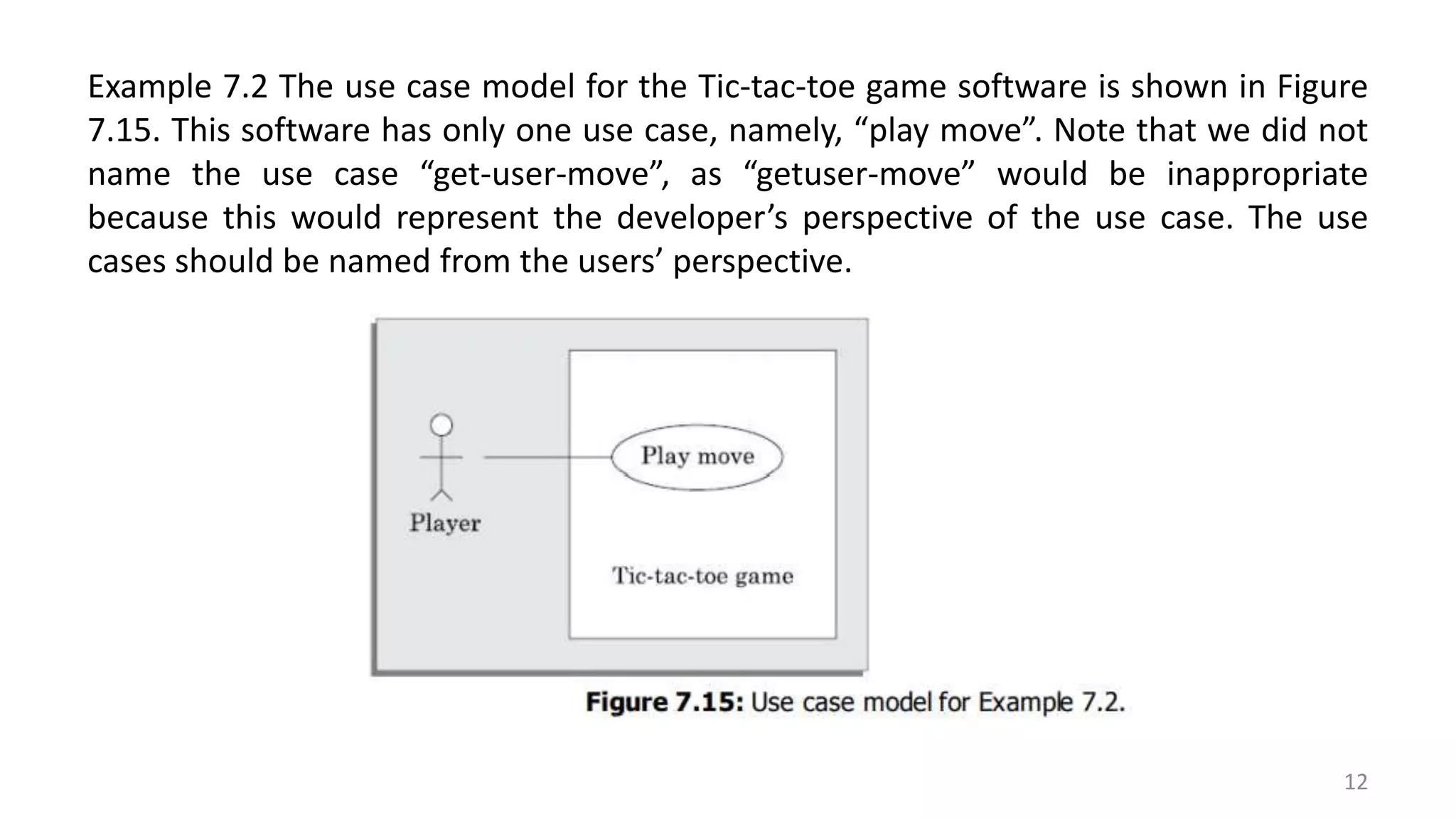
Example 7.2 The use case model for the Tic-tac-toe game software is shown in Figure
7.15. This software has only one use case, namely, “play move”. Note that we did not
name the use case “get-user-move”, as “getuser-move” would be inappropriate
because this would represent the developer’s perspective of the use case. The use
cases should be named from the users’ perspective.
12
Text Description of Use Cases
• The following are some of the information which may be included in a use case text description in addition to the
mainline sequence, and the alternate scenarios.
• Contact persons: This section lists of personnel of the client organisation with whom the use case was discussed,
date and time of the meeting, etc.
• Actors: In addition to identifying the actors, some information about actors using a use case which may help the
implementation of the use case may be recorded.
• Pre-condition: The preconditions would describe the state of the system before the use case execution starts.
Post-condition: This captures the state of the system after the use case has successfully completed.
• Non-functional requirements : This could contain the important constraints for the design and implementation,
such as platform and environment conditions, qualitative statements, response time requirements, etc.
Exceptions, error situations: This contains only the domain-related errors such as lack of user’s access rights,
invalid entry in the input fields, etc. Obviously, errors that are not domain related, such as software errors, need
not be discussed here.
• Sample dialogs: These serve as examples illustrating the use case. Specific user interface requiremen t s : These
contain specific requirements for the user interface of the use case. For example, it may contain forms to be used,
screen shots, interaction style, etc.
• Document references: This part contains references to specific domain related documents which may be useful to
understand the system operation.
13
Example 7.3 The use case diagram of the Super market prize scheme
described in example 6.3 is shown in Figure 7.16.
14
Text Description of Use Cases
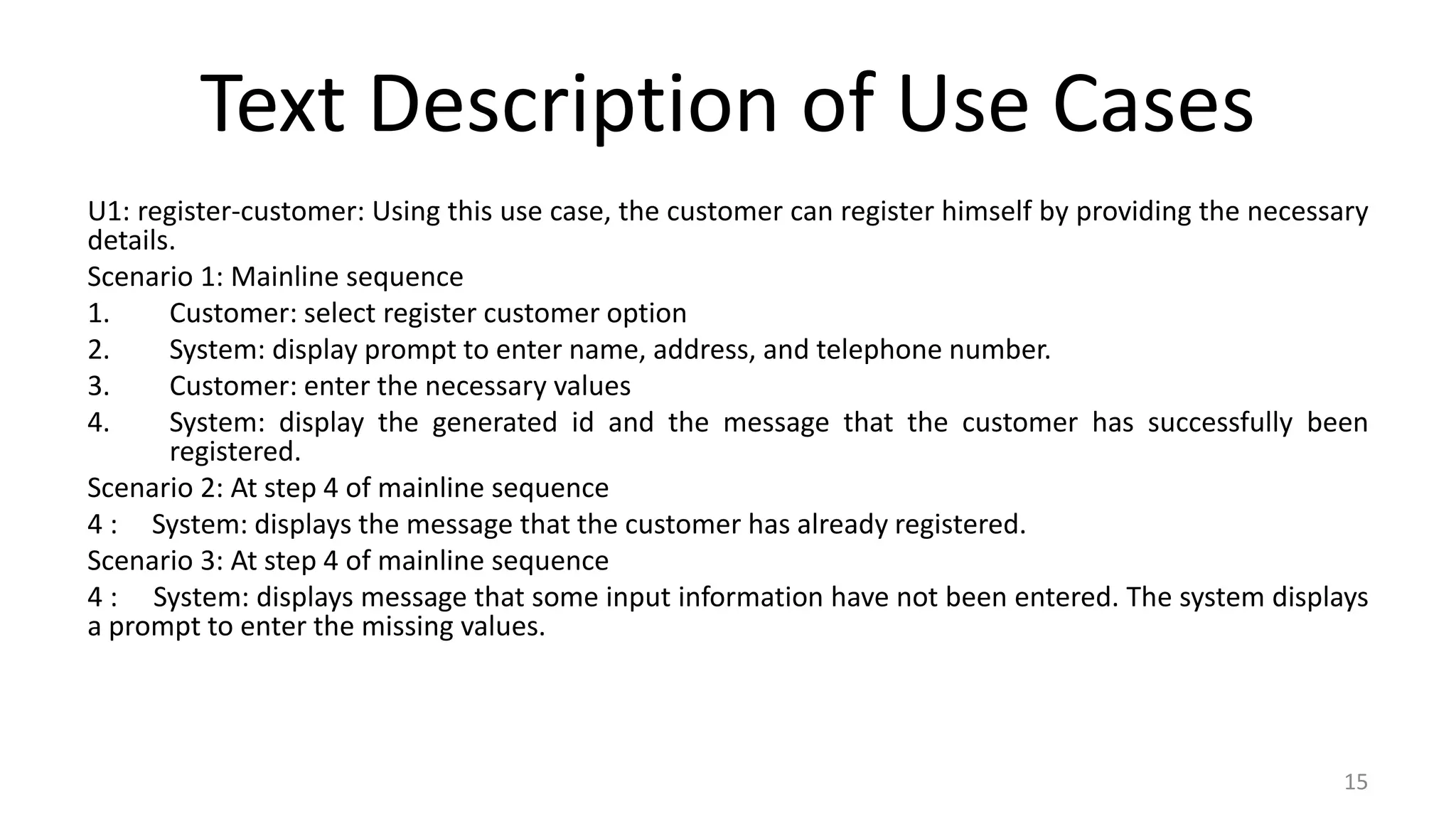
U1: register-customer: Using this use case, the customer can register himself by providing the necessary
details.
Scenario 1: Mainline sequence
1. Customer: select register customer option
2. System: display prompt to enter name, address, and telephone number.
3. Customer: enter the necessary values
4. System: display the generated id and the message that the customer has successfully been
registered.
Scenario 2: At step 4 of mainline sequence
4 : System: displays the message that the customer has already registered.
Scenario 3: At step 4 of mainline sequence
4 : System: displays message that some input information have not been entered. The system displays
a prompt to enter the missing values.
15
Text Description of Use Cases(Contd.)
U2: register-sales: Using this use case, the clerk can register the details of the
purchase made by a customer.
Scenario 1: Mainline sequence
1. Clerk: selects the register sales option.
2. System: displays prompt to enter the purchase details and the id of the customer.
3. Clerk: enters the required details.
4 : System: displays a message of having successfully registered the sale.
U3: select-winners. Using this use case, the manager can generate the winner list.
Scenario 2: Mainline sequence
1. Manager: selects the select-winner option.
2. System: displays the gold coin and the surprise gift winner list.
16
Identification of Use Cases
• Identification of the use cases involves brain storming and reviewing the
SRS document.
• Typically, the high-level requirements specified in the SRS document
correspond to the use cases.
• In the absence of a well formulated SRS document, a popular method of
identifying the use cases is actor-based. This involves first identifying the
different types of actors and their usage of the system. Subsequently, for
each actor the different functions that they might initiate or participate
are identified.
17
Relationships among Use Cases
• UML offers three factoring mechanisms
(relationships) among use cases:
• > Generalization
• > Includes
• > Extends
18
Generalization:
Use case generalization can be used when you have one use case that is similar to another, but does something slightly
differently or something more.
Generalisation works the same way with use cases as it does with classes.
The child use case inherits the behaviour and meaning of the present use case. The notation is the same too (See
Figure 7.17).
It is important to remember that the base and the derived use cases are separate use cases and should have separate
text descriptions
19
20
Includes:
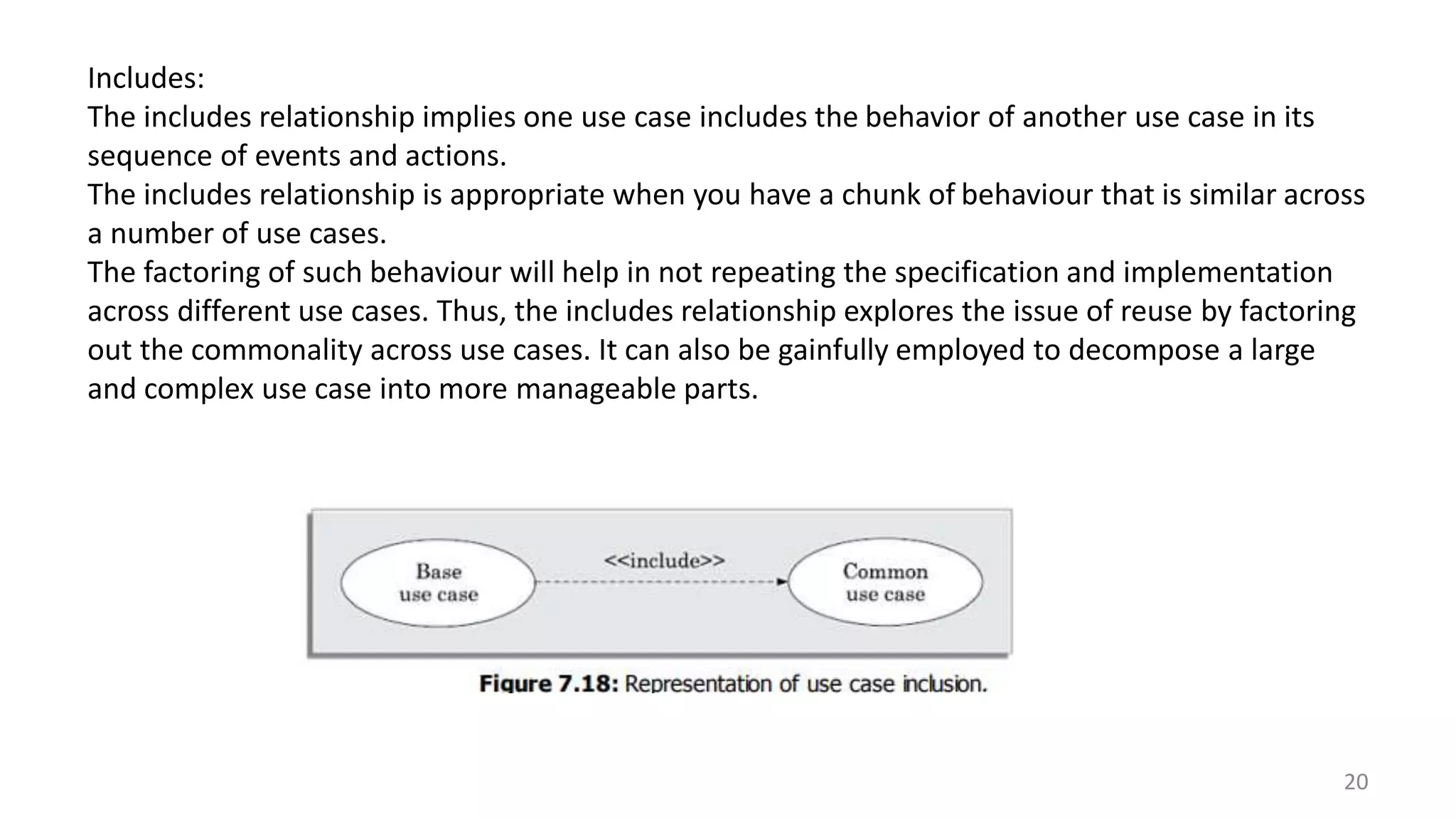
The includes relationship implies one use case includes the behavior of another use case in its
sequence of events and actions.
The includes relationship is appropriate when you have a chunk of behaviour that is similar across
a number of use cases.
The factoring of such behaviour will help in not repeating the specification and implementation
across different use cases. Thus, the includes relationship explores the issue of reuse by factoring
out the commonality across use cases. It can also be gainfully employed to decompose a large
and complex use case into more manageable parts.
21
Includes(Contd.):
As shown in Figure 7.18, the includes relationship is represented using a predefined stereotype <<include>>.
In the includes relationship, a base use case compulsorily and automatically includes the behaviour of the
common use case.
As shown in example Figure 7.19, the use cases issue-book and renew-book both include check-reservation use
case. The base use case may include several use cases. In such cases, it may interleave their associated
common use cases together. The common use case becomes a separate use case and independent text
description should be provided for it.
Extends:
> The extends relationship among use cases allows you show optional system behaviour.
> An optional system behaviour is executed only if certain conditions hold, otherwise the optional behaviour is
not executed. This relationship among use cases is also predefined as a stereotype as shown in Figure 7.20.
> The extends relationship is similar to generalisation. But unlike generalisation, the extending use case can
add additional behavior only at an extension point only when certain conditions are satisfied.
> The extends relationship is normally used to capture alternate paths or scenarios.
22
Class Diagram 1
23
Draw a class diagram using the UML syntax to represent the fact that an order consists of one or more order items. Each
order item contains the name of the item, its quantity and the date by which it is required. Each order item is described by
an item order specification object having details such as its vendor addresses, its unit price, and manufacturer
.
Ans:
Class Diagram 2
•Draw a class diagram using the UML syntax to
represent the following partial description of a library.
An issuable can either be a book or a CD. Books can be
either reference books or text books. The details of
various issuables are maintained in a register called the
issuable register. The library has many members whose
details are maintained in a member register. A member
can issue up to 10 text books for a month. A member
can also issue two CDs for a week.
24
Class Diagram 2(Contd.)
25

SELECT21.pptx

  • 1.
    1 UML Diagrams(Contd.) Mr. PraveenPai T. Assistant Professor(Senior Scale), CSE Dept, MIT, Manipal.
  • 2.
  • 3.
    UML Impact • UMLwas developed to standardize the large number of object oriented notations. • UML was adopted by Object Management Group(OMG) as a de facto method in 1997. • ISO adopted UML a standard(ISO 19805) in 2005 and with this has become an official standard. • The influence of various object modeling techniques on UML is shown in Fig. 7.12 • In the late eighties and early nineties, there was a proliferation of object oriented design techniques and notations. • With many popular techniques, it was not very uncommon to find different project teams in the same organization using different notations. • Using diverse notations created a lot of confusion among team members and made it extremely difficult to reuse design across projects and communicating ideas across project teams. • UML is the consolidation of all these modelling notations given below: • > OMT-Object Modeling Technique(Had the most profound influence on UML) • > OOSE-Object Oriented Software Engineering • > Booch Methodology 3
  • 4.
    Model • A modelis an abstraction of a real problem(or situation) and is constructed by leaving out unnecessary details. This reduces the problem complexity and makes it easy to understand the problem(or situation). • A model is a simplified version of a real system. It captures aspects important for some applications while omitting(or abstracting out) the rest. • As the size of a problem increases, the perceived complexity increases exponentially due to human cognitive limitations. So, to develop a good understanding of any problem, it is necessary to construct a model of the problem. 4
  • 5.
    Why construct aModel? • An important reason behind constructing a model is that it helps to manage the complexity in a problem and facilitates arriving at good solutions and at the same time helps to reduce the design costs. • The initial model of a problem is called an analysis model. The analysis model of a problem can be refined into a design model using a design methodology. • Once models of a system have been constructed, these can be used for a variety of purposes during development include the following: • Analysis, Specification, Design, Coding, Visualization and understanding of an implementation, Testing, etc. 5
  • 6.
  • 7.
    UML Diagrams • Ifa single model is made to capture all the required perspectives, then it would be as complex as the original problem, and would b of little use. • UML diagrams can capture the following views(models) of a system: User’s view, Structural view, Behavioral view, Implementation view, Environmental view. • Fig. 7.14 shows the different views that the UML diagrams can document. • The User’s view is shown as the central view. This is so, as based on the user’s view, all other views are developed and all views need to conform to the user’s view. 7
  • 8.
    Views in UML User’sView: • The users’ view captures the view of the system in terms of the functionalities offered by the system to its users. • The users’ view is a black-box view of the system where the internal structure, the dynamic behaviour of different system components, the implementation etc. are not captured. • The users’ view is very different from all other views in the sense that it is a functional model compared to all other views that are essentially object models. • The users’ view can be considered as the central view and all other views are required to conform to this view. Structural View: • The structural view defines the structure of the problem (or the solution) in terms of the kinds of objects (classes) important to the understanding of the working of a system and to its implementation. It also captures the relationships among the classes (objects). The structural model is also called the static model, since the structure of a system does not change with time. Implementation view: . The important components of the system and their interdependencies are captured by this view. For example, the implementation view might show the GUI part, the middleware, and the database part as the different parts and also would capture their interdependencies. Environmental Vew: . This view models how the different components are implemented on different pieces of hardware. 8
  • 9.
    Use Case Model •The use case model for any system consists of a set of use cases. • Intuitively, the use cases represent the different ways in which a system can be used by the users. • “What all can the different categories of users do by using the system?” is the question asked when listing the use cases. • Eg, for the library information system (LIS), the use cases could be: • issue-book • query-book • return-book • create-member • add-book, etc. • Roughly speaking, the use cases correspond to the high-level functional requirements. • The purpose of a use case is to define a piece of coherent behaviour without revealing the internal structure of the system. • The use cases do not mention any specific algorithm to be used nor the internal data representation, internal structure of the software. • A use case consists of one main line sequence and several alternate sequences. • For the bank ATM example, consider the following variations or alternate sequences: • Password is invalid. • The amount to be withdrawn exceeds the account balance. The mainline sequence and each of the alternate sequences corresponding to the invocation of a use case is called a scenario of the use case. 9
  • 10.
    Use Case Model •A use case can be viewed as a set of related scenarios tied together by a common goal. The main line sequence and each of the variations are called scenarios or instances of the use case. Each scenario is a single path of user events and system activity. • In contrast to all other types of UML diagrams, the use case model represents a functional or process model of a system. 10
  • 11.
    Representation of UseCases • A use case model can be documented by drawing a use case diagram and writing an accompanying text elaborating the drawing. • In the use case diagram, each use case is represented by an ellipse with the name of the use case written inside the ellipse. • All the ellipses (i.e. use cases) of a system are enclosed within a rectangle which represents the system boundary. The name of the system being modeled (e.g., library information system ) appears inside the rectangle. • The different users of the system are represented by using stick person icons. 11
  • 12.
    Example 7.2 Theuse case model for the Tic-tac-toe game software is shown in Figure 7.15. This software has only one use case, namely, “play move”. Note that we did not name the use case “get-user-move”, as “getuser-move” would be inappropriate because this would represent the developer’s perspective of the use case. The use cases should be named from the users’ perspective. 12
  • 13.
    Text Description ofUse Cases • The following are some of the information which may be included in a use case text description in addition to the mainline sequence, and the alternate scenarios. • Contact persons: This section lists of personnel of the client organisation with whom the use case was discussed, date and time of the meeting, etc. • Actors: In addition to identifying the actors, some information about actors using a use case which may help the implementation of the use case may be recorded. • Pre-condition: The preconditions would describe the state of the system before the use case execution starts. Post-condition: This captures the state of the system after the use case has successfully completed. • Non-functional requirements : This could contain the important constraints for the design and implementation, such as platform and environment conditions, qualitative statements, response time requirements, etc. Exceptions, error situations: This contains only the domain-related errors such as lack of user’s access rights, invalid entry in the input fields, etc. Obviously, errors that are not domain related, such as software errors, need not be discussed here. • Sample dialogs: These serve as examples illustrating the use case. Specific user interface requiremen t s : These contain specific requirements for the user interface of the use case. For example, it may contain forms to be used, screen shots, interaction style, etc. • Document references: This part contains references to specific domain related documents which may be useful to understand the system operation. 13
  • 14.
    Example 7.3 Theuse case diagram of the Super market prize scheme described in example 6.3 is shown in Figure 7.16. 14
  • 15.
    Text Description ofUse Cases U1: register-customer: Using this use case, the customer can register himself by providing the necessary details. Scenario 1: Mainline sequence 1. Customer: select register customer option 2. System: display prompt to enter name, address, and telephone number. 3. Customer: enter the necessary values 4. System: display the generated id and the message that the customer has successfully been registered. Scenario 2: At step 4 of mainline sequence 4 : System: displays the message that the customer has already registered. Scenario 3: At step 4 of mainline sequence 4 : System: displays message that some input information have not been entered. The system displays a prompt to enter the missing values. 15
  • 16.
    Text Description ofUse Cases(Contd.) U2: register-sales: Using this use case, the clerk can register the details of the purchase made by a customer. Scenario 1: Mainline sequence 1. Clerk: selects the register sales option. 2. System: displays prompt to enter the purchase details and the id of the customer. 3. Clerk: enters the required details. 4 : System: displays a message of having successfully registered the sale. U3: select-winners. Using this use case, the manager can generate the winner list. Scenario 2: Mainline sequence 1. Manager: selects the select-winner option. 2. System: displays the gold coin and the surprise gift winner list. 16
  • 17.
    Identification of UseCases • Identification of the use cases involves brain storming and reviewing the SRS document. • Typically, the high-level requirements specified in the SRS document correspond to the use cases. • In the absence of a well formulated SRS document, a popular method of identifying the use cases is actor-based. This involves first identifying the different types of actors and their usage of the system. Subsequently, for each actor the different functions that they might initiate or participate are identified. 17
  • 18.
    Relationships among UseCases • UML offers three factoring mechanisms (relationships) among use cases: • > Generalization • > Includes • > Extends 18
  • 19.
    Generalization: Use case generalizationcan be used when you have one use case that is similar to another, but does something slightly differently or something more. Generalisation works the same way with use cases as it does with classes. The child use case inherits the behaviour and meaning of the present use case. The notation is the same too (See Figure 7.17). It is important to remember that the base and the derived use cases are separate use cases and should have separate text descriptions 19
  • 20.
    20 Includes: The includes relationshipimplies one use case includes the behavior of another use case in its sequence of events and actions. The includes relationship is appropriate when you have a chunk of behaviour that is similar across a number of use cases. The factoring of such behaviour will help in not repeating the specification and implementation across different use cases. Thus, the includes relationship explores the issue of reuse by factoring out the commonality across use cases. It can also be gainfully employed to decompose a large and complex use case into more manageable parts.
  • 21.
    21 Includes(Contd.): As shown inFigure 7.18, the includes relationship is represented using a predefined stereotype <<include>>. In the includes relationship, a base use case compulsorily and automatically includes the behaviour of the common use case. As shown in example Figure 7.19, the use cases issue-book and renew-book both include check-reservation use case. The base use case may include several use cases. In such cases, it may interleave their associated common use cases together. The common use case becomes a separate use case and independent text description should be provided for it.
  • 22.
    Extends: > The extendsrelationship among use cases allows you show optional system behaviour. > An optional system behaviour is executed only if certain conditions hold, otherwise the optional behaviour is not executed. This relationship among use cases is also predefined as a stereotype as shown in Figure 7.20. > The extends relationship is similar to generalisation. But unlike generalisation, the extending use case can add additional behavior only at an extension point only when certain conditions are satisfied. > The extends relationship is normally used to capture alternate paths or scenarios. 22
  • 23.
    Class Diagram 1 23 Drawa class diagram using the UML syntax to represent the fact that an order consists of one or more order items. Each order item contains the name of the item, its quantity and the date by which it is required. Each order item is described by an item order specification object having details such as its vendor addresses, its unit price, and manufacturer . Ans:
  • 24.
    Class Diagram 2 •Drawa class diagram using the UML syntax to represent the following partial description of a library. An issuable can either be a book or a CD. Books can be either reference books or text books. The details of various issuables are maintained in a register called the issuable register. The library has many members whose details are maintained in a member register. A member can issue up to 10 text books for a month. A member can also issue two CDs for a week. 24
  • 25.