Prototipare col
Raspberry Pi
Gabriele Guizzardi
guizzardi@gmail.com
Perché?
Il costo?
La potenza?
I linguaggi o i vari sistemi operativi?
LA COMUNITA’ ONLINE!!!
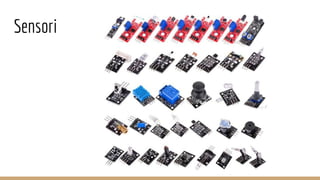
Sensori
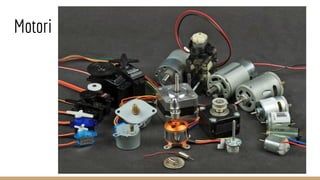
Motori
Principali Sistemi Operativi
Raspbian (da Debian)
Ubuntu Mate
Snappy Ubuntu Core
Arch Linux Arc
Gentoo
Debian ARM
Windows 10 IoT (Pi 2)
Principali linguaggi con libreria per la GPIO
Python (RPi.GPIO)
C (wiringPi)
Processing (processing.io.*)
Java (Pi4J)
da riga di comando o Bash usando i relativi files (/sys/class/gpio/….)
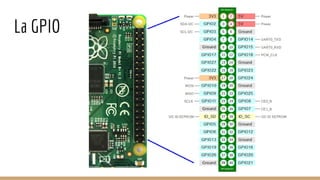
La GPIO
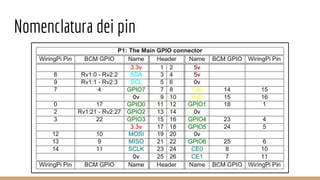
Nomenclatura dei pin
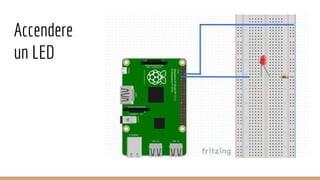
Accendere
un LED
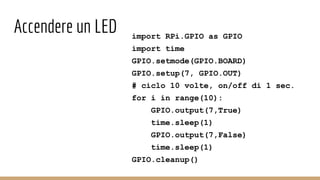
Accendere un LED import RPi.GPIO as GPIO
import time
GPIO.setmode(GPIO.BOARD)
GPIO.setup(7, GPIO.OUT)
# ciclo 10 volte, on/off di 1 sec.
for i in range(10):
GPIO.output(7,True)
time.sleep(1)
GPIO.output(7,False)
time.sleep(1)
GPIO.cleanup()
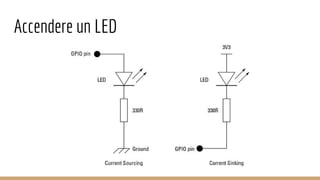
Accendere un LED
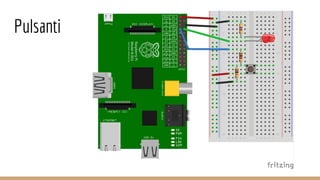
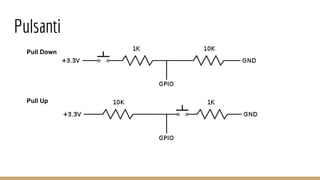
Pulsanti
Pulsanti
Pull Down
Pull Up
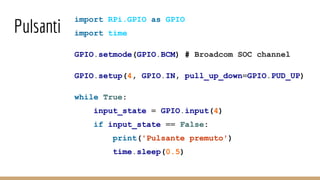
Pulsanti
import RPi.GPIO as GPIO
import time
GPIO.setmode(GPIO.BCM) # Broadcom SOC channel
GPIO.setup(4, GPIO.IN, pull_up_down=GPIO.PUD_UP)
while True:
input_state = GPIO.input(4)
if input_state == False:
print('Pulsante premuto')
time.sleep(0.5)
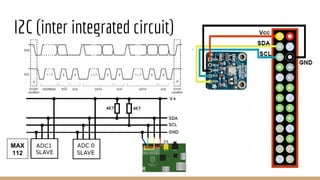
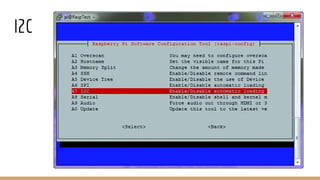
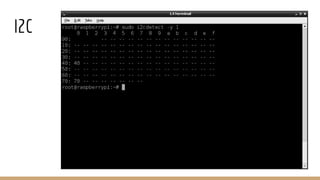
I2C (inter integrated circuit)
MAX
112
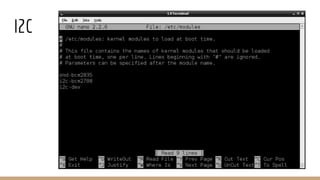
I2C
I2C
I2C
IC2 #!/usr/bin/python
import smbus
bus = smbus.SMBus(1) # 0 oppure 1 se RPi è 256 o 512 Mb di RAM
DEVICE_ADDRESS = 0x70 # indirizzo 7 bit
DEVICE_REG_MODE1 = 0x00
DEVICE_REG_LEDOUT0 = 0x1d
#Scrive un singolo char [long write_byte_data(int addr,char cmd,char val)]
bus.write_byte_data(DEVICE_ADDRESS, DEVICE_REG_MODE1, 0x80)
#Lettura
(msb, lsb, xsb) = bus.read_i2c_block_data(addr, REG_MSB, 3)
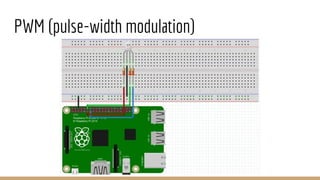
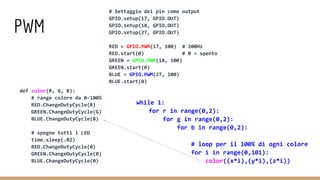
PWM (pulse-width modulation)
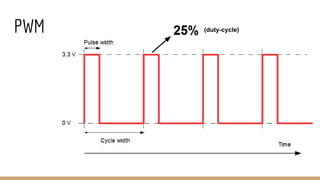
PWM (duty-cycle)
PWM
def color(R, G, B):
# range colore da 0-100%
RED.ChangeDutyCycle(R)
GREEN.ChangeDutyCycle(G)
BLUE.ChangeDutyCycle(B)
# spegne tutti i LED
time.sleep(.02)
RED.ChangeDutyCycle(0)
GREEN.ChangeDutyCycle(0)
BLUE.ChangeDutyCycle(0)
# Settaggio dei pin come output
GPIO.setup(17, GPIO.OUT)
GPIO.setup(18, GPIO.OUT)
GPIO.setup(27, GPIO.OUT)
RED = GPIO.PWM(17, 100) # 100Hz
RED.start(0) # 0 = spento
GREEN = GPIO.PWM(18, 100)
GREEN.start(0)
BLUE = GPIO.PWM(27, 100)
BLUE.start(0)
while 1:
for r in range(0,2):
for g in range(0,2):
for b in range(0,2):
# loop per il 100% di ogni colore
for i in range(0,101):
color((x*i),(y*i),(z*i))
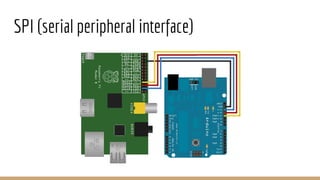
SPI (serial peripheral interface)
SPI
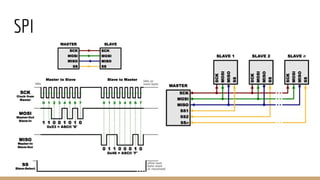
SPI
#!/usr/bin/python
import spidev
import time
spi = spidev.SpiDev()
spi.open(0, 0)
spi.max_speed_hz = 7629
# Divide un intero in un array di 2 byte per spedirlo via SPI
def write_pot(input):
msb = input >> 8
lsb = input & 0xFF
spi.xfer([msb, lsb])
# Loop infinito di apertura/chiusura della porta del MCP4151
while True:
write_pot(0x1FF)
time.sleep(0.5)
write_put(0x00)
time.sleep(0.5)
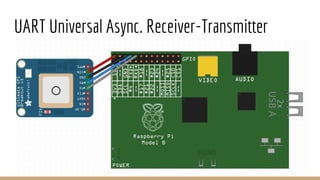
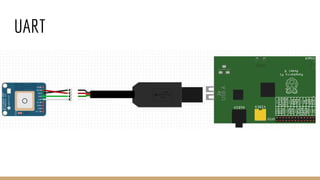
UART Universal Async. Receiver-Transmitter
UART
UART
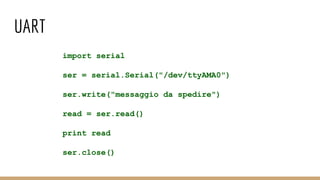
import serial
ser = serial.Serial("/dev/ttyAMA0")
ser.write("messaggio da spedire")
read = ser.read()
print read
ser.close()

Prototipare col raspberry pi

  • 1.
    Prototipare col Raspberry Pi GabrieleGuizzardi guizzardi@gmail.com
  • 2.
    Perché? Il costo? La potenza? Ilinguaggi o i vari sistemi operativi? LA COMUNITA’ ONLINE!!!
  • 3.
  • 4.
  • 5.
    Principali Sistemi Operativi Raspbian(da Debian) Ubuntu Mate Snappy Ubuntu Core Arch Linux Arc Gentoo Debian ARM Windows 10 IoT (Pi 2)
  • 6.
    Principali linguaggi conlibreria per la GPIO Python (RPi.GPIO) C (wiringPi) Processing (processing.io.*) Java (Pi4J) da riga di comando o Bash usando i relativi files (/sys/class/gpio/….)
  • 7.
  • 8.
  • 9.
  • 10.
    Accendere un LEDimport RPi.GPIO as GPIO import time GPIO.setmode(GPIO.BOARD) GPIO.setup(7, GPIO.OUT) # ciclo 10 volte, on/off di 1 sec. for i in range(10): GPIO.output(7,True) time.sleep(1) GPIO.output(7,False) time.sleep(1) GPIO.cleanup()
  • 11.
  • 12.
  • 13.
  • 14.
    Pulsanti import RPi.GPIO asGPIO import time GPIO.setmode(GPIO.BCM) # Broadcom SOC channel GPIO.setup(4, GPIO.IN, pull_up_down=GPIO.PUD_UP) while True: input_state = GPIO.input(4) if input_state == False: print('Pulsante premuto') time.sleep(0.5)
  • 15.
    I2C (inter integratedcircuit) MAX 112
  • 16.
  • 17.
  • 18.
  • 19.
    IC2 #!/usr/bin/python import smbus bus= smbus.SMBus(1) # 0 oppure 1 se RPi è 256 o 512 Mb di RAM DEVICE_ADDRESS = 0x70 # indirizzo 7 bit DEVICE_REG_MODE1 = 0x00 DEVICE_REG_LEDOUT0 = 0x1d #Scrive un singolo char [long write_byte_data(int addr,char cmd,char val)] bus.write_byte_data(DEVICE_ADDRESS, DEVICE_REG_MODE1, 0x80) #Lettura (msb, lsb, xsb) = bus.read_i2c_block_data(addr, REG_MSB, 3)
  • 20.
  • 21.
  • 22.
    PWM def color(R, G,B): # range colore da 0-100% RED.ChangeDutyCycle(R) GREEN.ChangeDutyCycle(G) BLUE.ChangeDutyCycle(B) # spegne tutti i LED time.sleep(.02) RED.ChangeDutyCycle(0) GREEN.ChangeDutyCycle(0) BLUE.ChangeDutyCycle(0) # Settaggio dei pin come output GPIO.setup(17, GPIO.OUT) GPIO.setup(18, GPIO.OUT) GPIO.setup(27, GPIO.OUT) RED = GPIO.PWM(17, 100) # 100Hz RED.start(0) # 0 = spento GREEN = GPIO.PWM(18, 100) GREEN.start(0) BLUE = GPIO.PWM(27, 100) BLUE.start(0) while 1: for r in range(0,2): for g in range(0,2): for b in range(0,2): # loop per il 100% di ogni colore for i in range(0,101): color((x*i),(y*i),(z*i))
  • 23.
  • 24.
  • 25.
    SPI #!/usr/bin/python import spidev import time spi= spidev.SpiDev() spi.open(0, 0) spi.max_speed_hz = 7629 # Divide un intero in un array di 2 byte per spedirlo via SPI def write_pot(input): msb = input >> 8 lsb = input & 0xFF spi.xfer([msb, lsb]) # Loop infinito di apertura/chiusura della porta del MCP4151 while True: write_pot(0x1FF) time.sleep(0.5) write_put(0x00) time.sleep(0.5)
  • 26.
    UART Universal Async.Receiver-Transmitter
  • 27.
  • 28.
    UART import serial ser =serial.Serial("/dev/ttyAMA0") ser.write("messaggio da spedire") read = ser.read() print read ser.close()