• Raspberry Pi, Developing on the
Raspberry Pi
• Difference between Raspberry Pi
and Arduino
@omega.teched
@omega_teched
Prototyping
Embedded Devices
What is
RASPBERRY PI?
OMega TechEd
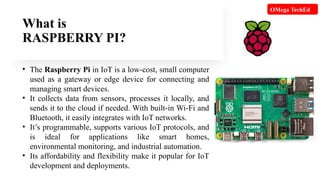
• The Raspberry Pi in IoT is a low-cost, small computer
used as a gateway or edge device for connecting and
managing smart devices.
• It collects data from sensors, processes it locally, and
sends it to the cloud if needed. With built-in Wi-Fi and
Bluetooth, it easily integrates with IoT networks.
• It’s programmable, supports various IoT protocols, and
is ideal for applications like smart homes,
environmental monitoring, and industrial automation.
• Its affordability and flexibility make it popular for IoT
development and deployments.
Developing Raspberry Pi
OMega TechEd
Hardware
Setup
Install
Operating
System
Programming
GPIO &
External
Devices
Remote Access Build & Test
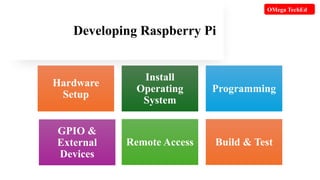
Developing Raspberry Pi involves these steps:
1. Hardware Setup: Connect Raspberry Pi with power, microSD card (with OS
installed), monitor, keyboard, and optional hardware (e.g., sensors, cameras).
2. Install Operating System: Use Raspberry Pi OS or another compatible OS on
the microSD card and boot it up.
3. Programming: Write code in languages like Python (popular for GPIO
control) or C++.
4. GPIO & External Devices: Use GPIO pins to connect and control sensors,
motors, and other devices.
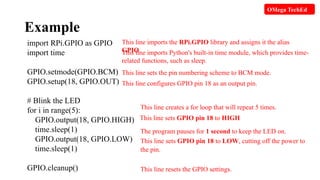
Example: Control an LED connected to the Raspberry Pi:
OMega TechEd
Example
import RPi.GPIO as GPIO
import time
GPIO.setmode(GPIO.BCM)
GPIO.setup(18, GPIO.OUT)
# Blink the LED
for i in range(5):
GPIO.output(18, GPIO.HIGH)
time.sleep(1)
GPIO.output(18, GPIO.LOW)
time.sleep(1)
GPIO.cleanup()
This line imports the RPi.GPIO library and assigns it the alias
GPIO.
This line imports Python's built-in time module, which provides time-
related functions, such as sleep.
This line sets the pin numbering scheme to BCM mode.
This line configures GPIO pin 18 as an output pin.
This line creates a for loop that will repeat 5 times.
This line sets GPIO pin 18 to HIGH
The program pauses for 1 second to keep the LED on.
This line sets GPIO pin 18 to LOW, cutting off the power to
the pin.
This line resets the GPIO settings.
OMega TechEd
Continue…
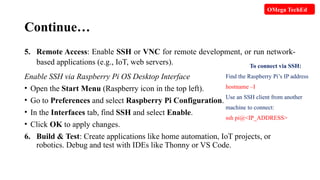
5. Remote Access: Enable SSH or VNC for remote development, or run network-
based applications (e.g., IoT, web servers).
Enable SSH via Raspberry Pi OS Desktop Interface
• Open the Start Menu (Raspberry icon in the top left).
• Go to Preferences and select Raspberry Pi Configuration.
• In the Interfaces tab, find SSH and select Enable.
• Click OK to apply changes.
6. Build & Test: Create applications like home automation, IoT projects, or
robotics. Debug and test with IDEs like Thonny or VS Code.
OMega TechEd
To connect via SSH:
Find the Raspberry Pi’s IP address
hostname –I
Use an SSH client from another
machine to connect:
ssh pi@<IP_ADDRESS>
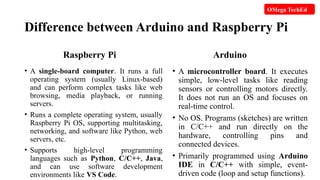
Difference between Arduino and Raspberry Pi
Raspberry Pi
• A single-board computer. It runs a full
operating system (usually Linux-based)
and can perform complex tasks like web
browsing, media playback, or running
servers.
• Runs a complete operating system, usually
Raspberry Pi OS, supporting multitasking,
networking, and software like Python, web
servers, etc.
• Supports high-level programming
languages such as Python, C/C++, Java,
and can use software development
environments like VS Code.
Arduino
• A microcontroller board. It executes
simple, low-level tasks like reading
sensors or controlling motors directly.
It does not run an OS and focuses on
real-time control.
• No OS. Programs (sketches) are written
in C/C++ and run directly on the
hardware, controlling pins and
connected devices.
• Primarily programmed using Arduino
IDE in C/C++ with simple, event-
driven code (loop and setup functions).
OMega TechEd
Difference between Arduino and Raspberry Pi
Raspberry Pi
• Includes a processor (CPU), RAM, HDMI
output, USB ports, and networking (Wi-Fi,
Ethernet), making it more powerful.
• Requires more power, usually via a 5V,
2.5–3A power supply.
• Best for complex projects needing
computing power—like IoT gateways,
media centers, web servers, robotics with
vision, etc.
• Has built-in Wi-Fi, Bluetooth, USB ports,
HDMI, and GPIO pins for interacting with
hardware.
Arduino
• Simple microcontroller (like ATmega328),
limited RAM and storage, and lacks the
ability to run complex software.
• Low power consumption can run on
batteries (e.g., 9V) for long periods.
• Best for simple electronics projects—
such as controlling LEDs, motors, sensors,
and real-time systems where quick pin
control is necessary.
• Focuses on GPIO pins, with additional
components (shields) needed for network
connectivity (Wi-Fi, Ethernet, etc.).
OMega TechEd
Conclusion
 Raspberry Pi is a minicomputer for complex
projects and multitasking.
 Arduino is a microcontroller for real-time
control and simpler electronics tasks.
Choose the Raspberry Pi for software-based
projects and the Arduino for hardware-centric, real-
time applications.
OMega TechEd
Thank You!
@omega.teched
LIKE,SHARE & SUBSCRIBE
@omega_teched

Raspberry-Pi, Developing on Raspberry Pi, Difference between Arduino & Raspberry Pi.

  • 1.
    • Raspberry Pi,Developing on the Raspberry Pi • Difference between Raspberry Pi and Arduino @omega.teched @omega_teched Prototyping Embedded Devices
  • 2.
    What is RASPBERRY PI? OMegaTechEd • The Raspberry Pi in IoT is a low-cost, small computer used as a gateway or edge device for connecting and managing smart devices. • It collects data from sensors, processes it locally, and sends it to the cloud if needed. With built-in Wi-Fi and Bluetooth, it easily integrates with IoT networks. • It’s programmable, supports various IoT protocols, and is ideal for applications like smart homes, environmental monitoring, and industrial automation. • Its affordability and flexibility make it popular for IoT development and deployments.
  • 3.
    Developing Raspberry Pi OMegaTechEd Hardware Setup Install Operating System Programming GPIO & External Devices Remote Access Build & Test
  • 4.
    Developing Raspberry Piinvolves these steps: 1. Hardware Setup: Connect Raspberry Pi with power, microSD card (with OS installed), monitor, keyboard, and optional hardware (e.g., sensors, cameras). 2. Install Operating System: Use Raspberry Pi OS or another compatible OS on the microSD card and boot it up. 3. Programming: Write code in languages like Python (popular for GPIO control) or C++. 4. GPIO & External Devices: Use GPIO pins to connect and control sensors, motors, and other devices. Example: Control an LED connected to the Raspberry Pi: OMega TechEd
  • 5.
    Example import RPi.GPIO asGPIO import time GPIO.setmode(GPIO.BCM) GPIO.setup(18, GPIO.OUT) # Blink the LED for i in range(5): GPIO.output(18, GPIO.HIGH) time.sleep(1) GPIO.output(18, GPIO.LOW) time.sleep(1) GPIO.cleanup() This line imports the RPi.GPIO library and assigns it the alias GPIO. This line imports Python's built-in time module, which provides time- related functions, such as sleep. This line sets the pin numbering scheme to BCM mode. This line configures GPIO pin 18 as an output pin. This line creates a for loop that will repeat 5 times. This line sets GPIO pin 18 to HIGH The program pauses for 1 second to keep the LED on. This line sets GPIO pin 18 to LOW, cutting off the power to the pin. This line resets the GPIO settings. OMega TechEd
  • 6.
    Continue… 5. Remote Access:Enable SSH or VNC for remote development, or run network- based applications (e.g., IoT, web servers). Enable SSH via Raspberry Pi OS Desktop Interface • Open the Start Menu (Raspberry icon in the top left). • Go to Preferences and select Raspberry Pi Configuration. • In the Interfaces tab, find SSH and select Enable. • Click OK to apply changes. 6. Build & Test: Create applications like home automation, IoT projects, or robotics. Debug and test with IDEs like Thonny or VS Code. OMega TechEd To connect via SSH: Find the Raspberry Pi’s IP address hostname –I Use an SSH client from another machine to connect: ssh pi@<IP_ADDRESS>
  • 7.
    Difference between Arduinoand Raspberry Pi Raspberry Pi • A single-board computer. It runs a full operating system (usually Linux-based) and can perform complex tasks like web browsing, media playback, or running servers. • Runs a complete operating system, usually Raspberry Pi OS, supporting multitasking, networking, and software like Python, web servers, etc. • Supports high-level programming languages such as Python, C/C++, Java, and can use software development environments like VS Code. Arduino • A microcontroller board. It executes simple, low-level tasks like reading sensors or controlling motors directly. It does not run an OS and focuses on real-time control. • No OS. Programs (sketches) are written in C/C++ and run directly on the hardware, controlling pins and connected devices. • Primarily programmed using Arduino IDE in C/C++ with simple, event- driven code (loop and setup functions). OMega TechEd
  • 8.
    Difference between Arduinoand Raspberry Pi Raspberry Pi • Includes a processor (CPU), RAM, HDMI output, USB ports, and networking (Wi-Fi, Ethernet), making it more powerful. • Requires more power, usually via a 5V, 2.5–3A power supply. • Best for complex projects needing computing power—like IoT gateways, media centers, web servers, robotics with vision, etc. • Has built-in Wi-Fi, Bluetooth, USB ports, HDMI, and GPIO pins for interacting with hardware. Arduino • Simple microcontroller (like ATmega328), limited RAM and storage, and lacks the ability to run complex software. • Low power consumption can run on batteries (e.g., 9V) for long periods. • Best for simple electronics projects— such as controlling LEDs, motors, sensors, and real-time systems where quick pin control is necessary. • Focuses on GPIO pins, with additional components (shields) needed for network connectivity (Wi-Fi, Ethernet, etc.). OMega TechEd
  • 9.
    Conclusion  Raspberry Piis a minicomputer for complex projects and multitasking.  Arduino is a microcontroller for real-time control and simpler electronics tasks. Choose the Raspberry Pi for software-based projects and the Arduino for hardware-centric, real- time applications. OMega TechEd
  • 10.