

















Getting Started with
Raspberry Pi
Tom Paulus
www.tompaulus.com
@tompaulus
Recommended
 Books
Hardware
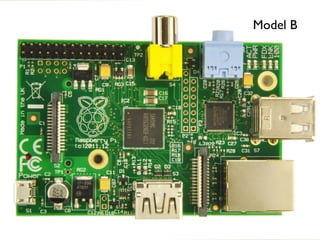
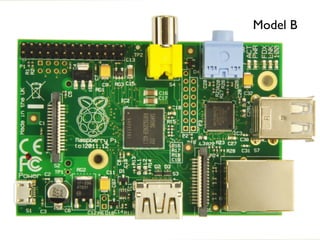
Model B
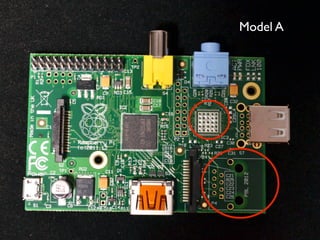
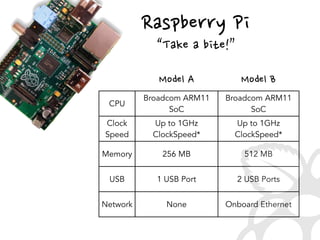
Model A
Model B
Raspberry
 Pi
Text
“Take
 a
 bite!”
CPU
Broadcom ARM11
SoC
Broadcom ARM11
SoC
Clock
Speed
Up to 1GHz
ClockSpeed*
Up to 1GHz
ClockSpeed*
Memory 256 MB 512 MB
USB 1 USB Port 2 USB Ports
Network None Onboard Ethernet
Model
 BModel
 A
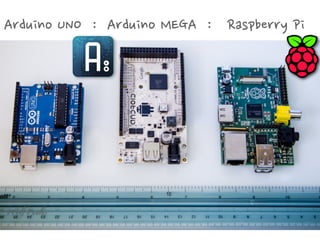
Arduino
 UNO
 
 :
 
 Arduino
 MEGA
 
 :
 
 
 Raspberry
 Pi
 
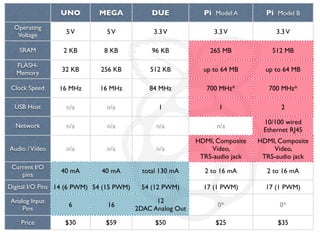
UNO MEGA DUE Pi Model A Pi Model B
Operating
Voltage
SRAM
FLASH-
Memory
Clock Speed
USB Host
Network
Audio /Video
Current I/O
pins
Digital I/O Pins
Analog Input
Pins
Price
5V 5V 3.3V 3.3V 3.3V
2 KB 8 KB 96 KB 265 MB 512 MB
32 KB 256 KB 512 KB up to 64 MB up to 64 MB
16 MHz 16 MHz 84 MHz 700 MHz* 700 MHz*
n/a n/a 1 1 2
n/a n/a n/a n/a
10/100 wired
Ethernet RJ45
n/a n/a n/a
HDMI, Composite
Video,
TRS-audio jack
HDMI, Composite
Video,
TRS-audio jack
40 mA 40 mA total 130 mA 2 to 16 mA 2 to 16 mA
14 (6 PWM) 54 (15 PWM) 54 (12 PWM) 17 (1 PWM) 17 (1 PWM)
6 16
12
2DAC Analog Out
0* 0*
$30 $59 $50 $25 $35
Initial Setup
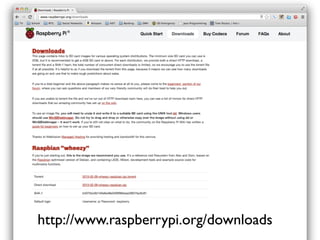
http://www.raspberrypi.org/downloads
Recommended
 SD
 Cards
•Class
 4
 Minimum
•2
 GB
 or
 More
•Major
 Brands
 are
 Better!
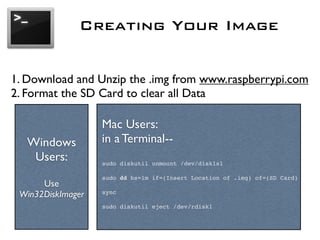
Creating Your Image
1. Download and Unzip the .img from www.raspberrypi.com
2. Format the SD Card to clear all Data
Windows
Users:
Use
Win32DiskImager
Mac Users:
in a Terminal--
sudo diskutil unmount /dev/disk1s1
sudo dd bs=1m if=(Insert Location of .img) of=(SD Card)
sync
sudo diskutil eject /dev/rdisk1
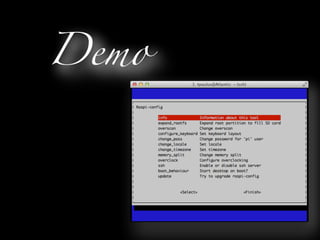
Demo
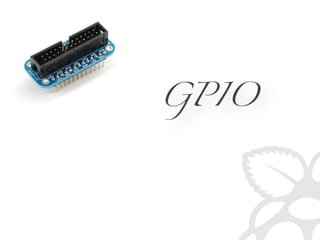
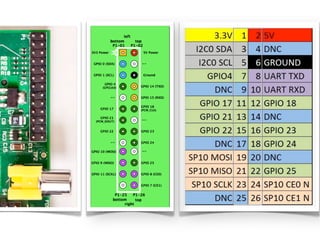
GPIO
sudo apt-get install python-dev python-pip
sudo easy_install -U distribute
sudo pip install RPi.GPIO
Preparing
 Python
Simple
 Blink
 App
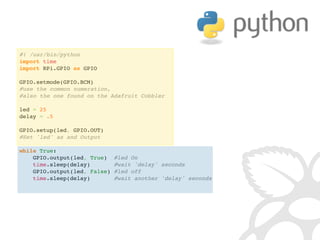
#! /usr/bin/python
import time
import RPi.GPIO as GPIO
 
GPIO.setmode(GPIO.BCM)
#use the common numeration,
#also the one found on the Adafruit Cobbler
 
led = 25
delay = .5
GPIO.setup(led, GPIO.OUT)
#Set 'led' as and Output
 
while True:
    GPIO.output(led, True)  #led On
    time.sleep(delay)       #wait 'delay' seconds
    GPIO.output(led, False) #led off
    time.sleep(delay)      #wait another 'delay' seconds
Demo
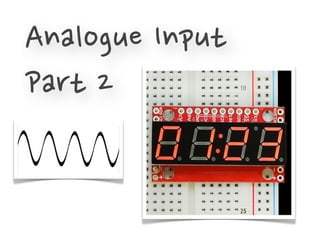
Analogue
 Input
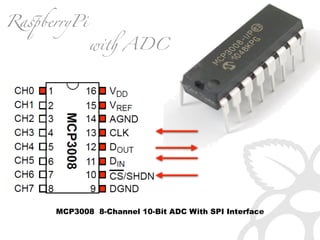
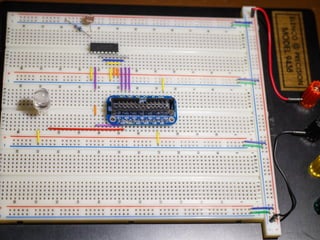
MCP3008 8-Channel 10-Bit ADC With SPI Interface
Ra!berryPi
wi ADC
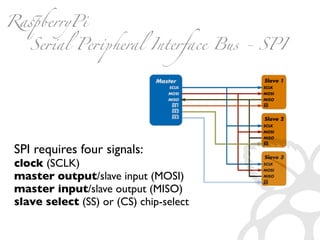
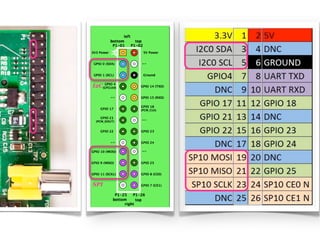
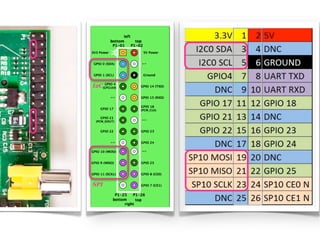
SPI requires four signals:
clock (SCLK)
master output/slave input (MOSI)
master input/slave output (MISO)
slave select (SS) or (CS) chip-select
Ra!berryPi
Se#al Pe#pheral Interface Bus - SPI
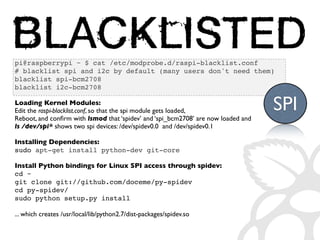
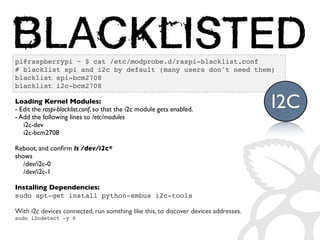
pi@raspberrypi ~ $ cat /etc/modprobe.d/raspi-blacklist.conf
# blacklist spi and i2c by default (many users don't need them)
blacklist spi-bcm2708
blacklist i2c-bcm2708
Loading Kernel Modules:
Edit the raspi-blacklist.conf, so that the spi module gets loaded,
Reboot, and confirm with lsmod that ‘spidev’ and ‘spi_bcm2708’ are now loaded and
ls /dev/spi* shows two spi devices: /dev/spidev0.0 and /dev/spidev0.1
Installing Dependencies:
sudo apt-get install python-dev git-core
Install Python bindings for Linux SPI access through spidev:
cd ~
git clone git://github.com/doceme/py-spidev
cd py-spidev/
sudo python setup.py install
... which creates /usr/local/lib/python2.7/dist-packages/spidev.so
SPI
I2C
SPI
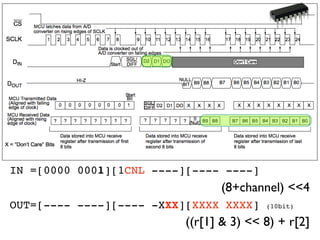
IN =[0000 0001][1CNL ----][---- ----]
(8+channel) 4
OUT=[---- ----][---- -XXX][XXXX XXXX] (10bit)
((r[1]  3)  8) + r[2]
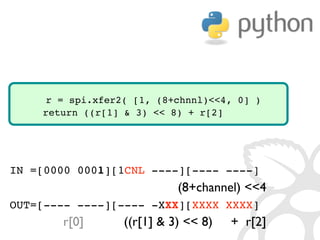
IN =[0000 0001][1CNL ----][---- ----]
(8+channel) 4
OUT=[---- ----][---- -XXX][XXXX XXXX]
r[0] ((r[1]  3)  8) + r[2]
r = spi.xfer2( [1, (8+chnnl)4, 0] )
return ((r[1]  3)  8) + r[2]
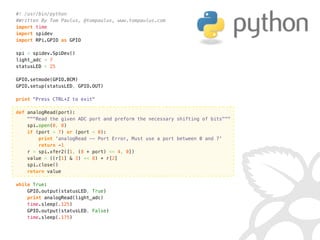
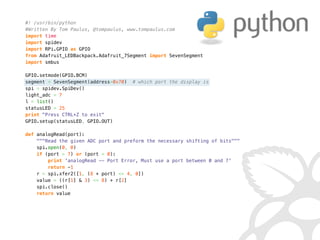
#! /usr/bin/python
#Written By Tom Paulus, @tompaulus, www.tompaulus.com
import time
import spidev
import RPi.GPIO as GPIO
 
spi = spidev.SpiDev()
light_adc = 7
statusLED = 25
 
GPIO.setmode(GPIO.BCM)
GPIO.setup(statusLED, GPIO.OUT)
 
print Press CTRL+Z to exit
 
def analogRead(port):
    Read the given ADC port and preform the necessary shifting of bits
    spi.open(0, 0)
    if (port  7) or (port  0):
        print 'analogRead -- Port Error, Must use a port between 0 and 7'
        return -1
    r = spi.xfer2([1, (8 + port)  4, 0])
    value = ((r[1]  3)  8) + r[2]
    spi.close()
    return value
 
while True:
    GPIO.output(statusLED, True)
    print analogRead(light_adc)
    time.sleep(.125)
    GPIO.output(statusLED, False)
    time.sleep(.175)

Getting Started with Raspberry Pi - DCC 2013.1

  • 1.
    Getting Started with RaspberryPi Tom Paulus www.tompaulus.com @tompaulus
  • 2.
  • 3.
  • 4.
  • 5.
  • 6.
  • 7.
  • 8.
  • 9.
  • 10.
  • 11.
     bite!” CPU Broadcom ARM11 SoC Broadcom ARM11 SoC Clock Speed Upto 1GHz ClockSpeed* Up to 1GHz ClockSpeed* Memory 256 MB 512 MB USB 1 USB Port 2 USB Ports Network None Onboard Ethernet Model
  • 12.
  • 13.
  • 15.
  • 16.
  • 17.
  • 18.
  • 19.
  • 20.
  • 21.
  • 22.
  • 23.
  • 24.
  • 25.
  • 26.
  • 27.
  • 28.
  • 29.
    UNO MEGA DUEPi Model A Pi Model B Operating Voltage SRAM FLASH- Memory Clock Speed USB Host Network Audio /Video Current I/O pins Digital I/O Pins Analog Input Pins Price 5V 5V 3.3V 3.3V 3.3V 2 KB 8 KB 96 KB 265 MB 512 MB 32 KB 256 KB 512 KB up to 64 MB up to 64 MB 16 MHz 16 MHz 84 MHz 700 MHz* 700 MHz* n/a n/a 1 1 2 n/a n/a n/a n/a 10/100 wired Ethernet RJ45 n/a n/a n/a HDMI, Composite Video, TRS-audio jack HDMI, Composite Video, TRS-audio jack 40 mA 40 mA total 130 mA 2 to 16 mA 2 to 16 mA 14 (6 PWM) 54 (15 PWM) 54 (12 PWM) 17 (1 PWM) 17 (1 PWM) 6 16 12 2DAC Analog Out 0* 0* $30 $59 $50 $25 $35
  • 30.
  • 31.
  • 32.
  • 33.
  • 34.
  • 35.
  • 36.
  • 37.
  • 38.
  • 39.
  • 40.
  • 41.
  • 42.
  • 43.
    Creating Your Image 1.Download and Unzip the .img from www.raspberrypi.com 2. Format the SD Card to clear all Data Windows Users: Use Win32DiskImager Mac Users: in a Terminal-- sudo diskutil unmount /dev/disk1s1 sudo dd bs=1m if=(Insert Location of .img) of=(SD Card) sync sudo diskutil eject /dev/rdisk1
  • 45.
  • 46.
  • 48.
    sudo apt-get installpython-dev python-pip sudo easy_install -U distribute sudo pip install RPi.GPIO Preparing
  • 49.
  • 50.
  • 51.
  • 52.
  • 53.
    #! /usr/bin/python import time importRPi.GPIO as GPIO   GPIO.setmode(GPIO.BCM) #use the common numeration, #also the one found on the Adafruit Cobbler   led = 25 delay = .5 GPIO.setup(led, GPIO.OUT) #Set 'led' as and Output   while True:     GPIO.output(led, True)  #led On     time.sleep(delay)       #wait 'delay' seconds     GPIO.output(led, False) #led off     time.sleep(delay)      #wait another 'delay' seconds
  • 55.
  • 56.
  • 57.
  • 58.
    MCP3008 8-Channel 10-BitADC With SPI Interface Ra!berryPi wi ADC
  • 59.
    SPI requires foursignals: clock (SCLK) master output/slave input (MOSI) master input/slave output (MISO) slave select (SS) or (CS) chip-select Ra!berryPi Se#al Pe#pheral Interface Bus - SPI
  • 60.
    pi@raspberrypi ~ $cat /etc/modprobe.d/raspi-blacklist.conf # blacklist spi and i2c by default (many users don't need them) blacklist spi-bcm2708 blacklist i2c-bcm2708 Loading Kernel Modules: Edit the raspi-blacklist.conf, so that the spi module gets loaded, Reboot, and confirm with lsmod that ‘spidev’ and ‘spi_bcm2708’ are now loaded and ls /dev/spi* shows two spi devices: /dev/spidev0.0 and /dev/spidev0.1 Installing Dependencies: sudo apt-get install python-dev git-core Install Python bindings for Linux SPI access through spidev: cd ~ git clone git://github.com/doceme/py-spidev cd py-spidev/ sudo python setup.py install ... which creates /usr/local/lib/python2.7/dist-packages/spidev.so SPI
  • 61.
  • 62.
    IN =[0000 0001][1CNL----][---- ----] (8+channel) 4 OUT=[---- ----][---- -XXX][XXXX XXXX] (10bit) ((r[1] 3) 8) + r[2]
  • 63.
    IN =[0000 0001][1CNL----][---- ----] (8+channel) 4 OUT=[---- ----][---- -XXX][XXXX XXXX] r[0] ((r[1] 3) 8) + r[2] r = spi.xfer2( [1, (8+chnnl)4, 0] ) return ((r[1] 3) 8) + r[2]
  • 64.
    #! /usr/bin/python #Written ByTom Paulus, @tompaulus, www.tompaulus.com import time import spidev import RPi.GPIO as GPIO   spi = spidev.SpiDev() light_adc = 7 statusLED = 25   GPIO.setmode(GPIO.BCM) GPIO.setup(statusLED, GPIO.OUT)   print Press CTRL+Z to exit   def analogRead(port):     Read the given ADC port and preform the necessary shifting of bits     spi.open(0, 0)     if (port 7) or (port 0):         print 'analogRead -- Port Error, Must use a port between 0 and 7'         return -1     r = spi.xfer2([1, (8 + port) 4, 0])     value = ((r[1] 3) 8) + r[2]     spi.close()     return value   while True:     GPIO.output(statusLED, True)     print analogRead(light_adc)     time.sleep(.125)     GPIO.output(statusLED, False)     time.sleep(.175)