Helping Third Sector Organisations  Make Sense of ICT Introduction to net:gain
Agenda What is net:gain? How can we help? … .. … . … . What’s next?
“ For a list of the ways in which technology has failed to improve your quality of life, please press 3.” Phil Green
Icebreaker – pairs exercise Introduce yourself to each other Name, Role Apart from funding, what are your top 3 technology challenges?
What is net:gain? A national, membership-based support programme Delivered as a local service For CEOs, Trustees, Senior Managers Funded under ChangeUp Heavily subsidised Pay as little as 12.5% of the market value
How will net:gain help? net:gain will introduce you to: Other sector leaders/managers And will provide: Easy-to-use planning techniques Inclusive exercises Visual grids and charts  to collect your planning data and questions to resolve Sources of help and support Free publications and discounts
How will net:gain help? net:gain will help you to: Look before you leap Involve staff, volunteers, users Gather, sift and prioritise information Understand your technology requirements better Align these with your mission Contribute to quality assurance eg PQASSO, IiP (Investors in People) and other quality processes net:gain will help you to take control
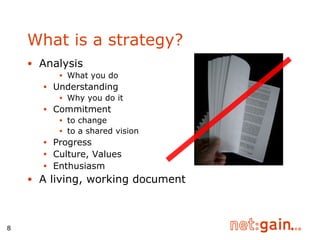
Analysis What you do Understanding Why you do it Commitment to change to a shared vision Progress Culture, Values Enthusiasm A living, working document What is a strategy?
Successful planning requires  Leadership  in your own organisation Time  to  invest in finding new ways to work Focus on improving the way you work Support Some of which  net:gain will provide A route map! net:gain 10 Step Reference Guide
What will I do? Using a Ten-step framework for planning: Review: Mission and goals Explore possibilities Refine decisions, via: initiatives, outcomes & outputs,  benefits & risk, costing & funding
What will this give me? Technical Specifications  covering Full Cost of Ownership eg better funding bids Implementation plan Strategic view on ICT … to incorporate into a written plan if you wish Template provided
How it’s helped... “ Due to better communication flow staff are now  being included in writing and contributing to bids”   Travelling Light Theatre Company “ We have better communications between staff.. and a section in the next Strategic Plan (2008) setting out our needs and plans in relation to ICT.” Devon Voluntary Youth Services “ The best thing is now we know how much to ask for in funding bids.” Anon, net:gain delegate
All aboard? net:gain helps you consider/include all points of view: Staff and volunteers Service users/beneficiaries Customers/suppliers Funders Stakeholders Board
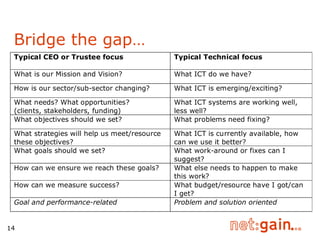
Bridge the gap…
Better staff buy-in…. “ A shared diary was an obvious solution, but formally to get clinical staff to understand this was hard. Going through the net:gain process really helped.”   Dorothy House Hospice “ Staff left our meeting feeling motivated - we agreed goals and new initiatives.” Lloyd Park Centre “ The funding blog is now owned and maintained by the funding advice team.” Voluntary Action North Somerset
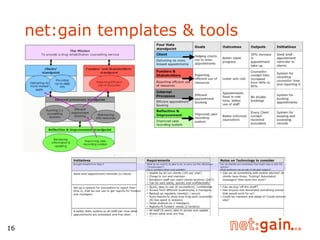
net:gain templates & tools
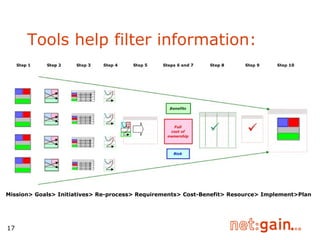
Tools help filter information: Mission> Goals> Initiatives> Re-process> Requirements> Cost-Benefit> Resource> Implement>Plan
Planning made simple.. “ How useful these processes are! Not just around ICT, but  for all planning!” net:gain delegate “ net:gain teaches you a good way of considering a complex situation.”   All Saints Action Network “ To have tools for strategic planners to understand an issue or part of a service from different perspectives is really valuable”   Travelling Light Theatre Company
How do circuit riders fit? Identify need for strategic planning During visits Selling benefits of strategic planning Referring to net:gain Understanding and supporting the net:gain method
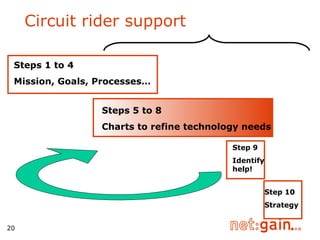
Circuit rider support Steps 5 to 8 Charts to refine technology needs Step 9 Identifyhelp! Steps 1 to 4 Mission, Goals, Processes… Step 10 Strategy
Typically 2/3 support sessions Group/individual ICT planning clinics & technology demonstrations Discounts and offers Guest speakers Case studies, Peer reviews  Sources of specialist support  Funding and planning advice online net:gain membership: features
Charity Technology Trust offer (CTX) 90% discount on CISCO equipment Discounted Microsoft software Free online guidance on selecting order For charities only - eligibility criteria may apply Go to online shop at  www.ctxchange.org Experts Online Free year’s membership Membership: Affinity schemes
Examples Ongoing ‘mentoring’ help A ‘clinic’ session Peer-to-peer support (other net:gain delegates) Links to local ChangeUp initiatives Centre membership benefits Example - discounted/free training Example - discounted ICT access Example - AIG for your staff and volunteers Example - ICT technical support ‘club’ Membership: Centre offers
How does planning for ICT help? Internally efficient processes effective communications and trust  happy, productive staff & volunteers good, available market information Externally increased likelihood of grant success increased likelihood of service contracts happy, well-served clients! This is what  is all about!
Tangible results... “ Our total annual saving could be £2,900… And we have won a funding bid for outreach laptops.”   Hartlepool Carers “ We’re getting more for the same - a cost and service benefit: more patients served effectively for the same cost.”   Dorothy House Hospice “ We’ve had both funding and technical help from the online forums… it’s good training  and good value and more should take of advantage of it.” Failsworth Community Alliance
Reference Guide
The Reference Guide structure Ten Steps Each with an Activity/Template The result of each Step informs the next Use Toolkits to go ‘deeper/wider’ ‘ Step off’ at any time… … armed with completed templates  to inform ‘an ICT expert’
The online Toolkit Templates All tools and diagrams needed  An ICT Plan template With sample text With guidance on where to use diagrams Further suggested activities by theme Sources of Support National, Local Sources of Funding … and how to approach these
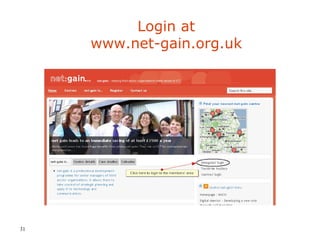
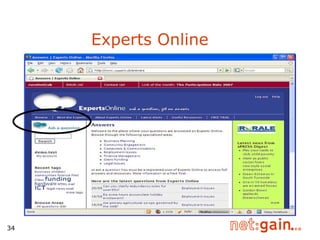
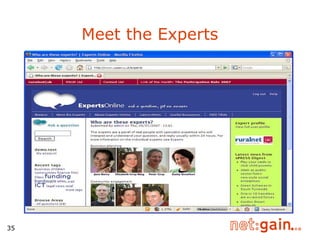
net:gain members’ area  - online materials access to Experts Online www.net-gain.org.uk
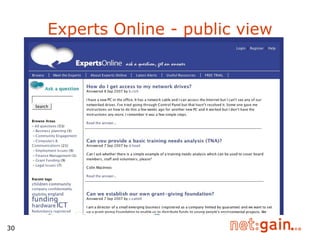
Experts Online - public view
Login at www.net-gain.org.uk
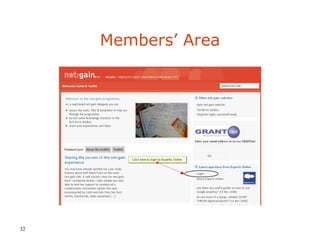
Members’ Area
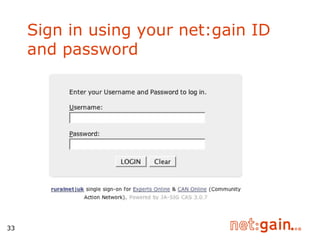
Sign in using your net:gain ID and password
Experts Online
  Meet the Experts
Support from your net:gain centre Centres to add their own slides/info here
Funders Acknowledgements net:gain centres and mentors for their help with pathfinder work Original Sources Strategy Maps - Robert Kaplan and David Norton The Balanced Scorecard - Robert Kaplan and David Norton The Technology Trap - David Wilcox and Terry Grunwald Development consultants

net:gain promotional presentation slides

  • 1.
    Helping Third SectorOrganisations Make Sense of ICT Introduction to net:gain
  • 2.
    Agenda What isnet:gain? How can we help? … .. … . … . What’s next?
  • 3.
    “ For alist of the ways in which technology has failed to improve your quality of life, please press 3.” Phil Green
  • 4.
    Icebreaker – pairsexercise Introduce yourself to each other Name, Role Apart from funding, what are your top 3 technology challenges?
  • 5.
    What is net:gain?A national, membership-based support programme Delivered as a local service For CEOs, Trustees, Senior Managers Funded under ChangeUp Heavily subsidised Pay as little as 12.5% of the market value
  • 6.
    How will net:gainhelp? net:gain will introduce you to: Other sector leaders/managers And will provide: Easy-to-use planning techniques Inclusive exercises Visual grids and charts to collect your planning data and questions to resolve Sources of help and support Free publications and discounts
  • 7.
    How will net:gainhelp? net:gain will help you to: Look before you leap Involve staff, volunteers, users Gather, sift and prioritise information Understand your technology requirements better Align these with your mission Contribute to quality assurance eg PQASSO, IiP (Investors in People) and other quality processes net:gain will help you to take control
  • 8.
    Analysis What youdo Understanding Why you do it Commitment to change to a shared vision Progress Culture, Values Enthusiasm A living, working document What is a strategy?
  • 9.
    Successful planning requires Leadership in your own organisation Time to invest in finding new ways to work Focus on improving the way you work Support Some of which net:gain will provide A route map! net:gain 10 Step Reference Guide
  • 10.
    What will Ido? Using a Ten-step framework for planning: Review: Mission and goals Explore possibilities Refine decisions, via: initiatives, outcomes & outputs, benefits & risk, costing & funding
  • 11.
    What will thisgive me? Technical Specifications covering Full Cost of Ownership eg better funding bids Implementation plan Strategic view on ICT … to incorporate into a written plan if you wish Template provided
  • 12.
    How it’s helped...“ Due to better communication flow staff are now being included in writing and contributing to bids” Travelling Light Theatre Company “ We have better communications between staff.. and a section in the next Strategic Plan (2008) setting out our needs and plans in relation to ICT.” Devon Voluntary Youth Services “ The best thing is now we know how much to ask for in funding bids.” Anon, net:gain delegate
  • 13.
    All aboard? net:gainhelps you consider/include all points of view: Staff and volunteers Service users/beneficiaries Customers/suppliers Funders Stakeholders Board
  • 14.
  • 15.
    Better staff buy-in….“ A shared diary was an obvious solution, but formally to get clinical staff to understand this was hard. Going through the net:gain process really helped.” Dorothy House Hospice “ Staff left our meeting feeling motivated - we agreed goals and new initiatives.” Lloyd Park Centre “ The funding blog is now owned and maintained by the funding advice team.” Voluntary Action North Somerset
  • 16.
  • 17.
    Tools help filterinformation: Mission> Goals> Initiatives> Re-process> Requirements> Cost-Benefit> Resource> Implement>Plan
  • 18.
    Planning made simple..“ How useful these processes are! Not just around ICT, but for all planning!” net:gain delegate “ net:gain teaches you a good way of considering a complex situation.” All Saints Action Network “ To have tools for strategic planners to understand an issue or part of a service from different perspectives is really valuable” Travelling Light Theatre Company
  • 19.
    How do circuitriders fit? Identify need for strategic planning During visits Selling benefits of strategic planning Referring to net:gain Understanding and supporting the net:gain method
  • 20.
    Circuit rider supportSteps 5 to 8 Charts to refine technology needs Step 9 Identifyhelp! Steps 1 to 4 Mission, Goals, Processes… Step 10 Strategy
  • 21.
    Typically 2/3 supportsessions Group/individual ICT planning clinics & technology demonstrations Discounts and offers Guest speakers Case studies, Peer reviews Sources of specialist support Funding and planning advice online net:gain membership: features
  • 22.
    Charity Technology Trustoffer (CTX) 90% discount on CISCO equipment Discounted Microsoft software Free online guidance on selecting order For charities only - eligibility criteria may apply Go to online shop at www.ctxchange.org Experts Online Free year’s membership Membership: Affinity schemes
  • 23.
    Examples Ongoing ‘mentoring’help A ‘clinic’ session Peer-to-peer support (other net:gain delegates) Links to local ChangeUp initiatives Centre membership benefits Example - discounted/free training Example - discounted ICT access Example - AIG for your staff and volunteers Example - ICT technical support ‘club’ Membership: Centre offers
  • 24.
    How does planningfor ICT help? Internally efficient processes effective communications and trust happy, productive staff & volunteers good, available market information Externally increased likelihood of grant success increased likelihood of service contracts happy, well-served clients! This is what is all about!
  • 25.
    Tangible results... “Our total annual saving could be £2,900… And we have won a funding bid for outreach laptops.” Hartlepool Carers “ We’re getting more for the same - a cost and service benefit: more patients served effectively for the same cost.” Dorothy House Hospice “ We’ve had both funding and technical help from the online forums… it’s good training and good value and more should take of advantage of it.” Failsworth Community Alliance
  • 26.
  • 27.
    The Reference Guidestructure Ten Steps Each with an Activity/Template The result of each Step informs the next Use Toolkits to go ‘deeper/wider’ ‘ Step off’ at any time… … armed with completed templates to inform ‘an ICT expert’
  • 28.
    The online ToolkitTemplates All tools and diagrams needed An ICT Plan template With sample text With guidance on where to use diagrams Further suggested activities by theme Sources of Support National, Local Sources of Funding … and how to approach these
  • 29.
    net:gain members’ area - online materials access to Experts Online www.net-gain.org.uk
  • 30.
    Experts Online -public view
  • 31.
  • 32.
  • 33.
    Sign in usingyour net:gain ID and password
  • 34.
  • 35.
    Meetthe Experts
  • 36.
    Support from yournet:gain centre Centres to add their own slides/info here
  • 37.
    Funders Acknowledgements net:gaincentres and mentors for their help with pathfinder work Original Sources Strategy Maps - Robert Kaplan and David Norton The Balanced Scorecard - Robert Kaplan and David Norton The Technology Trap - David Wilcox and Terry Grunwald Development consultants

Editor's Notes

  • #2 Release 01/09/07 From 1st September 2007 a more flexible delivery of the net:gain programme is possible. We still require centres to undertake certain MANDATORY activities/slides, and to produce certain learning outcomes or activity outcomes with delegates. Contact time with delegates may be EITHER in group sessions OR some may be delivered one-to-one and/or on delegate premises. Slides you must use are marked: THIS SLIDE IS MANDATORY . Where the activity is mandatory it is marked: THIS ACTIVITY IS MANDATORY (but you may change or omit the slide). This slide set includes some slides from the PLANNING session (previously workshop 1). Some of these slides are MANDATORY and must be covered either in the PROMOTIONAL session or in the PLANNING session. You need to review and delete slides you may not need in this PROMOTIONAL session.