Share your
workflows
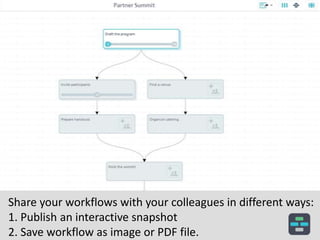
Share your workflows with your colleagues in different ways:
1. Publish an interactive snapshot
2. Save workflow as image or PDF file.
Access sharing functions by clicking on the Share icon
on top right of project canvas.
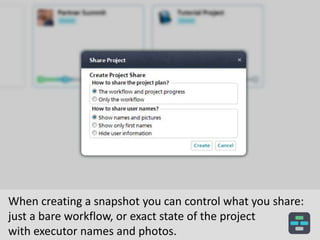
When creating a snapshot you can control what you share:
just a bare workflow, or exact state of the project
with executor names and photos.
After you create a snapshot you will receive a link to use in
your communications and an HTML code to embed
your snapshot into any web page.
By following a link your colleagues will be able to see your
project in its state on a moment when you created
a snapshot.
Your colleagues will see only the information which you
selected to be shared. In this example a snapshot was
created as a workflow only without user information.
By embedding your snapshot into web-pages you
can share your workflows with the whole world.
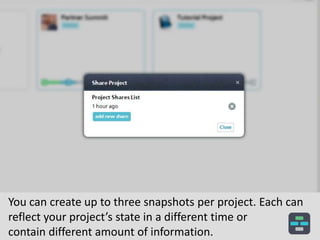
You can create up to three snapshots per project. Each can
reflect your project’s state in a different time or
contain different amount of information.
Have questions?
Send us an email:
founders@casual.pm

Sharing projects

  • 1.
  • 2.
    Share your workflowswith your colleagues in different ways: 1. Publish an interactive snapshot 2. Save workflow as image or PDF file.
  • 3.
    Access sharing functionsby clicking on the Share icon on top right of project canvas.
  • 4.
    When creating asnapshot you can control what you share: just a bare workflow, or exact state of the project with executor names and photos.
  • 5.
    After you createa snapshot you will receive a link to use in your communications and an HTML code to embed your snapshot into any web page.
  • 6.
    By following alink your colleagues will be able to see your project in its state on a moment when you created a snapshot.
  • 7.
    Your colleagues willsee only the information which you selected to be shared. In this example a snapshot was created as a workflow only without user information.
  • 8.
    By embedding yoursnapshot into web-pages you can share your workflows with the whole world.
  • 9.
    You can createup to three snapshots per project. Each can reflect your project’s state in a different time or contain different amount of information.
  • 10.
    Have questions? Send usan email: founders@casual.pm