1
Project Report
Online Computer Shop
Submitted by:
Md.Farhad Hossain
ID: 111-35-181
Dept. of Software Engineering
Daffodil International University
Supervised by:
Mr. Kaushik Sarker
Lecturer
Dept. of Software Engineering
Daffodil International University
2
Table of Contents
1. Abstract……………………………………….…………………………………03
2. Keywords..............................................................................................................03
3. Problems of Current System...............................................................................04
4. Proposed System...................................................................................................05
5. Requirement Collection and Analysis...........................................................06
6.1. Collected Requirements........................................................................07
6. Planning ……………………………….................................................................08
6.1 Features of the project...............................................................................08
6.2 Advantages of the project...........................................................................09
6.3Goals of the project………….................................................................09
6.4Use case diagram………………………………………………………..10
6.5Entity Relationship Diagram……………………………………………..11
6.6Database……………………………………………………………………12
7. Implementation…………………...............................................................................13-14
7.1User Interface.............................................................................................13
7.2Admin Interface................................................................14-17
7.3 Database…………………...........................................................................18
7.4 Database table…………..............................................19-22
7.5Database table………………...................................................................23-24
7.6. Access database and connect database.....................................................25
7.7. Essential Coding Insert Update Delete view ……………………………………………………25-29
8. Exception..................................................................................................................31
8.1Exception table....................................................................................15
8.2Error handling .....................................................................34
9. Test.........................................................................................................................34
9.1 Overview........................ .........................................................................34
9.2 Scope .........................................................................................................34
9.3 Test Appendix .............................................................................................34-38
9.31. Test Result…………………………………………………………..38-40
9.3.2 Code…………………………………………………………………..
10. Maintenance Policy................................................................................................40
11. Conclusion..............................................................................................................41
12. References.................... ..........................................................................................42
3
1. Abstract
This document serves as the proposal for the online computer shop Project .This project
offers you the online computer shop managements system . It’s a online computer shop.
There are different kinds of product in this shop.
Such as…………..
(i) Desktop computer
(ii) Laptop
(iii) Speakers
(iv) Accessories
(v) Different types of networking Product(Wireless, an)etc.
(vi) Computer Networking
(vii) Hardware
(viii) Software
Customers buy here with warranty with a faithfully security. Customer can choose product
on online. We have a powerfully Website, where we updates new product with details.
Admin can register our website. We have also own service centre and we provides good
service for all customer.
2. Keywords
Easy, secure solution, online accessibility, professional terms, standards, abbreviations,
feasibility, assumptions, requirements, test plan, source code.
4
3. Problems of Current System
There are many online computer shop managements system but the systems need internet
connection to use remotely of any location . Many of the system can be down several times
for heavy load. But there is no such a system which is only related to the user ’s need. The
interfaces of these systems are complicated to the users. Even the coding of those products is
much harder.
5
4. Proposed System
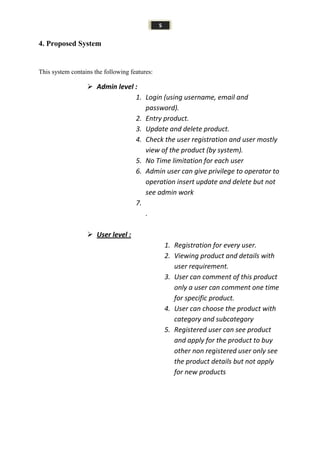
This system contains the following features:
 Admin level :
1. Login (using username, email and
password).
2. Entry product.
3. Update and delete product.
4. Check the user registration and user mostly
view of the product (by system).
5. No Time limitation for each user
6. Admin user can give privilege to operator to
operation insert update and delete but not
see admin work
7.
.
 User level :
1. Registration for every user.
2. Viewing product and details with
user requirement.
3. User can comment of this product
only a user can comment one time
for specific product.
4. User can choose the product with
category and subcategory
5. Registered user can see product
and apply for the product to buy
other non registered user only see
the product details but not apply
for new products
6
5 Requirement Collections and Analysis
5. 1Collected Requirements
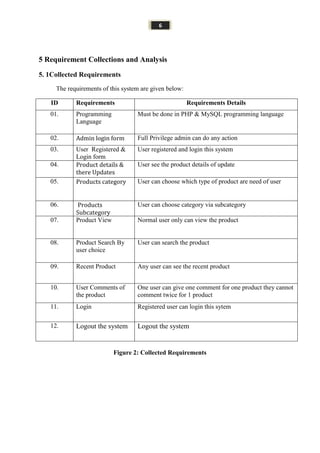
The requirements of this system are given below:
ID Requirements Requirements Details
01. Programming
Language
Must be done in PHP & MySQL programming language
02. Admin login form Full Privilege admin can do any action
03. User Registered &
Login form
User registered and login this system
04. Product details &
there Updates
User see the product details of update
05. Products category User can choose which type of product are need of user
06. Products
Subcategory
User can choose category via subcategory
07. Product View Normal user only can view the product
08. Product Search By
user choice
User can search the product
09. Recent Product Any user can see the recent product
10. User Comments of
the product
One user can give one comment for one product they cannot
comment twice for 1 product
11. Login Registered user can login this sytem
12. Logout the system Logout the system
Figure 2: Collected Requirements
7
5.2 Planning the project:
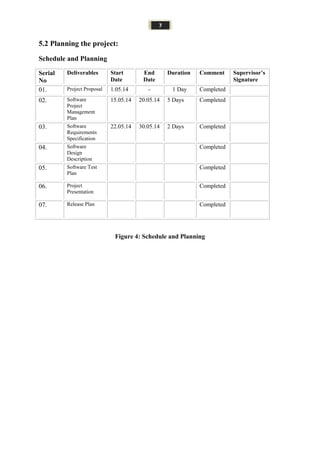
Schedule and Planning
Figure 4: Schedule and Planning
Serial
No
Deliverables Start
Date
End
Date
Duration Comment Supervisor’s
Signature
01. Project Proposal 1.05.14 - 1 Day Completed
02. Software
Project
Management
Plan
15.05.14 20.05.14 5 Days Completed
03. Software
Requirements
Specification
22.05.14 30.05.14 2 Days Completed
04. Software
Design
Description
Completed
05. Software Test
Plan
Completed
06. Project
Presentation
Completed
07. Release Plan Completed
8
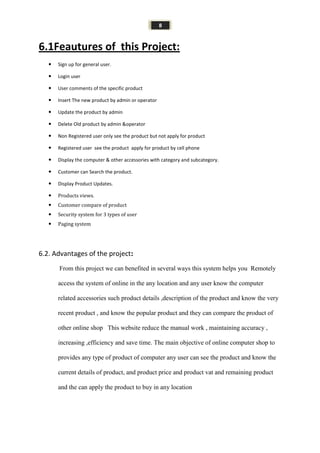
6.1Feautures of this Project:
 Sign up for general user.
 Login user
 User comments of the specific product
 Insert The new product by admin or operator
 Update the product by admin
 Delete Old product by admin &operator
 Non Registered user only see the product but not apply for product
 Registered user see the product apply for product by cell phone
 Display the computer & other accessories with category and subcategory.
 Customer can Search the product.
 Display Product Updates.
 Products views.
 Customer compare of product
 Security system for 3 types of user
 Paging system
6.2. Advantages of the project:
From this project we can benefited in several ways this system helps you Remotely
access the system of online in the any location and any user know the computer
related accessories such product details ,description of the product and know the very
recent product , and know the popular product and they can compare the product of
other online shop This website reduce the manual work , maintaining accuracy ,
increasing ,efficiency and save time. The main objective of online computer shop to
provides any type of product of computer any user can see the product and know the
current details of product, and product price and product vat and remaining product
and the can apply the product to buy in any location
9
6.3Goals of the project:
The main goal of this project is produce new and good product for customer by online
shop. People can buy new product with good facilities from our shop. They can know the
details view of our product from our online website. There are many kinds of brands in
our collection. We have also service center and give good service for every customer.
Every registered customer can purchase product by online customer care or cell phone.
10
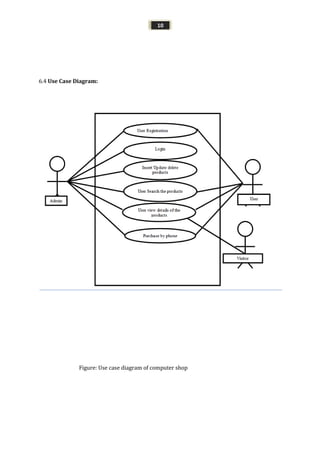
6.4 Use Case Diagram:
Figure: Use case diagram of computer shop
11
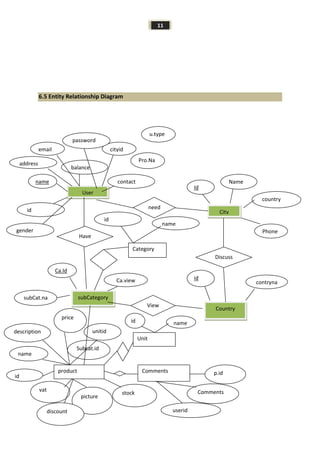
6.5 Entity Relationship Diagram
User
subCategory
City
Country
balance
name contact
Id
Name
country
Phone
contryna
me
id
id
Ca.Id
Ca.view
subCat.na
me
Have
Discuss
need
View
Category
Unit
product Comments
cityidemail
password
Pro.Na
meme
u.type
gender
address
id
name
unitid
Subcat.id
name
vat
picture
description
price
discount
stock
id
p.id
userid
Comments
nameid
12
6.6 Database:
Database is most important part of my system to dynamically organizing data in database usually
interrelated data and set of program to access the data .The collection of data usually referred the
database contains information relevant of enterprise .The primary goals of database managements
system way to store and retrieve database that’s is the convenient and efficient .In this project I am
using PHP & MySql database in my system. MySql is an essential part of almost every open source
PHP application. MySql is a freely available open source relational database management system
(RDBMS) that uses structured query language (SQL). SQL is the most popular language for adding,
accessing and managing content in a database. It is most popular for its quick processing, reliability
and flexibility of use. I can use oracle but oracle is heavy weighted database for my system, that's why
I use MySql database in my system.
13
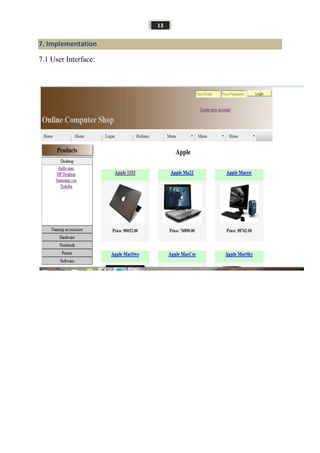
7. Implementation
7.1 User Interface:
14
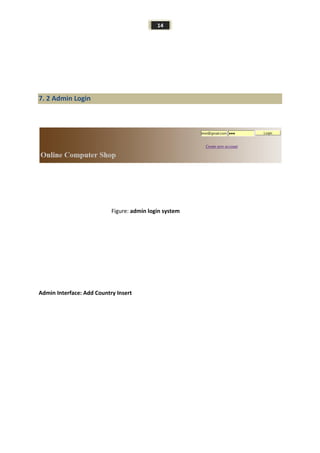
7. 2 Admin Login
Figure: admin login system
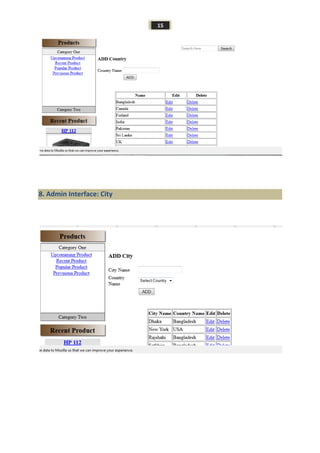
Admin Interface: Add Country Insert
15
8. Admin Interface: City
16
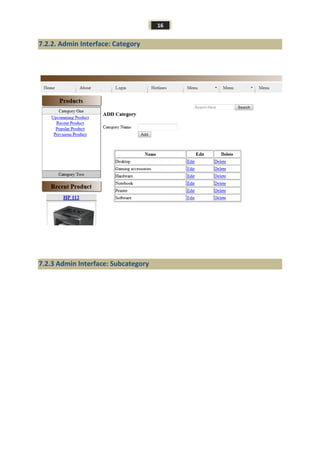
7.2.2. Admin Interface: Category
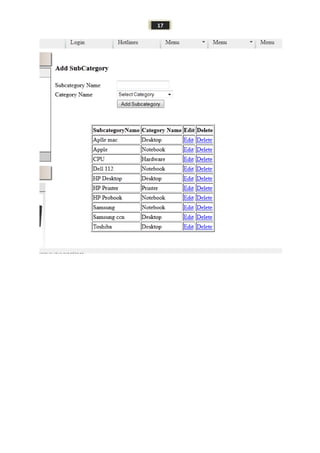
7.2.3 Admin Interface: Subcategory
17
18
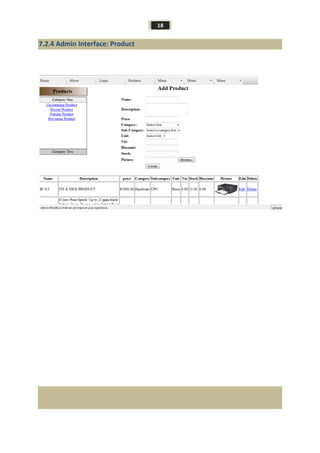
7.2.4 Admin Interface: Product
19
7.3Database
Database is the essential part of the existing my system .I am using PHP & Mysql existing database in
my web system .Why the big reason of using the database in my system I describe in the uppers site
of section of database. Every user and product information will save into database store information
when the user need .General user only see the product details and admin can insert and update, delete
products
Why I created database and its officially description in the next state of database??After creating the
database I am using Normalization techniques to store data dynamically for save space. Now
discusses normalization is techniques efficiently organizing data in database there are two goal this
process eliminating redundant data and ensuring data dependencies make sense storing related data
in database .Both of worthy goals as they reduce amount of space a database consumer ensure That
data are logically stored
20
7.4Catagories of the table
Table Name: Users
Field Type Extra
Id(PK) Int(12) Auto_increment
Fullname Varchar(40)
Email(Unique) Varchar(60)
Password Varchar(60)
Usertype Varchar(1)
Balance Float(10, 6)
Address Varchar(40)
City*****
Country*****
Cityid(FK)
References
City[Id]
Int(12)
Gender Varchar(1)
Contact Varchar(14)
Status Varchar(40)
Table Name: City
Field Type Extra
Id(PK) Int(12) Auto_increment
Name Varchar(60)
Country*******
CountryId(FK)
References
Country[Id]
Int(12)
Table Name: Country
Field Type Extra
Id(PK) Int(12) Auto_increment
Name Varchar(60)
21
Table Name: Product
Field Type Extra
Id(PK) Int(12) Auto_increment
Name Varchar(12)
Description Varchar(60)
Price Float(10, 6)
Sub-category******
Category******
SubcategoryId(Fk)
References
Subcategory[Id]
Unit*****
Unitid(FK)
References
Unit[Id]
Int(12)
Vat Float(4,4)
Picture Varchar(40)
Discount float(6,6)
Stock Float(6,6)
Table Name: Sub-category
Field Type Extra
Id(PK) Int(12) Auto_increment
Name Varchar(60)
Category********
CategoryId(Fk)
References
Category[Id]
Int(12)
Table Name: Category
Field Type Extra
Id(PK) Int(12) Auto_increment
Name Varchar(60)
22
Table Name: Unit
Filed Type Extra
Id(PK) Int(12) Auto_increment
Name(Unique) Varchar(40)
Table Name: Purchase
Field Type Extra
Id(PK) Int(12) Auto_increment
Userid(FK)
References
User[Id]
Int(12)
Delivery Varchar(40)
Date DateTime
Table Name: PurchaseReport
Filed Type Extra
Productid(FK)(PK)
References
Product[Id]
Int(12)
Purchaseid(FK)(PK)
References
Purchase[Id]
Int(12)
Quantity Float(8, 6)
RENAME TABLE old_table TO tmp_table
23
Table Name: Card
Field Type Extra
Serial(PK) Varchar(40)
Pin(PK) Varchar(40)
Amount Float(6, 2)
Status Varchar(1)
Table Name: Comment
Filed Type Extra
Productid(FK)(PK)
References
Product[Id]
Int(12)
Userid(FK)(PK)
References
User[Id]
Int(12)
Comment Varchar(40)
Date Datetime
Table Name: Rating
Field Type Extra
Productid(FK)(PK)
References
Product[Id]
Int(12)
Userid(FK)(PK)
References
User[Id]
Int(12)
Rate Int(2)
24
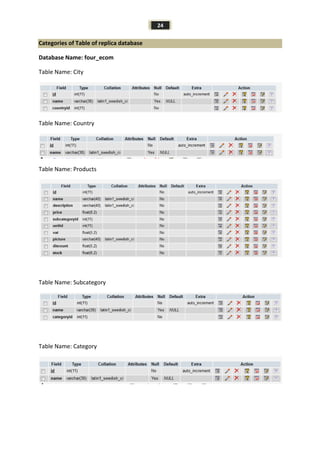
Categories of Table of replica database
Database Name: four_ecom
Table Name: City
Table Name: Country
Table Name: Products
Table Name: Subcategory
Table Name: Category
25
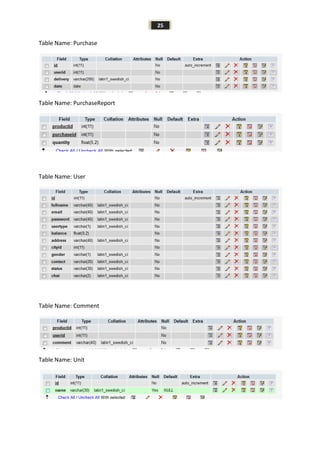
Table Name: Purchase
Table Name: PurchaseReport
Table Name: User
Table Name: Comment
Table Name: Unit
26
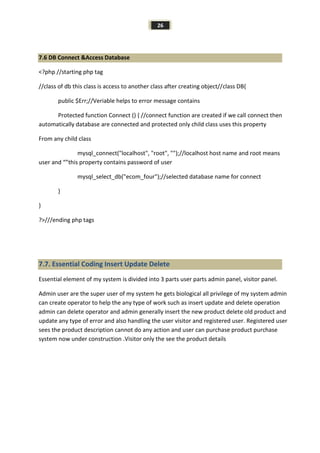
7.6 DB Connect &Access Database
<?php //starting php tag
//class of db this class is access to another class after creating object//class DB{
public $Err;//Veriable helps to error message contains
Protected function Connect () { //connect function are created if we call connect then
automatically database are connected and protected only child class uses this property
From any child class
mysql_connect("localhost", "root", "");//localhost host name and root means
user and “”this property contains password of user
mysql_select_db("ecom_four");//selected database name for connect
}
}
?>///ending php tags
7.7. Essential Coding Insert Update Delete
Essential element of my system is divided into 3 parts user parts admin panel, visitor panel.
Admin user are the super user of my system he gets biological all privilege of my system admin
can create operator to help the any type of work such as insert update and delete operation
admin can delete operator and admin generally insert the new product delete old product and
update any type of error and also handling the user visitor and registered user. Registered user
sees the product description cannot do any action and user can purchase product purchase
system now under construction .Visitor only the see the product details
27
7.7. 1. Inserting Data
I need to insert product data, city , country category, subcategory, user, and purchase data, and
Comments data of specific products this insertion coding is given bellow :
public function Insert() {
$this->Connect();
$sql = "insert into city (name, countryid)
values
('".MS($this-
>Name)."',
'".MS($this-
>CountryId)."')";
if(mysql_query($sql)) {
return true;
}
$this->Err = mysql_error();
return false;
}
28
7.7. 2. Updating Data
public function Update() {
$this->Connect();
$sql = "update city
set
name = '".MS($this->Name)."',
countryid = '".MS($this-
>CountryId)."'
where
id = '".MS($this->Id)."'";
if(mysql_query($sql)) {
return true;
}
$this->Err = mysql_error();
return false;
}
29
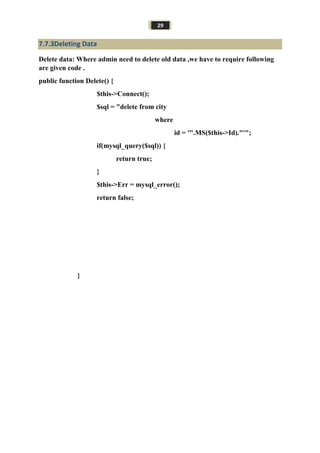
7.7.3Deleting Data
Delete data: Where admin need to delete old data ,we have to require following
are given code .
public function Delete() {
$this->Connect();
$sql = "delete from city
where
id = '".MS($this->Id)."'";
if(mysql_query($sql)) {
return true;
}
$this->Err = mysql_error();
return false;
}
30
8. 7.4 View Data
View data: Admin need to view data .following given are code of view
public function Select()
{
$this->Connect();
$a = "";
$sql = "select city.id, city.name, country.name
from city, country
where city.countryid = country.id";
if($this->Name != "") {
$sql .= " AND city.name LIKE '%".MS($this-
>Name)."%'";
}
if($this->CountryId > 0) {
$sql .= " AND city.countryid = '".MS($this-
>CountryId)."'";
}
$sql .= " ORDER BY city.name ASC";
//echo $sql;
$sql = mysql_query($sql);
while($d = mysql_fetch_row($sql)) {
$a[] = $d;
}
return $a;
}
31
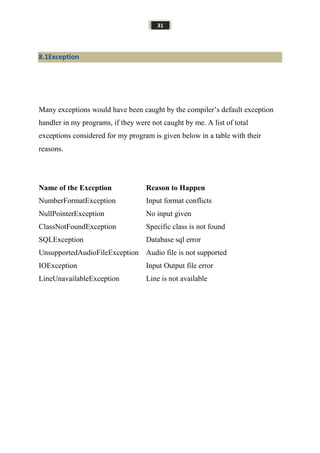
8.1Exception
Many exceptions would have been caught by the compiler’s default exception
handler in my programs, if they were not caught by me. A list of total
exceptions considered for my program is given below in a table with their
reasons.
Name of the Exception Reason to Happen
NumberFormatException Input format conflicts
NullPointerException No input given
ClassNotFoundException Specific class is not found
SQLException Database sql error
UnsupportedAudioFileException Audio file is not supported
IOException Input Output file error
LineUnavailableException Line is not available
32
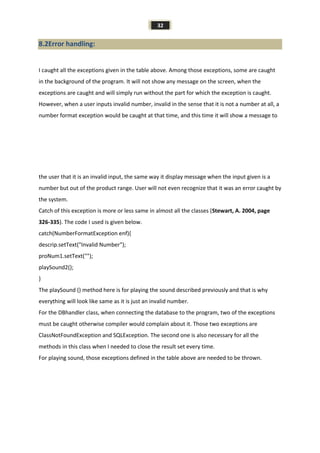
8.2Error handling:
I caught all the exceptions given in the table above. Among those exceptions, some are caught
in the background of the program. It will not show any message on the screen, when the
exceptions are caught and will simply run without the part for which the exception is caught.
However, when a user inputs invalid number, invalid in the sense that it is not a number at all, a
number format exception would be caught at that time, and this time it will show a message to
the user that it is an invalid input, the same way it display message when the input given is a
number but out of the product range. User will not even recognize that it was an error caught by
the system.
Catch of this exception is more or less same in almost all the classes (Stewart, A. 2004, page
326-335). The code I used is given below.
catch(NumberFormatException enf){
descrip.setText("Invalid Number");
proNum1.setText("");
playSound2();
}
The playSound () method here is for playing the sound described previously and that is why
everything will look like same as it is just an invalid number.
For the DBhandler class, when connecting the database to the program, two of the exceptions
must be caught otherwise compiler would complain about it. Those two exceptions are
ClassNotFoundException and SQLException. The second one is also necessary for all the
methods in this class when I needed to close the result set every time.
For playing sound, those exceptions defined in the table above are needed to be thrown.
33
9.Testing
9.1 Overview
Testing is the process of evaluating a system or its component(s) with the intent to find that
whether it satisfies the specified requirements or not. This activity results in the actual,
expected and difference between their results. In simple words testing is executing a system
in order to identify any gaps, errors or missing requirements in contrary to the actual desire or
requirements.
9.2 Scope
Testing depends on the source code but reviewing requirements and developing test cases is
independent from the developed code. Finding bugs in the Software is the task of testers.
Developers are only responsible for the specific component or area that is assigned to them
but testers understand the overall workings of the software, what the dependencies are and
what the impacts of one module on another module are. This section of the document
describes the overall testing activities with test case.
9.3 Appendix:
White box testing of user login system:
Serial
No:
Inputs: Click Button: Expected result: Pass/fail
01. Null, Null Login Message display Error Pass
02. Null, 123456789 Login Message display Error Pass
03. 123456789, Null Login Message display Error Pass
04. 123456789, admin Login Message display Error Pass
05. admin,Null Login Message display Error Pass
06. Null, admin Login Message display Error Pass
07. 123456789, 123456789 Login Message display Error Pass
08. @$%#*&!~(){}[], admin Login Message display Error Pass
34
09. @$%#*&!~(){}[],
@$%#*&!~(){}[]
Login Message display Error Pass
10. admin, @$%#*&!~(){}[] Login Message display Error Pass
11. @$%#*&!~(){}[], 123456789 Login Message display Error Pass
12. 123456789, @$%#*&!~(){}[] Login Message display Error Pass
13. admin, @$%#*&!~(){}[] Login Message display Error Pass
14. admin, 123456789 Login Message display Success Pass
15. admin, admin123456789 Login Message display Success Pass
16. admin, 123456789admin Login Message display Success Pass
17. ADMIN, 123456789 Login Message display Success Pass
18. ADMIN, admin123456789 Login Message display Success Pass
19. ADMIN, 123456789admin Login Message display Success Pass
20. ADMIN, ADMIN Login Message display Success Pass
21. admin, ADMIN 123456789 Login Message display Success Pass
22. admin, 123456789ADMIN Login Message display Success Pass
23. ADmin, AdminN Login Message display Success Pass
Table 4: Black box testing of "login system"
White box testing of category insert system:
Serial
No:
Inputs: Click Button: Expected result: Pass/fail
01. Null, Category name add Message display Error Pass
02. Null, Null, Null, captcha add Message display Error Pass
03. Null, Null, category name
cd,
add Message display Error at
least 3 character
Pass
35
White box testing of Subcategory insert system:
Serial
No:
Inputs: Click Button: Expected result: Pass/fail
01. Null, SubCategory name add Message display Error Pass
02. Null Category name, add Message display Error Pass
03. subcategory two character add Message display Error at
least 3 character
Pass
White box testing of country insert system:
Serial
No:
Inputs: Click Button: Expected result: Pass/fail
01. Null, Country name add Message display Error Pass
02. Null country add Message display Error Pass
03. Country name 2 character add Message display Error at
least 3 character
Pass
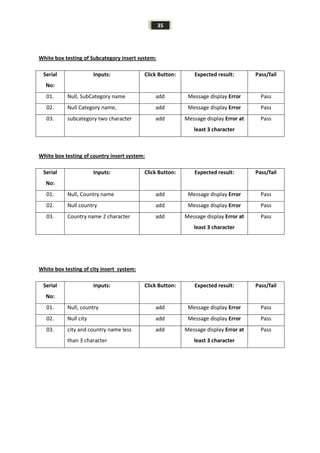
White box testing of city insert system:
Serial
No:
Inputs: Click Button: Expected result: Pass/fail
01. Null, country add Message display Error Pass
02. Null city add Message display Error Pass
03. city and country name less
than 3 character
add Message display Error at
least 3 character
Pass
36
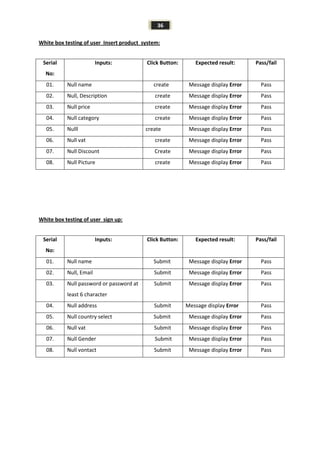
White box testing of user Insert product system:
Serial
No:
Inputs: Click Button: Expected result: Pass/fail
01. Null name create Message display Error Pass
02. Null, Description create Message display Error Pass
03. Null price create Message display Error Pass
04. Null category create Message display Error Pass
05. Nulll create Message display Error Pass
06. Null vat create Message display Error Pass
07. Null Discount Create Message display Error Pass
08. Null Picture create Message display Error Pass
White box testing of user sign up:
Serial
No:
Inputs: Click Button: Expected result: Pass/fail
01. Null name Submit Message display Error Pass
02. Null, Email Submit Message display Error Pass
03. Null password or password at
least 6 character
Submit Message display Error Pass
04. Null address Submit Message display Error Pass
05. Null country select Submit Message display Error Pass
06. Null vat Submit Message display Error Pass
07. Null Gender Submit Message display Error Pass
08. Null vontact Submit Message display Error Pass
37
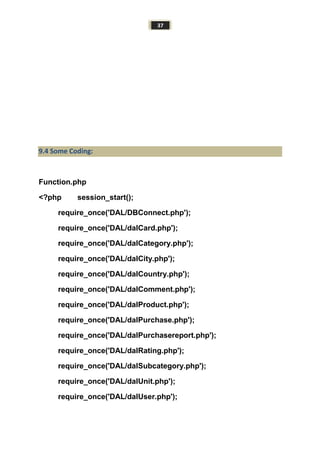
9.4 Some Coding:
Function.php
<?php session_start();
require_once('DAL/DBConnect.php');
require_once('DAL/dalCard.php');
require_once('DAL/dalCategory.php');
require_once('DAL/dalCity.php');
require_once('DAL/dalCountry.php');
require_once('DAL/dalComment.php');
require_once('DAL/dalProduct.php');
require_once('DAL/dalPurchase.php');
require_once('DAL/dalPurchasereport.php');
require_once('DAL/dalRating.php');
require_once('DAL/dalSubcategory.php');
require_once('DAL/dalUnit.php');
require_once('DAL/dalUser.php');
38
//require_once('DAL/dalReport.php');
require_once('controller/functions.php');
if(isset($_SESSION['id'])) {
$usr = new User();
$usr->Id = $_SESSION['id'];
$usr->SelectById();
//echo $usr->UserType;
}
?>
Finpages.php:
<?php
if(isset($_GET['p'])){
require_once("view/".$_GET['p'].".php");
}else if(isset($_GET['a']) && (isset($_SESSION['id']) && ($usr-
>UserType == "a")) ){
require_once("admin/".$_GET['a'].".php");
}else if(isset($_GET['u']) && (isset($_SESSION['id'])) ){
require_once("user/".$_GET['u'].".php");
}else if(isset($_GET['o']) && (isset($_SESSION['id'])) && (($usr-
>UserType == "a") || ($usr->UserType == "o"))){
require_once("operator/".$_GET['o'].".php");
}else{
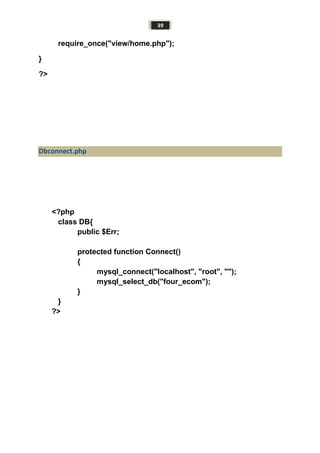
39
require_once("view/home.php");
}
?>
Dbconnect.php
<?php
class DB{
public $Err;
protected function Connect()
{
mysql_connect("localhost", "root", "");
mysql_select_db("four_ecom");
}
}
?>
40
10. Maintenance Policy
We will provide three months free maintenance as well as user guidelines. After three month
it should be cost 1500$ per month. And we are ready for lifetime maintenance at the same
rate.
41
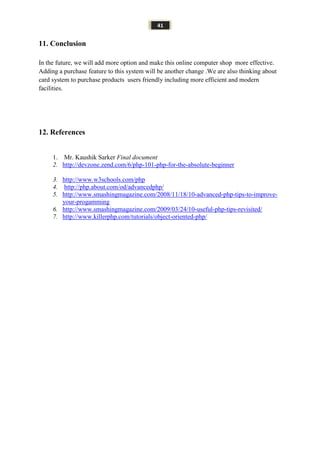
11. Conclusion
In the future, we will add more option and make this online computer shop more effective.
Adding a purchase feature to this system will be another change .We are also thinking about
card system to purchase products users friendly including more efficient and modern
facilities.
12. References
1. Mr. Kaushik Sarker Final document
2. http://devzone.zend.com/6/php-101-php-for-the-absolute-beginner
3. http://www.w3schools.com/php
4. http://php.about.com/od/advancedphp/
5. http://www.smashingmagazine.com/2008/11/18/10-advanced-php-tips-to-improve-
your-progamming
6. http://www.smashingmagazine.com/2009/03/24/10-useful-php-tips-revisited/
7. http://www.killerphp.com/tutorials/object-oriented-php/
42

Online computer shop 111 35-181

  • 1.
    1 Project Report Online ComputerShop Submitted by: Md.Farhad Hossain ID: 111-35-181 Dept. of Software Engineering Daffodil International University Supervised by: Mr. Kaushik Sarker Lecturer Dept. of Software Engineering Daffodil International University
  • 2.
    2 Table of Contents 1.Abstract……………………………………….…………………………………03 2. Keywords..............................................................................................................03 3. Problems of Current System...............................................................................04 4. Proposed System...................................................................................................05 5. Requirement Collection and Analysis...........................................................06 6.1. Collected Requirements........................................................................07 6. Planning ……………………………….................................................................08 6.1 Features of the project...............................................................................08 6.2 Advantages of the project...........................................................................09 6.3Goals of the project………….................................................................09 6.4Use case diagram………………………………………………………..10 6.5Entity Relationship Diagram……………………………………………..11 6.6Database……………………………………………………………………12 7. Implementation…………………...............................................................................13-14 7.1User Interface.............................................................................................13 7.2Admin Interface................................................................14-17 7.3 Database…………………...........................................................................18 7.4 Database table…………..............................................19-22 7.5Database table………………...................................................................23-24 7.6. Access database and connect database.....................................................25 7.7. Essential Coding Insert Update Delete view ……………………………………………………25-29 8. Exception..................................................................................................................31 8.1Exception table....................................................................................15 8.2Error handling .....................................................................34 9. Test.........................................................................................................................34 9.1 Overview........................ .........................................................................34 9.2 Scope .........................................................................................................34 9.3 Test Appendix .............................................................................................34-38 9.31. Test Result…………………………………………………………..38-40 9.3.2 Code………………………………………………………………….. 10. Maintenance Policy................................................................................................40 11. Conclusion..............................................................................................................41 12. References.................... ..........................................................................................42
  • 3.
    3 1. Abstract This documentserves as the proposal for the online computer shop Project .This project offers you the online computer shop managements system . It’s a online computer shop. There are different kinds of product in this shop. Such as………….. (i) Desktop computer (ii) Laptop (iii) Speakers (iv) Accessories (v) Different types of networking Product(Wireless, an)etc. (vi) Computer Networking (vii) Hardware (viii) Software Customers buy here with warranty with a faithfully security. Customer can choose product on online. We have a powerfully Website, where we updates new product with details. Admin can register our website. We have also own service centre and we provides good service for all customer. 2. Keywords Easy, secure solution, online accessibility, professional terms, standards, abbreviations, feasibility, assumptions, requirements, test plan, source code.
  • 4.
    4 3. Problems ofCurrent System There are many online computer shop managements system but the systems need internet connection to use remotely of any location . Many of the system can be down several times for heavy load. But there is no such a system which is only related to the user ’s need. The interfaces of these systems are complicated to the users. Even the coding of those products is much harder.
  • 5.
    5 4. Proposed System Thissystem contains the following features:  Admin level : 1. Login (using username, email and password). 2. Entry product. 3. Update and delete product. 4. Check the user registration and user mostly view of the product (by system). 5. No Time limitation for each user 6. Admin user can give privilege to operator to operation insert update and delete but not see admin work 7. .  User level : 1. Registration for every user. 2. Viewing product and details with user requirement. 3. User can comment of this product only a user can comment one time for specific product. 4. User can choose the product with category and subcategory 5. Registered user can see product and apply for the product to buy other non registered user only see the product details but not apply for new products
  • 6.
    6 5 Requirement Collectionsand Analysis 5. 1Collected Requirements The requirements of this system are given below: ID Requirements Requirements Details 01. Programming Language Must be done in PHP & MySQL programming language 02. Admin login form Full Privilege admin can do any action 03. User Registered & Login form User registered and login this system 04. Product details & there Updates User see the product details of update 05. Products category User can choose which type of product are need of user 06. Products Subcategory User can choose category via subcategory 07. Product View Normal user only can view the product 08. Product Search By user choice User can search the product 09. Recent Product Any user can see the recent product 10. User Comments of the product One user can give one comment for one product they cannot comment twice for 1 product 11. Login Registered user can login this sytem 12. Logout the system Logout the system Figure 2: Collected Requirements
  • 7.
    7 5.2 Planning theproject: Schedule and Planning Figure 4: Schedule and Planning Serial No Deliverables Start Date End Date Duration Comment Supervisor’s Signature 01. Project Proposal 1.05.14 - 1 Day Completed 02. Software Project Management Plan 15.05.14 20.05.14 5 Days Completed 03. Software Requirements Specification 22.05.14 30.05.14 2 Days Completed 04. Software Design Description Completed 05. Software Test Plan Completed 06. Project Presentation Completed 07. Release Plan Completed
  • 8.
    8 6.1Feautures of thisProject:  Sign up for general user.  Login user  User comments of the specific product  Insert The new product by admin or operator  Update the product by admin  Delete Old product by admin &operator  Non Registered user only see the product but not apply for product  Registered user see the product apply for product by cell phone  Display the computer & other accessories with category and subcategory.  Customer can Search the product.  Display Product Updates.  Products views.  Customer compare of product  Security system for 3 types of user  Paging system 6.2. Advantages of the project: From this project we can benefited in several ways this system helps you Remotely access the system of online in the any location and any user know the computer related accessories such product details ,description of the product and know the very recent product , and know the popular product and they can compare the product of other online shop This website reduce the manual work , maintaining accuracy , increasing ,efficiency and save time. The main objective of online computer shop to provides any type of product of computer any user can see the product and know the current details of product, and product price and product vat and remaining product and the can apply the product to buy in any location
  • 9.
    9 6.3Goals of theproject: The main goal of this project is produce new and good product for customer by online shop. People can buy new product with good facilities from our shop. They can know the details view of our product from our online website. There are many kinds of brands in our collection. We have also service center and give good service for every customer. Every registered customer can purchase product by online customer care or cell phone.
  • 10.
    10 6.4 Use CaseDiagram: Figure: Use case diagram of computer shop
  • 11.
    11 6.5 Entity RelationshipDiagram User subCategory City Country balance name contact Id Name country Phone contryna me id id Ca.Id Ca.view subCat.na me Have Discuss need View Category Unit product Comments cityidemail password Pro.Na meme u.type gender address id name unitid Subcat.id name vat picture description price discount stock id p.id userid Comments nameid
  • 12.
    12 6.6 Database: Database ismost important part of my system to dynamically organizing data in database usually interrelated data and set of program to access the data .The collection of data usually referred the database contains information relevant of enterprise .The primary goals of database managements system way to store and retrieve database that’s is the convenient and efficient .In this project I am using PHP & MySql database in my system. MySql is an essential part of almost every open source PHP application. MySql is a freely available open source relational database management system (RDBMS) that uses structured query language (SQL). SQL is the most popular language for adding, accessing and managing content in a database. It is most popular for its quick processing, reliability and flexibility of use. I can use oracle but oracle is heavy weighted database for my system, that's why I use MySql database in my system.
  • 13.
  • 14.
    14 7. 2 AdminLogin Figure: admin login system Admin Interface: Add Country Insert
  • 15.
  • 16.
    16 7.2.2. Admin Interface:Category 7.2.3 Admin Interface: Subcategory
  • 17.
  • 18.
  • 19.
    19 7.3Database Database is theessential part of the existing my system .I am using PHP & Mysql existing database in my web system .Why the big reason of using the database in my system I describe in the uppers site of section of database. Every user and product information will save into database store information when the user need .General user only see the product details and admin can insert and update, delete products Why I created database and its officially description in the next state of database??After creating the database I am using Normalization techniques to store data dynamically for save space. Now discusses normalization is techniques efficiently organizing data in database there are two goal this process eliminating redundant data and ensuring data dependencies make sense storing related data in database .Both of worthy goals as they reduce amount of space a database consumer ensure That data are logically stored
  • 20.
    20 7.4Catagories of thetable Table Name: Users Field Type Extra Id(PK) Int(12) Auto_increment Fullname Varchar(40) Email(Unique) Varchar(60) Password Varchar(60) Usertype Varchar(1) Balance Float(10, 6) Address Varchar(40) City***** Country***** Cityid(FK) References City[Id] Int(12) Gender Varchar(1) Contact Varchar(14) Status Varchar(40) Table Name: City Field Type Extra Id(PK) Int(12) Auto_increment Name Varchar(60) Country******* CountryId(FK) References Country[Id] Int(12) Table Name: Country Field Type Extra Id(PK) Int(12) Auto_increment Name Varchar(60)
  • 21.
    21 Table Name: Product FieldType Extra Id(PK) Int(12) Auto_increment Name Varchar(12) Description Varchar(60) Price Float(10, 6) Sub-category****** Category****** SubcategoryId(Fk) References Subcategory[Id] Unit***** Unitid(FK) References Unit[Id] Int(12) Vat Float(4,4) Picture Varchar(40) Discount float(6,6) Stock Float(6,6) Table Name: Sub-category Field Type Extra Id(PK) Int(12) Auto_increment Name Varchar(60) Category******** CategoryId(Fk) References Category[Id] Int(12) Table Name: Category Field Type Extra Id(PK) Int(12) Auto_increment Name Varchar(60)
  • 22.
    22 Table Name: Unit FiledType Extra Id(PK) Int(12) Auto_increment Name(Unique) Varchar(40) Table Name: Purchase Field Type Extra Id(PK) Int(12) Auto_increment Userid(FK) References User[Id] Int(12) Delivery Varchar(40) Date DateTime Table Name: PurchaseReport Filed Type Extra Productid(FK)(PK) References Product[Id] Int(12) Purchaseid(FK)(PK) References Purchase[Id] Int(12) Quantity Float(8, 6) RENAME TABLE old_table TO tmp_table
  • 23.
    23 Table Name: Card FieldType Extra Serial(PK) Varchar(40) Pin(PK) Varchar(40) Amount Float(6, 2) Status Varchar(1) Table Name: Comment Filed Type Extra Productid(FK)(PK) References Product[Id] Int(12) Userid(FK)(PK) References User[Id] Int(12) Comment Varchar(40) Date Datetime Table Name: Rating Field Type Extra Productid(FK)(PK) References Product[Id] Int(12) Userid(FK)(PK) References User[Id] Int(12) Rate Int(2)
  • 24.
    24 Categories of Tableof replica database Database Name: four_ecom Table Name: City Table Name: Country Table Name: Products Table Name: Subcategory Table Name: Category
  • 25.
    25 Table Name: Purchase TableName: PurchaseReport Table Name: User Table Name: Comment Table Name: Unit
  • 26.
    26 7.6 DB Connect&Access Database <?php //starting php tag //class of db this class is access to another class after creating object//class DB{ public $Err;//Veriable helps to error message contains Protected function Connect () { //connect function are created if we call connect then automatically database are connected and protected only child class uses this property From any child class mysql_connect("localhost", "root", "");//localhost host name and root means user and “”this property contains password of user mysql_select_db("ecom_four");//selected database name for connect } } ?>///ending php tags 7.7. Essential Coding Insert Update Delete Essential element of my system is divided into 3 parts user parts admin panel, visitor panel. Admin user are the super user of my system he gets biological all privilege of my system admin can create operator to help the any type of work such as insert update and delete operation admin can delete operator and admin generally insert the new product delete old product and update any type of error and also handling the user visitor and registered user. Registered user sees the product description cannot do any action and user can purchase product purchase system now under construction .Visitor only the see the product details
  • 27.
    27 7.7. 1. InsertingData I need to insert product data, city , country category, subcategory, user, and purchase data, and Comments data of specific products this insertion coding is given bellow : public function Insert() { $this->Connect(); $sql = "insert into city (name, countryid) values ('".MS($this- >Name)."', '".MS($this- >CountryId)."')"; if(mysql_query($sql)) { return true; } $this->Err = mysql_error(); return false; }
  • 28.
    28 7.7. 2. UpdatingData public function Update() { $this->Connect(); $sql = "update city set name = '".MS($this->Name)."', countryid = '".MS($this- >CountryId)."' where id = '".MS($this->Id)."'"; if(mysql_query($sql)) { return true; } $this->Err = mysql_error(); return false; }
  • 29.
    29 7.7.3Deleting Data Delete data:Where admin need to delete old data ,we have to require following are given code . public function Delete() { $this->Connect(); $sql = "delete from city where id = '".MS($this->Id)."'"; if(mysql_query($sql)) { return true; } $this->Err = mysql_error(); return false; }
  • 30.
    30 8. 7.4 ViewData View data: Admin need to view data .following given are code of view public function Select() { $this->Connect(); $a = ""; $sql = "select city.id, city.name, country.name from city, country where city.countryid = country.id"; if($this->Name != "") { $sql .= " AND city.name LIKE '%".MS($this- >Name)."%'"; } if($this->CountryId > 0) { $sql .= " AND city.countryid = '".MS($this- >CountryId)."'"; } $sql .= " ORDER BY city.name ASC"; //echo $sql; $sql = mysql_query($sql); while($d = mysql_fetch_row($sql)) { $a[] = $d; } return $a; }
  • 31.
    31 8.1Exception Many exceptions wouldhave been caught by the compiler’s default exception handler in my programs, if they were not caught by me. A list of total exceptions considered for my program is given below in a table with their reasons. Name of the Exception Reason to Happen NumberFormatException Input format conflicts NullPointerException No input given ClassNotFoundException Specific class is not found SQLException Database sql error UnsupportedAudioFileException Audio file is not supported IOException Input Output file error LineUnavailableException Line is not available
  • 32.
    32 8.2Error handling: I caughtall the exceptions given in the table above. Among those exceptions, some are caught in the background of the program. It will not show any message on the screen, when the exceptions are caught and will simply run without the part for which the exception is caught. However, when a user inputs invalid number, invalid in the sense that it is not a number at all, a number format exception would be caught at that time, and this time it will show a message to the user that it is an invalid input, the same way it display message when the input given is a number but out of the product range. User will not even recognize that it was an error caught by the system. Catch of this exception is more or less same in almost all the classes (Stewart, A. 2004, page 326-335). The code I used is given below. catch(NumberFormatException enf){ descrip.setText("Invalid Number"); proNum1.setText(""); playSound2(); } The playSound () method here is for playing the sound described previously and that is why everything will look like same as it is just an invalid number. For the DBhandler class, when connecting the database to the program, two of the exceptions must be caught otherwise compiler would complain about it. Those two exceptions are ClassNotFoundException and SQLException. The second one is also necessary for all the methods in this class when I needed to close the result set every time. For playing sound, those exceptions defined in the table above are needed to be thrown.
  • 33.
    33 9.Testing 9.1 Overview Testing isthe process of evaluating a system or its component(s) with the intent to find that whether it satisfies the specified requirements or not. This activity results in the actual, expected and difference between their results. In simple words testing is executing a system in order to identify any gaps, errors or missing requirements in contrary to the actual desire or requirements. 9.2 Scope Testing depends on the source code but reviewing requirements and developing test cases is independent from the developed code. Finding bugs in the Software is the task of testers. Developers are only responsible for the specific component or area that is assigned to them but testers understand the overall workings of the software, what the dependencies are and what the impacts of one module on another module are. This section of the document describes the overall testing activities with test case. 9.3 Appendix: White box testing of user login system: Serial No: Inputs: Click Button: Expected result: Pass/fail 01. Null, Null Login Message display Error Pass 02. Null, 123456789 Login Message display Error Pass 03. 123456789, Null Login Message display Error Pass 04. 123456789, admin Login Message display Error Pass 05. admin,Null Login Message display Error Pass 06. Null, admin Login Message display Error Pass 07. 123456789, 123456789 Login Message display Error Pass 08. @$%#*&!~(){}[], admin Login Message display Error Pass
  • 34.
    34 09. @$%#*&!~(){}[], @$%#*&!~(){}[] Login Messagedisplay Error Pass 10. admin, @$%#*&!~(){}[] Login Message display Error Pass 11. @$%#*&!~(){}[], 123456789 Login Message display Error Pass 12. 123456789, @$%#*&!~(){}[] Login Message display Error Pass 13. admin, @$%#*&!~(){}[] Login Message display Error Pass 14. admin, 123456789 Login Message display Success Pass 15. admin, admin123456789 Login Message display Success Pass 16. admin, 123456789admin Login Message display Success Pass 17. ADMIN, 123456789 Login Message display Success Pass 18. ADMIN, admin123456789 Login Message display Success Pass 19. ADMIN, 123456789admin Login Message display Success Pass 20. ADMIN, ADMIN Login Message display Success Pass 21. admin, ADMIN 123456789 Login Message display Success Pass 22. admin, 123456789ADMIN Login Message display Success Pass 23. ADmin, AdminN Login Message display Success Pass Table 4: Black box testing of "login system" White box testing of category insert system: Serial No: Inputs: Click Button: Expected result: Pass/fail 01. Null, Category name add Message display Error Pass 02. Null, Null, Null, captcha add Message display Error Pass 03. Null, Null, category name cd, add Message display Error at least 3 character Pass
  • 35.
    35 White box testingof Subcategory insert system: Serial No: Inputs: Click Button: Expected result: Pass/fail 01. Null, SubCategory name add Message display Error Pass 02. Null Category name, add Message display Error Pass 03. subcategory two character add Message display Error at least 3 character Pass White box testing of country insert system: Serial No: Inputs: Click Button: Expected result: Pass/fail 01. Null, Country name add Message display Error Pass 02. Null country add Message display Error Pass 03. Country name 2 character add Message display Error at least 3 character Pass White box testing of city insert system: Serial No: Inputs: Click Button: Expected result: Pass/fail 01. Null, country add Message display Error Pass 02. Null city add Message display Error Pass 03. city and country name less than 3 character add Message display Error at least 3 character Pass
  • 36.
    36 White box testingof user Insert product system: Serial No: Inputs: Click Button: Expected result: Pass/fail 01. Null name create Message display Error Pass 02. Null, Description create Message display Error Pass 03. Null price create Message display Error Pass 04. Null category create Message display Error Pass 05. Nulll create Message display Error Pass 06. Null vat create Message display Error Pass 07. Null Discount Create Message display Error Pass 08. Null Picture create Message display Error Pass White box testing of user sign up: Serial No: Inputs: Click Button: Expected result: Pass/fail 01. Null name Submit Message display Error Pass 02. Null, Email Submit Message display Error Pass 03. Null password or password at least 6 character Submit Message display Error Pass 04. Null address Submit Message display Error Pass 05. Null country select Submit Message display Error Pass 06. Null vat Submit Message display Error Pass 07. Null Gender Submit Message display Error Pass 08. Null vontact Submit Message display Error Pass
  • 37.
    37 9.4 Some Coding: Function.php <?phpsession_start(); require_once('DAL/DBConnect.php'); require_once('DAL/dalCard.php'); require_once('DAL/dalCategory.php'); require_once('DAL/dalCity.php'); require_once('DAL/dalCountry.php'); require_once('DAL/dalComment.php'); require_once('DAL/dalProduct.php'); require_once('DAL/dalPurchase.php'); require_once('DAL/dalPurchasereport.php'); require_once('DAL/dalRating.php'); require_once('DAL/dalSubcategory.php'); require_once('DAL/dalUnit.php'); require_once('DAL/dalUser.php');
  • 38.
    38 //require_once('DAL/dalReport.php'); require_once('controller/functions.php'); if(isset($_SESSION['id'])) { $usr =new User(); $usr->Id = $_SESSION['id']; $usr->SelectById(); //echo $usr->UserType; } ?> Finpages.php: <?php if(isset($_GET['p'])){ require_once("view/".$_GET['p'].".php"); }else if(isset($_GET['a']) && (isset($_SESSION['id']) && ($usr- >UserType == "a")) ){ require_once("admin/".$_GET['a'].".php"); }else if(isset($_GET['u']) && (isset($_SESSION['id'])) ){ require_once("user/".$_GET['u'].".php"); }else if(isset($_GET['o']) && (isset($_SESSION['id'])) && (($usr- >UserType == "a") || ($usr->UserType == "o"))){ require_once("operator/".$_GET['o'].".php"); }else{
  • 39.
    39 require_once("view/home.php"); } ?> Dbconnect.php <?php class DB{ public $Err; protectedfunction Connect() { mysql_connect("localhost", "root", ""); mysql_select_db("four_ecom"); } } ?>
  • 40.
    40 10. Maintenance Policy Wewill provide three months free maintenance as well as user guidelines. After three month it should be cost 1500$ per month. And we are ready for lifetime maintenance at the same rate.
  • 41.
    41 11. Conclusion In thefuture, we will add more option and make this online computer shop more effective. Adding a purchase feature to this system will be another change .We are also thinking about card system to purchase products users friendly including more efficient and modern facilities. 12. References 1. Mr. Kaushik Sarker Final document 2. http://devzone.zend.com/6/php-101-php-for-the-absolute-beginner 3. http://www.w3schools.com/php 4. http://php.about.com/od/advancedphp/ 5. http://www.smashingmagazine.com/2008/11/18/10-advanced-php-tips-to-improve- your-progamming 6. http://www.smashingmagazine.com/2009/03/24/10-useful-php-tips-revisited/ 7. http://www.killerphp.com/tutorials/object-oriented-php/
  • 42.