Ian Bays Project Managing an implementation of a Library Management System
Who am I? Who are you? will you manage the project? Project Managing an implementation of a LMS
Changing your LMS Setting up your Project Planning and Monitoring What Works well? Handover and Ongoing Support Project Phases The implementation project in context
Reasons  for change: economic, function, other document reasons in Business Case Mandatory and desirable  features  of new system Funds  available (or not) Staff  resources  available (or not) Tender  process for external supply of software and/or services Evaluating  options Decide how formal procedures to use… Changing your LMS
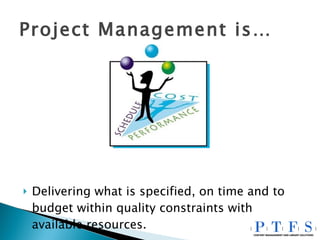
Project Management is… Delivering what is specified, on time and to budget within quality constraints with available resources.
Understand external time constraints: Financial Year Support contract on existing system Must spend budget by dd/mm/yy Do you want or need to phase the project? availability of funds / equipment / people ALWAYS plan extra time for the unexpected On Time…
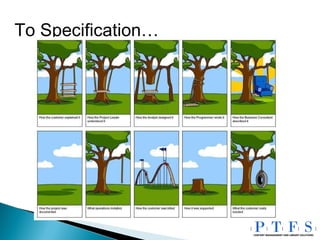
To Specification…
Project Initiation Document – as a reference You can often use the tender and the supplier’s response as the basis of what has to be supplied This may also be the basis of acceptance testing Carefully make your list of tasks to be done and any known time, resource or dependence constraints. Seek advice and assistance from supplier and others with similar experience in drawing up and reviewing this list. To Specification…
Within budget… External costs Stage payments and milestones Internal staff and resource costs Procedure for additional approvals Budget for ongoing support
… with available resources… Project manager for organisation and supplier internal vs external part-time vs full-time library or IT person Cover all bases: PR, technical, catalogue/data, training, integration Allow time for “day job” Holidays & absence Escalation procedures
Planning and Monitoring
Take your list of tasks to be done… Work out where dependences are Plan tasks with lead times early (eg IT purchase) Avoid external dependence (eg building work) Expect delays testing 3-way interfaces (eg EDI) Do not skimp testing data conversion Plan number of test data loads Check all peripherals (eg barcode scanners) Test custom work (and related areas) Test external interfaces… Planning  and Monitoring…
Test external interfaces… external access for users, staff and suppliers patron upload bibliographic import and export authentication Z39.50 interfaces EDI communication etc, etc Planning  and Monitoring…
 
At planning meeting agree frequency of meetings with supplier(s). Internal meetings each week at regular time Record and agree notes from meetings Encourage open reporting Seek solutions to problems and delays Some project dates should be almost “immovable”. You do not want any surprises Planning and  Monitoring …
It works well if… you were involved in the selection process you have full support of your team and management you start the project with a full planning meeting you keep your eye on the timeline you strike up and maintain a positive relationship with suppliers you know your library’s requirements you have a separate test environment
It works well if… you are practical and pragmatic you are able to embrace change you adopt a blame-free culture the success of the project is a priority for you and the team you communicate freely and openly you are enthusiastic you can negotiate, delegate and motivate both your own team and suppliers you make use of your supplier’s experience
You do not need … to be an expert, qualified project manager to be able to use project management software to be an expert in all topics – delegate and share this responsibility to replicate your old system – take advantage of the opportunity to introduce change
…  and finally things a project manager does not want to hear… 1. “I have a challenge for you.”   2. “One minor change.”   3. “Rearchitecting”   4. “This new technology would be  perfect .”   5. “I was too busy firefighting to finish.”   6. “I’ve been reassigned.”   7. “Let’s add more people to this!”   8. “It would be technically impossible.”   9. “Do you want full functionality or on time?”   10. “It’s not really what I expected.”
Any questions?
Project Managing an implementation of a Library Management System   Thank You
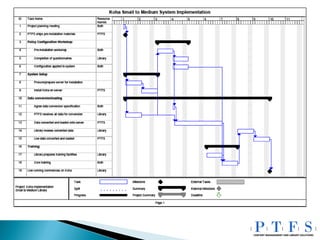
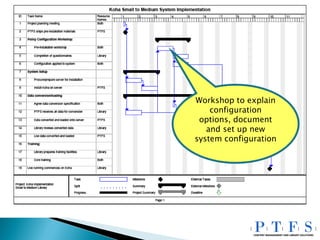
If time allows… A quick walk through a typical Gantt chart
Workshop to explain configuration options, document and set up new system configuration
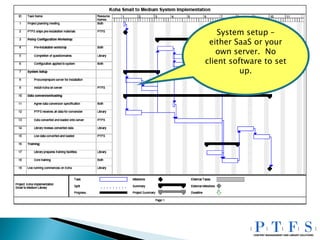
System setup – either SaaS or your own server.  No client software to set up.
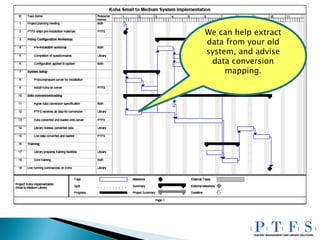
We can help extract data from your old system, and advise data conversion mapping.
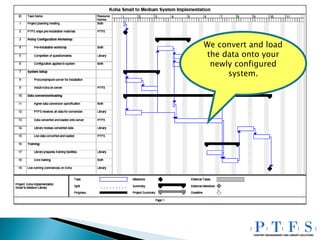
We convert and load the data onto your newly configured system.
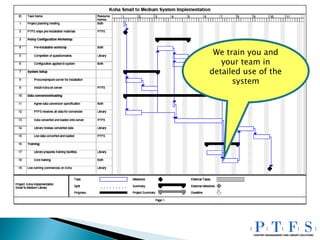
We train you and your team in detailed use of the system
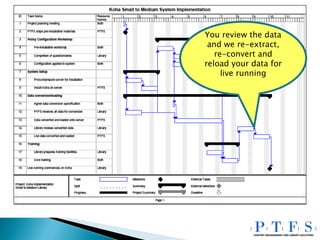
You review the data and we re-extract, re-convert and reload your data for live running
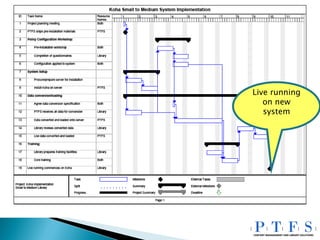
Live running on new system

Project Managing An Implementation Of A Library Management System

  • 1.
    Ian Bays ProjectManaging an implementation of a Library Management System
  • 2.
    Who am I?Who are you? will you manage the project? Project Managing an implementation of a LMS
  • 3.
    Changing your LMSSetting up your Project Planning and Monitoring What Works well? Handover and Ongoing Support Project Phases The implementation project in context
  • 4.
    Reasons forchange: economic, function, other document reasons in Business Case Mandatory and desirable features of new system Funds available (or not) Staff resources available (or not) Tender process for external supply of software and/or services Evaluating options Decide how formal procedures to use… Changing your LMS
  • 5.
    Project Management is…Delivering what is specified, on time and to budget within quality constraints with available resources.
  • 6.
    Understand external timeconstraints: Financial Year Support contract on existing system Must spend budget by dd/mm/yy Do you want or need to phase the project? availability of funds / equipment / people ALWAYS plan extra time for the unexpected On Time…
  • 7.
  • 8.
    Project Initiation Document– as a reference You can often use the tender and the supplier’s response as the basis of what has to be supplied This may also be the basis of acceptance testing Carefully make your list of tasks to be done and any known time, resource or dependence constraints. Seek advice and assistance from supplier and others with similar experience in drawing up and reviewing this list. To Specification…
  • 9.
    Within budget… Externalcosts Stage payments and milestones Internal staff and resource costs Procedure for additional approvals Budget for ongoing support
  • 10.
    … with availableresources… Project manager for organisation and supplier internal vs external part-time vs full-time library or IT person Cover all bases: PR, technical, catalogue/data, training, integration Allow time for “day job” Holidays & absence Escalation procedures
  • 11.
  • 12.
    Take your listof tasks to be done… Work out where dependences are Plan tasks with lead times early (eg IT purchase) Avoid external dependence (eg building work) Expect delays testing 3-way interfaces (eg EDI) Do not skimp testing data conversion Plan number of test data loads Check all peripherals (eg barcode scanners) Test custom work (and related areas) Test external interfaces… Planning and Monitoring…
  • 13.
    Test external interfaces…external access for users, staff and suppliers patron upload bibliographic import and export authentication Z39.50 interfaces EDI communication etc, etc Planning and Monitoring…
  • 14.
  • 15.
    At planning meetingagree frequency of meetings with supplier(s). Internal meetings each week at regular time Record and agree notes from meetings Encourage open reporting Seek solutions to problems and delays Some project dates should be almost “immovable”. You do not want any surprises Planning and Monitoring …
  • 16.
    It works wellif… you were involved in the selection process you have full support of your team and management you start the project with a full planning meeting you keep your eye on the timeline you strike up and maintain a positive relationship with suppliers you know your library’s requirements you have a separate test environment
  • 17.
    It works wellif… you are practical and pragmatic you are able to embrace change you adopt a blame-free culture the success of the project is a priority for you and the team you communicate freely and openly you are enthusiastic you can negotiate, delegate and motivate both your own team and suppliers you make use of your supplier’s experience
  • 18.
    You do notneed … to be an expert, qualified project manager to be able to use project management software to be an expert in all topics – delegate and share this responsibility to replicate your old system – take advantage of the opportunity to introduce change
  • 19.
    … andfinally things a project manager does not want to hear… 1. “I have a challenge for you.” 2. “One minor change.” 3. “Rearchitecting” 4. “This new technology would be perfect .” 5. “I was too busy firefighting to finish.” 6. “I’ve been reassigned.” 7. “Let’s add more people to this!” 8. “It would be technically impossible.” 9. “Do you want full functionality or on time?” 10. “It’s not really what I expected.”
  • 20.
  • 21.
    Project Managing animplementation of a Library Management System Thank You
  • 22.
    If time allows…A quick walk through a typical Gantt chart
  • 23.
    Workshop to explainconfiguration options, document and set up new system configuration
  • 24.
    System setup –either SaaS or your own server. No client software to set up.
  • 25.
    We can helpextract data from your old system, and advise data conversion mapping.
  • 26.
    We convert andload the data onto your newly configured system.
  • 27.
    We train youand your team in detailed use of the system
  • 28.
    You review thedata and we re-extract, re-convert and reload your data for live running
  • 29.
    Live running onnew system