Software Project Management
Project Planning
(Chapters 22, 23)
Casper Lassenius
What is a Project?
What is a project?
• A project is a planned activity that involves non-
routine tasks and has a clearly defined beginning
and an end.
• Other project characteristics:
– Specific objectives are to be met
– Specific resources are assigned for use on the project
– A schedule should be met
 Concerned with activities involved in
ensuring that software is delivered on time
and on schedule and in accordance with
the requirements of the organisations
developing and procuring the software.
 Project management is needed because software
development is always subject to budget and
schedule constraints that are set by the
organisation developing the software.
Software project management
Chapter 22 Project
management
4
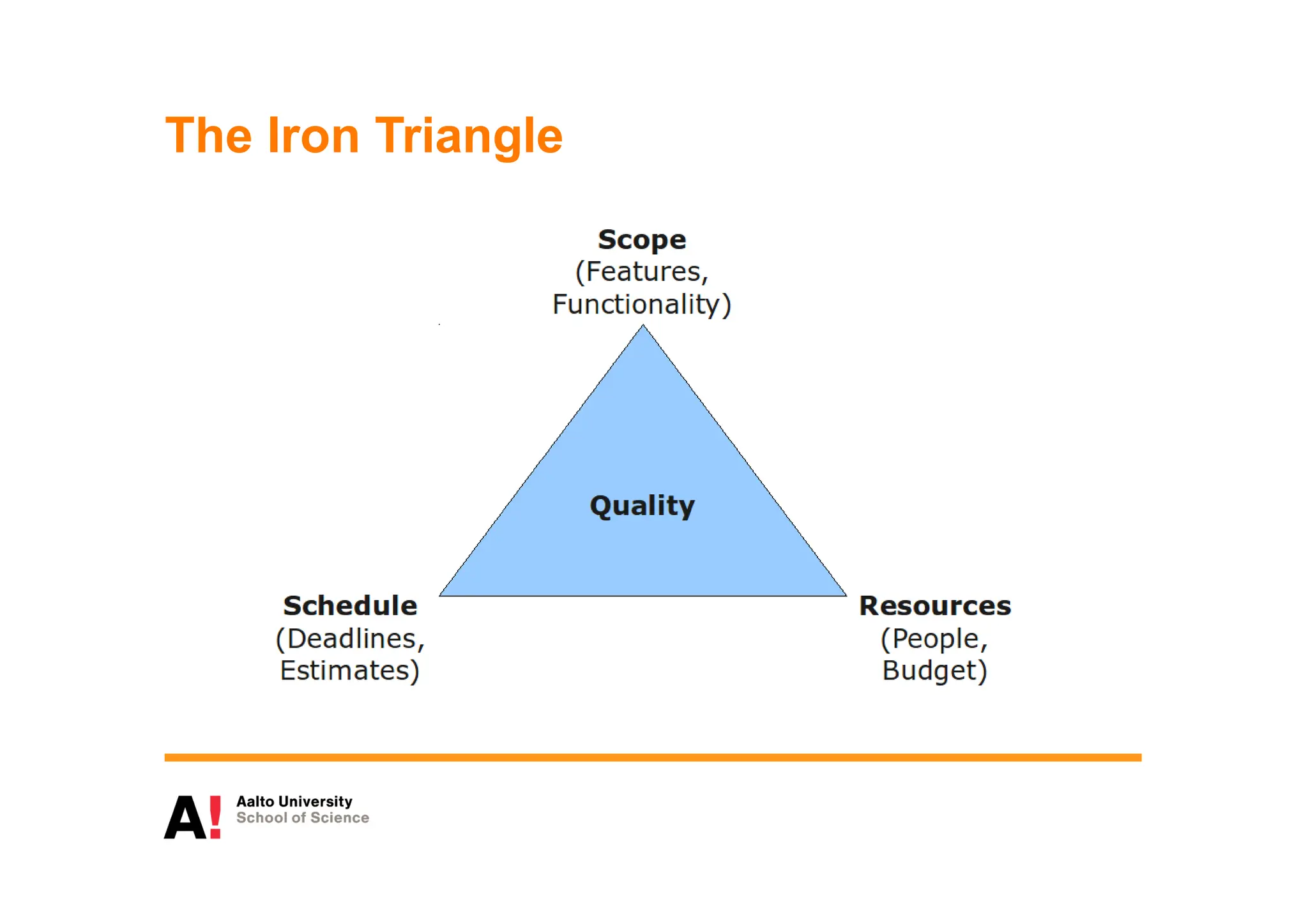
The Iron Triangle
 The product is intangible.
 Software cannot be seen or touched. Software project
managers cannot see progress by simply looking at the
artefact that is being constructed.
 Many software projects are 'one-off' projects.
 Large software projects are usually different in some
ways from previous projects. Even managers who have lots
of previous experience may find it difficult to anticipate
problems.
 Software processes are variable and
organization specific.
 We still cannot reliably predict when a
particular software process is likely to lead to
development problems.
Software management distinctions
Chapter 22 Project
management
6
 Project planning
 Project managers are responsible for planning.
estimating and scheduling project development and
assigning people to tasks.
 Reporting & controlling
 Project managers are usually responsible for
reporting on the progress of a project to customers and
to the managers of the company developing the software.
 Risk management
 Project managers assess the risks that may affect
a project, monitor these risks and take action when
problems arise.
Management activities
Chapter 22 Project
management
7
Management activities
 People management
 Project managers have to choose people for their team
and establish ways of working that leads to effective team
performance
Chapter 22 Project
management
8
Project planning
 Project planning involves breaking down the work into
parts and assign these to project team members,
anticipate problems that might arise and prepare
tentative solutions to those problems.
 The project plan, which is created at the start of a
project, is used to communicate how the work will be
done to the project team and customers, and to help
assess progress on the project.
Planning stages
 At the proposal stage, when you are bidding for a
contract to develop or provide a software system.
 During the project startup phase, when you have to
plan who will work on the project, how the project
will be broken down into increments, how resources
will be allocated across your company, etc.
 Periodically throughout the project, when you modify
your plan in the light of experience gained and
information from monitoring the progress of the work.
Plan-driven development
 Plan-driven or plan-based development is an
approach to software engineering where the
development process is planned in detail.
 Plan-driven development is based on engineering
project management techniques and is the ‘traditional’ way
of managing large software development projects.
 A project plan is created that records the work to be
done, who will do it, the development schedule and
the work products.
 Managers use the plan to support project decision
making and as a way of measuring progress.
Plan-driven development – pros and
cons
 The arguments in favor of a plan-driven approach are
that early planning allows organizational issues
(availability of staff, other projects, etc.) to be closely
taken into account, and that potential problems and
dependencies are discovered before the project starts,
rather than once the project is underway.
 The principal argument against plan-driven
development is that many early decisions have to be
revised because of changes to the environment in
which the software is to be developed and used.
Project plans
 In a plan-driven development project, a project plan
sets out the resources available to the project, the
work breakdown and a schedule for carrying out the
work.
 Plan sections
 Introduction
 Project organization
 Risk analysis
 Hardware and software resource requirements
 Work breakdown
 Project schedule
 Monitoring and reporting mechanisms
Project plan supplements
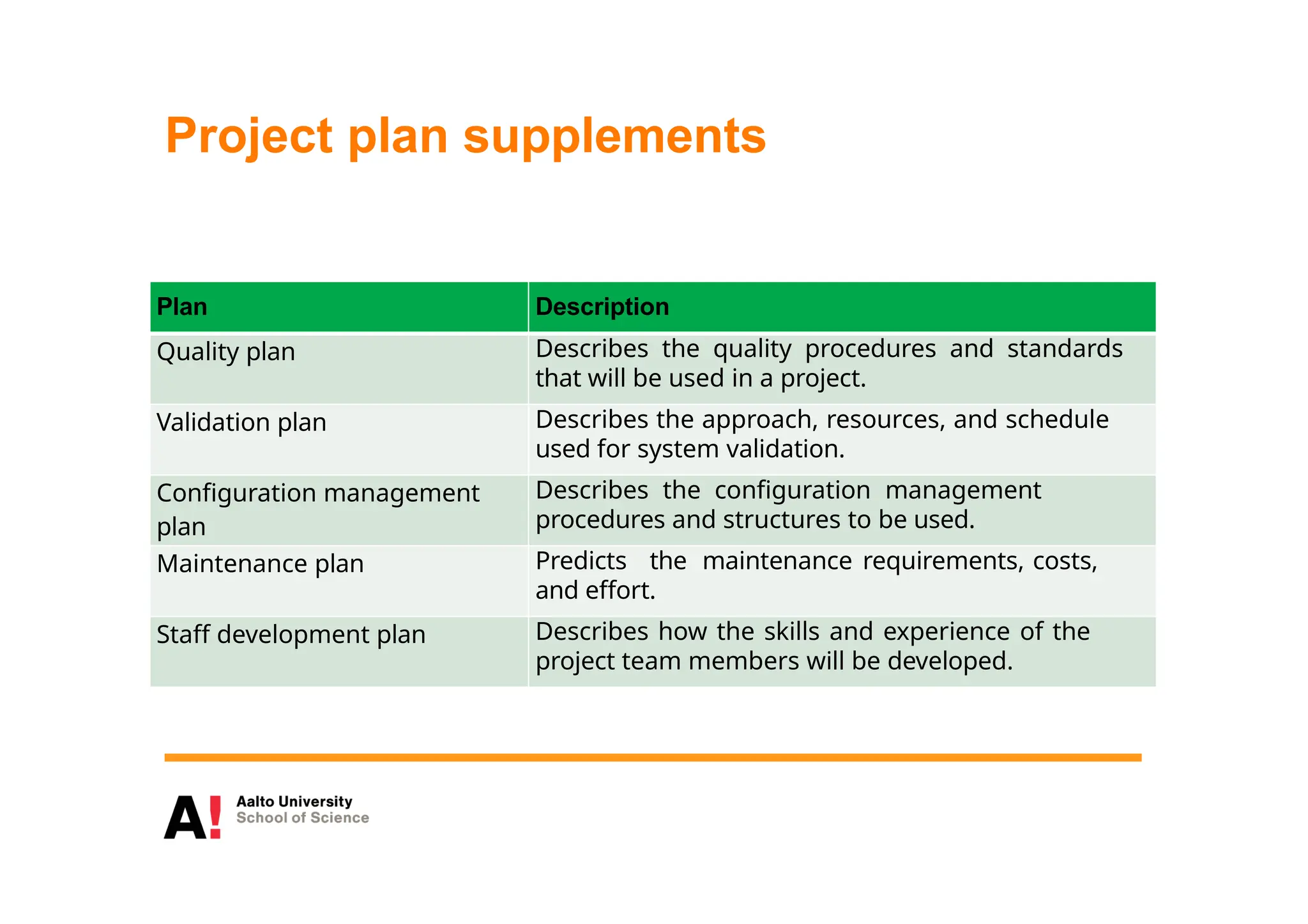
Plan Description
Quality plan Describes the quality procedures and standards
that will be used in a project.
Validation plan Describes the approach, resources, and schedule
used for system validation.
Configuration management
plan
Describes the configuration management
procedures and structures to be used.
Maintenance plan Predicts the maintenance requirements, costs,
and effort.
Staff development plan Describes how the skills and experience of the
project team members will be developed.
The planning process
 Project planning is an iterative process that starts
when you create an initial project plan during the
project startup phase.
 Plan changes are inevitable.
 As more information about the system and the project
team becomes available during the project, you should
regularly revise the plan to reflect requirements, schedule
and risk changes.
 Changing business goals also leads to changes in
project plans. As business goals change, this could affect all
projects, which may then have to be re-planned.
Project scheduling
 Project scheduling is the process of deciding how the
work in a project will be organized as separate tasks,
and when and how these tasks will be executed.
 You estimate the calendar time needed to complete
each task, the effort required and who will work on
the tasks that have been identified.
 You also have to estimate the resources needed to
complete each task, such as the disk space required on
a server, the time required on specialized hardware,
such as a simulator, and what the travel budget will be.
Project scheduling activities
 Split project into tasks and estimate time and
resources required to complete each task.
 Organize tasks concurrently to make
optimal use of workforce.
 Minimize task dependencies to avoid delays
caused by one task waiting for another to
complete.
 Dependent on project managers intuition
and experience.
Milestones and deliverables
 Milestones are points in the schedule against which
you can assess progress, for example, the handover
of the system for testing.
 Deliverables are work products that are delivered to
the customer, e.g. a requirements document for the
system.
Scheduling problems
 Estimating the difficulty of problems and hence the
cost of developing a solution is hard.
 Productivity is not proportional to the number of
people working on a task.
 Adding people to a late project makes it later
because of communication overheads.
 The unexpected always happens. Always
allow contingency in planning.
Activity bar chart
Week 0 1 2 3 4 5 6 7 8 9 10 11
T4
Start
T1
T2
(M1/T1)
T3
T5
(M4/T1& T2)
T6
T7
(M2/T4)
T8
(M5/T3 & T6)
T9
(M6/T7 & T8)
T10
(M7/T 9)
T11
(M8/T10 & T11)
T12
Finish
(M3/T2 & T4)
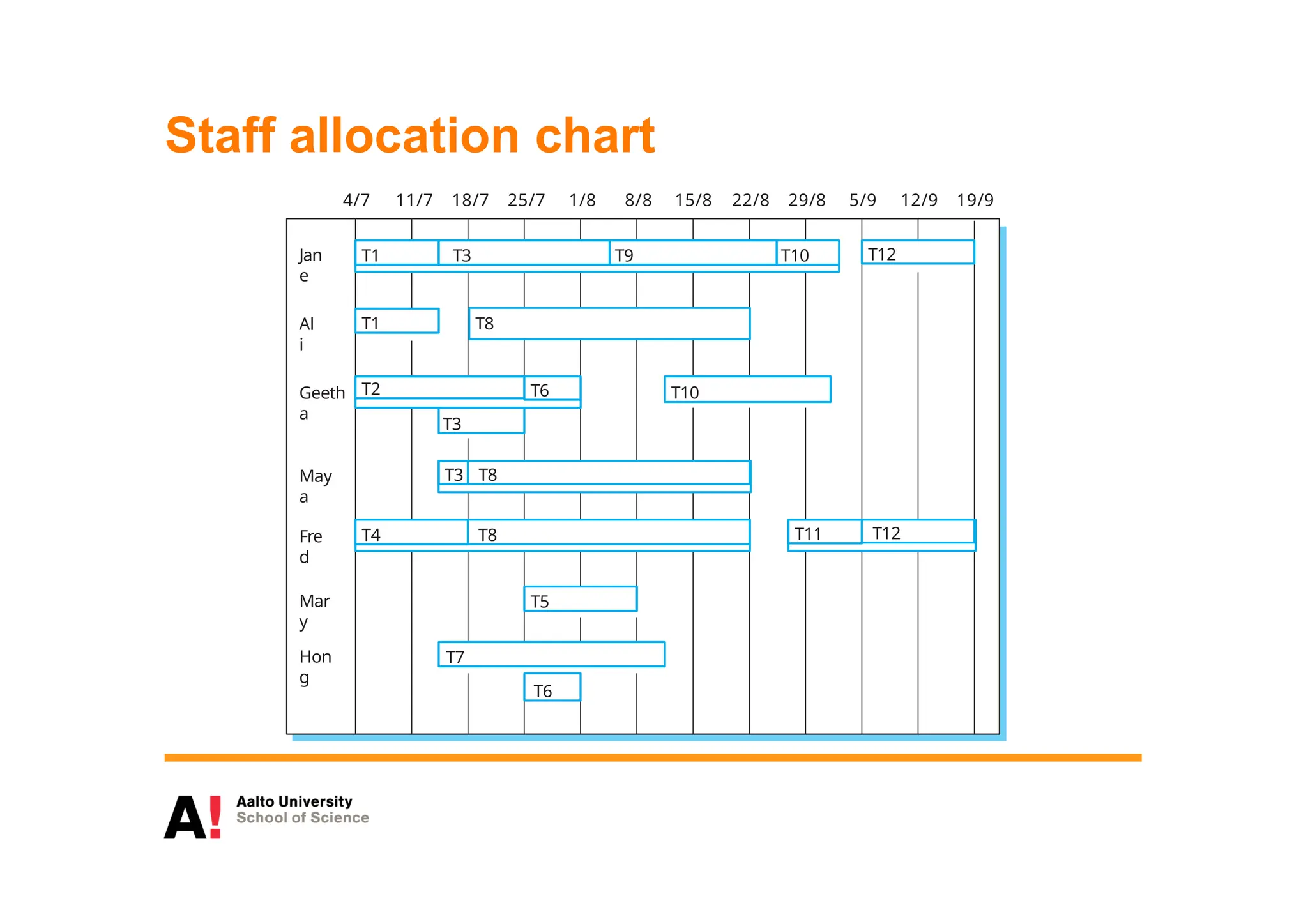
Staff allocation chart
4/7 11/7 18/7 25/7 1/8 8/8 15/8 22/8 29/8 5/9 12/9 19/9
T1 T3 T9
Jan
e
T3
T10
Geeth
a
T7
Hon
g
T5
Mar
y
T4 T8
Fre
d
T1 T8
Al
i
T12
T2
T6
May
a
T3 T8
T10
T6
T11 T12
T8
Agile planning
 Agile methods of software development are
iterative approaches where the software is
developed and delivered to customers in
increments.
 Unlike plan-driven approaches, the functionality of
these increments is not planned in advance but is
decided during the development.
 The decision on what to include in an increment
depends on progress and on the customer’s priorities.
 The customer’s priorities and requirements change
so it makes sense to have a flexible plan that can
accommodate these changes.
Agile planning stages
 Release planning, which looks ahead for several
months and decides on the features that should be
included in a release of a system.
 Iteration planning, which has a shorter term outlook,
and focuses on planning the next increment of a
system. This is typically 2-4 weeks of work for the
team.
Story-based planning
 The system specification in XP is based on user stories that reflect
the features that should be included in the system.
 The project team read and discuss the stories and rank them in
order of the amount of time they think it will take to implement
the story.
 Release planning involves selecting and refining the stories
that will reflect the features to be implemented in a release of a
system and the order in which the stories should be
implemented.
 Stories to be implemented in each iteration are chosen, with the
number of stories reflecting the time to deliver an iteration
(usually 2 or 3 weeks).
Estimation techniques
 Organizations need to make software effort and
cost estimates. There are two types of technique
that can be used to do this:
 Experience-based techniques The estimate of future
effort requirements is based on the manager’s experience of
past projects and the application domain. Essentially, the
manager makes an informed judgment of what the effort
requirements are likely to be.
 Algorithmic cost modeling In this approach, a formulaic
approach is used to compute the project effort based on
estimates of product attributes, such as size, and process
characteristics, such as experience of staff involved.
Experience-based approaches
 Experience-based techniques rely on judgments based
on experience of past projects and the effort
expended in these projects on software development
activities.
 Typically, you identify the deliverables to be produced
in a project and the different software components or
systems that are to be developed.
 You document these in a spreadsheet, estimate
them individually and compute the total effort
required.
 It usually helps to get a group of people involved in
the effort estimation and to ask each member of the
group to explain their estimate.
Algorithmic cost modelling
 Cost is estimated as a mathematical
function of product, project and process
attributes whose values are estimated by
project managers:
 Effort = A  SizeB  M
 A is an organisation-dependent constant, B
reflects the disproportionate effort for large projects and
M is a multiplier reflecting product, process and people
attributes.
 The most commonly used product attribute for
cost estimation is code size.
 Most models are similar but they use different
values for A, B and M.
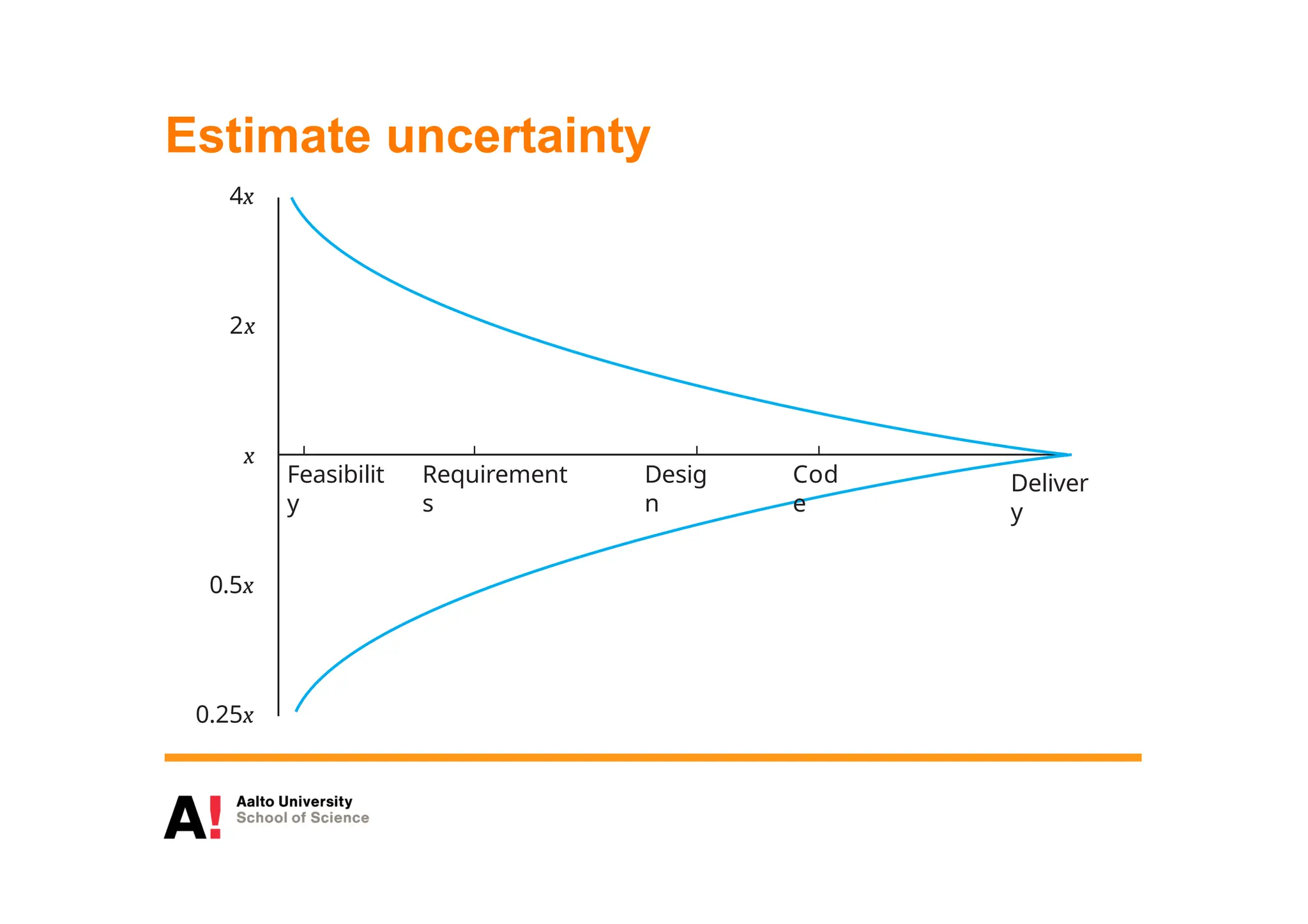
Estimate uncertainty
x
2x
4x
0.5x
0.25x
Feasibilit
y
Requirement
s
Desig
n
Cod
e
Deliver
y
The COCOMO 2 model
 An empirical model based on project experience.
 Well-documented, ‘independent’ model which is not
tied to a specific software vendor.
 Long history from initial version published in
1981 (COCOMO-81) through various
instantiations to COCOMO 2.
 COCOMO 2 takes into account different approaches
to software development, reuse, etc.
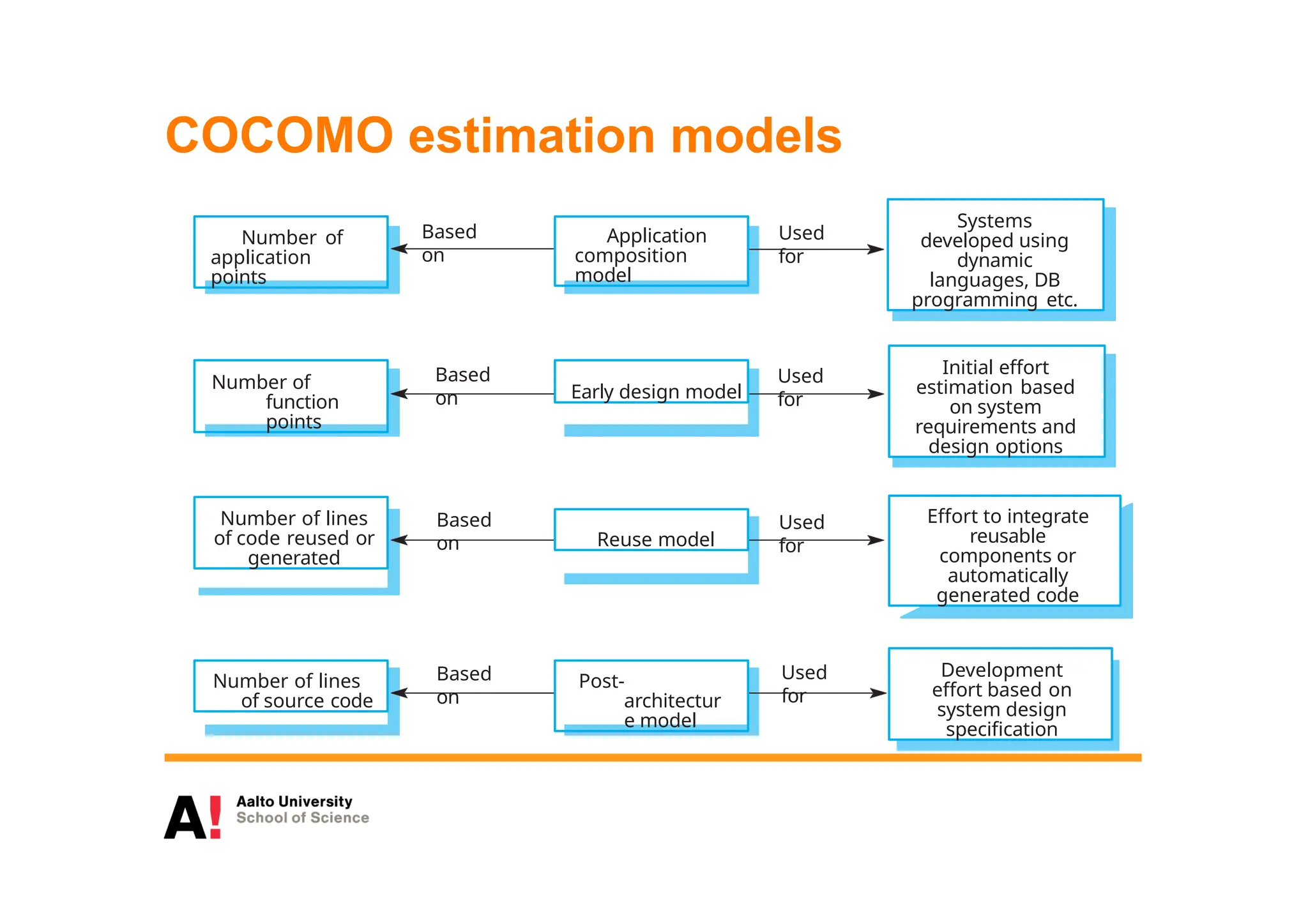
COCOMO estimation models
Number of
application
points
Number of
function
points
Based
on
Used
for
Used
for
Used
for
Used
for
Based
on
Based
on
Based
on
Number of lines
of code reused or
generated
Number of lines
of source code
Application
composition
model
Early design model
Reuse model
Post-
architectur
e model
Systems
developed using
dynamic
languages, DB
programming etc.
Initial effort
estimation based
on system
requirements and
design options
Effort to integrate
reusable
components or
automatically
generated code
Development
effort based on
system design
specification
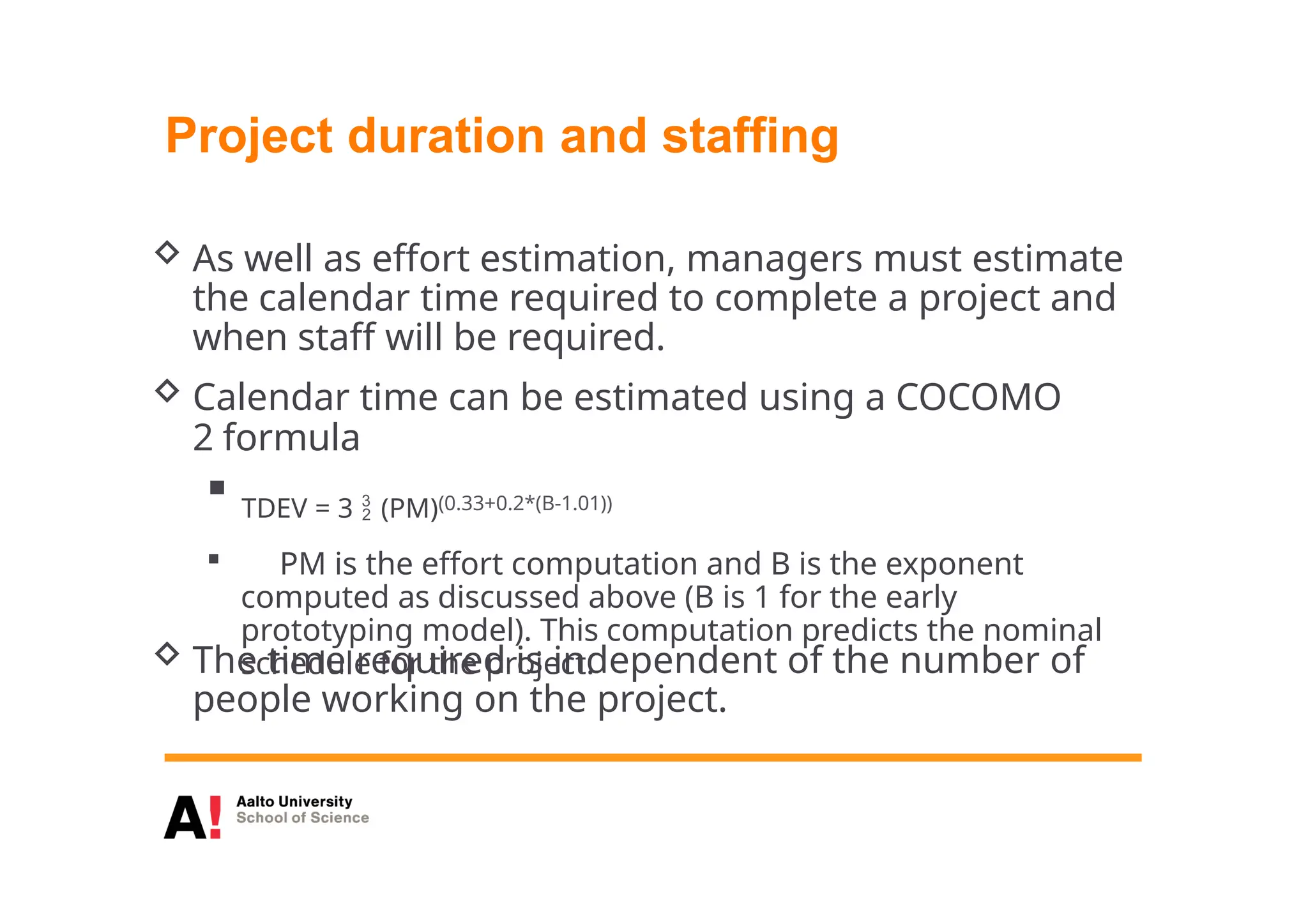
Project duration and staffing
 As well as effort estimation, managers must estimate
the calendar time required to complete a project and
when staff will be required.
 Calendar time can be estimated using a COCOMO
2 formula
 TDEV = 3  (PM)(0.33+0.2*(B-1.01))
 PM is the effort computation and B is the exponent
computed as discussed above (B is 1 for the early
prototyping model). This computation predicts the nominal
schedule for the project.
 The time required is independent of the number of
people working on the project.
Effort vs. Schedule
 Pay attention to the terms used:
 Use HOURS when talking about effort
 Use DAYS when talking about schedule
 Do not mix estimated efforts and calendar
time!!!
Software pricing
 Estimates are made to discover the cost, to
the developer, of producing a software
system.
 You take into account, hardware, software, travel,
training and effort costs.
 There is not a simple relationship between the
development cost and the price charged to the
customer.
 Broader organisational, economic, political and
business considerations influence the price charged.
Risk management
 Risk management is concerned with identifying risks
and drawing up plans to minimise their effect on a
project.
 A risk is a probability that some adverse
circumstance will occur
 Project risks affect schedule or resources;
 Product risks affect the quality or performance of
the software being developed;
 Business risks affect the organisation developing or
procuring the software.
Chapter 22 Project
management
34
The risk management process
 Risk identification
 Identify project, product and business risks;
 Risk analysis
 Assess the likelihood and consequences of these
risks;
 Risk planning
 Draw up plans to avoid or minimise the effects of the
risk;
 Risk monitoring
 Monitor the risks throughout the project;
Chapter 22 Project
management
35
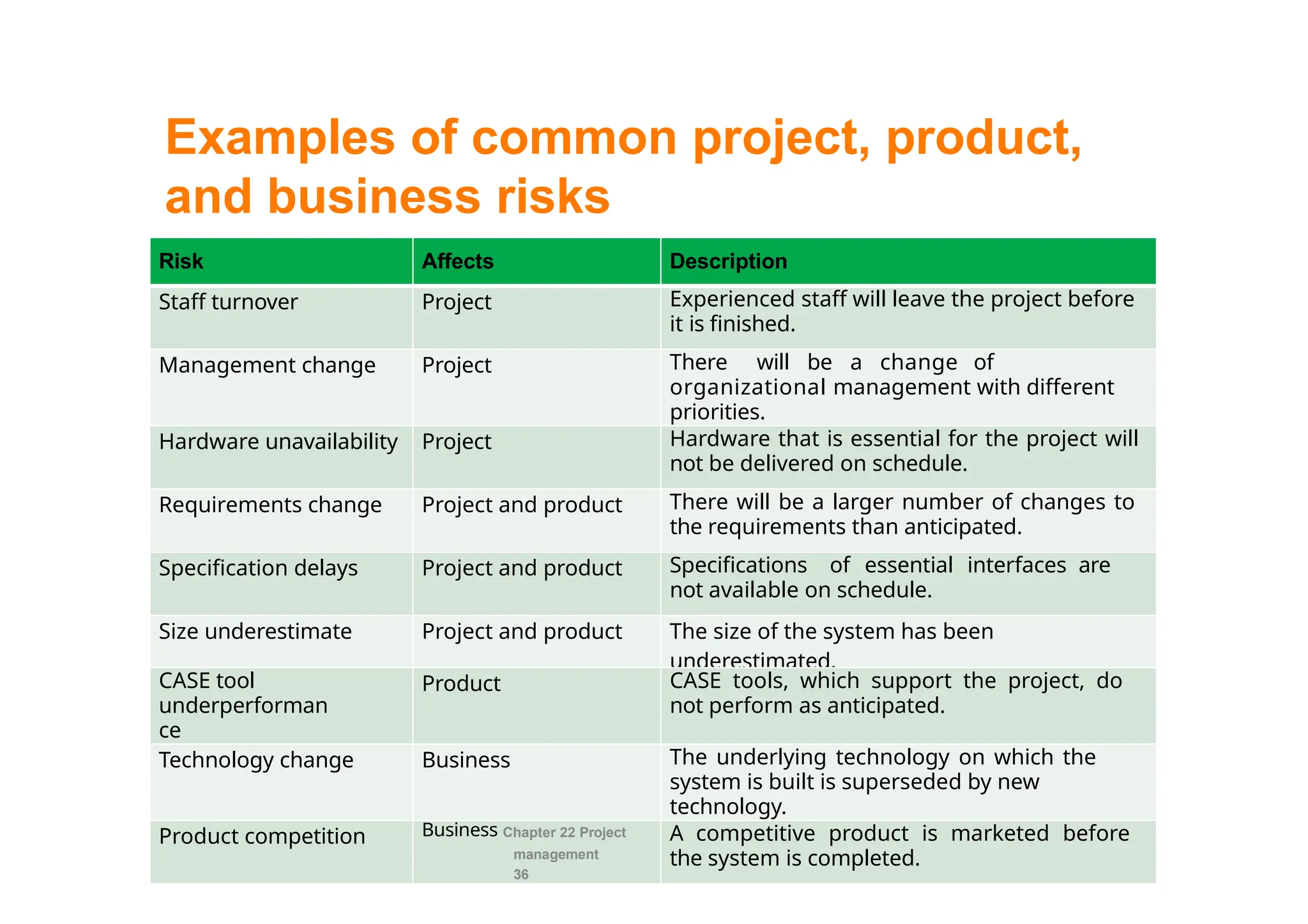
Examples of common project, product,
and business risks
Risk Affects Description
Staff turnover Project Experienced staff will leave the project before
it is finished.
Management change Project There will be a change of
organizational management with different
priorities.
Hardware unavailability Project Hardware that is essential for the project will
not be delivered on schedule.
Requirements change Project and product There will be a larger number of changes to
the requirements than anticipated.
Specification delays Project and product Specifications of essential interfaces are
not available on schedule.
Size underestimate Project and product The size of the system has been
underestimated.
CASE tool
underperforman
ce
Product CASE tools, which support the project, do
not perform as anticipated.
Technology change Business The underlying technology on which the
system is built is superseded by new
technology.
Product competition Business Chapter 22 Project
management
36
A competitive product is marketed before
the system is completed.
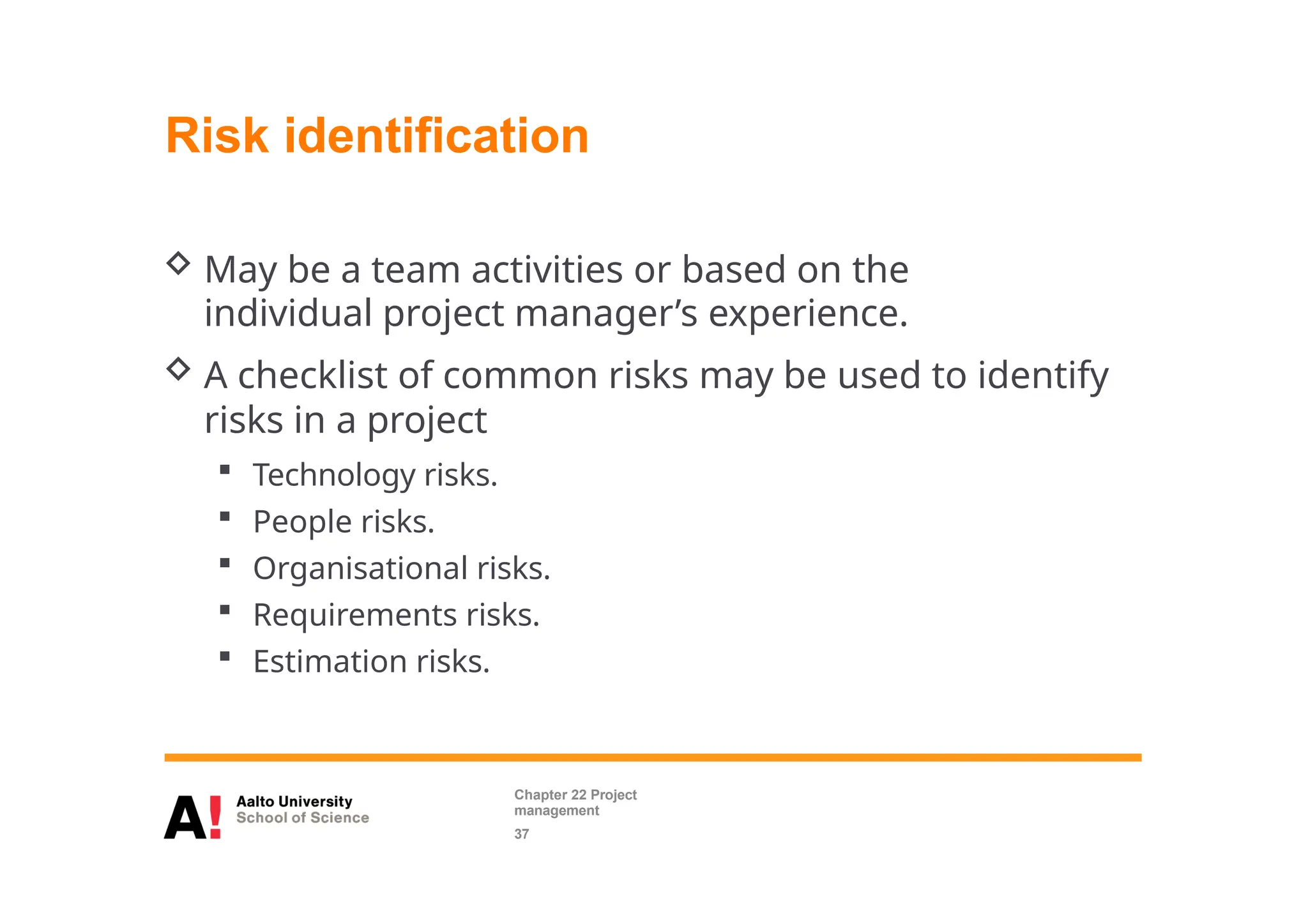
Risk identification
 May be a team activities or based on the
individual project manager’s experience.
 A checklist of common risks may be used to identify
risks in a project
 Technology risks.
 People risks.
 Organisational risks.
 Requirements risks.
 Estimation risks.
Chapter 22 Project
management
37
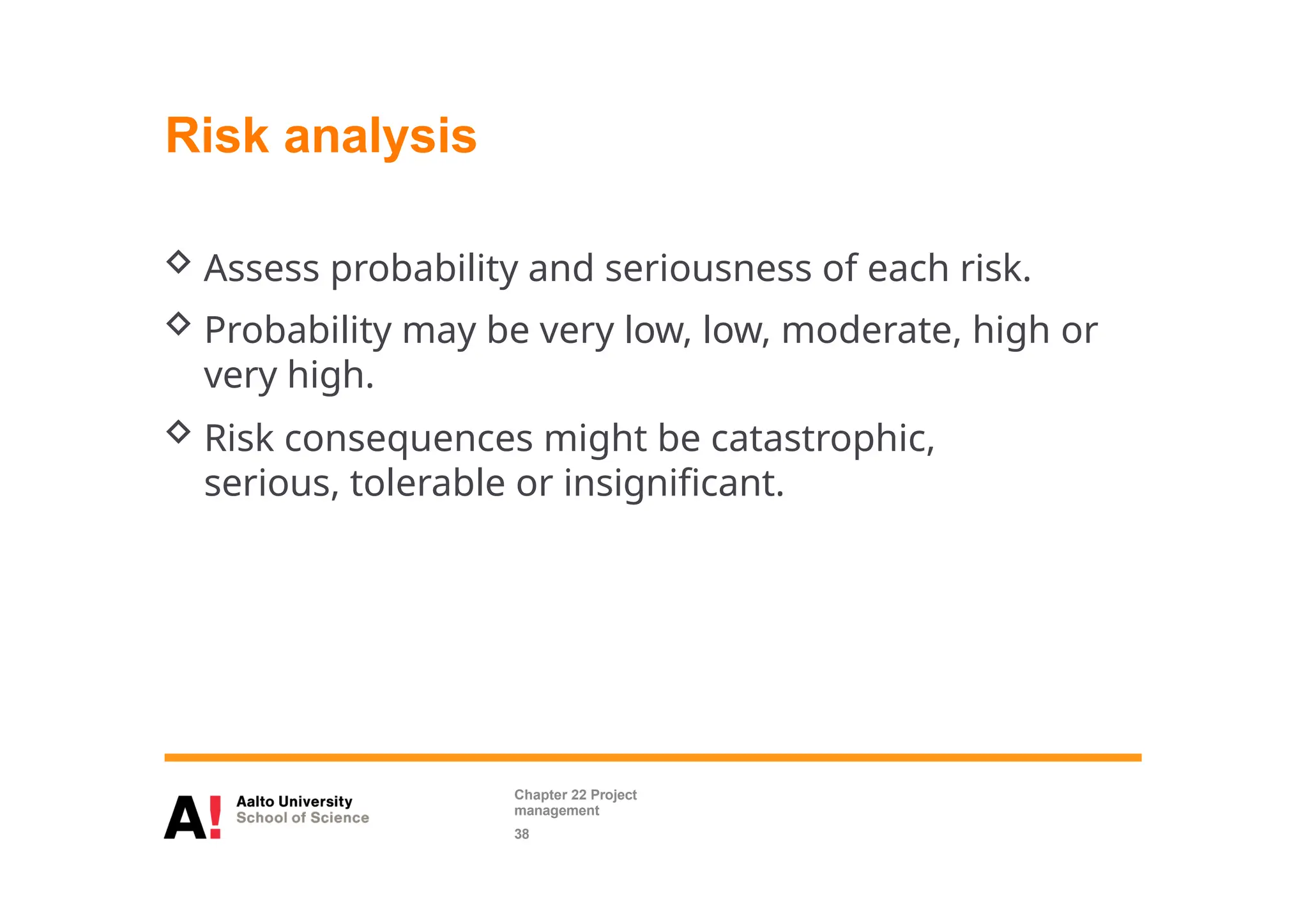
Risk analysis
 Assess probability and seriousness of each risk.
 Probability may be very low, low, moderate, high or
very high.
 Risk consequences might be catastrophic,
serious, tolerable or insignificant.
Chapter 22 Project
management
38
Risk planning
 Consider each risk and develop a strategy to
manage that risk.
 Avoidance strategies
 The probability that the risk will arise is reduced;
 Minimisation strategies
 The impact of the risk on the project or product will be
reduced;
 Contingency plans
 If the risk arises, contingency plans are plans to
deal with that risk;
Chapter 22 Project
management
39
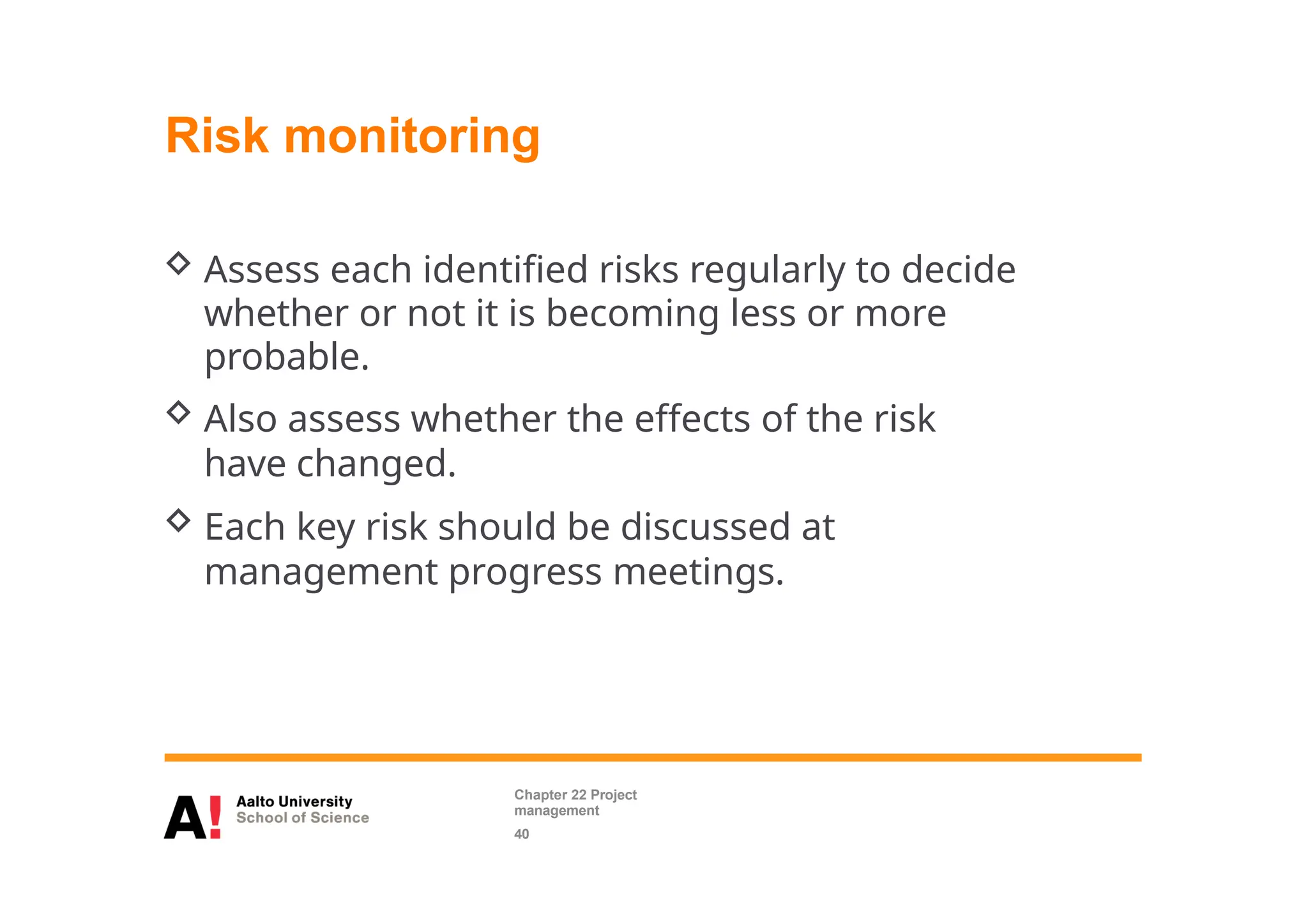
Risk monitoring
 Assess each identified risks regularly to decide
whether or not it is becoming less or more
probable.
 Also assess whether the effects of the risk
have changed.
 Each key risk should be discussed at
management progress meetings.
Chapter 22 Project
management
40
Managing people
 People are an organisation’s most important assets.
 The tasks of a manager are essentially people-
oriented. Unless there is some understanding of
people, management will be unsuccessful.
 Poor people management is an important
contributor to project failure.
Teamwork
 Most software engineering is a group activity
 The development schedule for most non-trivial software
projects is such that they cannot be completed by one person
working alone.
 A good group is cohesive and has a team spirit. The
people involved are motivated by the success of the
group as well as by their own personal goals.
 Group interaction is a key determinant of
group performance.
 Flexibility in group composition is limited
 Managers must do the best they can with
available people.
Chapter 22 Project
management
42
Selecting group members
 A manager or team leader’s job is to create a
cohesive group and organize their group so that
they can work together effectively.
 This involves creating a group with the right
balance of technical skills and personalities, and
organizing that group so that the members work
together effectively.
Chapter 22 Project
management
43
Assembling a team
 May not be possible to appoint the ideal people to
work on a project
 Project budget may not allow for the use of highly-paid
staff;
 Staff with the appropriate experience may not be
available;
 An organisation may wish to develop employee
skills on a software project.
 Managers have to work within these constraints
especially when there are shortages of trained staff.
Chapter 22 Project
management
44
Group organization
 Small software engineering groups are usually
organised informally without a rigid structure.
 For large projects, there may be a hierarchical
structure where different groups are responsible for
different sub- projects.
 Agile development is always based around an
informal group on the principle that formal
structure inhibits information exchange
Chapter 22 Project
management
45
Group communications
 Good communications are essential for effective
group working.
 Information must be exchanged on the status of
work, design decisions and changes to previous
decisions.
 Good communications also strengthens group
cohesion as it promotes understanding.
Chapter 22 Project
management
46
Questions?

202004132159500111minsa_jafar_Project_Management.pptx

  • 1.
    Software Project Management ProjectPlanning (Chapters 22, 23) Casper Lassenius
  • 2.
    What is aProject?
  • 3.
    What is aproject? • A project is a planned activity that involves non- routine tasks and has a clearly defined beginning and an end. • Other project characteristics: – Specific objectives are to be met – Specific resources are assigned for use on the project – A schedule should be met
  • 4.
     Concerned withactivities involved in ensuring that software is delivered on time and on schedule and in accordance with the requirements of the organisations developing and procuring the software.  Project management is needed because software development is always subject to budget and schedule constraints that are set by the organisation developing the software. Software project management Chapter 22 Project management 4
  • 5.
  • 6.
     The productis intangible.  Software cannot be seen or touched. Software project managers cannot see progress by simply looking at the artefact that is being constructed.  Many software projects are 'one-off' projects.  Large software projects are usually different in some ways from previous projects. Even managers who have lots of previous experience may find it difficult to anticipate problems.  Software processes are variable and organization specific.  We still cannot reliably predict when a particular software process is likely to lead to development problems. Software management distinctions Chapter 22 Project management 6
  • 7.
     Project planning Project managers are responsible for planning. estimating and scheduling project development and assigning people to tasks.  Reporting & controlling  Project managers are usually responsible for reporting on the progress of a project to customers and to the managers of the company developing the software.  Risk management  Project managers assess the risks that may affect a project, monitor these risks and take action when problems arise. Management activities Chapter 22 Project management 7
  • 8.
    Management activities  Peoplemanagement  Project managers have to choose people for their team and establish ways of working that leads to effective team performance Chapter 22 Project management 8
  • 9.
    Project planning  Projectplanning involves breaking down the work into parts and assign these to project team members, anticipate problems that might arise and prepare tentative solutions to those problems.  The project plan, which is created at the start of a project, is used to communicate how the work will be done to the project team and customers, and to help assess progress on the project.
  • 10.
    Planning stages  Atthe proposal stage, when you are bidding for a contract to develop or provide a software system.  During the project startup phase, when you have to plan who will work on the project, how the project will be broken down into increments, how resources will be allocated across your company, etc.  Periodically throughout the project, when you modify your plan in the light of experience gained and information from monitoring the progress of the work.
  • 11.
    Plan-driven development  Plan-drivenor plan-based development is an approach to software engineering where the development process is planned in detail.  Plan-driven development is based on engineering project management techniques and is the ‘traditional’ way of managing large software development projects.  A project plan is created that records the work to be done, who will do it, the development schedule and the work products.  Managers use the plan to support project decision making and as a way of measuring progress.
  • 12.
    Plan-driven development –pros and cons  The arguments in favor of a plan-driven approach are that early planning allows organizational issues (availability of staff, other projects, etc.) to be closely taken into account, and that potential problems and dependencies are discovered before the project starts, rather than once the project is underway.  The principal argument against plan-driven development is that many early decisions have to be revised because of changes to the environment in which the software is to be developed and used.
  • 13.
    Project plans  Ina plan-driven development project, a project plan sets out the resources available to the project, the work breakdown and a schedule for carrying out the work.  Plan sections  Introduction  Project organization  Risk analysis  Hardware and software resource requirements  Work breakdown  Project schedule  Monitoring and reporting mechanisms
  • 14.
    Project plan supplements PlanDescription Quality plan Describes the quality procedures and standards that will be used in a project. Validation plan Describes the approach, resources, and schedule used for system validation. Configuration management plan Describes the configuration management procedures and structures to be used. Maintenance plan Predicts the maintenance requirements, costs, and effort. Staff development plan Describes how the skills and experience of the project team members will be developed.
  • 15.
    The planning process Project planning is an iterative process that starts when you create an initial project plan during the project startup phase.  Plan changes are inevitable.  As more information about the system and the project team becomes available during the project, you should regularly revise the plan to reflect requirements, schedule and risk changes.  Changing business goals also leads to changes in project plans. As business goals change, this could affect all projects, which may then have to be re-planned.
  • 16.
    Project scheduling  Projectscheduling is the process of deciding how the work in a project will be organized as separate tasks, and when and how these tasks will be executed.  You estimate the calendar time needed to complete each task, the effort required and who will work on the tasks that have been identified.  You also have to estimate the resources needed to complete each task, such as the disk space required on a server, the time required on specialized hardware, such as a simulator, and what the travel budget will be.
  • 17.
    Project scheduling activities Split project into tasks and estimate time and resources required to complete each task.  Organize tasks concurrently to make optimal use of workforce.  Minimize task dependencies to avoid delays caused by one task waiting for another to complete.  Dependent on project managers intuition and experience.
  • 18.
    Milestones and deliverables Milestones are points in the schedule against which you can assess progress, for example, the handover of the system for testing.  Deliverables are work products that are delivered to the customer, e.g. a requirements document for the system.
  • 19.
    Scheduling problems  Estimatingthe difficulty of problems and hence the cost of developing a solution is hard.  Productivity is not proportional to the number of people working on a task.  Adding people to a late project makes it later because of communication overheads.  The unexpected always happens. Always allow contingency in planning.
  • 20.
    Activity bar chart Week0 1 2 3 4 5 6 7 8 9 10 11 T4 Start T1 T2 (M1/T1) T3 T5 (M4/T1& T2) T6 T7 (M2/T4) T8 (M5/T3 & T6) T9 (M6/T7 & T8) T10 (M7/T 9) T11 (M8/T10 & T11) T12 Finish (M3/T2 & T4)
  • 21.
    Staff allocation chart 4/711/7 18/7 25/7 1/8 8/8 15/8 22/8 29/8 5/9 12/9 19/9 T1 T3 T9 Jan e T3 T10 Geeth a T7 Hon g T5 Mar y T4 T8 Fre d T1 T8 Al i T12 T2 T6 May a T3 T8 T10 T6 T11 T12 T8
  • 22.
    Agile planning  Agilemethods of software development are iterative approaches where the software is developed and delivered to customers in increments.  Unlike plan-driven approaches, the functionality of these increments is not planned in advance but is decided during the development.  The decision on what to include in an increment depends on progress and on the customer’s priorities.  The customer’s priorities and requirements change so it makes sense to have a flexible plan that can accommodate these changes.
  • 23.
    Agile planning stages Release planning, which looks ahead for several months and decides on the features that should be included in a release of a system.  Iteration planning, which has a shorter term outlook, and focuses on planning the next increment of a system. This is typically 2-4 weeks of work for the team.
  • 24.
    Story-based planning  Thesystem specification in XP is based on user stories that reflect the features that should be included in the system.  The project team read and discuss the stories and rank them in order of the amount of time they think it will take to implement the story.  Release planning involves selecting and refining the stories that will reflect the features to be implemented in a release of a system and the order in which the stories should be implemented.  Stories to be implemented in each iteration are chosen, with the number of stories reflecting the time to deliver an iteration (usually 2 or 3 weeks).
  • 25.
    Estimation techniques  Organizationsneed to make software effort and cost estimates. There are two types of technique that can be used to do this:  Experience-based techniques The estimate of future effort requirements is based on the manager’s experience of past projects and the application domain. Essentially, the manager makes an informed judgment of what the effort requirements are likely to be.  Algorithmic cost modeling In this approach, a formulaic approach is used to compute the project effort based on estimates of product attributes, such as size, and process characteristics, such as experience of staff involved.
  • 26.
    Experience-based approaches  Experience-basedtechniques rely on judgments based on experience of past projects and the effort expended in these projects on software development activities.  Typically, you identify the deliverables to be produced in a project and the different software components or systems that are to be developed.  You document these in a spreadsheet, estimate them individually and compute the total effort required.  It usually helps to get a group of people involved in the effort estimation and to ask each member of the group to explain their estimate.
  • 27.
    Algorithmic cost modelling Cost is estimated as a mathematical function of product, project and process attributes whose values are estimated by project managers:  Effort = A  SizeB  M  A is an organisation-dependent constant, B reflects the disproportionate effort for large projects and M is a multiplier reflecting product, process and people attributes.  The most commonly used product attribute for cost estimation is code size.  Most models are similar but they use different values for A, B and M.
  • 28.
  • 29.
    The COCOMO 2model  An empirical model based on project experience.  Well-documented, ‘independent’ model which is not tied to a specific software vendor.  Long history from initial version published in 1981 (COCOMO-81) through various instantiations to COCOMO 2.  COCOMO 2 takes into account different approaches to software development, reuse, etc.
  • 30.
    COCOMO estimation models Numberof application points Number of function points Based on Used for Used for Used for Used for Based on Based on Based on Number of lines of code reused or generated Number of lines of source code Application composition model Early design model Reuse model Post- architectur e model Systems developed using dynamic languages, DB programming etc. Initial effort estimation based on system requirements and design options Effort to integrate reusable components or automatically generated code Development effort based on system design specification
  • 31.
    Project duration andstaffing  As well as effort estimation, managers must estimate the calendar time required to complete a project and when staff will be required.  Calendar time can be estimated using a COCOMO 2 formula  TDEV = 3  (PM)(0.33+0.2*(B-1.01))  PM is the effort computation and B is the exponent computed as discussed above (B is 1 for the early prototyping model). This computation predicts the nominal schedule for the project.  The time required is independent of the number of people working on the project.
  • 32.
    Effort vs. Schedule Pay attention to the terms used:  Use HOURS when talking about effort  Use DAYS when talking about schedule  Do not mix estimated efforts and calendar time!!!
  • 33.
    Software pricing  Estimatesare made to discover the cost, to the developer, of producing a software system.  You take into account, hardware, software, travel, training and effort costs.  There is not a simple relationship between the development cost and the price charged to the customer.  Broader organisational, economic, political and business considerations influence the price charged.
  • 34.
    Risk management  Riskmanagement is concerned with identifying risks and drawing up plans to minimise their effect on a project.  A risk is a probability that some adverse circumstance will occur  Project risks affect schedule or resources;  Product risks affect the quality or performance of the software being developed;  Business risks affect the organisation developing or procuring the software. Chapter 22 Project management 34
  • 35.
    The risk managementprocess  Risk identification  Identify project, product and business risks;  Risk analysis  Assess the likelihood and consequences of these risks;  Risk planning  Draw up plans to avoid or minimise the effects of the risk;  Risk monitoring  Monitor the risks throughout the project; Chapter 22 Project management 35
  • 36.
    Examples of commonproject, product, and business risks Risk Affects Description Staff turnover Project Experienced staff will leave the project before it is finished. Management change Project There will be a change of organizational management with different priorities. Hardware unavailability Project Hardware that is essential for the project will not be delivered on schedule. Requirements change Project and product There will be a larger number of changes to the requirements than anticipated. Specification delays Project and product Specifications of essential interfaces are not available on schedule. Size underestimate Project and product The size of the system has been underestimated. CASE tool underperforman ce Product CASE tools, which support the project, do not perform as anticipated. Technology change Business The underlying technology on which the system is built is superseded by new technology. Product competition Business Chapter 22 Project management 36 A competitive product is marketed before the system is completed.
  • 37.
    Risk identification  Maybe a team activities or based on the individual project manager’s experience.  A checklist of common risks may be used to identify risks in a project  Technology risks.  People risks.  Organisational risks.  Requirements risks.  Estimation risks. Chapter 22 Project management 37
  • 38.
    Risk analysis  Assessprobability and seriousness of each risk.  Probability may be very low, low, moderate, high or very high.  Risk consequences might be catastrophic, serious, tolerable or insignificant. Chapter 22 Project management 38
  • 39.
    Risk planning  Considereach risk and develop a strategy to manage that risk.  Avoidance strategies  The probability that the risk will arise is reduced;  Minimisation strategies  The impact of the risk on the project or product will be reduced;  Contingency plans  If the risk arises, contingency plans are plans to deal with that risk; Chapter 22 Project management 39
  • 40.
    Risk monitoring  Assesseach identified risks regularly to decide whether or not it is becoming less or more probable.  Also assess whether the effects of the risk have changed.  Each key risk should be discussed at management progress meetings. Chapter 22 Project management 40
  • 41.
    Managing people  Peopleare an organisation’s most important assets.  The tasks of a manager are essentially people- oriented. Unless there is some understanding of people, management will be unsuccessful.  Poor people management is an important contributor to project failure.
  • 42.
    Teamwork  Most softwareengineering is a group activity  The development schedule for most non-trivial software projects is such that they cannot be completed by one person working alone.  A good group is cohesive and has a team spirit. The people involved are motivated by the success of the group as well as by their own personal goals.  Group interaction is a key determinant of group performance.  Flexibility in group composition is limited  Managers must do the best they can with available people. Chapter 22 Project management 42
  • 43.
    Selecting group members A manager or team leader’s job is to create a cohesive group and organize their group so that they can work together effectively.  This involves creating a group with the right balance of technical skills and personalities, and organizing that group so that the members work together effectively. Chapter 22 Project management 43
  • 44.
    Assembling a team May not be possible to appoint the ideal people to work on a project  Project budget may not allow for the use of highly-paid staff;  Staff with the appropriate experience may not be available;  An organisation may wish to develop employee skills on a software project.  Managers have to work within these constraints especially when there are shortages of trained staff. Chapter 22 Project management 44
  • 45.
    Group organization  Smallsoftware engineering groups are usually organised informally without a rigid structure.  For large projects, there may be a hierarchical structure where different groups are responsible for different sub- projects.  Agile development is always based around an informal group on the principle that formal structure inhibits information exchange Chapter 22 Project management 45
  • 46.
    Group communications  Goodcommunications are essential for effective group working.  Information must be exchanged on the status of work, design decisions and changes to previous decisions.  Good communications also strengthens group cohesion as it promotes understanding. Chapter 22 Project management 46
  • 47.