“Android based
Wireless Load Control and Monitoring”
DAYANANDA SAGAR ACADEMY OF TECHNOLOGY
AND MANAGEMENT
Dept. of Information Science & Engineering.
By,
Thrishma Reddy.S
(1DT11IS044)
Bhuvana A.U (1DT11IS009)
Mohammed Mujahid Afsar
(1DT11IS025)
Under the guidance
of
Prof. Supreetha Pai
(Assistant Professor)
CONTENTS
• Problem Statement
• High level design
i)Modular classification
ii)System architecture
iii)Data flow diagram
• Detailed design
i)Use case diagram with scenario
ii)Sequence diagram
iii)Activity diagram
• Implementation
i)Modular design
ii)Pseudocode
• Gantt chart
PROBLEM STATEMENT
• While people are pursuing ever-growing high quality of their lives today.
This leads to more and more facilities and home appliances poured into
their buildings. How to control and manage these versatile facilities and
appliances in a house?
• Usually conventional wall switches are located in different corners of a
house and, thus necessitate the need of manual operations like pressing to
turn the loads on or off. It becomes very difficult for the elderly or
physically handicapped people to operate them. How to help them?
HIGH LEVEL DESIGN
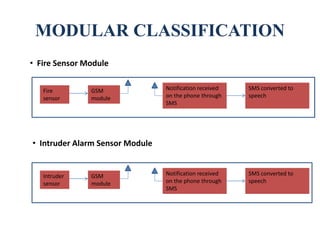
MODULAR CLASSIFICATION
Fire
sensor
GSM
module
Notification received
on the phone through
SMS
SMS converted to
speech
• Fire Sensor Module
Intruder
sensor
GSM
module
Notification received
on the phone through
SMS
SMS converted to
speech
• Intruder Alarm Sensor Module
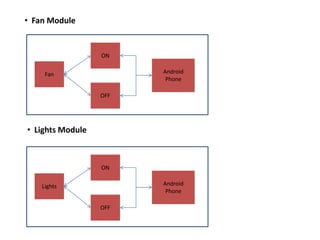
• Fan Module
Fan
OFF
ON
Android
Phone
Lights
OFF
ON
Android
Phone
• Lights Module
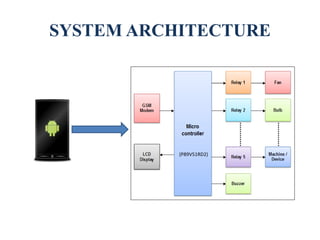
SYSTEM ARCHITECTURE
(P89V51RD2)
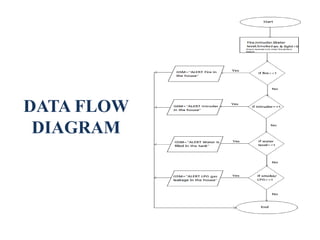
DATA FLOW
DIAGRAM
DETAILED DESIGN
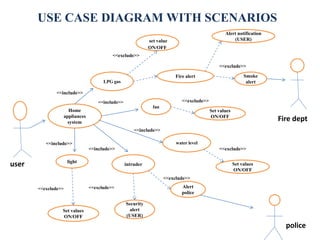
Home
appliances
system
LPG gas
fan
light
intruder
water level
<<include>>
Set values
ON/OFF
Security
alert
(USER)
Alert
police
Set values
ON/OFF
set value
ON/OFF
Fire alert
Alert notification
(USER)
Smoke
alert
Set values
ON/OFF
<<include>>
<<include>>
<<include>>
<<exclude>>
<<exclude>>
<<exclude>>
<<exclude>>
<<exclude>>
user
Fire dept
police
USE CASE DIAGRAM WITH SCENARIOS
<<include>>
<<exclude>> <<exclude>>
: Home Owner
:Login :Hardware
1: enter usrname & passwd
5: access
2: send username & passwd
3: authenticate
4: Ack
SEQUENCE DIAGRAM FOR LOGIN
: Home Owner
:Microcontroller
:Light
1: select light
2: check status
3: return status
4: display status
6: select options : turn on/off
7: enter value turn on/off
8: set value
9: update
10: ack
11: display result
5: display options
SEQUENCE DIAGRAM FOR CONTROLLING LIGHT
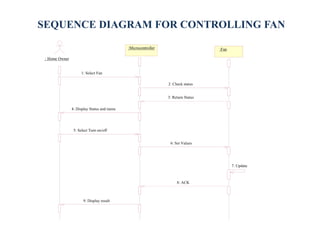
: Home Owner
:Microcontroller :Fan
1: Select Fan
2: Check status
3: Return Status
4: Display Status and menu
5: Select Turn on/off
6: Set Values
7: Update
8: ACK
9: Display result
SEQUENCE DIAGRAM FOR CONTROLLING FAN
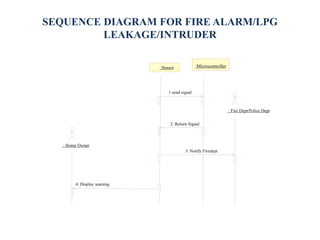
: Home Owner
:Sensor :Microcontroller
: Fire Dept/Police Dept
4: Display warning
1.send signal
2: Return Signal
3: Notify Firedept
SEQUENCE DIAGRAM FOR FIRE ALARM/LPG
LEAKAGE/INTRUDER
: Home Owner
:Microcontroller
:Water level
1: select water level
2: check status
3: return status
4: display status
6: select options : turn on/off
7: enter value turn on/off
8: set value
9: update
10: ack
11: display result
5: display options
SEQUENCE DIAGRAM FOR WATER LEVEL DETECTION
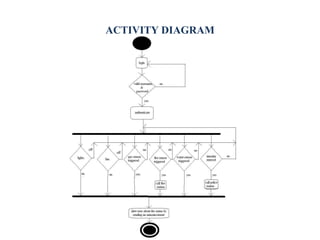
ACTIVITY DIAGRAM
IMPLEMENTATION
MODULAR DESIGN
• Fire sensor moduleI(FFS 05)
The Fire sensor is used to detect fire flames . The module makes use
of Fire sensor and comparator to detect fire up to a range of 2 meters. It
uses a input voltage of +5VDC.
• Intruder detection module(PIR SENSOR)
The unit output is high whenever human’s motion is detected. In
simple terms, it is a motion detector. This sensors measure infrared
radiation emanating from objects in the field of view. Apparent motion is
detected when an infrared emitting source with one temperature, such as
human body, passes in front of source with another temperature, such as
wall.
CONTD…
• Fan Module
It is directly connected to the microcontroller, it has only two
functions ON/OFF. The user can switch on the fan or switch off the fan
using the android app.
• Lights module
It is directly connected to the microcontroller, it has only two
functions ON/OFF. The user can switch on the light or switch off the light
using the android app.
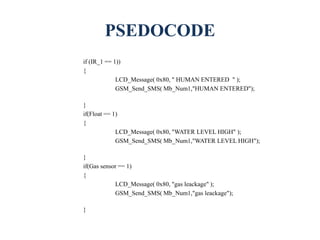
PSEDOCODE
if (IR_1 == 1))
{
LCD_Message( 0x80, " HUMAN ENTERED " );
GSM_Send_SMS( Mb_Num1,"HUMAN ENTERED");
}
if(Float == 1)
{
LCD_Message( 0x80, "WATER LEVEL HIGH" );
GSM_Send_SMS( Mb_Num1,"WATER LEVEL HIGH");
}
if(Gas sensor == 1)
{
LCD_Message( 0x80, "gas leackage" );
GSM_Send_SMS( Mb_Num1,"gas leackage");
}
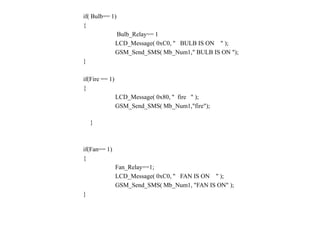
if( Bulb== 1)
{
Bulb_Relay== 1
LCD_Message( 0xC0, " BULB IS ON " );
GSM_Send_SMS( Mb_Num1," BULB IS ON ");
}
if(Fire == 1)
{
LCD_Message( 0x80, " fire " );
GSM_Send_SMS( Mb_Num1,"fire");
}
if(Fan== 1)
{
Fan_Relay==1;
LCD_Message( 0xC0, " FAN IS ON " );
GSM_Send_SMS( Mb_Num1, "FAN IS ON" );
}
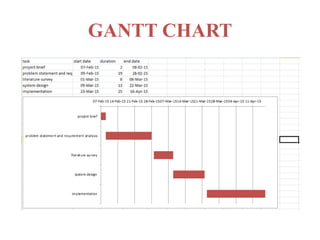
GANTT CHART
THANK YOU

Home automation using android phones-Project 2nd phase ppt

  • 1.
    “Android based Wireless LoadControl and Monitoring” DAYANANDA SAGAR ACADEMY OF TECHNOLOGY AND MANAGEMENT Dept. of Information Science & Engineering. By, Thrishma Reddy.S (1DT11IS044) Bhuvana A.U (1DT11IS009) Mohammed Mujahid Afsar (1DT11IS025) Under the guidance of Prof. Supreetha Pai (Assistant Professor)
  • 2.
    CONTENTS • Problem Statement •High level design i)Modular classification ii)System architecture iii)Data flow diagram • Detailed design i)Use case diagram with scenario ii)Sequence diagram iii)Activity diagram • Implementation i)Modular design ii)Pseudocode • Gantt chart
  • 3.
    PROBLEM STATEMENT • Whilepeople are pursuing ever-growing high quality of their lives today. This leads to more and more facilities and home appliances poured into their buildings. How to control and manage these versatile facilities and appliances in a house? • Usually conventional wall switches are located in different corners of a house and, thus necessitate the need of manual operations like pressing to turn the loads on or off. It becomes very difficult for the elderly or physically handicapped people to operate them. How to help them?
  • 4.
  • 5.
    MODULAR CLASSIFICATION Fire sensor GSM module Notification received onthe phone through SMS SMS converted to speech • Fire Sensor Module Intruder sensor GSM module Notification received on the phone through SMS SMS converted to speech • Intruder Alarm Sensor Module
  • 6.
  • 7.
  • 8.
  • 9.
  • 10.
    Home appliances system LPG gas fan light intruder water level <<include>> Setvalues ON/OFF Security alert (USER) Alert police Set values ON/OFF set value ON/OFF Fire alert Alert notification (USER) Smoke alert Set values ON/OFF <<include>> <<include>> <<include>> <<exclude>> <<exclude>> <<exclude>> <<exclude>> <<exclude>> user Fire dept police USE CASE DIAGRAM WITH SCENARIOS <<include>> <<exclude>> <<exclude>>
  • 11.
    : Home Owner :Login:Hardware 1: enter usrname & passwd 5: access 2: send username & passwd 3: authenticate 4: Ack SEQUENCE DIAGRAM FOR LOGIN
  • 12.
    : Home Owner :Microcontroller :Light 1:select light 2: check status 3: return status 4: display status 6: select options : turn on/off 7: enter value turn on/off 8: set value 9: update 10: ack 11: display result 5: display options SEQUENCE DIAGRAM FOR CONTROLLING LIGHT
  • 13.
    : Home Owner :Microcontroller:Fan 1: Select Fan 2: Check status 3: Return Status 4: Display Status and menu 5: Select Turn on/off 6: Set Values 7: Update 8: ACK 9: Display result SEQUENCE DIAGRAM FOR CONTROLLING FAN
  • 14.
    : Home Owner :Sensor:Microcontroller : Fire Dept/Police Dept 4: Display warning 1.send signal 2: Return Signal 3: Notify Firedept SEQUENCE DIAGRAM FOR FIRE ALARM/LPG LEAKAGE/INTRUDER
  • 15.
    : Home Owner :Microcontroller :Waterlevel 1: select water level 2: check status 3: return status 4: display status 6: select options : turn on/off 7: enter value turn on/off 8: set value 9: update 10: ack 11: display result 5: display options SEQUENCE DIAGRAM FOR WATER LEVEL DETECTION
  • 16.
  • 17.
  • 18.
    MODULAR DESIGN • Firesensor moduleI(FFS 05) The Fire sensor is used to detect fire flames . The module makes use of Fire sensor and comparator to detect fire up to a range of 2 meters. It uses a input voltage of +5VDC. • Intruder detection module(PIR SENSOR) The unit output is high whenever human’s motion is detected. In simple terms, it is a motion detector. This sensors measure infrared radiation emanating from objects in the field of view. Apparent motion is detected when an infrared emitting source with one temperature, such as human body, passes in front of source with another temperature, such as wall.
  • 19.
    CONTD… • Fan Module Itis directly connected to the microcontroller, it has only two functions ON/OFF. The user can switch on the fan or switch off the fan using the android app. • Lights module It is directly connected to the microcontroller, it has only two functions ON/OFF. The user can switch on the light or switch off the light using the android app.
  • 20.
    PSEDOCODE if (IR_1 ==1)) { LCD_Message( 0x80, " HUMAN ENTERED " ); GSM_Send_SMS( Mb_Num1,"HUMAN ENTERED"); } if(Float == 1) { LCD_Message( 0x80, "WATER LEVEL HIGH" ); GSM_Send_SMS( Mb_Num1,"WATER LEVEL HIGH"); } if(Gas sensor == 1) { LCD_Message( 0x80, "gas leackage" ); GSM_Send_SMS( Mb_Num1,"gas leackage"); }
  • 21.
    if( Bulb== 1) { Bulb_Relay==1 LCD_Message( 0xC0, " BULB IS ON " ); GSM_Send_SMS( Mb_Num1," BULB IS ON "); } if(Fire == 1) { LCD_Message( 0x80, " fire " ); GSM_Send_SMS( Mb_Num1,"fire"); } if(Fan== 1) { Fan_Relay==1; LCD_Message( 0xC0, " FAN IS ON " ); GSM_Send_SMS( Mb_Num1, "FAN IS ON" ); }
  • 22.
  • 23.