
1 | P a g e
Abstract
From the day the first human footstep was on the surface of earth the human being always
motivated for one thing remained certain. That is the motivation for “Technology”. Today we
are living on a busy life style and also in a world full of technological wonders. The time is the
most precious single commodity we are unable to share or even produce. To face the challenges
we face today everybody tries to integrate modern technology in their daily needs.
Basic features of home automation came out in practical world since the early 20th century
through the introduction of using electricity in home. The usage of electrical home automation
started between the years 1915 to 1920. Home automation provides the manners of computer
and information technology to control and monitor appliances and features. Its include control
over networks based of lighting, heating, ventilation and air conditioning, appliances, security
locks of gates and doors and other systems for providing convenience, comfort, energy
efficiency and safety security.
2 | P a g e
INDEX Page
Chapter 1- Introduction
1.1.Introduction…………………………………………………… 4
1.2.Problem Identification …………………………………………4
1.3.Aim……………………………………………………………..4
1.4.Objectives………………………………………………………4
1.5.Scope…………………………………………………………...4
1.6.Limitations……………………………………………………...5
Chapter 2- Literature Review
Chapter 3- Methodology
Chapter 4- Design and Implementation
4.1 Hardware Requirement ……………………………………....19
4.1 Hardware Requirement
2.1.Connection between appliance switch………………………….6
2.2.Security and detection ………………………………………….7
2.3.Remote Access………………………………………………….7
2.4.Processing……………………..………………………………...9
3.1.Design 1- using X.10……………………...……………………11
3.2.Design 2- Using single Arduino Board………………………...13
3.3.Design 3- Optimum Design…………………………………….15
4.1.1 Arduino MEGA…………………………………...…... 20
4.1.2 Arduino UNO…………………………………………..21
4.1.3 ESP8266 Wi-Fi Module…………………….………......22
4.1.4 12V 5Pin Relay…………………………………………23
4.1.5 PIR Sensor……………………………………………...23
4.1.6 D400 Transistor…………….........……………………...…24
4.1.7 10K Resistor…………………………………………….24
4.1.8 Two way switch………………………………………...24
4.1.9 Actuator…………………………………………...........24
4.2.1 Arduino MEGA and Wi-Fi Shield……...........................25
4.2.2 Arduino UNO and Wi-Fi Shield ….................................28
4.2.3 Appliance and Arduino UNO…………………………...29
4.2.4 Feedback connectivity……………....................................31
4.2.5 PIR Sensor connectivity………………………………...33
4.2.6 Random light on/off…………………………………….35
4.2.7 Android Application GUI…………...………………….36
3 | P a g e
INDEX Page
Chapter 5- Testing and Analysis
5.1.Testing the Circuit…………………………………………….39
5.2.PIR Detection…………………………………………………40
5.3.Testing of 2 way switch and feedback Relay…………………41
5.4.Control Appliance over Android app…………………………43
Chapter 6- Conclusion……………………………… ………..44
4 | P a g e
Chapter 1
Project title: Home Security Automation
1.1 Introduction
Home security automation can be introduced as housing extension of building automation. The
main purpose of the home security automation is reducing human effort for controlling house
hold appliances. The concept of home automation is not a new concept. Modern home
automation systems are consisting with built in security systems that can merge to provide
security and safety on human and properties. Home automation would provide a package that
performs the scheduling and automatic operation of garden water supplying, ventilation, heating
and air conditioning, window shades, security systems, lighting, ambient music and interface
food preparation appliances. The main objective is to bring out smart and comfortable living
conditions and make lives more versatile and fast. Home automation may also allow remote
access or in other words, essential home functions to be controlled remotely from anywhere in
the world using a personal computer or a smart mobile phone connected to the Internet.
Basic features of home automation came out in practical world since the early 20th century
through the introduction of using electricity in home. The usage of electrical home automation
started between the years 1915 to 1920. TV remote controller can be introduced as a simple
automation system. Then it increased through rapid development of technology [1].The earliest
home control systems were proposed by Hitachi and Matsushita of Japan in 1978
Need of home automation is needed to reduce human involvement in doing some activities and
it replaces considerable amount of human work force. Also it results in, saving the energy by
reducing cycle time, labor and material waste and to improve quality, accuracy and precision. It
supports people to do tasks that involve hard physical or tedious work, tasks done in dangerous
environments,
Nowadays automation does a huge role in increasing of productivity, quality and robustness in
human needs. This is why this project looks into construction and implementation of a system
involving hardware to control variety of electrical and electronics systems.
5 | P a g e
1.2 Problem Identification
Switches are very simple yet powerful devices can be seen at almost every instant of day today
actions. Today the human has become more powerful than ever and operations like “On” and
“OFF” a switch became little bit less important and always people used to forget to do these
operation.
Sometimes residents of a house may always find it difficult to remember turn off home
appliances when leaving homes. That may lead device malfunctioning the reasons like
exceeding of work capacity, high electricity usage, over heat and fire risk, etc.
Intruders are a main problem for almost every resident. It is important to make sure that
everything is protected from harm when leaving home. There is a risk of unauthorized access to
home premises.
1.3 Aim
Design and implement of home security automation to control basic home appliances while
providing security features for detecting unauthorized access by motion detection.
1.4 Objectives
To meet the above aims of the project followings should be considered.
1. Current status of the appliance is to be identified.
2. Human motion to be detected
3. It is required to read input signal by control panel
4. Received input signal need to send to remote user over internet as their request.
5. Randomly turn on/ off lights if required for security purposes
6. Turn ON/ OFF appliance by remote end.
1.5 Scope.
1. Control basic home appliance which is connected to output Relay from remote location.
2. Detects motion and send notification to remote user.
3. Turn ON/ OFF relay randomly when turn on out of home mode.
6 | P a g e
1.6 Limitations.
1. No environment sensors to detect to control home appliances.
2. PIR sensor to detect intruder/ unauthorized access
3. Wi-Fi coverage is required to place control panel and node circuit
4. Router is needed to connect with Digital subscriber‟s line.
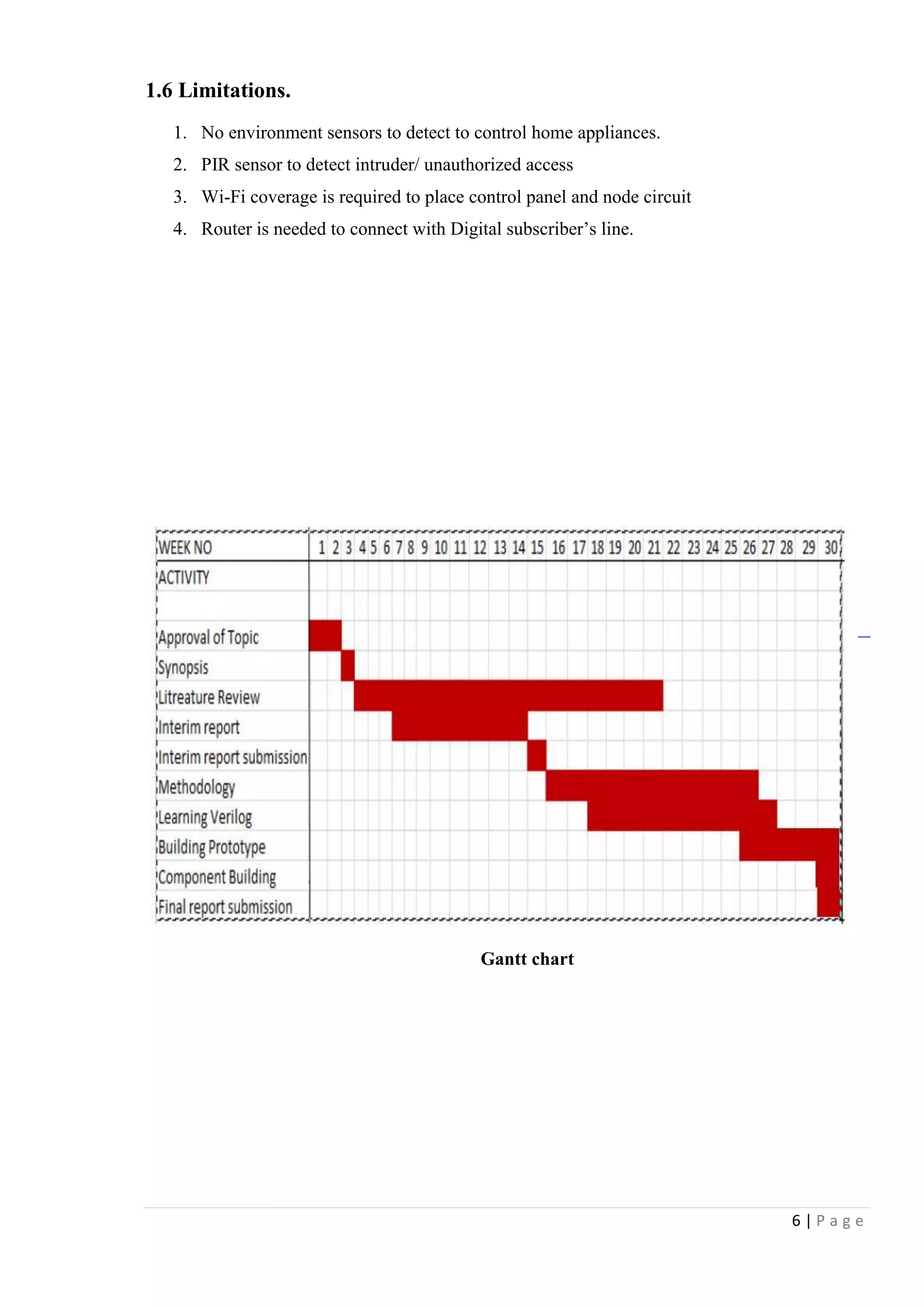
Gantt chart
7 | P a g e
Chapter 2 –Literature Review
2.1 Connectivity between appliance, switch and main control panel
Mayank Bhati1, Ankit Gupta (2014) introduced a system to control electrical devices remotely
using standard Infrared remote controller. This is capable to control switches up to 6 numbers.
Normal current rating for switch is 5Amp; high power load can be connected using extra relay
or contactors. The system consists with 8 bit microcontroller and remote control distance about
10m.
Prashant Chakole and Dr. Pradip B. Dahikar. (2013) proposed a development of a wireless
control system as well as display the current status of the power line devices through the radio
waves. This development is assumption to control devices using radio waves for existed infrared
controlling system. It has been introduced as 2 parts as transmitter and a receiving circuit.
Transmitter consist with LCD display and controlling keys to control 16 power line devices and
send command to receiving end. Receiver module used to collect information which is sent from
transmitter through same frequency range. Both transmitter and receiver work with individual
microcontroller circuit.
Chia-Hung Lien*, Hsien-Chung Chen (2008) proposed a system entitled “Power Monitoring
and Control for Electric Home Appliances Based on Power Line Communication” that control
and monitor home appliances through personal computer and PDA remotely. From that paper
they introduced a system PLC (Power line communication to give commands through existing
power line infrastructure to control appliances without using new wires. The information signal
has high amplitude than the AC signal. To show the current status of appliance, they used power
measuring modules such as current transformers, electrical power detector etc. This technology
is widely used in home automation and meter reading applications because speed, accuracy and
less additional cost for wirings. Aru, Okereke Eze ,Ihekweaba Gozie (2013) design a
microcontroller based RF remote control to switch on/off 13A power outlet. Since it is
connected through RF signals, which can be control in anywhere within frequency range.
Operation is independent of the direction/positioned, not like the Infrared remote control. The
remote control transmits signal which is received by the receiver receiving circuit installed in the
wall socket and decoded by the microcontroller which now turns the electro mechanical relay
ON or OFF.
8 | P a g e
2.2 Security/ Detection
Rhowel Dellosa (2014) describes an anti- thief low cost device using motion detection and body
temperature. When sensor device detects a moving object such as human of an animal, the
device gives a signal to trigger receiver circuit and that produce an audible signal that served as
alarm. Detecting motion and body temperature was their project. As the description, It used
wireless digital door bell as receiver circuit.
Jer-Vui Lee, Yea-Dat Chuah and Chin-Tin Chai (2013) use PIR (Passive infrared sensor) at their
multilevel detection system. When there is no motion detects by sensor, the output of the sensor
is 0.3V. In active condition voltage will be 3.3 up to 5V depend on manufacturer specification.
When voltage become high, and it will be sent to the signal control unit. Then, it will be
processed to give commands to start recording on webcam.
Mehek Potnis1, Ayesha Chimnani1 (2015) uses an infrared transceiver to detect and object or an
intruder. The transceiver consists with IR LED and IR receiver. The IR LED transmits an
infrared beam; it does not get reflected reverse except there is an object, or in the case of
intruder cut the beam. Receiver is an active low device, it will send high signal to the
microcontroller when IR light detected.
Chun-Pai Jimmy Hsieh & Yang Cao (2004) Used magnetic contact sensor (Reed Switch) to
their project as a door open/close sensor. reed switch can be used to detect whether that a door is
close or open when someone open the door, magnet and the switch will be separated as per
installation. The switch may be normally open or close, that gives trigger signal to main panel.
This switch is also called as magnetic switch, because that uses magnetic fields to power cycle
2.3 Remote Access
According to the published study “International Journal of Research in Engineering and
Technology eISSN: 2319-1163 | pISSN: 2321-7308” of ITM University, (201X) Gurgaon,
Haryana, India enhances a home appliances controlling system using zigbee wireless system. By
their paper it introduced to control basic home appliances such as Refrigerator, Fans and air
conditioner etc. Input will be given by computer through serial port. It is a wireless protocol low
power consumption limits transmission distances to 10–100 meters. Zigbee can transfer data for
long distances by connecting devices as mesh network. Zigbee devices can communicate up to
40kbps in 915Hz and 2.4GHz that vary by environment characteristics.
9 | P a g e
M. Puthanial1, S.Rajeshwari2 (2014) considers the problems with the implementation and
design of home automation systems. Still the possible solutions are devised through various
network technologies. . This system is developed by using Bluetooth and android technology.
The outcome is combination of Remote control with the Smart phones and provides simple user
interface. This is an alternating system like Zigbee to control home appliances within the house
limit area. This circuit is designed in which the microcontroller is connected to the relay and
Bluetooth device. One time the user switches on / off the device through the application
developed on the smart phone, the command is received by the Bluetooth device which is
connected to microcontroller. The microcontroller receives the command and allows the relay is
connected to the device to turn on / off.
(Thoraya Obaid, Haliemah Rashed 2014) presented a wireless home automation system for
elderly and disable people. The system is developed by using Zigbee technology and, speech
recognition. Zegbee wireless module was used for implement the wireless system between
appliance and the speech recognition system. LabVIEW software has been used to employ voice
recognition method. The LabView software can recognize voice commands and it will convert
to relevant data format which is required to send through the wireless transmitter. The receiver
module is connected with the switching circuit of the appliances. The wireless transmission unit
consists of Xbee and Arduino. A speech recognition program is written to control the house by
means of human voice.
Yuksekkaya et al., (2006) designed wireless home automation system by merging
communication technologies of GSM, Internet and speech recognition. GSM and Internet
methods were used for remote access of devices of house and speech recognition was designed
for users when they are stay at home. The communication between the user and the home is set
by the SMS (Short Message Service) protocol. A GSM modem is connected to the home
automation server. The communication between the home automation server and the GSM
modem is accomplished by the attention commands. To carry out Internet connectivity, a web
server is installed to get information from client side. When the send requests to the home
appliances, the appliance will send their status information to show client through the server. A
webpage is created as an operational interface where commands can be sent by the client to
change and control the status of devices.
10 | P a g e
By World Academy of Science, Engineering and Technology 68 (2012), Ahmed .M.Elshafee
and Karim Alaa Hamed design a home and building automation system using wi-fi technology.
This system consists of server, hardware interface modules. Server controls hardware, one
interface module. Server is a personal computer with wifi module. The server computer can be
accessed through any remote device in same LAN network. In this system, they used wifi to
interconnect server and hardware interface modules. The main functions of the server is to
control, and monitor installed system components, that enables hardware interface modules to
execute their assigned duties (through actuators), and to report server with triggered events
(from sensors).
2.4 Processing
Jon Burroughs (2010) discussed a home automation system using PIC microcontroller. This was
an experimental design to facilitate to control X-10 home appliance using PIC16F877A
microcontroller. X-10 is a communication protocol; communicate via existing power line
network.
Mohammad Arif Hossain, Md. Nazmul Hasan (2014) designed a microcontroller based
embedded home automation system using 8- bit AVR microcontroller. The prototype developed
can control electrical devices such as lighting, HVAC, Security access, Etc. An AVR
microcontroller is a brand of device manufactured by Atmel.
Vijay P.Jadhao (2013) developed an ARM LPC2148 microcontroller based home automation
and security system that can monitor and control home appliances through JAVA based mobile
phones on GSM network. This system allow user to send commands and receive present status
of sensor and appliance through cell phone and microcontroller system send signal through its
ports to switch ON/OFF appliances like light, fan, siren etc.
Akbar Satria, Muhammad Luthfi Priadi, (2015) proposed the architecture of embedded remote
monitoring system based on Internet. The embedded system consists of Arduino based
Atmega2560 microcontroller board, signal conditioning, Power measuring tool, and
communications interface. The user can see amount of electricity used by the appliance or
selected zone. Such as room, whole house, etc with a Smartphone in daily, weekly, and monthly
period.
11 | P a g e
P.Bhagyalakshmi at el. (2015), develop a home automation system to control and monitor home
appliances remotely while providing security against intrusion when the home host is not at
home. This project is made with facilitate of the Raspberry Pi microcontroller. The different
types of appliances are connected to the microcontroller and the sensor is connected using
wireless network. Raspberry Pi is a small, single board, low cost computer, which can be used in
electronics projects.
12 | P a g e
Chapter 3 –Methodology
3.1 Design 1- Using X.10 Module and Web server
Design overview
Here the home automation system mainly functions using an X10 Wi-Fi module. The appliances
are linked via a micro sensor network and are linked to an ad hoc Wi-Fi data connection and
proposed to control by both user via Wi-Fi/internet and the programmable controller installed
inside the home. Here the main feature is such that the appliances and sensor network are linked
via faster and pretty stable Wi-Fi connection. But all systems are not perfect invincible and it is
a truth for this as well. The drawbacks of this model are that installation cost is still considered
very high and the need of internet to allow remote access. The cost of the hardware components
also remains at significantly high than some other technologies have limited their usability for
moderate houses. The figure 3.1A sketches out a mapping of devices and access in a X10 linked
home automation system.
Appliance- Device, which need to control
remotely.
Relay- Turn On/Off power supply by the
command
X.10 Module- Data converts in to voltage
signal
Main Control panel- Arduino Mega,
Control input/output signals as the program
written.
Web server- Store operation history, allow
user to access through remote device.
Sensor- detects unauthorized access and
gives signal to main control panel.
Actuator- external devices such as door
lock, Alarm sounders.
Remote device- Mobile phone/ Desktop
Figure 3.1A [Drawn by Microsoft word]
13 | P a g e
Figure 3.1B shows the basic diagram for X.10 home automation systems
230V AC Power line
Relay module
PIR Sensor
Sounder Beacon
Web Server
Control PanelAppliance
Figure 3.1B [Drawn by Microsoft word]
14 | P a g e
3.2 Design 2- Using Single Arduino Board
In this design the appliances connected to home automation system are controlled by the
Arduino Single Board computer. The Arduino provides more flexibility and agility to the
proposed system because it allows easy interfacing with most of the transducers used in today‟s
applications. As depicted in the Figure 3.2A the control signals received from Arduino supposed
to be authenticated and distributed via a network of relay devices and the advantages are easy
user interactions via keypads, remote access via Ethernet, gsm/gprs, Wi-Fi and many more. On
the other hand this may also leads to cutoff the budget since the Arduino systems are free and
open source platforms. The drawback and the difficulty faced by the user is the requirement of
the awareness of Arduino programming and interfacing with sensors and actuators and other
passive electronic devices such as Wi-Fi modules, GSM modules, Ethernet modules…etc. Main
disadvantage of the systems is, additional wires required from main panel to each appliance and
also inputs outputs are limited since single Arduino control panel.
Appliance- Device, which need to control
remotely.
Relay- Turn On/Off power supply by the
command
Switch- Manual operated switch to turn on/off
appliance, located at appliance
Feedback module- Gives a feedback signal to
main panel, when device appliance turned on
manually.
Control panel- Arduino Mega, Control
input/output signals as the program written.
Sensor- detects unauthorized access and gives
signal to main control panel.
Actuator- external devices such as door lock,
Alarm sounders.
GSM module: provides remote access over
GSM net work
Remote device- Mobile phone/ Desktop
Figure 3.2A [Drawn by Microsoft word]
15 | P a g e
Figure 3.2B [Drawn by Microsoft word]
16 | P a g e
3.3 Design 3- Using two Arduino Boards: Optimum Design
Node Circuit
Main Control panel circuit
Figure 3.3A [Drawn by Microsoft word]
Figure 3.3B [Drawn by Microsoft word]
17 | P a g e
Appliance- Device, which is needs to control remotely.
Relay- Turn On/Off power supply to the appliance by the command
Switch- Manual operated switch to turn on/off appliance, located at appliance
Feedback module- Gives a feedback signal to main panel, when device appliance turned on
manually.
Node Panel- Arduino Mini, Control input/output signals as command by main panel.
Wi-Fi Module- use to communicate with router through main board
Sensor- detects unauthorized access and gives signal to main control panel.
Actuator- external devices such as door lock, Alarm sounders.
Router: Provide TCP/IP connectivity to access main panel over internet
Remote device- Mobile phone/ Desktop
The method proposed supposed to control and actuate via the node panels and each node
connected to central located main control panel. They are either parallel or serial connected to
the individual transducer (or sensor or actuator) and obtain the controls from Wi-Fi. Here the
main issue could be if one node is down to some reason the whole process of node part could go
blind since the dependency of each node is high. Main advantage of the panel is reducing of
wiring between appliances and control panel. Node panel can be located at any place within Wi-
Fi limit. Appliances can set more than one for each node.
Figure 3.3C [Drawn by Microsoft word]
18 | P a g e
Chapter 4 –Design and Implementation
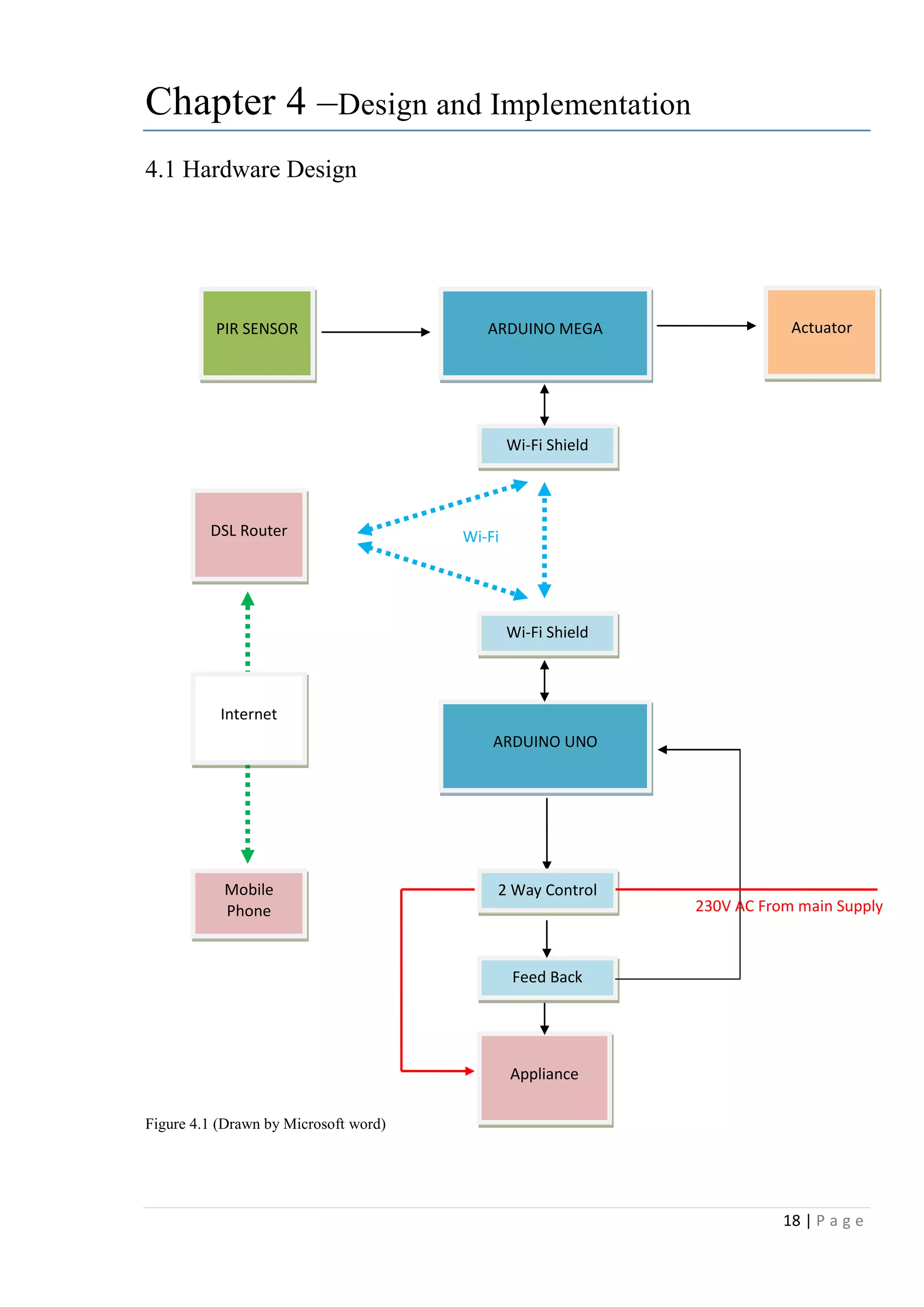
4.1 Hardware Design
Figure 4.1 (Drawn by Microsoft word)
ARDUINO MEGAPIR SENSOR Actuator
Appliance
ARDUINO UNO
Wi-Fi Shield
Wi-Fi Shield
Feed Back
2 Way Control
230V AC From main Supply
DSL Router Wi-Fi
Mobile
Phone
Internet
19 | P a g e
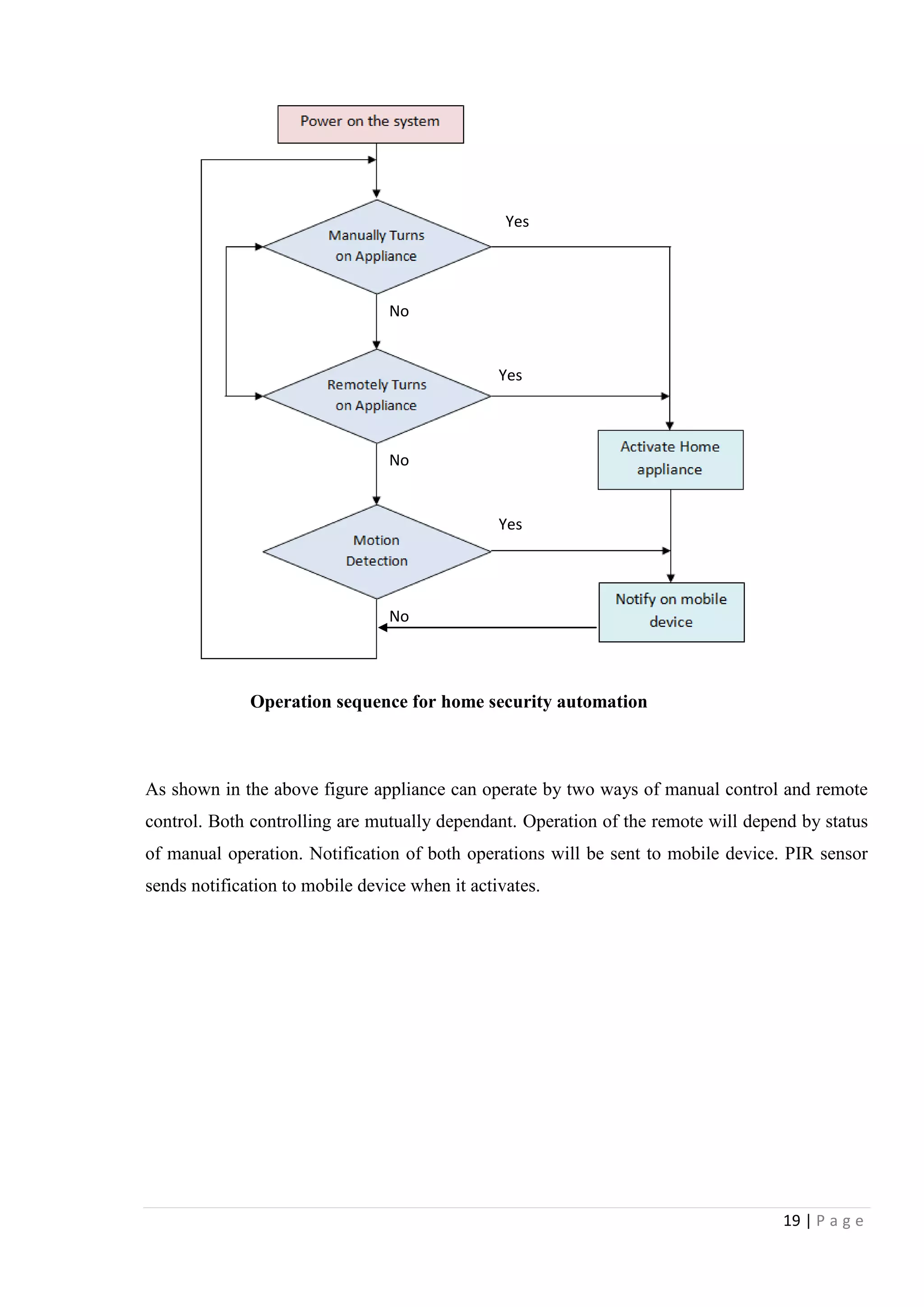
Operation sequence for home security automation
As shown in the above figure appliance can operate by two ways of manual control and remote
control. Both controlling are mutually dependant. Operation of the remote will depend by status
of manual operation. Notification of both operations will be sent to mobile device. PIR sensor
sends notification to mobile device when it activates.
Yes
Yes
Yes
No
No
No
20 | P a g e
The Figure 4.1 demonstrates the Block Diagram the content of this project. There is a one
sensing inputs have used. It is really essential to identify that all the electrical input to Arduino
support with either Analog or Digital.
Digital signals are also electronic signals transmitted as referenced binary code that can be
represented as current, high and low voltage or frequency difference as pulses. Arduino is used
to read system voltage (5V) as ON or HIGH signal, while the OFF or Low signal always as 0V.
Also it is programmed to output aDigital signal that acts as an Analog signal, this signal is
always known as Pulse Modulated Signal (PWM).
Analog signal is a voltage signal that can be HIGH (on), LOW (off) or any voltage between
these ranges. This means an Analog signal can be a voltage in between 0V and 5V. Analog
constantly send output or receive input about devices that run at percentages as well as on and
off. Arduino operate this by sampling the input signal and with comparing to a reference signal.
4.1 Hardware Requirements
The first step was to select the required hardware modules for this project. In this project a
controller and sensor actuator and communication modules were required. For communication
modules, it was required a HUZZAH ESP8266 breakout, which was the central component of
each modules.
List of hardware Requirement
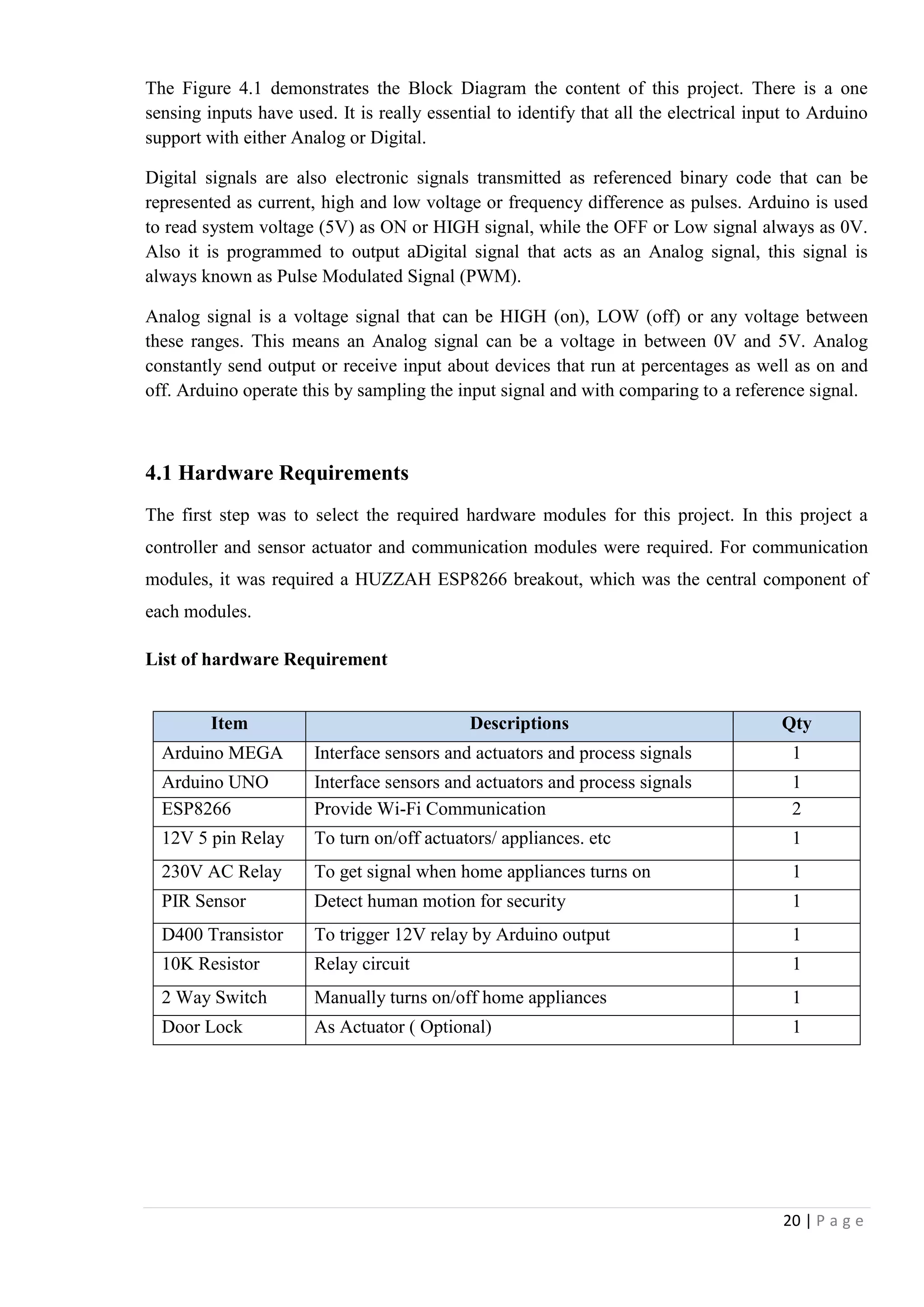
Item Descriptions Qty
Arduino MEGA Interface sensors and actuators and process signals 1
Arduino UNO Interface sensors and actuators and process signals 1
ESP8266 Provide Wi-Fi Communication 2
12V 5 pin Relay To turn on/off actuators/ appliances. etc 1
230V AC Relay To get signal when home appliances turns on 1
PIR Sensor Detect human motion for security 1
D400 Transistor To trigger 12V relay by Arduino output 1
10K Resistor Relay circuit 1
2 Way Switch Manually turns on/off home appliances 1
Door Lock As Actuator ( Optional) 1
21 | P a g e
4.1.1 Arduino MEGA
The Arduino Mega is a microcontroller board based on the ATmega1280. It has 54 digital
input/output pins (of which 14 can be used as PWM outputs), 16 analog inputs, 4 UARTs
(hardware serial ports), a 16 MHz crystal oscillator, a USB connection, a power jack, an ICSP
header, and a reset button. It contains everything needed to support the microcontroller; simply
connect it to a computer with a USB cable or power it with a AC-to-DC adapter or battery to get
started. The Mega is compatible with most shields designed for the Arduino Duemilanove or
Diecimila. [ https://www.arduino.cc/en/Main/arduinoBoardMega]
Summary
Microcontroller ATmega1280
Operating Voltage 5V
Input Voltage (recommended) 7-12V
Input Voltage (limits) 6-20V
Digital I/O Pins 54 (of which 15 provide PWM output)
Analog Input Pins 16
DC Current per I/O Pin 40 mA
DC Current for 3.3V Pin 50 mA
Flash Memory 128 KB of which 4 KB used by boot loader
SRAM 8 KB
EEPROM 4 KB
Clock Speed 16 MHz
The Arduino Mega can be powered using the USB connection or with an external power supply.
Power source automatically selected by arduino board
External (non-USB) power can come either from an AC-to-DC SMPS adapter (wall-wart) or
battery. The board can operate on an external supply of 6 to 20 volts. Smoothness of the power
supply is must for proper working and also durability. To overcome malfunctioning and
overheating it is recommended to maintain supply voltage within 6V to 12V. The adapter can be
connected by plugging a 2.1mm center-positive plug into the board's power jack. Leads from a
battery can be inserted in the GND and Vin pin headers of the POWER connector.
22 | P a g e
4.1.2 Arduino UNO
The Arduino UNO is a microcontroller board originally based on the ATmega328P.. It has 14
digital input/output pins (of which 6 can be used as PWM outputs), 6 analog inputs, a 16 MHz
quartz crystal, a USB connection, a power jack, an ICSP header and a reset button. It contains
everything needed to support the microcontroller; simply connect it to a computer with a USB
cable or power it with a AC-to-DC adapter or battery to get started.
[https://www.arduino.cc/en/Main/arduinoBoardUno]
Specifications
Microcontroller ATmega328P
Operating Voltage 5V
Input Voltage (recommended) 7-12V
Input Voltage (limit) 6-20V
Digital I/O Pins 14 (of which 6 provide PWM output)
PWM Digital I/O Pins 6
Analog Input Pins 6
DC Current per I/O Pin 20 mA
DC Current for 3.3V Pin 50 mA
Flash Memory 32 KB (ATmega328P) of which 0.5 KB used by
bootloader
SRAM 2 KB (ATmega328P)
EEPROM 1 KB (ATmega328P)
Clock Speed 16 MHz
Power supply for the arduino UNO is same as Arduino MEGA
23 | P a g e
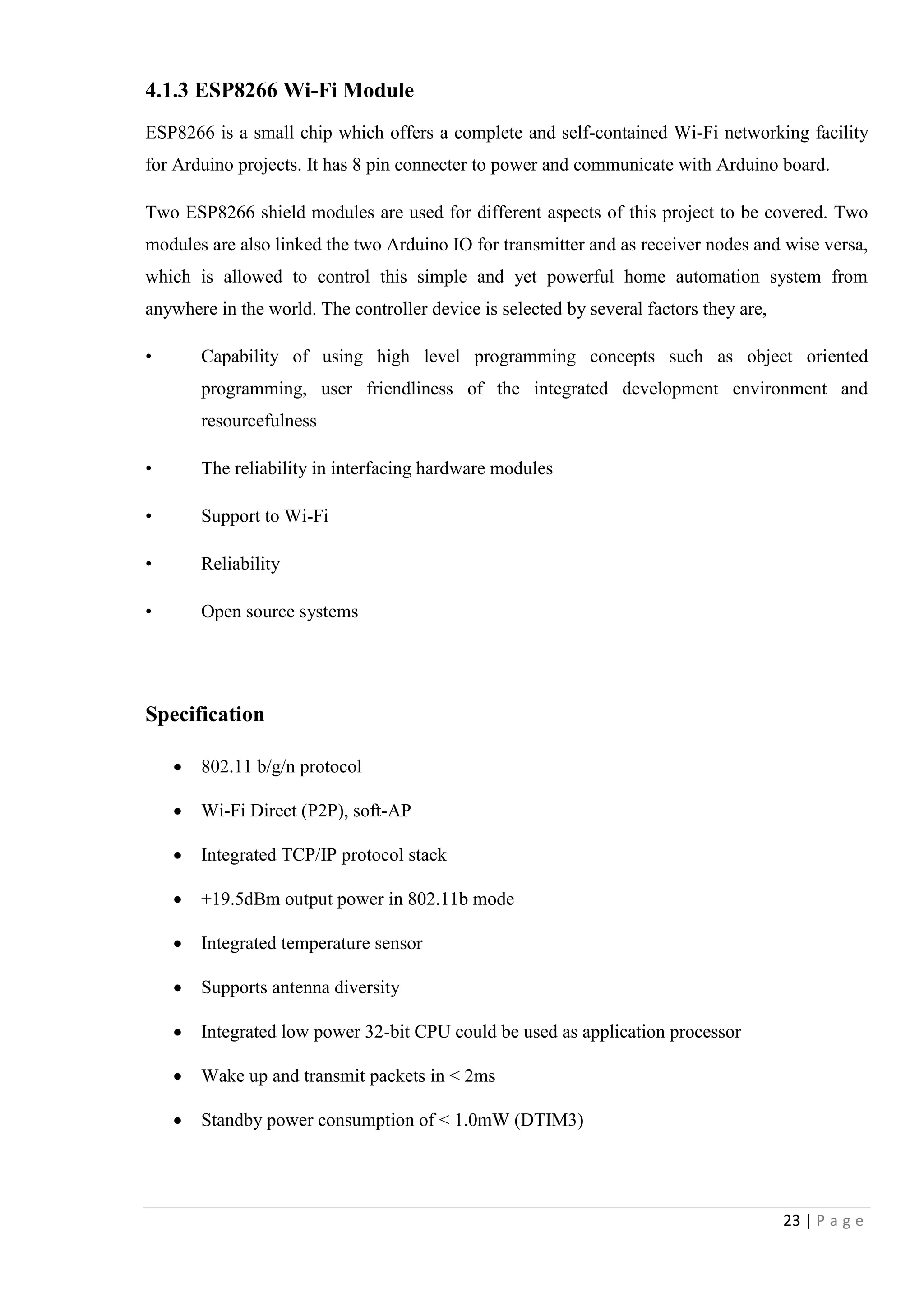
4.1.3 ESP8266 Wi-Fi Module
ESP8266 is a small chip which offers a complete and self-contained Wi-Fi networking facility
for Arduino projects. It has 8 pin connecter to power and communicate with Arduino board.
Two ESP8266 shield modules are used for different aspects of this project to be covered. Two
modules are also linked the two Arduino IO for transmitter and as receiver nodes and wise versa,
which is allowed to control this simple and yet powerful home automation system from
anywhere in the world. The controller device is selected by several factors they are,
• Capability of using high level programming concepts such as object oriented
programming, user friendliness of the integrated development environment and
resourcefulness
• The reliability in interfacing hardware modules
• Support to Wi-Fi
• Reliability
• Open source systems
Specification
 802.11 b/g/n protocol
 Wi-Fi Direct (P2P), soft-AP
 Integrated TCP/IP protocol stack
 +19.5dBm output power in 802.11b mode
 Integrated temperature sensor
 Supports antenna diversity
 Integrated low power 32-bit CPU could be used as application processor
 Wake up and transmit packets in < 2ms
 Standby power consumption of < 1.0mW (DTIM3)
24 | P a g e
4.1.4 12V 5 pin Relay
A relay is a simple electromechanical switch made up of an electromagnet and a set of contacts.
In this project 12V 5 pin relay is used to control home appliance and actuator. It has 2 pin for
activate by 12V DC supply and other 3 Pin for Normally open and normally close contacts. NO,
NC pins can drive 230V AC up to 7A for appliance turns on and off.
Specification
Operating voltage: 12V DC
Numbers of pin 5 (2 for coil, other 3 pins for switching dry contacts)
Max Amps can drive by contacts 10A/24V DC, 7A/240V AC
Frequency 50/60Hz
4.1.5 240V AC Relay
To detect whether appliance is on or off, 230V AC driven relay is used. It activates by the
supply of home appliance when it switch on.
Specification
Operating voltage: 240V AC
Numbers of pin 8 (2 for coil, other 6 pins for switching dry contacts)
Max Amps can drive by contacts 5A/24V DC, 5A/240V AC
Frequency 50/60Hz
4.1.6 PIR Sensor
In here RK410PT PIR sensor used to detect human motion. This sensor has relay contact, which
will be triggered when some motion has detected by object exceeding 33KG [3]. It can be
directly connected with analog input terminal of the Adriano with 5V in other side
25 | P a g e
4.1.7 D400 Transistor
D400 is a silicon made NPN transistor can be used as Low-Frequency Power Amp and also as a
electronic switch. It can drive up to 25V collector to base, Collector to emitter and also 5V
Emitter to base. Collector power dissipation 900mW [4]
[http://pdf.datasheetcatalog.com/datasheets2/45/455733_1.pdf]
4.1.8 10K Resistor
A resistor is an electrical component that limits or regulates the flow of electrical current in an
electronic circuit. Resistors can also be used to provide a specific voltage for an active device
such as a transistor. In here 10K resister is used to control and supply voltage to Transistor base
pin.
4.1.9 Two way switch
Two witch is coupled with 5 pin relay to operate as two way switching function for home
appliance. Using this switch user can turn on/ off appliance independency by remote operator.
4.1.10 Actuator
Actuator is a 12V electro magnetically operated door lock, which can be connected via relay
circuit. This is useful to control access of home main door garage doors and any doors as
requirement. Door lock can handle up to 200KG weight as manufacture‟s specification.
D400 Transistor 10K Resistor Two way switch
26 | P a g e
4.2 Hardware and Software Configuration
4.2.1 Connection between Arduino MEGA and Wi-Fi Shield.
Wi-Fi Shield Arduino MEGA Power by USB
Wi-Fi shield pin-out details
1. TX- with Arduino RX
2. V+ - 3.3V supplied from Arduino
3. Not in use
4. Not in use
5. Not in use
6. Not in use
7. Ground connected
8. RX- setup to TX in Arduino
Description
The Wi-Fi module communicates with the host Arduino mega using the serial communication at
19200 bauds per second. The Arduino mega is the master device hence responsible for
collecting and processing the data from the transducers attached
Figure 4.2.1A [Drawn by MS paint]
Figure 4.2.1B [From prototype]
27 | P a g e
Note: This is used USART protocol to communicate between each device. Arduino MEGA has
4 hardware serial TX RX connections for difference connections. This is able to add more TX,
RX connections by software serial.
Arduino has programming by using „C‟ and the basic structure of the Arduino programming is
fairly simple and mainly have two parts. These two required parts, or functions, enclose blocks
of statements.
void setups()
{
statements;
}
void loop ()
{
statements;
}
Where setup () is the preparation, loop () is the execution. Both functions are required for the run
the programme.
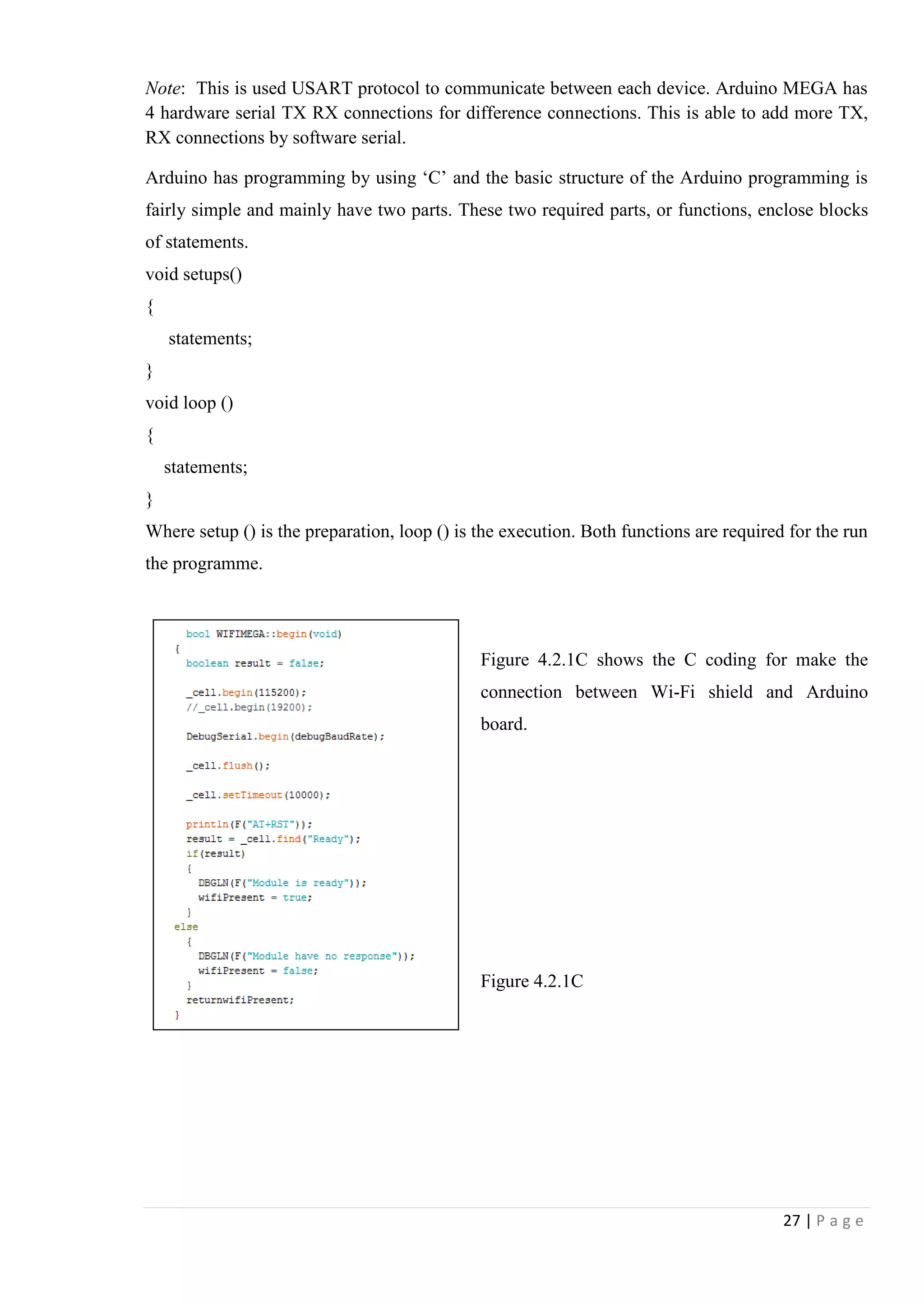
Figure 4.2.1C shows the C coding for make the
connection between Wi-Fi shield and Arduino
board.
Figure 4.2.1C
28 | P a g e
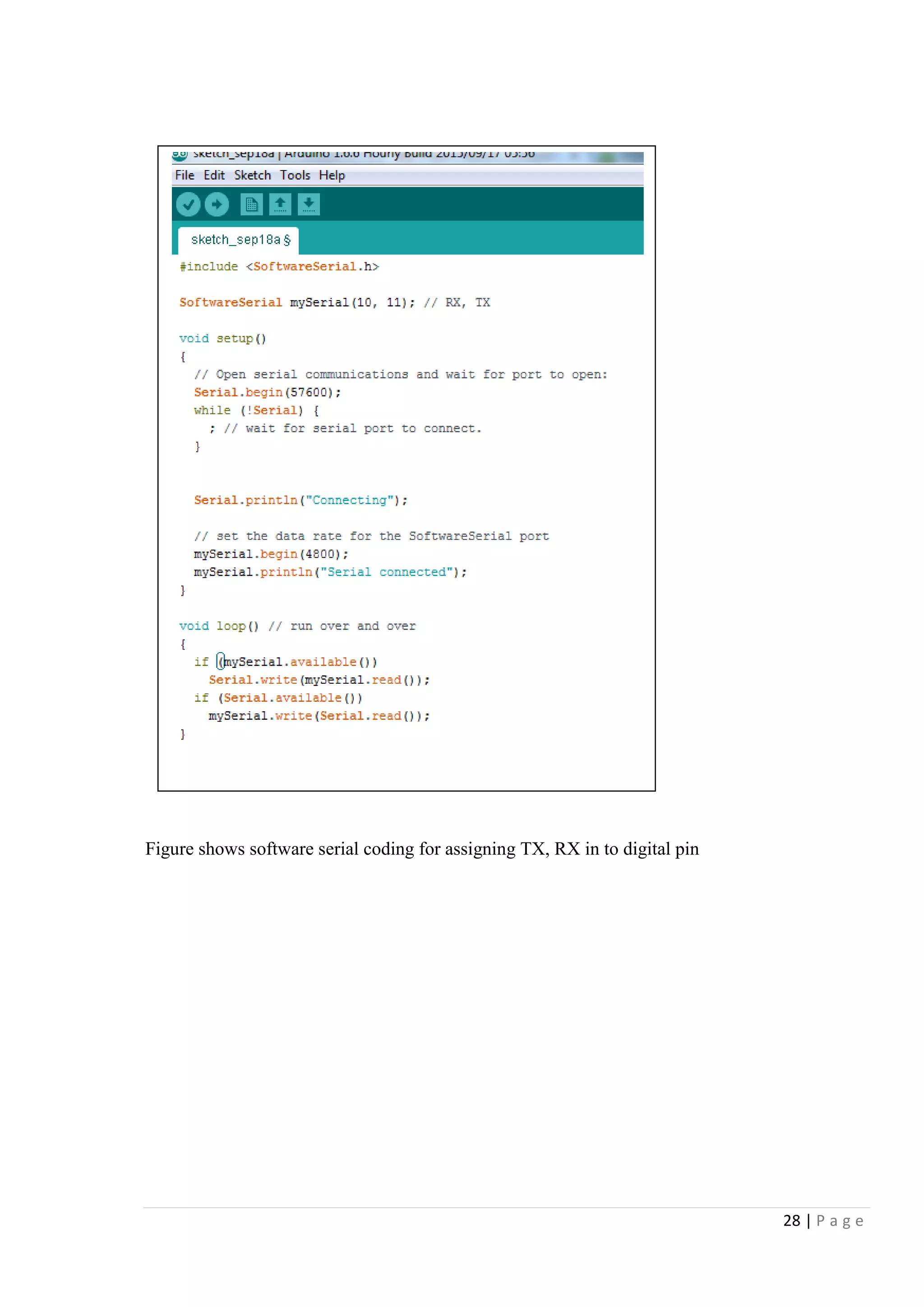
Figure shows software serial coding for assigning TX, RX in to digital pin
29 | P a g e
4.2.2 Connection between Arduino UNO and Wi-Fi Shield
Arduino UNO Wi-Fi Shield USB Power
Wi-Fi shield pin
1. TX- with RX in Arduino
2. V+ - 3.3V supplied from Arduino
3. Not in use
4. Not in use
5. Not in use
6. Not in use
7. Ground connected
8. RX- with TX in Arduino
Description:
The Wi-Fi module communicates with the host Arduino Uno using the serial communication at
19200 bauds per second. The Arduino Uno is the slave device hence responsible for transferring
the requested data to the Arduino mega master device.
Figure 4.2.2A [Drawn by MS paint]
Figure 4.2.1B [From prototype]
30 | P a g e
4.2.3 Connection between Appliance and Arduino UNO
10 K Resistors
Transistor
IN 4001Diode
Relay
1. Digital pin 5 for relay driven circuit
2. Common is connected together
3. 12V relay work as switch
4. Transistor drives 12V relay
5. 10K resistor to reduce voltage to transistor base
6. Diode to transistor protection
7. NO, C, NC can be used as requirement
Figure 4.2.3A [Drawn by MS paint]
Figure 4.2.3BB [From prototype]
31 | P a g e
Description:
The actuation of components is accommodated by the relay device. The relay is an electrically
magnetized coil and with and without signal it acts as an open or close switch. The relays are
capable of operating under rough conditions is a key in this work.
Interfacing Output relay for Appliance
Figure 4.2.3C shows that the programming code for activate the relay output pin in Arduino
UNO board as in shown when the serial read as A, it gives a command to make the value high in
associated pin.
Figure 4.2.3C [From Arduino Software]
32 | P a g e
4.2.4 Feedback connectivity
1. 230 AC relay will activate if somebody turns on the appliance manually
2. NO dry contact gets 5V from Arduino
3. 5V received by analog in A0. It will work as feedback
Description:
When the relay gets a on signal it is directed back to Arduino Uno with a OR logic circuit
created. This is active for both manual and remote operation.
Figure 4.2.4A [drawn by MS paint]
Figure 4.2.4B [From prototype]
33 | P a g e
Interfacing Feedback Relay
Figure 4.2.4C elaborated how to be programmed Arduino software coding to read current status
of the appliance by getting value to analog pin A0.
Figure 4.2.4C [From Arduino Software]
34 | P a g e
4.2.5 PIR Sensor Connectivity
PIR Sensor
External 12V DC power source is
required
R Relay dry contact
PIR sensor connects with PWM pin 6 and 7
Description:
PIR gives a signal when it detects motion and Arduino notices the change and does the
necessary process activations.
Figure 4.2.5B [From prototype]
Figure 4.2.4A [Drawn by MS Paint]
35 | P a g e
Here used PIR sensor and feedback relay as inputs. They all output analog DC voltages to
processor. Then inbuilt registers of processor (Arduino) convert that analog input to digital.
These digital 10 bit outputs have 1024 quantization level and therefore can have sensitive output
to processor. Therefore when sensor produces output, it can be monitored as digital valve.
0V 0000000000 = 010
5V 1111111111 = 102310
Interfacing PIR Sensor –Important Section of programming
Figure 4.2.4C has shown coding it had used to detect the PIR relay signal and assign in to
integer pir. Motion is detect by Arduino MEGA.
Figure 4.2.4C [From Arduino Software]
36 | P a g e
4.3 Randomly turns on and off lights for security purposes
Random operation of lights is designed to add additional feature to security system. This will
help to mislead intruder trying to entering premises. Random operation of lights convinces that
residents are at home.
Figure 4.3 [from arduino software]
Figure 4.3 elaborate Arduino coding set a timer to output pin. Lights can be set to turn on/off
within specific time period.
37 | P a g e
4.4 Remote Access
4.4.1 Android Application GUI
Android
Android is a mobile operating system (OS) based on the Linux kernel. With a user
interface based on direct manipulation, Android is designed primarily for touch screen mobile
devices such as smart phones and tablet computers. There are millions of android applications
are available to free download on Google‟s play store and many other third party sources. Some
developers choose to make their apps available to download from their own sites or alternative
app stores Main advantage of this OS is open source capability.
Current status of the device is off
Current status of the device is ON
Turns ON/OFF random light mode when leaving home
Notify when the PIR activates
Figure 4.4.1 shows the android application Graphical user interface which is used to control
home appliances and it allow user to see current status of home appliances. It will notify that
when some motion detected by PIR sensor.
Figure 4.4.1 [By MS word]
38 | P a g e
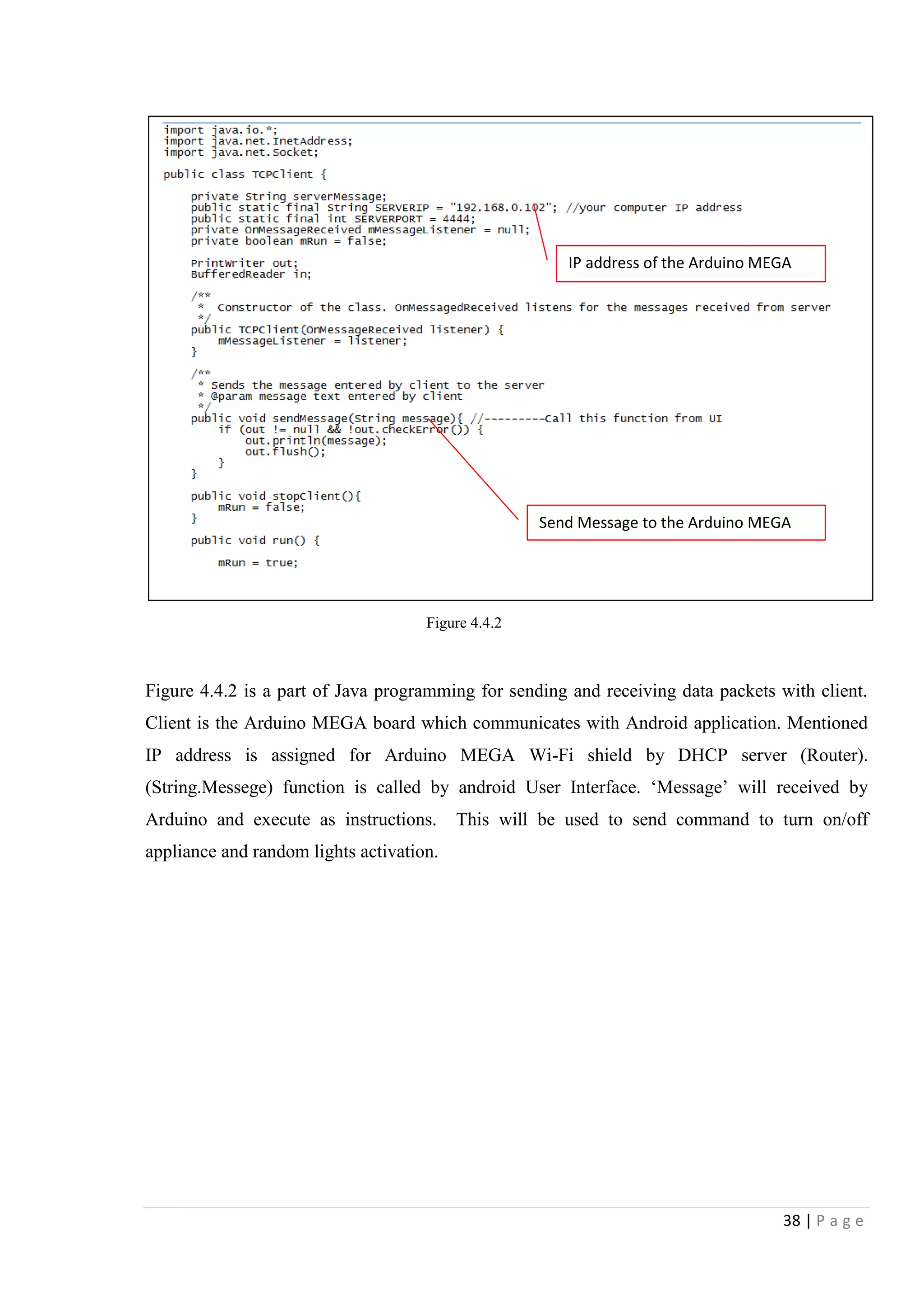
Figure 4.4.2 is a part of Java programming for sending and receiving data packets with client.
Client is the Arduino MEGA board which communicates with Android application. Mentioned
IP address is assigned for Arduino MEGA Wi-Fi shield by DHCP server (Router).
(String.Messege) function is called by android User Interface. „Message‟ will received by
Arduino and execute as instructions. This will be used to send command to turn on/off
appliance and random lights activation.
Send Message to the Arduino MEGA
Figure 4.4.2
IP address of the Arduino MEGA
39 | P a g e
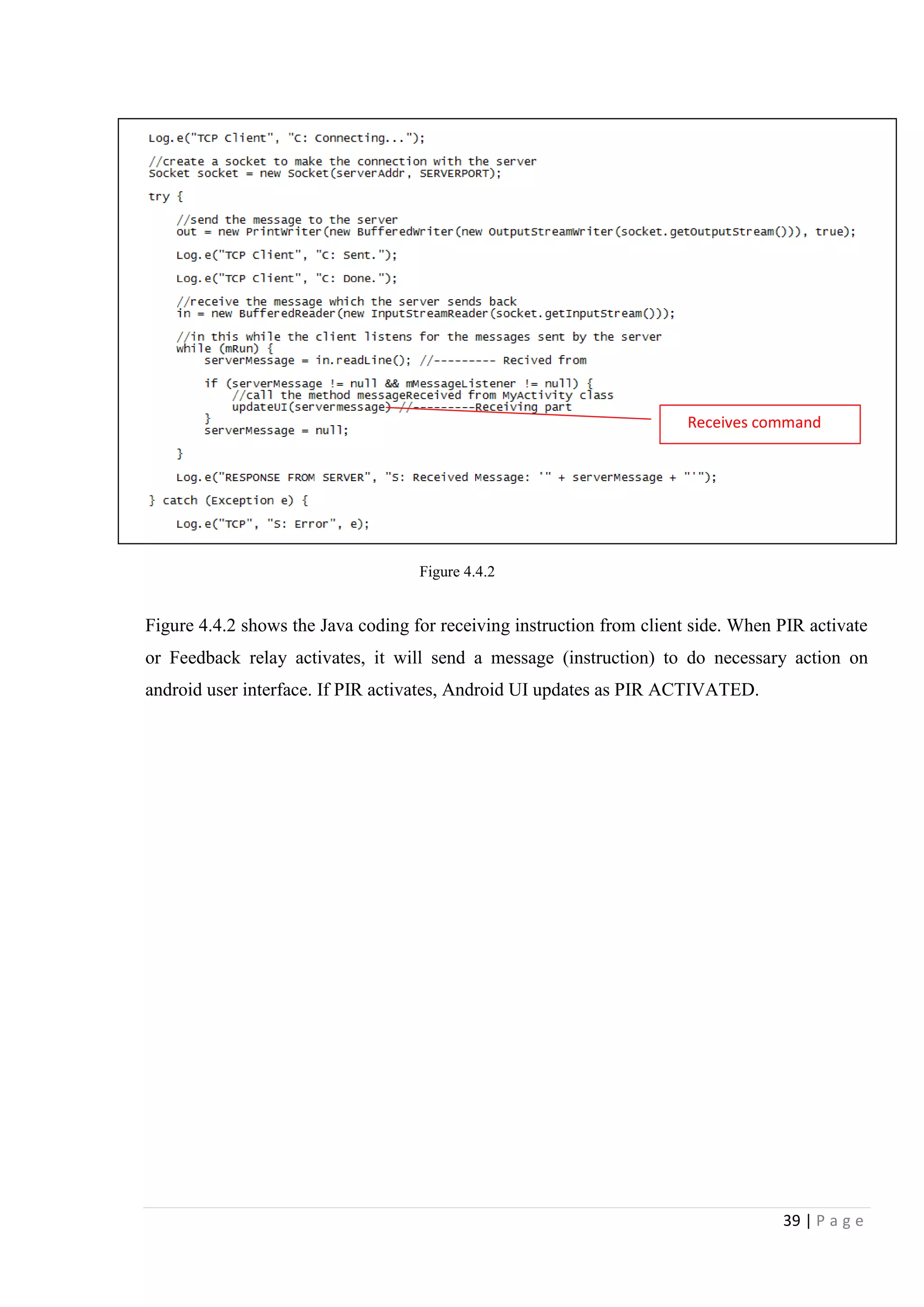
Figure 4.4.2 shows the Java coding for receiving instruction from client side. When PIR activate
or Feedback relay activates, it will send a message (instruction) to do necessary action on
android user interface. If PIR activates, Android UI updates as PIR ACTIVATED.
Figure 4.4.2
Receives command
40 | P a g e
Chapter 5 –Testing and Analysis
5.1 Testing the circuit
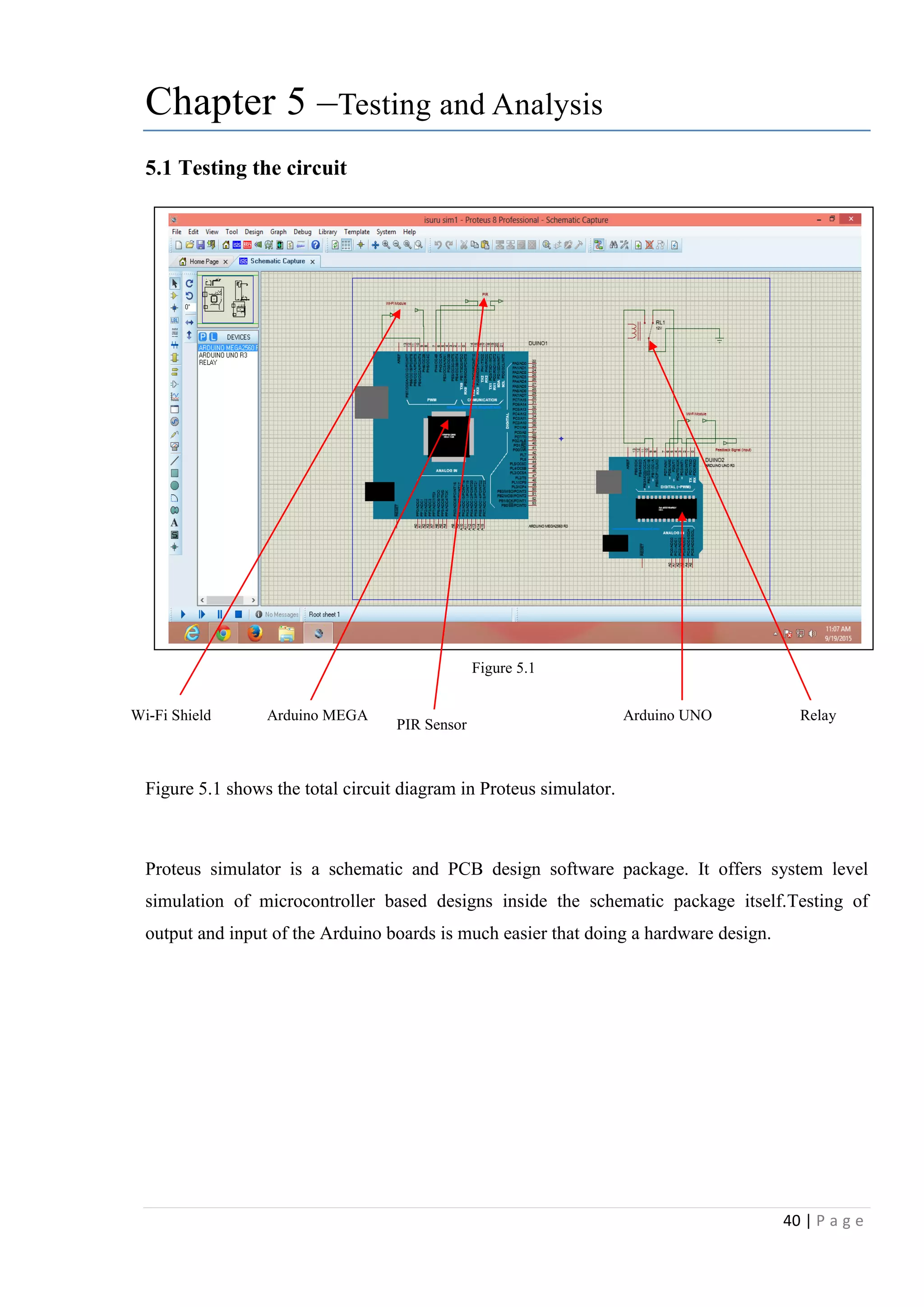
Figure 5.1 shows the total circuit diagram in Proteus simulator.
Proteus simulator is a schematic and PCB design software package. It offers system level
simulation of microcontroller based designs inside the schematic package itself.Testing of
output and input of the Arduino boards is much easier that doing a hardware design.
Figure 5.1
Wi-Fi Shield Arduino MEGA Arduino UNO
PIR Sensor
Relay
41 | P a g e
5.2 PIR Detection
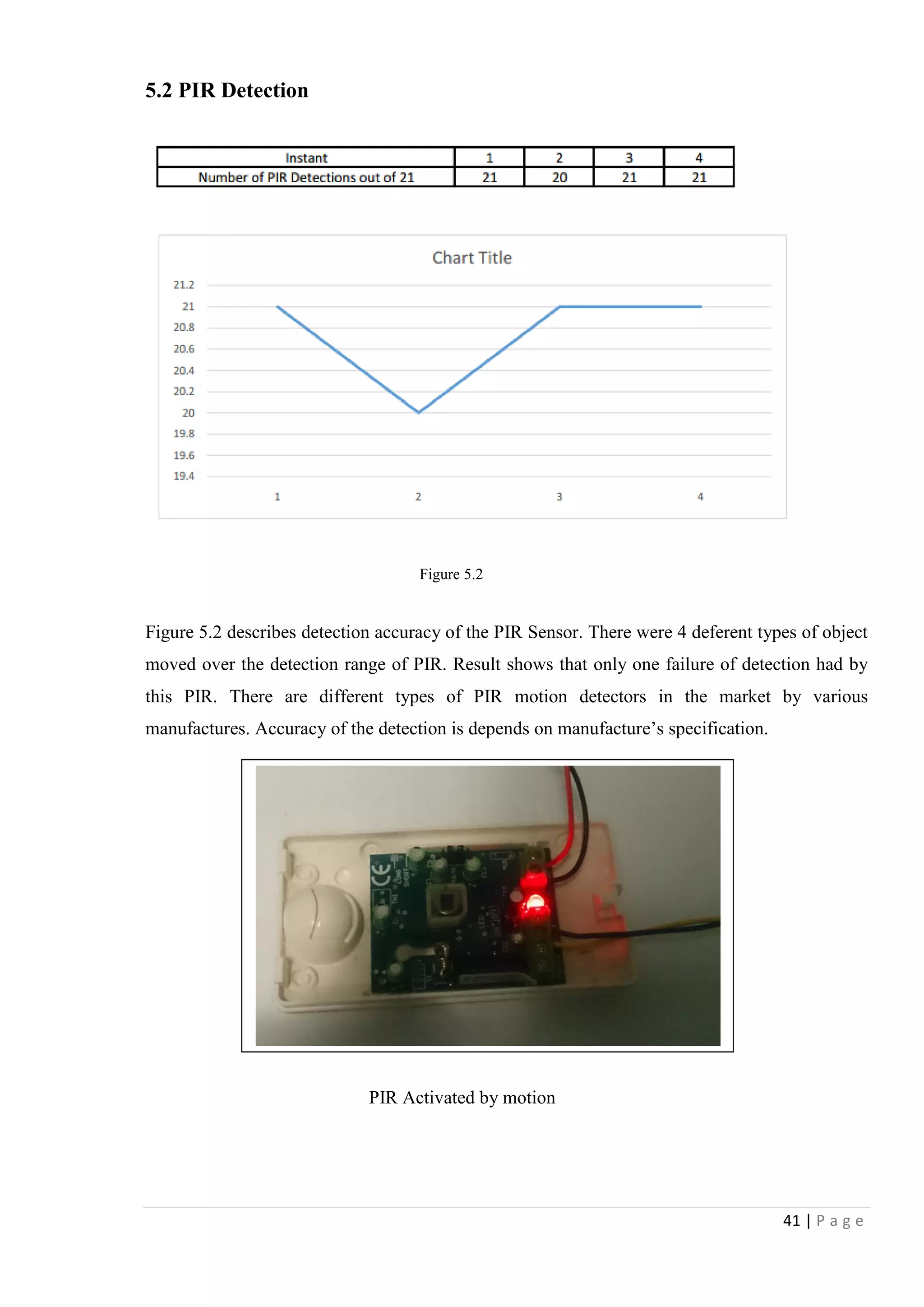
Figure 5.2 describes detection accuracy of the PIR Sensor. There were 4 deferent types of object
moved over the detection range of PIR. Result shows that only one failure of detection had by
this PIR. There are different types of PIR motion detectors in the market by various
manufactures. Accuracy of the detection is depends on manufacture‟s specification.
PIR Activated by motion
Figure 5.2
42 | P a g e
5.3 Testing of two way Switch and feedback Relay
Figure 5.3 shows the circuit connectivity of appliance wall outlet, manual control switch, remote
control Relay circuit and feedback relay to inform that whether appliance is on or off. When
wall outlet powered, feedback relay will trigger. Use of the AC power detection circuit is better
than using of AC relay because of the characteristic of AC Relay. Relay has limited switching
time and get heated when long time working. Therefore as further development, power detection
circuit will be added.
Figure5.3 [from prototype]
Relay control
by Arduino
Feedback relay
Wall outlet
Manual
switch
43 | P a g e
Figure 5.4 elaborate the connection between feedback relay and Arduino UNO board
Figure5.4 [from Proteus Simulator]
44 | P a g e
5.4 Control appliances over android application
Figure 5.5 [captured from prototype 2]
Figure 5.5 shows operation of Arduino home automation system using android application
which is available to download from Google‟s play store. We can set input and output as our
requirement
Wi-Fi Module
ATmega328P
Android App
Light 1 ON
Light 1 OFF
Light 1 turned off from App
45 | P a g e
Chapter 6 –Conclusion
The initial project objectives were
1. Current status of the appliance is to be identified.
2. Human motion to be detected
3. It is required to read input signal by control panel
4. Received input signal need to send to remote user over internet as their request.
5. Randomly turn on/ off lights if required for security purposes
6. Turn ON/ OFF appliance by remote end.
As my first objective of identifying current status of the appliance, I have done it using a 230V
AC relay. It was successful as its simplicity. I connected it with Arduino UNO board and it
properly worked. Use of 2 way switch and relay circuit also works properly.
I use readymade PIR sensor as my motion detector. There was no any issue of PIR sensor it
already tested. Human detection of the sensor is 99% accurate even few error detection due to
improper placement of sensor.
Reading of input signals is not too much hard since easy programming of Arduino board. Any
signals received by Arduino, which can be assigned in to character. I had difficulties on
developing of Android application to outmatch my total project report during the time period.
Designing of android application with User interface was somewhat difficult task since it is
related on Java programming. From the beginning I basically focused on designing of modules
and Arduino control panels. Finally I was unable to get required technical support for develop
android to complete my project as I wished. I hope complete development of own android app
which will fulfill the actual requirement of my project as further development.
Random light turns on and off can be done using timer and interval.
Time became a major constraint in the project for full implantation. I appreciate for the time I
spent this project even it is not yet completed. I had to know most of technical terms related to
home security automation and Arduino programming are valuable.

Home security automation

  • 1.
    1 | Pa g e Abstract From the day the first human footstep was on the surface of earth the human being always motivated for one thing remained certain. That is the motivation for “Technology”. Today we are living on a busy life style and also in a world full of technological wonders. The time is the most precious single commodity we are unable to share or even produce. To face the challenges we face today everybody tries to integrate modern technology in their daily needs. Basic features of home automation came out in practical world since the early 20th century through the introduction of using electricity in home. The usage of electrical home automation started between the years 1915 to 1920. Home automation provides the manners of computer and information technology to control and monitor appliances and features. Its include control over networks based of lighting, heating, ventilation and air conditioning, appliances, security locks of gates and doors and other systems for providing convenience, comfort, energy efficiency and safety security.
  • 2.
    2 | Pa g e INDEX Page Chapter 1- Introduction 1.1.Introduction…………………………………………………… 4 1.2.Problem Identification …………………………………………4 1.3.Aim……………………………………………………………..4 1.4.Objectives………………………………………………………4 1.5.Scope…………………………………………………………...4 1.6.Limitations……………………………………………………...5 Chapter 2- Literature Review Chapter 3- Methodology Chapter 4- Design and Implementation 4.1 Hardware Requirement ……………………………………....19 4.1 Hardware Requirement 2.1.Connection between appliance switch………………………….6 2.2.Security and detection ………………………………………….7 2.3.Remote Access………………………………………………….7 2.4.Processing……………………..………………………………...9 3.1.Design 1- using X.10……………………...……………………11 3.2.Design 2- Using single Arduino Board………………………...13 3.3.Design 3- Optimum Design…………………………………….15 4.1.1 Arduino MEGA…………………………………...…... 20 4.1.2 Arduino UNO…………………………………………..21 4.1.3 ESP8266 Wi-Fi Module…………………….………......22 4.1.4 12V 5Pin Relay…………………………………………23 4.1.5 PIR Sensor……………………………………………...23 4.1.6 D400 Transistor…………….........……………………...…24 4.1.7 10K Resistor…………………………………………….24 4.1.8 Two way switch………………………………………...24 4.1.9 Actuator…………………………………………...........24 4.2.1 Arduino MEGA and Wi-Fi Shield……...........................25 4.2.2 Arduino UNO and Wi-Fi Shield ….................................28 4.2.3 Appliance and Arduino UNO…………………………...29 4.2.4 Feedback connectivity……………....................................31 4.2.5 PIR Sensor connectivity………………………………...33 4.2.6 Random light on/off…………………………………….35 4.2.7 Android Application GUI…………...………………….36
  • 3.
    3 | Pa g e INDEX Page Chapter 5- Testing and Analysis 5.1.Testing the Circuit…………………………………………….39 5.2.PIR Detection…………………………………………………40 5.3.Testing of 2 way switch and feedback Relay…………………41 5.4.Control Appliance over Android app…………………………43 Chapter 6- Conclusion……………………………… ………..44
  • 4.
    4 | Pa g e Chapter 1 Project title: Home Security Automation 1.1 Introduction Home security automation can be introduced as housing extension of building automation. The main purpose of the home security automation is reducing human effort for controlling house hold appliances. The concept of home automation is not a new concept. Modern home automation systems are consisting with built in security systems that can merge to provide security and safety on human and properties. Home automation would provide a package that performs the scheduling and automatic operation of garden water supplying, ventilation, heating and air conditioning, window shades, security systems, lighting, ambient music and interface food preparation appliances. The main objective is to bring out smart and comfortable living conditions and make lives more versatile and fast. Home automation may also allow remote access or in other words, essential home functions to be controlled remotely from anywhere in the world using a personal computer or a smart mobile phone connected to the Internet. Basic features of home automation came out in practical world since the early 20th century through the introduction of using electricity in home. The usage of electrical home automation started between the years 1915 to 1920. TV remote controller can be introduced as a simple automation system. Then it increased through rapid development of technology [1].The earliest home control systems were proposed by Hitachi and Matsushita of Japan in 1978 Need of home automation is needed to reduce human involvement in doing some activities and it replaces considerable amount of human work force. Also it results in, saving the energy by reducing cycle time, labor and material waste and to improve quality, accuracy and precision. It supports people to do tasks that involve hard physical or tedious work, tasks done in dangerous environments, Nowadays automation does a huge role in increasing of productivity, quality and robustness in human needs. This is why this project looks into construction and implementation of a system involving hardware to control variety of electrical and electronics systems.
  • 5.
    5 | Pa g e 1.2 Problem Identification Switches are very simple yet powerful devices can be seen at almost every instant of day today actions. Today the human has become more powerful than ever and operations like “On” and “OFF” a switch became little bit less important and always people used to forget to do these operation. Sometimes residents of a house may always find it difficult to remember turn off home appliances when leaving homes. That may lead device malfunctioning the reasons like exceeding of work capacity, high electricity usage, over heat and fire risk, etc. Intruders are a main problem for almost every resident. It is important to make sure that everything is protected from harm when leaving home. There is a risk of unauthorized access to home premises. 1.3 Aim Design and implement of home security automation to control basic home appliances while providing security features for detecting unauthorized access by motion detection. 1.4 Objectives To meet the above aims of the project followings should be considered. 1. Current status of the appliance is to be identified. 2. Human motion to be detected 3. It is required to read input signal by control panel 4. Received input signal need to send to remote user over internet as their request. 5. Randomly turn on/ off lights if required for security purposes 6. Turn ON/ OFF appliance by remote end. 1.5 Scope. 1. Control basic home appliance which is connected to output Relay from remote location. 2. Detects motion and send notification to remote user. 3. Turn ON/ OFF relay randomly when turn on out of home mode.
  • 6.
    6 | Pa g e 1.6 Limitations. 1. No environment sensors to detect to control home appliances. 2. PIR sensor to detect intruder/ unauthorized access 3. Wi-Fi coverage is required to place control panel and node circuit 4. Router is needed to connect with Digital subscriber‟s line. Gantt chart
  • 7.
    7 | Pa g e Chapter 2 –Literature Review 2.1 Connectivity between appliance, switch and main control panel Mayank Bhati1, Ankit Gupta (2014) introduced a system to control electrical devices remotely using standard Infrared remote controller. This is capable to control switches up to 6 numbers. Normal current rating for switch is 5Amp; high power load can be connected using extra relay or contactors. The system consists with 8 bit microcontroller and remote control distance about 10m. Prashant Chakole and Dr. Pradip B. Dahikar. (2013) proposed a development of a wireless control system as well as display the current status of the power line devices through the radio waves. This development is assumption to control devices using radio waves for existed infrared controlling system. It has been introduced as 2 parts as transmitter and a receiving circuit. Transmitter consist with LCD display and controlling keys to control 16 power line devices and send command to receiving end. Receiver module used to collect information which is sent from transmitter through same frequency range. Both transmitter and receiver work with individual microcontroller circuit. Chia-Hung Lien*, Hsien-Chung Chen (2008) proposed a system entitled “Power Monitoring and Control for Electric Home Appliances Based on Power Line Communication” that control and monitor home appliances through personal computer and PDA remotely. From that paper they introduced a system PLC (Power line communication to give commands through existing power line infrastructure to control appliances without using new wires. The information signal has high amplitude than the AC signal. To show the current status of appliance, they used power measuring modules such as current transformers, electrical power detector etc. This technology is widely used in home automation and meter reading applications because speed, accuracy and less additional cost for wirings. Aru, Okereke Eze ,Ihekweaba Gozie (2013) design a microcontroller based RF remote control to switch on/off 13A power outlet. Since it is connected through RF signals, which can be control in anywhere within frequency range. Operation is independent of the direction/positioned, not like the Infrared remote control. The remote control transmits signal which is received by the receiver receiving circuit installed in the wall socket and decoded by the microcontroller which now turns the electro mechanical relay ON or OFF.
  • 8.
    8 | Pa g e 2.2 Security/ Detection Rhowel Dellosa (2014) describes an anti- thief low cost device using motion detection and body temperature. When sensor device detects a moving object such as human of an animal, the device gives a signal to trigger receiver circuit and that produce an audible signal that served as alarm. Detecting motion and body temperature was their project. As the description, It used wireless digital door bell as receiver circuit. Jer-Vui Lee, Yea-Dat Chuah and Chin-Tin Chai (2013) use PIR (Passive infrared sensor) at their multilevel detection system. When there is no motion detects by sensor, the output of the sensor is 0.3V. In active condition voltage will be 3.3 up to 5V depend on manufacturer specification. When voltage become high, and it will be sent to the signal control unit. Then, it will be processed to give commands to start recording on webcam. Mehek Potnis1, Ayesha Chimnani1 (2015) uses an infrared transceiver to detect and object or an intruder. The transceiver consists with IR LED and IR receiver. The IR LED transmits an infrared beam; it does not get reflected reverse except there is an object, or in the case of intruder cut the beam. Receiver is an active low device, it will send high signal to the microcontroller when IR light detected. Chun-Pai Jimmy Hsieh & Yang Cao (2004) Used magnetic contact sensor (Reed Switch) to their project as a door open/close sensor. reed switch can be used to detect whether that a door is close or open when someone open the door, magnet and the switch will be separated as per installation. The switch may be normally open or close, that gives trigger signal to main panel. This switch is also called as magnetic switch, because that uses magnetic fields to power cycle 2.3 Remote Access According to the published study “International Journal of Research in Engineering and Technology eISSN: 2319-1163 | pISSN: 2321-7308” of ITM University, (201X) Gurgaon, Haryana, India enhances a home appliances controlling system using zigbee wireless system. By their paper it introduced to control basic home appliances such as Refrigerator, Fans and air conditioner etc. Input will be given by computer through serial port. It is a wireless protocol low power consumption limits transmission distances to 10–100 meters. Zigbee can transfer data for long distances by connecting devices as mesh network. Zigbee devices can communicate up to 40kbps in 915Hz and 2.4GHz that vary by environment characteristics.
  • 9.
    9 | Pa g e M. Puthanial1, S.Rajeshwari2 (2014) considers the problems with the implementation and design of home automation systems. Still the possible solutions are devised through various network technologies. . This system is developed by using Bluetooth and android technology. The outcome is combination of Remote control with the Smart phones and provides simple user interface. This is an alternating system like Zigbee to control home appliances within the house limit area. This circuit is designed in which the microcontroller is connected to the relay and Bluetooth device. One time the user switches on / off the device through the application developed on the smart phone, the command is received by the Bluetooth device which is connected to microcontroller. The microcontroller receives the command and allows the relay is connected to the device to turn on / off. (Thoraya Obaid, Haliemah Rashed 2014) presented a wireless home automation system for elderly and disable people. The system is developed by using Zigbee technology and, speech recognition. Zegbee wireless module was used for implement the wireless system between appliance and the speech recognition system. LabVIEW software has been used to employ voice recognition method. The LabView software can recognize voice commands and it will convert to relevant data format which is required to send through the wireless transmitter. The receiver module is connected with the switching circuit of the appliances. The wireless transmission unit consists of Xbee and Arduino. A speech recognition program is written to control the house by means of human voice. Yuksekkaya et al., (2006) designed wireless home automation system by merging communication technologies of GSM, Internet and speech recognition. GSM and Internet methods were used for remote access of devices of house and speech recognition was designed for users when they are stay at home. The communication between the user and the home is set by the SMS (Short Message Service) protocol. A GSM modem is connected to the home automation server. The communication between the home automation server and the GSM modem is accomplished by the attention commands. To carry out Internet connectivity, a web server is installed to get information from client side. When the send requests to the home appliances, the appliance will send their status information to show client through the server. A webpage is created as an operational interface where commands can be sent by the client to change and control the status of devices.
  • 10.
    10 | Pa g e By World Academy of Science, Engineering and Technology 68 (2012), Ahmed .M.Elshafee and Karim Alaa Hamed design a home and building automation system using wi-fi technology. This system consists of server, hardware interface modules. Server controls hardware, one interface module. Server is a personal computer with wifi module. The server computer can be accessed through any remote device in same LAN network. In this system, they used wifi to interconnect server and hardware interface modules. The main functions of the server is to control, and monitor installed system components, that enables hardware interface modules to execute their assigned duties (through actuators), and to report server with triggered events (from sensors). 2.4 Processing Jon Burroughs (2010) discussed a home automation system using PIC microcontroller. This was an experimental design to facilitate to control X-10 home appliance using PIC16F877A microcontroller. X-10 is a communication protocol; communicate via existing power line network. Mohammad Arif Hossain, Md. Nazmul Hasan (2014) designed a microcontroller based embedded home automation system using 8- bit AVR microcontroller. The prototype developed can control electrical devices such as lighting, HVAC, Security access, Etc. An AVR microcontroller is a brand of device manufactured by Atmel. Vijay P.Jadhao (2013) developed an ARM LPC2148 microcontroller based home automation and security system that can monitor and control home appliances through JAVA based mobile phones on GSM network. This system allow user to send commands and receive present status of sensor and appliance through cell phone and microcontroller system send signal through its ports to switch ON/OFF appliances like light, fan, siren etc. Akbar Satria, Muhammad Luthfi Priadi, (2015) proposed the architecture of embedded remote monitoring system based on Internet. The embedded system consists of Arduino based Atmega2560 microcontroller board, signal conditioning, Power measuring tool, and communications interface. The user can see amount of electricity used by the appliance or selected zone. Such as room, whole house, etc with a Smartphone in daily, weekly, and monthly period.
  • 11.
    11 | Pa g e P.Bhagyalakshmi at el. (2015), develop a home automation system to control and monitor home appliances remotely while providing security against intrusion when the home host is not at home. This project is made with facilitate of the Raspberry Pi microcontroller. The different types of appliances are connected to the microcontroller and the sensor is connected using wireless network. Raspberry Pi is a small, single board, low cost computer, which can be used in electronics projects.
  • 12.
    12 | Pa g e Chapter 3 –Methodology 3.1 Design 1- Using X.10 Module and Web server Design overview Here the home automation system mainly functions using an X10 Wi-Fi module. The appliances are linked via a micro sensor network and are linked to an ad hoc Wi-Fi data connection and proposed to control by both user via Wi-Fi/internet and the programmable controller installed inside the home. Here the main feature is such that the appliances and sensor network are linked via faster and pretty stable Wi-Fi connection. But all systems are not perfect invincible and it is a truth for this as well. The drawbacks of this model are that installation cost is still considered very high and the need of internet to allow remote access. The cost of the hardware components also remains at significantly high than some other technologies have limited their usability for moderate houses. The figure 3.1A sketches out a mapping of devices and access in a X10 linked home automation system. Appliance- Device, which need to control remotely. Relay- Turn On/Off power supply by the command X.10 Module- Data converts in to voltage signal Main Control panel- Arduino Mega, Control input/output signals as the program written. Web server- Store operation history, allow user to access through remote device. Sensor- detects unauthorized access and gives signal to main control panel. Actuator- external devices such as door lock, Alarm sounders. Remote device- Mobile phone/ Desktop Figure 3.1A [Drawn by Microsoft word]
  • 13.
    13 | Pa g e Figure 3.1B shows the basic diagram for X.10 home automation systems 230V AC Power line Relay module PIR Sensor Sounder Beacon Web Server Control PanelAppliance Figure 3.1B [Drawn by Microsoft word]
  • 14.
    14 | Pa g e 3.2 Design 2- Using Single Arduino Board In this design the appliances connected to home automation system are controlled by the Arduino Single Board computer. The Arduino provides more flexibility and agility to the proposed system because it allows easy interfacing with most of the transducers used in today‟s applications. As depicted in the Figure 3.2A the control signals received from Arduino supposed to be authenticated and distributed via a network of relay devices and the advantages are easy user interactions via keypads, remote access via Ethernet, gsm/gprs, Wi-Fi and many more. On the other hand this may also leads to cutoff the budget since the Arduino systems are free and open source platforms. The drawback and the difficulty faced by the user is the requirement of the awareness of Arduino programming and interfacing with sensors and actuators and other passive electronic devices such as Wi-Fi modules, GSM modules, Ethernet modules…etc. Main disadvantage of the systems is, additional wires required from main panel to each appliance and also inputs outputs are limited since single Arduino control panel. Appliance- Device, which need to control remotely. Relay- Turn On/Off power supply by the command Switch- Manual operated switch to turn on/off appliance, located at appliance Feedback module- Gives a feedback signal to main panel, when device appliance turned on manually. Control panel- Arduino Mega, Control input/output signals as the program written. Sensor- detects unauthorized access and gives signal to main control panel. Actuator- external devices such as door lock, Alarm sounders. GSM module: provides remote access over GSM net work Remote device- Mobile phone/ Desktop Figure 3.2A [Drawn by Microsoft word]
  • 15.
    15 | Pa g e Figure 3.2B [Drawn by Microsoft word]
  • 16.
    16 | Pa g e 3.3 Design 3- Using two Arduino Boards: Optimum Design Node Circuit Main Control panel circuit Figure 3.3A [Drawn by Microsoft word] Figure 3.3B [Drawn by Microsoft word]
  • 17.
    17 | Pa g e Appliance- Device, which is needs to control remotely. Relay- Turn On/Off power supply to the appliance by the command Switch- Manual operated switch to turn on/off appliance, located at appliance Feedback module- Gives a feedback signal to main panel, when device appliance turned on manually. Node Panel- Arduino Mini, Control input/output signals as command by main panel. Wi-Fi Module- use to communicate with router through main board Sensor- detects unauthorized access and gives signal to main control panel. Actuator- external devices such as door lock, Alarm sounders. Router: Provide TCP/IP connectivity to access main panel over internet Remote device- Mobile phone/ Desktop The method proposed supposed to control and actuate via the node panels and each node connected to central located main control panel. They are either parallel or serial connected to the individual transducer (or sensor or actuator) and obtain the controls from Wi-Fi. Here the main issue could be if one node is down to some reason the whole process of node part could go blind since the dependency of each node is high. Main advantage of the panel is reducing of wiring between appliances and control panel. Node panel can be located at any place within Wi- Fi limit. Appliances can set more than one for each node. Figure 3.3C [Drawn by Microsoft word]
  • 18.
    18 | Pa g e Chapter 4 –Design and Implementation 4.1 Hardware Design Figure 4.1 (Drawn by Microsoft word) ARDUINO MEGAPIR SENSOR Actuator Appliance ARDUINO UNO Wi-Fi Shield Wi-Fi Shield Feed Back 2 Way Control 230V AC From main Supply DSL Router Wi-Fi Mobile Phone Internet
  • 19.
    19 | Pa g e Operation sequence for home security automation As shown in the above figure appliance can operate by two ways of manual control and remote control. Both controlling are mutually dependant. Operation of the remote will depend by status of manual operation. Notification of both operations will be sent to mobile device. PIR sensor sends notification to mobile device when it activates. Yes Yes Yes No No No
  • 20.
    20 | Pa g e The Figure 4.1 demonstrates the Block Diagram the content of this project. There is a one sensing inputs have used. It is really essential to identify that all the electrical input to Arduino support with either Analog or Digital. Digital signals are also electronic signals transmitted as referenced binary code that can be represented as current, high and low voltage or frequency difference as pulses. Arduino is used to read system voltage (5V) as ON or HIGH signal, while the OFF or Low signal always as 0V. Also it is programmed to output aDigital signal that acts as an Analog signal, this signal is always known as Pulse Modulated Signal (PWM). Analog signal is a voltage signal that can be HIGH (on), LOW (off) or any voltage between these ranges. This means an Analog signal can be a voltage in between 0V and 5V. Analog constantly send output or receive input about devices that run at percentages as well as on and off. Arduino operate this by sampling the input signal and with comparing to a reference signal. 4.1 Hardware Requirements The first step was to select the required hardware modules for this project. In this project a controller and sensor actuator and communication modules were required. For communication modules, it was required a HUZZAH ESP8266 breakout, which was the central component of each modules. List of hardware Requirement Item Descriptions Qty Arduino MEGA Interface sensors and actuators and process signals 1 Arduino UNO Interface sensors and actuators and process signals 1 ESP8266 Provide Wi-Fi Communication 2 12V 5 pin Relay To turn on/off actuators/ appliances. etc 1 230V AC Relay To get signal when home appliances turns on 1 PIR Sensor Detect human motion for security 1 D400 Transistor To trigger 12V relay by Arduino output 1 10K Resistor Relay circuit 1 2 Way Switch Manually turns on/off home appliances 1 Door Lock As Actuator ( Optional) 1
  • 21.
    21 | Pa g e 4.1.1 Arduino MEGA The Arduino Mega is a microcontroller board based on the ATmega1280. It has 54 digital input/output pins (of which 14 can be used as PWM outputs), 16 analog inputs, 4 UARTs (hardware serial ports), a 16 MHz crystal oscillator, a USB connection, a power jack, an ICSP header, and a reset button. It contains everything needed to support the microcontroller; simply connect it to a computer with a USB cable or power it with a AC-to-DC adapter or battery to get started. The Mega is compatible with most shields designed for the Arduino Duemilanove or Diecimila. [ https://www.arduino.cc/en/Main/arduinoBoardMega] Summary Microcontroller ATmega1280 Operating Voltage 5V Input Voltage (recommended) 7-12V Input Voltage (limits) 6-20V Digital I/O Pins 54 (of which 15 provide PWM output) Analog Input Pins 16 DC Current per I/O Pin 40 mA DC Current for 3.3V Pin 50 mA Flash Memory 128 KB of which 4 KB used by boot loader SRAM 8 KB EEPROM 4 KB Clock Speed 16 MHz The Arduino Mega can be powered using the USB connection or with an external power supply. Power source automatically selected by arduino board External (non-USB) power can come either from an AC-to-DC SMPS adapter (wall-wart) or battery. The board can operate on an external supply of 6 to 20 volts. Smoothness of the power supply is must for proper working and also durability. To overcome malfunctioning and overheating it is recommended to maintain supply voltage within 6V to 12V. The adapter can be connected by plugging a 2.1mm center-positive plug into the board's power jack. Leads from a battery can be inserted in the GND and Vin pin headers of the POWER connector.
  • 22.
    22 | Pa g e 4.1.2 Arduino UNO The Arduino UNO is a microcontroller board originally based on the ATmega328P.. It has 14 digital input/output pins (of which 6 can be used as PWM outputs), 6 analog inputs, a 16 MHz quartz crystal, a USB connection, a power jack, an ICSP header and a reset button. It contains everything needed to support the microcontroller; simply connect it to a computer with a USB cable or power it with a AC-to-DC adapter or battery to get started. [https://www.arduino.cc/en/Main/arduinoBoardUno] Specifications Microcontroller ATmega328P Operating Voltage 5V Input Voltage (recommended) 7-12V Input Voltage (limit) 6-20V Digital I/O Pins 14 (of which 6 provide PWM output) PWM Digital I/O Pins 6 Analog Input Pins 6 DC Current per I/O Pin 20 mA DC Current for 3.3V Pin 50 mA Flash Memory 32 KB (ATmega328P) of which 0.5 KB used by bootloader SRAM 2 KB (ATmega328P) EEPROM 1 KB (ATmega328P) Clock Speed 16 MHz Power supply for the arduino UNO is same as Arduino MEGA
  • 23.
    23 | Pa g e 4.1.3 ESP8266 Wi-Fi Module ESP8266 is a small chip which offers a complete and self-contained Wi-Fi networking facility for Arduino projects. It has 8 pin connecter to power and communicate with Arduino board. Two ESP8266 shield modules are used for different aspects of this project to be covered. Two modules are also linked the two Arduino IO for transmitter and as receiver nodes and wise versa, which is allowed to control this simple and yet powerful home automation system from anywhere in the world. The controller device is selected by several factors they are, • Capability of using high level programming concepts such as object oriented programming, user friendliness of the integrated development environment and resourcefulness • The reliability in interfacing hardware modules • Support to Wi-Fi • Reliability • Open source systems Specification  802.11 b/g/n protocol  Wi-Fi Direct (P2P), soft-AP  Integrated TCP/IP protocol stack  +19.5dBm output power in 802.11b mode  Integrated temperature sensor  Supports antenna diversity  Integrated low power 32-bit CPU could be used as application processor  Wake up and transmit packets in < 2ms  Standby power consumption of < 1.0mW (DTIM3)
  • 24.
    24 | Pa g e 4.1.4 12V 5 pin Relay A relay is a simple electromechanical switch made up of an electromagnet and a set of contacts. In this project 12V 5 pin relay is used to control home appliance and actuator. It has 2 pin for activate by 12V DC supply and other 3 Pin for Normally open and normally close contacts. NO, NC pins can drive 230V AC up to 7A for appliance turns on and off. Specification Operating voltage: 12V DC Numbers of pin 5 (2 for coil, other 3 pins for switching dry contacts) Max Amps can drive by contacts 10A/24V DC, 7A/240V AC Frequency 50/60Hz 4.1.5 240V AC Relay To detect whether appliance is on or off, 230V AC driven relay is used. It activates by the supply of home appliance when it switch on. Specification Operating voltage: 240V AC Numbers of pin 8 (2 for coil, other 6 pins for switching dry contacts) Max Amps can drive by contacts 5A/24V DC, 5A/240V AC Frequency 50/60Hz 4.1.6 PIR Sensor In here RK410PT PIR sensor used to detect human motion. This sensor has relay contact, which will be triggered when some motion has detected by object exceeding 33KG [3]. It can be directly connected with analog input terminal of the Adriano with 5V in other side
  • 25.
    25 | Pa g e 4.1.7 D400 Transistor D400 is a silicon made NPN transistor can be used as Low-Frequency Power Amp and also as a electronic switch. It can drive up to 25V collector to base, Collector to emitter and also 5V Emitter to base. Collector power dissipation 900mW [4] [http://pdf.datasheetcatalog.com/datasheets2/45/455733_1.pdf] 4.1.8 10K Resistor A resistor is an electrical component that limits or regulates the flow of electrical current in an electronic circuit. Resistors can also be used to provide a specific voltage for an active device such as a transistor. In here 10K resister is used to control and supply voltage to Transistor base pin. 4.1.9 Two way switch Two witch is coupled with 5 pin relay to operate as two way switching function for home appliance. Using this switch user can turn on/ off appliance independency by remote operator. 4.1.10 Actuator Actuator is a 12V electro magnetically operated door lock, which can be connected via relay circuit. This is useful to control access of home main door garage doors and any doors as requirement. Door lock can handle up to 200KG weight as manufacture‟s specification. D400 Transistor 10K Resistor Two way switch
  • 26.
    26 | Pa g e 4.2 Hardware and Software Configuration 4.2.1 Connection between Arduino MEGA and Wi-Fi Shield. Wi-Fi Shield Arduino MEGA Power by USB Wi-Fi shield pin-out details 1. TX- with Arduino RX 2. V+ - 3.3V supplied from Arduino 3. Not in use 4. Not in use 5. Not in use 6. Not in use 7. Ground connected 8. RX- setup to TX in Arduino Description The Wi-Fi module communicates with the host Arduino mega using the serial communication at 19200 bauds per second. The Arduino mega is the master device hence responsible for collecting and processing the data from the transducers attached Figure 4.2.1A [Drawn by MS paint] Figure 4.2.1B [From prototype]
  • 27.
    27 | Pa g e Note: This is used USART protocol to communicate between each device. Arduino MEGA has 4 hardware serial TX RX connections for difference connections. This is able to add more TX, RX connections by software serial. Arduino has programming by using „C‟ and the basic structure of the Arduino programming is fairly simple and mainly have two parts. These two required parts, or functions, enclose blocks of statements. void setups() { statements; } void loop () { statements; } Where setup () is the preparation, loop () is the execution. Both functions are required for the run the programme. Figure 4.2.1C shows the C coding for make the connection between Wi-Fi shield and Arduino board. Figure 4.2.1C
  • 28.
    28 | Pa g e Figure shows software serial coding for assigning TX, RX in to digital pin
  • 29.
    29 | Pa g e 4.2.2 Connection between Arduino UNO and Wi-Fi Shield Arduino UNO Wi-Fi Shield USB Power Wi-Fi shield pin 1. TX- with RX in Arduino 2. V+ - 3.3V supplied from Arduino 3. Not in use 4. Not in use 5. Not in use 6. Not in use 7. Ground connected 8. RX- with TX in Arduino Description: The Wi-Fi module communicates with the host Arduino Uno using the serial communication at 19200 bauds per second. The Arduino Uno is the slave device hence responsible for transferring the requested data to the Arduino mega master device. Figure 4.2.2A [Drawn by MS paint] Figure 4.2.1B [From prototype]
  • 30.
    30 | Pa g e 4.2.3 Connection between Appliance and Arduino UNO 10 K Resistors Transistor IN 4001Diode Relay 1. Digital pin 5 for relay driven circuit 2. Common is connected together 3. 12V relay work as switch 4. Transistor drives 12V relay 5. 10K resistor to reduce voltage to transistor base 6. Diode to transistor protection 7. NO, C, NC can be used as requirement Figure 4.2.3A [Drawn by MS paint] Figure 4.2.3BB [From prototype]
  • 31.
    31 | Pa g e Description: The actuation of components is accommodated by the relay device. The relay is an electrically magnetized coil and with and without signal it acts as an open or close switch. The relays are capable of operating under rough conditions is a key in this work. Interfacing Output relay for Appliance Figure 4.2.3C shows that the programming code for activate the relay output pin in Arduino UNO board as in shown when the serial read as A, it gives a command to make the value high in associated pin. Figure 4.2.3C [From Arduino Software]
  • 32.
    32 | Pa g e 4.2.4 Feedback connectivity 1. 230 AC relay will activate if somebody turns on the appliance manually 2. NO dry contact gets 5V from Arduino 3. 5V received by analog in A0. It will work as feedback Description: When the relay gets a on signal it is directed back to Arduino Uno with a OR logic circuit created. This is active for both manual and remote operation. Figure 4.2.4A [drawn by MS paint] Figure 4.2.4B [From prototype]
  • 33.
    33 | Pa g e Interfacing Feedback Relay Figure 4.2.4C elaborated how to be programmed Arduino software coding to read current status of the appliance by getting value to analog pin A0. Figure 4.2.4C [From Arduino Software]
  • 34.
    34 | Pa g e 4.2.5 PIR Sensor Connectivity PIR Sensor External 12V DC power source is required R Relay dry contact PIR sensor connects with PWM pin 6 and 7 Description: PIR gives a signal when it detects motion and Arduino notices the change and does the necessary process activations. Figure 4.2.5B [From prototype] Figure 4.2.4A [Drawn by MS Paint]
  • 35.
    35 | Pa g e Here used PIR sensor and feedback relay as inputs. They all output analog DC voltages to processor. Then inbuilt registers of processor (Arduino) convert that analog input to digital. These digital 10 bit outputs have 1024 quantization level and therefore can have sensitive output to processor. Therefore when sensor produces output, it can be monitored as digital valve. 0V 0000000000 = 010 5V 1111111111 = 102310 Interfacing PIR Sensor –Important Section of programming Figure 4.2.4C has shown coding it had used to detect the PIR relay signal and assign in to integer pir. Motion is detect by Arduino MEGA. Figure 4.2.4C [From Arduino Software]
  • 36.
    36 | Pa g e 4.3 Randomly turns on and off lights for security purposes Random operation of lights is designed to add additional feature to security system. This will help to mislead intruder trying to entering premises. Random operation of lights convinces that residents are at home. Figure 4.3 [from arduino software] Figure 4.3 elaborate Arduino coding set a timer to output pin. Lights can be set to turn on/off within specific time period.
  • 37.
    37 | Pa g e 4.4 Remote Access 4.4.1 Android Application GUI Android Android is a mobile operating system (OS) based on the Linux kernel. With a user interface based on direct manipulation, Android is designed primarily for touch screen mobile devices such as smart phones and tablet computers. There are millions of android applications are available to free download on Google‟s play store and many other third party sources. Some developers choose to make their apps available to download from their own sites or alternative app stores Main advantage of this OS is open source capability. Current status of the device is off Current status of the device is ON Turns ON/OFF random light mode when leaving home Notify when the PIR activates Figure 4.4.1 shows the android application Graphical user interface which is used to control home appliances and it allow user to see current status of home appliances. It will notify that when some motion detected by PIR sensor. Figure 4.4.1 [By MS word]
  • 38.
    38 | Pa g e Figure 4.4.2 is a part of Java programming for sending and receiving data packets with client. Client is the Arduino MEGA board which communicates with Android application. Mentioned IP address is assigned for Arduino MEGA Wi-Fi shield by DHCP server (Router). (String.Messege) function is called by android User Interface. „Message‟ will received by Arduino and execute as instructions. This will be used to send command to turn on/off appliance and random lights activation. Send Message to the Arduino MEGA Figure 4.4.2 IP address of the Arduino MEGA
  • 39.
    39 | Pa g e Figure 4.4.2 shows the Java coding for receiving instruction from client side. When PIR activate or Feedback relay activates, it will send a message (instruction) to do necessary action on android user interface. If PIR activates, Android UI updates as PIR ACTIVATED. Figure 4.4.2 Receives command
  • 40.
    40 | Pa g e Chapter 5 –Testing and Analysis 5.1 Testing the circuit Figure 5.1 shows the total circuit diagram in Proteus simulator. Proteus simulator is a schematic and PCB design software package. It offers system level simulation of microcontroller based designs inside the schematic package itself.Testing of output and input of the Arduino boards is much easier that doing a hardware design. Figure 5.1 Wi-Fi Shield Arduino MEGA Arduino UNO PIR Sensor Relay
  • 41.
    41 | Pa g e 5.2 PIR Detection Figure 5.2 describes detection accuracy of the PIR Sensor. There were 4 deferent types of object moved over the detection range of PIR. Result shows that only one failure of detection had by this PIR. There are different types of PIR motion detectors in the market by various manufactures. Accuracy of the detection is depends on manufacture‟s specification. PIR Activated by motion Figure 5.2
  • 42.
    42 | Pa g e 5.3 Testing of two way Switch and feedback Relay Figure 5.3 shows the circuit connectivity of appliance wall outlet, manual control switch, remote control Relay circuit and feedback relay to inform that whether appliance is on or off. When wall outlet powered, feedback relay will trigger. Use of the AC power detection circuit is better than using of AC relay because of the characteristic of AC Relay. Relay has limited switching time and get heated when long time working. Therefore as further development, power detection circuit will be added. Figure5.3 [from prototype] Relay control by Arduino Feedback relay Wall outlet Manual switch
  • 43.
    43 | Pa g e Figure 5.4 elaborate the connection between feedback relay and Arduino UNO board Figure5.4 [from Proteus Simulator]
  • 44.
    44 | Pa g e 5.4 Control appliances over android application Figure 5.5 [captured from prototype 2] Figure 5.5 shows operation of Arduino home automation system using android application which is available to download from Google‟s play store. We can set input and output as our requirement Wi-Fi Module ATmega328P Android App Light 1 ON Light 1 OFF Light 1 turned off from App
  • 45.
    45 | Pa g e Chapter 6 –Conclusion The initial project objectives were 1. Current status of the appliance is to be identified. 2. Human motion to be detected 3. It is required to read input signal by control panel 4. Received input signal need to send to remote user over internet as their request. 5. Randomly turn on/ off lights if required for security purposes 6. Turn ON/ OFF appliance by remote end. As my first objective of identifying current status of the appliance, I have done it using a 230V AC relay. It was successful as its simplicity. I connected it with Arduino UNO board and it properly worked. Use of 2 way switch and relay circuit also works properly. I use readymade PIR sensor as my motion detector. There was no any issue of PIR sensor it already tested. Human detection of the sensor is 99% accurate even few error detection due to improper placement of sensor. Reading of input signals is not too much hard since easy programming of Arduino board. Any signals received by Arduino, which can be assigned in to character. I had difficulties on developing of Android application to outmatch my total project report during the time period. Designing of android application with User interface was somewhat difficult task since it is related on Java programming. From the beginning I basically focused on designing of modules and Arduino control panels. Finally I was unable to get required technical support for develop android to complete my project as I wished. I hope complete development of own android app which will fulfill the actual requirement of my project as further development. Random light turns on and off can be done using timer and interval. Time became a major constraint in the project for full implantation. I appreciate for the time I spent this project even it is not yet completed. I had to know most of technical terms related to home security automation and Arduino programming are valuable.