Firstly, I made a new landscape Photoshop file with International Sized paper, size A3.
I then added the correct image, increased the size and positioned the image where I believe it looked
best.
I then added the costing of each item in the outfit and put it in a small font in the top corner of the
fashion spread, I made it a bright yellow to reinstate the fact that this is a summer themed magazine.
I then wanted to change around the settings to see if I could make the picture look more summery, as
you can see the current image is on default settings.
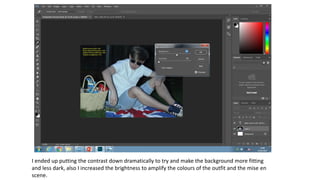
I ended up putting the contrast down dramatically to try and make the background more fitting
and less dark, also I increased the brightness to amplify the colours of the outfit and the mise en
scene.
This is a screen grab of the final look of my fashion spread.

Production process picnic

  • 1.
    Firstly, I madea new landscape Photoshop file with International Sized paper, size A3.
  • 2.
    I then addedthe correct image, increased the size and positioned the image where I believe it looked best.
  • 3.
    I then addedthe costing of each item in the outfit and put it in a small font in the top corner of the fashion spread, I made it a bright yellow to reinstate the fact that this is a summer themed magazine.
  • 4.
    I then wantedto change around the settings to see if I could make the picture look more summery, as you can see the current image is on default settings.
  • 5.
    I ended upputting the contrast down dramatically to try and make the background more fitting and less dark, also I increased the brightness to amplify the colours of the outfit and the mise en scene.
  • 6.
    This is ascreen grab of the final look of my fashion spread.