ProdSec
A technical approach
Jeremy Brown, April 2018
Bio
• Been around for a while in the industry
• Bug hunter
• Hardening products and systems
• Tools and teams that make stuff ./
• Security Lead @ NVIDIA
• All things ProdSec, breaking/fixing and providing solutions
• Previously Microsoft (windows), Amazon (cloud) and independent consulting
Agenda
I. Intro
II. Fundamentals
III. Tooling & Automation
IV. Campaigns
V. Conclusion
Fundamentals
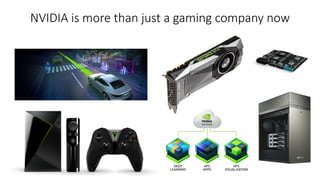
NVIDIA is more than just a gaming company now
Fundamentals
• Security is managing risk
• Identify
• Approach
• Mitigate
• R&D to understand and mitigate future risks
• Defense is trained by offense
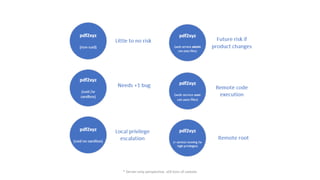
* Server-only perspective, still tons of caveats
Foundations
• Vertical
• Security persons or teams in each product group
• Horizontal
• Central team that collaborates across product groups
• Hybrid
• Most companies with significant security presence fit somewhere in here
Roles
• Security devs
• Build security features or tooling, automate to scale
• Security engs
• Work with product team(s) or company-wide initiatives on reducing risk
• SecOps
• Often handle IT security, incidents, network hardening, holistic pen-testing
Roles
• Pen-testers
• Focus on internal and external testing, even red teaming and service security
• Exploiters / Researchers
• Pushing bugs to maximum potential, assessing blast radius, determining risk
• PSIRT
• Managing mostly externally reported bugs, product team fixes, public comms
All have various shades, levels and specialties in between
What are we trying to do
• Ship less bugs
• Avoid the avoidable
• Limit the blast radius
• Make attacking more difficult in the first place
• If compromise occurs, harden platform / network to mitigate advancement
• Maintain balance
• Security in lieu of usability/perf generally doesn’t ship (or sell)
Relevant: https://cansecwest.com/slides/2015/Project%20Zero%20-%20making%200day%20hard%20-%20Ben%20Hawkes.pdf
Org tools at your disposal
• Culture / Policy
• “We should do it” or “According to the SDL”
• Alignment
• “X says we need to do this”
• Escalation
• “Your people talk to my people”
Of course, always be nice J
Models
• Training
• Teach them how to fish, but risk losing sight of the rewards long term
• Hands-on
• Work with them every step of the way, but this is hard to scale
• On-boarding process, partnering, general visibility into org
• Opt-in only
• Must use these libraries and check these boxes, but requires culture
Hybrid models are common
MVSB
• Minimally Viable Security Bar
• The basics a dev team has to do without risking their ship getting blocked
• Eg. design review, static analysis scan, pen-test
• Negotiable, yet dedicated % of product roadmap for security activities
• Allows security to be a requirement instead of ‘nice to have, but no time’
Bug Hunting
• Evaluating assumptions in the product’s design and implementation
• No one should ever send a large buffer, no need to check length before copy
• Local users are trusted anyways, we don’t need to protect data on filesystem
• Only registered accounts can upload files and we shouldn’t restrict them
• Users know they cannot insert scripts here, nothing to worry about
• We trust clients not to upload bad data, we don’t need to check it beforehand
• We want users to be able to run whatever they want, we’ll block the bad stuff
• The client should validate data before parsing it, that’s not the server’s job
• The service is just open to internal users, so authentication is unnecessary
• [….]
Security inside
• Access to source code
• Whitebox all the things
• Reuse data for longer term initiatives to improve code quality
• Coordinated new releases with product team
Bugs are filed and queued for fix.
Security outside
• Only access to OSS, not closed products
• But as they say, if you can read assembly…
• One bug may affect many different products or only certain versions
• Often negotiated disclosure
All bugs are special!
Having perspective
When someone tells you your code has bugs, you can either respond
1) “Why are they picking on us!?”
or
2) “I wish we were more prepared, but this is good data to use and improve[…]“
Which one is more productive? J
Having perspective
• Vendors
• Once you release the code, package or service, it’s out there
• Assume anything someone can do with it, they will
• Come to terms with
• You wrote the code, therefore you also wrote the buggy code
• Someone writing an exploit is just exercising the bug that was already there
• Better for you if they report it and it’s fixed than if they don’t
Having perspective
• Reporters
• It costs money to fix bugs, so each fix must justify the cost
• Key reason why bug bars / risk rating / exploitability index exist
• Come to terms with
• Your bug is unlikely to stop all development just to fix it
• The codebase may be old (internally) and devs working on latest & greatest
• Many things depend on the size of the company and resources available
Relevant: https://2017.zeronights.org/wp-content/uploads/materials/ZN17_AndreyLabunets_BootstrappingSecureByDesign.pdf
Mindset
• Think ‘vulnerable until proven otherwise’
• Instead of asking for proof there’s bugs or attack surface, assume yes
• Identify and poke each one to see if there’s merit
• Document & address if there are issues, else document why not vulnerable
• Reengineer systems or transition to new ones that make patching easier if
that’s a pain point
Mindset
• Map the notion of not doing security to a risky business
• What’s going to save us if they break out of this isolation?
• Has this third party software been reviewed?
• Should this parser be in kernel land?
“Unsandboxed ImageMagick is an unacceptable liability for any kind of business”
Reference: https://www.imageflow.io / @micksmix0
Interacting with developers
• It’s not enough to point and say ‘this is broken’
• Each problem you describe should come paired with a solution
• Tons of benefits
• They trust you actually know what the problem is
• They treat you as a partner instead of just a critic (always be constructive)
• Enables reuse of the solutions in the future
• Automate the bug/class away
Relevant: https://lcamtuf.blogspot.com/2018/02/getting-product-security-engineering.html
Strategies
• Integrate into the dev process
• Insert people (or robots) into code repos and product checkpoints
• Make security easier for product team
• Automation and tooling
• Don’t make security optional
• Code gating
• Secure-by-defaults
• Hold folks accountable
Relevant: https://lcamtuf.blogspot.com/2018/02/getting-product-security-engineering.html
Strategies
• De-value where possible
• Do we need to store any user data here?
• Why is access to this service so powerful?
• Could we not keep anything sensitive going between hosts in this network?
• Attackers don’t spend time on worthless targets
• Increase cost, decrease value gained if compromised
Strategies
• Finish line
• Threat model correct? Y/N
• Triaged static analysis results? Y/N
• Tests? Y/N
• Pen-test? Y/N
• For each Y, attach proof
• For each N, you may not pass (without exception)
Being Effective
• Easy to say, but surprisingly more difficult to achieve
• Make mistakes non-repeatable where possible
• Automate tasks to make it easier for devs & secengs to find/fix bugs
• There’s only so many security folks, so one must scale themselves
Being Effective
• More security and hardening generally means less bugs
• Less incidents, less pages, less randomizing patches
• Mix this thoroughly within your company culture
• Get data where possible
• There’s a difference between doing stuff that’s fun vs measurably productive
• Focus on making them the same thing
Tooling & Automation
Static analysis
• Automate code reviews where you can
• A very finely tuned SA tool > team of code reviewers
• Spend your time writing or skimming more than reading
• Don’t just run it one time
• Make it run every time
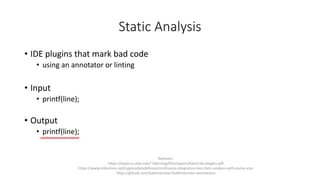
Static Analysis
• IDE plugins that mark bad code
• using an annotator or linting
• Input
• printf(line);
• Output
• printf(line);
Relevant:
https://www.cs.utah.edu/~tdenning/files/papers/baset-ide-plugins.pdf
https://www.slideshare.net/cypressdatadefense/continuous-integration-live-static-analysis-with-puma-scan
https://github.com/SublimeLinter/SublimeLinter-annotations
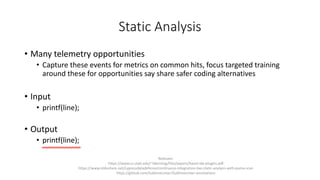
Static Analysis
• Many telemetry opportunities
• Capture these events for metrics on common hits, focus targeted training
around these for opportunities say share safer coding alternatives
• Input
• printf(line);
• Output
• printf(line);
Relevant:
https://www.cs.utah.edu/~tdenning/files/papers/baset-ide-plugins.pdf
https://www.slideshare.net/cypressdatadefense/continuous-integration-live-static-analysis-with-puma-scan
https://github.com/SublimeLinter/SublimeLinter-annotations
Static Analysis
• Banning dangerous functions via headers
• Throw errors during compile
• Eg. gcc poison and __attribute__ ((deprecated))
• Or parse build logs for warnings
• Start campaigns for stomping out ignored bugs
• “Treat warnings as errors” approach where practical
Reference: https://leafsr.wordpress.com/2013/12/02/gcc-poison/
Static Analysis
• Gating code via infrastructure
• Client side commit hooks
• Server side scanning for undesirable coding practices
• Eg. credentials in source code is an easy catch
• Another telemetry opportunity
• Gather statistics on which patterns keep getting attempted
• Focus training and bug bashes accordingly
Reference: https://github.com/awslabs/git-secrets
Static Analysis
• Source/Binary Diffing
• How do you know the compiler is producing code as intended?
• Statements that are security-related could be optimized out
• Check if critical checks are missing in the release binary
• “Never underestimate RE in your threat model”
Relevant work: http://www.eng.utah.edu/~cs5785/slides-f10/Dangerous+Optimizations.pdf
Static Analysis
• Scanning code upon build
• Hook platforms into code repos
• Scan on-demand, every build or bug bash before a new release
Static Analysis
• Subscription of code changes
• Addition of interesting patterns
• Modification of critical files or components
• Notification via email, auto-added to CRs, Slack pings
• Also use the code index to gain additionally visibility into projects
Static Analysis
• Mitigating hardware attacks
• Insert redundancy, other anti-glitching strategies in critical code sections at
compile time or pre-commit
• Pros and cons with both transform points, still needs quick manual review
Static Analysis
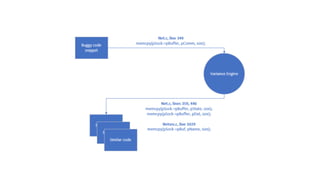
• Variant finding
• Input: bad code
• Output: more bad code
• For PSIRT bugs, use reported bug data to find & fix any similar issues
• In the same product or other product lines
• Various algorithms to approach similarity searches
Static Analysis
• Machine learning
• If you have bug data, why not put it to work?
• Hope to talk about this one next time ;-)
Product DNA
• What components are native or imported from elsewhere
• Using OSS saves time / !re-inventing the wheel
• But also adds to your attack surface and requires maintenance
• You want to know..
• If you’re running an old version
• If you’re using an deprecated package
• If you’re no longer relying on code that’s still accessible
Dynamic analysis
• There’s nothing like running the code
• Understand how it actually works, validate/invalidate assumptions
• Eg. Sanitizers
• Free bugs from just opting-in and running the application
Reference: https://github.com/google/sanitizers
Dynamic analysis
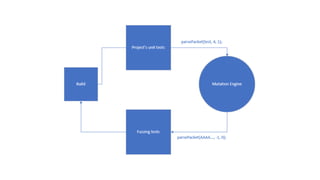
• Re-use unit tests to create fuzzing tests
• Input: tests/* -> mutation engine
• Output: tests/security/*
“Free” security tests!
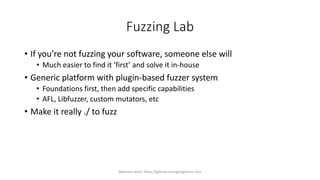
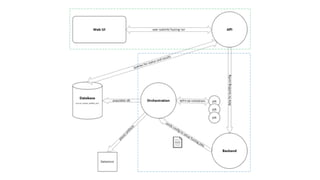
Fuzzing Lab
• If you’re not fuzzing your software, someone else will
• Much easier to find it ‘first’ and solve it in-house
• Generic platform with plugin-based fuzzer system
• Foundations first, then add specific capabilities
• AFL, Libfuzzer, custom mutators, etc
• Make it really ./ to fuzz
Relevant work: https://github.com/google/oss-fuzz
Dynamic Analysis
• Sub-system diffing
• What changes when the app is installed or service turned on?
• Are new DLLs being loaded?
• Network ports, pipes, registry, ACLs, etc
Related: https://packetstormsecurity.com/files/140055/Whale-Win32-Attack-Surface-Toolkit.html
Dynamic Analysis
• Auto-isolation
• Each new app is thoroughly exercised in an emulator
• Based upon behavior, sandbox config is generated
• App is restricted to necessary calls and ‘known good’
• Rinse and repeat for each application
• Can also use this for offense
• Capture in more detail what the app is doing and poke assumptions
Campaigns
Attack Surface Reduction
• Target product lines that ship large codebases
• Do we need to ship every native API?
• Do we need to include all these applications by default?
• Should we remove unused or deprecated components?
• If we turn this off in the config file, does anything fail?
• Also use code coverage data to drive removals
• More code == more attack surface == more bugs
Automating Information
• Don’t spend time repeating yourself
• Build a knowledge base
• Add reusable content and solutions
• Keep it as a running wiki for everyone to update
Bug Bashes
• Getting devs + security team together for a day or evening
• Code review/fuzz attack surfaces
• Shake out bugs quickly
Door Knocking
• Continuously scanning the network for misconfigurations
• Default passwords, weak or no auth, open shares
• FTP, Telnet, Network shares, Web, etc
• Notify server owners with guidance on how to improve
• Document and follow-up
Hardening APIs
• Make APIs safer to use by default
• ParseStruct() -> HardenedParseStruct()
• Just wraps API to do some extra checks before passing it on
• Code that’s prone to bugs requires explicit exception or override
• Look for any projects using non-Hardened versions and switch them out
Relevant project: http://www.gwtproject.org/doc/latest/DevGuideSecuritySafeHtml.html
Pen-testing
• Have a process and stick to it
• Try to be frictionless with the intake
• Test the code that’s shipping, not the previous version
• Use surveys post-test for feedback and continuous improvement
• Vend it out when you need to
• But build up internal capabilities for deeper dives
Red Teaming
• Blackbox approach for pen-testing
• Trading coverage for simulating real world attacks
• Different perspectives can make external attack surface more clear
• “Heat checks” can be healthy
• Prioritize and don’t be destructive
• But not on Fridays J
Training
• Expensive, but…
• The less you know, the more mistakes you’ll make
• Can sprinkle this into roadmaps, explicitly or implicitly
Wide-net hunting
• Using a index to search for particular bug patterns across code bases
• Patterns can come from externally reported bugs (re-using free data) or
generically what certain bug classes look like
Mentoring
• Work on the next generation
• Fundamentals first
• Then how to be effective
• Develop a specialization
• So many distractions out there, focus and be productive
Conclusion
Culture
• Do stuff that matters
• Just because it’s cool doesn’t mean it will be effective
• Have an open mind
• Maybe the way we’ve been doing it isn’t the best way to do it
• Do the little things
• There’s many thankless, little to zero visibility tasks that make a big difference
Culture
• Externally reported bugs are randomizing by nature
• Get what data you can out of them and use it
• Not productive to ‘wish away’ bugs
• There really is no ‘not our bugs’ explanation
• Adding external, third party code to your platform can extend attack surface
• It doesn’t not make your platform any less vulnerable
• Evaluate and set expectations with vendors before you buy, or don’t
Relevant: http://addxorrol.blogspot.com/2015/12/a-decisionmakers-guide-to-buying.html
Culture
• Train folks to make the best decisions overall
• The ecosystem includes many different companies, researchers and
consumers
• Sometimes it takes time to steer the ship, so think big
• Cross-company > cross-org > intra-team
• Constructive criticism is healthy
• It’s ok to make mistakes, but be teachable and accept feedback
• Do post-mortems to ensure the same thing doesn’t happen twice
In Closing
• We discussed many tools and techniques to help you ship less bugs
• Balancing security with shipping a product will have tradeoffs
• Document stuff even if you can’t work on it today
• Prioritize and conquer
• Work on what you think is valuable
• problem:solution > problem
EOF
Questions?
jeremybatnvidia.com

ProdSec: A Technical Approach

  • 1.
  • 2.
    Bio • Been aroundfor a while in the industry • Bug hunter • Hardening products and systems • Tools and teams that make stuff ./ • Security Lead @ NVIDIA • All things ProdSec, breaking/fixing and providing solutions • Previously Microsoft (windows), Amazon (cloud) and independent consulting
  • 3.
    Agenda I. Intro II. Fundamentals III.Tooling & Automation IV. Campaigns V. Conclusion
  • 4.
  • 5.
    NVIDIA is morethan just a gaming company now
  • 6.
    Fundamentals • Security ismanaging risk • Identify • Approach • Mitigate • R&D to understand and mitigate future risks • Defense is trained by offense
  • 7.
    * Server-only perspective,still tons of caveats
  • 8.
    Foundations • Vertical • Securitypersons or teams in each product group • Horizontal • Central team that collaborates across product groups • Hybrid • Most companies with significant security presence fit somewhere in here
  • 9.
    Roles • Security devs •Build security features or tooling, automate to scale • Security engs • Work with product team(s) or company-wide initiatives on reducing risk • SecOps • Often handle IT security, incidents, network hardening, holistic pen-testing
  • 10.
    Roles • Pen-testers • Focuson internal and external testing, even red teaming and service security • Exploiters / Researchers • Pushing bugs to maximum potential, assessing blast radius, determining risk • PSIRT • Managing mostly externally reported bugs, product team fixes, public comms All have various shades, levels and specialties in between
  • 11.
    What are wetrying to do • Ship less bugs • Avoid the avoidable • Limit the blast radius • Make attacking more difficult in the first place • If compromise occurs, harden platform / network to mitigate advancement • Maintain balance • Security in lieu of usability/perf generally doesn’t ship (or sell) Relevant: https://cansecwest.com/slides/2015/Project%20Zero%20-%20making%200day%20hard%20-%20Ben%20Hawkes.pdf
  • 12.
    Org tools atyour disposal • Culture / Policy • “We should do it” or “According to the SDL” • Alignment • “X says we need to do this” • Escalation • “Your people talk to my people” Of course, always be nice J
  • 13.
    Models • Training • Teachthem how to fish, but risk losing sight of the rewards long term • Hands-on • Work with them every step of the way, but this is hard to scale • On-boarding process, partnering, general visibility into org • Opt-in only • Must use these libraries and check these boxes, but requires culture Hybrid models are common
  • 14.
    MVSB • Minimally ViableSecurity Bar • The basics a dev team has to do without risking their ship getting blocked • Eg. design review, static analysis scan, pen-test • Negotiable, yet dedicated % of product roadmap for security activities • Allows security to be a requirement instead of ‘nice to have, but no time’
  • 15.
    Bug Hunting • Evaluatingassumptions in the product’s design and implementation • No one should ever send a large buffer, no need to check length before copy • Local users are trusted anyways, we don’t need to protect data on filesystem • Only registered accounts can upload files and we shouldn’t restrict them • Users know they cannot insert scripts here, nothing to worry about • We trust clients not to upload bad data, we don’t need to check it beforehand • We want users to be able to run whatever they want, we’ll block the bad stuff • The client should validate data before parsing it, that’s not the server’s job • The service is just open to internal users, so authentication is unnecessary • [….]
  • 16.
    Security inside • Accessto source code • Whitebox all the things • Reuse data for longer term initiatives to improve code quality • Coordinated new releases with product team Bugs are filed and queued for fix.
  • 17.
    Security outside • Onlyaccess to OSS, not closed products • But as they say, if you can read assembly… • One bug may affect many different products or only certain versions • Often negotiated disclosure All bugs are special!
  • 18.
    Having perspective When someonetells you your code has bugs, you can either respond 1) “Why are they picking on us!?” or 2) “I wish we were more prepared, but this is good data to use and improve[…]“ Which one is more productive? J
  • 19.
    Having perspective • Vendors •Once you release the code, package or service, it’s out there • Assume anything someone can do with it, they will • Come to terms with • You wrote the code, therefore you also wrote the buggy code • Someone writing an exploit is just exercising the bug that was already there • Better for you if they report it and it’s fixed than if they don’t
  • 20.
    Having perspective • Reporters •It costs money to fix bugs, so each fix must justify the cost • Key reason why bug bars / risk rating / exploitability index exist • Come to terms with • Your bug is unlikely to stop all development just to fix it • The codebase may be old (internally) and devs working on latest & greatest • Many things depend on the size of the company and resources available Relevant: https://2017.zeronights.org/wp-content/uploads/materials/ZN17_AndreyLabunets_BootstrappingSecureByDesign.pdf
  • 21.
    Mindset • Think ‘vulnerableuntil proven otherwise’ • Instead of asking for proof there’s bugs or attack surface, assume yes • Identify and poke each one to see if there’s merit • Document & address if there are issues, else document why not vulnerable • Reengineer systems or transition to new ones that make patching easier if that’s a pain point
  • 22.
    Mindset • Map thenotion of not doing security to a risky business • What’s going to save us if they break out of this isolation? • Has this third party software been reviewed? • Should this parser be in kernel land? “Unsandboxed ImageMagick is an unacceptable liability for any kind of business” Reference: https://www.imageflow.io / @micksmix0
  • 23.
    Interacting with developers •It’s not enough to point and say ‘this is broken’ • Each problem you describe should come paired with a solution • Tons of benefits • They trust you actually know what the problem is • They treat you as a partner instead of just a critic (always be constructive) • Enables reuse of the solutions in the future • Automate the bug/class away Relevant: https://lcamtuf.blogspot.com/2018/02/getting-product-security-engineering.html
  • 24.
    Strategies • Integrate intothe dev process • Insert people (or robots) into code repos and product checkpoints • Make security easier for product team • Automation and tooling • Don’t make security optional • Code gating • Secure-by-defaults • Hold folks accountable Relevant: https://lcamtuf.blogspot.com/2018/02/getting-product-security-engineering.html
  • 25.
    Strategies • De-value wherepossible • Do we need to store any user data here? • Why is access to this service so powerful? • Could we not keep anything sensitive going between hosts in this network? • Attackers don’t spend time on worthless targets • Increase cost, decrease value gained if compromised
  • 26.
    Strategies • Finish line •Threat model correct? Y/N • Triaged static analysis results? Y/N • Tests? Y/N • Pen-test? Y/N • For each Y, attach proof • For each N, you may not pass (without exception)
  • 27.
    Being Effective • Easyto say, but surprisingly more difficult to achieve • Make mistakes non-repeatable where possible • Automate tasks to make it easier for devs & secengs to find/fix bugs • There’s only so many security folks, so one must scale themselves
  • 28.
    Being Effective • Moresecurity and hardening generally means less bugs • Less incidents, less pages, less randomizing patches • Mix this thoroughly within your company culture • Get data where possible • There’s a difference between doing stuff that’s fun vs measurably productive • Focus on making them the same thing
  • 29.
  • 30.
    Static analysis • Automatecode reviews where you can • A very finely tuned SA tool > team of code reviewers • Spend your time writing or skimming more than reading • Don’t just run it one time • Make it run every time
  • 31.
    Static Analysis • IDEplugins that mark bad code • using an annotator or linting • Input • printf(line); • Output • printf(line); Relevant: https://www.cs.utah.edu/~tdenning/files/papers/baset-ide-plugins.pdf https://www.slideshare.net/cypressdatadefense/continuous-integration-live-static-analysis-with-puma-scan https://github.com/SublimeLinter/SublimeLinter-annotations
  • 32.
    Static Analysis • Manytelemetry opportunities • Capture these events for metrics on common hits, focus targeted training around these for opportunities say share safer coding alternatives • Input • printf(line); • Output • printf(line); Relevant: https://www.cs.utah.edu/~tdenning/files/papers/baset-ide-plugins.pdf https://www.slideshare.net/cypressdatadefense/continuous-integration-live-static-analysis-with-puma-scan https://github.com/SublimeLinter/SublimeLinter-annotations
  • 33.
    Static Analysis • Banningdangerous functions via headers • Throw errors during compile • Eg. gcc poison and __attribute__ ((deprecated)) • Or parse build logs for warnings • Start campaigns for stomping out ignored bugs • “Treat warnings as errors” approach where practical Reference: https://leafsr.wordpress.com/2013/12/02/gcc-poison/
  • 34.
    Static Analysis • Gatingcode via infrastructure • Client side commit hooks • Server side scanning for undesirable coding practices • Eg. credentials in source code is an easy catch • Another telemetry opportunity • Gather statistics on which patterns keep getting attempted • Focus training and bug bashes accordingly Reference: https://github.com/awslabs/git-secrets
  • 35.
    Static Analysis • Source/BinaryDiffing • How do you know the compiler is producing code as intended? • Statements that are security-related could be optimized out • Check if critical checks are missing in the release binary • “Never underestimate RE in your threat model” Relevant work: http://www.eng.utah.edu/~cs5785/slides-f10/Dangerous+Optimizations.pdf
  • 36.
    Static Analysis • Scanningcode upon build • Hook platforms into code repos • Scan on-demand, every build or bug bash before a new release
  • 37.
    Static Analysis • Subscriptionof code changes • Addition of interesting patterns • Modification of critical files or components • Notification via email, auto-added to CRs, Slack pings • Also use the code index to gain additionally visibility into projects
  • 38.
    Static Analysis • Mitigatinghardware attacks • Insert redundancy, other anti-glitching strategies in critical code sections at compile time or pre-commit • Pros and cons with both transform points, still needs quick manual review
  • 39.
    Static Analysis • Variantfinding • Input: bad code • Output: more bad code • For PSIRT bugs, use reported bug data to find & fix any similar issues • In the same product or other product lines • Various algorithms to approach similarity searches
  • 41.
    Static Analysis • Machinelearning • If you have bug data, why not put it to work? • Hope to talk about this one next time ;-)
  • 42.
    Product DNA • Whatcomponents are native or imported from elsewhere • Using OSS saves time / !re-inventing the wheel • But also adds to your attack surface and requires maintenance • You want to know.. • If you’re running an old version • If you’re using an deprecated package • If you’re no longer relying on code that’s still accessible
  • 44.
    Dynamic analysis • There’snothing like running the code • Understand how it actually works, validate/invalidate assumptions • Eg. Sanitizers • Free bugs from just opting-in and running the application Reference: https://github.com/google/sanitizers
  • 45.
    Dynamic analysis • Re-useunit tests to create fuzzing tests • Input: tests/* -> mutation engine • Output: tests/security/* “Free” security tests!
  • 47.
    Fuzzing Lab • Ifyou’re not fuzzing your software, someone else will • Much easier to find it ‘first’ and solve it in-house • Generic platform with plugin-based fuzzer system • Foundations first, then add specific capabilities • AFL, Libfuzzer, custom mutators, etc • Make it really ./ to fuzz Relevant work: https://github.com/google/oss-fuzz
  • 49.
    Dynamic Analysis • Sub-systemdiffing • What changes when the app is installed or service turned on? • Are new DLLs being loaded? • Network ports, pipes, registry, ACLs, etc Related: https://packetstormsecurity.com/files/140055/Whale-Win32-Attack-Surface-Toolkit.html
  • 50.
    Dynamic Analysis • Auto-isolation •Each new app is thoroughly exercised in an emulator • Based upon behavior, sandbox config is generated • App is restricted to necessary calls and ‘known good’ • Rinse and repeat for each application • Can also use this for offense • Capture in more detail what the app is doing and poke assumptions
  • 51.
  • 52.
    Attack Surface Reduction •Target product lines that ship large codebases • Do we need to ship every native API? • Do we need to include all these applications by default? • Should we remove unused or deprecated components? • If we turn this off in the config file, does anything fail? • Also use code coverage data to drive removals • More code == more attack surface == more bugs
  • 53.
    Automating Information • Don’tspend time repeating yourself • Build a knowledge base • Add reusable content and solutions • Keep it as a running wiki for everyone to update
  • 54.
    Bug Bashes • Gettingdevs + security team together for a day or evening • Code review/fuzz attack surfaces • Shake out bugs quickly
  • 55.
    Door Knocking • Continuouslyscanning the network for misconfigurations • Default passwords, weak or no auth, open shares • FTP, Telnet, Network shares, Web, etc • Notify server owners with guidance on how to improve • Document and follow-up
  • 56.
    Hardening APIs • MakeAPIs safer to use by default • ParseStruct() -> HardenedParseStruct() • Just wraps API to do some extra checks before passing it on • Code that’s prone to bugs requires explicit exception or override • Look for any projects using non-Hardened versions and switch them out Relevant project: http://www.gwtproject.org/doc/latest/DevGuideSecuritySafeHtml.html
  • 57.
    Pen-testing • Have aprocess and stick to it • Try to be frictionless with the intake • Test the code that’s shipping, not the previous version • Use surveys post-test for feedback and continuous improvement • Vend it out when you need to • But build up internal capabilities for deeper dives
  • 58.
    Red Teaming • Blackboxapproach for pen-testing • Trading coverage for simulating real world attacks • Different perspectives can make external attack surface more clear • “Heat checks” can be healthy • Prioritize and don’t be destructive • But not on Fridays J
  • 59.
    Training • Expensive, but… •The less you know, the more mistakes you’ll make • Can sprinkle this into roadmaps, explicitly or implicitly
  • 60.
    Wide-net hunting • Usinga index to search for particular bug patterns across code bases • Patterns can come from externally reported bugs (re-using free data) or generically what certain bug classes look like
  • 61.
    Mentoring • Work onthe next generation • Fundamentals first • Then how to be effective • Develop a specialization • So many distractions out there, focus and be productive
  • 62.
  • 63.
    Culture • Do stuffthat matters • Just because it’s cool doesn’t mean it will be effective • Have an open mind • Maybe the way we’ve been doing it isn’t the best way to do it • Do the little things • There’s many thankless, little to zero visibility tasks that make a big difference
  • 64.
    Culture • Externally reportedbugs are randomizing by nature • Get what data you can out of them and use it • Not productive to ‘wish away’ bugs • There really is no ‘not our bugs’ explanation • Adding external, third party code to your platform can extend attack surface • It doesn’t not make your platform any less vulnerable • Evaluate and set expectations with vendors before you buy, or don’t Relevant: http://addxorrol.blogspot.com/2015/12/a-decisionmakers-guide-to-buying.html
  • 65.
    Culture • Train folksto make the best decisions overall • The ecosystem includes many different companies, researchers and consumers • Sometimes it takes time to steer the ship, so think big • Cross-company > cross-org > intra-team • Constructive criticism is healthy • It’s ok to make mistakes, but be teachable and accept feedback • Do post-mortems to ensure the same thing doesn’t happen twice
  • 66.
    In Closing • Wediscussed many tools and techniques to help you ship less bugs • Balancing security with shipping a product will have tradeoffs • Document stuff even if you can’t work on it today • Prioritize and conquer • Work on what you think is valuable • problem:solution > problem
  • 67.