Prism Tech Ed India
Prism Tech Ed India
Prism Tech Ed India
Prism Tech Ed India
Prism Tech Ed India
Prism Tech Ed India
Prism Tech Ed India
Prism Tech Ed India
Prism Tech Ed India
Prism Tech Ed India
Prism Tech Ed India
Prism Tech Ed India
Prism Tech Ed India
Prism Tech Ed India
Prism Tech Ed India
Prism Tech Ed India
Prism Tech Ed India
Prism Tech Ed India
Prism Tech Ed India
Prism Tech Ed India
Prism Tech Ed India
Prism Tech Ed India
Prism Tech Ed India
Prism Tech Ed India
Prism Tech Ed India

Editor's Notes

  • #4 First we’re going to talk about Prism – what it is, what it’s for, what does it do…Define what we mean by a composite client application, and what challenges they pose.Then we’ll talk about what’s in the Prism box, and where we are in the development cycle for Prism. If you’ve been following the evolution of Prism, you’ll know we’re in the middle of developing Prism 2.0. We’ll talk about that and where we are.Next we’re going to talk about some of the patterns that Prism supports.Patterns for modularity – how to break an app into modules and how to find and load those modules.Patterns for UI composition – how to compose you’re applications UI from pieces that are contained in the modules.Separated presentation patterns – patterns to help you separate out the nasty UI stuff from good old fashioned unit-testable code.Lastly, we’ll talk about multi-targeting – how to build apps that can provide a desktop experience and an in-browser RIA experience.Going to see some code and demos…
  • #5 http://www.sxc.hu/photo/833284http://www.sxc.hu/photo/338544The Challenge:Client tier lots of componentsWorkflow- ui flow service agent requirements can also change a lotMost apps start having a clear structure, seem to be logically laid out Lot’s of people start with: User controls could be dragged and droppedWired together with eventsFalls apart very quickly Large number of developers, making it even less clear, and you end up with a big pile And you end up feeling like thisNeeds to make reusable & support lots of developers / teamsClient Apps: Complex, Lots of Moving Pieces, User ExperienceMultiple Developers, Multiple TeamsHow To Make App Dynamic, Customizable, Extensible, Testable?
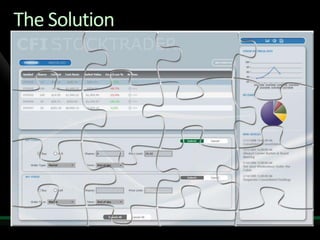
  • #6 The SolutionBreak into pieces so you can manage pieces, evolve independently, release independentlyManage dependencies between piecesReassemble in a way that appears seamlessWhat patterns can use to address these challenges
  • #7 Most client apps are actually fairly complex. Client app design poses a number of unique challenges.One of which is how to present a huge amount of data, business processes and domain knowledge to a user, who might not care about computers (if you can imagine such a thing) so that they can make sense of it, stay out of trouble, and maybe even have an enjoyable experience!! You might have the best service oriented, scalable flexible back-end in existence, but if your users can’t make head nor tail of it, if the user experience isn’t right, you’re pretty much sunk. The client app is where the rubber meets the road.Client apps can be also complex with lots of moving parts (like data access & storage, services, business objects, processes, workflows, functions, as well as the UI itself). How can you manage that complexity and keep quality and reliability high?You’ll likely have more than 1 developer, maybe even have a large team, or even multiple teams, to build it all. How can you distribute the work over your development team and allow them to work as independently as possible while still maintaining productivity and quality?And the requirements might change dramatically while your building it as you get feedback from those fickle users. How easy is it to adapt to new requirements, add new features, change existing features, extend the application to service new users? Can your users, or an admin, configure or customize the application instead of building and rolling out a new version.So there are a number of challenges, and so there is the need to build client applications that are dynamic, customizable and extensible, where you can re-use lots of code and components, leverage TDD, and split the work over multiple developers or teams in a manageable way.Composite applications are what they call applications that are split into separate, composable parts. The approach is to split the application into pieces and have individual developers or teams build those pieces, carefully manage the dependencies between those pieces (to make them as loosely coupled as possible), and then re-assemble the pieces back into a coherent app. Sounds easy right?Splitting things up introduces new, specific challenges but there of course patterns that help meet those challenges.The trick is to split the application up in the right way, to manage the dependencies between the pieces in the right way, and to put them all back together in the right way.Prism provides patterns for decomposition and for recomposition of client applications.
  • #8 Like all of our guidance deliverable from P&P, you get a few things out of the box.Library = Implementation of the PatternsPrism = “Composite Client Application Guidance for WPF and Silverlight”Guidance For Modular, Composite WPF ApplicationsIndependent TeamsComplexity Management, Loose CouplingRe-Use & Agility & TDDPatternsInversion of ControlSeparated Presentation – Model-View-PresenterHow many of you are familiar with the Composite UI Application Block that we released a few years ago?
  • #9 Reference implementation provides an example of how the patterns in the guidance can be used in combination.Enterprise style app: Data-oriented Rich interactions with different visual experiences Complex screens Separately evolvingBut, not a complete application – “based on a true story” – stubs out most of the real non-UI services and data.Not a real app – based on a true story.Shows how the various patterns can work together to make an end-to-end application.Not a Franken-App – can’t see the seems.
  • #10 If you would like to host your demo on the Virtual Server, please use the myVPC demo slide, not this slide.
  • #11 Prism is a library of patterns with reference implementations. You can use one or all of these in combination.This slide shows the main patterns and concepts that are included in Prism 1.0Bootstrapper – Your app’s point of contact with Prism. A simple class that connects your app to the Prism container and the other services that Prism provides. Modules – Key units of functionality within the application. Services & Container – Prism uses Dependency Injection (Inversion of Control) pattern to support loose coupling of the modules and services and views within the application. Regions & Views – Support composition support at the UI level. Views represent the UI of the various pieces within the application, Regions provide support for putting views in the right places within the overall UI. Events & Commands – Support communication between loosely coupled parts of the application.
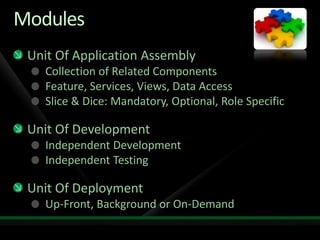
  • #13 Will discusss catalog:Describe the modules and module attributesVisual structure may not follow module structureCatalog provides meta data for applicationFixed list of modules in codeConfig fileWeb services that provides a list of users and role and decide which modules to provideDirectory and load the modules and go
  • #14 If you would like to host your demo on the Virtual Server, please use the myVPC demo slide, not this slide.
  • #16 Some benefits of this approach:Simpler.Regions can choose or select which view to pull in and when – can create views on demand.In some sense provides a looser coupling between modules and shell.Might make AutoPopulate default to true so you might not even need to set it.Might have something more flexible than names for connecting views to regions.
  • #17 If you would like to host your demo on the Virtual Server, please use the myVPC demo slide, not this slide.
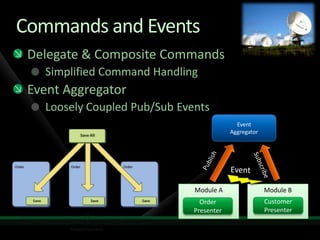
  • #18 Demo Stock Trader Reference ImplementationShow the ability to buy & sell stockMultiple buttons that could buy a stock Buttons: View level & Composite ViewMultiple buttons that invoke 1 commandSave All button uses attach property to the SaveAll Composite CommandComposite Comand Hold delegates to each order objectEA uses the publish subscribe patternScenarioEvent Aggregator  Customer model updates order total once an order is placed needs to a loosely coupled event when the order is placed Customer module subscribes to a names event Order model published an event when the order is placed Customer module listens to event and then updates the order total on the customer view
  • #19 Good piece of advice I was given once was never to talk about Religion, Politics, or Separated Presentation Patterns with people you like…M-V-VM really just Presentation Model. Essential thing is that the view is just bound to the ViewModel or PresentationModel. It’s an observer.Trick is to model the presentation state, not the UI stateMake the presentation model bindable & easily consumable by a designer.Make it friendly to a developer – easily unit-tested.Designers don’t like to write code, but they can bind UI to a ViewModel.Got to leave the designer with artistic freedom – they are a sensitve bunch and we really need them so we don’t want to upset them.
  • #20 Talk about key scenarios – Full RIA, not enriched web scenario.
  • #21 Strategies:We looked at a number of approaches hereModify the build systemProjects for ‘shared’ code projected to Silverlight and WPF projectsFinally settled on linked projectsSupported natively in VSEasy to understandPractices:Start with least common denominator (Silverlight)Use links & setup your projects with parallel structuresWhere code needs to be different,Apply the SieveRewrite the code -> keeps you in single sourceDrawbacks: not taking advantage of platformExample: Use #if statements if you have simple or single line constructsDrawbacks: less readable, debugging more challengingExample: Around dispatcherUse partial classes when most of the class is similar, but some methods have platform specific implementationsKeep platform specific methods private -> keeps your unit tests from having to have platform specific testsClasses have Single clear responsibilityExample: Retrieving images from a web service vs. the file system.Use partial methods only if you need to call an extra method on one platform but not the otherExample:Build platform specific classes with a single responsibilityExample: A data gateway with a well-defined interface, but different implementations for WPF and Silverlight.Keep namespaces and assembly names the sameSeparated Presentation StrategiesA bunch of code around the presentation logic, models, service interaction is likely to compile straight across.Simple XAML can be shared, but more complicated XAML becomes tougher.No Triggers, more limited data binding, commands and templating, different validation models.Share what you canConsider using VSM -> not in guidance as its only preview, but this is where you need to go.Rely on exceptions for validation to support bothPrism provides some attached behavior commands to help with command bindingWorst case code is will need to create Silverlight and WPF skins but the logic is reusable patterns allow you reuse your logic
  • #22 If you would like to host your demo on the Virtual Server, please use the myVPC demo slide, not this slide.