1
 PHASE I INTRODUCTION
 PHASE II PRINTER &TYPES
 PHASE III NON IMPACT PRINTER
 PHASE IV IMPACT PRINTER
 PHASE V DIFFERENCE BETWEEN
IMPACT PRINTER & NON
IMPACT PRINTER
2
INTRODUCTION
 Printer was firstly invented by
Christopher Shole in 1869 and in 1873
firstly the work of printing was started by
Remington and from that time different
techniques are developed for the
invention of printer. In 1953 first high
speed printer was developed by
Remington.
There is a very good change
that it is an Ink jet printer. Since
introduction in the later half of the
1980 years. Ink jet printer have
grown in popularity and an
inexpensive colour printer made by
hewlett packard.
Continue…
4
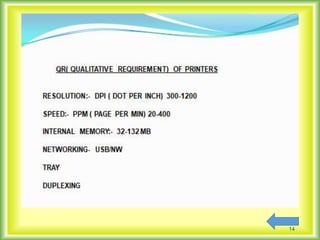
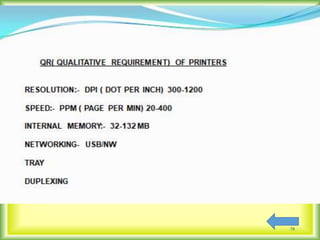
Printers are the most commonly
used and popular output devices. They
provide information in a permanent
readable form. They produce printed
output of data. Prints text or image on
paper called hard copy. The printing
speed of a printer is measured in pages
per minute (ppm).Printer resolution is
often measured in dots per inch (dpi).
5
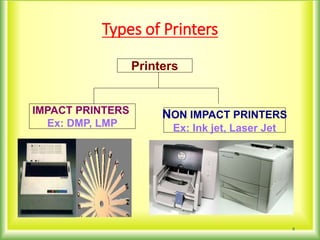
Types of Printers
6
Printers
IMPACT PRINTERS
Ex: DMP, LMP
NON IMPACT PRINTERS
Ex: Ink jet, Laser Jet
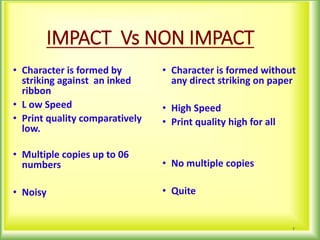
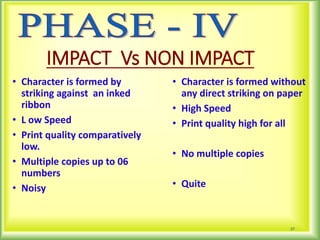
IMPACT Vs NON IMPACT
• Character is formed by
striking against an inked
ribbon
• L ow Speed
• Print quality comparatively
low.
• Multiple copies up to 06
numbers
• Noisy
• Character is formed without
any direct striking on paper
• High Speed
• Print quality high for all
• No multiple copies
• Quite
7
8
PHASE-III
IMPACT PRINTER
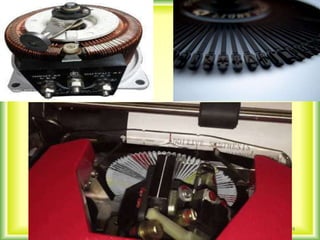
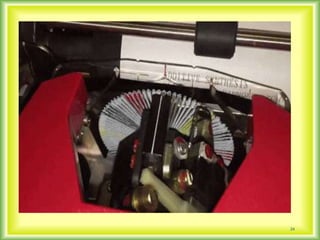
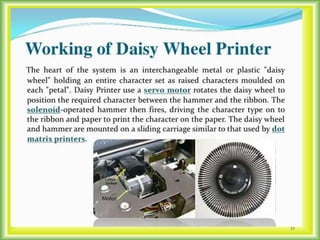
 Impact printer head strike on
the ink ribbon by physical contacting
the paper. We can say impact printer
operate in similar manner to
typewriter . Impact printer work’s on
electro mechanical magnesium .
Impact printers are the oldest
printing technologies still in use.
IMPACT PRINTERS
A. DOT MATRIX PRINTER
B. CHARACTER PRINTER
C. LINE PRINTER
10
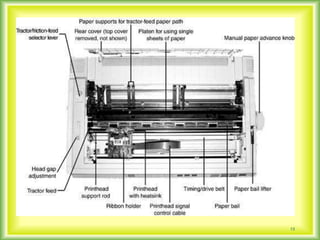
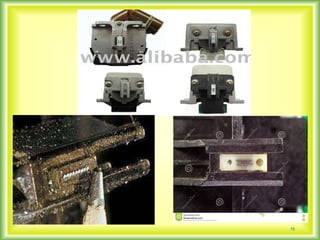
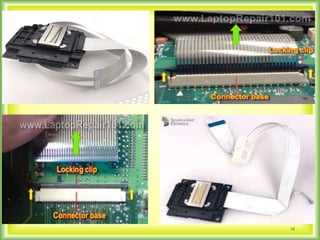
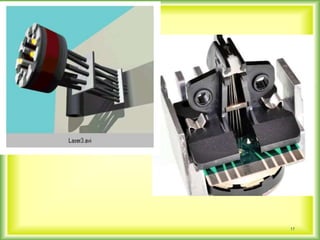
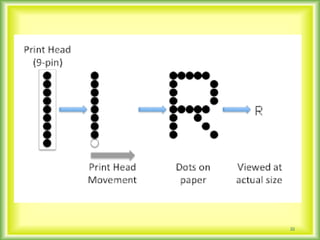
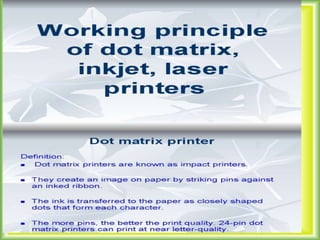
DOT MARTIX PRINTER-:
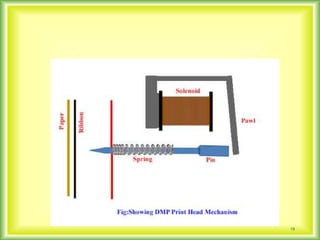
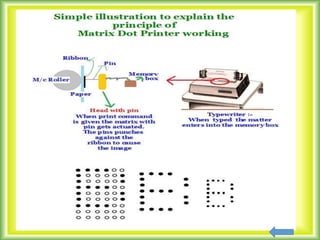
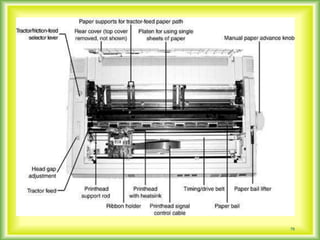
In dot matrix printer character are
form using a number of dot to dots hit
the ribbon against the paper and
character is formed . It contain 9,24
pins in their printer head . It is good
quality printers. Speed of a dot matrix
printer is 150 to 300 characters per
second.
11
DMP
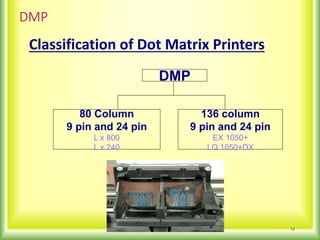
Classification of Dot Matrix Printers
12
DMP
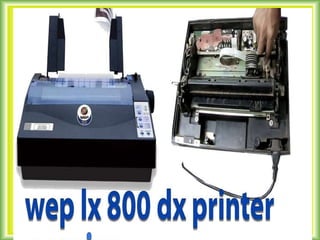
80 Column
9 pin and 24 pin
L x 800
L x 240
136 column
9 pin and 24 pin
EX 1050+
LQ 1050+DX
13
14
15
16
17
18
19
20
21
22
23
24
25
 Non impact printers are the printers
that produce their output without making
contact on the paper to be printed . They
use several technique such as electro
sensitive, electrostatic inkjet and laser
technique for printing. Non impact printer
are the faster form of printer they are also
much less noisy than impact printer.
The most common form of Non Impact
printer are :-
1.INK JET PRINTER.
1.LASER PRINTER.
27
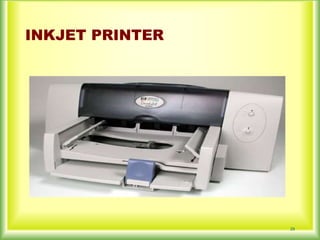
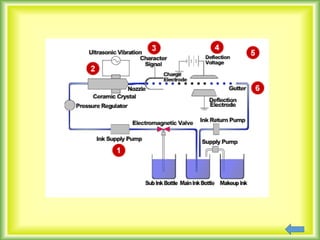
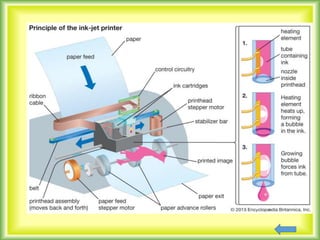
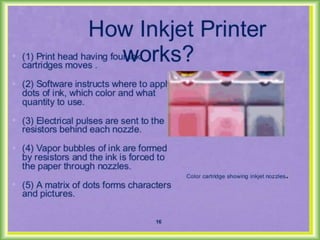
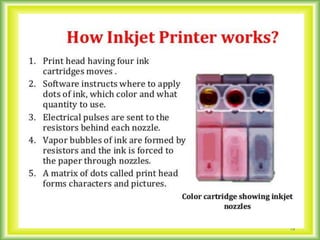
 An inkjet printer is non impact
printer in which the printer does not
have any contact with the paper to be
printed . An inkjet printer uses most
popular printing technologies (such as
thermal heating bubbles inkjet
technology)
An inkjet printer consist of fine nozzle in
which a jet of special ink is ejected on the
paper . The characters are formed by
controlling this nozzle electrically . The
nozzle moves horizontally to print the next
character . The advantage of inkjet printer
good quality printing with very high quality
resolution. The collectively low cost and
multipurpose printing abilities make inkjet
printers a good choice for small distance
and home offices.
Continue…
INKJET PRINTER
29
HISTORY OF LASER JET PRINTER
The first commercial implementation of
a laser printer was the IBM model 3800 in
1975, used for high-volume printing of
documents such as invoices and mailing
labels. It is often cited as "taking up a whole
room," implying that it was a primitive
version of the later familiar device used with
a personal computer.
Presently the laser jet printer used are LJ
1050.1020
31
32
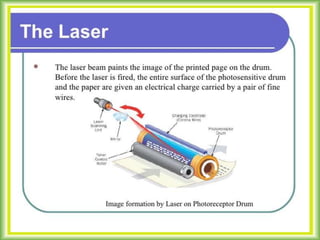
A printer using laser beam used a photo
sensitive drum to provide on image of the
text. The bits of the data sent by the
computer to the printer acts two term laser
beam On or Off .
A negative electric charge is applied to
surface of the drum where laser beam ON
or OFF the electric charge of the beam
become positive when laser beam are
exposed. The laser exposed parts of the
drums surface attracted negative charged
toner (Ink powder) which are transferred to
the paper.
Then the paper moves to a pushing
station where toner on permanently fused
on the paper with heat and pressure . The
print quality of laser printer is excellent .
There are quite in operation and uses
standard photo paper . High speed leaser
printer print at speed over 200 pages per
min. . A low speed printer can print 6-25
pages per min.
Fundamentals of LASER Printer:-
LASER stands for Light Amplification by
Stimulated Emission of Radiation
Classification of Laser Printer
1. Mono Laser
2. Color Laser
36
IMPACT Vs NON IMPACT
• Character is formed by
striking against an inked
ribbon
• L ow Speed
• Print quality comparatively
low.
• Multiple copies up to 06
numbers
• Noisy
• Character is formed without
any direct striking on paper
• High Speed
• Print quality high for all
• No multiple copies
• Quite
37
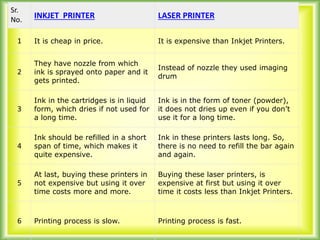
Sr.
No. INKJET PRINTER LASER PRINTER
1 It is cheap in price. It is expensive than Inkjet Printers.
2
They have nozzle from which
ink is sprayed onto paper and it
gets printed.
Instead of nozzle they used imaging
drum
3
Ink in the cartridges is in liquid
form, which dries if not used for
a long time.
Ink is in the form of toner (powder),
it does not dries up even if you don’t
use it for a long time.
4
Ink should be refilled in a short
span of time, which makes it
quite expensive.
Ink in these printers lasts long. So,
there is no need to refill the bar again
and again.
5
At last, buying these printers in
not expensive but using it over
time costs more and more.
Buying these laser printers, is
expensive at first but using it over
time it costs less than Inkjet Printers.
6 Printing process is slow. Printing process is fast.
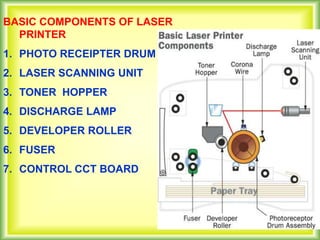
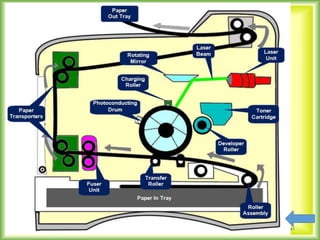
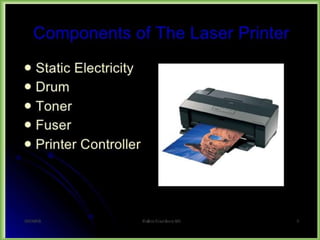
BASIC COMPONENTS OF LASER
PRINTER
1. PHOTO RECEIPTER DRUM
2. LASER SCANNING UNIT
3. TONER HOPPER
4. DISCHARGE LAMP
5. DEVELOPER ROLLER
6. FUSER
7. CONTROL CCT BOARD
40
41
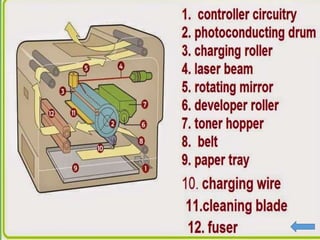
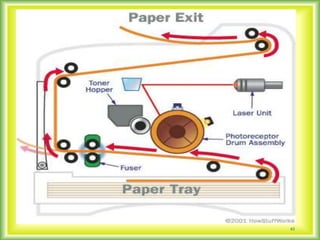
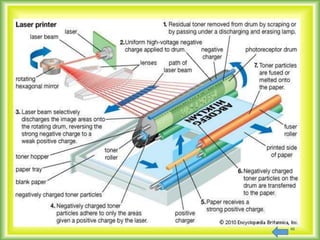
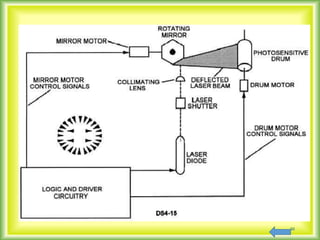
When a printer command received from
source, the control cct board convert the
digital data into electrical signal and applied
to laser scanning unit . The unit having
laser diode which emits the light (laser
beam) according to data and strike into the
image drum negative charge. Further
corona wire touch with developer that
transfer the charge with reversed line.
Positive electrostatic image on a negative
background.
WORKING OF LASERJET PRINTER
43
THE IMAGE DRUM HAVING A THREE PARTS
1. Corona wire
2. Discharge lamp
3. Developer
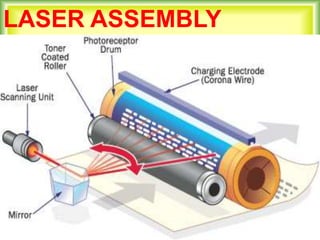
Physically photo receipted drum having corona
wire with total positive charger. If laser beam
strikes the corona wires that are converts into
positive charge. Then further developer touches
with toner . The toner is a fine black powder ,
which has a positive charged and toner clings to
the negative charged areas of the drum The
powder pattern affix the drum roller over a sheet
of paper which moving along with drum it can pull
the toner powder away and moving into the fuser.
LASER ASSEMBLY
46
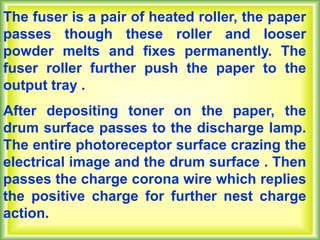
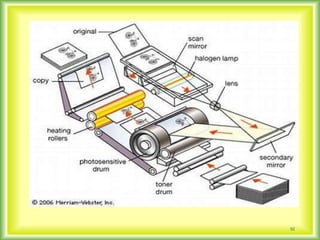
The fuser is a pair of heated roller, the paper
passes though these roller and looser
powder melts and fixes permanently. The
fuser roller further push the paper to the
output tray .
After depositing toner on the paper, the
drum surface passes to the discharge lamp.
The entire photoreceptor surface crazing the
electrical image and the drum surface . Then
passes the charge corona wire which replies
the positive charge for further nest charge
action.
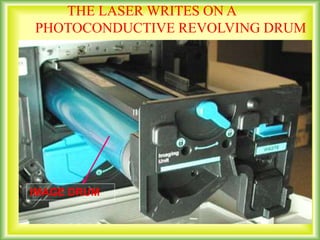
THE LASER WRITES ON A
PHOTOCONDUCTIVE REVOLVING DRUM
IMAGE DRUM
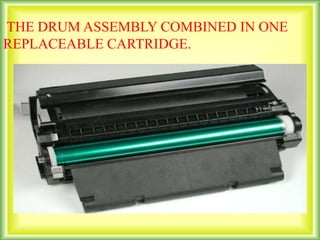
THE DRUM ASSEMBLY COMBINED IN ONE
REPLACEABLE CARTRIDGE.
50
51
52
53
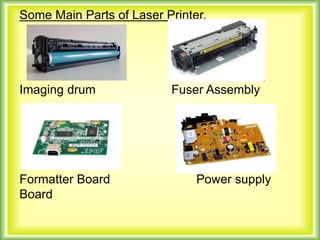
Some Main Parts of Laser Printer.
Imaging drum Fuser Assembly
Formatter Board Power supply
Board
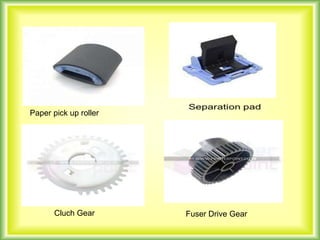
Paper pick up roller
Cluch Gear Fuser Drive Gear
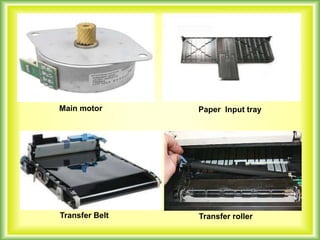
Main motor Paper Input tray
Transfer Belt Transfer roller
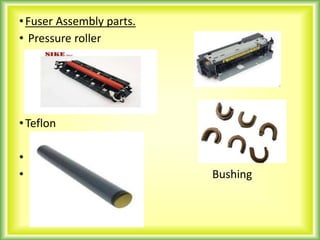
•Fuser Assembly parts.
• Pressure roller
•Teflon
•
• Bushing
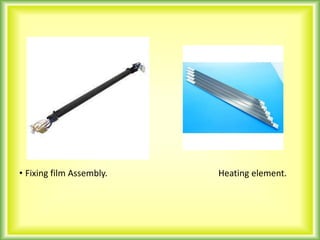
• Fixing film Assembly. Heating element.
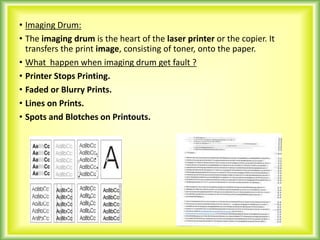
• Imaging Drum:
• The imaging drum is the heart of the laser printer or the copier. It
transfers the print image, consisting of toner, onto the paper.
• What happen when imaging drum get fault ?
• Printer Stops Printing.
• Faded or Blurry Prints.
• Lines on Prints.
• Spots and Blotches on Printouts.
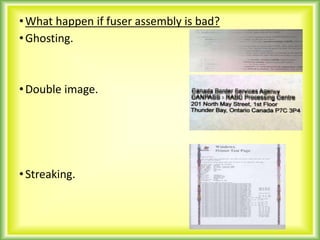
•What happen if fuser assembly is bad?
•Ghosting.
•Double image.
•Streaking.
Black lines & smudges.
• Jamming
Remedies: Cleaning of bushing, change Teflon
Clean rollers. Cleaning of heating element. At major problem we have
to change the complete fuser assembly.
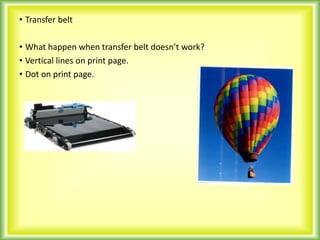
• Transfer belt
• What happen when transfer belt doesn’t work?
• Vertical lines on print page.
• Dot on print page.
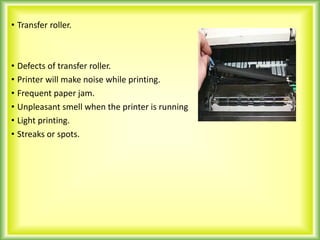
• Transfer roller.
• Defects of transfer roller.
• Printer will make noise while printing.
• Frequent paper jam.
• Unpleasant smell when the printer is running
• Light printing.
• Streaks or spots.
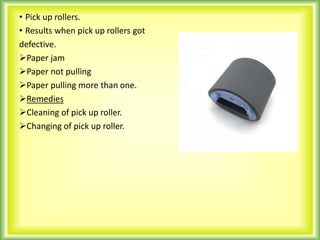
• Pick up rollers.
• Results when pick up rollers got
defective.
Paper jam
Paper not pulling
Paper pulling more than one.
Remedies
Cleaning of pick up roller.
Changing of pick up roller.
• Separate pads.
• Its main function is to fixed
the size of paper to be printed.
Eg. A4 size, Legal paper etc.
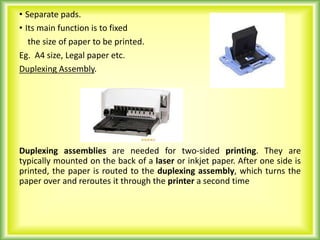
Duplexing Assembly.
Duplexing assemblies are needed for two-sided printing. They are
typically mounted on the back of a laser or inkjet paper. After one side is
printed, the paper is routed to the duplexing assembly, which turns the
paper over and reroutes it through the printer a second time
• What will happen if duplexing assembly got defective?
• Problem while both side print.
• Paper jam while both side print.
Remedies:
Cleaning of duplex assembly.
Replacing of duplex assembly.
CONCLUSION
Advantages of a Laser Printer
The main advantages of laser printers are speed,
precision and economy.
•A laser can move very quickly, so it can "write"
with much greater speed than an ink jet. And
because of the laser beam has an unvarying
diameter, it can draw more precisely, without spilling
any excess ink.
• Laser printers tend to be more expensive than
inkjet printers, but it doesn't cost as much to keep
them running - toner powder is cheap and lasts a
long time,
DISADVANTAGES
1. Laser printers are more costly.
2. The cost of the cartridges is more.
3. In a hot or humid climate a laser printer may
not work properly.
4. Laser printers only really print on certain
kinds of paper.
5. Many of Laser printers are limited by the
amount of memory. This can sometimes limit
the number of fonts that you can use. To
expand the memory of your colours laser
printer you usually have to buy a small RAM
board
70
71
72
73
74
75
76
77
78

printer FINAL.PPT

  • 1.
    1  PHASE IINTRODUCTION  PHASE II PRINTER &TYPES  PHASE III NON IMPACT PRINTER  PHASE IV IMPACT PRINTER  PHASE V DIFFERENCE BETWEEN IMPACT PRINTER & NON IMPACT PRINTER
  • 2.
    2 INTRODUCTION  Printer wasfirstly invented by Christopher Shole in 1869 and in 1873 firstly the work of printing was started by Remington and from that time different techniques are developed for the invention of printer. In 1953 first high speed printer was developed by Remington.
  • 3.
    There is avery good change that it is an Ink jet printer. Since introduction in the later half of the 1980 years. Ink jet printer have grown in popularity and an inexpensive colour printer made by hewlett packard. Continue…
  • 4.
    4 Printers are themost commonly used and popular output devices. They provide information in a permanent readable form. They produce printed output of data. Prints text or image on paper called hard copy. The printing speed of a printer is measured in pages per minute (ppm).Printer resolution is often measured in dots per inch (dpi).
  • 5.
  • 6.
    Types of Printers 6 Printers IMPACTPRINTERS Ex: DMP, LMP NON IMPACT PRINTERS Ex: Ink jet, Laser Jet
  • 7.
    IMPACT Vs NONIMPACT • Character is formed by striking against an inked ribbon • L ow Speed • Print quality comparatively low. • Multiple copies up to 06 numbers • Noisy • Character is formed without any direct striking on paper • High Speed • Print quality high for all • No multiple copies • Quite 7
  • 8.
    8 PHASE-III IMPACT PRINTER  Impactprinter head strike on the ink ribbon by physical contacting the paper. We can say impact printer operate in similar manner to typewriter . Impact printer work’s on electro mechanical magnesium . Impact printers are the oldest printing technologies still in use.
  • 9.
    IMPACT PRINTERS A. DOTMATRIX PRINTER B. CHARACTER PRINTER C. LINE PRINTER
  • 10.
    10 DOT MARTIX PRINTER-: Indot matrix printer character are form using a number of dot to dots hit the ribbon against the paper and character is formed . It contain 9,24 pins in their printer head . It is good quality printers. Speed of a dot matrix printer is 150 to 300 characters per second.
  • 11.
  • 12.
    DMP Classification of DotMatrix Printers 12 DMP 80 Column 9 pin and 24 pin L x 800 L x 240 136 column 9 pin and 24 pin EX 1050+ LQ 1050+DX
  • 13.
  • 14.
  • 15.
  • 16.
  • 17.
  • 18.
  • 19.
  • 20.
  • 21.
  • 22.
  • 23.
  • 24.
  • 25.
    25  Non impactprinters are the printers that produce their output without making contact on the paper to be printed . They use several technique such as electro sensitive, electrostatic inkjet and laser technique for printing. Non impact printer are the faster form of printer they are also much less noisy than impact printer.
  • 26.
    The most commonform of Non Impact printer are :- 1.INK JET PRINTER. 1.LASER PRINTER.
  • 27.
    27  An inkjetprinter is non impact printer in which the printer does not have any contact with the paper to be printed . An inkjet printer uses most popular printing technologies (such as thermal heating bubbles inkjet technology)
  • 28.
    An inkjet printerconsist of fine nozzle in which a jet of special ink is ejected on the paper . The characters are formed by controlling this nozzle electrically . The nozzle moves horizontally to print the next character . The advantage of inkjet printer good quality printing with very high quality resolution. The collectively low cost and multipurpose printing abilities make inkjet printers a good choice for small distance and home offices. Continue…
  • 29.
  • 30.
    HISTORY OF LASERJET PRINTER The first commercial implementation of a laser printer was the IBM model 3800 in 1975, used for high-volume printing of documents such as invoices and mailing labels. It is often cited as "taking up a whole room," implying that it was a primitive version of the later familiar device used with a personal computer. Presently the laser jet printer used are LJ 1050.1020
  • 31.
  • 32.
    32 A printer usinglaser beam used a photo sensitive drum to provide on image of the text. The bits of the data sent by the computer to the printer acts two term laser beam On or Off .
  • 33.
    A negative electriccharge is applied to surface of the drum where laser beam ON or OFF the electric charge of the beam become positive when laser beam are exposed. The laser exposed parts of the drums surface attracted negative charged toner (Ink powder) which are transferred to the paper.
  • 34.
    Then the papermoves to a pushing station where toner on permanently fused on the paper with heat and pressure . The print quality of laser printer is excellent . There are quite in operation and uses standard photo paper . High speed leaser printer print at speed over 200 pages per min. . A low speed printer can print 6-25 pages per min.
  • 35.
    Fundamentals of LASERPrinter:- LASER stands for Light Amplification by Stimulated Emission of Radiation Classification of Laser Printer 1. Mono Laser 2. Color Laser
  • 36.
  • 37.
    IMPACT Vs NONIMPACT • Character is formed by striking against an inked ribbon • L ow Speed • Print quality comparatively low. • Multiple copies up to 06 numbers • Noisy • Character is formed without any direct striking on paper • High Speed • Print quality high for all • No multiple copies • Quite 37
  • 38.
    Sr. No. INKJET PRINTERLASER PRINTER 1 It is cheap in price. It is expensive than Inkjet Printers. 2 They have nozzle from which ink is sprayed onto paper and it gets printed. Instead of nozzle they used imaging drum 3 Ink in the cartridges is in liquid form, which dries if not used for a long time. Ink is in the form of toner (powder), it does not dries up even if you don’t use it for a long time. 4 Ink should be refilled in a short span of time, which makes it quite expensive. Ink in these printers lasts long. So, there is no need to refill the bar again and again. 5 At last, buying these printers in not expensive but using it over time costs more and more. Buying these laser printers, is expensive at first but using it over time it costs less than Inkjet Printers. 6 Printing process is slow. Printing process is fast.
  • 39.
    BASIC COMPONENTS OFLASER PRINTER 1. PHOTO RECEIPTER DRUM 2. LASER SCANNING UNIT 3. TONER HOPPER 4. DISCHARGE LAMP 5. DEVELOPER ROLLER 6. FUSER 7. CONTROL CCT BOARD
  • 40.
  • 41.
  • 42.
    When a printercommand received from source, the control cct board convert the digital data into electrical signal and applied to laser scanning unit . The unit having laser diode which emits the light (laser beam) according to data and strike into the image drum negative charge. Further corona wire touch with developer that transfer the charge with reversed line. Positive electrostatic image on a negative background. WORKING OF LASERJET PRINTER
  • 43.
  • 44.
    THE IMAGE DRUMHAVING A THREE PARTS 1. Corona wire 2. Discharge lamp 3. Developer Physically photo receipted drum having corona wire with total positive charger. If laser beam strikes the corona wires that are converts into positive charge. Then further developer touches with toner . The toner is a fine black powder , which has a positive charged and toner clings to the negative charged areas of the drum The powder pattern affix the drum roller over a sheet of paper which moving along with drum it can pull the toner powder away and moving into the fuser.
  • 45.
  • 46.
  • 47.
    The fuser isa pair of heated roller, the paper passes though these roller and looser powder melts and fixes permanently. The fuser roller further push the paper to the output tray . After depositing toner on the paper, the drum surface passes to the discharge lamp. The entire photoreceptor surface crazing the electrical image and the drum surface . Then passes the charge corona wire which replies the positive charge for further nest charge action.
  • 48.
    THE LASER WRITESON A PHOTOCONDUCTIVE REVOLVING DRUM IMAGE DRUM
  • 49.
    THE DRUM ASSEMBLYCOMBINED IN ONE REPLACEABLE CARTRIDGE.
  • 50.
  • 51.
  • 52.
  • 53.
  • 54.
    Some Main Partsof Laser Printer. Imaging drum Fuser Assembly Formatter Board Power supply Board
  • 55.
    Paper pick uproller Cluch Gear Fuser Drive Gear
  • 56.
    Main motor PaperInput tray Transfer Belt Transfer roller
  • 57.
    •Fuser Assembly parts. •Pressure roller •Teflon • • Bushing
  • 58.
    • Fixing filmAssembly. Heating element.
  • 59.
    • Imaging Drum: •The imaging drum is the heart of the laser printer or the copier. It transfers the print image, consisting of toner, onto the paper. • What happen when imaging drum get fault ? • Printer Stops Printing. • Faded or Blurry Prints. • Lines on Prints. • Spots and Blotches on Printouts.
  • 60.
    •What happen iffuser assembly is bad? •Ghosting. •Double image. •Streaking.
  • 61.
    Black lines &smudges. • Jamming Remedies: Cleaning of bushing, change Teflon Clean rollers. Cleaning of heating element. At major problem we have to change the complete fuser assembly.
  • 62.
    • Transfer belt •What happen when transfer belt doesn’t work? • Vertical lines on print page. • Dot on print page.
  • 63.
    • Transfer roller. •Defects of transfer roller. • Printer will make noise while printing. • Frequent paper jam. • Unpleasant smell when the printer is running • Light printing. • Streaks or spots.
  • 64.
    • Pick uprollers. • Results when pick up rollers got defective. Paper jam Paper not pulling Paper pulling more than one. Remedies Cleaning of pick up roller. Changing of pick up roller.
  • 65.
    • Separate pads. •Its main function is to fixed the size of paper to be printed. Eg. A4 size, Legal paper etc. Duplexing Assembly. Duplexing assemblies are needed for two-sided printing. They are typically mounted on the back of a laser or inkjet paper. After one side is printed, the paper is routed to the duplexing assembly, which turns the paper over and reroutes it through the printer a second time
  • 66.
    • What willhappen if duplexing assembly got defective? • Problem while both side print. • Paper jam while both side print. Remedies: Cleaning of duplex assembly. Replacing of duplex assembly.
  • 67.
    CONCLUSION Advantages of aLaser Printer The main advantages of laser printers are speed, precision and economy. •A laser can move very quickly, so it can "write" with much greater speed than an ink jet. And because of the laser beam has an unvarying diameter, it can draw more precisely, without spilling any excess ink. • Laser printers tend to be more expensive than inkjet printers, but it doesn't cost as much to keep them running - toner powder is cheap and lasts a long time,
  • 68.
    DISADVANTAGES 1. Laser printersare more costly. 2. The cost of the cartridges is more. 3. In a hot or humid climate a laser printer may not work properly. 4. Laser printers only really print on certain kinds of paper. 5. Many of Laser printers are limited by the amount of memory. This can sometimes limit the number of fonts that you can use. To expand the memory of your colours laser printer you usually have to buy a small RAM board
  • 70.
  • 71.
  • 72.
  • 73.
  • 74.
  • 75.
  • 76.
  • 77.
  • 78.