Unit Four: Maintenance procedures
• Preventive maintenance is a regular and systematic inspection, cleaning, and
replacement of worn parts, materials, and systems.
 Purpose of preventive maintenance
• Reduce the likelihood of hardware or software problems by systematically and
periodically checking hardware and software to ensure proper operation.
• Reduce computer down time and repair costs
 Troubleshooting is a systematic approach to locating the cause of a fault in a
computer system.
 Troubleshooting is a learned skill.
 Not all troubleshooting processes are the same, and technicians tend to refine their
own troubleshooting skills based on knowledge and personal experience.
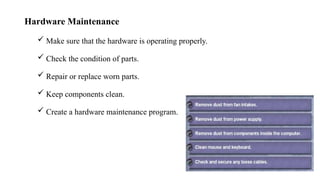
Hardware Maintenance
 Make sure that the hardware is operating properly.
 Check the condition of parts.
 Repair or replace worn parts.
 Keep components clean.
 Create a hardware maintenance program.
Software Maintenance
 Review updates
 Follow policies of your organization
 Create a schedule
Preventive Maintenance Benefit
• Reduce computer down time.
• Reduce loss of worker productivity.
The Troubleshooting Process
• Follow an organized and logical procedure.
• Address possible issues one at a time.
• Troubleshooting is a skill that is refined over time.
• The first and last steps involve effectively communicating with the customer.
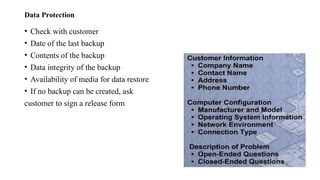
Data Protection
• Check with customer
• Date of the last backup
• Contents of the backup
• Data integrity of the backup
• Availability of media for data restore
• If no backup can be created, ask
customer to sign a release form
Gather Data from the Customer
• Communicate respectfully with the customer
• Start with open-ended questions
• “What types of problems are you having with your computer or network?”
• Then, ask closed-ended (yes/no) questions “have you changed your password
recently?”
Verify Obvious Issues
• Problem may be simpler than the customer thinks.
• Checking for obvious issues can save time.
• If this step turns up nothing, continue to the next step of the troubleshooting
process.
Try Quick Solutions
• May provide additional information,
• Even if they do not solve the problem.
• Document each solution you try.
• May need to gather more information from the customer.
• If you find the problem at this stage, document it and proceed to the end of the
troubleshooting process
Gather Data from the Computer
 When system, user, or software errors occur on a computer, the Event Viewer is
updated with information about the errors:
 What problem occurred?
 The date and time of the problem
 The severity of the problem
 The source of the problem
 Event ID number
 Which user was logged in when the problem occurred?
• Although this utility lists details about the error, you may still need to research the
Cont………
Gather Data from the Computer Device Manager
• A flag of ! Indicates the device is acting incorrectly.
• A flag of X indicates the device is disabled.
Gather Data from the Computer
• When troubleshooting, power on the computer and listen to the beep code sequence.
• Document the beep code sequence and research the code to determine the specific
hardware failure.
• If the computer boots and stops after the POST, investigate the BIOS settings to
determine where to find the problem. Refer to the motherboard manual to make sure
that the BIOS settings are accurate.
Evaluate the Problem, Implement the Solution
• Research possible solutions:
• Prioritize solutions to try.
• Try easiest solutions first.
• After an unsuccessful try, undo any changes you have made.
• Unnecessary changes could complicate finding the solution
Close with the Customer
• Discuss the solution with the customer
• Have the customer confirm that the problem has been solved
• Document the process
• Regular preventive maintenance reduces hardware and software problems.
• Before beginning any repair, back up the data on a computer.
• The troubleshooting process is a guideline to help you solve computer problems in an
efficient manner.
 Document everything that you try, even if it fails. The documentation that you create will become a
useful resource for you and other technicians.
Type of Maintenance
a. Reactive maintenance
 Also known as breakdown or run-to-failure, reactive maintenance is pretty simple:
fix things when they break.
It is a type of corrective maintenance carried out upon unexpected machine failure
that needs to be repaired or replaced to resume business operation
b. Preventive maintenance (scheduled)
• Also known as proactive maintenance, this method involves periodically taking
assets offline and inspecting or repairing them at predetermined intervals (usually
time or event-based triggers).
• The goal of this approach is to extend the useful life of an asset and prevent
breakdowns from occurring.
Objectives of Preventive Maintenance
 Minimize Equipment Downtime
 Extend Equipment Lifespan
 Improve Operational Efficiency
 Improve Safety
 Lower Costs of Repairs
 Optimize Resource Utilization:
 Increases Equipment Reliability:
 Improves Product Quality
 Increases Overall Productivity
Types of Preventive
Maintenance
Time-Based Maintenance (TBM)
Usage-Based Maintenance (UBM)
Condition-Based Maintenance
(CBM)
c. Predictive maintenance
• Predictive maintenance aims to predict failures before they happen so
maintenance can occur at just the right time.
• PdM uses data from machine sensors and smart technology to alert the
maintenance team when a piece of equipment is at risk of failing.
• Predictive maintenance avoids unnecessary maintenance by understanding the
actual condition of the equipment.
d. Reliability- centered maintenance (RCM)
• Reliability-centered maintenance (RCM) addresses the fact that failure is not always linear.
• RCM is a highly-involved process that seeks to analyse all the possible failure modes for
each piece of equipment and customize a maintenance plan for each individual machine.
• The ultimate goal of RCM is to increase equipment availability or reliability.
• RCM is considered complex because each individual asset must be analysed and prioritized
based on criticality.
• RCM is very sophisticated, to the extent where it is not a realistic or necessary technique for
every organization.
4.3. Documentation and approval of recommended procedure
• Document approvals are formalized processes that you use to track the
development of a whole document.
• Using document approvals, you can route documents for approval, monitor the
approval process from person to person, log who approved or denied the
document, and review suggestions that they made about the document.
• The process facilitates a more detailed control of a document and helps ensure that
the contract is within standards of individuals and groups in an organization.
• Document approvals use approval framework
Submit for Approval
• Select to immediately start the approval process. After starting the approval process,
the system displays another Document Approval Status page with the new approval
status. Using the page you can:
Review approvers and reviewers.
Review approval process stages and paths.
Make comments about the document before continuing the approval process.
Add approvers and reviewers.
Start new approval paths.
Cancel the approval process.
Staff Orientation About Maintenance
 Orientation is important because it:
 Provides the users with concise and accurate information to make him/her more
comfortable in the job;
 Encourages users confidence and helps the new user adapt faster to the job;
 Contributes to a more effective, productive workforce;
 Improves users retention and
 Promotes communication between the technical person and the users.
Occupational health and safety
• For smooth, safe and successful maintenance work a prior risk assessment has to be
carried out.
• The implementation may mean making changes to the organization and working
procedures, working environment, equipment and products used.
• Changes could also be necessary in training management and staff as well as
improving communications.
Measures should follow the prevention hierarchy:
 Elimination of risks
 Substitution e.g. of dangerous substances
 Collective control measures like exhaust systems
 Individual control like personal protective equipment
Special issues, qualification
 Based on the conducted risk assessment the following issues need special attention:
• A qualification level has to be determined for the specific repair and maintenance tasks.
• It may be necessary to put a permission system in place, only giving specifically trained
people access to sensitive and dangerous areas.
• The issuing of permits for work and lock-off systems has also to be considered.
• A permit to work should detail the work to be done and the precautions to be taken.
• Enough time and appropriate resources have to be allocated.
• Stress and unsuitable tools may lead to errors, unsafe situations and prolonged down times.
Providing a safe work area
• Only authorized personnel should be allowed to do repair or maintenance work.
• This becomes all the more important when the machines and structures are more
sophisticated.
• Only then can it be guaranteed that the right steps are followed and the correct
equipment is used.
• The work area needs to be secured by preventing unauthorized access, for example,
by using barriers and signs and safe routes, which have to be established for workers
to enter and exit the work area.
 Sometimes, it can be necessary to conduct the repair or maintenance work at running
machines. In this case special measures have to be taken:
 The normal safeguards should be in place and should be used.
 If that is not possible, special protection devices have to be used (special tools,
mobile switches), the speed of the machine has to be reduced, and special covers
for dangerous areas have to be provided.
 If this should, in some very special cases, not be possible, special measures have to
be taken based on a detailed risk assessment.
 Supervision must be provided throughout the process
 Maintenance work often requires contact with a variety of substances, many of them hazardous:
• Cleaning and lubricating agents should be selected carefully
• E.g. using selection tools such as Clean tool and others maintenance tools in order
to use substances with the least impact on human health.
•Thank you !!!

Implement maintenance procedures (3).pptx

  • 1.
    Unit Four: Maintenanceprocedures • Preventive maintenance is a regular and systematic inspection, cleaning, and replacement of worn parts, materials, and systems.  Purpose of preventive maintenance • Reduce the likelihood of hardware or software problems by systematically and periodically checking hardware and software to ensure proper operation. • Reduce computer down time and repair costs
  • 2.
     Troubleshooting isa systematic approach to locating the cause of a fault in a computer system.  Troubleshooting is a learned skill.  Not all troubleshooting processes are the same, and technicians tend to refine their own troubleshooting skills based on knowledge and personal experience.
  • 3.
    Hardware Maintenance  Makesure that the hardware is operating properly.  Check the condition of parts.  Repair or replace worn parts.  Keep components clean.  Create a hardware maintenance program.
  • 4.
    Software Maintenance  Reviewupdates  Follow policies of your organization  Create a schedule
  • 5.
    Preventive Maintenance Benefit •Reduce computer down time. • Reduce loss of worker productivity.
  • 6.
    The Troubleshooting Process •Follow an organized and logical procedure. • Address possible issues one at a time. • Troubleshooting is a skill that is refined over time. • The first and last steps involve effectively communicating with the customer.
  • 7.
    Data Protection • Checkwith customer • Date of the last backup • Contents of the backup • Data integrity of the backup • Availability of media for data restore • If no backup can be created, ask customer to sign a release form
  • 8.
    Gather Data fromthe Customer • Communicate respectfully with the customer • Start with open-ended questions • “What types of problems are you having with your computer or network?” • Then, ask closed-ended (yes/no) questions “have you changed your password recently?”
  • 9.
    Verify Obvious Issues •Problem may be simpler than the customer thinks. • Checking for obvious issues can save time. • If this step turns up nothing, continue to the next step of the troubleshooting process.
  • 10.
    Try Quick Solutions •May provide additional information, • Even if they do not solve the problem. • Document each solution you try. • May need to gather more information from the customer. • If you find the problem at this stage, document it and proceed to the end of the troubleshooting process
  • 11.
    Gather Data fromthe Computer  When system, user, or software errors occur on a computer, the Event Viewer is updated with information about the errors:  What problem occurred?  The date and time of the problem  The severity of the problem  The source of the problem  Event ID number  Which user was logged in when the problem occurred? • Although this utility lists details about the error, you may still need to research the
  • 12.
  • 13.
    Gather Data fromthe Computer Device Manager • A flag of ! Indicates the device is acting incorrectly. • A flag of X indicates the device is disabled.
  • 14.
    Gather Data fromthe Computer • When troubleshooting, power on the computer and listen to the beep code sequence. • Document the beep code sequence and research the code to determine the specific hardware failure. • If the computer boots and stops after the POST, investigate the BIOS settings to determine where to find the problem. Refer to the motherboard manual to make sure that the BIOS settings are accurate.
  • 15.
    Evaluate the Problem,Implement the Solution • Research possible solutions: • Prioritize solutions to try. • Try easiest solutions first. • After an unsuccessful try, undo any changes you have made. • Unnecessary changes could complicate finding the solution
  • 16.
    Close with theCustomer • Discuss the solution with the customer • Have the customer confirm that the problem has been solved • Document the process • Regular preventive maintenance reduces hardware and software problems. • Before beginning any repair, back up the data on a computer. • The troubleshooting process is a guideline to help you solve computer problems in an efficient manner.  Document everything that you try, even if it fails. The documentation that you create will become a useful resource for you and other technicians.
  • 17.
    Type of Maintenance a.Reactive maintenance  Also known as breakdown or run-to-failure, reactive maintenance is pretty simple: fix things when they break. It is a type of corrective maintenance carried out upon unexpected machine failure that needs to be repaired or replaced to resume business operation
  • 18.
    b. Preventive maintenance(scheduled) • Also known as proactive maintenance, this method involves periodically taking assets offline and inspecting or repairing them at predetermined intervals (usually time or event-based triggers). • The goal of this approach is to extend the useful life of an asset and prevent breakdowns from occurring.
  • 19.
    Objectives of PreventiveMaintenance  Minimize Equipment Downtime  Extend Equipment Lifespan  Improve Operational Efficiency  Improve Safety  Lower Costs of Repairs  Optimize Resource Utilization:  Increases Equipment Reliability:  Improves Product Quality  Increases Overall Productivity
  • 20.
    Types of Preventive Maintenance Time-BasedMaintenance (TBM) Usage-Based Maintenance (UBM) Condition-Based Maintenance (CBM)
  • 21.
    c. Predictive maintenance •Predictive maintenance aims to predict failures before they happen so maintenance can occur at just the right time. • PdM uses data from machine sensors and smart technology to alert the maintenance team when a piece of equipment is at risk of failing. • Predictive maintenance avoids unnecessary maintenance by understanding the actual condition of the equipment.
  • 22.
    d. Reliability- centeredmaintenance (RCM) • Reliability-centered maintenance (RCM) addresses the fact that failure is not always linear. • RCM is a highly-involved process that seeks to analyse all the possible failure modes for each piece of equipment and customize a maintenance plan for each individual machine. • The ultimate goal of RCM is to increase equipment availability or reliability. • RCM is considered complex because each individual asset must be analysed and prioritized based on criticality. • RCM is very sophisticated, to the extent where it is not a realistic or necessary technique for every organization.
  • 23.
    4.3. Documentation andapproval of recommended procedure • Document approvals are formalized processes that you use to track the development of a whole document. • Using document approvals, you can route documents for approval, monitor the approval process from person to person, log who approved or denied the document, and review suggestions that they made about the document. • The process facilitates a more detailed control of a document and helps ensure that the contract is within standards of individuals and groups in an organization. • Document approvals use approval framework
  • 24.
    Submit for Approval •Select to immediately start the approval process. After starting the approval process, the system displays another Document Approval Status page with the new approval status. Using the page you can: Review approvers and reviewers. Review approval process stages and paths. Make comments about the document before continuing the approval process. Add approvers and reviewers. Start new approval paths. Cancel the approval process.
  • 25.
    Staff Orientation AboutMaintenance  Orientation is important because it:  Provides the users with concise and accurate information to make him/her more comfortable in the job;  Encourages users confidence and helps the new user adapt faster to the job;  Contributes to a more effective, productive workforce;  Improves users retention and  Promotes communication between the technical person and the users.
  • 26.
    Occupational health andsafety • For smooth, safe and successful maintenance work a prior risk assessment has to be carried out. • The implementation may mean making changes to the organization and working procedures, working environment, equipment and products used. • Changes could also be necessary in training management and staff as well as improving communications.
  • 27.
    Measures should followthe prevention hierarchy:  Elimination of risks  Substitution e.g. of dangerous substances  Collective control measures like exhaust systems  Individual control like personal protective equipment
  • 28.
    Special issues, qualification Based on the conducted risk assessment the following issues need special attention: • A qualification level has to be determined for the specific repair and maintenance tasks. • It may be necessary to put a permission system in place, only giving specifically trained people access to sensitive and dangerous areas. • The issuing of permits for work and lock-off systems has also to be considered. • A permit to work should detail the work to be done and the precautions to be taken. • Enough time and appropriate resources have to be allocated. • Stress and unsuitable tools may lead to errors, unsafe situations and prolonged down times.
  • 29.
    Providing a safework area • Only authorized personnel should be allowed to do repair or maintenance work. • This becomes all the more important when the machines and structures are more sophisticated. • Only then can it be guaranteed that the right steps are followed and the correct equipment is used. • The work area needs to be secured by preventing unauthorized access, for example, by using barriers and signs and safe routes, which have to be established for workers to enter and exit the work area.
  • 30.
     Sometimes, itcan be necessary to conduct the repair or maintenance work at running machines. In this case special measures have to be taken:  The normal safeguards should be in place and should be used.  If that is not possible, special protection devices have to be used (special tools, mobile switches), the speed of the machine has to be reduced, and special covers for dangerous areas have to be provided.  If this should, in some very special cases, not be possible, special measures have to be taken based on a detailed risk assessment.  Supervision must be provided throughout the process
  • 31.
     Maintenance workoften requires contact with a variety of substances, many of them hazardous: • Cleaning and lubricating agents should be selected carefully • E.g. using selection tools such as Clean tool and others maintenance tools in order to use substances with the least impact on human health.
  • 32.