DIGITAL DOCUMENTATION
Art
Integrated
Project
What Do You Mean By DIGITAL
DOCUMENTATION?
Using digital document management helps bring
everything into one uniformed and standardised
approach.
Documents can be updated by more than one person at
a time, meaning that no time is wasted trying to locate
items.
Its more than just a way to replace paperwork files with
digital counterparts
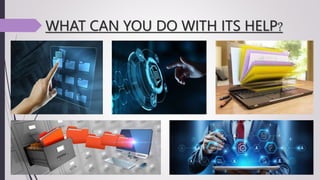
WHAT CAN YOU DO WITH ITS HELP?
What is its use?
When dealing with any sort of paperwork or data,
You get Quick, easy and efficient access to the
information required.
With digital document management, all aspects of
finding and retrieving data are significantly improved.
Searches can be made from desktops, with no need to
visit multiple locations and sort through paperwork.
the potential for remote working exists.
What is its use?
Customised filing
users can prioritise any information they
may need regular access to.
File security
In a similar manner, access can be
restricted to certain forms of data, based
on need, ensuring that all people can find
what they are supposed to, without the risk
of straying into areas not designed for
them.
Major Features it Includes
Creating a
Document
Editing &
Formatting
Stylising
Graphics(Objects)
Printing
Distribution/Mail
graphics
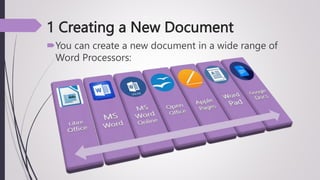
1 Creating a New Document
You can create a new document in a wide range of
Word Processors:
2 Editing & Formatting Features
EDITING Features
Editing features like copying, deleting, cutting, pasting,
overwriting text.
Inserting sentences, paragraphs, text boxes, page
numbers, headers and footers or words, etc.
FORMATTING Features
Formatting features like Boldface, Italics, Underline,
Font, Font Size, Font Colour, WordArt, etc.
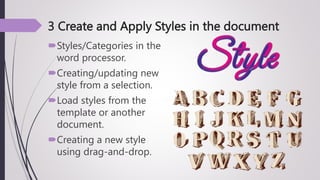
3 Create and Apply Styles in the document
Styles/Categories in the
word processor.
Creating/updating new
style from a selection.
Load styles from the
template or another
document.
Creating a new style
using drag-and-drop.
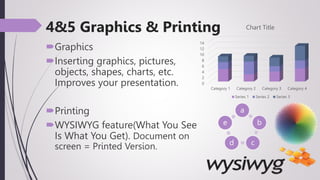
4&5 Graphics & Printing
Graphics
Inserting graphics, pictures,
objects, shapes, charts, etc.
Improves your presentation.
Printing
WYSIWYG feature(What You See
Is What You Get). Document on
screen = Printed Version.
a
b
c
d
e
0
2
4
6
8
10
12
14
Category 1 Category 2 Category 3 Category 4
Chart Title
Series 1 Series 2 Series 3
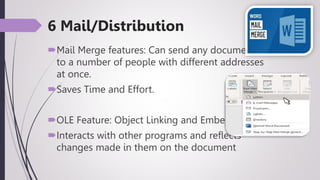
6 Mail/Distribution
Mail Merge features: Can send any document
to a number of people with different addresses
at once.
Saves Time and Effort.
OLE Feature: Object Linking and Embedding
Interacts with other programs and reflects
changes made in them on the document
What Features it includes?
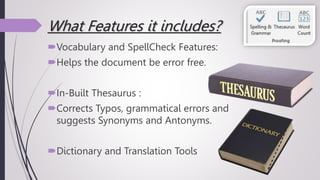
Vocabulary and SpellCheck Features:
Helps the document be error free.
In-Built Thesaurus :
Corrects Typos, grammatical errors and
suggests Synonyms and Antonyms.
Dictionary and Translation Tools
What other Features it includes?
Ease and Speed OF TYPING
Storage features: Stores documents
for future use
Can be retrieved when required
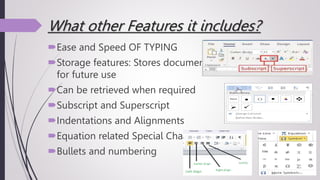
Subscript and Superscript
Indentations and Alignments
Equation related Special Characters
Bullets and numbering
Presentation on Digital documentation...

Presentation on Digital documentation...

  • 1.
  • 2.
  • 3.
    What Do YouMean By DIGITAL DOCUMENTATION? Using digital document management helps bring everything into one uniformed and standardised approach. Documents can be updated by more than one person at a time, meaning that no time is wasted trying to locate items. Its more than just a way to replace paperwork files with digital counterparts
  • 4.
    WHAT CAN YOUDO WITH ITS HELP?
  • 5.
    What is itsuse? When dealing with any sort of paperwork or data, You get Quick, easy and efficient access to the information required. With digital document management, all aspects of finding and retrieving data are significantly improved. Searches can be made from desktops, with no need to visit multiple locations and sort through paperwork. the potential for remote working exists.
  • 6.
    What is itsuse? Customised filing users can prioritise any information they may need regular access to. File security In a similar manner, access can be restricted to certain forms of data, based on need, ensuring that all people can find what they are supposed to, without the risk of straying into areas not designed for them.
  • 7.
    Major Features itIncludes Creating a Document Editing & Formatting Stylising Graphics(Objects) Printing Distribution/Mail graphics
  • 8.
    1 Creating aNew Document You can create a new document in a wide range of Word Processors:
  • 9.
    2 Editing &Formatting Features EDITING Features Editing features like copying, deleting, cutting, pasting, overwriting text. Inserting sentences, paragraphs, text boxes, page numbers, headers and footers or words, etc. FORMATTING Features Formatting features like Boldface, Italics, Underline, Font, Font Size, Font Colour, WordArt, etc.
  • 10.
    3 Create andApply Styles in the document Styles/Categories in the word processor. Creating/updating new style from a selection. Load styles from the template or another document. Creating a new style using drag-and-drop.
  • 11.
    4&5 Graphics &Printing Graphics Inserting graphics, pictures, objects, shapes, charts, etc. Improves your presentation. Printing WYSIWYG feature(What You See Is What You Get). Document on screen = Printed Version. a b c d e 0 2 4 6 8 10 12 14 Category 1 Category 2 Category 3 Category 4 Chart Title Series 1 Series 2 Series 3
  • 12.
    6 Mail/Distribution Mail Mergefeatures: Can send any document to a number of people with different addresses at once. Saves Time and Effort. OLE Feature: Object Linking and Embedding Interacts with other programs and reflects changes made in them on the document
  • 13.
    What Features itincludes? Vocabulary and SpellCheck Features: Helps the document be error free. In-Built Thesaurus : Corrects Typos, grammatical errors and suggests Synonyms and Antonyms. Dictionary and Translation Tools
  • 14.
    What other Featuresit includes? Ease and Speed OF TYPING Storage features: Stores documents for future use Can be retrieved when required Subscript and Superscript Indentations and Alignments Equation related Special Characters Bullets and numbering