DATABASE TRANSACTION
YOURNAME
CONTENT
• Idea Of Transaction
• Why Are Sql Transactions Necessary & When Should You Use?
• Properties Of Transaction
• What Is Commit And Rollback
• Difference Between Commit And Rollback In Sql
• Syntax & implementation
- Idea of transaction.
A SQL transaction is a grouping of one or more SQL statements that
interact with a database. A transaction in its entirety can commit to a
database as a single logical unit or rollback (become undone) as a single
logical unit. In SQL, transactions are essential for maintaining database
integrity. They are used to preserve integrity when multiple related
operations are executed concurrently, or when multiple users interact with a
database concurrently.
- Why are SQL Transactions Necessary & when should you use?
A database application has to account for every possible failure scenario while writing and reading
from a database. Without SQL transactions, application code that protects database integrity
would be complex and expensive to develop and maintain. With SQL transactions, application
code and database maintenance can be simplified.
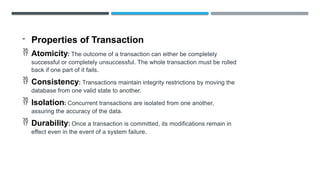
- Properties of Transaction
 Atomicity: The outcome of a transaction can either be completely
successful or completely unsuccessful. The whole transaction must be rolled
back if one part of it fails.
 Consistency: Transactions maintain integrity restrictions by moving the
database from one valid state to another.
 Isolation: Concurrent transactions are isolated from one another,
assuring the accuracy of the data.
 Durability: Once a transaction is committed, its modifications remain in
effect even in the event of a system failure.
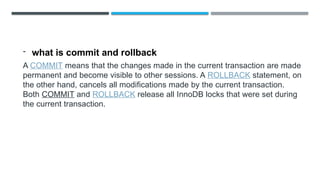
- what is commit and rollback
A COMMIT means that the changes made in the current transaction are made
permanent and become visible to other sessions. A ROLLBACK statement, on
the other hand, cancels all modifications made by the current transaction.
Both COMMIT and ROLLBACK release all InnoDB locks that were set during
the current transaction.
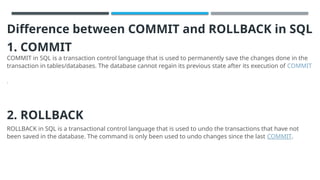
Difference between COMMIT and ROLLBACK in SQL
1. COMMIT
COMMIT in SQL is a transaction control language that is used to permanently save the changes done in the
transaction in tables/databases. The database cannot regain its previous state after its execution of COMMIT
.
2. ROLLBACK
ROLLBACK in SQL is a transactional control language that is used to undo the transactions that have not
been saved in the database. The command is only been used to undo changes since the last COMMIT.
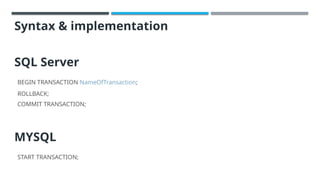
Syntax & implementation
SQL Server
BEGIN TRANSACTION NameOfTransaction;
ROLLBACK;
COMMIT TRANSACTION;
MYSQL
START TRANSACTION;
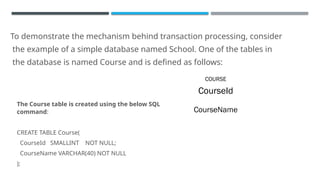
To demonstrate the mechanism behind transaction processing, consider
the example of a simple database named School. One of the tables in
the database is named Course and is defined as follows:
COURSE
CourseId
CourseName
The Course table is created using the below SQL
command:
CREATE TABLE Course(
CourseId SMALLINT NOT NULL;
CourseName VARCHAR(40) NOT NULL
);
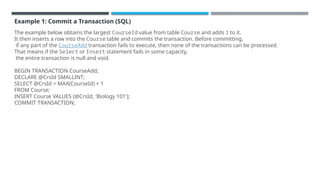
Example 1: Commit a Transaction (SQL)
The example below obtains the largest CourseId value from table Course and adds 1 to it.
It then inserts a row into the Course table and commits the transaction. Before committing,
if any part of the CourseAdd transaction fails to execute, then none of the transactions can be processed.
That means if the Select or Insert statement fails in some capacity,
the entire transaction is null and void.
BEGIN TRANSACTION CourseAdd;
DECLARE @CrsId SMALLINT;
SELECT @CrsId = MAX(CourseId) + 1
FROM Course;
INSERT Course VALUES (@CrsId, 'Biology 101');
COMMIT TRANSACTION;
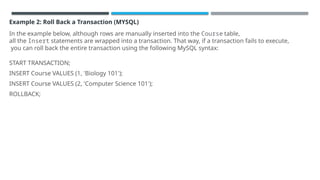
Example 2: Roll Back a Transaction (MYSQL)
In the example below, although rows are manually inserted into the Course table,
all the Insert statements are wrapped into a transaction. That way, if a transaction fails to execute,
you can roll back the entire transaction using the following MySQL syntax:
START TRANSACTION;
INSERT Course VALUES (1, 'Biology 101');
INSERT Course VALUES (2, 'Computer Science 101');
ROLLBACK;
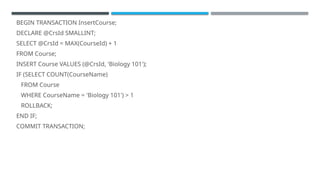
Example 3: Combining Commit and Rollback in a Transaction
The example below combines the ability to both commit and rollback
transactions in the same transaction code block.
BEGIN TRANSACTION InsertCourse;
DECLARE @CrsId SMALLINT;
SELECT @CrsId = MAX(CourseId) + 1
FROM Course;
INSERT Course VALUES (@CrsId, 'Biology 101');
IF (SELECT COUNT(CourseName)
FROM Course
WHERE CourseName = 'Biology 101') > 1
ROLLBACK;
END IF;
COMMIT TRANSACTION;
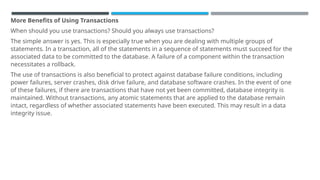
More Benefits of Using Transactions
When should you use transactions? Should you always use transactions?
The simple answer is yes. This is especially true when you are dealing with multiple groups of
statements. In a transaction, all of the statements in a sequence of statements must succeed for the
associated data to be committed to the database. A failure of a component within the transaction
necessitates a rollback.
The use of transactions is also beneficial to protect against database failure conditions, including
power failures, server crashes, disk drive failure, and database software crashes. In the event of one
of these failures, if there are transactions that have not yet been committed, database integrity is
maintained. Without transactions, any atomic statements that are applied to the database remain
intact, regardless of whether associated statements have been executed. This may result in a data
integrity issue.
Conclusion
SQL transaction logic is a fundamental mechanism for ensuring database integrity
and minimizing error handling logic that is required in a multi-user database
application. The use of transactions in SQL environments guarantees accuracy and
completeness.

presentation about Database transaction

  • 1.
  • 2.
    CONTENT • Idea OfTransaction • Why Are Sql Transactions Necessary & When Should You Use? • Properties Of Transaction • What Is Commit And Rollback • Difference Between Commit And Rollback In Sql • Syntax & implementation
  • 3.
    - Idea oftransaction. A SQL transaction is a grouping of one or more SQL statements that interact with a database. A transaction in its entirety can commit to a database as a single logical unit or rollback (become undone) as a single logical unit. In SQL, transactions are essential for maintaining database integrity. They are used to preserve integrity when multiple related operations are executed concurrently, or when multiple users interact with a database concurrently.
  • 5.
    - Why areSQL Transactions Necessary & when should you use? A database application has to account for every possible failure scenario while writing and reading from a database. Without SQL transactions, application code that protects database integrity would be complex and expensive to develop and maintain. With SQL transactions, application code and database maintenance can be simplified.
  • 6.
    - Properties ofTransaction  Atomicity: The outcome of a transaction can either be completely successful or completely unsuccessful. The whole transaction must be rolled back if one part of it fails.  Consistency: Transactions maintain integrity restrictions by moving the database from one valid state to another.  Isolation: Concurrent transactions are isolated from one another, assuring the accuracy of the data.  Durability: Once a transaction is committed, its modifications remain in effect even in the event of a system failure.
  • 7.
    - what iscommit and rollback A COMMIT means that the changes made in the current transaction are made permanent and become visible to other sessions. A ROLLBACK statement, on the other hand, cancels all modifications made by the current transaction. Both COMMIT and ROLLBACK release all InnoDB locks that were set during the current transaction.
  • 8.
    Difference between COMMITand ROLLBACK in SQL 1. COMMIT COMMIT in SQL is a transaction control language that is used to permanently save the changes done in the transaction in tables/databases. The database cannot regain its previous state after its execution of COMMIT . 2. ROLLBACK ROLLBACK in SQL is a transactional control language that is used to undo the transactions that have not been saved in the database. The command is only been used to undo changes since the last COMMIT.
  • 9.
    Syntax & implementation SQLServer BEGIN TRANSACTION NameOfTransaction; ROLLBACK; COMMIT TRANSACTION; MYSQL START TRANSACTION;
  • 10.
    To demonstrate themechanism behind transaction processing, consider the example of a simple database named School. One of the tables in the database is named Course and is defined as follows: COURSE CourseId CourseName The Course table is created using the below SQL command: CREATE TABLE Course( CourseId SMALLINT NOT NULL; CourseName VARCHAR(40) NOT NULL );
  • 11.
    Example 1: Commita Transaction (SQL) The example below obtains the largest CourseId value from table Course and adds 1 to it. It then inserts a row into the Course table and commits the transaction. Before committing, if any part of the CourseAdd transaction fails to execute, then none of the transactions can be processed. That means if the Select or Insert statement fails in some capacity, the entire transaction is null and void. BEGIN TRANSACTION CourseAdd; DECLARE @CrsId SMALLINT; SELECT @CrsId = MAX(CourseId) + 1 FROM Course; INSERT Course VALUES (@CrsId, 'Biology 101'); COMMIT TRANSACTION;
  • 12.
    Example 2: RollBack a Transaction (MYSQL) In the example below, although rows are manually inserted into the Course table, all the Insert statements are wrapped into a transaction. That way, if a transaction fails to execute, you can roll back the entire transaction using the following MySQL syntax: START TRANSACTION; INSERT Course VALUES (1, 'Biology 101'); INSERT Course VALUES (2, 'Computer Science 101'); ROLLBACK;
  • 13.
    Example 3: CombiningCommit and Rollback in a Transaction The example below combines the ability to both commit and rollback transactions in the same transaction code block.
  • 14.
    BEGIN TRANSACTION InsertCourse; DECLARE@CrsId SMALLINT; SELECT @CrsId = MAX(CourseId) + 1 FROM Course; INSERT Course VALUES (@CrsId, 'Biology 101'); IF (SELECT COUNT(CourseName) FROM Course WHERE CourseName = 'Biology 101') > 1 ROLLBACK; END IF; COMMIT TRANSACTION;
  • 15.
    More Benefits ofUsing Transactions When should you use transactions? Should you always use transactions? The simple answer is yes. This is especially true when you are dealing with multiple groups of statements. In a transaction, all of the statements in a sequence of statements must succeed for the associated data to be committed to the database. A failure of a component within the transaction necessitates a rollback. The use of transactions is also beneficial to protect against database failure conditions, including power failures, server crashes, disk drive failure, and database software crashes. In the event of one of these failures, if there are transactions that have not yet been committed, database integrity is maintained. Without transactions, any atomic statements that are applied to the database remain intact, regardless of whether associated statements have been executed. This may result in a data integrity issue.
  • 16.
    Conclusion SQL transaction logicis a fundamental mechanism for ensuring database integrity and minimizing error handling logic that is required in a multi-user database application. The use of transactions in SQL environments guarantees accuracy and completeness.

Editor's Notes

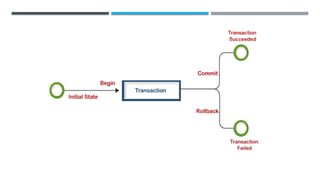
  • #3 Transactions group a set of tasks into a single execution unit. Each transaction begins with a specific job and ends when all the tasks in the group successfully completed. If any of the tasks fail, the transaction fails. Therefore, a transaction has only two results: success or failure.
  • #8 Transactions in Client-Side Languages (Optional) In APIs such as PHP, Perl DBI, JDBC, ODBC, or the standard C call interface of MySQL, you can send transaction control statements such as COMMIT to the MySQL server as strings just like any other SQL statements such as SELECT or INSERT. Some APIs also offer separate special transaction commit and rollback functions or methods.  
  • #12 From the above MySQL syntax, you have ensured that the Insert statements have not committed (inserted) the data into the Course table until a Commit command is received. By issuing a Rollback statement, you have effectively undone the two prior Insert statements, and not committed either of these two rows to the database.  
  • #14 The MySQL code above inserts a row in the Course table with the next highest CourseId. Before committing the transaction, the code checks if there are more than one rows where the CourseName is Biology 101. If true, the transaction is not committed to the database. At this point, the transaction rolls back and the code segment aborts from further processing. Otherwise, if the new row is the first instance of a CourseName of Biology 101, then the transaction proceeds and is committed to the database.