RFID Applications 
March/2014 
Presentation 
1 
• Introduction 
• components 
• Layers 
Presentation 
2 
• Regulations 
• Standards 
• Protocols 
Presentation 
3 
• RFID Software 
Developer 
• Middleware 
• Labs 
Presentation 
4 
• RIFIDI 
Emulator LAB 
Mouhanad Alkhaldi | Postgraduate Taught Part Time - Information Technology (SS), MSc |ma1049@hw.ac.uk
Index 
4. Icon Meaning 
5. RFID System Layers Hardware / Soft 
6. RFID Middleware Layer 
7. RFID enabled Middlewares 
8. RIFIDI Middleware 
9. RIFIDI Emulator 
10. RIFIDI Prototype 
11. Microsoft BizTalk RFID Architect 
12. RFID Manager 
13. Microsoft BizTalk RFID – quick lab installing device emulator 
14. Quick lab steps 
15. Quick lab step 
16. Quick lab step 
17. Quick lab step 
18. Quick lab step 
19. Samples open source & development Labs 
20. LLRP toolkit 
21. LLRP Lap (Java LLRP client) 
22. Fosstrack 
23. Developers! Prepare your machines 
24. Good Reads
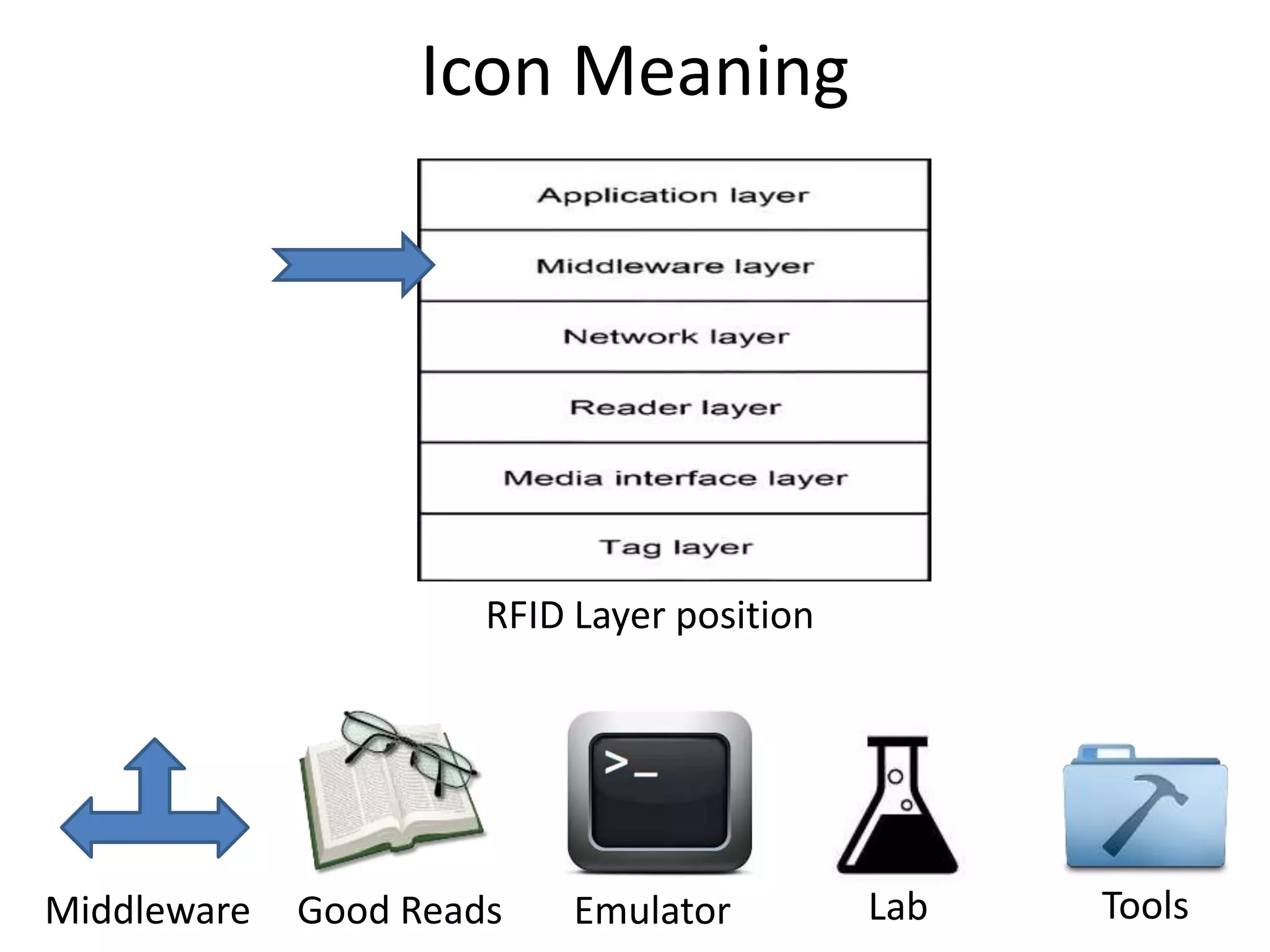
Icon Meaning 
RFID Layer position 
Good Reads Tools 
Middleware Emulator Lab
March/2014 
Software Developer and RFID 
Middleware 
Emulators 
RFID enabled Software 
B2B Services 
Mouhanad Alkhaldi | Postgraduate Taught Part Time - Information Technology (SS), MSc |ma1049@hw.ac.uk
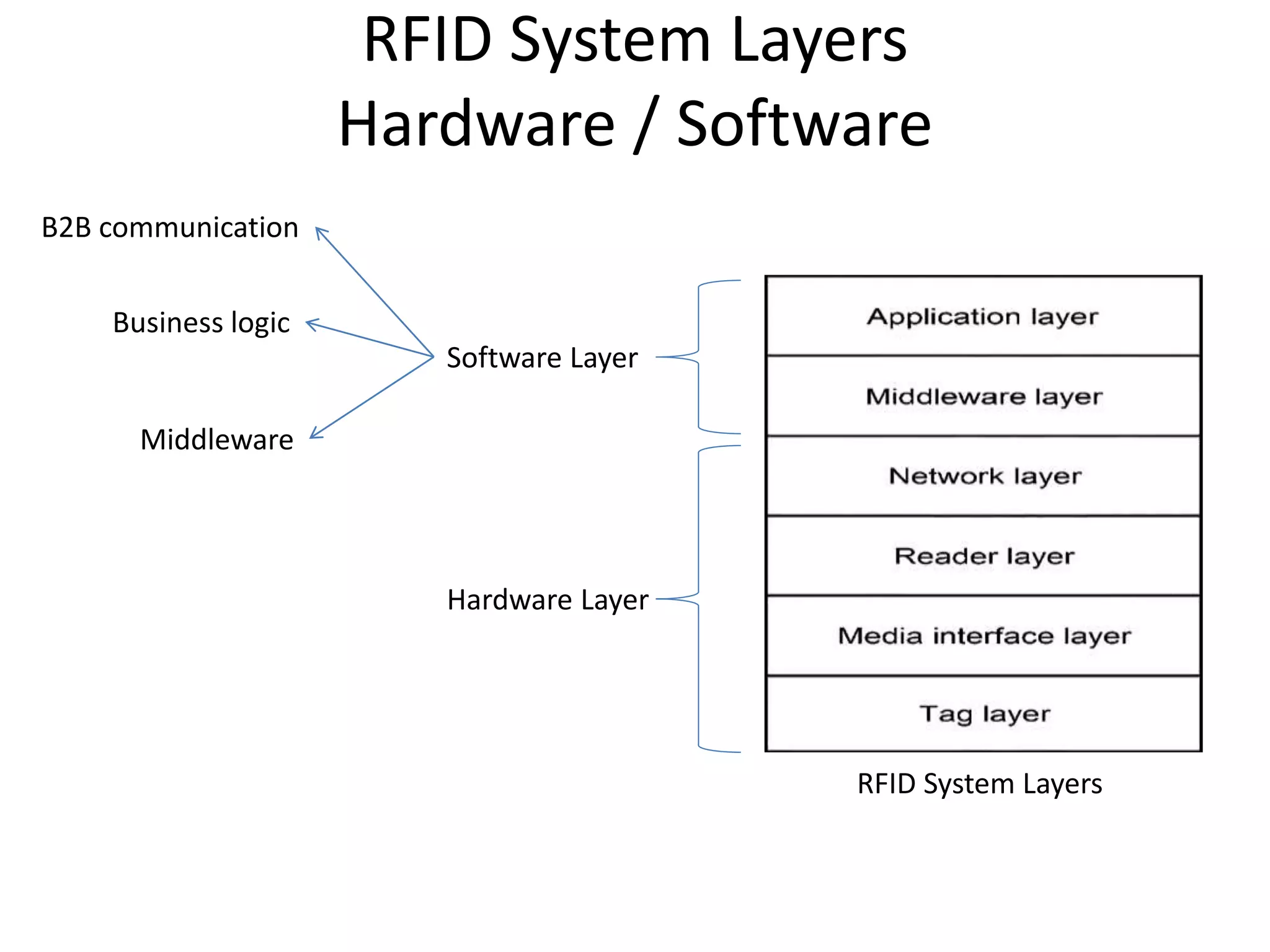
RFID System Layers 
Hardware / Software 
RFID System Layers 
Software Layer 
Hardware Layer 
B2B communication 
Business logic 
Middleware
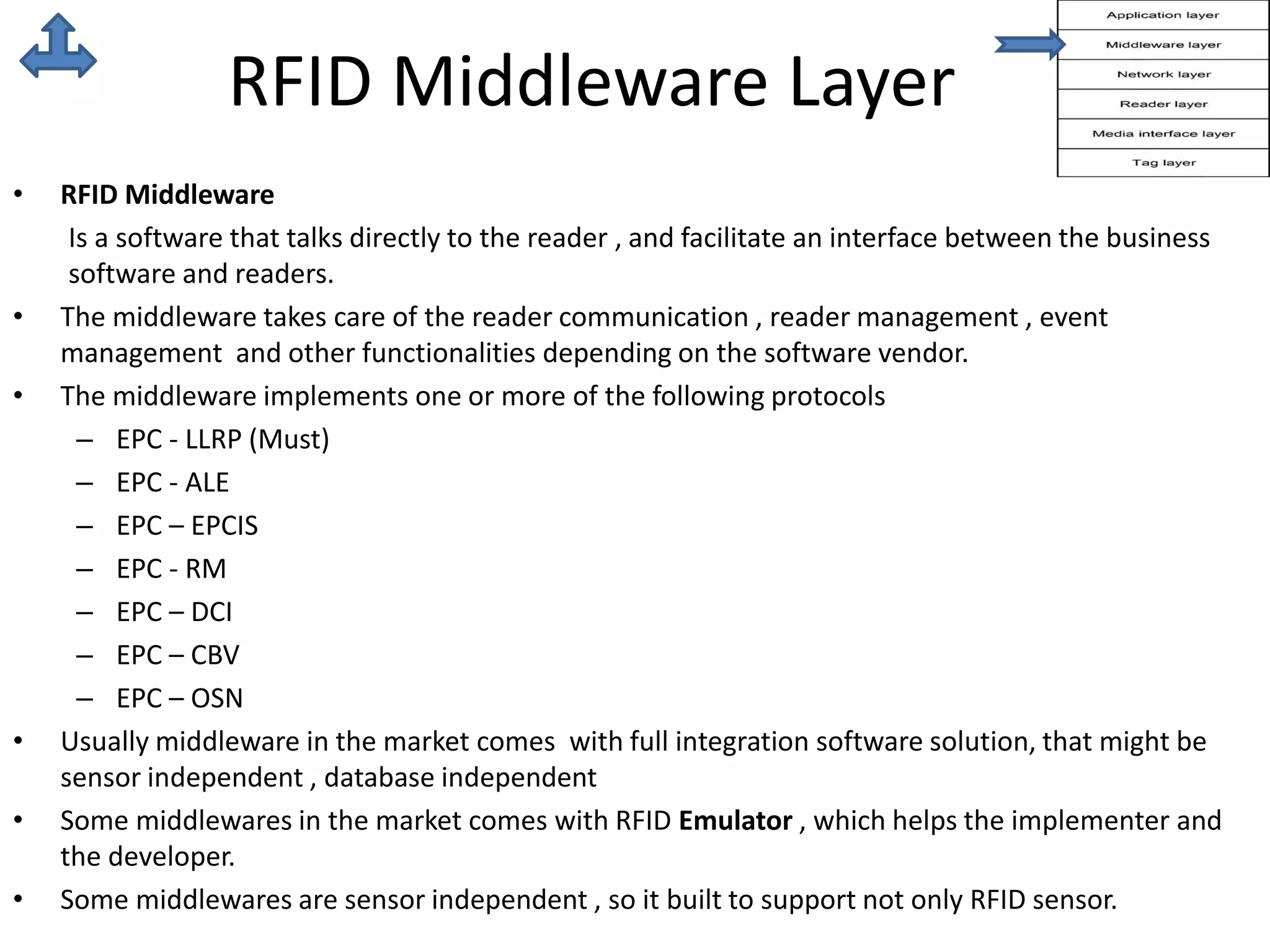
RFID Middleware Layer 
• RFID Middleware 
Is a software that talks directly to the reader , and facilitate an interface between the business 
software and readers. 
• The middleware takes care of the reader communication , reader management , event 
management and other functionalities depending on the software vendor. 
• The middleware implements one or more of the following protocols 
– EPC - LLRP (Must) 
– EPC - ALE 
– EPC – EPCIS 
– EPC - RM 
– EPC – DCI 
– EPC – CBV 
– EPC – OSN 
• Usually middleware in the market comes with full integration software solution, that might be 
sensor independent , database independent 
• Some middlewares in the market comes with RFID Emulator , which helps the implementer and 
the developer. 
• Some middlewares are sensor independent , so it built to support not only RFID sensor.
RFID enabled 
Middlewares 
These are just examples about market middleware… 
• RIFIDI [Open source] 
http://www.transcends.co/ 
• IBM WebSphere [using ale,llrp] 
http://www-01.ibm.com/software/websphere/ 
• Oracle BEA WebLogic RFID Enterprise Server™ 2.0 
http://docs.oracle.com/cd/E13197_01/rfid/enterprise_server/docs20/index.html 
• Microsoft Biztalk Server [imlplements llrp only - version 2010] 
www.microsoft.com/en-us/biztalk
RIFIDI 
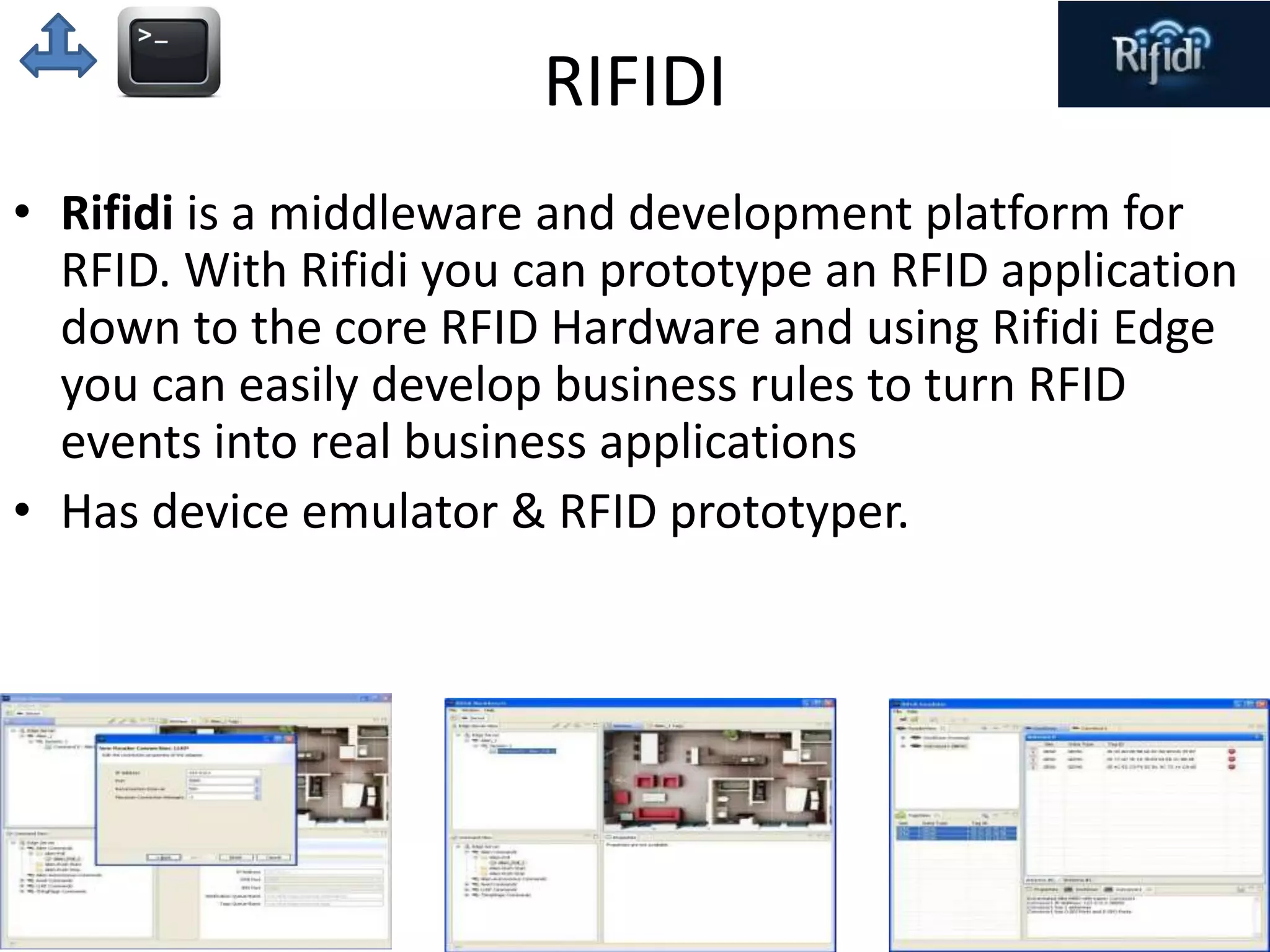
• Rifidi is a middleware and development platform for 
RFID. With Rifidi you can prototype an RFID application 
down to the core RFID Hardware and using Rifidi Edge 
you can easily develop business rules to turn RFID 
events into real business applications 
• Has device emulator & RFID prototyper.
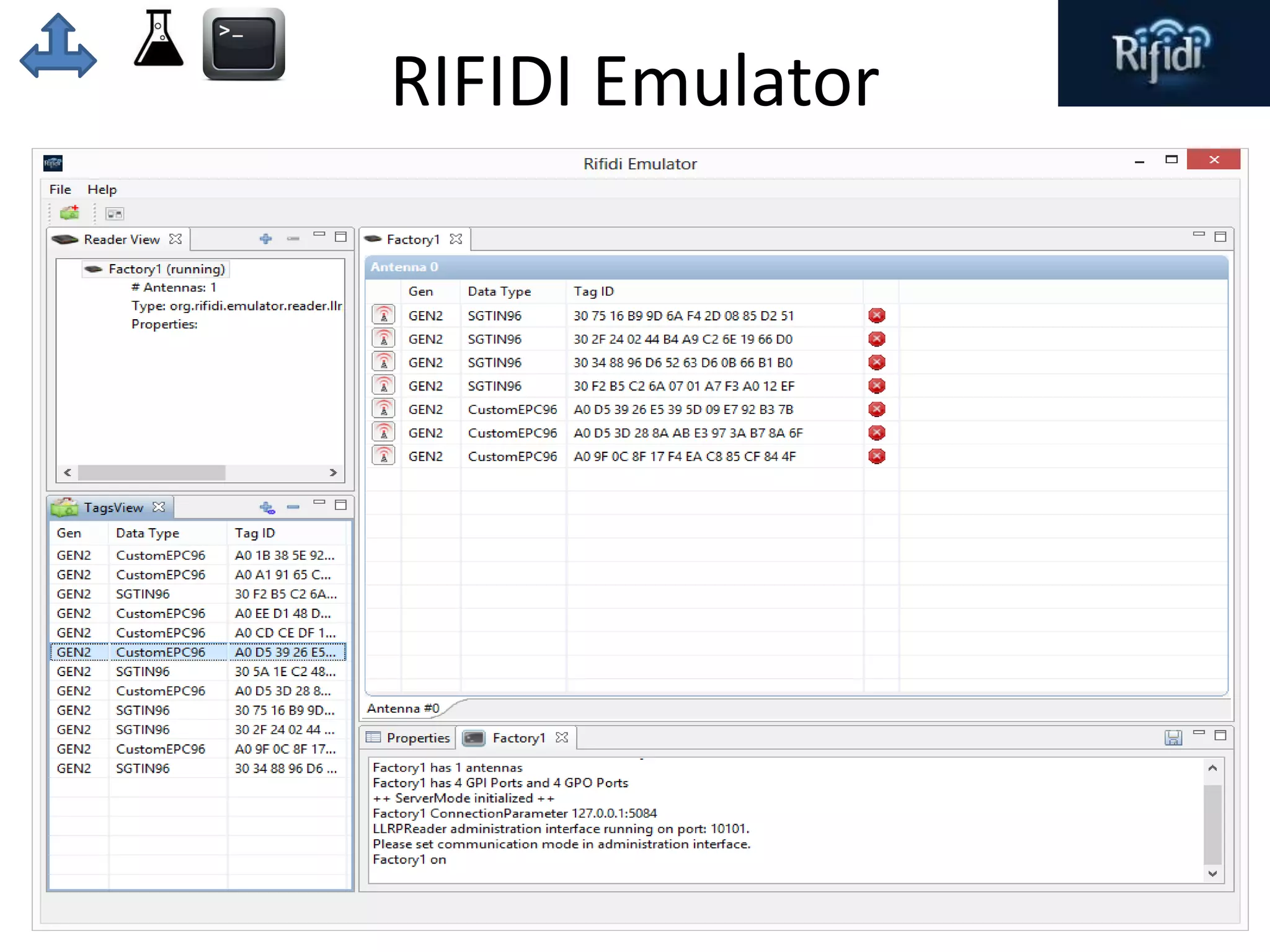
RIFIDI Emulator
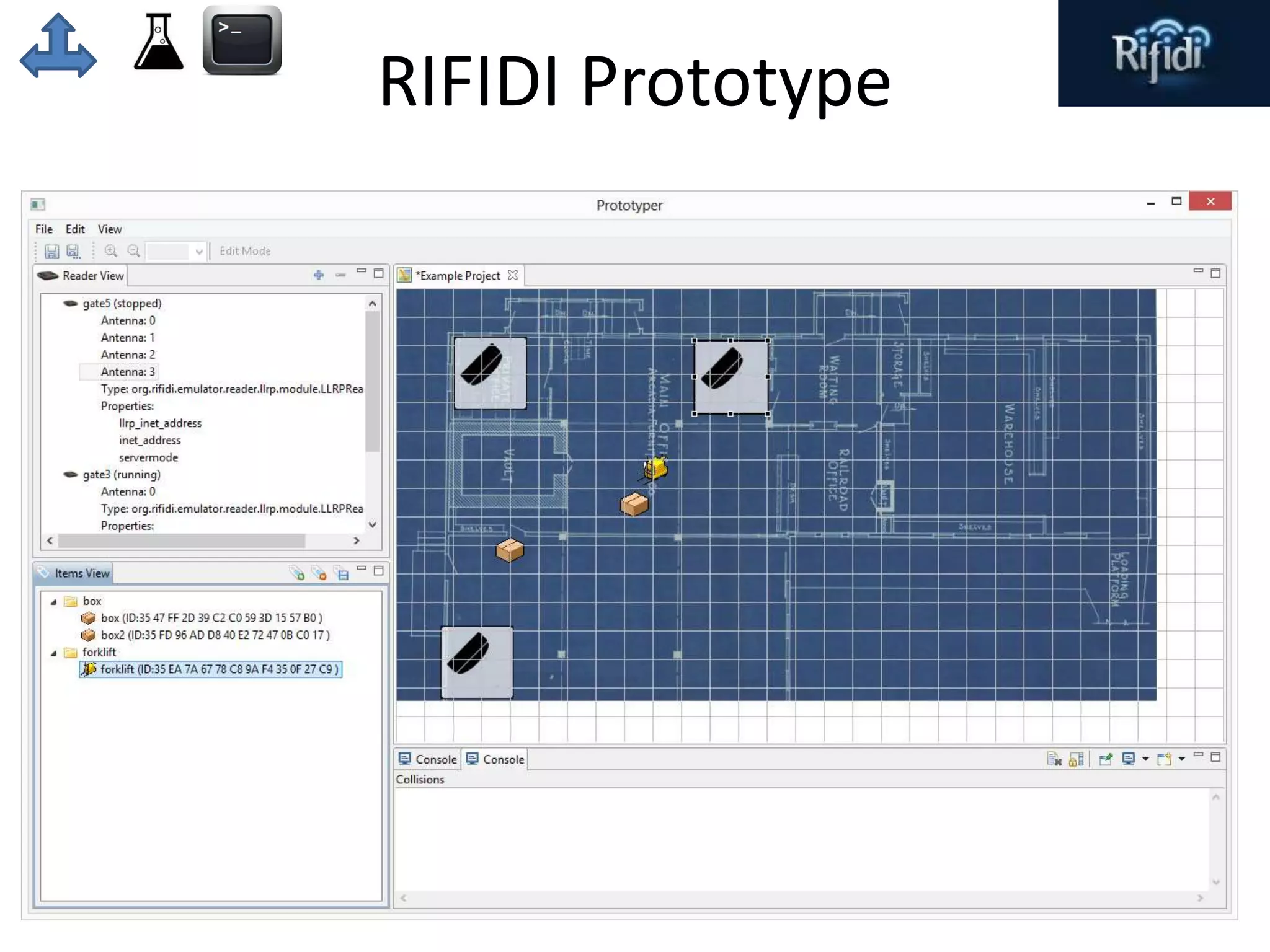
RIFIDI Prototype
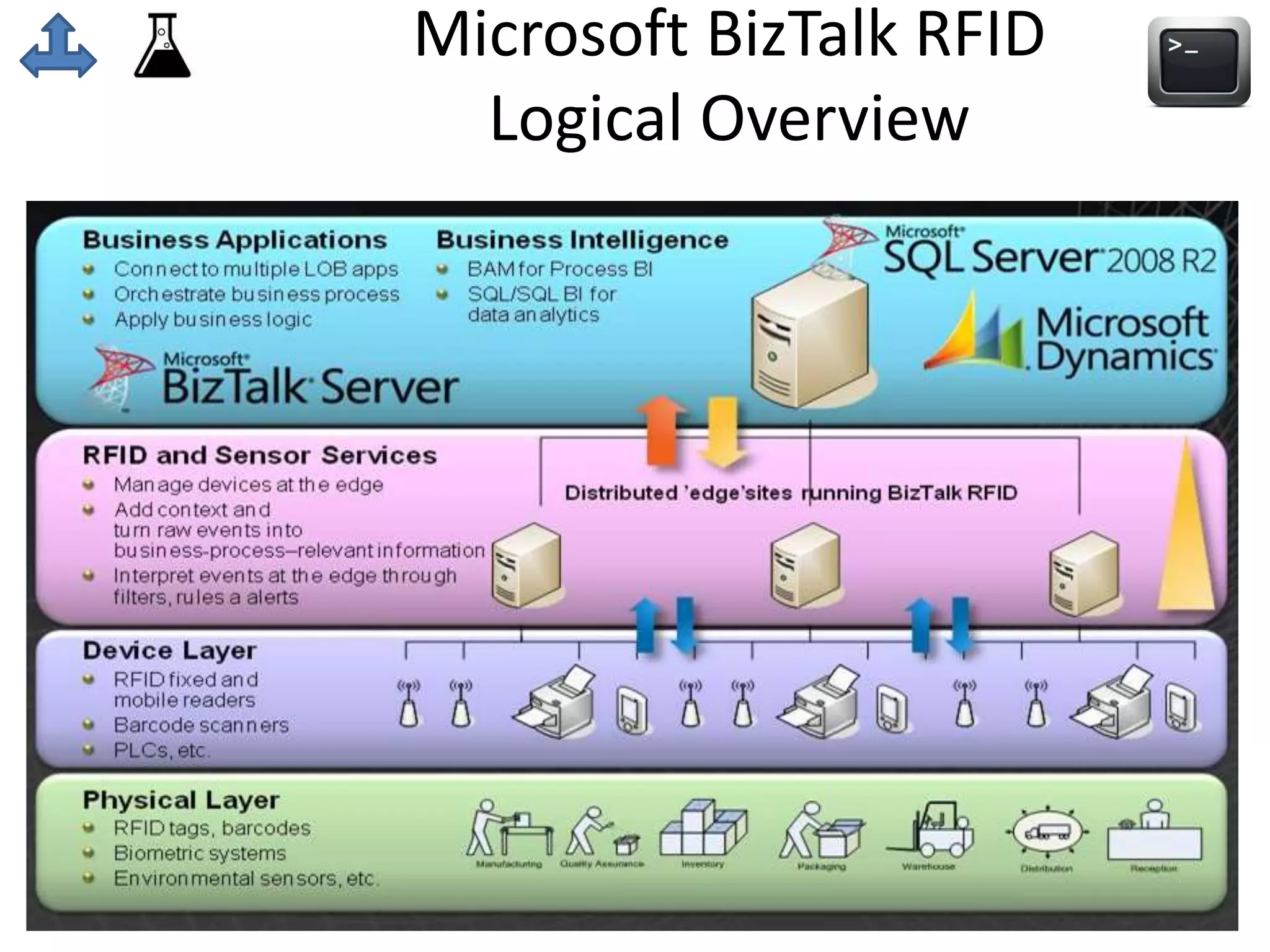
Microsoft BizTalk RFID 
Logical Overview
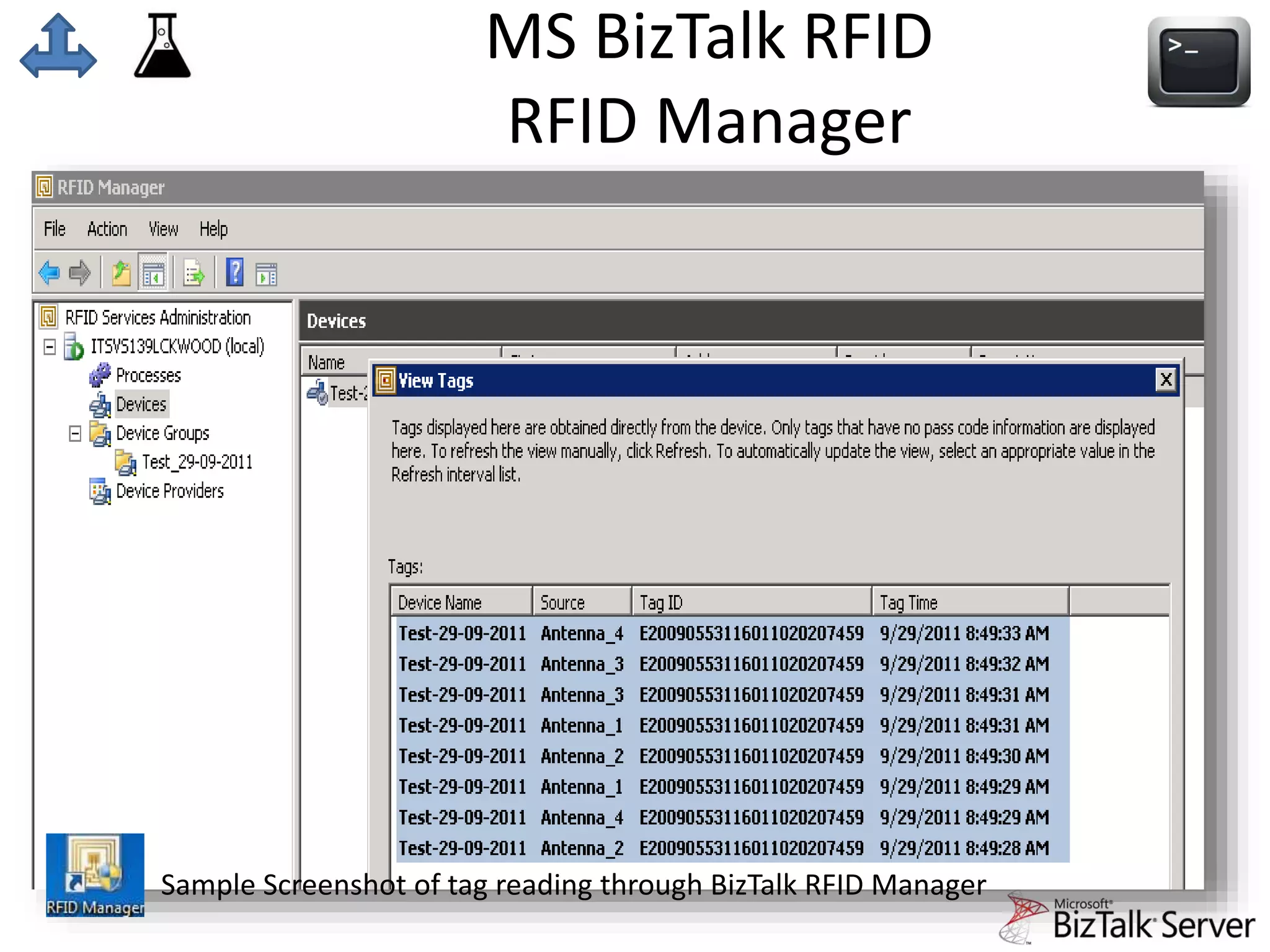
MS BizTalk RFID 
RFID Manager 
Sample Screenshot of tag reading through BizTalk RFID Manager
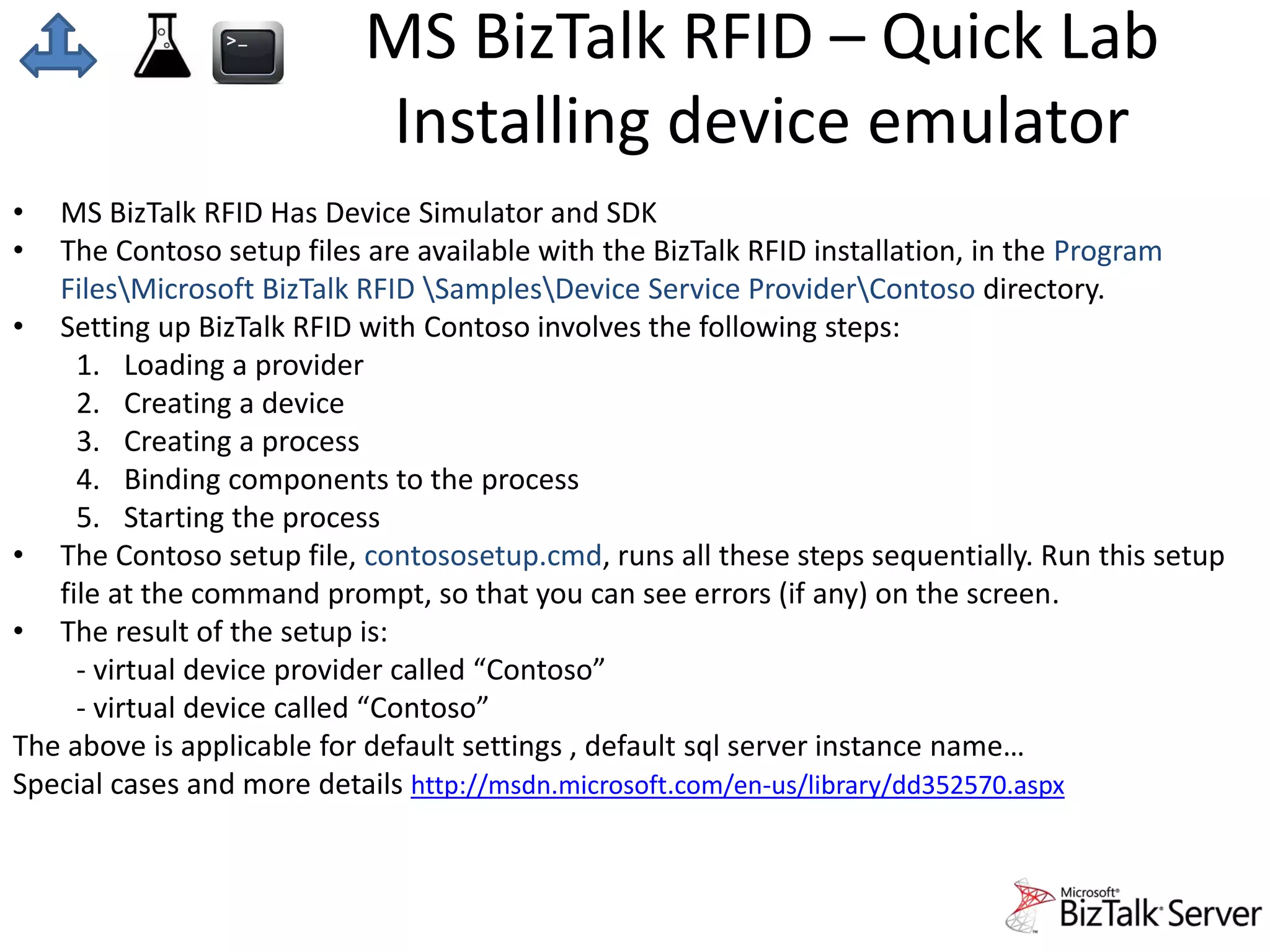
MS BizTalk RFID – Quick Lab 
Installing device emulator 
• MS BizTalk RFID Has Device Simulator and SDK 
• The Contoso setup files are available with the BizTalk RFID installation, in the Program 
FilesMicrosoft BizTalk RFID SamplesDevice Service ProviderContoso directory. 
• Setting up BizTalk RFID with Contoso involves the following steps: 
1. Loading a provider 
2. Creating a device 
3. Creating a process 
4. Binding components to the process 
5. Starting the process 
• The Contoso setup file, contososetup.cmd, runs all these steps sequentially. Run this setup 
file at the command prompt, so that you can see errors (if any) on the screen. 
• The result of the setup is: 
- virtual device provider called “Contoso” 
- virtual device called “Contoso” 
The above is applicable for default settings , default sql server instance name… 
Special cases and more details http://msdn.microsoft.com/en-us/library/dd352570.aspx
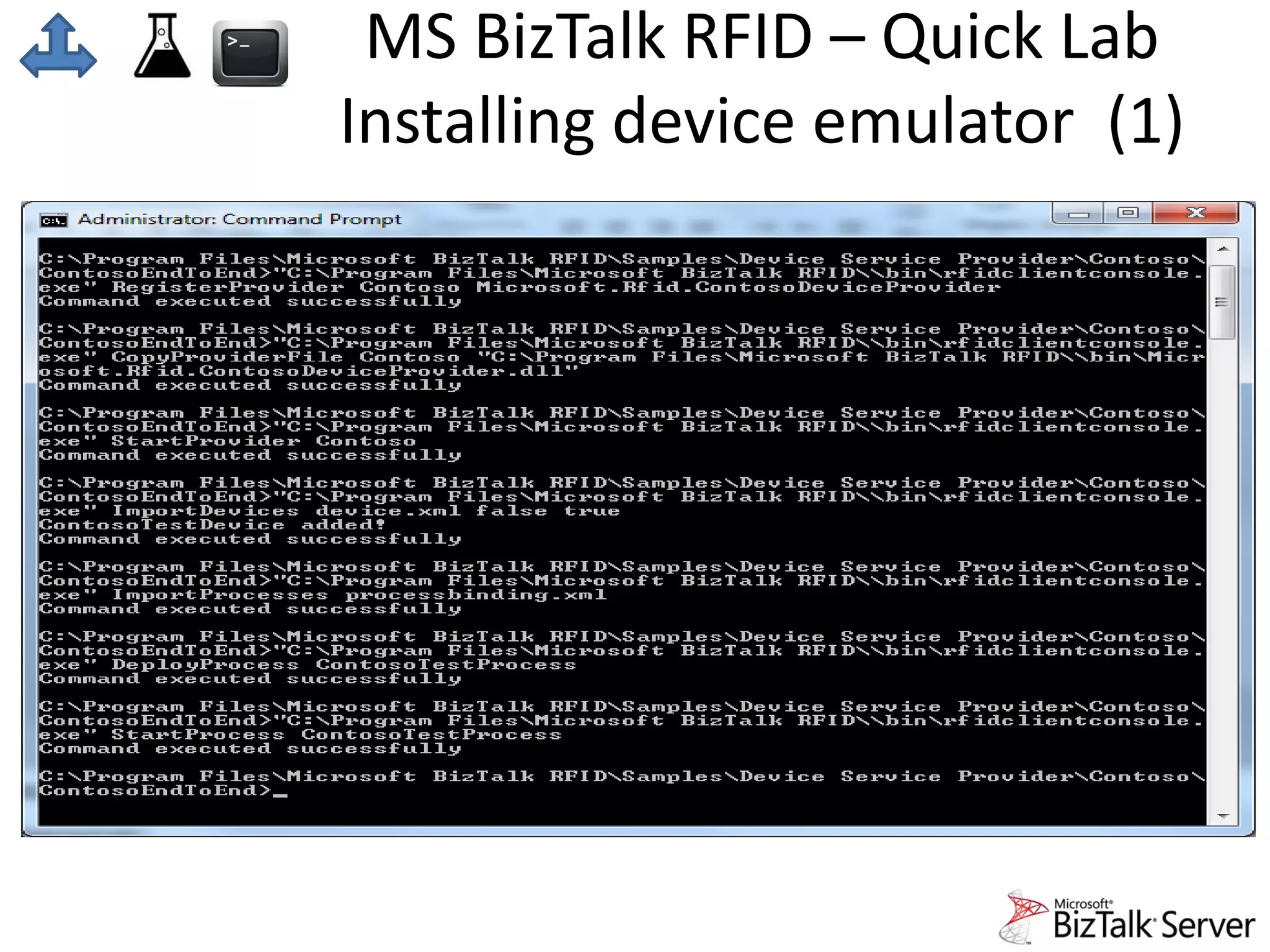
MS BizTalk RFID – Quick Lab 
Installing device emulator (1)
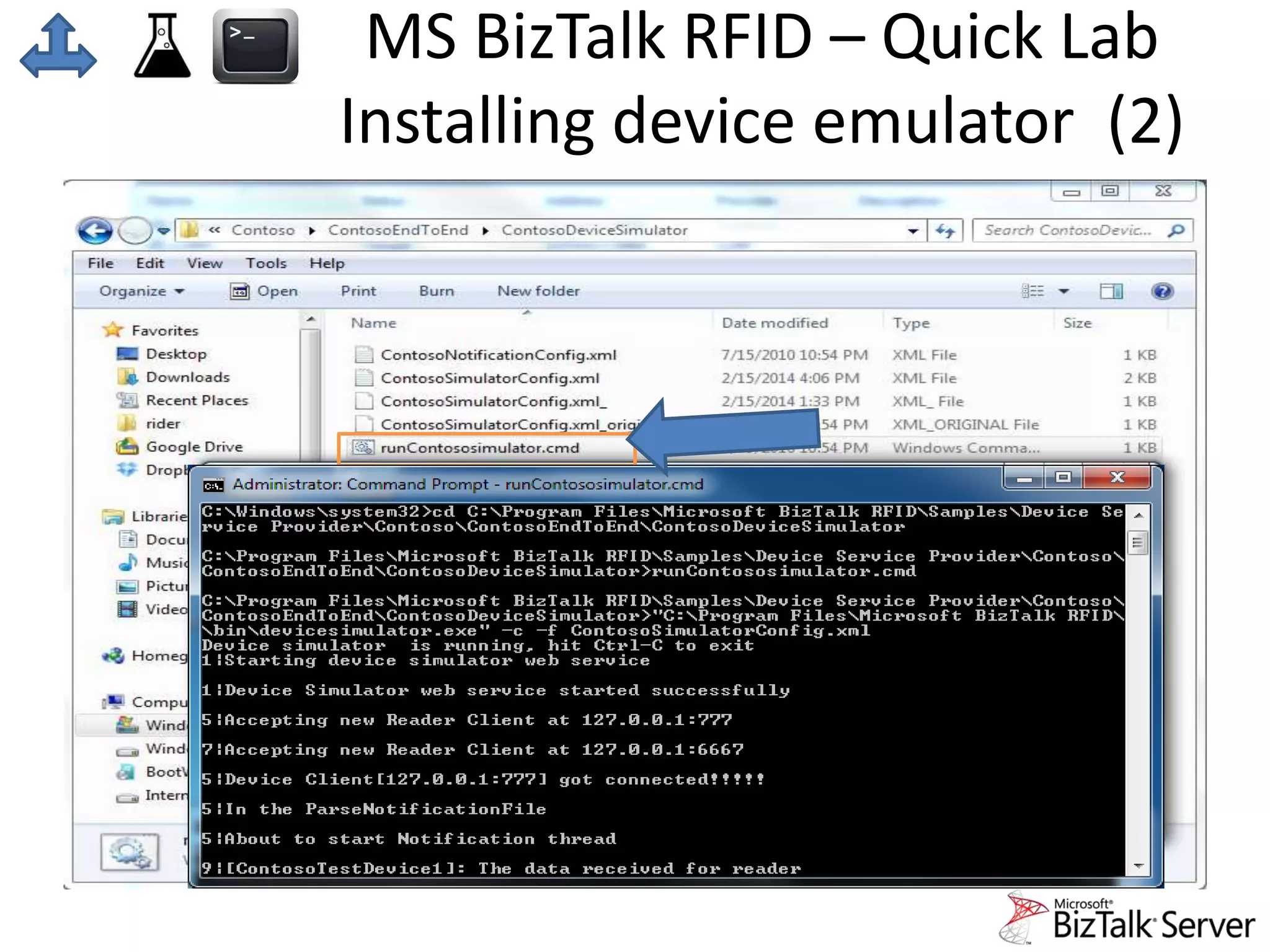
MS BizTalk RFID – Quick Lab 
Installing device emulator (2)
MS BizTalk RFID – Quick Lab 
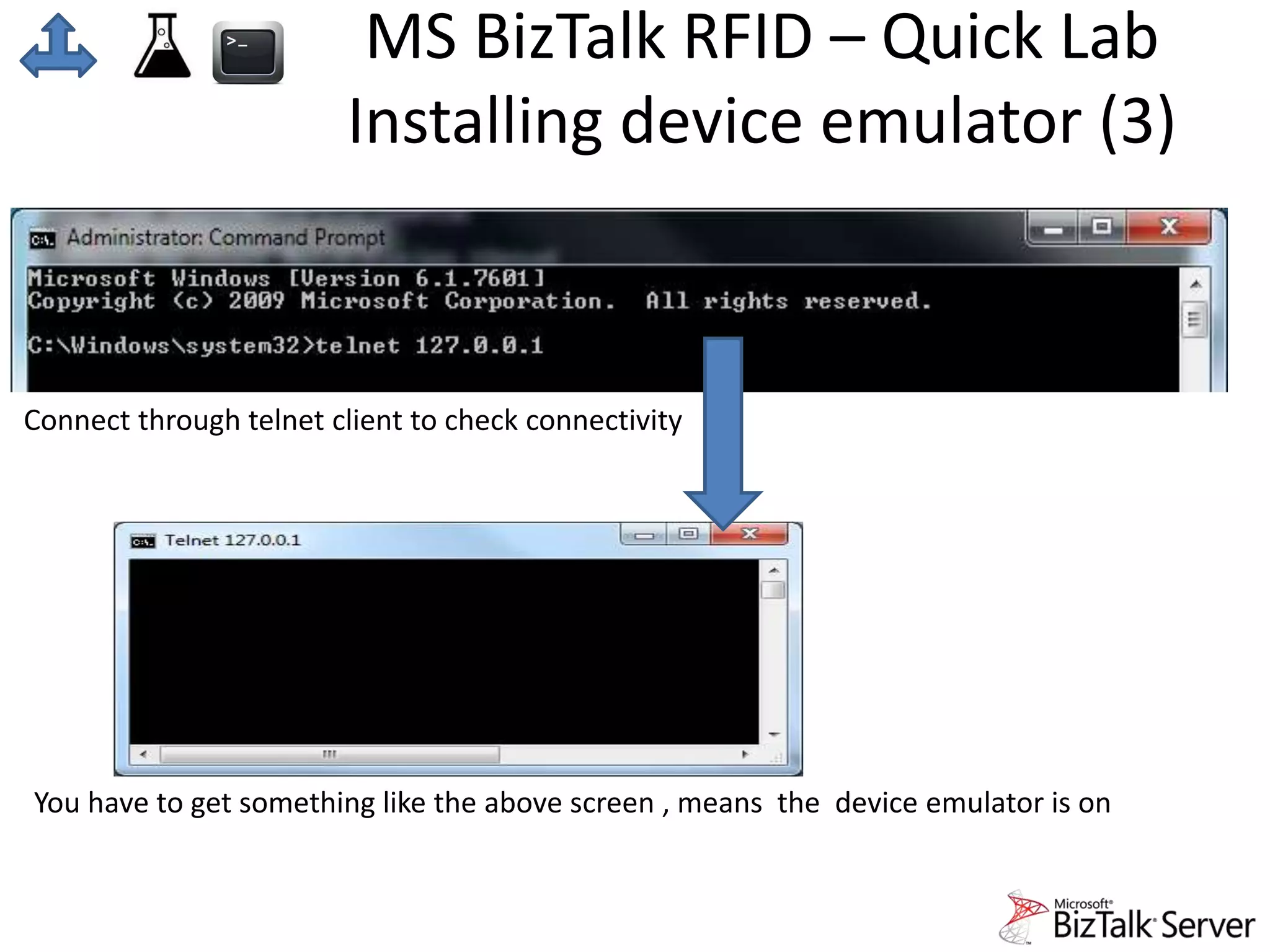
Installing device emulator (3) 
Connect through telnet client to check connectivity 
You have to get something like the above screen , means the device emulator is on
MS BizTalk RFID – Quick Lab 
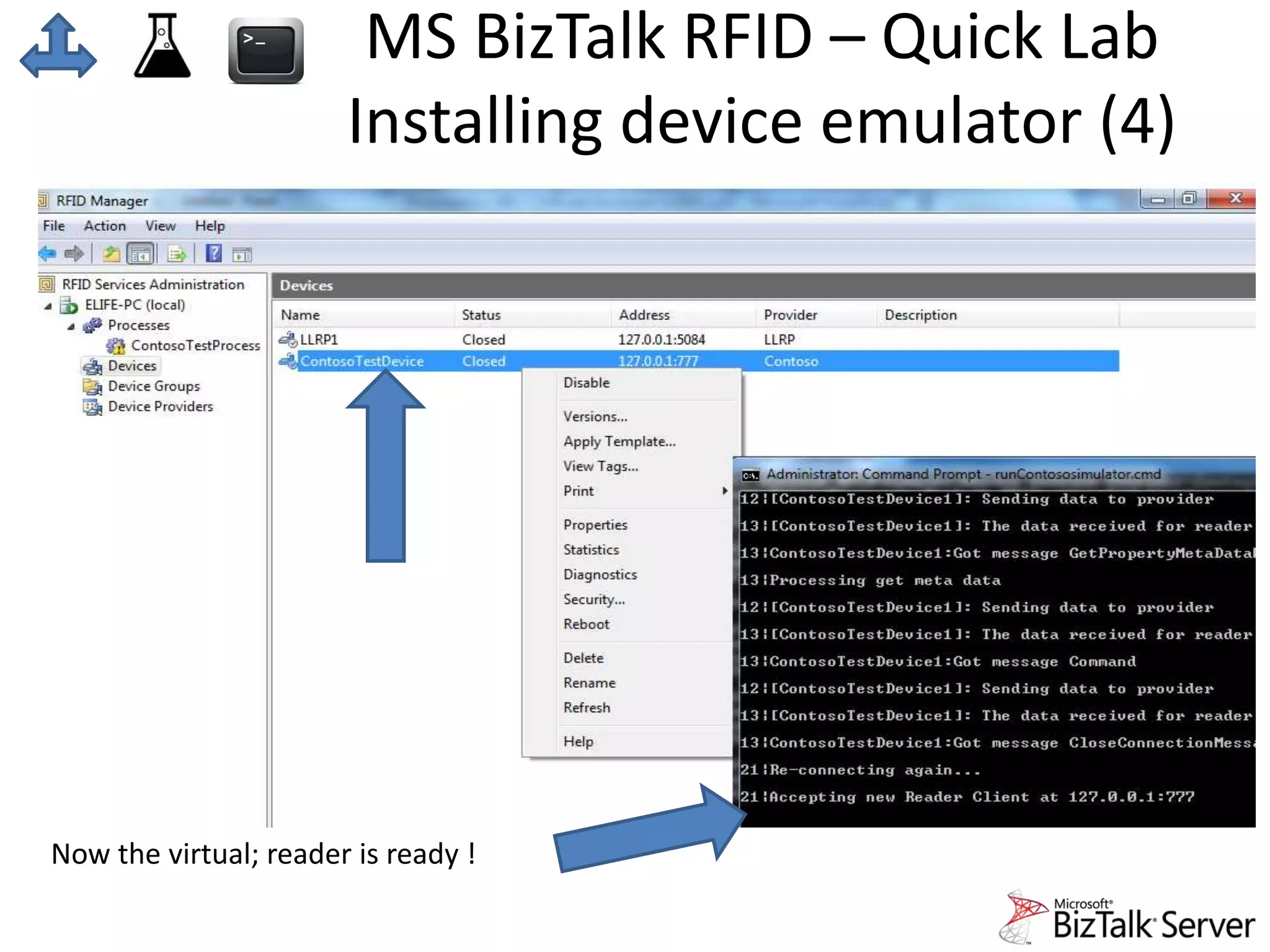
Installing device emulator (4) 
Now the virtual; reader is ready !
MS BizTalk RFID – Quick Lab 
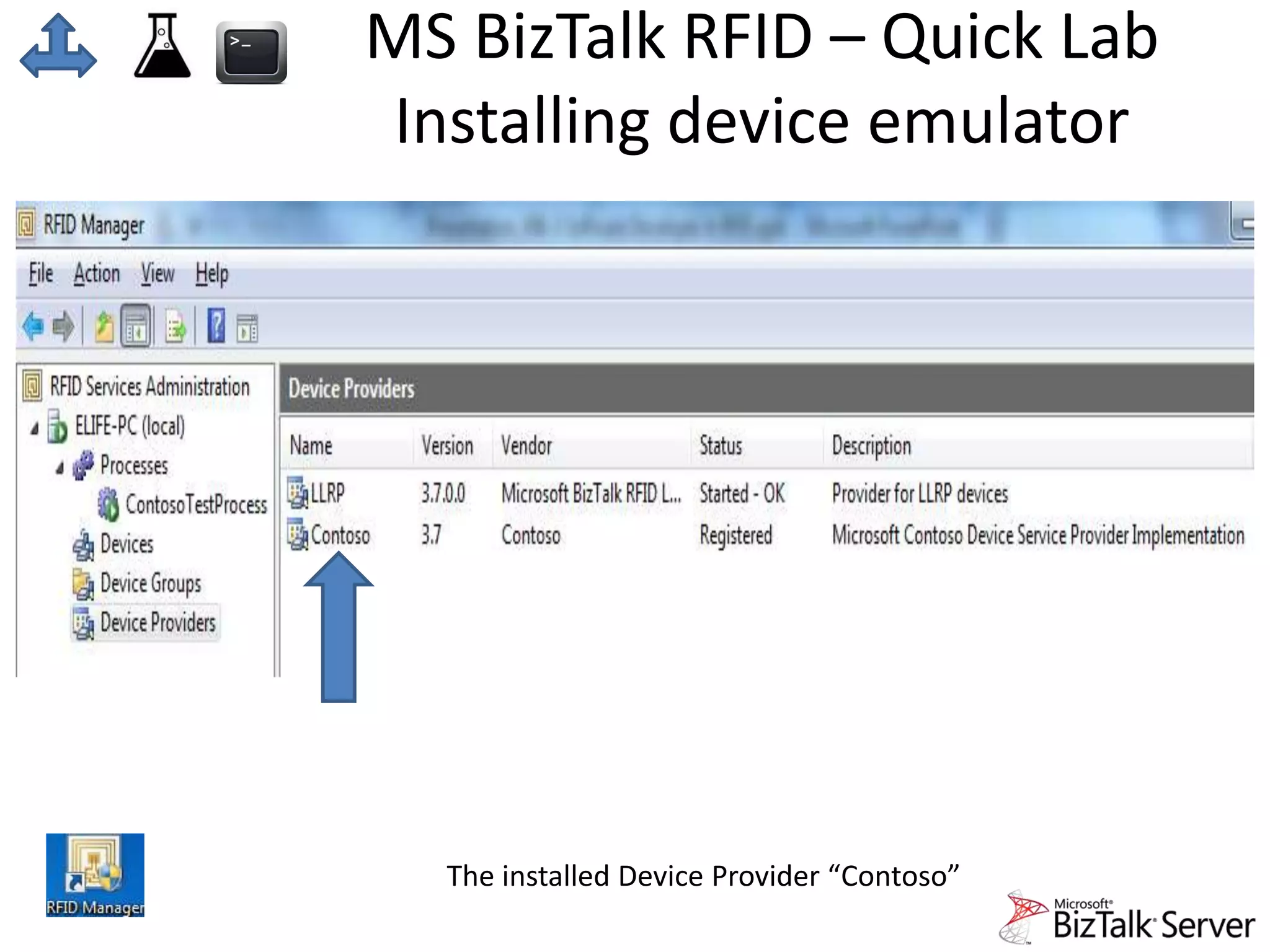
Installing device emulator 
The installed Device Provider “Contoso”
Sample open source & dev Labs 
• RFID Open source projects 
• Lab using LLRPToolkit with Java 
• Lab Idea , not presented: Using Biztalk RFID SDK
LLRP toolkit 
http://www.llrp.org 
LLRP Toolkit 
llrp.org 
• Open source software toolkit 
for using the EPCglobal Low Level Reader Protocol (LLRP) to 
communicate with conforming RFID readers. 
• LTKJava_with_dep_0_1_0-SNAPSHOT.jar 
is a library that converts between LLRP Messages and java 
objects. 
• LTK-Java library can be found here: 
http://llrp-toolkit.wiki.sourceforge.net/LTKJava
LLRP Lap (Java LLRP client) 
LLRP Toolkit 
llrp.org 
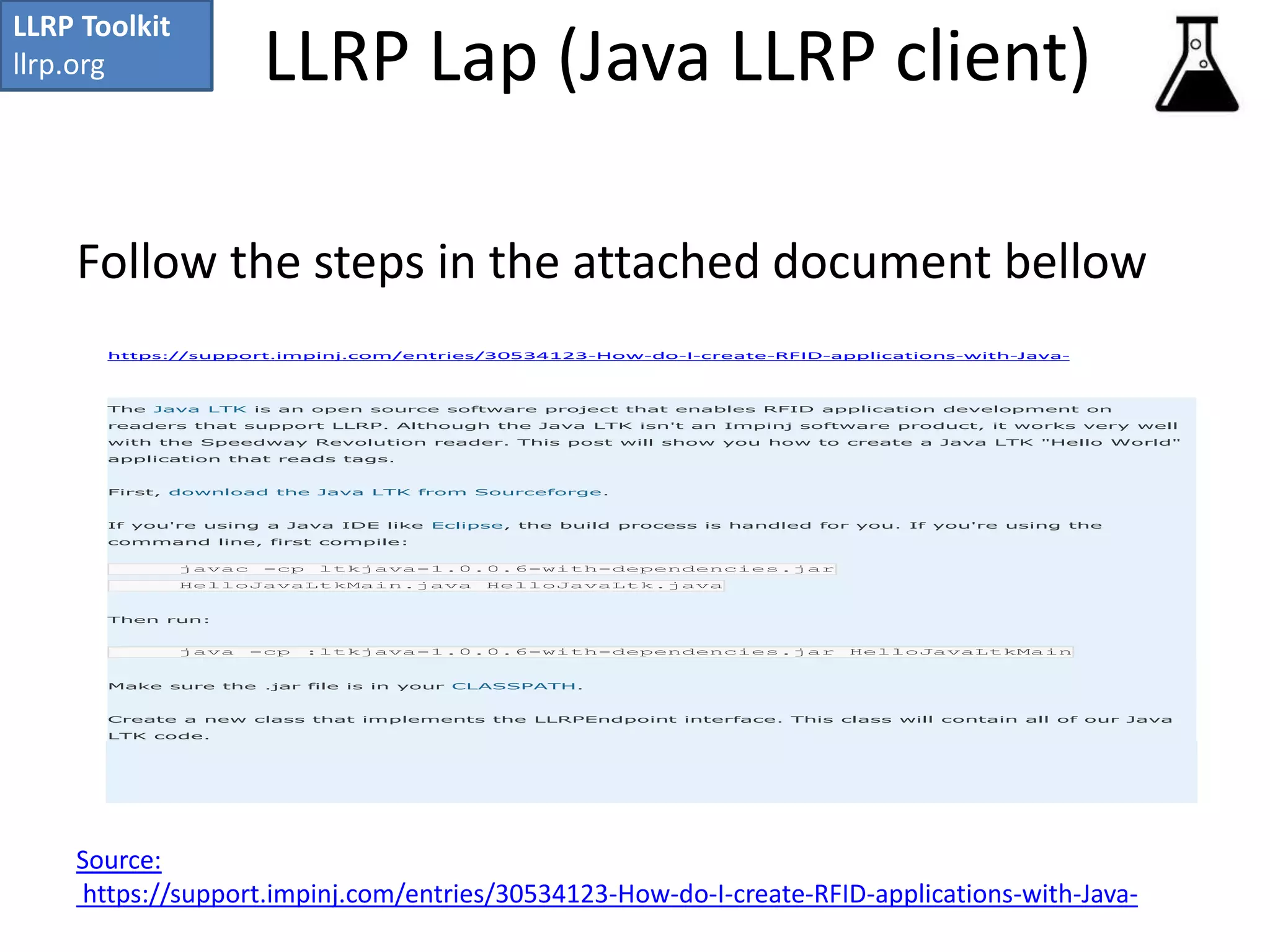
Follow the steps in the attached document bellow 
https://support.impinj.com/entries/30534123-How-do-I-create-RFID-applications-with-Java- 
The Java LTK is an open source software project that enables RFID application development on 
readers that support LLRP. Although the Java LTK isn't an Impinj software product, it works very well 
with the Speedway Revolution reader. This post will show you how to create a Java LTK "Hello World" 
application that reads tags. 
First, download the Java LTK from Sourceforge. 
If you're using a Java IDE like Eclipse, the build process is handled for you. If you're using the 
command line, first compile: 
javac -cp ltkjava-1.0.0.6-with-dependencies.jar 
HelloJavaLtkMain.java HelloJavaLtk.java 
Then run: 
java -cp :ltkjava-1.0.0.6-with-dependencies.jar HelloJavaLtkMain 
Make sure the .jar file is in your CLASSPATH. 
Create a new class that implements the LLRPEndpoint interface. This class will contain all of our Java 
LTK code. 
Source: 
https://support.impinj.com/entries/30534123-How-do-I-create-RFID-applications-with-Java-
Fosstrack 
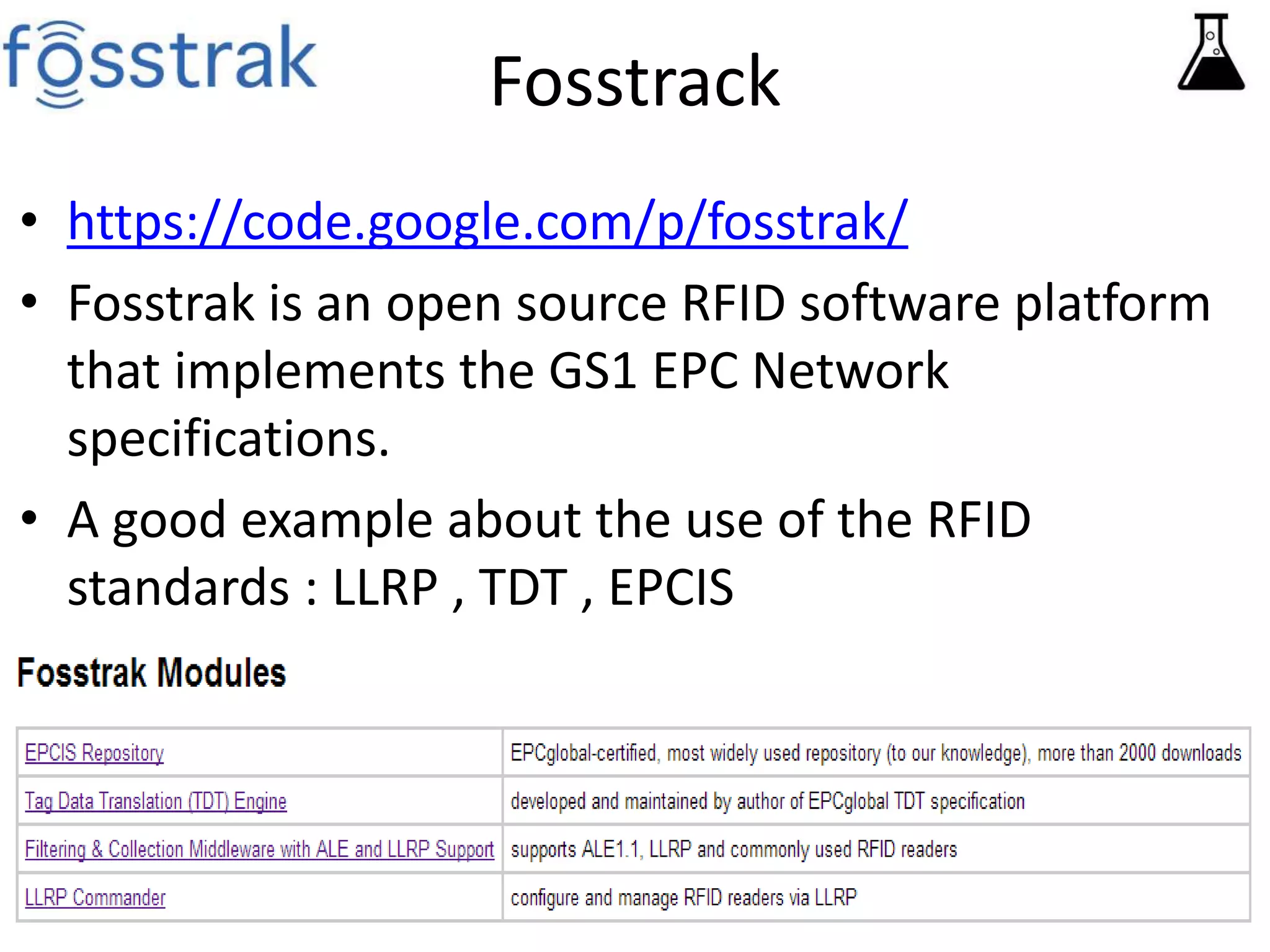
• https://code.google.com/p/fosstrak/ 
• Fosstrak is an open source RFID software platform 
that implements the GS1 EPC Network 
specifications. 
• A good example about the use of the RFID 
standards : LLRP , TDT , EPCIS
Developers! 
Prepare your machines 
• Source code control & download for open source 
– Apache-Subversion: http://subversion.apache.org/ 
– CVS (Concurrent Versions System) http://www.nongnu.org/cvs/ 
• Development Environment 
– Eclipse https://www.eclipse.org/ 
– Netbeans https://netbeans.org/ 
– MS Visual studio express edition: http://www.visualstudio.com 
• XML light Editor: 
– NotePad++ http://notepad-plus-plus.org/ 
• RFID Emulators 
– RIFIDI [Open source] http://www.transcends.co
Good Reads 
1. Software Certification Program 
http://www.gs1.org/epcglobal/certification/sw_cert 
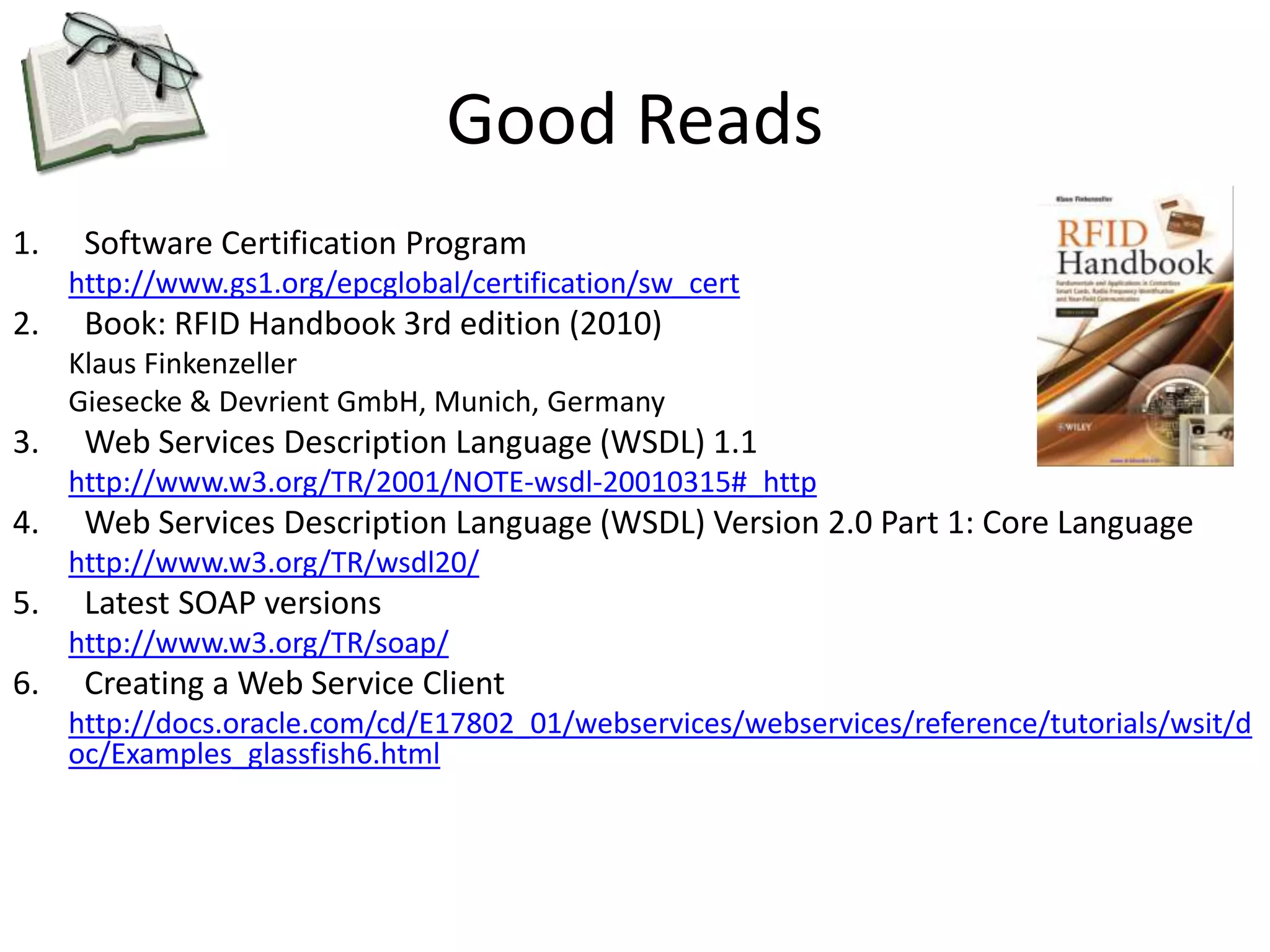
2. Book: RFID Handbook 3rd edition (2010) 
Klaus Finkenzeller 
Giesecke & Devrient GmbH, Munich, Germany 
3. Web Services Description Language (WSDL) 1.1 
http://www.w3.org/TR/2001/NOTE-wsdl-20010315#_http 
4. Web Services Description Language (WSDL) Version 2.0 Part 1: Core Language 
http://www.w3.org/TR/wsdl20/ 
5. Latest SOAP versions 
http://www.w3.org/TR/soap/ 
6. Creating a Web Service Client 
http://docs.oracle.com/cd/E17802_01/webservices/webservices/reference/tutorials/wsit/d 
oc/Examples_glassfish6.html

Presentation 3 software developer in rfid

  • 1.
    RFID Applications March/2014 Presentation 1 • Introduction • components • Layers Presentation 2 • Regulations • Standards • Protocols Presentation 3 • RFID Software Developer • Middleware • Labs Presentation 4 • RIFIDI Emulator LAB Mouhanad Alkhaldi | Postgraduate Taught Part Time - Information Technology (SS), MSc |ma1049@hw.ac.uk
  • 2.
    Index 4. IconMeaning 5. RFID System Layers Hardware / Soft 6. RFID Middleware Layer 7. RFID enabled Middlewares 8. RIFIDI Middleware 9. RIFIDI Emulator 10. RIFIDI Prototype 11. Microsoft BizTalk RFID Architect 12. RFID Manager 13. Microsoft BizTalk RFID – quick lab installing device emulator 14. Quick lab steps 15. Quick lab step 16. Quick lab step 17. Quick lab step 18. Quick lab step 19. Samples open source & development Labs 20. LLRP toolkit 21. LLRP Lap (Java LLRP client) 22. Fosstrack 23. Developers! Prepare your machines 24. Good Reads
  • 3.
    Icon Meaning RFIDLayer position Good Reads Tools Middleware Emulator Lab
  • 4.
    March/2014 Software Developerand RFID Middleware Emulators RFID enabled Software B2B Services Mouhanad Alkhaldi | Postgraduate Taught Part Time - Information Technology (SS), MSc |ma1049@hw.ac.uk
  • 5.
    RFID System Layers Hardware / Software RFID System Layers Software Layer Hardware Layer B2B communication Business logic Middleware
  • 6.
    RFID Middleware Layer • RFID Middleware Is a software that talks directly to the reader , and facilitate an interface between the business software and readers. • The middleware takes care of the reader communication , reader management , event management and other functionalities depending on the software vendor. • The middleware implements one or more of the following protocols – EPC - LLRP (Must) – EPC - ALE – EPC – EPCIS – EPC - RM – EPC – DCI – EPC – CBV – EPC – OSN • Usually middleware in the market comes with full integration software solution, that might be sensor independent , database independent • Some middlewares in the market comes with RFID Emulator , which helps the implementer and the developer. • Some middlewares are sensor independent , so it built to support not only RFID sensor.
  • 7.
    RFID enabled Middlewares These are just examples about market middleware… • RIFIDI [Open source] http://www.transcends.co/ • IBM WebSphere [using ale,llrp] http://www-01.ibm.com/software/websphere/ • Oracle BEA WebLogic RFID Enterprise Server™ 2.0 http://docs.oracle.com/cd/E13197_01/rfid/enterprise_server/docs20/index.html • Microsoft Biztalk Server [imlplements llrp only - version 2010] www.microsoft.com/en-us/biztalk
  • 8.
    RIFIDI • Rifidiis a middleware and development platform for RFID. With Rifidi you can prototype an RFID application down to the core RFID Hardware and using Rifidi Edge you can easily develop business rules to turn RFID events into real business applications • Has device emulator & RFID prototyper.
  • 9.
  • 10.
  • 11.
    Microsoft BizTalk RFID Logical Overview
  • 12.
    MS BizTalk RFID RFID Manager Sample Screenshot of tag reading through BizTalk RFID Manager
  • 13.
    MS BizTalk RFID– Quick Lab Installing device emulator • MS BizTalk RFID Has Device Simulator and SDK • The Contoso setup files are available with the BizTalk RFID installation, in the Program FilesMicrosoft BizTalk RFID SamplesDevice Service ProviderContoso directory. • Setting up BizTalk RFID with Contoso involves the following steps: 1. Loading a provider 2. Creating a device 3. Creating a process 4. Binding components to the process 5. Starting the process • The Contoso setup file, contososetup.cmd, runs all these steps sequentially. Run this setup file at the command prompt, so that you can see errors (if any) on the screen. • The result of the setup is: - virtual device provider called “Contoso” - virtual device called “Contoso” The above is applicable for default settings , default sql server instance name… Special cases and more details http://msdn.microsoft.com/en-us/library/dd352570.aspx
  • 14.
    MS BizTalk RFID– Quick Lab Installing device emulator (1)
  • 15.
    MS BizTalk RFID– Quick Lab Installing device emulator (2)
  • 16.
    MS BizTalk RFID– Quick Lab Installing device emulator (3) Connect through telnet client to check connectivity You have to get something like the above screen , means the device emulator is on
  • 17.
    MS BizTalk RFID– Quick Lab Installing device emulator (4) Now the virtual; reader is ready !
  • 18.
    MS BizTalk RFID– Quick Lab Installing device emulator The installed Device Provider “Contoso”
  • 19.
    Sample open source& dev Labs • RFID Open source projects • Lab using LLRPToolkit with Java • Lab Idea , not presented: Using Biztalk RFID SDK
  • 20.
    LLRP toolkit http://www.llrp.org LLRP Toolkit llrp.org • Open source software toolkit for using the EPCglobal Low Level Reader Protocol (LLRP) to communicate with conforming RFID readers. • LTKJava_with_dep_0_1_0-SNAPSHOT.jar is a library that converts between LLRP Messages and java objects. • LTK-Java library can be found here: http://llrp-toolkit.wiki.sourceforge.net/LTKJava
  • 21.
    LLRP Lap (JavaLLRP client) LLRP Toolkit llrp.org Follow the steps in the attached document bellow https://support.impinj.com/entries/30534123-How-do-I-create-RFID-applications-with-Java- The Java LTK is an open source software project that enables RFID application development on readers that support LLRP. Although the Java LTK isn't an Impinj software product, it works very well with the Speedway Revolution reader. This post will show you how to create a Java LTK "Hello World" application that reads tags. First, download the Java LTK from Sourceforge. If you're using a Java IDE like Eclipse, the build process is handled for you. If you're using the command line, first compile: javac -cp ltkjava-1.0.0.6-with-dependencies.jar HelloJavaLtkMain.java HelloJavaLtk.java Then run: java -cp :ltkjava-1.0.0.6-with-dependencies.jar HelloJavaLtkMain Make sure the .jar file is in your CLASSPATH. Create a new class that implements the LLRPEndpoint interface. This class will contain all of our Java LTK code. Source: https://support.impinj.com/entries/30534123-How-do-I-create-RFID-applications-with-Java-
  • 22.
    Fosstrack • https://code.google.com/p/fosstrak/ • Fosstrak is an open source RFID software platform that implements the GS1 EPC Network specifications. • A good example about the use of the RFID standards : LLRP , TDT , EPCIS
  • 23.
    Developers! Prepare yourmachines • Source code control & download for open source – Apache-Subversion: http://subversion.apache.org/ – CVS (Concurrent Versions System) http://www.nongnu.org/cvs/ • Development Environment – Eclipse https://www.eclipse.org/ – Netbeans https://netbeans.org/ – MS Visual studio express edition: http://www.visualstudio.com • XML light Editor: – NotePad++ http://notepad-plus-plus.org/ • RFID Emulators – RIFIDI [Open source] http://www.transcends.co
  • 24.
    Good Reads 1.Software Certification Program http://www.gs1.org/epcglobal/certification/sw_cert 2. Book: RFID Handbook 3rd edition (2010) Klaus Finkenzeller Giesecke & Devrient GmbH, Munich, Germany 3. Web Services Description Language (WSDL) 1.1 http://www.w3.org/TR/2001/NOTE-wsdl-20010315#_http 4. Web Services Description Language (WSDL) Version 2.0 Part 1: Core Language http://www.w3.org/TR/wsdl20/ 5. Latest SOAP versions http://www.w3.org/TR/soap/ 6. Creating a Web Service Client http://docs.oracle.com/cd/E17802_01/webservices/webservices/reference/tutorials/wsit/d oc/Examples_glassfish6.html

Editor's Notes

  • #3 Slide Notes: Slide Resources:
  • #5 Slide Notes: Slide Resources:
  • #6 Slide Notes: Slide Resources:
  • #7 Slide Notes: In early days of RFID middleware functionality was part of the business application. You might decide to develop your own Middleware Or integrate to an existing one All middlewares in the market has an API (SDK) Slide Resources:
  • #8 Slide Notes: Slide Resources: RIFIDI [Open source] http://www.transcends.co/ http://sourceforge.net/projects/rifidi/?source=recommended IBM WebSphere [using ale,llrp] http://www-01.ibm.com/software/websphere/ Oracle BEA WebLogic RFID Enterprise Server™ 2.0 http://docs.oracle.com/cd/E13197_01/rfid/enterprise_server/docs20/index.html Microsoft Biztalk Server [imleents llrp only] www.microsoft.com/en-us/biztalk
  • #9 Slide Notes: Slide Resources: http://sourceforge.net/projects/rifidi/?source=recommended
  • #10 Slide Notes: Slide Resources:
  • #11 Slide Notes: Slide Resources:
  • #12 Slide Notes: Slide Resources:
  • #13 Slide Notes: Slide Resources: http://msdn.microsoft.com/en-us/library/dd352570.aspx
  • #14 Slide Notes: Slide Resources: http://msdn.microsoft.com/en-us/library/dd352570.aspx
  • #15 Slide Notes: Slide Resources: http://msdn.microsoft.com/en-us/library/dd352570.aspx
  • #16 Slide Notes: Slide Resources: http://msdn.microsoft.com/en-us/library/dd352570.aspx
  • #17 Slide Notes: Slide Resources: http://msdn.microsoft.com/en-us/library/dd352570.aspx
  • #18 Slide Notes: Slide Resources: http://msdn.microsoft.com/en-us/library/dd352570.aspx
  • #19 Slide Notes: Slide Resources: http://msdn.microsoft.com/en-us/library/dd352570.aspx
  • #20 Slide Notes: Slide Resources:
  • #21 Slide Notes: http://sourceforge.net/projects/llrp-toolkit/files/llrp-toolkit/ltkjava/1.0.0.7/ Slide Resources: https://support.impinj.com/entries/30534123-How-do-I-create-RFID-applications-with-Java-
  • #22 Slide Notes: Slide Resources: https://support.impinj.com/entries/30534123-How-do-I-create-RFID-applications-with-Java-
  • #23 Slide Notes: Slide Resources: https://code.google.com/p/fosstrak/
  • #25 Slide Notes: Software Certification Program http://www.gs1.org/epcglobal/certification/sw_cert Slide Resources: