1
The concept of Computer Systems
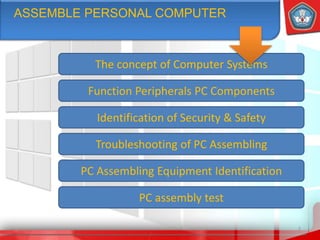
ASSEMBLE PERSONAL COMPUTER
Troubleshooting of PC Assembling
Identification of Security & Safety
Function Peripherals PC Components
2
PC Assembling Equipment Identification
PC assembly test
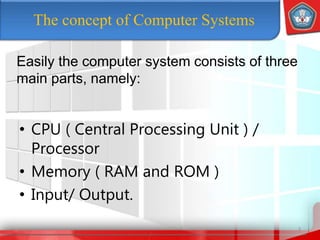
The concept of Computer Systems
• CPU ( Central Processing Unit ) /
Processor
• Memory ( RAM and ROM )
• Input/ Output.
3
Easily the computer system consists of three
main parts, namely:
4
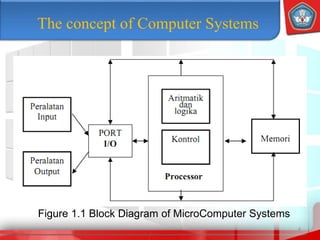
The concept of Computer Systems
Figure 1.1 Block Diagram of MicroComputer Systems
The concept of Computer Systems
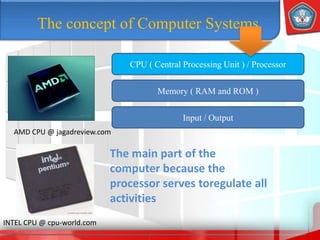
CPU ( Central Processing Unit ) / Processor
Input / Output
Memory ( RAM and ROM )
AMD CPU @ jagadreview.com
INTEL CPU @ cpu-world.com
The main part of the
computer because the
processor serves toregulate all
activities
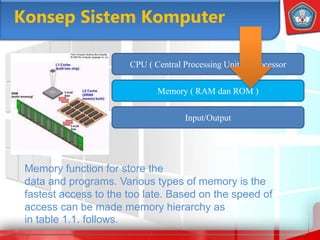
Konsep Sistem Komputer
Input/Output
Memory ( RAM dan ROM )
Memory function for store the
data and programs. Various types of memory is the
fastest access to the too late. Based on the speed of
access can be made memory hierarchy as
in table 1.1. follows.
CPU ( Central Processing Unit ) / Processor
Memory ( RAM and ROM )
7
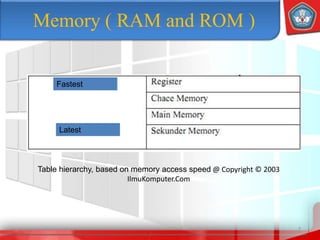
Table hierarchy, based on memory access speed @ Copyright © 2003
IlmuKomputer.Com
Fastest
Latest
8
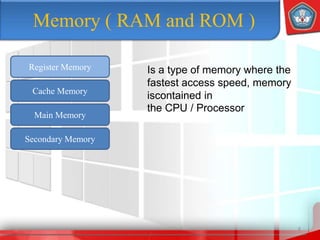
Register Memory
Cache Memory
Main Memory
Secondary Memory
Is a type of memory where the
fastest access speed, memory
iscontained in
the CPU / Processor
Memory ( RAM and ROM )
9
Register Memory
Cache Memory
Main Memory
Secondary Memory
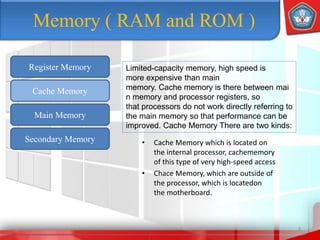
Limited-capacity memory, high speed is
more expensive than main
memory. Cache memory is there between mai
n memory and processor registers, so
that processors do not work directly referring to
the main memory so that performance can be
improved. Cache Memory There are two kinds:
• Cache Memory which is located on
the internal processor, cachememory
of this type of very high-speed access
• Chace Memory, which are outside of
the processor, which is locatedon
the motherboard.
Memory ( RAM and ROM )
10
Register Memory
Cache Memory
Main Memory
Secondary Memory
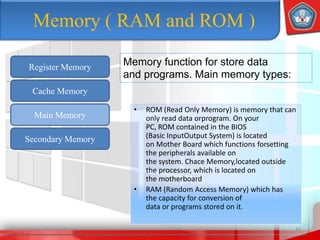
Memory function for store data
and programs. Main memory types:
• ROM (Read Only Memory) is memory that can
only read data orprogram. On your
PC, ROM contained in the BIOS
(Basic InputOutput System) is located
on Mother Board which functions forsetting
the peripherals available on
the system. Chace Memory,located outside
the processor, which is located on
the motherboard
• RAM (Random Access Memory) which has
the capacity for conversion of
data or programs stored on it.
Memory ( RAM and ROM )
11
Register Memory
Cache Memory
Main Memory
Secondary Memory
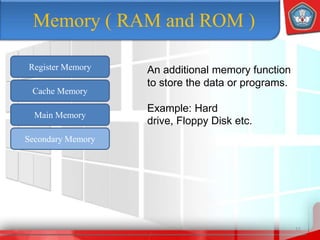
An additional memory function
to store the data or programs.
Example: Hard
drive, Floppy Disk etc.
Memory ( RAM and ROM )
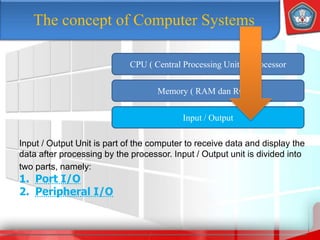
Input / Output Unit is part of the computer to receive data and display the
data after processing by the processor. Input / Output unit is divided into
two parts, namely:
1. Port I/O
2. Peripheral I/O
CPU ( Central Processing Unit ) / Processor
Input / Output
Memory ( RAM dan ROM )
The concept of Computer Systems
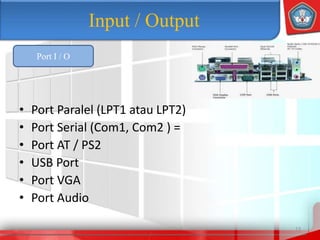
• Port Paralel (LPT1 atau LPT2)
• Port Serial (Com1, Com2 ) =
• Port AT / PS2
• USB Port
• Port VGA
• Port Audio
13
Input / Output
Port I / O
• The first category consists of equipment that perform input and output
operations, this category includes the keyboard, trackball, mouse,
printers, and video display.
• The second category consists of equipment in priority to the
secondary data storage, where storage is mainly provided by the
computer's main memory.
14
Input / Output
Peripheral I/O
Peripherals is something that refers to the external equipment is
connected to a computer. Computer peripherals can be divided into
two categories based on function.
FUNCTION COMPONENTS / PHERIFERAL
PC
Component - component of the PC are:
•CPU (Central Processing Unit) atau Processor
•Motherboard
•Memory
•Casing dan Power Supply
•Keyboard dan Mouse
•Expansion Card
16
FUNCTION COMPONENTS /PHERIFERAL
PC
1. Printer
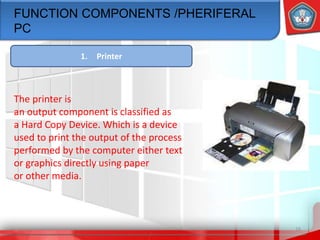
The printer is
an output component is classified as
a Hard Copy Device. Which is a device
used to print the output of the process
performed by the computer either text
or graphics directly using paper
or other media.
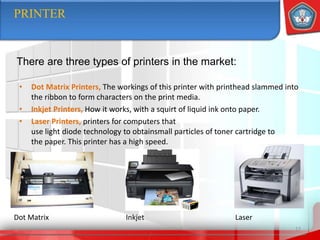
• Dot Matrix Printers, The workings of this printer with printhead slammed into
the ribbon to form characters on the print media.
• Inkjet Printers, How it works, with a squirt of liquid ink onto paper.
• Laser Printers, printers for computers that
use light diode technology to obtainsmall particles of toner cartridge to
the paper. This printer has a high speed.
17
PRINTER
There are three types of printers in the market:
Dot Matrix Inkjet Laser
• Conektor Paralel Port
• USB Port.
18
PRINTER
According to
the printer connector there are
two kinds :
19
FUNCTION COMPONENTS /PHERIFERAL
PC
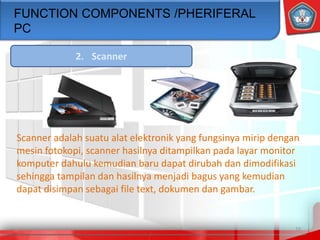
2. Scanner
Scanner adalah suatu alat elektronik yang fungsinya mirip dengan
mesin fotokopi, scanner hasilnya ditampilkan pada layar monitor
komputer dahulu kemudian baru dapat dirubah dan dimodifikasi
sehingga tampilan dan hasilnya menjadi bagus yang kemudian
dapat disimpan sebagai file text, dokumen dan gambar.
Component - component of the PC are:
•CPU (Central Processing Unit) atau Processor
•Motherboard
•Memory
•Casing and Power Supply
FUNCTION COMPONENTS / PHERIFERAL
PC
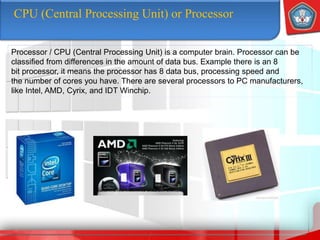
CPU (Central Processing Unit) or Processor
Processor / CPU (Central Processing Unit) is a computer brain. Processor can be
classified from differences in the amount of data bus. Example there is an 8
bit processor, it means the processor has 8 data bus, processing speed and
the number of cores you have. There are several processors to PC manufacturers,
like Intel, AMD, Cyrix, and IDT Winchip.
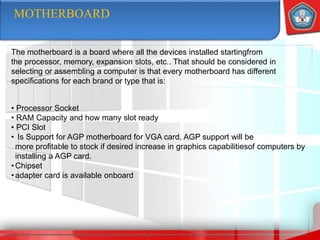
MOTHERBOARD
The motherboard is a board where all the devices installed startingfrom
the processor, memory, expansion slots, etc.. That should be considered in
selecting or assembling a computer is that every motherboard has different
specifications for each brand or type that is:
• Processor Socket
• RAM Capacity and how many slot ready
• PCI Slot
• Is Support for AGP motherboard for VGA card, AGP support will be
more profitable to stock if desired increase in graphics capabilitiesof computers by
installing a AGP card.
•Chipset
•adapter card is available onboard
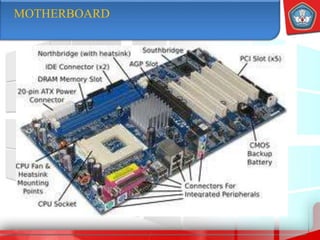
MOTHERBOARD
MEMORY
RAM
ROM
Random Access Memory
In accessing data stored in memory is done
by random (Random)rather
than sequential manner (sequential) as in
the streamer. This means for accessing
the memory elements located anywhere within
the module, will be accessed in the same time.
Based on the manufacture, RAM classified
into two main parts,namely:
• Static RAM
• Dynamic RAM
MEMORY
ROM
RAM
Read Only Memory
Data is written in the memory can not be
changed with the normal process and can only
be read only. It is stored in the BIOS when the
computer starts and the first steps is known
as bootstrapping. This type of ROM include:
• PROM (Programmable ROM)
• EPROM (Erasable Programmable ROM)
• EEPROM (Electrically Erasable PROM)
CHASING and POWER SUPPLY
CASING
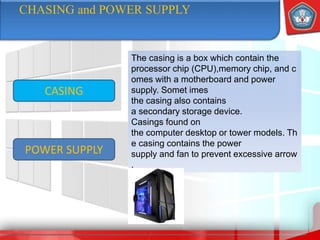
The casing is a box which contain the
processor chip (CPU),memory chip, and c
omes with a motherboard and power
supply. Somet imes
the casing also contains
a secondary storage device.
Casings found on
the computer desktop or tower models. Th
e casing contains the power
supply and fan to prevent excessive arrow
.
POWER SUPPLY
CHASING and POWER SUPPLY
CASING
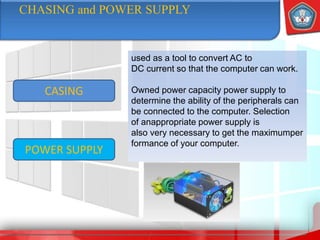
used as a tool to convert AC to
DC current so that the computer can work.
Owned power capacity power supply to
determine the ability of the peripherals can
be connected to the computer. Selection
of anappropriate power supply is
also very necessary to get the maximumper
formance of your computer.
POWER SUPPLY
IDENTIFICATION OF THE HEALTH AND
SAFETY.
Definition  philosophy , A thought and effort to ensure the
integrity and perfection of bothphysical and
spiritual labor in particular and people in general,
worksand cultures towards a just
and prosperous society
Science , Science and its application in an
attempt to prevent
possible accidents and occupational diseases.
Practical: protection efforts so that workers are
always in asafe and healthy during
a work wrought work, and do the work in the
workplace and the source and production
process can be safe andefficient in its use.
Target
Preparation
and
Safety in
Assembling
PC.
IDENTIFICATION OF THE HEALTH AND
SAFETY.
Definition  Guarantee the physical and
spiritual perfection as well as the work
oflabor and culture
Prevent and reduce accidents and (Work Due
to Illness)
guarantee:
• Every labor and other people who are in the
workplace have the protection of the safety
• Any source of production can
be used and used safely and efficiently
• The production process runs smoothly
Target
Preparation
and
Safety in
Assembling
PC.
IDENTIFICATION OF THE HEALTH AND
SAFETY.
Definition  Screwdrivers, pliers, AVO meter (if
any), solder, tin solder, insulation,
wire rope and record evidence.
Current and voltage measurement is only performed if
the components used is the
old component is still unknown whether or not
AVO meter should not use if the motherboard is
still good, because you do not know where
the points are a point of measurement.
Carelessness in this regard could lead to deadly
consequences.
If you already know the power
source voltage of the power supplylook at the
computer (located in the cashing / computer box) if it
is set on a scale voltage corresponding to
the electrical voltage at your place or not.
Target
Preparation
and
Safety in
Assembling
PC.
ASSEMBLING and TEST PC
• Improper installation of memory, a good motherboard will give a
warning sound signal that is not correct installation guidelines. Check
and place it properly.
• AGP VGA Card Installation or less toned or fit, a good motherboard
will give a warning sound signal. Check and place it correctly.
• Disk Data Cabling for that does not fit or reversed. Or setting position
of the Master or Slave Disk incorrect. Correct and check the
jumper position Disk for Master / Slave and check with auto detect Disk in
the BIOS.
• Installation of incorrect connector panel so that the indicator lights
for Disk and Power, is not active. Correct.
32
Troubleshooting in
Assembling PC
A common problem in computer assembly and handling include:
• Improper installation of memory, a good motherboard will give a
warning sound signal that is not correct installation guidelines. Check
and place it properly.
• AGP VGA Card Installation or less toned or fit, a good motherboard
will give a warning sound signal. Check and place it correctly.
• Disk Data Cabling for that does not fit or reversed. Or setting position
of the Master or Slave Disk incorrect. Correct and check the
jumper position Disk for Master / Slave and check with auto detect Disk in
the BIOS.
• Installation of incorrect connector panel so that the indicator lights
for Disk and Power, is not active. Correct.
33
Assembling a PC test results.
A common problem in computer assembly and handling include:

Presentasi merakit komputer untuk pemula

  • 1.
  • 2.
    The concept ofComputer Systems ASSEMBLE PERSONAL COMPUTER Troubleshooting of PC Assembling Identification of Security & Safety Function Peripherals PC Components 2 PC Assembling Equipment Identification PC assembly test
  • 3.
    The concept ofComputer Systems • CPU ( Central Processing Unit ) / Processor • Memory ( RAM and ROM ) • Input/ Output. 3 Easily the computer system consists of three main parts, namely:
  • 4.
    4 The concept ofComputer Systems Figure 1.1 Block Diagram of MicroComputer Systems
  • 5.
    The concept ofComputer Systems CPU ( Central Processing Unit ) / Processor Input / Output Memory ( RAM and ROM ) AMD CPU @ jagadreview.com INTEL CPU @ cpu-world.com The main part of the computer because the processor serves toregulate all activities
  • 6.
    Konsep Sistem Komputer Input/Output Memory( RAM dan ROM ) Memory function for store the data and programs. Various types of memory is the fastest access to the too late. Based on the speed of access can be made memory hierarchy as in table 1.1. follows. CPU ( Central Processing Unit ) / Processor
  • 7.
    Memory ( RAMand ROM ) 7 Table hierarchy, based on memory access speed @ Copyright © 2003 IlmuKomputer.Com Fastest Latest
  • 8.
    8 Register Memory Cache Memory MainMemory Secondary Memory Is a type of memory where the fastest access speed, memory iscontained in the CPU / Processor Memory ( RAM and ROM )
  • 9.
    9 Register Memory Cache Memory MainMemory Secondary Memory Limited-capacity memory, high speed is more expensive than main memory. Cache memory is there between mai n memory and processor registers, so that processors do not work directly referring to the main memory so that performance can be improved. Cache Memory There are two kinds: • Cache Memory which is located on the internal processor, cachememory of this type of very high-speed access • Chace Memory, which are outside of the processor, which is locatedon the motherboard. Memory ( RAM and ROM )
  • 10.
    10 Register Memory Cache Memory MainMemory Secondary Memory Memory function for store data and programs. Main memory types: • ROM (Read Only Memory) is memory that can only read data orprogram. On your PC, ROM contained in the BIOS (Basic InputOutput System) is located on Mother Board which functions forsetting the peripherals available on the system. Chace Memory,located outside the processor, which is located on the motherboard • RAM (Random Access Memory) which has the capacity for conversion of data or programs stored on it. Memory ( RAM and ROM )
  • 11.
    11 Register Memory Cache Memory MainMemory Secondary Memory An additional memory function to store the data or programs. Example: Hard drive, Floppy Disk etc. Memory ( RAM and ROM )
  • 12.
    Input / OutputUnit is part of the computer to receive data and display the data after processing by the processor. Input / Output unit is divided into two parts, namely: 1. Port I/O 2. Peripheral I/O CPU ( Central Processing Unit ) / Processor Input / Output Memory ( RAM dan ROM ) The concept of Computer Systems
  • 13.
    • Port Paralel(LPT1 atau LPT2) • Port Serial (Com1, Com2 ) = • Port AT / PS2 • USB Port • Port VGA • Port Audio 13 Input / Output Port I / O
  • 14.
    • The firstcategory consists of equipment that perform input and output operations, this category includes the keyboard, trackball, mouse, printers, and video display. • The second category consists of equipment in priority to the secondary data storage, where storage is mainly provided by the computer's main memory. 14 Input / Output Peripheral I/O Peripherals is something that refers to the external equipment is connected to a computer. Computer peripherals can be divided into two categories based on function.
  • 15.
    FUNCTION COMPONENTS /PHERIFERAL PC Component - component of the PC are: •CPU (Central Processing Unit) atau Processor •Motherboard •Memory •Casing dan Power Supply •Keyboard dan Mouse •Expansion Card
  • 16.
    16 FUNCTION COMPONENTS /PHERIFERAL PC 1.Printer The printer is an output component is classified as a Hard Copy Device. Which is a device used to print the output of the process performed by the computer either text or graphics directly using paper or other media.
  • 17.
    • Dot MatrixPrinters, The workings of this printer with printhead slammed into the ribbon to form characters on the print media. • Inkjet Printers, How it works, with a squirt of liquid ink onto paper. • Laser Printers, printers for computers that use light diode technology to obtainsmall particles of toner cartridge to the paper. This printer has a high speed. 17 PRINTER There are three types of printers in the market: Dot Matrix Inkjet Laser
  • 18.
    • Conektor ParalelPort • USB Port. 18 PRINTER According to the printer connector there are two kinds :
  • 19.
    19 FUNCTION COMPONENTS /PHERIFERAL PC 2.Scanner Scanner adalah suatu alat elektronik yang fungsinya mirip dengan mesin fotokopi, scanner hasilnya ditampilkan pada layar monitor komputer dahulu kemudian baru dapat dirubah dan dimodifikasi sehingga tampilan dan hasilnya menjadi bagus yang kemudian dapat disimpan sebagai file text, dokumen dan gambar.
  • 20.
    Component - componentof the PC are: •CPU (Central Processing Unit) atau Processor •Motherboard •Memory •Casing and Power Supply FUNCTION COMPONENTS / PHERIFERAL PC
  • 21.
    CPU (Central ProcessingUnit) or Processor Processor / CPU (Central Processing Unit) is a computer brain. Processor can be classified from differences in the amount of data bus. Example there is an 8 bit processor, it means the processor has 8 data bus, processing speed and the number of cores you have. There are several processors to PC manufacturers, like Intel, AMD, Cyrix, and IDT Winchip.
  • 22.
    MOTHERBOARD The motherboard isa board where all the devices installed startingfrom the processor, memory, expansion slots, etc.. That should be considered in selecting or assembling a computer is that every motherboard has different specifications for each brand or type that is: • Processor Socket • RAM Capacity and how many slot ready • PCI Slot • Is Support for AGP motherboard for VGA card, AGP support will be more profitable to stock if desired increase in graphics capabilitiesof computers by installing a AGP card. •Chipset •adapter card is available onboard
  • 23.
  • 24.
    MEMORY RAM ROM Random Access Memory Inaccessing data stored in memory is done by random (Random)rather than sequential manner (sequential) as in the streamer. This means for accessing the memory elements located anywhere within the module, will be accessed in the same time. Based on the manufacture, RAM classified into two main parts,namely: • Static RAM • Dynamic RAM
  • 25.
    MEMORY ROM RAM Read Only Memory Datais written in the memory can not be changed with the normal process and can only be read only. It is stored in the BIOS when the computer starts and the first steps is known as bootstrapping. This type of ROM include: • PROM (Programmable ROM) • EPROM (Erasable Programmable ROM) • EEPROM (Electrically Erasable PROM)
  • 26.
    CHASING and POWERSUPPLY CASING The casing is a box which contain the processor chip (CPU),memory chip, and c omes with a motherboard and power supply. Somet imes the casing also contains a secondary storage device. Casings found on the computer desktop or tower models. Th e casing contains the power supply and fan to prevent excessive arrow . POWER SUPPLY
  • 27.
    CHASING and POWERSUPPLY CASING used as a tool to convert AC to DC current so that the computer can work. Owned power capacity power supply to determine the ability of the peripherals can be connected to the computer. Selection of anappropriate power supply is also very necessary to get the maximumper formance of your computer. POWER SUPPLY
  • 28.
    IDENTIFICATION OF THEHEALTH AND SAFETY. Definition  philosophy , A thought and effort to ensure the integrity and perfection of bothphysical and spiritual labor in particular and people in general, worksand cultures towards a just and prosperous society Science , Science and its application in an attempt to prevent possible accidents and occupational diseases. Practical: protection efforts so that workers are always in asafe and healthy during a work wrought work, and do the work in the workplace and the source and production process can be safe andefficient in its use. Target Preparation and Safety in Assembling PC.
  • 29.
    IDENTIFICATION OF THEHEALTH AND SAFETY. Definition  Guarantee the physical and spiritual perfection as well as the work oflabor and culture Prevent and reduce accidents and (Work Due to Illness) guarantee: • Every labor and other people who are in the workplace have the protection of the safety • Any source of production can be used and used safely and efficiently • The production process runs smoothly Target Preparation and Safety in Assembling PC.
  • 30.
    IDENTIFICATION OF THEHEALTH AND SAFETY. Definition  Screwdrivers, pliers, AVO meter (if any), solder, tin solder, insulation, wire rope and record evidence. Current and voltage measurement is only performed if the components used is the old component is still unknown whether or not AVO meter should not use if the motherboard is still good, because you do not know where the points are a point of measurement. Carelessness in this regard could lead to deadly consequences. If you already know the power source voltage of the power supplylook at the computer (located in the cashing / computer box) if it is set on a scale voltage corresponding to the electrical voltage at your place or not. Target Preparation and Safety in Assembling PC.
  • 31.
  • 32.
    • Improper installationof memory, a good motherboard will give a warning sound signal that is not correct installation guidelines. Check and place it properly. • AGP VGA Card Installation or less toned or fit, a good motherboard will give a warning sound signal. Check and place it correctly. • Disk Data Cabling for that does not fit or reversed. Or setting position of the Master or Slave Disk incorrect. Correct and check the jumper position Disk for Master / Slave and check with auto detect Disk in the BIOS. • Installation of incorrect connector panel so that the indicator lights for Disk and Power, is not active. Correct. 32 Troubleshooting in Assembling PC A common problem in computer assembly and handling include:
  • 33.
    • Improper installationof memory, a good motherboard will give a warning sound signal that is not correct installation guidelines. Check and place it properly. • AGP VGA Card Installation or less toned or fit, a good motherboard will give a warning sound signal. Check and place it correctly. • Disk Data Cabling for that does not fit or reversed. Or setting position of the Master or Slave Disk incorrect. Correct and check the jumper position Disk for Master / Slave and check with auto detect Disk in the BIOS. • Installation of incorrect connector panel so that the indicator lights for Disk and Power, is not active. Correct. 33 Assembling a PC test results. A common problem in computer assembly and handling include: