Addressing Security Risks
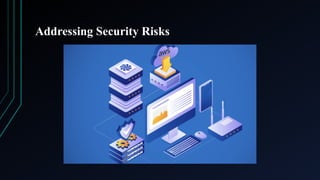
•Amazon Web Services (AWS) is the largest and most popular hyper-scale
public cloud provider. AWS provides over 200 services from 38 worldwide
data centers, offering infrastructure, platform, and software as service
solutions.
• The breadth and flexibility of AWS services add a high degree of complexity to
the AWS cloud. At the same time, AWS aims to make its platform accessible to
everyone, from startups and small businesses to the largest enterprises.
• This combination of complexity and accessibility can, in turn, lead to security
risks in AWS deployments. If left unmitigated, threat actors can take advantage
of these vulnerabilities, potentially resulting in data compromise, service
disruption, and reputation damage.
Need for AWSSecurity
• The cloud's flexibility has attracted many organizations to
AWS, making it a popular choice for companies aiming to
grow quickly. However, this ease of use also makes it an
attractive target for cybercriminals.
• The use of IAM root user credentials is low, but it still
poses a potential security risk. Most organizations have at
least one account that does not use multi-factor
authentication, which increases the likelihood of security
breaches. There have been numerous documented cases of
security incidents involving AWS.
5.
Need for AWSSecurity
• Cloud misconfigurations, poor access control, and a lack of
adherence to security best practices can increase security
risks on AWS. Many organizations use cloud services
without fully grasping the security implications, mistakenly
believing that AWS will take care of everything for them.
• AWS offers tools, guidelines, and documentation for users
to protect their resources. But misusing or misconfiguring
these tools can create vulnerabilities. To minimize risks,
organizations should understand the main security risks
with AWS and take proactive measures to reduce their
attack surface.
6.
AWS Security Risks
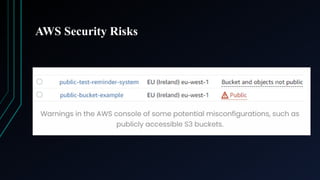
1.Misconfigured S3 Buckets:
What It is: AWS Simple Storage Service (S3) is a popular choice
for businesses to store and retrieve any data. However, a common
security mistake is misconfiguring S3 buckets to be publicly
accessible. This can lead to sensitive data being exposed, as was
the case in 2017 when Verizon's data belonging to thousands of its
customers was exposed due to an S3 bucket misconfiguration.
This typically occurs when developers or admins accidentally
leave S3 buckets open to the public.
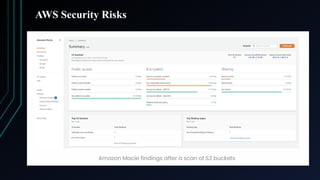
How to avoid: Organizations should always verify their S3
bucket configurations. AWS provides tools like AWS Config and
Amazon Macie that help detect publicly accessible S3 buckets and
sensitive data leaks.
AWS Security Risks
2.Unrestricted Access to EC2 Instances:
What It is: EC2 allows users to launch virtual servers. However,
if access control is not properly configured, it can lead to severe
vulnerabilities. One basic example is leaving SSH open to the
entire internet. Attackers can then brute-force SSH credentials to
gain unauthorized access to EC2 instances and the entire cloud
environment.
How to avoid: Limit SSH access by using security groups, and
restricting access to known IP addresses. Implement multi-factor
authentication (MFA) and disable password-based login for
enhanced security. Encrypt data at rest using AWS Key
Management Service (KMS).
9.
AWS Security Risks
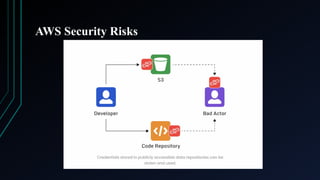
3.Credential leaks:
What It is: AWS security breaches often happen when login details get exposed.
While usernames and passwords can be leaked, hackers more commonly target
and steal AWS access keys used by programs. These sensitive keys are often
long strings of numbers and letters, and it may not be immediately apparent to
some people the access they provide. Users may unwittingly commit them into a
public code repository or place them in a public document or a shared storage
area such as an S3 bucket. From there, they can be retrieved by hackers to access
or modify AWS resources in the compromised AWS account.
How to avoid: Enforce strong passwords and password management practices.
Organizations should implement secure password management practices, such as
requiring a minimum length password, disallowing password sharing, and using
a secure password management solution. Enable multi-factor authentication as
MFA doesn’t directly prevent credential leakage. Use proactive monitoring tools
as Protective monitoring solutions help ensure keys are not committed into code
repositories or placed in public shared storage. For example, Amazon Macie can
monitor S3 buckets for this and other personally identifiable identification data.
AWS Security Risks
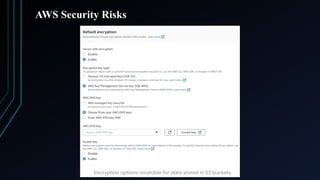
4.Inadequate Encryption:
What It is: Another major security risk is failing to encrypt sensitive data both
at rest and in transit. Without encryption, attackers can intercept data during
transmission or access sensitive information if they gain unauthorized access to
cloud storage. Insecure passwords can be compromised via brute force attacks(A
brute force attack is a hacking method that uses trial and error to crack
passwords, login credentials, and encryption keys.).
How to avoid: AWS offers encryption features like AWS Key Management
Service (KMS) for encrypting data at rest and Amazon S3 encryption for stored
objects. Ensure that all sensitive data is encrypted using industry-standard
protocols like TLS (for data in transit) and AES-256 (for data at rest). Users also
shouldn’t use the same password across all services and devices and make sure
to rotate or change them frequently. They should learn the best password
management practices and set the right lengths as well. AWS CloudHSM
provides a fully managed FIPS 140-2 Level 3 validated service to automate
secure encryption keys and operations for those with even higher security
requirements.
AWS Security Risks
5.Insecure APIs and Public Endpoints:
What It is: Many AWS services use APIs for integration, but
insecure APIs can expose the system to attacks. If an API lacks
proper authentication or rate limiting, attackers can exploit it using
brute-force attacks or distributed denial-of-service (DDoS)
attacks.
How to avoid: Always use API Gateway to manage API
authentication and enforce usage quotas. AWS WAF (Web
Application Firewall) can protect public endpoints from malicious
traffic. Implement security mechanisms like Oauth (OAuth is an
open standard that allows users to grant access to their information
on other websites without sharing their passwords. It's used by
web, mobile, and desktop applications.) for authentication and
enable logging to monitor API access.
14.
AWS Security Risks
6.Neglecting Security Patching:
What It is: Cloud environments, like on-premises
infrastructure, require regular updates and patches.
However, some organizations fail to patch
vulnerabilities in virtual machines (VMs), leading to an
increased risk of exploitation. Unpatched vulnerabilities
were responsible for many high-profile attacks.
How to avoid: Using AWS Systems Manager Patch
Manager, set up automated patching for EC2 instances
and other AWS resources. This ensures that operating
systems and applications are always up-to-date.
15.
AWS Security Risks
7.Lack of Cloud Security Monitoring:
What It is: Many organizations need to pay more attention to
real-time monitoring in cloud environments. This makes detecting
unauthorized access, data exfiltration, or potential security
breaches difficult. Without continuous monitoring, incidents may
go unnoticed for months.
How to avoid: AWS offers several tools, such as Amazon
GuardDuty and AWS CloudTrail, for monitoring suspicious
activities. These tools provide real-time security alerts that can
help identify and respond to threats more effectively.
To help analyze log data from a security perspective, AWS offers
services such as Security Hub, GuardDuty, Inspector, and Macie.
Together these tools provide threat reporting, analysis, and issue
remediation for applications and data.
AWS Security Risks
8.Insufficient Backup and Disaster Recovery Planning:
What It is: Organizations often neglect to create a cloud-specific security strategy.
This is a mistake since cloud security needs to address different challenges than on-
premise security. It is arguably easier to achieve greater IT security within the cloud
than on-premises, but it requires knowledge and effort. Relying on a single point of
failure, like an untested backup or recovery process, can leave organizations
vulnerable to data loss or service downtime. Data breaches, ransomware attacks, or
accidental deletions can happen unexpectedly, making disaster recovery plans
critical.
How to avoid: Use Amazon S3 and Amazon S3 Glacier to automatically back up
important data. Implement AWS Backup to streamline backup management.
Regularly test disaster recovery plans to ensure they function as expected during a
crisis. A plan of action is also crucial for handling different situations. Key questions
to consider include: what is the process to follow if a system is compromised? Or if
a user leaks their access credentials? Document and test your processes to ensure
fast remediation as soon as possible – this will limit or prevent data loss and
reputational damage. AWS provides a Security Incident Response Guide to assist
you with creating and developing a robust process.
18.
AWS Security Risks
9.Shadow IT:
What It is: Public cloud platforms are dynamic, allowing quick
and easy deployment of resources. It is simple, therefore, for
employees or even departments to build or install applications,
store data and communicate internally using AWS cloud services,
potentially with no security overview or controls.
How to avoid: The nature of the public cloud means advanced IT
services are accessible to all. Without the necessary strategy and
oversight(supervision), security controls are easy to bypass.
Alongside clear company policy, cloud management and
governance tools are required to give visibility and control over
deployed resources. AWS provides tools such as Control Tower,
Organizations, and Service Catalog to assist with this governance
process.
19.
AWS Security Risks
10.Overlooked IAM User Activity:
What It is: If not managed carefully, IAM user credentials can be
easily compromised. Organizations often overlook unusual user
activity, which can be an early indicator of compromised credentials or
insider threats. Failing to monitor IAM user activity leaves a security
gap. Overly permissive IAM roles can widen attack surfaces and
increase the blast radius.
How to avoid: Enable multi-factor authentication (MFA) for all IAM
users. Use AWS CloudTrail to monitor user activities and frequently
review access logs for suspicious actions. IAM access keys should also
be rotated regularly, and unused keys should be deactivated. Analyze
access patterns and test IAM policies frequently by using an AWS IAM
policy simulator. Implement carefully constructed service control
policies (SCPs) and set guardrails and action restrictions across
multiple accounts for extra security.
20.
What is theZero Trust Framework?
• The Zero Trust framework describes a strict approach to cybersecurity in which
every individual or device that attempt to access a private network, whether
they are located inside or outside of that network, must be identified and
authorized.
• Unlike other security models, which automatically trust individuals and devices
that are already within the corporate network, zero trust advocates trusting no
one at any time. The model was first described by John Kindervag, and then a
principal analyst at Forrester Research, in 2010.
• Zero Trust can best be described by the axiom “don’t trust, always verify.”
• It acknowledges that traditional IT security models that seek to protect networks
from outside threats but that inherently(naturally) trust individuals or devices
already within the network, are flawed. The reason is because that trust could be
misplaced: there may be insider threats within the network in the form of an
employee who wants to compromise corporate data, or a device that has been
compromised by an outside attack, or a set of user security credentials that has
been stolen by a bad actor outside of the organization.
21.
Concept of PrincipleLeast Privilege(POLP)
• One of the most important components of account security is privilege
assignment.
• Privileged accounts, such as superuser accounts, protect sensitive
information. They use role-based authentication, authorizations, as well
as other parameters that specify the data a specific user is allowed to
access.
• The aim of privilege delegation is to restrict them to authorized activity
only — ensuring that both user and machine identities can only access the
data they need. This helps avoid insider threats, minimizes the fallout of
password compromise, and ultimately protects critical system resources.
• Least privilege offers a variety of benefits for IT security. It adds an
additional layer of defense against insider threats, hackers, and other
cyberattacks.
22.
Concept of PrincipleOf Least Privilege (POLP)
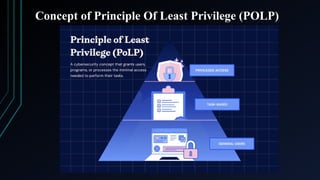
• The principle of least privilege (POLP) is a concept in computer security
that limits users' access rights to only what is strictly required to do their
jobs. POLP can also restrict access rights for applications, systems and
processes to only those who are authorized. This principle is also known
as the access control principle or the principle of minimal privilege. The
traditional method of cybersecurity focuses on a perimeter-based
approach. This means that users can access information once they verify
their credentials. However, a better strategy is to use least-privileged
access, which avoids the limitations of perimeter security by creating
specific privilege levels tailored to each user.
• To effectively implement the least privilege principle in your
organization, you need a flexible approach to managing privileged access.
Instead of assigning permanent credentials, a good least privilege
management system grants temporary privileges as employees complete
their tasks.
23.
Concept of PrincipleOf Least Privilege (POLP)
• Although least privilege enforcement is a more
effective alternative to perimeter security, there is a
risk known as "privilege creep." This term refers to
the situation where privileges are granted but not
revoked over time.
• Privilege creep can create vulnerabilities, even with
advanced Privileged Access Management (PAM)
solutions. To counteract this issue, it's essential to
adopt a Zero Trust strategy, which uses temporary
access credentials to reduce the risk of insider
threats.
Best Practices forImplementing the Least Privilege
Principle
• Monitor continuously: By constantly monitoring
your privileged account access, you can identify
which users have unnecessary or inappropriate
access to passwords and keys. Regular surveillance
allows you to prevent privilege creep and identify the
source of potential threats. Remember to monitor
permissions for cloud-based applications, not just
your on-premises data.
• Set up alerts: In addition to auditing consistently, an
alert system can help you detect unusual activity
before a major data breach occurs.
26.
Best Practices forImplementing the Least Privilege
Principle
• Establish administrative accounts: When you
separate administrative accounts from standard user
accounts, you can help to ensure that privileged users
aren’t able to access administrative capabilities
unless it’s absolutely necessary.
• Rotate passwords regularly: By rotating passwords
and keys, you can avoid the risk of cyber attackers
gaining access to privileged account credentials.
27.
Best Practices forImplementing the Least Privilege
Principle
• Set just-in-time (JIT) privileges: JIT privileges are
a central component of least privilege, offering a
specific timeframe for the use of access on an as-
needed basis. This access is based on ephemeral
certificates to ensure that the credentials needed for
the connections are created just-in-time and
disappear immediately after use. The users never see
or handle the credentials nor are the any credentials
left to manage. When you replace standing
passwords with JIT access, you can ensure data is
only available to the right user at the right time.
28.
Benefits of usingprinciple of least privilege
• Prevents the spread of malware: By imposing
POLP restrictions on computer systems, malware
attacks can't use higher-privilege or administrator
accounts to install malware or damage the system.
• Decreases chances of a cyber attack: Most cyber
attacks occur when a hacker exploits privileged
credentials. POLP protects systems by limiting the
potential damage that an unauthorized user gaining
access to a system can cause.
29.
Benefits of usingprinciple of least privilege
• Improves user productivity: Only giving users, the
required access to complete their necessary tasks
means higher productivity and less troubleshooting.
• Helps demonstrate compliance: In the event of an
audit, an organization can prove its compliance with
regulatory requirements by presenting the POLP
concepts it has implemented.
• Helps with data classification: POLP concepts
enable companies to keep track of who has access to
what data in the event of unauthorized access.
30.
How does theprinciple of least privilege work?
• The principle of least privilege works by granting users only the
minimal access needed to perform their tasks, reducing security
risks and preventing unauthorized actions.
• Key components of PoLP include:
Granular permission assignment: Access is customized to
each user, limiting exposure to the data they need.
Task-based privilege allocation: Permissions are granted
based on specific tasks, preventing over-access and aligning
with job duties.
Role-based access control (RBAC): Permissions are
grouped into roles, making it easier to manage and enforce
least privilege.
31.
How does theprinciple of least privilege work?
• Key components of PoLP include:
Just-in-time (JIT) access: Users receive temporary access
only when required, reducing the risk of prolonged,
unnecessary permissions.
Separation of privileges: Access rights are split among
users, preventing any one person from having too much
control.
Continuous permission adjustments: Regular updates keep
access aligned with changing roles and security needs.
Minimal default privileges: Starting with the least access
possible reduces potential vulnerabilities.
Least access paths: Limiting access routes to critical
resources reduces opportunities for unauthorized entry.
32.
Practical applications ofleast privilege access
• Database access: Restricting access to authorized users only
minimizes the risk of data breaches and maintains database
integrity.
• File permissions: Carefully managing read, write, and execute
permissions prevents unauthorized alterations to critical
documents, ensuring data security.
• System admin rights: Limiting administrative access reduces
the risk of misconfigurations and unauthorized changes,
ensuring control remains with trained personnel.
• API access: PoLP secures APIs by granting specific
permissions to trusted users and applications, protecting against
unauthorized use.
33.
Practical applications ofleast privilege access
• Remote worker access: Limiting remote access to necessary
resources reduces security risks and protects against potential
threats.
• Cloud storage: Ensuring only authorized users can access cloud
data helps maintain confidentiality and prevent breaches.
• Service accounts: Restricting access to essential functions
reduces exploitation risks and ensures proper use of system
resources.
• Virtual machines (VMs): Controlling access to VMs prevents
unauthorized actions, protecting the stability of virtual
environments.
• Third-party vendor access: Limiting vendor access to necessary
systems safeguards internal resources and reduces vulnerabilities.
34.
Concept of SharedResponsibility Model
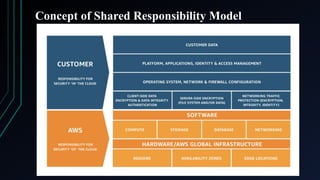
• The shared responsibility model is a framework establishing who is responsible for
securing different aspects of the cloud-computing environment between the cloud service
provider (CSP) and the customer.
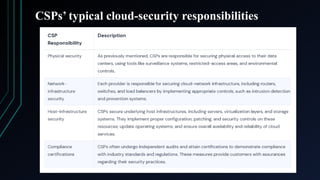
• The CSP is generally tasked with the security of the underlying infrastructure, while it is on
the customer to secure its cloud-hosted data and applications.
• CSPs are responsible for securing data centers and all networking equipment. They also
handle tasks such as patching and updating operating systems as well as ensuring the
availability and reliability of the cloud services. This is known as the "security of the
cloud" responsibility.
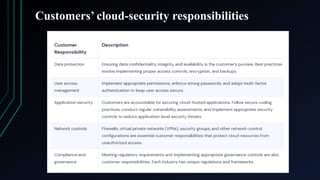
• Customers’ security responsibilities include setting up secure access controls, encrypting
data in transit and at rest, managing user accounts and credentials, and implementing
application-specific security measures. This is called the "security in the cloud"
responsibility.
• For instance, as a CSP, Amazon S3 ensures the physical security of their data center and
protects against infrastructure-level threats. However, it’s the S3 users’ responsibility to
properly configure access control and permissions for their S3 buckets, implement
encryption for sensitive data, and regularly monitor and manage access to stored data.
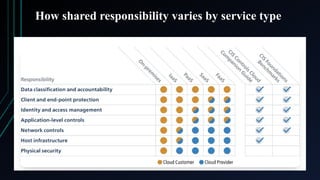
How shared responsibilityvaries by service type
• The level of a CSP customer’s shared responsibility depends on service type:
software as a service (SaaS), platform as a service (PaaS), or infrastructure as a
service (IaaS).
• In the SaaS model, CSPs bear most security responsibilities. They secure the
software application, including infrastructure and networks, and they are responsible
for application-level security. Customers’ responsibilities often include managing
user access and ensuring data is protected and accounts are secure. In short,
customers rely heavily on their cloud service provider for security, uptime, and
system performance.
• In the PaaS model, CSPs manage infrastructure and underlying platform components,
such as runtime, libraries, and operating systems. Customers are responsible for
developing, maintaining, and managing data and user access within their
applications.
• Of the three models, IaaS customers have the highest level of responsibility. The CSP
secures the foundational infrastructure, including virtual machines, storage, and
networks—while customers secure everything built on the infrastructure, such as the
operating system, runtime, applications, and data.
Network Isolation
• Networkisolation refers to the process of separating a network from
the rest of the system in order to prevent and contain attacks.
• Network isolation in AWS refers to the practice of creating secure
and separate network environments within the AWS cloud to control
and restrict communication between different resources.
• This enhances security, compliance, and performance.
• In AWS cloud computing, "network isolation" refers to the practice
of using features like Virtual Private Clouds (VPCs) and subnets to
create separate, logically isolated virtual networks, effectively
partitioning different applications or customer data within the cloud,
preventing unauthorized access between them; essentially creating a
secure, private network environment within the larger AWS
infrastructure.
42.
Key points aboutnetwork isolation on AWS
• VPCs as the foundation: The primary tool for network isolation is
the VPC, which allows you to define your own IP address range,
subnets, and security groups to control traffic within your virtual
network.
• Subnets: Within a VPC, you can create multiple subnets, further
segmenting your network and enabling finer-grained access control.
• Security Groups: These act as virtual firewalls that filter incoming
and outgoing traffic based on source/destination IP addresses, ports,
and protocols, enforcing access rules within a subnet.
• Network Access Control Lists (NACLs): An additional layer of
security that can be applied at the VPC level, providing more
granular control over traffic flow.
43.
Benefits of networkisolation
• Enhanced security: By isolating different
applications or customer data, you minimize the
risk of unauthorized access or data breaches.
• Improved data privacy: Sensitive information
can be kept separate from other parts of your
system.
• Multi-tenant architecture: Network isolation is
crucial for building secure multi-tenant
applications where different customers need to be
separated from each other.
44.
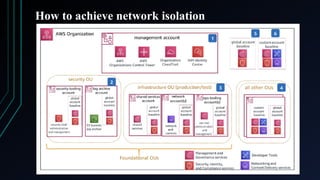
How to achievenetwork isolation
• Create separate VPCs: For highly sensitive data or
completely isolated environments, create dedicated
VPCs for each application or customer.
• Use private subnets: Place resources that should not be
directly accessible from the internet in private subnets.
• Implement strict security group rules: Carefully
configure security groups to allow only necessary traffic
between resources.
• Monitor network traffic: Utilize VPC flow logs to
monitor network activity and identify potential security
issues.
How to achievenetwork isolation
• An Endpoint in the AWS ecosystem refers to a URL or
web address that enables communication with a specific
web service or API. It serves as a crucial entry point for
any interaction with the resources offered by AWS.
• Endpoints play a pivotal role in facilitating secure and
efficient communication between various components
within the AWS infrastructure. By directing requests to
the appropriate service, endpoints ensure that data flows
smoothly and securely between the client and the
desired AWS service. This not only enhances
performance but also enables the implementation of
robust security measures.
47.
How to achievenetwork isolation
• AWS provides different types of endpoints, each designed to address specific
requirements. For instance, Regional Endpoints are associated with a
particular AWS region and enable communication within that region. This
ensures low latency and minimizes network traffic by keeping data within a
specific geographic area.
• On the other hand, AWS Edge locations host CloudFront, a content delivery
network service that accelerates the delivery of content and minimizes
latency. This is achieved by caching data at the edge, which reduces the
round-trip time between the client and the server.
• Moreover, considering the importance of security in the cloud, AWS offers
VPC (Virtual Private Cloud) endpoints. These endpoints enable secure
access to AWS services from within a VPC using private IP addresses,
eliminating the need for internet-bound traffic. This ensures that sensitive or
critical workloads remain protected from potential threats and unauthorized
access.
48.
AWS Services forEndpoint Security
• AWS Systems Manager (SSM): Automates patch management, software
updates, and compliance checks. Provides Session Manager for secure
remote access to instances.
• AWS GuardDuty: Detects threats like unauthorized access, suspicious
activities, and malware. Uses machine learning to analyze logs from AWS
CloudTrail, VPC Flow Logs, and DNS queries.
• AWS Security Hub: Centralized security management and compliance
monitoring. Integrates with AWS security services like GuardDuty, Macie,
and Inspector.
• AWS IAM (Identity and Access Management): Implements least privilege
access control. Uses IAM roles, policies, and permissions to manage
endpoint security.
• AWS Shield: Protects endpoints from DDoS attacks. AWS Shield Advanced
provides enhanced security features.
49.
AWS Services forEndpoint Security
• AWS WAF (Web Application Firewall): Protects
applications from common web attacks like SQL
injection and XSS. It blocks malicious IP addresses and
traffic patterns.
• AWS Inspector: Scans EC2 instances and container
images for vulnerabilities. Provides security
recommendations for remediation.
• AWS Macie: Uses AI to identify sensitive data and prevent
unauthorized access. Helps with compliance requirements.
• AWS Endpoint Security Partner Solutions: AWS
Marketplace offers third-party endpoint security tools (e.g.,
CrowdStrike, Palo Alto, Trend Micro).
50.
Best Practices forEndpoint Security in AWS
• Implement Least Privilege Access: Use IAM roles and policies
to limit user access. Avoid using root accounts for daily
operations.
• Enable Multi-Factor Authentication (MFA): Require MFA for
AWS accounts and sensitive applications.
• Encrypt Data at Rest and in Transit: Use AWS Key
Management Service (KMS) for encryption. Enable TLS for data
transmission.
• Regularly Patch and Update Endpoints: Use AWS Systems
Manager Patch Manager for automated patching.
• Secure Remote Access: Use AWS Systems Manager Session
Manager instead of SSH/RDP. Limit inbound access with Security
Groups.
51.
Best Practices forEndpoint Security in AWS
• Monitor Logs and Alerts: Use AWS
CloudTrail for auditing API calls. Enable
Amazon CloudWatch and GuardDuty for real-
time monitoring.
• Implement Network Isolation: Use VPCs,
private subnets, and network ACLs to limit
endpoint exposure.
• Use Anti-Malware and EDR Solutions:
Deploy endpoint detection and response (EDR)
tools from AWS Marketplace.
52.
Common Use Casesfor AWS Endpoint Security
• Securing EC2 Instances – Implement IAM roles,
enable patching, and monitor with GuardDuty.
• Protecting Workstations & Mobile Devices –
Use AWS WorkSpaces with encryption and IAM
controls.
• Ensuring Compliance – Automate security
audits with AWS Security Hub and AWS Config.
• Mitigating Insider Threats – Monitor access
logs and use least privilege access.
53.
Detective controls
• Detectivecontrols in AWS are security measures that monitor and
alert for issues like policy violations and unauthorized access. They
help identify and respond to potential risks, and are a key part of
AWS governance frameworks.
• Detective controls are security controls that are designed to detect,
log, and alert after an event has occurred.
• For instance, you could use a system that alerts you if an Amazon S3
bucket is open to the public. Even if you have measures to stop
public access to S3 buckets in your account and through service
controls, someone with admin access can bypass these measures. In
such cases, the alert system can notify you about the problem and
potential danger.
54.
Objectives of Detectivecontrols
• Detective controls help you make security
operations and quality processes better.
• They help you follow rules and laws.
• Detective controls allow security teams to see
and respond to security problems, including
serious threats that get past preventive
measures.
• They can also help you find the right response
to security problems and possible threats.
55.
Process of Detectivecontrols
• First, you make the system record events and resource
statuses in one place, like Amazon CloudWatch Logs.
• Once logging is set up, you check those logs to find any
unusual activities that could mean a threat.
• Each check relates back to your original rules and policies.
• For example, you can create a control that looks for a
specific pattern in the logs and sends an alert if it finds one.
• Security teams use these controls to better see the threats
and risks their system may face.
56.
Use cases ofDetective controls
• Detection of suspicious behavior: Detective controls help identify any anomalous
activity, such as compromised privileged user credentials or access to or exfiltration
(The unauthorized transfer of information from an information system.) of sensitive
data. These controls are important reactive factors that can help your company identify
and understand the scope of anomalous activity.
• Detection of fraud: These controls help detect and identify a threat inside your
company, such as a user who is circumventing (avoiding)
policies and performing unauthorized transactions.
• Compliance: Detective controls help you meet compliance requirements, such as
Payment Card Industry Data Security Standard (PCI DSS), and can help prevent
identity theft. These controls can help you discover and protect sensitive information
that is subject to regulatory compliance, such as personally identifiable information.
• Automated analysis: Detective controls can automatically analyze logs to detect
anomalies and other indicators of unauthorized activity. You can automatically analyze
logs from different sources such as AWS CloudTrail logs, VPC Flow Log, and Domain
Name System (DNS) logs, for indications of potentially malicious activity. To help
with organization, aggregate security alerts or findings from multiple AWS services to
a centralized location.
57.
Key AWS DetectiveControl Services
• Amazon CloudTrail: Amazon CloudTrail is an AWS service that records API calls and
activities in your AWS account, helping with security auditing, operational troubleshooting, and
compliance monitoring. It automatically logs who did what, when, from where, and how within
your AWS environment.
Key points about CloudTrail:
Function: Logs all API calls made through the AWS Management Console, AWS SDKs,
and command-line tools.
Data storage: Stores logs in an S3 bucket you specify.
Monitoring and alerting: Integrates with CloudWatch for real-time monitoring and
Security Hub for security analysis.
Use cases:
Security audits: Identify unauthorized access attempts by tracking who made changes to
sensitive configurations like IAM policies.
Incident investigation: Analyze logs to pinpoint the source of suspicious activity or
potential security breaches.
Compliance monitoring: Ensure adherence to regulations by maintaining a detailed
record of all account activity.
Operational troubleshooting: Identify issues by reviewing historical activity logs.
58.
Key AWS DetectiveControl Services
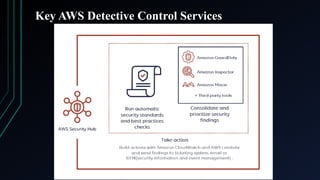
• AWS Security Hub: AWS Security Hub is a centralized security and compliance service that aggregates, analyzes, and
prioritizes security alerts (findings) from various AWS security services and third-party tools. It helps organizations
detect vulnerabilities, enforce compliance, and automate security responses. Security Hub provides a pre-built
dashboard to help organize and prioritize any issues or alerts for your AWS environment discovered from security
checks.
How does Security Hub work?
Security Hub simplifies how you understand and improve your security position with automated security best
practice checks powered by AWS Config rules and automated integrations with dozens of AWS services and partner
products. Security Hub only detects and consolidates findings that are generated after you enable it.
The benefits of Security Hub in practice:
Reduce the time and effort to collect information: collect and prioritize security findings results across
multiple accounts from integrated AWS services and third-party partner products.
Automation capability: automate remediation of specific findings, and define custom actions to be taken when
the specific findings are received. The findings can also be sent to the ticketing system or automatic remediation
software.
Best practices and standards security checks: Security Hub runs continuous security checks following AWS
best practices and industry standards, provides the results of these checks as scores, and identifies AWS accounts
and resources that require attention.
Consolidated view across AWS accounts: consolidate your security findings from multiple AWS accounts.
Thanks to the accurate charts and tables, you can easily identify potential threats and take necessary action.
Findings aggregation across AWS regions: view findings across multiple regions by setting an aggregation
region and then linking other AWS regions to it.
59.
Key AWS DetectiveControl Services
Security Hub common use cases:
Security scanning: Use various security standards to continuously scan
your AWS environment for configuration errors, and aggregate account
and multi-account security check results to understand your overall
security status.
Simple classification and prioritization: Use Security Hub’s dashboards
and filters to identify and prioritize which findings from other AWS
security services and partner security integrations are most important and
which require the most direct attention
.
Compliance: Simplify compliance management with built-in mapping
capabilities for common frameworks such as the Internet Security Center
(CIS) and Payment Card Industry Data Security Standard (PCI DSS).
Speed up response time with automatic ticket routing: Security Hub
ensures that AWS findings are sent to the right people through integration
with chat, ticketing, incident management, and security information and
incident management (SIEM) tools.
Key AWS DetectiveControl Services
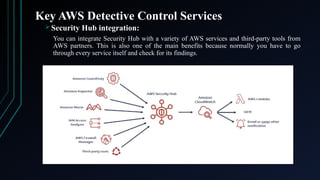
Security Hub integration:
You can integrate Security Hub with a variety of AWS services and third-party tools from
AWS partners. This is also one of the main benefits because normally you have to go
through every service itself and check for its findings.
62.
Key AWS DetectiveControl Services
Security Hub and AWS services integration:
It integrates with these AWS services:
1. Amazon GuardDuty for intelligent continuous threat detection of your AWS
accounts, data stored in Amazon S3, and workloads to reduce risk.
2. Amazon Macie, which you can use to help you find personally identifiable
information in your S3 buckets and classify data according to how sensitive it is
as a high, medium, or low risk, and alert you accordingly.
3. Amazon Inspector, which of course you can use to run checks for common
vulnerabilities and exposures on Amazon EC2 instances.
4. IAM Access Analyzer, a tool that scans the policies attached to your AWS
resources like S3 buckets, KMS keys, Lambda functions, and identity access
management roles, to see if they allow external access from outside your AWS
account.
5. Amazon CloudWatch and CloudWatch events and you can use AWS Lambda for
automating any response to the alerts that are found.
6. AWS Firewall Manager, which is a service that allows you to centrally manage
web application firewalls and security groups as well across multiple AWS
accounts.
63.
Key AWS DetectiveControl Services
• Amazon GuardDuty: Amazon GuardDuty is a managed threat detection
service that continuously monitors AWS accounts, workloads, and data
for malicious activity, anomalies, and unauthorized behavior. It uses
machine learning, threat intelligence, and anomaly detection to identify
potential security risks.
GuardDuty detects three primary types of threats on the AWS
cloud
Attacker reconnaissance: These types of threats include failed login
patterns, unusual API activity and port scanning;
Compromised resources: This category of threats includes
cryptojacking, unusual spikes in network traffic and temporary
access to Elastic Compute Cloud (EC2) instances by an external IP
address; and
Compromised accounts: Examples of these threats include API
calls from an odd location, attempts to disable CloudTrail and
unusual instance or infrastructure deployments.
64.
Key AWS DetectiveControl Services
While an admin can supply GuardDuty with his or her own list of "safe" IP
addresses, the service does not otherwise support customized detection rules. An
admin can, however, respond to each GuardDuty finding with thumbs-up or thumbs-
down responses to provide feedback for future detections.
Amazon GuardDuty compiles and delivers security findings to the Management
Console in a JSON format, which enables an admin or automated workflow to take
action. For example, Amazon CloudWatch Events can accept findings from
GuardDuty, then trigger an AWS Lambda function to modify security
configurations. The GuardDuty console and APIs retain security findings for 90
days.
Amazon GuardDuty works independently from cloud resources, which means it has
no performance impact on running systems. Additionally, GuardDuty uses service-
linked roles through AWS Identity and Access Management, which means an admin
doesn't have to manage or modify S3 bucket policies or log collection, as they would
with permissions for individuals.
An AWS customer pays for GuardDuty based on the quantity of AWS CloudTrail
Events and volume of VPC Flow Logs and DNS logs the service analyzes. AWS
provides a free trial.
65.
Key AWS DetectiveControl Services
Amazon GuardDuty Use Cases:
Detecting Unauthorized Access: Identify stolen IAM credentials used from unexpected
locations. Detect brute force attacks on AWS accounts.
Identifying Malware & Botnets: Find EC2 instances communicating with known
malware C2 servers. Detect cryptocurrency mining operations on compromised
instances.
Preventing Data Exfiltration: Monitor unusual large-scale S3 data transfers. Identify
attempts to copy data to unauthorized locations.
Securing AWS Accounts & Workloads: Alert on misconfigured security groups exposing
instances to public access. Detect unauthorized API calls modifying security policies.
Amazon GuardDuty Best Practices:
Enable GuardDuty Across All AWS Accounts – Use AWS Organizations for centralized
threat detection.
Investigate High-Severity Findings Immediately – Prioritize threats that impact security.
Integrate with Security Hub & EventBridge – Automate remediation of critical alerts.
Review GuardDuty Insights Regularly – Analyze trends and improve security posture.
Combine GuardDuty with IAM Access Analyzer – Ensure least privilege IAM policies.
66.
Key AWS DetectiveControl Services
• AWS Config: It is a service that enables you to assess, audit, and evaluate the
configurations of your AWS resources. It continuously monitors and records AWS
resource configurations and helps you track compliance with security and
governance policies. With this, you can review changes in configurations and
relationships between AWS resources, dive into detailed resource configuration
histories, and determine your overall compliance against the configurations specified
in your internal guidelines. This enables you to simplify compliance auditing,
security analysis, change management and operational troubleshooting.
Benefits of AWS Config:
Security Analysis & Resource Administration – It allows continuous
monitoring and oversight of resource configurations, as well as assisting you in
evaluating them for any misconfigurations that could lead to security
vulnerabilities or weaknesses.
Continuous monitoring – It allows you to monitor and record configuration
changes to your AWS resources in real-time. At any time, it allows you to
inventory your AWS resources, their configurations, and software
configurations within EC2 instances. An Amazon Simple Notification Service
(SNS) notification can be sent to you after a change from a prior state is
detected for you to review and act on.
67.
Key AWS DetectiveControl Services
Benefits of AWS Config:
Continuous assessment – It allows you to audit and analyse the overall compliance
of your AWS resource configurations with your organization’s policies and standards
on a continual basis. Config allows you to specify rules for creating and configuring
Amazon Web Services services. These rules can be delivered individually or in a
pack (known as a conformance pack) with compliance remediation actions that can
be implemented throughout your whole business with a single click.
Change management – Before making changes, you can use Config to track
resource relationships and examine resource dependencies. You can rapidly check
the history of the resource’s configuration once a change occurs and determine what
the resource’s configuration looked like at any point in time. It provides you with
information to assess how a change to a resource configuration would affect your
other resources, which minimizes the impact of change-related incidents.
Enterprise-wide compliance monitoring – With multi-account, multi-region data
aggregation in Config, you can view compliance status across your enterprise and
identify non-compliant accounts. You can dive deeper to view the status for a
specific region or a specific account across regions. You can view this data from the
Config console in a central account, removing the need to retrieve this information
individually from each account and each region.
68.
Key AWS DetectiveControl Services
Key Features of AWS Config:
Resource Configuration Monitoring – Tracks changes in AWS
resources.
Compliance Auditing – Checks if resources comply with rules and
policies.
Historical Configuration Tracking – Maintains a history of
configurations for troubleshooting.
Security & Governance – Works with AWS Security Hub and AWS
Organizations.
Use Cases for AWS Config:
Security & Compliance Audits.
Tracking Configuration Changes.
Enforcing Governance Policies.
Troubleshooting Misconfigurations.
69.
Encryption of dataat rest, in motion
• Data at rest is data that is not actively moving from device to device or network to network
such as data stored on a hard drive, laptop, flash drive, or archived/stored in some other way.
Data protection at rest aims to secure inactive data stored on any device or network. While
data at rest is sometimes considered to be less vulnerable than data in transit, attackers often
find data at rest a more valuable target than data in motion. The risk profile for data in transit
or data at rest depends on the security measures that are in place to secure data in either state.
• Data in transit, or data in motion, is data actively moving from one location to another
such as across the internet or through a private network. Data protection in transit is the
protection of this data while it’s traveling from network to network or being transferred from
a local storage device to a cloud storage device – wherever data is moving, effective data
protection measures for in transit data are critical as data is often considered less secure while
in motion.
• Data can be exposed to risks both in transit and at rest and requires protection in both states.
As such, there are multiple different approaches to protecting data in transit and at rest.
Encryption plays a major role in data protection and is a popular tool for securing data both
in transit and at rest. For protecting data in transit, enterprises often choose to encrypt
sensitive data prior to moving and/or use encrypted connections (HTTPS, SSL, TLS, FTPS,
etc) to protect the contents of data in transit. For protecting data at rest, enterprises can
simply encrypt sensitive files prior to storing them and/or choose to encrypt the storage drive
70.
Best Practices forData Protection In Transit and At Rest
• Data that is not protected can be easily attacked, whether it is being sent or stored. However,
there are strong security measures that can keep data safe on devices and networks. One of the
best ways to protect data during both sending and storage is through data encryption.
• In addition to encryption, best practices for robust data protection for data in transit and data at
rest include:
1. Use strong security measures to keep data safe while it's being sent. Tools like firewalls and
access controls can protect networks from malware and intrusions.
2. Don't just wait for security problems to happen; take steps to prevent them. Use security
methods that find weak data and protect it both while it's being sent and when it's stored.
3. Pick data protection tools that can prompt users, block actions, or automatically encrypt
important data when it's sent through email, moved to cloud storage, or transferred to other
devices.
4. Make rules for organizing and labeling all company data, no matter where it is, to ensure
the right protection is in place when data is stored and activated when at-risk data is
71.
Encrypting Data Storedand Transferred Between AWS Services
• To encrypt data stored and transferred between AWS services, you can leverage the AWS Key
Management Service (KMS) which allows you to manage encryption keys and apply
encryption at rest and in transit across most AWS services, ensuring data security both when
stored and while moving between different AWS components; most services offer built-in
encryption options that integrate with KMS for easy implementation.
• AWS KMS (Key Management System): This central service manages your encryption keys,
allowing you to control key rotation, access permissions, and usage across different AWS
services.
• How to implement encryption:
1. Using service-specific settings: Most AWS services have options within their configuration to enable encryption
at rest and in transit, often with the ability to select a KMS key for managing encryption.
2. Client-side encryption: For fine-grained control, you can implement client-side encryption within your
application code to encrypt data before sending it to AWS services.
• Important considerations:
1. Key management: Properly managing your encryption keys is critical. Use strong key rotation practices and
restrict access to keys to authorized users only.
2. Compliance requirements: Depending on your industry, you may need to adhere to specific data encryption
standards, so choose appropriate encryption algorithms and key lengths.
72.
Examples of AWSservices that support encryption
• Amazon S3: Encrypt objects stored in S3 buckets
using server-side encryption with KMS keys.
• Amazon RDS: Encrypt data stored in relational
databases.
• Amazon EFS: Encrypt data within Elastic File
System file systems.
• Amazon DynamoDB: Encrypt data stored in
NoSQL tables.
• AWS Lambda: Encrypt data within Lambda
functions using KMS keys.
73.
The importance ofEC2 Security
• AWS EC2 is an Infrastructure-as-a-Service (IaaS) solution that lets users launch
virtual machine instances in the AWS cloud.
• Although EC2 makes it easy to launch VM instances with minimal
configuration and management burden on the part of users, it does not
automatically secure users’ workloads. Because AWS does not take charge of
protecting EC2 instances against security risks and threats, it is critical that
users seek out external security solutions. AWS does assume responsibility for
keeping the underlying infrastructure that hosts EC2 instances secure, but it
doesn’t secure any software that runs within EC2 instances. It expects
customers to do that, under the terms of the AWS shared responsibility model.
• This means that the only way to protect EC2 against security risks is to develop
an active EC2 security strategy. Expecting AWS to handle EC2 security for you
would be a huge mistake that would leave your workloads vulnerable to a
variety of security issues.
74.
Main EC2 Securityrisks
• Vulnerabilities in the operating systems that customers install inside EC2 instances. Whether you use
an officially supported EC2 operating system image or deploy a custom image, your OS could contain
vulnerabilities that attackers could exploit to exfiltrate data, deploy malware, or even take control of
your entire VM instance.
• Vulnerabilities in individual applications that you deploy on EC2. These vulnerabilities, which could
also enable a variety of attacks, including but not limited to taking full control of the VM, can exist
even if the OS that you run on your EC2 instances is secure.
• Network configuration mistakes. Poor network settings could expose your EC2 instances to Internet-
borne attacks or provide opportunities for malicious actors to intercept sensitive data traveling over the
network.
• Weak access controls in your AWS account. Overly permissive Identity and Access Management
(IAM) settings may make it easier for attackers or malicious insiders to modify EC2 instance
configurations or change the workloads running on EC2.
• Poor security settings to govern the storage resources used by EC2 instances. In most cases, VMs
hosted on EC2 store persistent data using Amazon EBS, a block storage service. Oversights in the way
EBS is configured – such as forgetting to encrypt EBS volumes, which are not generally encrypted by
default – could expose sensitive data to attack. (To be clear, EBS is a separate service from EC2, so
insecure storage settings aren’t a risk to EC2 per se; nonetheless, since EBS and EC2 go hand-in-hand,
weak security for EBS often translates to security issues for any workloads hosted on EC2.)
75.
Security risks affectall EC2 instance types and configurations
• All EC2 instance types and setups have the same
security risks. Whether you use a regular instance
or a special one for graphics tasks, you still face
risks like weak security and unsafe storage.
• Also, the way you pay for your EC2 instances
does not change their security. Your EC2 tasks can
be at risk no matter how you choose to pay.
• In short, no EC2 instance is completely safe. Any
type of EC2 instance can have security issues, no
matter how they are set up.
76.
Best practices forsecuring AWS EC2
• Isolate Workloads: You can run many applications on one EC2 instance. But it is
usually safer to use different instances for different tasks. This way, if one application
has a problem, it won't affect the others. EC2 has many types of instances, so you can
usually find ones that are affordable, no matter how big or small your tasks are. In
simple terms, trying to save money by putting multiple tasks on one EC2 instance
might not work and could make your security weaker. So, it's better to use separate
instances for each task.
• Enforce least privilege in AWS IAM: When setting up which users in your AWS can
access your EC2 instances, use the principle of least privilege. This means each user
should have only the access they need and nothing extra. Access controls should be
specific so that each user has permissions that fit their needs.
• Secure the network: To keep EC2 secure, you should only connect it to the Internet
when necessary. AWS offers many ways to set up the network for EC2. The best way to
secure your EC2 network depends on how you configure it. Make sure that EC2
instances that don’t need Internet access are protected by firewalls. Avoid opening
unnecessary ports or network protocols. Usually, only EC2 instances that run public
applications need to be connected to the Internet, and you should limit how users can
interact with them.
77.
Best practices forsecuring AWS EC2
• Monitor EC2 workloads for vulnerabilities: To keep your EC2
safe, teams should keep track of the operating systems and
applications they use in EC2 instances and look for known
problems. Even if you use a supported EC2 OS image, it might still
have issues, and you can't be sure that your applications are safe
unless you check them. AWS will not do these checks for you. It is
your responsibility to watch for EC2 problems based on the shared
responsibility model.
• Keep EC2 software up to date: As an EC2 customer, it's your job
to keep the operating systems and applications you use on EC2
updated and secure. This is important for protecting against security
risks. AWS will update the basic software that runs EC2, but it will
not update any software that you install on EC2. It's up to you to
install those updates.
78.
Securing Your AWSLambda Functions
• AWS Lambda is a service that lets you run your code without
needing to manage servers. It can easily grow to handle any type of
application or service based on events.
• Lambda functions are simple to use: You put your code into Lambda
functions, and AWS Lambda runs them only when needed. This
service can automatically handle a small number of requests or
thousands every second. You can call your Lambda functions using
the Lambda API, or they can start from events in other AWS
services.
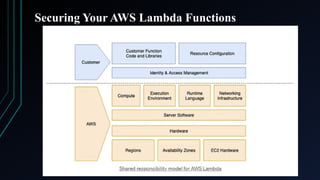
• AWS Lambda is a flexible, powerful, and increasingly popular
service. Consequently, maintaining its security is of paramount
importance. While AWS’ serverless architecture already lends a high
degree of security to the service by default, users still bear a
significant portion of security responsibilities.
Best Practices forsecuring your AWS Lambda Functions
• Apply ‘Principle of Least Privilege’ to Your IAM Policies: The Principle
of Least Privilege (PoLP) is a fundamental best practice in AWS security. It
recommends that IAM roles should have just the bare minimum permissions
needed to accomplish their tasks within AWS Lambda functions. By
adopting this principle, you can create a more secure environment for your
serverless applications.
• Avoid Storing Sensitive Data in Lambda Function Code or
Configurations: Storing sensitive data directly in Lambda function code or
configurations is a serious security risk that can expose your sensitive
information. A well-known real-world example that underscores the severity
of this misconfiguration, though not Lambda function-based, occurred with
Uber in 2016. Uber engineers stored sensitive access keys in their code,
which was then accidentally uploaded to a public GitHub repository. This
security oversight led to a data breach that exposed the data of 57 million
Uber users and drivers.
81.
Best Practices forsecuring your AWS Lambda Functions
• Enable Comprehensive Logging and Monitoring:
Maintaining a clear view of your AWS Lambda functions’
behavior is essential for identifying and responding to potential
security incidents. Comprehensive logging and monitoring
enable you to detect unusual activity, investigate potential
threats, and maintain optimal performance.
• Secure Your APIs using AWS API Gateway: Securing your
APIs is just as crucial as securing your AWS Lambda functions.
APIs often act as the front door to your applications, meaning
they need stringent security measures. AWS API Gateway
provides several powerful features to enhance the security of
your APIs: Authentication and Authorization, API Keys, IAM
Policies.
82.
Best Practices forsecuring your AWS Lambda Functions
• Leverage Reserved Concurrency for Function Scaling: Properly managing
concurrency in AWS Lambda is key to maintaining the performance and security of
your applications. By using the Reserved Concurrency feature, you can have fine-
grained control over the scaling of your Lambda functions. Reserved Concurrency
allows you to specify the maximum number of instances that a function can use
concurrently. These reserved instances are exclusively for that function and cannot be
used by other functions in your account. Importantly, there is no additional cost for
configuring Reserved Concurrency. One of the main benefits of using Reserved
Concurrency is to limit the potential impact of overloading your function, which could
occur during events such as a Denial of Service (DoS) attack or during the processing
of an unexpectedly high number of requests. By setting the maximum number of
concurrent instances, you can ensure that your function won’t exhaust your account’s
concurrency limit and will always have the necessary resources to run when needed.
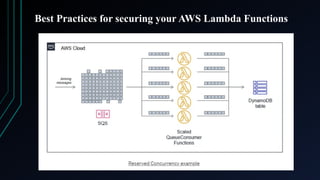
For example, a Lambda function receives messages from an SQS queue and writes to a
DynamoDB table. It has a reserved concurrency of 10 with a batch size of 10 items.
The SQS queue rapidly receives 1,000 messages. The Lambda function scales up to 10
concurrent instances, each processing 10 messages from the queue. While it takes
longer to process the entire queue, this results in a consistent rate of write capacity
units (WCUs) consumed by the DynamoDB table.
Best Practices forsecuring your AWS Lambda Functions
• Clean up and Delete Unused Lambda Functions: Proper management
and maintenance of your AWS Lambda functions is an essential aspect of
cloud security. Unused or forgotten Lambda functions can become an
unintentional security liability. These unused functions may contain
outdated libraries, deprecated APIs, or unpatched vulnerabilities that an
attacker might exploit. Also, unused functions might have access to
important data or resources, which could allow unauthorized users to get
in. Even functions made just for testing that were later forgotten can be a
risk. It is a good idea to regularly check your Lambda functions and
delete any that you do not use anymore. This will permanently remove
the function and its settings, like environment variables and IAM roles,
from your AWS account, reducing any risks they might cause.
Remember, good housekeeping practices like these not only help to
maintain security but also help to avoid unnecessary costs, as you only
pay for what you use with AWS Lambda. It also keeps your environment
clean, making it easier to manage and understand.
85.
Best Practices forsecuring your AWS Lambda Functions
• Ensure Secure Coding Practices for Lambda Functions:
Secure coding practices are a cornerstone of cybersecurity.
While AWS Lambda’s serverless architecture inherently
reduces the surface area of attacks, vulnerabilities can still
be introduced through insecure code. To maintain the
security of your Lambda functions, consider the following
measures: Use AWS Security Services: AWS CodeGuru (It
offers a centralized interface for managing your software
development process, automating crucial security checks,
and seamlessly handling access control across your
codebase.), Amazon Inspector (It is an automated security
assessment service that helps improve the security and
compliance of applications deployed on AWS.)
86.
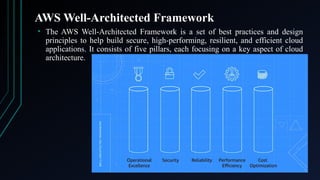
AWS Well-Architected Framework
•The AWS Well-Architected Framework is a set of best practices and design
principles to help build secure, high-performing, resilient, and efficient cloud
applications. It consists of five pillars, each focusing on a key aspect of cloud
architecture.
87.
AWS Well-Architected Framework
1.Operational Excellence Pillar: The operational excellence pillar is a capacity to
manage and monitor systems. It improves supporting systems processes and
procedures. It includes: Making small and reversible changes, Prediction of
system disruptions, Performing code tasks, Making documentation notes.
2. Security Pillar: The security pillar consists of protecting systems and data. Well-
Architected Framework applies security at all levels. It protects both stored and
in-transit data. When possible, best security practices are automatically applied.
3. Reliability Pillar: The reliability pillar is the ability to minimize disruptions of
the system. It obtains computing resources as needed. It entails boosting system
availability. It automatically recovers the system from disruptions.
4. Performance Efficiency Pillar: The performance efficiency pillar is the capacity
to accurately use computing resources. It satisfies the efficiency on demand.
5. Cost Optimization Pillar: Cost optimization pillar helps you run your cloud
services at the lowest price points. Cost optimization performs operations such as:
Analysis of your costs, Operating managed services, Makes sure you only pay for
what you use.
Editor's Notes
#11 Transport Layer Security (TLS) is a protocol that encrypts data sent over a network to ensure privacy and security. It's used to secure communication between applications, such as email, web browsing, and messaging.
AES 256 stands for Advanced Encryption Standard 256-bit encryption. AES-256 is a symmetric encryption algorithm that uses a 256-bit key to encrypt data. It's the most secure version of Advanced Encryption Standard (AES) and is considered one of the most secure encryption algorithms available.
FIPS 140-2 Level 3 encryption refers to a level of cryptographic security defined by the Federal Information Processing Standard (FIPS) 140-2, where a cryptographic module meets stringent requirements for physical tamper resistance, identity-based authentication, and strict separation of critical security parameters, providing a high level of protection against unauthorized access to sensitive data; essentially, it's a robust encryption standard designed for scenarios requiring strong security against advanced intrusion attempts. Key points about the name:
FIPS:
Stands for "Federal Information Processing Standard," which is a set of guidelines established by the US government for information technology security.
140:
Identifies the specific standard category related to cryptographic modules.
2:
Indicates that this is the second version of the FIPS 140 standard, following the original FIPS 140-1.
https://cpl.thalesgroup.com/faq/key-secrets-management/what-fips-140-2
#13 Rate limiting is a technique that controls the number of requests that can be sent or received by a system within a set time period. It's used in computer networks and cloud APIs to prevent system overload and malicious attacks.
#15 Data exfiltration—also known as data extrusion or data exportation—is data theft: the intentional, unauthorized, covert transfer of data from a computer or other device. Data exfiltration can be conducted manually, or automated using malware.
A data breach is any security incident in which unauthorized parties access sensitive or confidential information, including personal data (Social Security numbers, bank account numbers, healthcare data) and corporate data (customer records, intellectual property, financial information).
#18 Shadow IT is the use of IT systems, devices, software, or services without the approval of an organization's IT department. It can include cloud services, hardware, and software.
#21 a user of a computer system with special privileges needed to administer and maintain the system; a system administrator.
Authentication verifies that a user is who they claim to be, while authorization gives that user permission to access a resource. Both are security processes that are often used together.
#23 What is privilege creep?
Privilege creep refers to the tendency of software developers to gradually add more access rights beyond what individuals need to do their jobs. This commonly happens when a user is given access that isn't revoked later. For example, employees who are promoted might still need temporary access rights to certain systems for their old jobs. But, once they're settled in their new position, more access rights are added and existing privileges often aren't revoked. This unnecessary accumulation of rights could cause major cybersecurity risks and result in data loss or theft.
#27 Ephemeral certificates are short-lived access credentials that are valid for as long as they are required to authenticate and authorize privileged connections.
https://venafi.com/blog/what-are-ephemeral-certificates-and-how-do-they-work/
#45 Security OU stands for Security Organizational Unit, which is a container in AWS that's used for managing security.
#49 Cross-site scripting (XSS) is a web security vulnerability that allows attackers to inject malicious code into a trusted website. This code can then be used to compromise a user's session, steal their data, or take over their account.
#71 Fine-grained control, or access control, is a method of limiting who can access data and resources. It's a more detailed approach than traditional access control, and is often used for sensitive data.
#81 Reserved concurrency is a feature in Amazon Lambda that limits the number of concurrent executions for a function. This ensures that critical functions have enough capacity to handle incoming requests.