Technical university - Sofia , branch Plovdiv


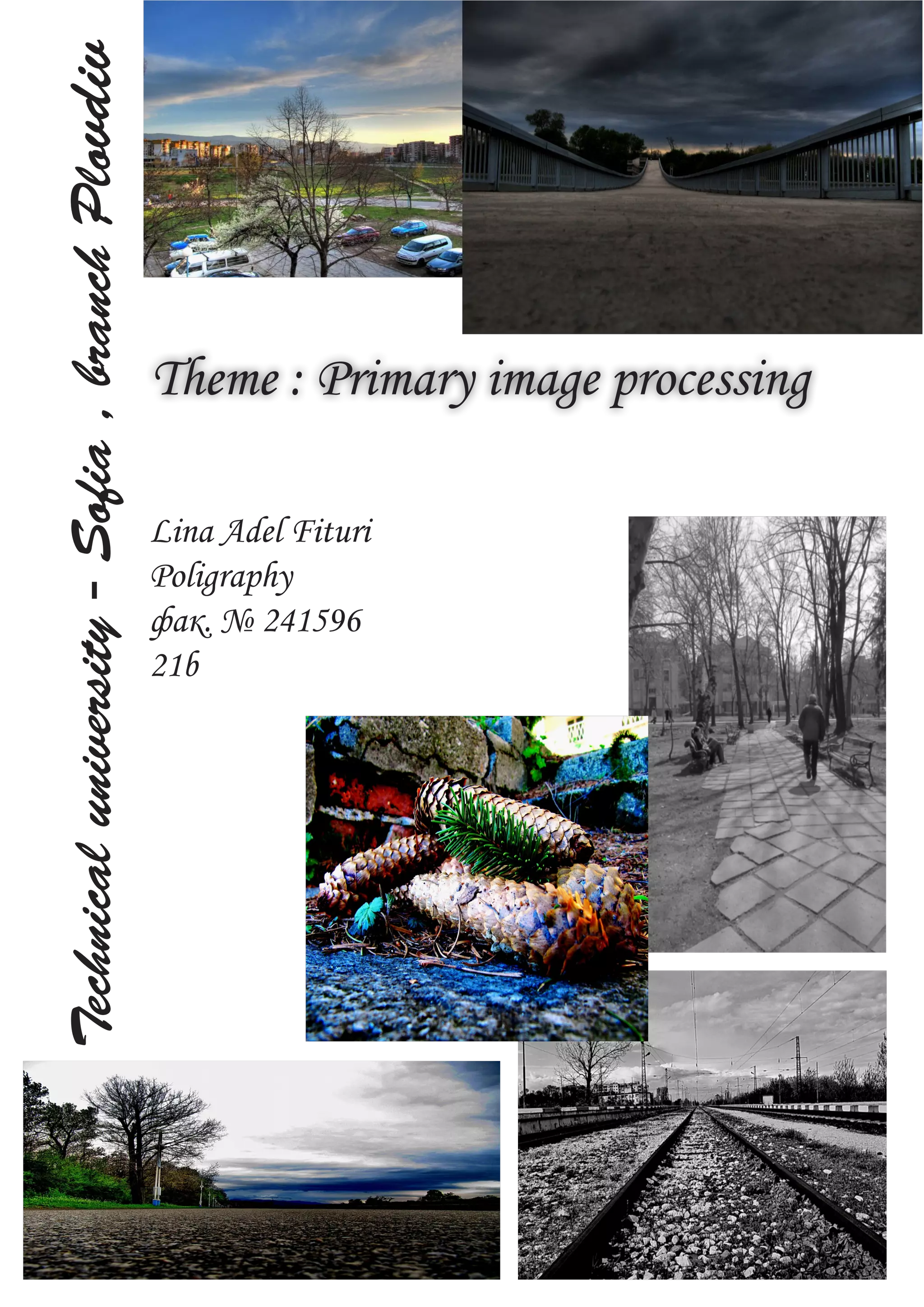
                                                Theme : Primary image processing

                                                Lina Adel Fituri
                                                Poligraphy
                                                фак. № 241596
                                                21b
Contens:

1.What is
                             the purpose of image processing?


2. Мethods
                               in image processing. Correction of histogram.
                               Сonvolution methods. Binarization.


3. Adjustments
                                                in Adobe Photoshop


Brightness/Contrast

       Levels           5
       6
                  The Photoshop Curves tool


                  Lightness channel and adjustments curves


                                                       7-8
        The Exposure tool


                                     8-9
          Vibrance


      Hue/ Saturation


                                   10
   Color Balance


   Black & White film
What is the purpose of image processing?

  Image processing has multiple purpose.

   • To improve the quality of an image in subjective way, usually by increasing its contrast. This is called
     image enhancement.
   • To use az few bits as possible to represent the image, with minimum deterioration in its quality. This is
     called image compression.
   • To improve an image in an objective way, for axample by reducing its blurring. This is called image
     restoration.
   • To make explicit certain characteristics of the image which can be used to identify the contents of the
     image. This is called feature extraction.

   Methods in image processing

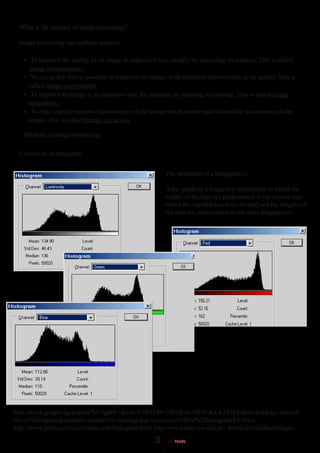
  Correction of histogram


                                                          The definition of a histogram is:

                                                          A bar graph of a frequency distribution in which the
                                                          widths of the bars are proportional to the classes into
                                                          which the variable has been divided and the heights of
                                                          the bars are proportional to the class frequencies.


http://www.google.bg/patents?hl=bg&lr=&vid=USPAT4677465&id=6BM-AAAAEBAJ&oi=fnd&dq=correcti
on+of+histogram&printsec=abstract#v=onepage&q=correction%20of%20histogram&f=false
http://www.photocolorcorrection.com/histogram.html http://www.mini.pw.edu.pl/~kotowski/Grafika/Images/
Convolution


Convolution is the modification of a pixel’s value on the basis of the value of neighbouring pixels.

Convolution Filters
One of the most powerful techniques in all of image processing is convolution.

Convolution is the modification of a pixel's value on the basis of the value of neighboring pixels.

Images are convolved by multiplying each pixel and its neighbors by a numerical matrix, called a kernel. This matrix
is essentially moved over each pixel in the image, each pixel under the matrix is multiplied by the appropriate matrix
value, the total is summed and normalized, and the central pixel is replaced by the result.

Cx,y = å(å(Pi,j*Mi,j))/(å(å(Mi,j))

http://www.mini.pw.edu.pl/~kotowski/Grafika/Images/Index.html


Binary Images
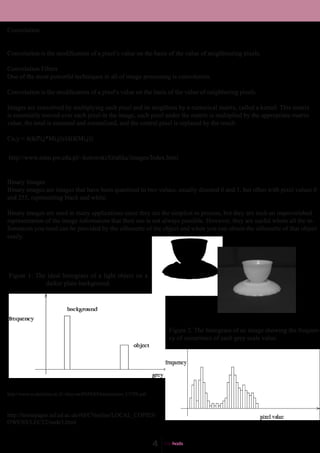
Binary images are images that have been quantised to two values, usually denoted 0 and 1, but often with pixel values 0
and 255, representing black and white.

Binary images are used in many applications since they are the simplest to process, but they are such an impoverished
representation of the image information that their use is not always possible. However, they are useful where all the in-
formation you need can be provided by the silhouette of the object and when you can obtain the silhouette of that object
easily.


Figure 1: The ideal histogram of a light object on a
             darker plain background.


                                                                     Figure 2: The histogram of an image showing the frequen-
                                                                     cy of occurrence of each grey scale value.


http://www.cs.technion.ac.il/~blayvas/PAPERS/binarization_CVPR.pdf


http://homepages.inf.ed.ac.uk/rbf/CVonline/LOCAL_COPIES/
OWENS/LECT2/node3.html
Adjustments
                                                                                    Brightness/Contrast
                                                                                    What are brightness and
                                                                                    contrast?
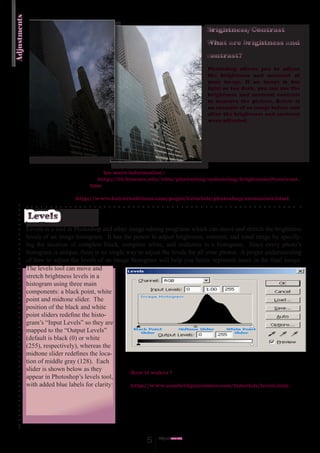
                                                                                     Photoshop allows you to adjust
                                                                                     the brightness and contrast of
                                                                                     your image. If an image is too
                                                                                     light or too dark, you can use the
                                                                                     brightness and contrast controls
                                                                                     to improve the picture. Below is
                                                                                     an example of an image before and
                                                                                     after the brightness and contrast
                                                                                     were adjusted.


                                           for more information :
                                         http://iit.bloomu.edu/vthc/photoshop/enhancing/brightness&contrast.
                                       htm

                                 http://www.bairarteditions.com/pages/tutorials/photoshop/excontrast.html


              Levels
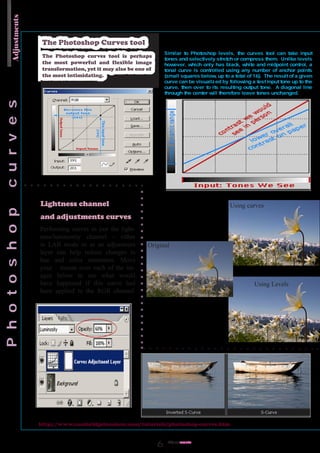
              Levels is a tool in Photoshop and other image editing programs which can move and stretch the brightness
              levels of an image histogram. It has the power to adjust brightness, contrast, and tonal range by specify-
              ing the location of complete black, complete white, and midtones in a histogram. Since every photo’s
              histogram is unique, there is no single way to adjust the levels for all your photos. A proper understanding
              of how to adjust the levels of an image histogram will help you better represent tones in the final image.
              The levels tool can move and
              stretch brightness levels in a
              histogram using three main
              components: a black point, white
              point and midtone slider. The
              position of the black and white
              point sliders redefine the histo-
              gram’s “Input Levels” so they are
              mapped to the “Output Levels”
              (default is black (0) or white
              (255), respectively), whereas the
              midtone slider redefines the loca-
              tion of middle gray (128). Each
              slider is shown below as they
                                                       How it wokrs ?
              appear in Photoshop’s levels tool,
              with added blue labels for clarity:      http://www.cambridgeincolour.com/tutorials/levels.htm


                                                             5    Adjust
                                                                       ments
Adjustments


               The Photoshop Curves tool
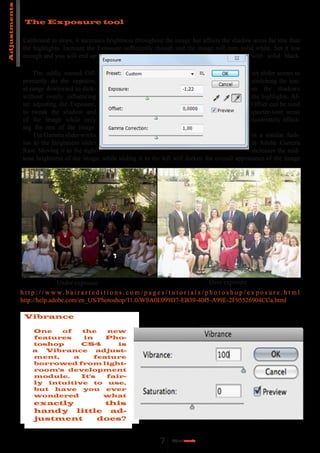
               The Photoshop curves tool is perhaps
               the most powerful and flexible image
               transformation, yet it may also be one of
               the most intimidating.


              Lightness channel                                             Using curves
              and adjustments curves
              Performing curves to just the light-
              ness/luminosity channel - either
              in LAB mode or as an adjustment         Original
              layer can help reduce changes in
              hue and color saturation. Move
              your mouse over each of the im-
              ages below to see what would
              have happened if this curve had                                       Using Levels
              been applied to the RGB channel.


              http://www.cambridgeincolour.com/tutorials/photoshop-curves.htm


                                                             Adjust
                                                                  ments
Adjustments

                The Exposure tool

               Calibrated in stops, it increases brightness throughout the image but affects the shadow areas far less than
               the highlights. Increase the Exposure sufficiently though and the image will turn solid white. Set it low
               enough and you will end up                                                              with solid black.

                   The oddly named Off-                                                                 set slider seems to
               primarily do the opposite,                                                               stretching the ton-
               al range downward to dark-                                                               en the shadows
               without overly influencing                                                               the highlights. Af-
               ter adjusting the Exposure,                                                              Offset can be used
               to tweak the shadow and                                                                  quarter-tone areas
               of the image while only                                                                  moderately affect-
               ing the rest of the image.
                   The Gamma slider works                                                               in a similar fash-
               ion to the Brightness slider                                                             in Adobe Camera
               Raw. Moving it to the right                                                              increases the mid-
               tone brightness of the image, while sliding it to the left will darken the overall appearance of the image


                                Under exposure                                                               Over exposure
              h t t p : / / w w w. b a i r a r t e d i t i o n s . c o m / p a g e s / t u t o r i a l s / p h o t o s h o p / e x p o s u r e . h t m l
              http://help.adobe.com/en_US/Photoshop/11.0/WSA0E099D7-EB39-40f5-A99E-2F95526904CCa.html

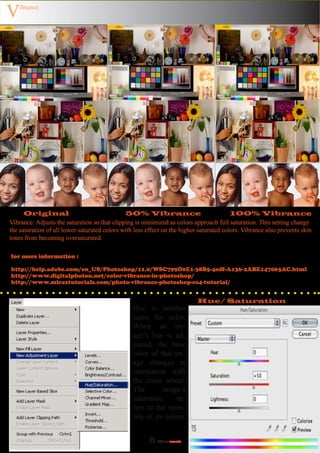
               Vibrance

                   One   of   the    new
                   features    in    Pho-
                   toshop     CS4       is
                   a  Vibrance     adjust-
                   ment,    a     feature
                   borrowed from light-
                   room's development
                   module.    It's   fair-
                   ly intuitive to use,
                   but have you ever
                   wondered         what
                    exactly     this
                    handy little ad-
                    justment   does?


                                                                                  7     Adjust
                                                                                           ments
V   ibrance


      Original                                50% Vibrance                               100% Vibrance
Vibrance: Adjusts the saturation so that clipping is minimized as colors approach full saturation. This setting change
the saturation of all lower-saturated colors with less effect on the higher-saturated colors. Vibrance also prevents skin
tones from becoming oversaturated.

for more information :

http://help.adobe.com/en_US/Photoshop/11.0/WSC799D0E1-38B5-4edf-A136-2ABE147063AC.html
http://www.digitalphoton.net/color-vibrance-in-photoshop/
http://www.miraztutorials.com/photo-vibrance-photoshop-cs4-tutorial/


                                                                           Hue/ Saturation
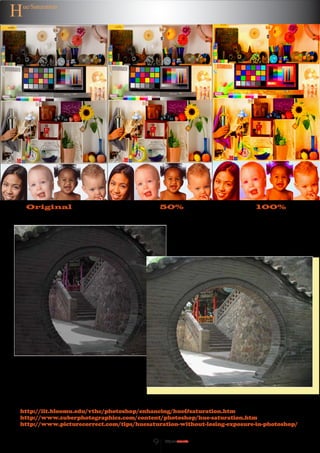
                                                 Hue is another
                                                 name for color.
                                                 When an im-
                                                 age’s hue is ad-
                                                 justed, the base
                                                 color of that im-
                                                 age changes in
                                                 correlation with
                                                 the color wheel.
                                                 The        image’s
                                                 saturation      re-
                                                 fers to the inten-
                                                 sity of its colors.


                                                       8   Adjust
                                                              ments
H   ue/Saturation


     Original                                50%                        100%


http://iit.bloomu.edu/vthc/photoshop/enhancing/hue&saturation.htm
http://www.zuberphotographics.com/content/photoshop/hue-saturation.htm
http://www.picturecorrect.com/tips/huesaturation-without-losing-exposure-in-photoshop/


                                         9   Adjust
                                                ments
Color Balance


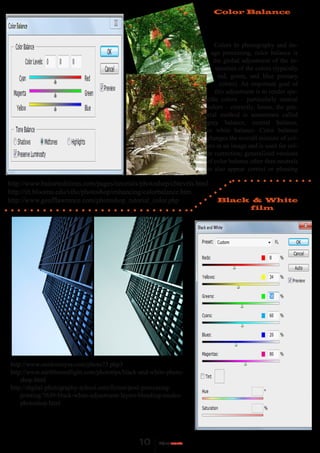
                                                                         Colors In photography and im-
                                                                       age processing, color balance is
                                                                        the global adjustment of the in-
                                                                         tensities of the colors (typically
                                                                          red, green, and blue primary
                                                                           colors). An important goal of
                                                                         this adjustment is to render spe-
                                                                     cific colors – particularly neutral
                                                                     colors – correctly; hence, the gen-
                                                                     eral method is sometimes called
                                                                     gray balance, neutral balance,
                                                                     or white balance. Color balance
                                                                     changes the overall mixture of col-
                                                                     ors in an image and is used for col-
                                                                     or correction; generalized versions
                                                                     of color balance other than neutrals
                                                                     to also appear correct or pleasing

http://www.bairarteditions.com/pages/tutorials/photoshop/cblevels.html
http://iit.bloomu.edu/vthc/photoshop/enhancing/colorbalance.htm
http://www.geofflawrence.com/photoshop_tutorial_color.php                Black & White
                                                                              film


http://www.outdooreyes.com/photo73.php3
http://www.earthboundlight.com/phototips/black-and-white-photo-
    shop.html
http://digital-photography-school.com/forum/post-processing-
    printing/7630-black-white-adjustment-layers-blending-modes-
    photoshop.html

Pp2

  • 1.
    Technical university -Sofia , branch Plovdiv Theme : Primary image processing Lina Adel Fituri Poligraphy фак. № 241596 21b
  • 2.
    Contens: 1.What is the purpose of image processing? 2. Мethods in image processing. Correction of histogram. Сonvolution methods. Binarization. 3. Adjustments in Adobe Photoshop Brightness/Contrast Levels 5 6 The Photoshop Curves tool Lightness channel and adjustments curves 7-8 The Exposure tool 8-9 Vibrance Hue/ Saturation 10 Color Balance Black & White film
  • 3.
    What is thepurpose of image processing? Image processing has multiple purpose. • To improve the quality of an image in subjective way, usually by increasing its contrast. This is called image enhancement. • To use az few bits as possible to represent the image, with minimum deterioration in its quality. This is called image compression. • To improve an image in an objective way, for axample by reducing its blurring. This is called image restoration. • To make explicit certain characteristics of the image which can be used to identify the contents of the image. This is called feature extraction. Methods in image processing Correction of histogram The definition of a histogram is: A bar graph of a frequency distribution in which the widths of the bars are proportional to the classes into which the variable has been divided and the heights of the bars are proportional to the class frequencies. http://www.google.bg/patents?hl=bg&lr=&vid=USPAT4677465&id=6BM-AAAAEBAJ&oi=fnd&dq=correcti on+of+histogram&printsec=abstract#v=onepage&q=correction%20of%20histogram&f=false http://www.photocolorcorrection.com/histogram.html http://www.mini.pw.edu.pl/~kotowski/Grafika/Images/
  • 4.
    Convolution Convolution is themodification of a pixel’s value on the basis of the value of neighbouring pixels. Convolution Filters One of the most powerful techniques in all of image processing is convolution. Convolution is the modification of a pixel's value on the basis of the value of neighboring pixels. Images are convolved by multiplying each pixel and its neighbors by a numerical matrix, called a kernel. This matrix is essentially moved over each pixel in the image, each pixel under the matrix is multiplied by the appropriate matrix value, the total is summed and normalized, and the central pixel is replaced by the result. Cx,y = å(å(Pi,j*Mi,j))/(å(å(Mi,j)) http://www.mini.pw.edu.pl/~kotowski/Grafika/Images/Index.html Binary Images Binary images are images that have been quantised to two values, usually denoted 0 and 1, but often with pixel values 0 and 255, representing black and white. Binary images are used in many applications since they are the simplest to process, but they are such an impoverished representation of the image information that their use is not always possible. However, they are useful where all the in- formation you need can be provided by the silhouette of the object and when you can obtain the silhouette of that object easily. Figure 1: The ideal histogram of a light object on a darker plain background. Figure 2: The histogram of an image showing the frequen- cy of occurrence of each grey scale value. http://www.cs.technion.ac.il/~blayvas/PAPERS/binarization_CVPR.pdf http://homepages.inf.ed.ac.uk/rbf/CVonline/LOCAL_COPIES/ OWENS/LECT2/node3.html
  • 5.
    Adjustments Brightness/Contrast What are brightness and contrast? Photoshop allows you to adjust the brightness and contrast of your image. If an image is too light or too dark, you can use the brightness and contrast controls to improve the picture. Below is an example of an image before and after the brightness and contrast were adjusted. for more information : http://iit.bloomu.edu/vthc/photoshop/enhancing/brightness&contrast. htm http://www.bairarteditions.com/pages/tutorials/photoshop/excontrast.html Levels Levels is a tool in Photoshop and other image editing programs which can move and stretch the brightness levels of an image histogram. It has the power to adjust brightness, contrast, and tonal range by specify- ing the location of complete black, complete white, and midtones in a histogram. Since every photo’s histogram is unique, there is no single way to adjust the levels for all your photos. A proper understanding of how to adjust the levels of an image histogram will help you better represent tones in the final image. The levels tool can move and stretch brightness levels in a histogram using three main components: a black point, white point and midtone slider. The position of the black and white point sliders redefine the histo- gram’s “Input Levels” so they are mapped to the “Output Levels” (default is black (0) or white (255), respectively), whereas the midtone slider redefines the loca- tion of middle gray (128). Each slider is shown below as they How it wokrs ? appear in Photoshop’s levels tool, with added blue labels for clarity: http://www.cambridgeincolour.com/tutorials/levels.htm 5 Adjust ments
  • 6.
    Adjustments The Photoshop Curves tool The Photoshop curves tool is perhaps the most powerful and flexible image transformation, yet it may also be one of the most intimidating. Lightness channel Using curves and adjustments curves Performing curves to just the light- ness/luminosity channel - either in LAB mode or as an adjustment Original layer can help reduce changes in hue and color saturation. Move your mouse over each of the im- ages below to see what would have happened if this curve had Using Levels been applied to the RGB channel. http://www.cambridgeincolour.com/tutorials/photoshop-curves.htm Adjust ments
  • 7.
    Adjustments The Exposure tool Calibrated in stops, it increases brightness throughout the image but affects the shadow areas far less than the highlights. Increase the Exposure sufficiently though and the image will turn solid white. Set it low enough and you will end up with solid black. The oddly named Off- set slider seems to primarily do the opposite, stretching the ton- al range downward to dark- en the shadows without overly influencing the highlights. Af- ter adjusting the Exposure, Offset can be used to tweak the shadow and quarter-tone areas of the image while only moderately affect- ing the rest of the image. The Gamma slider works in a similar fash- ion to the Brightness slider in Adobe Camera Raw. Moving it to the right increases the mid- tone brightness of the image, while sliding it to the left will darken the overall appearance of the image Under exposure Over exposure h t t p : / / w w w. b a i r a r t e d i t i o n s . c o m / p a g e s / t u t o r i a l s / p h o t o s h o p / e x p o s u r e . h t m l http://help.adobe.com/en_US/Photoshop/11.0/WSA0E099D7-EB39-40f5-A99E-2F95526904CCa.html Vibrance One of the new features in Pho- toshop CS4 is a Vibrance adjust- ment, a feature borrowed from light- room's development module. It's fair- ly intuitive to use, but have you ever wondered what exactly this handy little ad- justment does? 7 Adjust ments
  • 8.
    V ibrance Original 50% Vibrance 100% Vibrance Vibrance: Adjusts the saturation so that clipping is minimized as colors approach full saturation. This setting change the saturation of all lower-saturated colors with less effect on the higher-saturated colors. Vibrance also prevents skin tones from becoming oversaturated. for more information : http://help.adobe.com/en_US/Photoshop/11.0/WSC799D0E1-38B5-4edf-A136-2ABE147063AC.html http://www.digitalphoton.net/color-vibrance-in-photoshop/ http://www.miraztutorials.com/photo-vibrance-photoshop-cs4-tutorial/ Hue/ Saturation Hue is another name for color. When an im- age’s hue is ad- justed, the base color of that im- age changes in correlation with the color wheel. The image’s saturation re- fers to the inten- sity of its colors. 8 Adjust ments
  • 9.
    H ue/Saturation Original 50% 100% http://iit.bloomu.edu/vthc/photoshop/enhancing/hue&saturation.htm http://www.zuberphotographics.com/content/photoshop/hue-saturation.htm http://www.picturecorrect.com/tips/huesaturation-without-losing-exposure-in-photoshop/ 9 Adjust ments
  • 10.
    Color Balance Colors In photography and im- age processing, color balance is the global adjustment of the in- tensities of the colors (typically red, green, and blue primary colors). An important goal of this adjustment is to render spe- cific colors – particularly neutral colors – correctly; hence, the gen- eral method is sometimes called gray balance, neutral balance, or white balance. Color balance changes the overall mixture of col- ors in an image and is used for col- or correction; generalized versions of color balance other than neutrals to also appear correct or pleasing http://www.bairarteditions.com/pages/tutorials/photoshop/cblevels.html http://iit.bloomu.edu/vthc/photoshop/enhancing/colorbalance.htm http://www.geofflawrence.com/photoshop_tutorial_color.php Black & White film http://www.outdooreyes.com/photo73.php3 http://www.earthboundlight.com/phototips/black-and-white-photo- shop.html http://digital-photography-school.com/forum/post-processing- printing/7630-black-white-adjustment-layers-blending-modes- photoshop.html