Introduction to
Power BI
Power BI is a comprehensive business intelligence (BI) and data
visualization platform that empowers users to analyze data, create
interactive reports, and share insights with others. It's a powerful tool that
allows businesses to make data-driven decisions and gain a deeper
understanding of their operations. Power BI offers a wide range of
features, including data connectivity, transformation, visualization, and
collaboration, making it suitable for organizations of all sizes.
by Kenneth James Fernandez
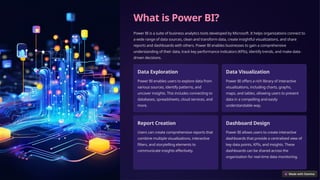
What is Power BI?
Power BI is a suite of business analytics tools developed by Microsoft. It helps organizations connect to
a wide range of data sources, clean and transform data, create insightful visualizations, and share
reports and dashboards with others. Power BI enables businesses to gain a comprehensive
understanding of their data, track key performance indicators (KPIs), identify trends, and make data-
driven decisions.
Data Exploration
Power BI enables users to explore data from
various sources, identify patterns, and
uncover insights. This includes connecting to
databases, spreadsheets, cloud services, and
more.
Data Visualization
Power BI offers a rich library of interactive
visualizations, including charts, graphs,
maps, and tables, allowing users to present
data in a compelling and easily
understandable way.
Report Creation
Users can create comprehensive reports that
combine multiple visualizations, interactive
filters, and storytelling elements to
communicate insights effectively.
Dashboard Design
Power BI allows users to create interactive
dashboards that provide a centralized view of
key data points, KPIs, and insights. These
dashboards can be shared across the
organization for real-time data monitoring.
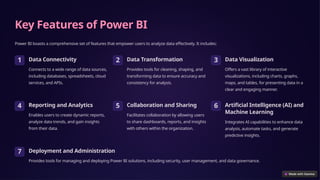
Key Features of Power BI
Power BI boasts a comprehensive set of features that empower users to analyze data effectively. It includes:
1 Data Connectivity
Connects to a wide range of data sources,
including databases, spreadsheets, cloud
services, and APIs.
2 Data Transformation
Provides tools for cleaning, shaping, and
transforming data to ensure accuracy and
consistency for analysis.
3 Data Visualization
Offers a vast library of interactive
visualizations, including charts, graphs,
maps, and tables, for presenting data in a
clear and engaging manner.
4 Reporting and Analytics
Enables users to create dynamic reports,
analyze data trends, and gain insights
from their data.
5 Collaboration and Sharing
Facilitates collaboration by allowing users
to share dashboards, reports, and insights
with others within the organization.
6 Artificial Intelligence (AI) and
Machine Learning
Integrates AI capabilities to enhance data
analysis, automate tasks, and generate
predictive insights.
7 Deployment and Administration
Provides tools for managing and deploying Power BI solutions, including security, user management, and data governance.
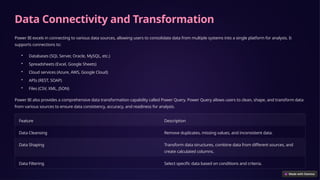
Data Connectivity and Transformation
Power BI excels in connecting to various data sources, allowing users to consolidate data from multiple systems into a single platform for analysis. It
supports connections to:
• Databases (SQL Server, Oracle, MySQL, etc.)
• Spreadsheets (Excel, Google Sheets)
• Cloud services (Azure, AWS, Google Cloud)
• APIs (REST, SOAP)
• Files (CSV, XML, JSON)
Power BI also provides a comprehensive data transformation capability called Power Query. Power Query allows users to clean, shape, and transform data
from various sources to ensure data consistency, accuracy, and readiness for analysis.
Feature Description
Data Cleansing Remove duplicates, missing values, and inconsistent data.
Data Shaping Transform data structures, combine data from different sources, and
create calculated columns.
Data Filtering Select specific data based on conditions and criteria.
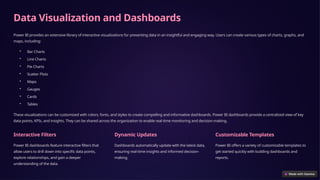
Data Visualization and Dashboards
Power BI provides an extensive library of interactive visualizations for presenting data in an insightful and engaging way. Users can create various types of charts, graphs, and
maps, including:
• Bar Charts
• Line Charts
• Pie Charts
• Scatter Plots
• Maps
• Gauges
• Cards
• Tables
These visualizations can be customized with colors, fonts, and styles to create compelling and informative dashboards. Power BI dashboards provide a centralized view of key
data points, KPIs, and insights. They can be shared across the organization to enable real-time monitoring and decision-making.
Interactive Filters
Power BI dashboards feature interactive filters that
allow users to drill down into specific data points,
explore relationships, and gain a deeper
understanding of the data.
Dynamic Updates
Dashboards automatically update with the latest data,
ensuring real-time insights and informed decision-
making.
Customizable Templates
Power BI offers a variety of customizable templates to
get started quickly with building dashboards and
reports.
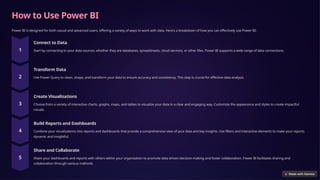
How to Use Power BI
Power BI is designed for both casual and advanced users, offering a variety of ways to work with data. Here's a breakdown of how you can effectively use Power BI:
Connect to Data
Start by connecting to your data sources, whether they are databases, spreadsheets, cloud services, or other files. Power BI supports a wide range of data connections.
Transform Data
Use Power Query to clean, shape, and transform your data to ensure accuracy and consistency. This step is crucial for effective data analysis.
Create Visualizations
Choose from a variety of interactive charts, graphs, maps, and tables to visualize your data in a clear and engaging way. Customize the appearance and styles to create impactful
visuals.
Build Reports and Dashboards
Combine your visualizations into reports and dashboards that provide a comprehensive view of your data and key insights. Use filters and interactive elements to make your reports
dynamic and insightful.
Share and Collaborate
Share your dashboards and reports with others within your organization to promote data-driven decision-making and foster collaboration. Power BI facilitates sharing and
collaboration through various methods.
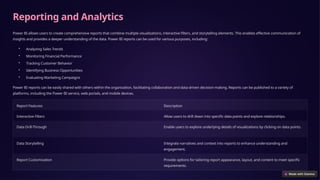
Reporting and Analytics
Power BI allows users to create comprehensive reports that combine multiple visualizations, interactive filters, and storytelling elements. This enables effective communication of
insights and provides a deeper understanding of the data. Power BI reports can be used for various purposes, including:
• Analyzing Sales Trends
• Monitoring Financial Performance
• Tracking Customer Behavior
• Identifying Business Opportunities
• Evaluating Marketing Campaigns
Power BI reports can be easily shared with others within the organization, facilitating collaboration and data-driven decision-making. Reports can be published to a variety of
platforms, including the Power BI service, web portals, and mobile devices.
Report Features Description
Interactive Filters Allow users to drill down into specific data points and explore relationships.
Data Drill-Through Enable users to explore underlying details of visualizations by clicking on data points.
Data Storytelling Integrate narratives and context into reports to enhance understanding and
engagement.
Report Customization Provide options for tailoring report appearance, layout, and content to meet specific
requirements.
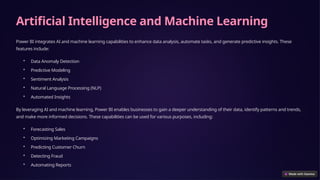
Artificial Intelligence and Machine Learning
Power BI integrates AI and machine learning capabilities to enhance data analysis, automate tasks, and generate predictive insights. These
features include:
• Data Anomaly Detection
• Predictive Modeling
• Sentiment Analysis
• Natural Language Processing (NLP)
• Automated Insights
By leveraging AI and machine learning, Power BI enables businesses to gain a deeper understanding of their data, identify patterns and trends,
and make more informed decisions. These capabilities can be used for various purposes, including:
• Forecasting Sales
• Optimizing Marketing Campaigns
• Predicting Customer Churn
• Detecting Fraud
• Automating Reports
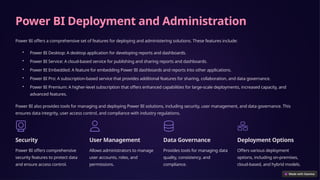
Power BI Deployment and Administration
Power BI offers a comprehensive set of features for deploying and administering solutions. These features include:
• Power BI Desktop: A desktop application for developing reports and dashboards.
• Power BI Service: A cloud-based service for publishing and sharing reports and dashboards.
• Power BI Embedded: A feature for embedding Power BI dashboards and reports into other applications.
• Power BI Pro: A subscription-based service that provides additional features for sharing, collaboration, and data governance.
• Power BI Premium: A higher-level subscription that offers enhanced capabilities for large-scale deployments, increased capacity, and
advanced features.
Power BI also provides tools for managing and deploying Power BI solutions, including security, user management, and data governance. This
ensures data integrity, user access control, and compliance with industry regulations.
Security
Power BI offers comprehensive
security features to protect data
and ensure access control.
User Management
Allows administrators to manage
user accounts, roles, and
permissions.
Data Governance
Provides tools for managing data
quality, consistency, and
compliance.
Deployment Options
Offers various deployment
options, including on-premises,
cloud-based, and hybrid models.
Future Trends and Roadmap for Power BI
Power BI is constantly evolving to meet the growing demands of businesses for data-driven decision-making. Some of the future trends and
roadmap items for Power BI include:
• Enhanced AI and Machine Learning Capabilities: Further integration of advanced AI and machine learning algorithms to automate tasks,
generate predictive insights, and provide more intelligent recommendations.
• Expanded Data Connectivity: Support for a broader range of data sources, including real-time data streams, IoT devices, and emerging
data platforms.
• Improved Data Visualization: More innovative and interactive visualization techniques to enhance data storytelling and communication.
• Enhanced Collaboration and Sharing: Improved features for sharing reports and dashboards, facilitating real-time collaboration and
knowledge sharing.
• Mobile Optimization: Continued development of mobile applications and experiences to provide access to Power BI insights on any device.
• Integration with Other Microsoft Products: Deeper integration with other Microsoft products, such as Azure, Office 365, and Dynamics
365, to create a seamless and comprehensive data analytics ecosystem.
Power BI continues to innovate and evolve, offering businesses a powerful tool for data analysis, visualization, and decision-making. With its
focus on AI, automation, and user experience, Power BI is poised to play a significant role in the future of business intelligence and data
analytics.

Introduction-to-Power-BI Presentation(1).pptx

  • 1.
    Introduction to Power BI PowerBI is a comprehensive business intelligence (BI) and data visualization platform that empowers users to analyze data, create interactive reports, and share insights with others. It's a powerful tool that allows businesses to make data-driven decisions and gain a deeper understanding of their operations. Power BI offers a wide range of features, including data connectivity, transformation, visualization, and collaboration, making it suitable for organizations of all sizes. by Kenneth James Fernandez
  • 2.
    What is PowerBI? Power BI is a suite of business analytics tools developed by Microsoft. It helps organizations connect to a wide range of data sources, clean and transform data, create insightful visualizations, and share reports and dashboards with others. Power BI enables businesses to gain a comprehensive understanding of their data, track key performance indicators (KPIs), identify trends, and make data- driven decisions. Data Exploration Power BI enables users to explore data from various sources, identify patterns, and uncover insights. This includes connecting to databases, spreadsheets, cloud services, and more. Data Visualization Power BI offers a rich library of interactive visualizations, including charts, graphs, maps, and tables, allowing users to present data in a compelling and easily understandable way. Report Creation Users can create comprehensive reports that combine multiple visualizations, interactive filters, and storytelling elements to communicate insights effectively. Dashboard Design Power BI allows users to create interactive dashboards that provide a centralized view of key data points, KPIs, and insights. These dashboards can be shared across the organization for real-time data monitoring.
  • 3.
    Key Features ofPower BI Power BI boasts a comprehensive set of features that empower users to analyze data effectively. It includes: 1 Data Connectivity Connects to a wide range of data sources, including databases, spreadsheets, cloud services, and APIs. 2 Data Transformation Provides tools for cleaning, shaping, and transforming data to ensure accuracy and consistency for analysis. 3 Data Visualization Offers a vast library of interactive visualizations, including charts, graphs, maps, and tables, for presenting data in a clear and engaging manner. 4 Reporting and Analytics Enables users to create dynamic reports, analyze data trends, and gain insights from their data. 5 Collaboration and Sharing Facilitates collaboration by allowing users to share dashboards, reports, and insights with others within the organization. 6 Artificial Intelligence (AI) and Machine Learning Integrates AI capabilities to enhance data analysis, automate tasks, and generate predictive insights. 7 Deployment and Administration Provides tools for managing and deploying Power BI solutions, including security, user management, and data governance.
  • 4.
    Data Connectivity andTransformation Power BI excels in connecting to various data sources, allowing users to consolidate data from multiple systems into a single platform for analysis. It supports connections to: • Databases (SQL Server, Oracle, MySQL, etc.) • Spreadsheets (Excel, Google Sheets) • Cloud services (Azure, AWS, Google Cloud) • APIs (REST, SOAP) • Files (CSV, XML, JSON) Power BI also provides a comprehensive data transformation capability called Power Query. Power Query allows users to clean, shape, and transform data from various sources to ensure data consistency, accuracy, and readiness for analysis. Feature Description Data Cleansing Remove duplicates, missing values, and inconsistent data. Data Shaping Transform data structures, combine data from different sources, and create calculated columns. Data Filtering Select specific data based on conditions and criteria.
  • 5.
    Data Visualization andDashboards Power BI provides an extensive library of interactive visualizations for presenting data in an insightful and engaging way. Users can create various types of charts, graphs, and maps, including: • Bar Charts • Line Charts • Pie Charts • Scatter Plots • Maps • Gauges • Cards • Tables These visualizations can be customized with colors, fonts, and styles to create compelling and informative dashboards. Power BI dashboards provide a centralized view of key data points, KPIs, and insights. They can be shared across the organization to enable real-time monitoring and decision-making. Interactive Filters Power BI dashboards feature interactive filters that allow users to drill down into specific data points, explore relationships, and gain a deeper understanding of the data. Dynamic Updates Dashboards automatically update with the latest data, ensuring real-time insights and informed decision- making. Customizable Templates Power BI offers a variety of customizable templates to get started quickly with building dashboards and reports.
  • 6.
    How to UsePower BI Power BI is designed for both casual and advanced users, offering a variety of ways to work with data. Here's a breakdown of how you can effectively use Power BI: Connect to Data Start by connecting to your data sources, whether they are databases, spreadsheets, cloud services, or other files. Power BI supports a wide range of data connections. Transform Data Use Power Query to clean, shape, and transform your data to ensure accuracy and consistency. This step is crucial for effective data analysis. Create Visualizations Choose from a variety of interactive charts, graphs, maps, and tables to visualize your data in a clear and engaging way. Customize the appearance and styles to create impactful visuals. Build Reports and Dashboards Combine your visualizations into reports and dashboards that provide a comprehensive view of your data and key insights. Use filters and interactive elements to make your reports dynamic and insightful. Share and Collaborate Share your dashboards and reports with others within your organization to promote data-driven decision-making and foster collaboration. Power BI facilitates sharing and collaboration through various methods.
  • 7.
    Reporting and Analytics PowerBI allows users to create comprehensive reports that combine multiple visualizations, interactive filters, and storytelling elements. This enables effective communication of insights and provides a deeper understanding of the data. Power BI reports can be used for various purposes, including: • Analyzing Sales Trends • Monitoring Financial Performance • Tracking Customer Behavior • Identifying Business Opportunities • Evaluating Marketing Campaigns Power BI reports can be easily shared with others within the organization, facilitating collaboration and data-driven decision-making. Reports can be published to a variety of platforms, including the Power BI service, web portals, and mobile devices. Report Features Description Interactive Filters Allow users to drill down into specific data points and explore relationships. Data Drill-Through Enable users to explore underlying details of visualizations by clicking on data points. Data Storytelling Integrate narratives and context into reports to enhance understanding and engagement. Report Customization Provide options for tailoring report appearance, layout, and content to meet specific requirements.
  • 8.
    Artificial Intelligence andMachine Learning Power BI integrates AI and machine learning capabilities to enhance data analysis, automate tasks, and generate predictive insights. These features include: • Data Anomaly Detection • Predictive Modeling • Sentiment Analysis • Natural Language Processing (NLP) • Automated Insights By leveraging AI and machine learning, Power BI enables businesses to gain a deeper understanding of their data, identify patterns and trends, and make more informed decisions. These capabilities can be used for various purposes, including: • Forecasting Sales • Optimizing Marketing Campaigns • Predicting Customer Churn • Detecting Fraud • Automating Reports
  • 9.
    Power BI Deploymentand Administration Power BI offers a comprehensive set of features for deploying and administering solutions. These features include: • Power BI Desktop: A desktop application for developing reports and dashboards. • Power BI Service: A cloud-based service for publishing and sharing reports and dashboards. • Power BI Embedded: A feature for embedding Power BI dashboards and reports into other applications. • Power BI Pro: A subscription-based service that provides additional features for sharing, collaboration, and data governance. • Power BI Premium: A higher-level subscription that offers enhanced capabilities for large-scale deployments, increased capacity, and advanced features. Power BI also provides tools for managing and deploying Power BI solutions, including security, user management, and data governance. This ensures data integrity, user access control, and compliance with industry regulations. Security Power BI offers comprehensive security features to protect data and ensure access control. User Management Allows administrators to manage user accounts, roles, and permissions. Data Governance Provides tools for managing data quality, consistency, and compliance. Deployment Options Offers various deployment options, including on-premises, cloud-based, and hybrid models.
  • 10.
    Future Trends andRoadmap for Power BI Power BI is constantly evolving to meet the growing demands of businesses for data-driven decision-making. Some of the future trends and roadmap items for Power BI include: • Enhanced AI and Machine Learning Capabilities: Further integration of advanced AI and machine learning algorithms to automate tasks, generate predictive insights, and provide more intelligent recommendations. • Expanded Data Connectivity: Support for a broader range of data sources, including real-time data streams, IoT devices, and emerging data platforms. • Improved Data Visualization: More innovative and interactive visualization techniques to enhance data storytelling and communication. • Enhanced Collaboration and Sharing: Improved features for sharing reports and dashboards, facilitating real-time collaboration and knowledge sharing. • Mobile Optimization: Continued development of mobile applications and experiences to provide access to Power BI insights on any device. • Integration with Other Microsoft Products: Deeper integration with other Microsoft products, such as Azure, Office 365, and Dynamics 365, to create a seamless and comprehensive data analytics ecosystem. Power BI continues to innovate and evolve, offering businesses a powerful tool for data analysis, visualization, and decision-making. With its focus on AI, automation, and user experience, Power BI is poised to play a significant role in the future of business intelligence and data analytics.