Zay Yar Win
BIM
PROFESSIONAL PORTFOLIO
MECHCALNICAL,DRAFTSPERSON and BIM MODELER, 4 years experienced in
MEP projects for buildings and Civil works of international concern for
construction firms and collaborating with multidisciplinary teams.
Development of projects in CAD and BIM platforms covering the different
levels of development (LOD). Using software as Revit, Navisworks, AutoCAD
and the package of Autodesk Suites.
SUMMARY
-BIM Implementation and methodology under tutelage of BIM Manager
-Building Project including: Executive Projects, Rehabilitation of Buildings,
Pathologies, Facilities Design, Site Planning, and Construction.
SCOPE:
Developing BIM
MEP Model
Self Check for
MEP Model QA
Collaboration
Among the
Team Member
Quantity Take-
Off
(MECHNICAL
EQUIPMENT)
Documentation
BIM e-Submission
OBJECTIVES
FILE SHARING AND COLLABORATION AMONG THE PROJECT TEAM MEMBER
SHARING AND COLLABORATIONAMONG THE PROJECT TEAM
MEMBERS
COLLABORATION Works With MOBILE DEVICES IN CLOUD
EXCHANGE FILE FORMAT for BIM AUTHORING TOOL & ANALYSIC TOOL.
REVIT 2015 & NAVISWORK (NWC)
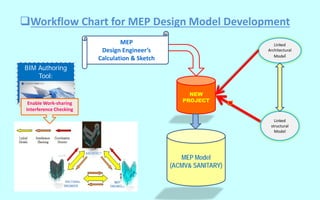
Workflow Chart for MEP Design Model Development
BIM Authoring
Tool:
Enable Work-sharing
Interference Checking
Linked
structural
Model
Linked
Architectural
Model
MEP Model
(ACMV& SANITARY)
NEW
PROJECT
MEP
Design Engineer’s
Calculation & Sketch
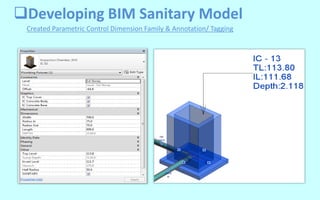
Created Parametric Control Dimension Family & Annotation/ Tagging
Developing BIM Sanitary Model
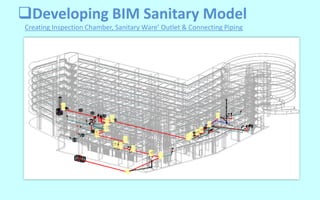
Creating Inspection Chamber, Sanitary Ware’ Outlet & Connecting Piping
Developing BIM Sanitary Model
Creating Isometric view for Inspection Chamber & Underground Piping System
Developing BIM Sanitary Model
• Realistic illustration of toilet with WC
and basin from Revit library.
• Architectural wall are made
transparent to highlight:
i. show concealed cold water
and vent pipe.
ii. Sewerage pipe cast-in and
below slab level
Developing ACMV Model
SDBIM 12i GROUP16
Creating ACMV Systems as Design Calculated
Developing ACMV Model
NV c/w Exhaust Duct System & AC c/w VRV System for 1st Storey Layout Plan
Creating Exhaust Ducting System & Air Conditioning System Plan
Developing ACMV Model
NV c/w Exhaust Air Duct System & AC c/w VRV System for Child Care Center
Creating Isometric view Exhaust Ducting System & Air Conditioning System
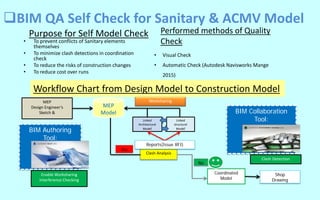
Workflow Chart from Design Model to Construction Model
• To prevent conflicts of Sanitary elements
themselves
• To minimize clash detections in coordination
check
• To reduce the risks of construction changes
• To reduce cost over runs
BIM QA Self Check for Sanitary & ACMV Model
Performed methods of Quality
Check
• Visual Check
• Automatic Check (Autodesk Navisworks Mange
2015)
BIM Collaboration
Tool:Linked
Architectural
Model
Coordinated
Model
Clash Analysis
MEP
Design Engineer’s
Sketch &
Shop
Drawing
No
BIM Authoring
Tool:
Yes
Linked
structural
Model
Reports(Issue RFI)
Enable Worksharing
Interference Checking
Clash Detection
Purpose for Self Model Check
Worksharing
MEP
Model
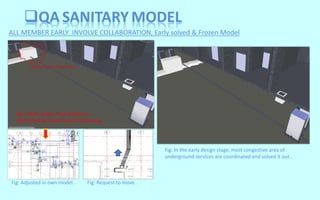
QA SANITARY MODEL
ALL MEMBER EARLY INVOLVE COLLABORATION, Early solved & Frozen Model
Fig: In the early design stage, most congestive area of
underground services are coordinated and solved it out .
Fig: 150 Ø. Sewer Pipe Routine is
obstructed by Cable Draw Pit Clashing .
Fig: Adjusted in own model. Fig: Request to move .
Visual Checking for Space
QA SANITARY MODEL
Auto Clash Detection with Hard Clash Rule
Visual Clearance Check with the family
QA ACMV MODEL
Revit - Daikin-FXUQ18-36PVJU 4-Way Ceiling-
Suspended Cassette
For easy to visualize any obstructed element
on the Air-flow direction.
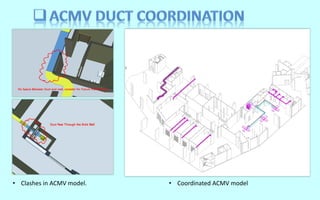
• Coordinated ACMV model• Clashes in ACMV model.
TRADITIONAL WAY
TRADITIONALWAY AND WITH BIM QTO
MANUALLYMANUALLY
MANUALLY
AUTOMATICUPDATE
AUTOMATIC
BIM QTO
VS.
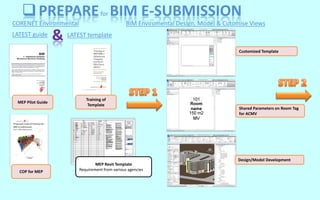
CORENET Environmental
MEP Pilot Guide
MEP Revit Template
Requirement from various agencies
PREPAREfor BIM E-SUBMISSION
LATEST template&LATEST guide
Training of
Template
Customized Template
BIM Enviromental Design, Model & Cutomise Views
Design/Model Development
Shared Parameters on Room Tag
for ACMV
COP for MEP
FILE FORMAT
DWF/ PDF
PREPAREfor BIM E-SUBMISSION
BIM Enviromental Pre-check & Save File to Export View
Save Native File with Standard File
Naming
Submission to Agencies
ONE DWF/ PDF
Pre-check Standard View
Naming & all standard
A single light-weighted file
format, as published from the
similar BIM native file:
i. DWF (.dwf); or
ii. PDF (.pdf)
The respective regulatory agency
reserves the right to request BIM
native file for verification, ONLY
if necessary.
Other Useful tool
_MEP BIM E-Submission - Tutorial 01 to 06 for BIM SG
_SBM 384 - BIM for e-Submission & Documentation
_Core-net e-Submission Manual Guide
Conclusion

Portfolio

  • 1.
  • 2.
    MECHCALNICAL,DRAFTSPERSON and BIMMODELER, 4 years experienced in MEP projects for buildings and Civil works of international concern for construction firms and collaborating with multidisciplinary teams. Development of projects in CAD and BIM platforms covering the different levels of development (LOD). Using software as Revit, Navisworks, AutoCAD and the package of Autodesk Suites. SUMMARY -BIM Implementation and methodology under tutelage of BIM Manager -Building Project including: Executive Projects, Rehabilitation of Buildings, Pathologies, Facilities Design, Site Planning, and Construction. SCOPE:
  • 3.
    Developing BIM MEP Model SelfCheck for MEP Model QA Collaboration Among the Team Member Quantity Take- Off (MECHNICAL EQUIPMENT) Documentation BIM e-Submission OBJECTIVES
  • 4.
    FILE SHARING ANDCOLLABORATION AMONG THE PROJECT TEAM MEMBER SHARING AND COLLABORATIONAMONG THE PROJECT TEAM MEMBERS COLLABORATION Works With MOBILE DEVICES IN CLOUD EXCHANGE FILE FORMAT for BIM AUTHORING TOOL & ANALYSIC TOOL. REVIT 2015 & NAVISWORK (NWC)
  • 5.
    Workflow Chart forMEP Design Model Development BIM Authoring Tool: Enable Work-sharing Interference Checking Linked structural Model Linked Architectural Model MEP Model (ACMV& SANITARY) NEW PROJECT MEP Design Engineer’s Calculation & Sketch
  • 6.
    Created Parametric ControlDimension Family & Annotation/ Tagging Developing BIM Sanitary Model
  • 7.
    Creating Inspection Chamber,Sanitary Ware’ Outlet & Connecting Piping Developing BIM Sanitary Model
  • 8.
    Creating Isometric viewfor Inspection Chamber & Underground Piping System Developing BIM Sanitary Model
  • 9.
    • Realistic illustrationof toilet with WC and basin from Revit library. • Architectural wall are made transparent to highlight: i. show concealed cold water and vent pipe. ii. Sewerage pipe cast-in and below slab level
  • 10.
    Developing ACMV Model SDBIM12i GROUP16 Creating ACMV Systems as Design Calculated
  • 11.
    Developing ACMV Model NVc/w Exhaust Duct System & AC c/w VRV System for 1st Storey Layout Plan Creating Exhaust Ducting System & Air Conditioning System Plan
  • 12.
    Developing ACMV Model NVc/w Exhaust Air Duct System & AC c/w VRV System for Child Care Center Creating Isometric view Exhaust Ducting System & Air Conditioning System
  • 13.
    Workflow Chart fromDesign Model to Construction Model • To prevent conflicts of Sanitary elements themselves • To minimize clash detections in coordination check • To reduce the risks of construction changes • To reduce cost over runs BIM QA Self Check for Sanitary & ACMV Model Performed methods of Quality Check • Visual Check • Automatic Check (Autodesk Navisworks Mange 2015) BIM Collaboration Tool:Linked Architectural Model Coordinated Model Clash Analysis MEP Design Engineer’s Sketch & Shop Drawing No BIM Authoring Tool: Yes Linked structural Model Reports(Issue RFI) Enable Worksharing Interference Checking Clash Detection Purpose for Self Model Check Worksharing MEP Model
  • 14.
    QA SANITARY MODEL ALLMEMBER EARLY INVOLVE COLLABORATION, Early solved & Frozen Model Fig: In the early design stage, most congestive area of underground services are coordinated and solved it out . Fig: 150 Ø. Sewer Pipe Routine is obstructed by Cable Draw Pit Clashing . Fig: Adjusted in own model. Fig: Request to move .
  • 15.
    Visual Checking forSpace QA SANITARY MODEL Auto Clash Detection with Hard Clash Rule
  • 16.
    Visual Clearance Checkwith the family QA ACMV MODEL Revit - Daikin-FXUQ18-36PVJU 4-Way Ceiling- Suspended Cassette For easy to visualize any obstructed element on the Air-flow direction.
  • 17.
    • Coordinated ACMVmodel• Clashes in ACMV model.
  • 18.
    TRADITIONAL WAY TRADITIONALWAY ANDWITH BIM QTO MANUALLYMANUALLY MANUALLY AUTOMATICUPDATE AUTOMATIC BIM QTO VS.
  • 19.
    CORENET Environmental MEP PilotGuide MEP Revit Template Requirement from various agencies PREPAREfor BIM E-SUBMISSION LATEST template&LATEST guide Training of Template Customized Template BIM Enviromental Design, Model & Cutomise Views Design/Model Development Shared Parameters on Room Tag for ACMV COP for MEP
  • 20.
    FILE FORMAT DWF/ PDF PREPAREforBIM E-SUBMISSION BIM Enviromental Pre-check & Save File to Export View Save Native File with Standard File Naming Submission to Agencies ONE DWF/ PDF Pre-check Standard View Naming & all standard A single light-weighted file format, as published from the similar BIM native file: i. DWF (.dwf); or ii. PDF (.pdf) The respective regulatory agency reserves the right to request BIM native file for verification, ONLY if necessary. Other Useful tool _MEP BIM E-Submission - Tutorial 01 to 06 for BIM SG _SBM 384 - BIM for e-Submission & Documentation _Core-net e-Submission Manual Guide
  • 21.