ACHARYA
INSTITIUTE
OF
TECHNOLOGY
WITH REGARDS
MAHALAKSHMI MA’AM
THRISHA H S
S.YASHASHVINI
SUDEEP
PANINDRA REDDY
VIPIN S
KUNAL SINGHA
TOPIC
CONTENT
1.What is a Soft Copy Output Device?
2.Example of Soft Copy Output Devices.
Monitors
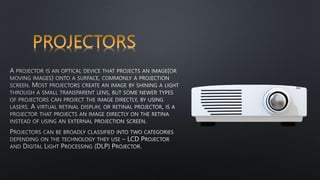
Projectors
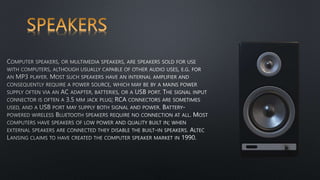
Speakers
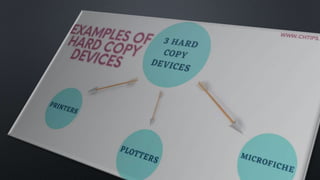
3.What is a Hard Copy Output Device?
4.Example of Hard Copy Output Devices.
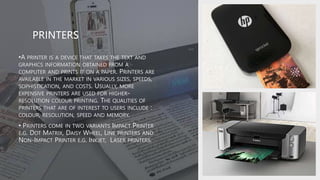
Printers
Plotters
5.Difference between Hard and Soft Copy Output
Devices.
 OUTPUT DEVICES
• ANY DEVICE THAT GIVES INFORMATION FROM
A COMPUTER CAN BE CALLED AN OUTPUT
DEVICE. BASICALLY, OUTPUT DEVICES ARE
ELECTROMECHANICAL DEVICES THAT ACCEPT
DIGITAL DATA (IN THE FORM OF O'S AND
1'S) FROM THE COMPUTER AND CONVERT
THEM INTO HUMAN-UNDERSTANDABLE
LANGUAGE.
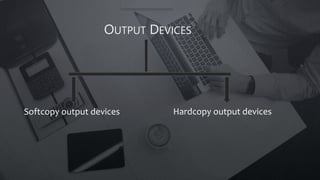
OUTPUT DEVICES
Softcopy output devices Hardcopy output devices
•
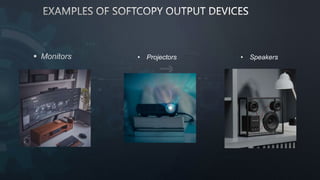
 Monitors • Projectors • Speakers
MONITORS
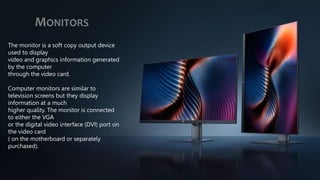
The monitor is a soft copy output device
used to display
video and graphics information generated
by the computer
through the video card.
Computer monitors are similar to
television screens but they display
information at a much
higher quality. The monitor is connected
to either the VGA
or the digital video interface (DVI) port on
the video card
( on the motherboard or separately
purchased).
Types/Variants of monitor
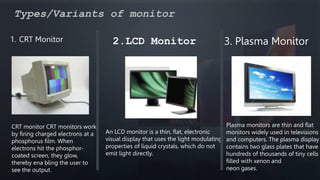
1. CRT Monitor
CRT monitor CRT monitors work
by firing charged electrons at a
phosphorus film. When
electrons hit the phosphor-
coated screen, they glow,
thereby ena bling the user to
see the output.
2.LCD Monitor
An LCD monitor is a thin, flat, electronic
visual display that uses the light modulating
properties of liquid crystals, which do not
emit light directly.
3. Plasma Monitor
Plasma monitors are thin and flat
monitors widely used in televisions
and computers. The plasma display
contains two glass plates that have
hundreds of thousands of tiny cells
filled with xenon and
neon gases.
• HARD COPY OUTPUT DEVICES ARE DEVICES THAT
PROVIDE OUTPUT ON PRINTED PAPER OR
OTHER PERMANENT MEDIA THAT IS HUMAN READABLE.
•
•
•A plotter is basically a printer that interprets
commands from a computer to make line
drawings on paper with one or more
automated pens. Since plotters are much
more expensive than printers, they are
used only for specialized applications.
•They are widely used to draw maps, in
scientific applications, and computer-aided
engineering (CA E). Architects use plotters to
draw blueprints of the structures they are
working on.
•Types Of Plotters
 Drum plotter
 Flatbed plotter
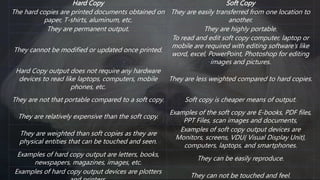
Hard Copy Soft Copy
The hard copies are printed documents obtained on
paper, T-shirts, aluminum, etc.
They are easily transferred from one location to
another.
They are permanent output. They are highly portable.
They cannot be modified or updated once printed.
To read and edit soft copy computer, laptop or
mobile are required with editing software’s like
word, excel, PowerPoint, Photoshop for editing
images and pictures.
Hard Copy output does not require any hardware
devices to read like laptops, computers, mobile
phones, etc.
They are less weighted compared to hard copies.
They are not that portable compared to a soft copy. Soft copy is cheaper means of output.
They are relatively expensive than the soft copy.
Examples of the soft copy are E-books, PDF files,
PPT Files, scan images and documents,
They are weighted than soft copies as they are
physical entities that can be touched and seen.
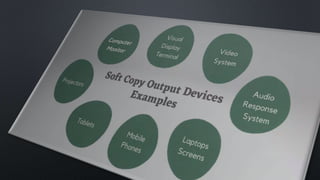
Examples of soft copy output devices are
Monitors, screens, VDU{ Visual Display Unit},
computers, laptops, and smartphones.
Examples of hard copy output are letters, books,
newspapers, magazines, images, etc.
They can be easily reproduce.
Examples of hard copy output devices are plotters
They can not be touched and feel.
POP 2.pptx

POP 2.pptx

  • 1.
  • 2.
  • 3.
  • 4.
    CONTENT 1.What is aSoft Copy Output Device? 2.Example of Soft Copy Output Devices. Monitors Projectors Speakers 3.What is a Hard Copy Output Device? 4.Example of Hard Copy Output Devices. Printers Plotters 5.Difference between Hard and Soft Copy Output Devices.
  • 5.
     OUTPUT DEVICES •ANY DEVICE THAT GIVES INFORMATION FROM A COMPUTER CAN BE CALLED AN OUTPUT DEVICE. BASICALLY, OUTPUT DEVICES ARE ELECTROMECHANICAL DEVICES THAT ACCEPT DIGITAL DATA (IN THE FORM OF O'S AND 1'S) FROM THE COMPUTER AND CONVERT THEM INTO HUMAN-UNDERSTANDABLE LANGUAGE.
  • 6.
    OUTPUT DEVICES Softcopy outputdevices Hardcopy output devices
  • 7.
  • 8.
     Monitors •Projectors • Speakers
  • 10.
    MONITORS The monitor isa soft copy output device used to display video and graphics information generated by the computer through the video card. Computer monitors are similar to television screens but they display information at a much higher quality. The monitor is connected to either the VGA or the digital video interface (DVI) port on the video card ( on the motherboard or separately purchased).
  • 11.
    Types/Variants of monitor 1.CRT Monitor CRT monitor CRT monitors work by firing charged electrons at a phosphorus film. When electrons hit the phosphor- coated screen, they glow, thereby ena bling the user to see the output. 2.LCD Monitor An LCD monitor is a thin, flat, electronic visual display that uses the light modulating properties of liquid crystals, which do not emit light directly. 3. Plasma Monitor Plasma monitors are thin and flat monitors widely used in televisions and computers. The plasma display contains two glass plates that have hundreds of thousands of tiny cells filled with xenon and neon gases.
  • 14.
    • HARD COPYOUTPUT DEVICES ARE DEVICES THAT PROVIDE OUTPUT ON PRINTED PAPER OR OTHER PERMANENT MEDIA THAT IS HUMAN READABLE.
  • 16.
  • 17.
    •A plotter isbasically a printer that interprets commands from a computer to make line drawings on paper with one or more automated pens. Since plotters are much more expensive than printers, they are used only for specialized applications. •They are widely used to draw maps, in scientific applications, and computer-aided engineering (CA E). Architects use plotters to draw blueprints of the structures they are working on. •Types Of Plotters  Drum plotter  Flatbed plotter
  • 18.
    Hard Copy SoftCopy The hard copies are printed documents obtained on paper, T-shirts, aluminum, etc. They are easily transferred from one location to another. They are permanent output. They are highly portable. They cannot be modified or updated once printed. To read and edit soft copy computer, laptop or mobile are required with editing software’s like word, excel, PowerPoint, Photoshop for editing images and pictures. Hard Copy output does not require any hardware devices to read like laptops, computers, mobile phones, etc. They are less weighted compared to hard copies. They are not that portable compared to a soft copy. Soft copy is cheaper means of output. They are relatively expensive than the soft copy. Examples of the soft copy are E-books, PDF files, PPT Files, scan images and documents, They are weighted than soft copies as they are physical entities that can be touched and seen. Examples of soft copy output devices are Monitors, screens, VDU{ Visual Display Unit}, computers, laptops, and smartphones. Examples of hard copy output are letters, books, newspapers, magazines, images, etc. They can be easily reproduce. Examples of hard copy output devices are plotters They can not be touched and feel.